MacX DVD Ripper Pro: Rip Any DVD to MP4, HEVC or ISO on a Mac
MacX DVD Ripper Pro is a Mac DVD ripper from Digiarty that turns DVDs, including protected and 99-title discs, into MP4, HEVC, MOV or MKV files for your Mac, iPhone, iPad, Apple TV or Plex library, or backs them up 1:1 as an ISO image. The lifetime license is $65.95 on the order page, and version 6.9.0 runs natively on Apple Silicon and Intel Macs.
Macs haven't had a DVD drive for years, and plenty of people still have a box of movies, TV series and family discs they can't easily play. Plug in a USB DVD drive, let MacX DVD Ripper Pro rip each disc once, and the films live on your Mac from then on.
Quick facts
- Developer: Digiarty Software, Inc. (MacXDVD)
- Version: 6.9.0, released June 4, 2026, with native Apple Silicon support
- Platform: macOS 10.13 High Sierra through macOS 26 Tahoe and macOS 27. A separate build covers macOS 10.12 and earlier. The Windows edition is a separate product
- Rips to: MP4 (H.264), HEVC, MOV, AVI, MKV, MP3, AAC and 350+ device profiles
- Backs up to: ISO image, full-title MPEG-2, main-title MPEG-2, MKV with all tracks
- Price: $65.95 one-time for a lifetime license on the order page
- Free trial: rips the first 5 minutes of each DVD, and Trim is disabled
- Languages: English, French, German, Italian, Japanese, Spanish, Chinese
What we checked: the installer on Digiarty's download link (a 94.6 MB disk image dated June 15, 2026), version 6.9.0 on Digiarty's upgrade page, and the lifetime license at $65.95 on the order page on November 4, 2026. We didn't rip a disc with it.
Before you buy
- It's a one-time purchase. The license behind our Buy Now button is a lifetime license with no renewal. Digiarty's own store also sells yearly plans that renew automatically (see Editions and Pricing).
- Update to 6.9.0 on an Apple Silicon Mac. Versions released before June 2026 are Intel apps that need Rosetta. Apple has said Rosetta apps won't open in macOS 28, so older copies will stop working there.
- The refund guarantee only covers faults. Digiarty refunds within 30 days when the program doesn't work because of an error or bug that support can't fix in reasonable time. Changing your mind isn't covered, so test your own discs with the trial first.
- Check your local law. Removing DVD copy protection, even for a personal backup, is treated differently from country to country. Digiarty says the program is for discs you own and personal use.
Download Free TrialBuy Now
Overview
MacX DVD Ripper Pro opens on a "Getting Started" screen with the whole workflow written out: load the DVD, choose a target format, click Run. Across the top are buttons to load a Disc, a DVD Folder or an ISO Image. On the right sit a preview player, a snapshot button and the speed settings: the hardware encoder for Intel, AMD or NVIDIA graphics, a High Quality Engine, deinterlacing, Safe Mode and how many CPU cores to use.
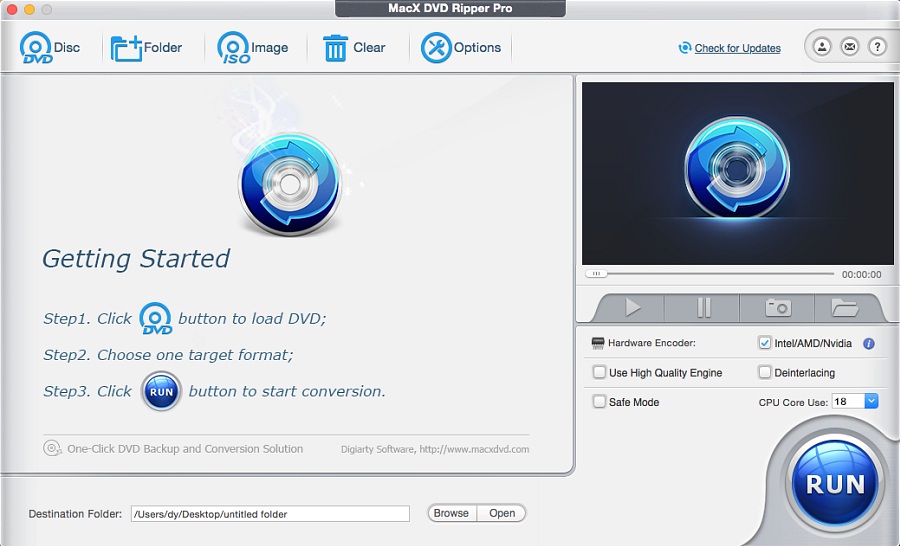
The main window before a disc is loaded: Disc, Folder and Image buttons, the three-step guide, the preview player and the speed settings above the Run button.
Once a disc is loaded, it lists every title with its length, resolution, audio track and subtitle choice, and ticks the one it thinks is the main movie. That detection matters on discs with dozens of fake titles, which is where cheaper and free rippers tend to fail.
Features
Reads protected, old, damaged and 99-title DVDs
MacX DVD Ripper Pro rips homemade and commercial discs with CSS encryption, region codes 1 to 6 (including RCE), UOPs, Sony ARccOS bad sectors, Disney X-project protection and APS. Digiarty's title-check algorithm picks the real main movie on "99-title" discs, and a Safe Mode slows things down for heavily protected or scratched discs that fail at full speed.
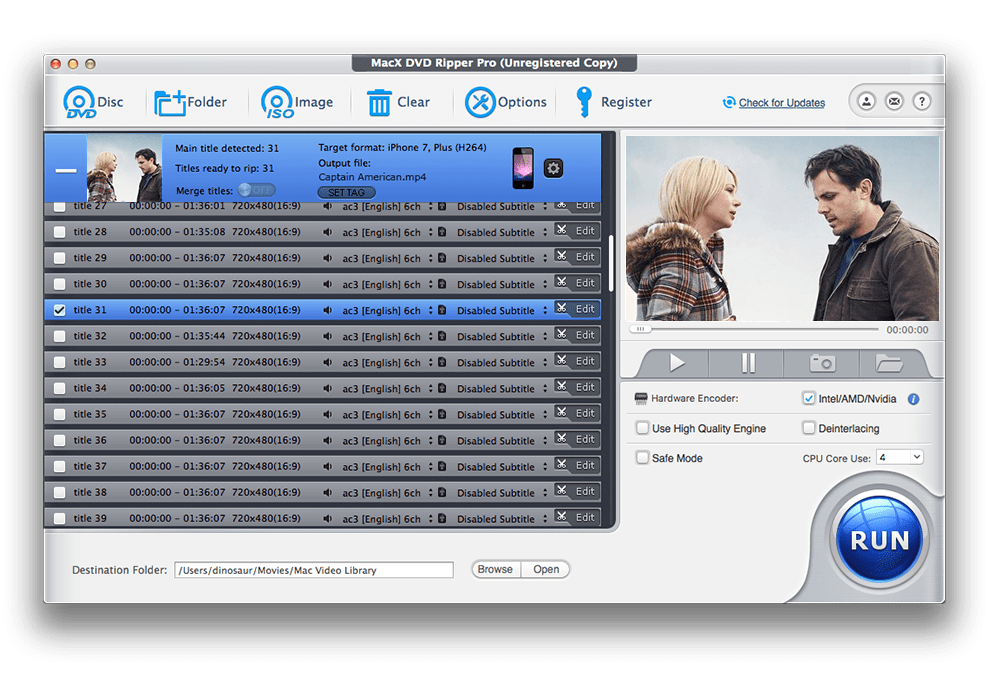
A disc with dozens of titles of nearly the same length: the program reports "Main title detected: 31" and ticks it (the trial shows "Unregistered Copy" in the title bar).
MP4, HEVC and 350+ device profiles
MacX DVD Ripper Pro converts a DVD to MP4 (H.264), HEVC, MOV, AVI, M4V, FLV and other formats, or to ready-made profiles for iPhone, iPad, Apple TV, Android phones and tablets, PlayStation, Xbox and smart TVs. It can also pull out just the soundtrack as MP3, AAC or AC3. Digiarty says a rip comes out about 80% smaller than the disc, which is what makes a whole DVD shelf fit on a laptop.
1:1 backups: ISO, MPEG-2 or MKV
MacX DVD Ripper Pro's DVD Backup profiles keep the disc's quality instead of re-encoding: Clone DVD to ISO Image (a full 1:1 copy you can play in VLC or burn back to disc), Full Title Copy (every title with all audio and subtitle tracks), Main Title Content Copy (just the movie as one MPEG-2 file), and Backup full title to MKV. Since version 6.9.0 the MKV backup can also be encoded to HEVC or AV1 to save space.

The Output Profile window with the four DVD Backup options, and the device categories on the left.
GPU acceleration for fast rips
MacX DVD Ripper Pro uses Intel Quick Sync, AMD and NVIDIA hardware encoding and, since 6.9.0, runs natively on Apple Silicon, with multi-core CPU support up to 28 cores. Digiarty claims a full DVD in about 5 minutes and up to 47 times real-time speed. That's the vendor's best case: your speed depends on the Mac, the drive and the disc.
Pick your tracks, then crop, trim and add subtitles
MacX DVD Ripper Pro lets you choose each title's audio track (for example English 5.1 or French) and subtitle, merge several titles into one file, and fill in the movie's tags. The Edit button opens tabs to crop black bars with presets such as Crop LetterBox, 16:9 or 4:3, trim intros and credits, and add your own subtitle file. Output settings let you change the codec, bitrate, frame rate, resolution (up to 1920x1200) and audio.

Title list with the main title ticked and the audio menu open: English 6-channel and 2-channel, French and Spanish AC3 tracks.

The edit window's Crop & Expand tab: before and after previews, crop presets and the position and size fields. General, Subtitle and Trim are the other tabs.
Benefits
- No more disc swapping. Rip once and the movie plays on your Mac, iPhone, iPad or Apple TV.
- Discs that other rippers reject. The title detection and Safe Mode are why people pay for it instead of using free tools.
- A choice between small and perfect. An MP4 or HEVC file for everyday viewing, or an ISO that keeps the menus and extras for the archive.
- Current Macs supported. Native Apple Silicon support means no Rosetta, and it's ready for macOS releases after Rosetta goes away.
Real-World Uses
- A Plex or NAS movie library. Rip each film to HEVC MP4 or MKV and copy it to the server.
- Kids' DVDs for a road trip. Convert them with the iPad profile so they play offline in the car.
- A TV series box set. Tick each episode title and rip them in one batch, trimming the recap or credits if you want.
- A scratched favourite. Turn on Safe Mode, make an ISO while the disc still reads, and keep the ISO as your copy.
- Family DVDs from a camcorder. Homemade discs rip to MP4 for sharing or for editing in iMovie or Final Cut Pro.
Who It's For, and Who Should Skip It
MacX DVD Ripper Pro is for Mac users with a DVD collection, especially commercial discs, who want a simple ripper that copes with copy protection and fake titles.
Skip it if you:
- Rip Blu-rays. It handles DVDs only.
- Only have a few unprotected home DVDs. A free tool such as HandBrake can rip those without a license.
- Use Windows. This is the Mac edition; Digiarty sells Windows rippers separately.
- Need it on 3 Macs. Digiarty's Premium yearly plan covers 3 Macs; the lifetime license on our Buy Now button covers one.
Usage Guide
- Install and launch. Open the downloaded disk image and drag MacX DVD Ripper Pro to Applications, then start it. On macOS 10.12 or earlier, download the separate older build instead. To register, click Register and paste the license code from your order email.
- Load the movie. Insert the DVD in your Mac's drive or a USB DVD drive and click Disc, or use Folder or Image for a VIDEO_TS folder or an ISO file.
- Choose an output profile. Pick a device profile, a general format such as MP4 or HEVC, or one of the DVD Backup options, and click Done.
- Check the titles. Make sure the main title is ticked, choose the audio track and subtitle, and click Edit if you want to crop or trim.
- Set the speed options. Leave the hardware encoder ticked, and turn on Safe Mode only if a disc fails.
- Choose the destination folder and click Run.
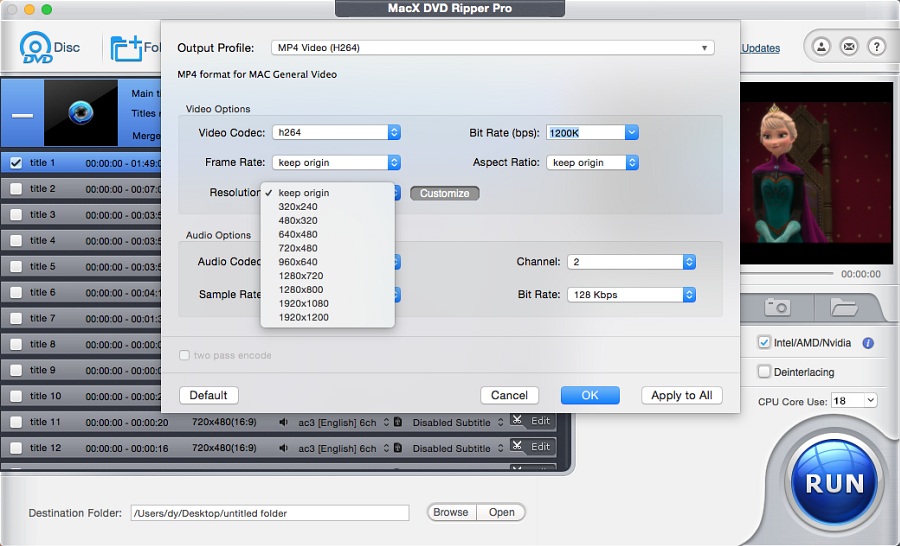
Output settings for the MP4 (H264) profile: video codec, bitrate, frame rate, aspect ratio, a resolution list from 320x240 to 1920x1200, and audio options.
Where it falls short
- The interface looks dated. FileHorse lists "Interface Feels Dated" as a con, and the window design hasn't changed much in years.
- Speed claims are best case. The "5 minutes per DVD" figure assumes a fast Mac with hardware encoding; the High Quality Engine and Safe Mode are slower.
- No AI enhancement in this program. Digiarty's DVD upscaling to 1080p or 4K is a separate product, Macxvideo AI.
- Support gets mixed marks. FileHorse lists "Limited Customer Support", and one Trustpilot reviewer says crash reports went unanswered, while others praise quick help with lost license codes.
- Older copies and Rosetta. Anyone on a pre-June 2026 version needs to update before macOS 28 removes Rosetta.
What Users Say
MacXDVD has been selling Mac software since 2009, so there's a long trail of opinions about its DVD ripper. Here's a cross-section, good and bad.
Trustpilot (MacXDVD)
MacXDVD has a TrustScore of 4.7 out of 5 from 245 reviews, mostly about support and licenses across Digiarty's Mac products:
- Gareth Smith, 5 stars, "Excellent Customer Service": support helped with an old license. "I purchased MacX DVD Ripper Pro over 13 years ago."
- Guilherme Degani, 5 stars, "Great software for encoding/editing": "It’s worth every penny! Great features, fast encode engine, user friendly interface!"
- Terry Hillick, 5 stars, "Lost Licsense Key": "Contacted the company and within a day was provided with my account and the license number"
- Marcus, 5 stars, "Reliable Software and Excellent Support": "I have been using Digiarty’s video software for around eight years"
- Jason Conners, 1 star, "what a horrible piece of software": "it constantly crashes, or just locks up and sits there" (the review doesn't name which Digiarty product)
FileHorse (Mac)
FileHorse lists version 6.9.0. Its review gives these pros:
- "Fastest DVD Ripping Speed"
- "Supports All DVD Types"
- "1:1 DVD Backup Option"
And these cons:
- "Limited Customer Support"
- "Interface Feels Dated"
Mac press (as quoted by Digiarty)
Digiarty's product page quotes several Mac sites. These are the parts the vendor chose to show:
- Macworld, Cliff Joseph: "MacX DVD Ripper Pro makes easy work of getting movies and TV off DVD and into a more modern digital format you can preserve, stream or watch on new devices."
- AppleInsider, Charles Martin: "MacX DVD Ripper Pro accepts any DVDs, including newer and older discs, as well as regional DVDs. You can even rip content from encrypted or damaged discs."
- 9to5Mac, Jeff Benjamin: "It can back up the entire contents of a DVD by creating an ISO image file. This completely maintains video and audio fidelity without any quality loss."
- Cult of Mac, Rajesh Pandey: "MacX DVD Ripper Pro lets you take your old DVDs and transfer them directly to your Mac — and even upscale them if the quality’s not as good as it could be."
Other ratings
Digiarty's own page shows 4.5 out of 5 from 619 ratings. The French download site Clubic is far less enthusiastic, at 5.2 out of 10 from 41 user ratings. Many of the Mac-site articles about MacX DVD Ripper Pro are giveaways or sponsored deals (PCWorld's 2023 piece is labelled "Sponsored DealPost"), so read the press praise with that in mind.
The pattern: buyers like the speed, the format choice and the way it gets through protected discs, and several long-time users praise the support for lost licenses. The complaints are a dated interface, uneven support for crashes, and ratings on independent download sites that are much lower than the vendor's own.
Comparisons
MacX DVD Ripper Pro vs HandBrake
HandBrake is free and open source, and it converts unprotected DVDs very well. It doesn't remove commercial copy protection on its own and has no 1:1 ISO backup or fake-title detection. If your discs are homemade, HandBrake may be all you need. For a shelf of store-bought movies, MacX DVD Ripper Pro is the simpler choice.
MacX DVD Ripper Pro vs Macxvideo AI
Both are Digiarty Mac products. MacX DVD Ripper Pro reads and rips DVDs. Macxvideo AI works on video files: AI upscaling, stabilization, conversion, compression and screen recording. Digiarty sells them together in its 3-in-1 bundle with MacX MediaTrans, and on November 3, 2026 the lifetime DVD Ripper Pro license came with a 6-month Macxvideo AI license as a gift.
Editions and Pricing
| License |
Price |
Term |
Macs |
| Lifetime license (our Buy Now button) |
$65.95 one-time |
Lifetime |
1 |
| Premium (Digiarty's store, holiday price) |
$39.95 first year |
Yearly, auto-renewing |
3 |
| Ultimate (Digiarty's store) |
$59.95 |
Lifetime |
1 |
| 3-in-1 Bundle with Macxvideo AI and MacX MediaTrans |
$79.95 |
Lifetime |
1 |
The store prices are from Digiarty's own buy page during its holiday sale on November 3, 2026, and change with each promotion. Schools, charities and organizations buying 5 or more licenses get volume pricing from Digiarty. Every paid license includes free updates for its term and email support.
FAQs
Does MacX DVD Ripper Pro run natively on Apple Silicon Macs?
Yes, from version 6.9.0. MacX DVD Ripper Pro 6.9.0, released June 4, 2026, added native Apple Silicon support. Earlier versions are Intel apps that ask you to install Rosetta, and Apple has said Rosetta apps won't open in macOS 28.
Does MacX DVD Ripper Pro work on macOS 27?
Yes. Digiarty says MacX DVD Ripper Pro 6.9.0 and later support macOS 27, and the tech specs list every release back to macOS 10.13 High Sierra. Macs on 10.12 or earlier need the separate older build from Digiarty's site.
Do I need a DVD drive to use MacX DVD Ripper Pro?
For discs, yes. MacX DVD Ripper Pro reads from your Mac's DVD drive or an external USB drive. Without a drive, it can still convert DVD folders (VIDEO_TS) and ISO images already on your Mac.
Is the MacX DVD Ripper Pro license a subscription?
The license behind our Buy Now button is a one-time lifetime license at $65.95, with no renewal. Digiarty's store also sells yearly plans, which renew automatically each year unless you cancel; Digiarty emails you 7 days before the charge.
Can I install MacX DVD Ripper Pro on more than one Mac?
A standard MacX DVD Ripper Pro license covers one Mac. Digiarty's Premium yearly plan covers 3 Macs, and its sales team offers a personal license for all of one person's computers.
Can MacX DVD Ripper Pro rip Blu-ray discs?
No. MacX DVD Ripper Pro works with DVD discs, DVD folders and DVD ISO images only.
Can I get MacX DVD Ripper Pro for Windows?
Digiarty sells a separate Windows edition, MacX DVD Ripper Pro for Windows, with its own version numbers and license. A Mac license doesn't cover it.
System Requirements
- macOS: 10.13 High Sierra, 10.14 Mojave, 10.15 Catalina, 11 Big Sur, 12 Monterey, 13 Ventura, 14 Sonoma, 15 Sequoia, 26 Tahoe and 27
- Older Macs: a separate build for macOS 10.12 and earlier
- Processor: Apple Silicon or Intel (native on both since 6.9.0)
- Drive: a built-in or USB DVD drive for discs
- Input: DVD discs, DVD folders and ISO images
- Download size: about 95 MB
Conclusion
MacX DVD Ripper Pro is worth it if you own commercial DVDs and a Mac and want them as files you can play anywhere, without fiddling with separate decryption tools. The one reason to buy it is that it gets through protected and 99-title discs and gives you either a small MP4 or a perfect ISO in a few clicks. The main reasons to hesitate are that the lifetime license covers a single Mac and the refund guarantee only covers faults. Rip the first five minutes of your trickiest disc with the free trial, and if that works, the rest of your shelf almost certainly will too.
Download Free TrialBuy Now