Leawo Video Converter: A Budget Windows Converter for Everyday Video and Audio Files
Leawo Video Converter is a Windows program that converts video and audio files between more than 180 formats (MP4, H.265, MKV, MOV, AVI, MP3, FLAC and more), with a simple editor, device presets, 2D-to-3D conversion and a photo slideshow maker built in. The license sold here costs $29.95 for one year on one PC, and the free trial converts the first five minutes of every file so you can check the results first.
It's for the person with a folder of phone clips, old camcorder MTS files and downloaded MKVs that won't play on the TV, the tablet or in the video editor: you want them all in one format that works, without learning what a bitrate is.
Quick facts
- Current version: 13.0.1.6, installed as a module of Leawo Prof. Media 13
- Developer: Leawo Software
- Runs on: Windows 11, 10, 8.1, 8 and 7. A Mac edition is sold separately.
- Formats: 180+ video and audio formats in, including 4K MP4 and MKV, H.265, MTS/M2TS, FLV, MP3, AAC, AC3, FLAC and WAV
- Price: $29.95 for 1 year on 1 PC (auto-renews), or $39.95 for a lifetime license
- Free trial: converts only the first 5 minutes of each video or audio file
- Money-back guarantee: 5 days on the 1-year plan, 14 days on the lifetime plan
- Download: 199 MB installer (the whole Prof. Media suite)
- What we checked: the installer we downloaded from Leawo on October 20, 2026 is Leawo Prof. Media 13.0.1.6 (199 MB), digitally signed by ShenZhen Moyea Software. The order page showed "Leawo Video Converter, 1 year subscription" at $29.95 on October 20, 2026, with no discount line. We didn't convert any files with it ourselves.
Before you buy
Leawo no longer ships Video Converter as a separate program. The download installs Leawo Prof. Media 13, a suite with Blu-ray, DVD, copy and download modules, and your license activates only the Video Converter module. The other tiles stay in trial mode. The cheaper plan is a subscription that renews every year. If you'd rather pay once, the lifetime license costs $10 more and has a longer money-back window. Run the trial on your own files first: Leawo's refund policy covers bugs it can't fix, hardware incompatibility and duplicate orders, not buying the wrong product.
Download Free TrialBuy Now
Overview
When you launch Leawo Video Converter you land on the Prof. Media home screen, a grid of tiles marked Registered or Trial. Click the Video Converter tile (or the Convert tab at the top) and you get a blank workspace that says "Drag File Into Me". Drop in files or whole folders, pick an output profile from the drop-down next to the big green Convert button, and start. Everything else (editing, subtitles, 3D, merging) hangs off that one screen.
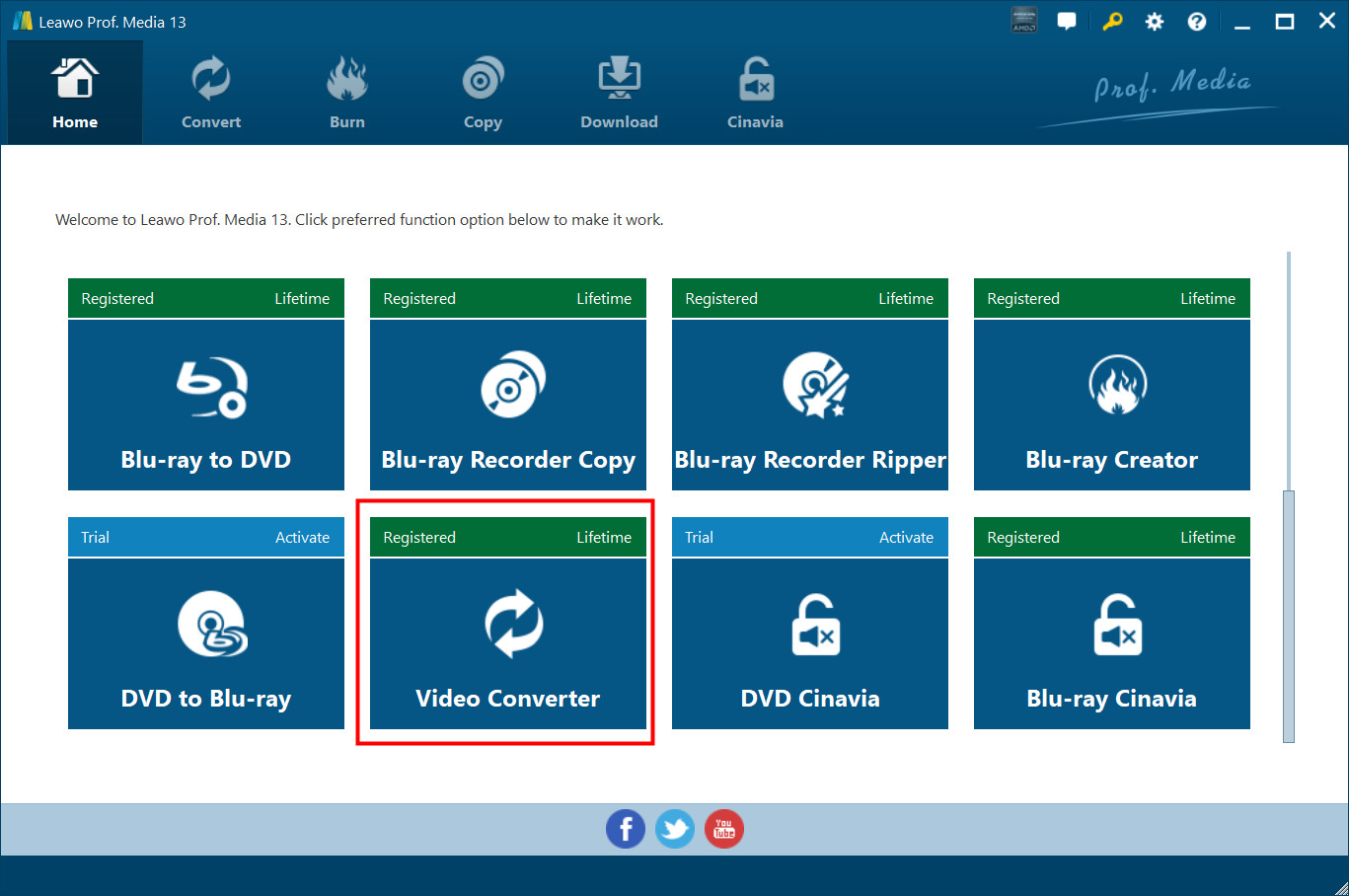
The Leawo Prof. Media 13 home screen, from Leawo's user guide. Each module is a tile: here Video Converter is registered with a lifetime license, while DVD to Blu-ray and DVD Cinavia are still in trial mode.
Features
Convert between 180+ video and audio formats
Leawo Video Converter reads MP4, AVI, MOV, MKV, MTS, FLV and other video files, and audio such as MP3, AAC, FLAC and AC3. Output profiles are grouped into Common Video (MP4, H.265 MP4, MKV, H.265 MKV, MOV), Common Audio (AAC, AC3, WAV, MP3, WMA, FLAC), HD Video, 2K/4K Video and Lossless video, and a search box finds a profile by name. You can also turn any video into an audio file, for example a concert recording into MP3.
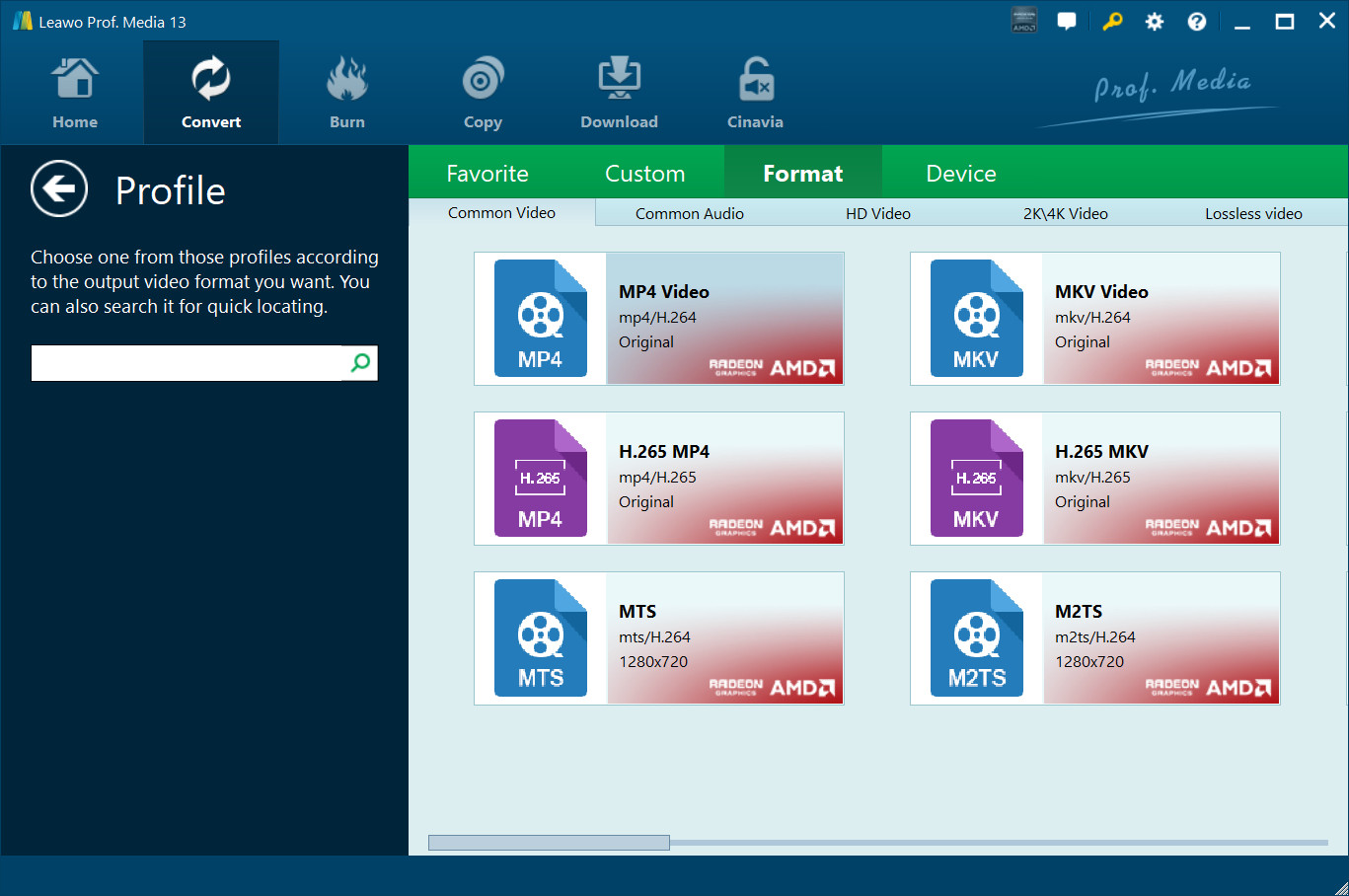
The Profile panel, from Leawo's user guide: Format tab with Common Video, Common Audio, HD Video, 2K/4K Video and Lossless video groups, plus Favorite, Custom and Device tabs.
Device presets and full control over the settings
Leawo Video Converter has a Device tab with presets for iPhone, iPad, Android and Windows devices, so you can pick the gadget instead of the format. If you do want control, the Edit option on the same drop-down opens Profile Settings, where you set the video codec, quality, resolution, bitrate, frame rate and aspect ratio, and the audio codec, bitrate, sample rate and channels.
Batch conversion, merging and GPU acceleration
Leawo Video Converter converts a whole list of files in one run, and accepts entire folders. A "Merge all files into one" button next to Convert joins the loaded clips into a single output file. Conversion uses GPU acceleration (the profile tiles show an AMD Radeon badge on a PC with a supported AMD card), and the Settings panel lets you set how many tasks run at once and how many CPU cores to use.
A basic editor for trimming, cropping and watermarks
Leawo Video Converter's editor opens from the Edit icon on each file and shows a live before-and-after preview. It has six tabs: Video & Audio (playback speed from 1/4x to 4x, volume, noise removal, flips and 90-degree rotation), Trim, Watermark (text or image, with transparency and position), Crop (drag a frame or choose Letter, Pan, 16:9, 4:3 or a custom size), Effect (brightness, contrast, saturation) and 3D. "Apply to all" copies a watermark or effect to every loaded file. It isn't a timeline editor: you can't add titles, transitions between clips or a second video track.
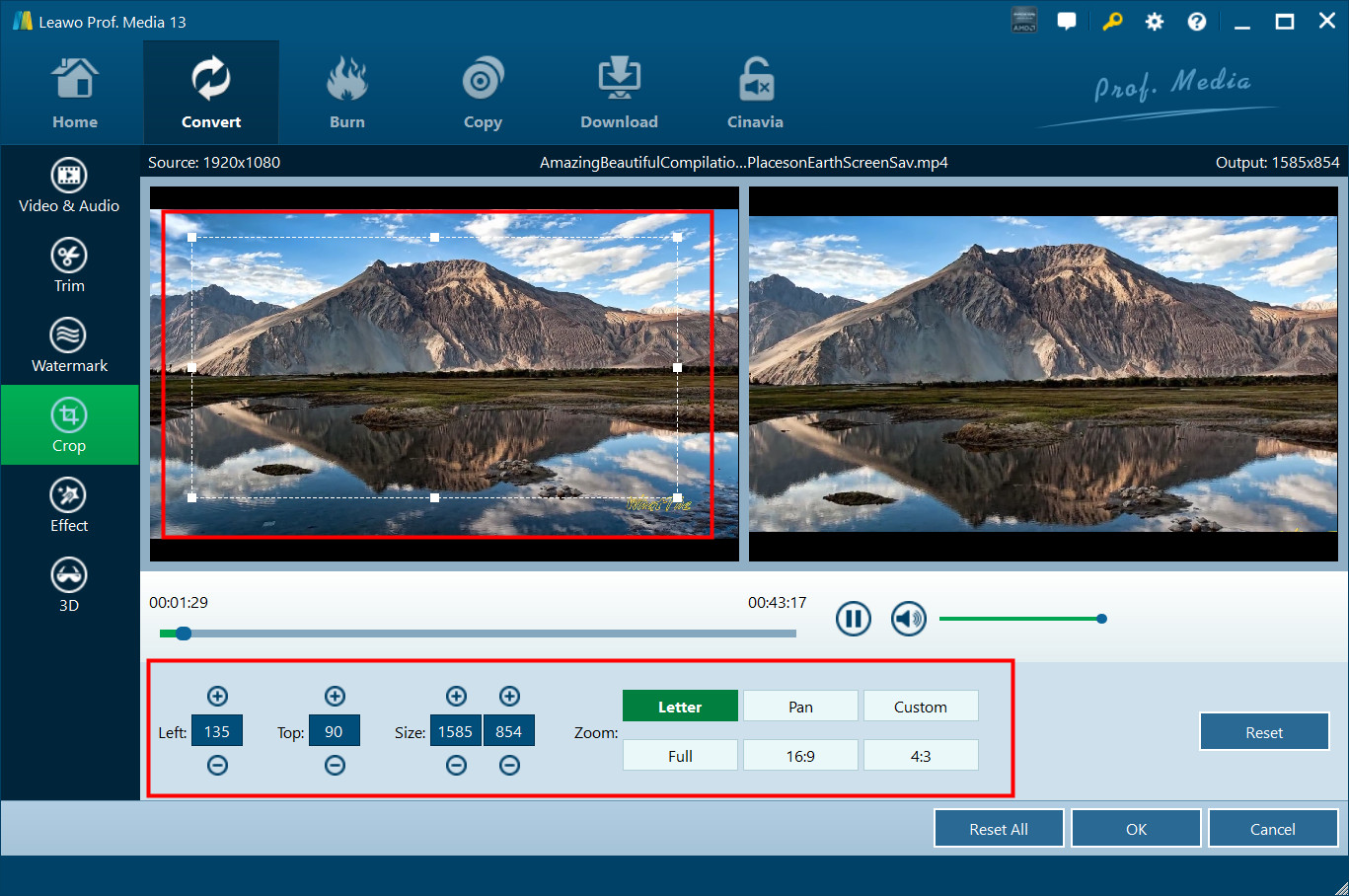
The Crop tab, from Leawo's user guide: a 1920x1080 source cropped to 1585x854, with the original on the left and the result on the right.
Subtitles and audio tracks
Leawo Video Converter can add an external SRT, ASS or SSA subtitle file to a video and lets you choose which audio track to keep, which helps with MKV files that carry several languages. Settings also let you set where external subtitles are looked for and their default text encoding.
2D to 3D conversion
Leawo Video Converter turns ordinary 2D video into 3D in six modes: Red/Cyan, Red/Green, Red/Blue, Blue/Yellow, Interleaved and Side by Side. You pick the one that matches your glasses or 3D TV and adjust the depth on a -50 to +50 slider. It's a simulated effect, not real stereo footage, so expect a mild sense of depth rather than a cinema result.
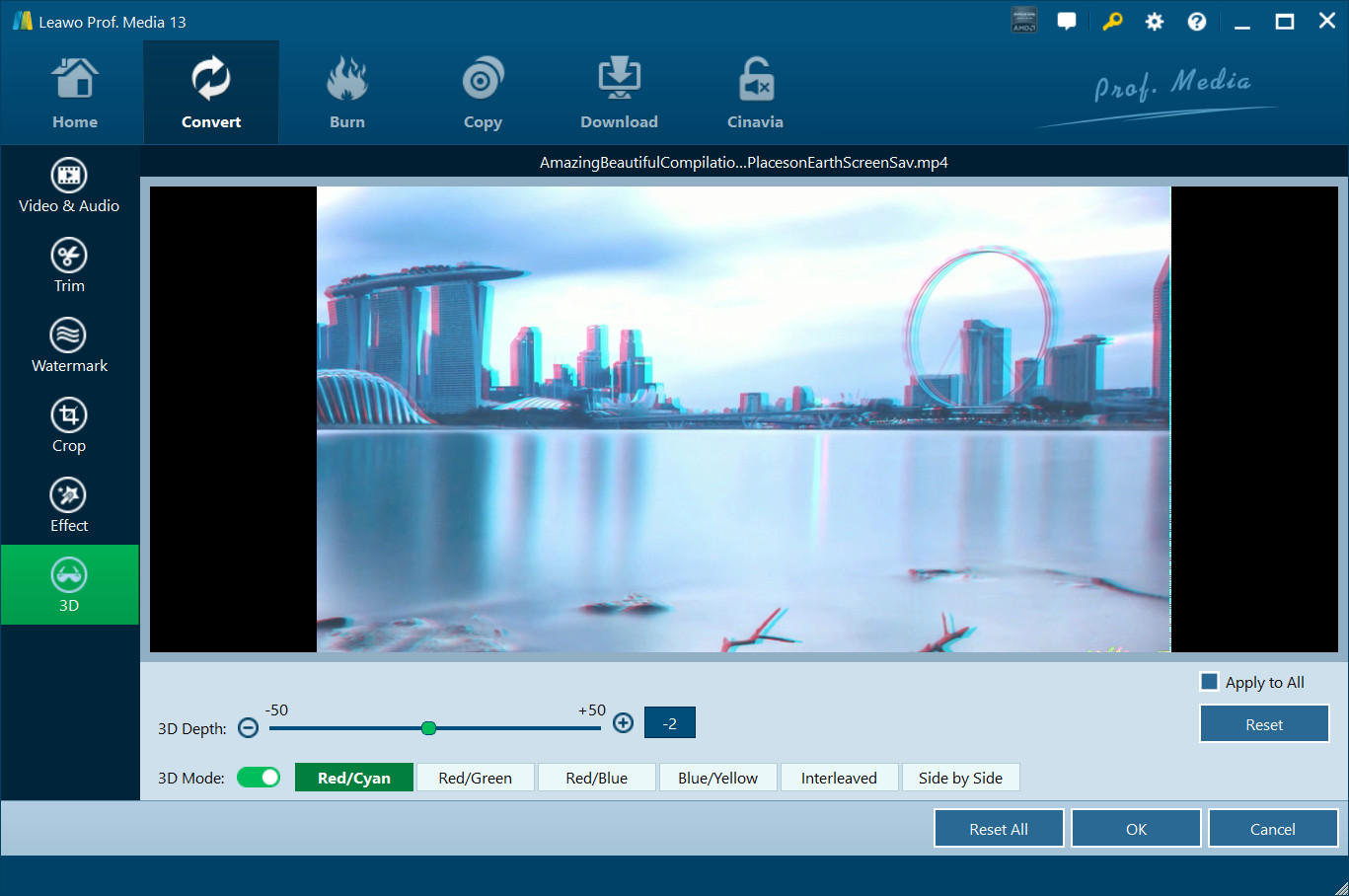
The 3D tab, from Leawo's user guide: Red/Cyan mode switched on, with the depth slider and the five other 3D modes below the preview.
Photo slideshow maker
Leawo Video Converter also turns photos or a whole photo folder into a slideshow video. You set each photo's duration, the transition length and effect (or Random), reorder or remove photos, add background music with fade-in, fade-out and loop, and then export it in any of the output formats.
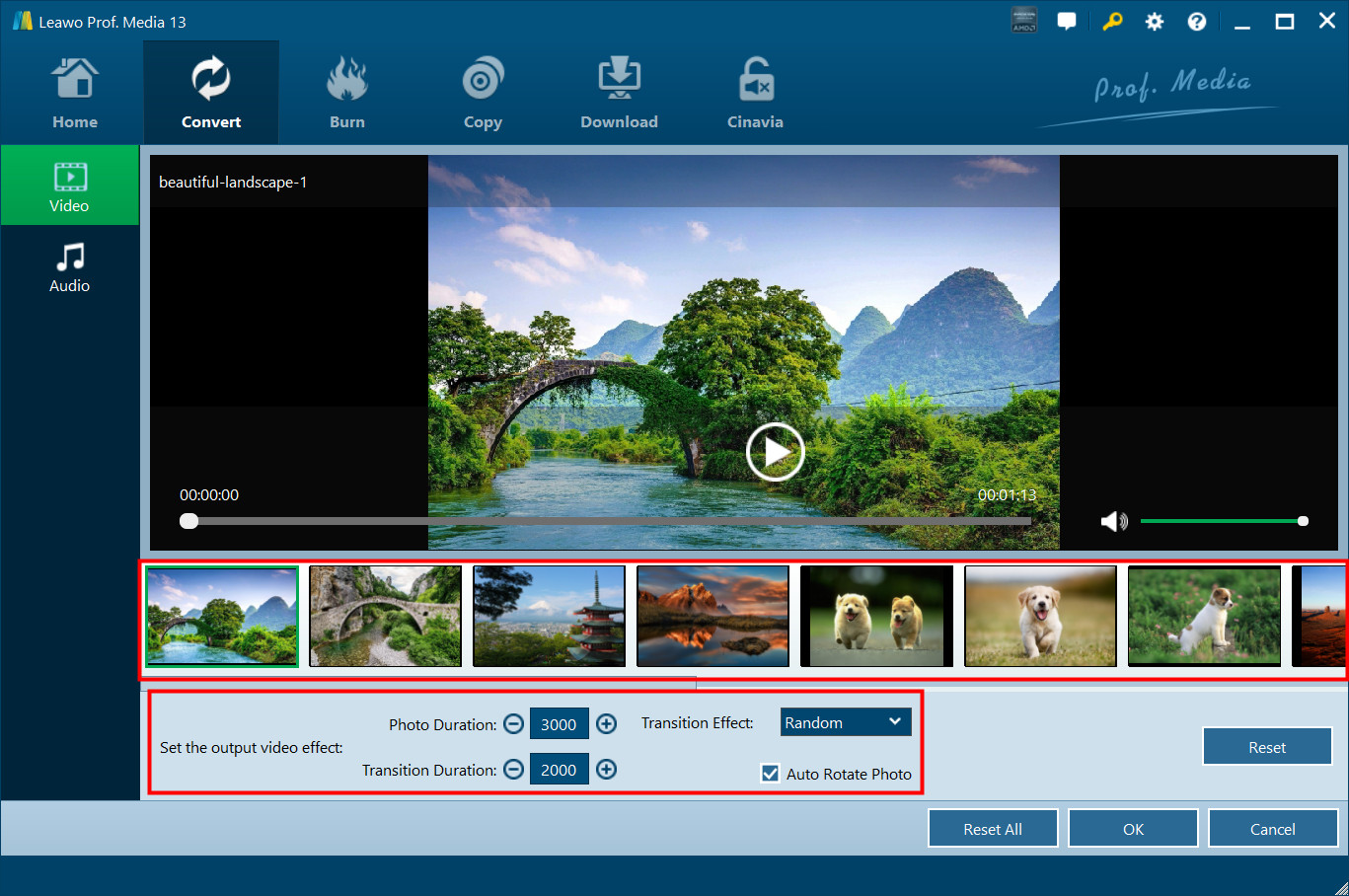
The slideshow editor, from Leawo's user guide: a strip of photos under the preview, 3000 ms photo duration, 2000 ms transitions and Auto Rotate Photo ticked.
Benefits
- One tool for the odd files. Camcorder MTS, old FLV downloads and multi-track MKVs go into the same list and come out as one format your devices accept.
- No settings homework. Pick "iPad" or "MP4 Video" and go. The detailed codec settings are there only when you want them.
- Small fixes without a second program. Cutting off a shaky start, cropping black bars or stamping a logo happens in the same window as the conversion.
- Low entry price. $29.95 a year, or $39.95 once, is less than many converters charge.
Real-World Uses
- Family videos from an old camcorder: batch-convert a folder of MTS clips to H.265 MP4 to save space, and merge a holiday's clips into one file.
- Movies for a tablet: convert MKV files to the iPad preset, keep the English audio track and add an SRT subtitle file.
- Audio from video: pull the soundtrack of a recorded lecture or concert into MP3 or FLAC.
- Clips for social media: trim a long recording to the good part, crop it to 4:3 or 16:9 and add a text watermark before uploading.
- A birthday slideshow: load a folder of photos, add a song with fade-out, and export an MP4 to play on the TV.
Who It's For, and Who Should Skip It
Leawo Video Converter suits home users on Windows who convert files every so often and want presets, batch conversion and a few edits in one inexpensive, simple program.
Skip it if you want to rip DVDs or Blu-rays, download online videos or burn discs: those are separate Leawo modules (Video Converter Ultimate or the Prof. Media packs include them). Skip it too if you need real editing with a timeline, titles and transitions, since a video editor fits that job better. And if you're comfortable with presets and don't need the editor or 3D, a free converter such as HandBrake covers plain format conversion at no cost.
Usage Guide
- Install and launch. Download the trial and run the installer, which installs Leawo Prof. Media. Click the Video Converter tile, or the Convert tab at the top.
- Register (after buying). Click the key icon at the top right, enter your registration code and activate. Until then, only the first five minutes of each file are converted.
- Add files. Click Add Video (choose Add Video or Add Video Folder) or drag files into the window. Add Photo starts a slideshow instead.
- Choose the output. Open the drop-down before the green Convert button (it reads "MP4 Video" by default), click Change and pick a format or a device. Click Edit instead to adjust codec, resolution, bitrate and audio settings.
- Edit if needed. Click the Edit icon on a file to trim, crop, add a watermark, adjust effects or apply 3D, and the subtitle button to add an external subtitle.
- Convert. Click the green Convert button, set the "Save to" folder in the sidebar, and click Convert at the bottom.
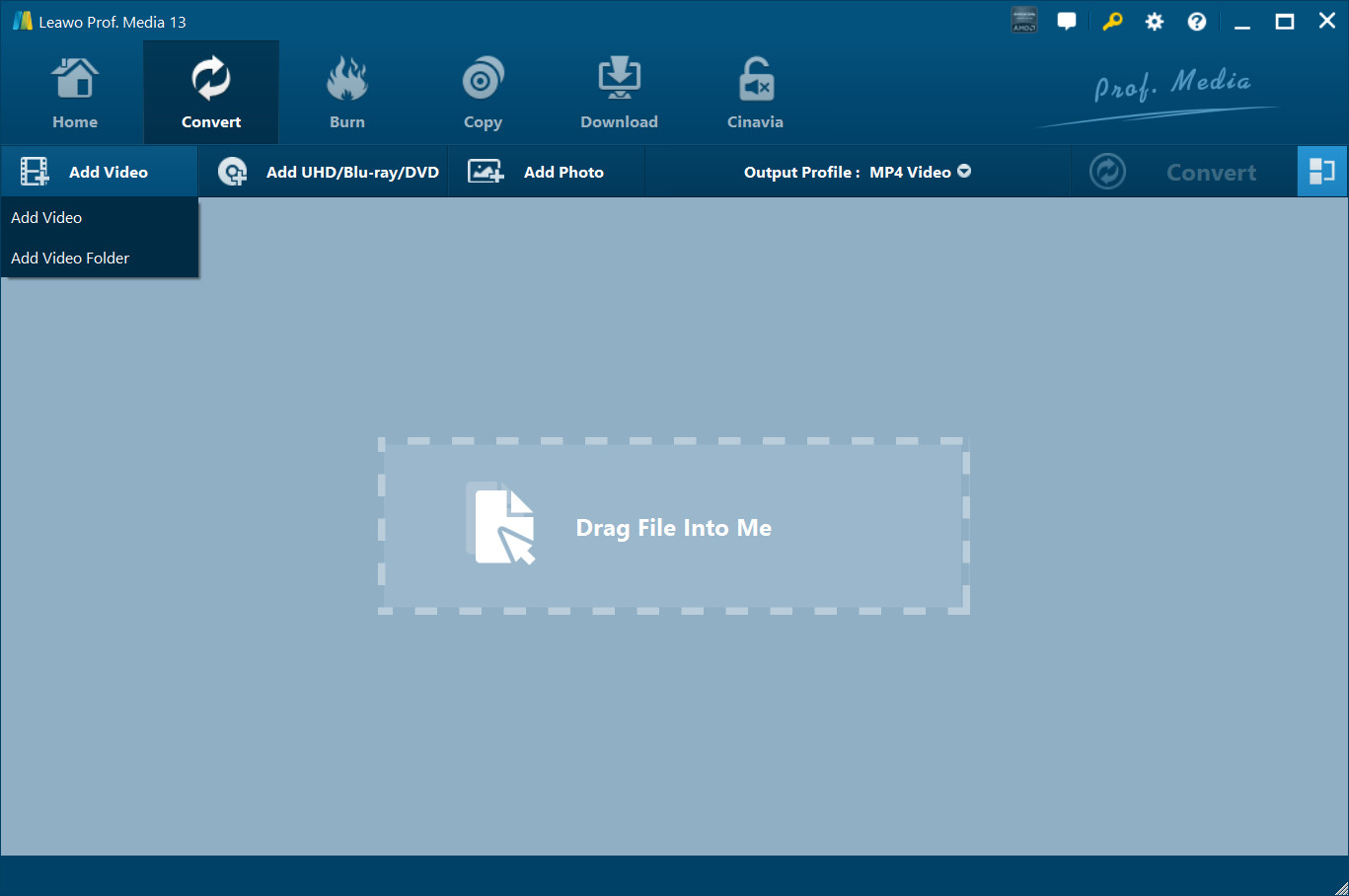
The empty Convert screen, from Leawo's user guide: Add Video, Add UHD/Blu-ray/DVD and Add Photo buttons, the Output Profile drop-down set to MP4 Video, and the drag-and-drop area.
Where it falls short
- A big download for one module. The 199 MB installer is the whole Prof. Media suite, and its toolbar shows Burn, Copy, Download and Cinavia tabs you haven't paid for.
- "Add UHD/Blu-ray/DVD" isn't included. The button sits in the Convert screen, but disc ripping needs the separate ripper modules.
- The editor is basic. Trim, crop, watermark, effects and 3D only: no timeline, text titles, transitions between clips or filters beyond brightness, contrast and saturation.
- Bold marketing claims. "50X faster" and "100% original quality" are Leawo's own claims. Any re-encode loses some quality, and the speed depends on your GPU.
- Strict refunds. Leawo refunds bugs it can't solve, hardware problems and duplicate orders, not a purchase you changed your mind about, and the 1-year plan's guarantee is only 5 days.
What Users Say
Independent reviews of Leawo Video Converter itself are thin and mostly years old, so most of what follows comes from Leawo's own page and from Trustpilot, where reviews cover all of Leawo's products.
Leawo's own review page
Leawo's review page for Video Converter shows 26 ratings: 18 five-star, 6 four-star, 1 three-star, 1 two-star and no one-star ratings. The product page quotes three customers, picked by Leawo:
- "Leawo Video Converter is user-friendly and easier to be operated. And it is feasible to get much more fun in converting and editing different video/audio formats." (Laura)
- "What an efficient video converter it is! Leawo Video Converter help me convert various video and audio formats in high conversion speed with good quality." (George)
- "I have used this product before and it served me well, this latest version does it so much better, easy to use and the conversion of my files turned out great. Very happy with this product." (Leon Andrews)
Trustpilot: the praise
Leawo has two Trustpilot profiles: leawo.org rated 4.4 out of 5 from 150 reviews, and www.leawo.com rated 4.3 from 157 reviews. Long-time users of the converter and the Prof. Media suite write most of the positive ones:
- Hans G. (5 stars, October 2026): "I have used their video conversion software for 10+ years, and recommend it to anyone needing it for personal use."
- Leon Andrews (5 stars, February 2026): "I had been using Prof Media 13 blu-ray ripper and video Converter for many years and they have served me well."
- Ronald Donofero (5 stars, June 2026): "Leawo is simply the #1 best software for video encoding."
- Robert (5 stars, December 2025): "I have used Leawo Prof. Media 13 for many years ripping DVDs and Blue-ray disks; it has worked flawlessly."
- Joseph Colon (5 stars, June 2026), on support: "The representative answer right away and help me with my issues and resolve the problem for me."
- Nick (5 stars, November 2024), after buying the wrong product: "they were helpful, communicative, and gave me the option of a lifetime license"
Trustpilot: the complaints
The negative reviews are few, and none we found is about Video Converter itself. Two show the kind of problems Leawo buyers run into:
- Leviticus Stroud (1 star, July 2025): "Crashed every time I tried to run it normally, seemed it had to run in admin mode."
- A. Gaudette (2 stars, February 2026), about Leawo's DRM software on a Mac: "it only works with OS 10.13 or earlier and we are now on OS 23 it should have been mentioned up front"
Trustpilot also notes that Leawo hasn't replied to its negative reviews.
The pattern
People who like Leawo have usually used it for years and praise how easy it is and how well the conversions turn out. Support gets credit for quick answers. The complaints are about crashes on particular PCs and about products that don't match a newer operating system, which is one more reason to run the trial on your own machine before you pay.
Comparisons
Leawo Video Converter vs. Leawo Video Converter Ultimate
Leawo Video Converter Ultimate (also called Prof. Media DVD Media Pack) does everything Video Converter does and adds online video downloading, DVD ripping and copying, and burning videos and photos to DVD. It starts at $79.95 a year, against $29.95 for Video Converter. Buy Ultimate only if you have discs to rip or burn. For converting files you already have, Video Converter is the same converter for far less.
Leawo Video Converter vs. HandBrake
HandBrake is free and open source, and very good at turning video into MP4 or MKV with H.264 or H.265. Leawo Video Converter's advantages are the wider list of output formats (including audio formats and older video formats), the device presets, merging clips, the watermark and 3D tools, and the slideshow maker, all in a simpler window. If you only need modern MP4 files, try HandBrake first.
Editions and Pricing
| Plan |
Price |
License term |
Money-back guarantee |
What you get |
| Video Converter, 1 Year |
$29.95 |
1 year, auto-renews, cancel any time |
5 days |
Video Converter on 1 PC, free upgrades |
| Video Converter, Lifetime |
$39.95 |
One-time payment |
14 days |
Video Converter on 1 PC, free upgrades |
| Prof. Media DVD Pack + CleverGet Video Downloader |
$99.94 (list $199.88) |
Lifetime |
14 days |
DVD Ripper, DVD Copy, DVD Creator, Video Converter and CleverGet Video Downloader |
Prices are from Leawo's Video Converter page on October 20, 2026. The Buy Now button below goes to that page, where you choose the plan.
FAQs
Does the Leawo Video Converter trial add a watermark?
No. Leawo's guide says the Leawo Video Converter trial converts only the first five minutes of each video or audio file, and trial users don't get free technical support. Short clips under five minutes convert in full, so test it with a longer file to see the limit.
What happens when the 1-year Leawo Video Converter plan ends?
The 1-year Leawo Video Converter plan renews automatically at the end of the year unless you cancel it. If you'd rather not keep paying, the lifetime license costs $39.95 once.
Can Leawo Video Converter rip DVDs or Blu-rays?
No. Leawo Video Converter converts video and audio files. Ripping DVDs and Blu-rays needs Leawo's DVD Ripper or Blu-ray Ripper modules, which are included in Video Converter Ultimate and the Prof. Media packs.
Does the Windows license work on a Mac?
No. This Leawo Video Converter license is for one Windows PC. Leawo sells a separate Mac edition, which runs on macOS 10.13 High Sierra and later, including Apple M1 and M2 Macs.
Can Leawo Video Converter convert 4K and H.265 video?
Yes. Leawo Video Converter has 4K MP4 and 4K MKV output profiles and H.265 MP4 and MKV profiles, and accepts 4K and H.265 files as input. Converting 4K to H.265 takes much longer on a PC without a supported graphics card.
Why does the installer say Leawo Prof. Media?
Leawo Video Converter has been built into Leawo Prof. Media as a module since version 13. The installer puts the whole suite on your PC, and your registration code activates the Video Converter tile. The other modules stay in trial mode until you buy them.
Which languages does Leawo Video Converter support?
Leawo Video Converter's interface comes in 11 languages: English, German, Japanese, Simplified Chinese, Russian, Hungarian, Armenian, Spanish, French, Portuguese and Dutch. You switch it under Settings, General.
System Requirements
- Operating system: Windows 7, 8, 8.1, 10 or 11
- Processor: 1 GHz Intel or AMD processor or faster
- Memory: 256 MB RAM (512 MB recommended)
- Disk space: 512 MB free
- Other: DirectX 8.1 or later
Conclusion
Leawo Video Converter is worth it if you're a Windows user who needs to convert a mixed pile of video and audio files now and then, and wants presets, batch conversion and a few quick edits without any learning curve. The one reason to buy it is that it does the everyday job simply and cheaply. The main reason not to is that it does only that: no disc ripping, no downloading and no real editing, and the cheap plan is a renewing subscription. If you buy, the $39.95 lifetime license is the better deal for most people. Run the five-minute trial on your own files first.
Download Free TrialBuy Now