Leawo Music Recorder for Mac: Record What Your Mac Plays as MP3, M4A or WAV
Leawo Music Recorder for Mac is a small macOS recorder that captures whatever your Mac plays (streaming music, web radio, podcasts) or what its microphone hears, splits the recording into tracks and tags them. It costs $19.99 a year or $29.99 for a lifetime license, and Leawo lists macOS 10.12 Sierra through macOS 27. It's for people who want offline copies of streams they can only listen to live, without setting up a loopback driver and an audio editor themselves.
The catch: the Mac version hasn't changed since August 2023, and it's an Intel app. It still installs its own audio capture driver and runs on Apple silicon through Rosetta, but try it on your Mac and macOS version before paying.
Quick facts
- Version: Leawo Music Recorder for Mac 3.0.7, built August 2023 (the Windows edition is 3.0.0.7, June 2026)
- Developer: Leawo Software Co., Ltd.
- macOS: Leawo lists 10.12 Sierra to macOS 27; the app is Intel-only and runs on M-series Macs through Rosetta 2
- Records: computer audio (through its own virtual audio device) or a built-in input such as the microphone
- Saves as: MP3, M4A or WAV, with codec, bit rate and sample rate settings
- Extras: split on silence, skip short clips, scheduled recording, a library with tag editing, playlists and iTunes export
- Price: $19.99 for one year (renews automatically) or $29.99 lifetime, one Mac
- What we checked: the installer on Leawo's "Thank you for downloading Leawo Music Recorder for Mac" page (macmusicrecorder_g.dmg, 30,470,792 bytes, dated August 29, 2023, which installs LeawoMusicRecorder.app version 3.0.7, about 72 MB, with an x86_64-only main program and a LeawoVADevice audio driver built for both Intel and Apple silicon), and the order page for "Leawo Music Recorder for Mac", which charged $19.99 for a year and $29.99 for lifetime on November 1, 2026. We didn't record anything with it.
Before you buy
- Test it on your macOS first. The app is three years old, and past macOS upgrades caused problems until Leawo sent a fix (see the reviews below). Run the free download before paying.
- Expect a Rosetta prompt and a driver. On an Apple silicon Mac, macOS asks to install Rosetta 2 the first time. The installer also adds Leawo's virtual audio device, which is how it hears system sound.
- It records in real time. A one-hour playlist takes an hour, and you get whatever plays, ads included.
- Take lifetime. At $29.99 it's $10 more than a year, with no renewal.
- Personal use only. Leawo limits its software to content "that you have lawfully obtained", and streaming services' terms may forbid recording.
Download Free TrialBuy Now
Overview
macOS has no simple built-in way to record the sound your Mac is playing. The usual workaround is a free loopback driver plus a recorder, and then cutting one long file into songs by hand. Leawo Music Recorder for Mac packs those steps into one window: a red record button and transport controls at the top, and a sidebar with Recording, Library (All Recordings, Newly Recordings) and PlayList sections. Settings live in Leawo Music Recorder > Preferences, on General, Control, Format and Network settings tabs.
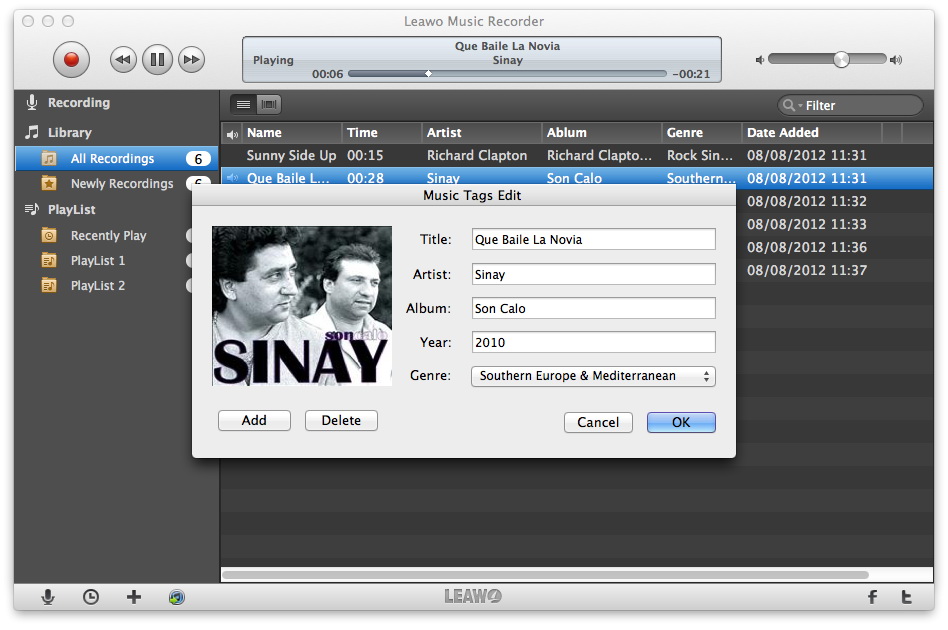
The Mac library from Leawo's tutorial (dates show 2012): six recordings with name, time, artist, album, genre and date added, and the Music Tags Edit dialog with title, artist, album, year, genre and cover art.
Features
Record system audio or the microphone
Leawo Music Recorder for Mac has two sources: Record Computer Audio for anything playing on the Mac (a browser tab, the Spotify or Music app, a radio player) and Record Built-in Audio for the microphone, line input or another input device. System audio goes through the LeawoVADevice driver that the installer adds, so there's no separate loopback tool to configure.

The Mac Audio Source dialog: Record Built-in Audio with a device menu (Built-in Microphone, Built-in Input and another installed audio device) or Record Computer Audio for streams and online music.
MP3, M4A or WAV at the quality you set
Leawo Music Recorder for Mac saves as MP3, M4A or WAV. The Format tab picks the output format, audio codec, bit rate and sample rate, and the General tab sets the output folder. M4A suits Apple devices; WAV keeps everything for editing later.

Preferences on the Mac: General, Control, Format and Network settings tabs, with Format showing MP3 output, 128 kbps and 44100 Hz.
Tracks split and short clips dropped automatically
Leawo Music Recorder for Mac starts a new file when the silence between songs passes a length you set, and throws away anything shorter than a minimum length, which removes many jingles and short ads. A two-hour radio session comes back as a list of separate songs rather than one long file.
Scheduled recordings
Leawo Music Recorder for Mac's task scheduler (the clock icon at the bottom left) starts a recording at a set time for a set duration, and can shut the Mac down afterwards. Keep the Mac awake and the stream playing at that time.
A library with tags, playlists and iTunes export
Leawo Music Recorder for Mac keeps every recording in its library with a player and a filter box. It tries to fill in song details itself (the installer includes a music recognition library), and Edit Music Tags lets you fix the title, artist, album, year, genre and cover. You can build playlists and send tracks to iTunes in one click; on macOS 10.15 and later, iTunes has become the Music app, so test that export on your Mac.
Benefits
- No audio routing to learn. Choose Computer Audio, press record, press play.
- Songs, not one long file. Splitting and tagging mean the recordings arrive ready for Music, a phone or a USB stick.
- Cheap and small. $29.99 once, and a 30 MB download.
Real-World Uses
- A web radio show while you sleep: schedule the recording, keep the Mac awake, and listen on your iPhone next day.
- A lecture or webinar that only streams: capture the audio as M4A and review it on the commute.
- Voice-over for an iMovie project: switch to the microphone and record straight to WAV.
- Songs for a device with no app: record a playlist you have the right to keep, tag it and copy it to an old iPod or a car's USB port.
Who It's For, and Who Should Skip It
A fit for Mac users who want a set-and-forget recorder for radio, podcasts and streams, with automatic splitting and tags, and who don't want to wire up audio drivers.
Skip it if:
- You want to edit audio. There's no waveform editing, fades or noise removal; Audacity (free) does that and can record too.
- You're comfortable with free tools. A free loopback driver such as BlackHole plus Audacity or QuickTime Player does the recording for nothing, without splitting or tags.
- You want whole albums quickly. A recorder works at playback speed.
- You need software that keeps pace with macOS. The Mac version's last build is from 2023.
Usage Guide
- Install. Open the DMG and run the installer, which places Leawo Music Recorder in Applications and adds its audio device. Allow Rosetta 2 on an M-series Mac, and microphone access if you'll record your voice.
- Choose the source. Click the microphone icon at the bottom left and pick Record Computer Audio or Record Built-in Audio.
- Set format and folder. Leawo Music Recorder > Preferences: Format for MP3, M4A or WAV and quality; General for the output folder; Control for splitting and the minimum track length.
- Record. Click the red button first, then start the music, so the opening isn't cut off. Click again to stop.
- Tidy up. In Library, right-click a track to edit tags, add it to a playlist or send it to iTunes.
- Register. Enter the code from your order e-mail through the menu icon at the top right.
Where it falls short
- Not maintained like the Windows edition. The Mac installer dates from August 2023, while Windows received 3.0.0.7 in June 2026.
- Intel-only app. Only the audio driver is native to Apple silicon; the app itself needs Rosetta 2, which Apple has announced it will phase out in a future macOS.
- Careless Mac specs. Leawo's Mac requirements for this audio recorder list a DVD drive, an external Blu-ray drive and 5 to 25 GB of disk space, copied from its disc software. The app itself installs about 72 MB.
- Trial limits aren't stated for Mac. Leawo's registration guide covers only Windows, where the trial records 3 minutes.
- Old screenshots. Leawo's Mac tutorials show the app with recordings dated 2012; the Mac user-guide link opens the Windows guide.
What Users Say
Mac-specific feedback is thin and mostly old. These are the reviews we could check, all about the Mac edition.
Leawo's review page for Music Recorder for Mac (5.0 out of 5, 4 reviews)
"I think this will be the best music recorder i've ever used, the quality is near studio sound quality...tnx Leawo!" anton gi, 5 stars, April 2020
"Super easy to use, and no loss of sound quality! Perfect product." Vanessa, 5 stars, July 2019
"Best music recorder with out the any issues or problems. Works right out of the box. I enjoy working with the program." Efren, 5 stars, June 2019
"best music recorder ever comes out loud and clear" colin squire, 5 stars, October 2018. Leawo moderates this page.
Trustpilot: two Mac owners (leawo.org 4.4 from 151 reviews, for Leawo as a company)
Frank, 5 stars, "Leawo Music Recorder for Mac excellent product and support (updated)", October 2015: after upgrading to OS X 10.11 he needed help from support, which sent a plugin: "Very friendly support gave me SW plugin to fix this."
Andreas, 5 stars, "Great product, great support!", November 2015, a long-time user of the Mac version, had an issue after an OS update that support fixed quickly: "So everything works fine again. I am deeply satisfied!"
The recurring themes
Users like the sound quality and how little setup it needs. The real-world risk is macOS upgrades: twice in 2015 an OS X upgrade caused problems that only support could fix. With the Mac build unchanged since 2023 and no recent Mac reviews, assume you're relying on support if a future macOS breaks the audio driver.
Comparisons
Mac vs Windows edition
Same price, separate licenses. The Mac edition adds M4A output and installs its own audio device, but it's 3.0.7 from 2023 and Intel-only, while Windows is 3.0.0.7 from June 2026.
Leawo Music Recorder vs BlackHole and Audacity
BlackHole (a free virtual audio driver) and Audacity (a free editor) record system audio on a Mac and add full editing, but you route the audio in Audio MIDI Setup yourself and cut the songs apart by hand. Leawo trades the editing for automatic splitting, tags, a library and a scheduler.
Editions and Pricing
| License |
Price |
Term |
Refund window |
| Music Recorder for Mac, 1 year |
$19.99 |
One Mac, renews automatically |
5 days |
| Music Recorder for Mac, lifetime |
$29.99 |
One Mac, one-time payment |
14 days |
Refunds cover only problems Leawo confirms and can't fix, not a change of mind.
FAQs
Does Leawo Music Recorder work on M1, M2 and later Macs?
Leawo Music Recorder for Mac runs on Apple silicon through Rosetta 2: the app in the installer we checked is Intel-only, while its audio capture driver includes native Apple silicon code. Leawo's requirements list M1 and M2 chips.
Can Leawo Music Recorder for Mac record Apple Music or Spotify?
Leawo Music Recorder for Mac records whatever plays through the Mac's audio, so it captures the Music app, Spotify and browser players in real time. Keeping those recordings may break the service's terms or your local law.
Will other Mac sounds end up in my recordings?
Yes. Leawo Music Recorder for Mac's Computer Audio mode records everything the Mac plays, including notification sounds and other tabs, so turn on Focus mode and close other audio before a long session.
Does the Mac license also cover Windows?
No. Leawo Music Recorder for Mac and Leawo Music Recorder for Windows are separate products, each licensed for one computer.
System Requirements
- macOS: 10.12 Sierra through 15 Sequoia, 26 Tahoe and 27 (Leawo's list)
- Processor: 1 GHz Intel, or Apple silicon with Rosetta 2
- Memory: 512 MB RAM or more
- Disk: about 72 MB for the app, plus space for your recordings
- Other: internet connection
Conclusion
Leawo Music Recorder for Mac is a reasonable $29.99 buy if it works on your Mac in the trial and you want recordings that arrive split and tagged. It removes the fiddly part of recording Mac audio, and its scheduler suits radio shows you can't catch live.
The reason to buy: one-click system audio recording with automatic tracks and tags, no audio routing to learn. The reason to hesitate: the Mac build hasn't been updated since 2023, runs through Rosetta, and macOS upgrades have caused problems before; free tools like BlackHole and Audacity do the core job if you don't mind the setup.
Download Free TrialBuy Now