Leawo Total Media Converter Ultimate for Mac: Every Prof. Media Module for 4K UHD, Blu-ray, DVD and Video on macOS
Leawo Total Media Converter Ultimate for Mac is the full Leawo Prof. Media 13 suite for macOS: all 17 modules for ripping, copying and burning 4K UHD, Blu-ray and DVD discs, removing Cinavia, converting video and downloading online video. It costs $229.95 for a lifetime license on one Mac (or $239.90 for one year), runs on macOS 10.13 through macOS 27 with a native Apple-chip build, and is meant for Mac owners with a large mixed disc collection.
The question on a Mac is less "does it do enough" than "can my Mac feed it". Blu-ray and 4K work needs an external Blu-ray drive, and 4K discs need a drive with UHD-friendly firmware. Get that sorted first and this is the most complete disc toolkit Leawo sells for macOS.
Quick facts
- What you get: a license that registers every module of Leawo Prof. Media for Mac, sold as "Leawo Prof. Media 13 Bundle for Mac"
- Version: 13.0.8 in the Intel installer; the separate Apple-chip installer is dated July 7, 2026
- macOS: 10.13 High Sierra to macOS 27, Intel and Apple silicon
- Discs: 4K UHD Blu-ray, Blu-ray (including BDAV recorder discs) and DVD, as discs, folders or ISO files
- Price: $229.95 lifetime (list $389.88) or $239.90 for 1 year, one Mac
- Trial: Leawo's Mac screenshots show each module with a 31-day trial; conversions stop after the first five minutes of each title
- Refunds: within 14 days on lifetime (5 on yearly), only for faults Leawo confirms and can't fix
- What we checked: the "Thank you for downloading Leawo Prof. Media 13 for Mac" page and both installers it serves (Intel ltmcu_setup.dmg, 252,961,353 bytes, whose package reads version 13.0.8, x86_64, macOS 10.13 minimum, about 580 MB installed; Apple-chip ltmcu_setup_arm64.dmg, 331,793,186 bytes), the Mac module list and prices on Leawo's buy page, and the order page for "Leawo Prof. Media 13 Bundle for Mac", which showed $389.88 lifetime less a $159.93 discount ($229.95) and $239.90 for a year, on November 1, 2026. We didn't rip or burn a disc ourselves.
Before you buy
- Take the lifetime license. At $229.95 it's cheaper than one year at $239.90. Make sure the discount line appears on the order page before you pay.
- Plan the hardware. Leawo's Mac specs ask for a recordable Blu-ray drive and 25 GB of free space for Blu-ray work. 4K UHD ripping and copying also need a drive whose firmware lets software read UHD discs; Leawo's UHD Drive Tool, sold separately, can downgrade some drives.
- It's the Mac edition only. The license doesn't cover a Windows PC, and Leawo won't refund a purchase of the wrong platform.
- Only for discs you own. Leawo's fair-use notice limits its software to content you've lawfully obtained.
Download Free TrialBuy Now
Overview
Total Media Converter Ultimate for Mac is a license, not a separate app: it registers every tile in Leawo Prof. Media, the one program all of Leawo's Mac disc tools share. The window has Home, Convert, Burn, Copy, Download and Cinavia tabs, and the home screen scrolls through the modules, each marked Registered once you activate.

The Mac home screen (Prof. Media 12 in Leawo's guide), with Blu-ray Ripper, Blu-ray Copy, UHD Ripper, UHD Copy, UHD Creator, Blu-ray to DVD, Blu-ray Recorder Copy and Blu-ray Recorder Ripper all registered.
| Job |
Modules included for Mac |
| Convert disc to video |
UHD Ripper, Blu-ray Ripper, Blu-ray Recorder Ripper, DVD Ripper |
| Copy disc to disc or ISO |
UHD Copy, Blu-ray Copy, Blu-ray Recorder Copy, DVD Copy |
| Convert between discs |
Blu-ray to DVD Converter, DVD to Blu-ray Converter |
| Burn video to disc |
UHD Creator, Blu-ray Creator, DVD Creator |
| Remove Cinavia |
Blu-ray Cinavia Removal, DVD Cinavia Removal |
| Convert and download video |
Video Converter, CleverGet Video Downloader |
Features
Rip 4K UHD, Blu-ray and DVD to files
Total Media Converter Ultimate for Mac turns discs, folders and ISO images into MP4, MOV, MKV, H.265, 4K MP4/MKV, lossless and audio files. The Format panel adds MTS and M2TS, and the lossless options keep the disc's audio tracks and subtitles in one multi-track MKV, which suits Plex or Infuse on an Apple TV.
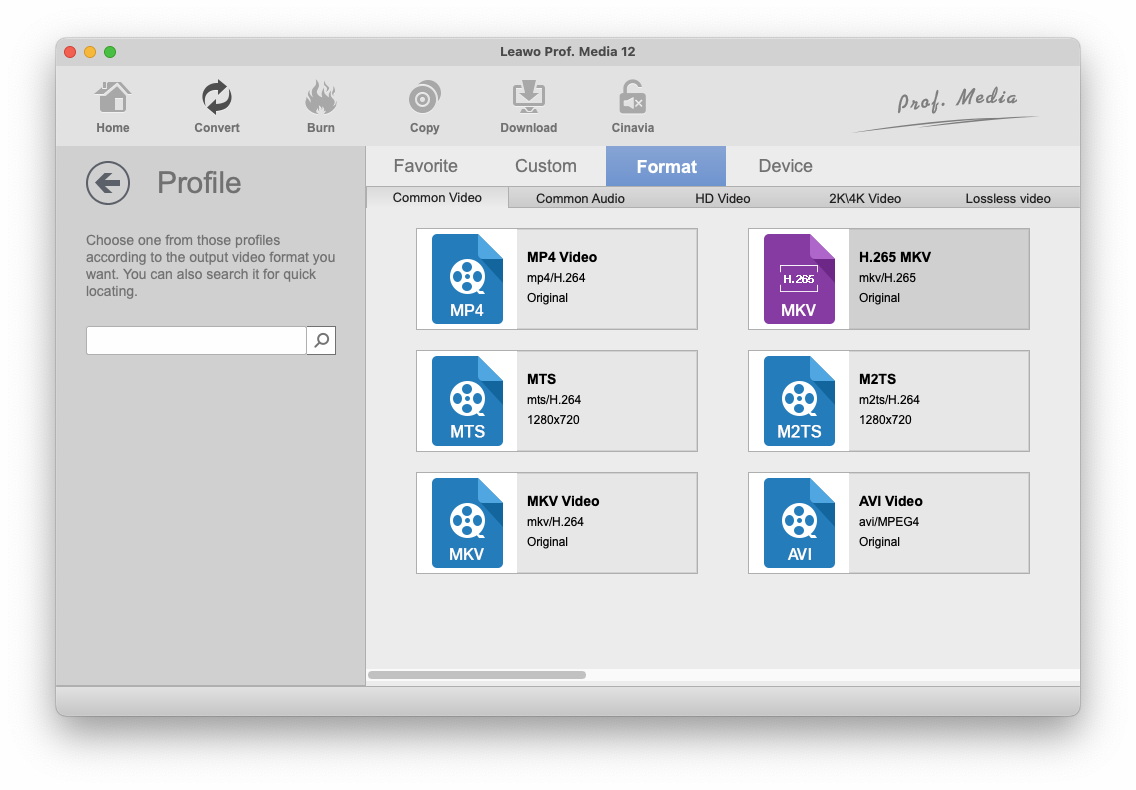
The Mac Profile panel: Common Video, Common Audio, HD Video, 2K/4K Video and Lossless video groups, with MP4, H.265 MKV, MTS, M2TS, MKV and AVI shown.
Copy discs to ISO, folder or a blank disc
Total Media Converter Ultimate for Mac backs up a disc to a folder, an ISO file or a writer in one pass, with Full Movie, Main Movie or Custom Mode and a target size (BD-50, BD-25, DVD-9, DVD-5). A Blu-ray can be shrunk to fit a BD-25, and the sidebar shows the disk space needed against what's free.
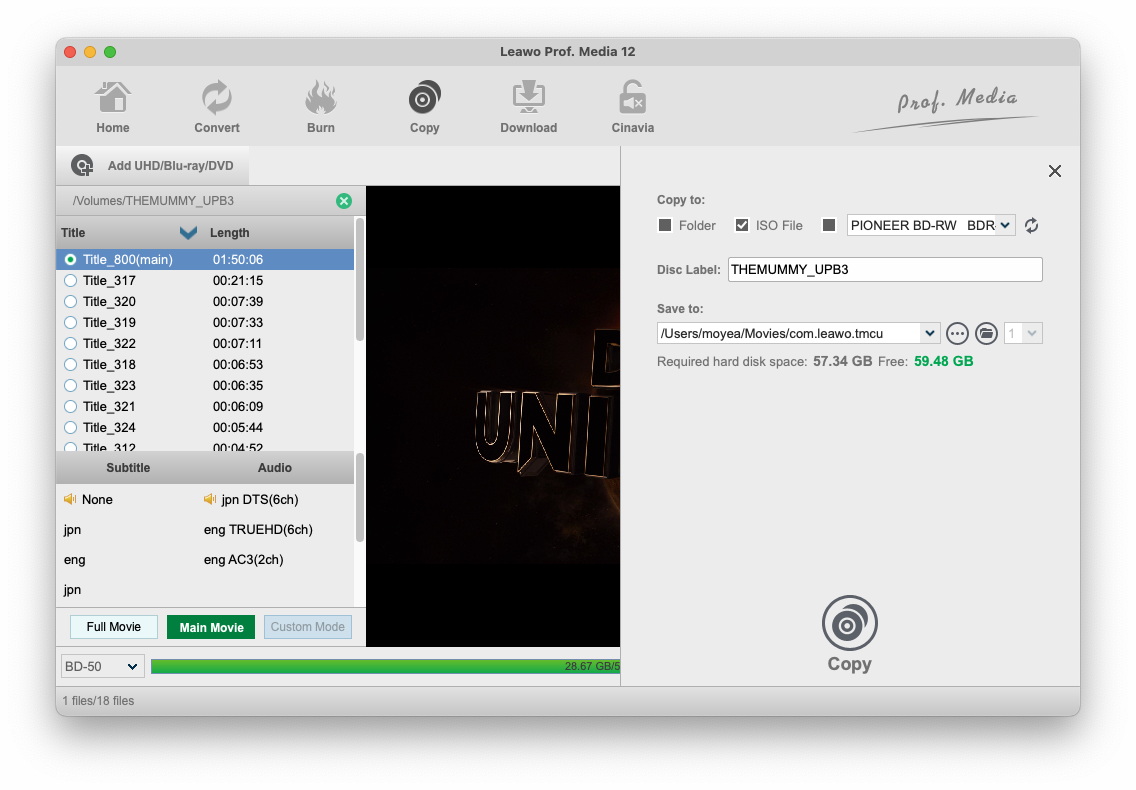
Copying a disc on a Mac: Copy to Folder, ISO File or a Pioneer BD-RW writer, a disc label, the Movies/com.leawo.tmcu output folder, 57.34 GB required against 59.48 GB free, and BD-50 as the target.
Author Blu-ray and DVD discs with menus
Total Media Converter Ultimate for Mac burns videos and photo slideshows to UHD, Blu-ray or DVD discs, folders or ISO files, with built-in and downloadable menu templates you can edit (titles, fonts, background image or video, music). It also converts between disc types: a Blu-ray down to a DVD for an older player, or several DVDs onto one Blu-ray.
Remove Cinavia from copies
Total Media Converter Ultimate for Mac includes Blu-ray and DVD Cinavia Removal, which Leawo says stops the audio watermark that mutes some disc copies on Cinavia-enabled players. It has its own tab, so you run it as a separate step after copying.

Prof. Media 13 for Mac before activation: the Cinavia tab and the DVD Cinavia and Blu-ray Cinavia tiles outlined, and other modules marked Trial with "31-day Trial" or "Activate".
Video conversion, editing and downloading
Total Media Converter Ultimate for Mac also converts everyday files between 180+ formats, edits them (trim, crop, watermark, effects, 3D, merge), and adds CleverGet Video Downloader for public videos on YouTube and similar sites. Hardware encoding uses Apple's VideoToolbox, which you can switch on in the Performance settings.
Benefits
- Nothing left locked. Whatever disc turns up, 4K, Blu-ray, a BDAV recording or a DVD, the module for it is already registered.
- One app on the Mac, not five. The same tabs and buttons for ripping, copying and burning every disc type.
- Cheaper than collecting modules. The 17 modules at Leawo's single-module prices add up to $709.15 a year; the lifetime bundle is $229.95.
Real-World Uses
- A Plex library on a Mac mini: rip 4K discs to HDR MKV, Blu-rays to H.265 and DVDs to MP4, all from one queue.
- Archive copies of a Blu-ray collection: save each disc as an ISO on a NAS, shrunk to BD-25 where space matters.
- Home movies for relatives: burn an edited video to Blu-ray or DVD with a menu, from the same app.
- TV recordings from a Blu-ray recorder: rip or copy BDAV discs that ordinary rippers don't handle.
Who It's For, and Who Should Skip It
A good fit for Mac owners with a mix of 4K, Blu-ray and DVD discs who want to rip, back up and burn them, and who have (or will buy) the external drives that takes.
Skip it if:
- You only rip. Blu-ray Ripper for Mac ($99.95 lifetime, includes DVD Ripper) covers most collections; add UHD Ripper only if you have 4K discs.
- You only have DVDs. Video Converter Ultimate for Mac (five DVD and video modules) costs much less.
- Your Mac can't take a Blu-ray drive. Without one, most of the suite has nothing to work on.
Usage Guide
- Install. On the download page, choose "Mac with Apple Chip" or "Mac with Intel Chip", open the DMG and run the installer.
- Activate. Open Help > Activate in Leawo Prof. Media and enter your code; every tile should turn to Registered.
- Connect the drive and insert the disc. It appears under /Volumes.
- Pick the job: Convert to rip, Copy to back up, Burn to author, Cinavia to clean a copy.
- Add the source with Add UHD/Blu-ray/DVD, choose Full Movie, Main Movie or Custom Mode, then choose the output and start from the green button.
Where it falls short
- macOS upgrades can break it for a while. On Leawo's own review page a Mac user wrote that it "Stopped working when i updates to mac OS12.3". Hold off on a major macOS upgrade until Leawo has updated.
- The Mac version trails Windows. The Intel Mac installer is 13.0.8 from June 2026; Windows got 13.0.1.6 in October 2026. Leawo's Mac spec page still lists only up to macOS 15 and M1-M3 chips, while the product page lists macOS 27.
- Older complaints about tracks. Several long-time reviewers asked for multiple audio and subtitle tracks in outputs other than lossless MKV, and one 2013 review reported audio drifting 1 to 3 seconds on long Blu-ray rips.
- Yearly licenses can lapse mid-project. A 3-star review from 2013 warned that ripping "options expire with your license", another reason to buy lifetime.
What Users Say
Leawo's review page for the Mac suite has the most material, though Leawo moderates it and many reviewers clearly use the Windows version too. We've added Mac owners from Trustpilot and an independent Mac test on YouTube that appears with this page.
Leawo's review page for Prof. Media for Mac (4.9 out of 5, 62 reviews)
"I Love this software. It's a game changer for my media server. Now I can create video playlists of single tracks. Very intuitive and easy to use." Terry A Weaver, 5 stars, October 2025
"it just works as advertised. i tried others but they couldn,t ripped uhd 4k" michael walker, 5 stars, December 2023
"I purchased the Lifetime Media Creator package almost 4 years ago and have used it on both Apple and Windows machines. Software works great! Support has been fantastic as I have had to reactivate the software a few times as my computers have been updated and changed." Scott Olson, 5 stars, October 2021
"Stopped working when i updates to mac OS12.3.. Any support for Monterey 12.3 sometime in the near futre?" brian Wilson, 5 stars, April 2022
"I believe one of the most useful parts of the Copying functionality is that it can shrink a blu-ray down to 25GB (saving money on discs)." Chuck K., 5 stars, August 2017, who also asked to be able to "select all videos and all subtitles"
"The feature that I am missing for a long time already is the possibility to make multiple subtitle and sound tracks." Pedro Campos Rojo, 5 stars, October 2019
"Blu Ray and DVD ripping options expire with your license. This isn't mentioned until you try to update the software to a newer version." Converter Guy, 3 stars, January 2013
Trustpilot: Mac owners (leawo.com 4.3 from 158 reviews, leawo.org 4.4 from 151)
Doug Stidham, 5 stars, August 2020: "This is the best application (out of 4) I have ever used on the MAC to rip BlueRays."
Frans Vandenburg, 5 stars, October 2023: "I recently updated to the full version of LeawoProf.Media for Mac"
Oliver, 5 stars, November 2014, after problems with Blu-ray Creator and Blu-ray Copy on Mac OS 10.10: "Great products with outstanding support, therefore I can definitely recommend the purchase!"
The recurring themes
Owners praise range (it rips the 4K discs others couldn't), ease of use and support that reactivates licenses on new Macs. The complaints repeat too: macOS updates that broke it until Leawo caught up, limited multi-track audio and subtitle output outside lossless MKV, and yearly licenses that can expire under you.
Comparisons
Mac edition vs Windows edition
Both have the same 17 modules and prices. The Mac edition has separate Intel and Apple-chip builds and uses VideoToolbox for hardware encoding; the Windows edition lists NVIDIA, AMD and Intel acceleration and gets updates first. A license works only on its own platform.
Total Media Converter Ultimate vs Video Converter Ultimate for Mac
Video Converter Ultimate for Mac is the DVD-and-video subset (five modules). Total Media Converter Ultimate adds every Blu-ray, 4K UHD and Cinavia module. If you have no Blu-ray drive, the smaller bundle is enough.
Total Media Converter Ultimate vs MakeMKV plus HandBrake
MakeMKV (free while in beta for Blu-ray) and HandBrake (free) together rip and re-encode Blu-rays on a Mac, but neither copies discs to discs, burns menus or removes Cinavia. Leawo puts all of that in one app with a single license.
Editions and Pricing
| Mac option |
Price |
Modules |
Refund window |
| Total Media Converter Ultimate for Mac, lifetime |
$229.95 (list $389.88) |
All 17 |
14 days |
| Total Media Converter Ultimate for Mac, 1 year |
$239.90 |
All 17 |
5 days |
| BD Media Pack for Mac, lifetime |
$169.94 |
11 Blu-ray, DVD and video modules, without 4K UHD, Cinavia or DVD to Blu-ray |
14 days |
| Single modules for Mac, 1 year |
$29.95 to $64.95 each |
One each; a second module is 50% off |
5 days |
FAQs
Can Leawo Total Media Converter Ultimate rip 4K UHD Blu-rays on a Mac?
Yes, Leawo Total Media Converter Ultimate for Mac includes UHD Ripper, UHD Copy and UHD Creator. Reading 4K discs depends on your external drive: many UHD drives need older, UHD-friendly firmware first, which Leawo's separately sold UHD Drive Tool can install on supported models.
Does Leawo Total Media Converter Ultimate run natively on M-series Macs?
Leawo Total Media Converter Ultimate for Mac has its own Apple-chip installer next to the Intel one, and the Intel package is built only for x86_64, so M1 to M4 owners should pick "Mac with Apple Chip".
Should I upgrade macOS right after buying?
Leawo Total Media Converter Ultimate for Mac has broken after macOS point releases before (a reviewer reported it with Monterey 12.3). Check Help > Check Update for a new build, and wait for it before a major macOS upgrade if you rely on the app.
What happens when a 1-year Total Media Converter Ultimate license ends?
Leawo Total Media Converter Ultimate's 1-year license renews automatically until you cancel it, and a 2013 reviewer found the disc modules stopped working when his yearly license ran out. The $229.95 lifetime license costs less than one year anyway, so it's the sensible choice.
Can I move the license to a new Mac?
Leawo Total Media Converter Ultimate for Mac covers one Mac at a time. Reviewers on Leawo's page and Trustpilot describe support reactivating their licenses after replacing computers.
System Requirements
- macOS: 10.13 High Sierra, 10.14, 10.15, 11 Big Sur, 12 Monterey, 13 Ventura, 14 Sonoma, 15 Sequoia, 26 Tahoe, 27
- Processor: 1 GHz Intel, or Apple M-series with the Apple-chip build
- Memory: 512 MB RAM, 1 GB or more recommended
- Disk: about 580 MB for the app; 5 GB+ free for DVD and 25 GB+ for Blu-ray jobs
- Drives: a recordable Blu-ray drive (UHD-friendly firmware for 4K discs)
- Other: internet connection
Conclusion
Leawo Total Media Converter Ultimate for Mac is worth $229.95 lifetime if you own 4K, Blu-ray and DVD discs and the drives to read them. No other Leawo license covers as much, it runs natively on Apple silicon, and long-time owners report years of use with support that answers.
The reason to buy: every rip, copy, burn and Cinavia job for every disc type in one Mac app, for less than a year of the modules separately. The reason to think twice: you're paying for 17 modules when most people use two or three, and macOS upgrades have broken it before, so if you only rip Blu-rays, Blu-ray Ripper for Mac is the cheaper answer. Test your own discs and drive with the trial first.
Download Free TrialBuy Now