Leawo DVD Copy for Mac: Back Up Your DVDs to Disc, Folder or ISO on a Mac
Leawo DVD Copy for Mac is a $29.95-a-year (or $39.95 lifetime) macOS DVD copier. It clones a DVD-9 or DVD-5 movie 1:1, or squeezes a dual-layer DVD-9 onto a single-layer DVD-5, and saves the copy to a blank DVD, a DVD folder or an ISO image. It runs on Intel and Apple silicon Macs with macOS 10.13 or later, and it's the cheapest of Leawo's Mac copy tools, aimed at people whose collection is DVDs only.
The usual reason to buy it is simple: the original disc is precious, out of print or headed for the car, and you'd rather risk a $1 DVD-R. Plug a USB DVD writer into the Mac, copy the film, and put the original away.
Quick facts
- Program: the Copy tab of Leawo Prof. Media for Mac 13.0.8 (updated June 2026)
- Download: Intel DMG (241 MB) or native Apple silicon DMG (316 MB)
- macOS: 10.13 High Sierra through macOS 26 Tahoe and macOS 27
- Reads: DVD discs, DVD folders (VIDEO_TS) and ISO images
- Writes: a blank DVD, a DVD folder or an ISO, as DVD-9 or DVD-5
- Modes: Full Movie, Main Movie and Custom Mode
- Price: $29.95 for one year, $39.95 lifetime, one Mac
- Trial: copies only the first 5 minutes of content
- What we checked: the Mac download page for DVD Copy (it serves the Prof. Media for Mac DMGs: ltmcu_setup.dmg, 252,961,353 bytes, and ltmcu_setup_arm64.dmg, 331,793,186 bytes), the Mac spec sheet and trial limit, and the order page for "Leawo DVD Copy for Mac": $29.95 for one year (auto-renewal unticked, renewal quoted at $19.09) and $39.95 lifetime, on November 1, 2026. We didn't copy a DVD on a Mac.
Before you buy
- Take the lifetime license. At $39.95 it's only $10 more than one year, and less than a year plus one renewal.
- Got Blu-rays too? Leawo Blu-ray Copy for Mac ($44.95 a year, $99.95 lifetime) includes DVD Copy, so don't buy both.
- Get the Mac edition. Windows and Mac codes are separate, and Leawo refuses refunds for buying the wrong product.
- You need a DVD drive. Leawo asks for a recordable DVD drive. Apple's USB SuperDrive or any USB DVD writer will do.
Download Free TrialBuy Now
Overview
On a Mac, DVD Copy is part of Leawo Prof. Media and opens on its Copy tab. A DVD in the drive shows up as a list of titles with their lengths, the subtitle and audio tracks underneath, a preview player on the right, and a disc-size drop-down with a fill bar at the bottom. One green Copy button opens the output choices.
What you get is a DVD that still behaves like a DVD: menus, chapters and the original audio are kept in a disc structure, rather than re-encoded into an MP4 the way a ripper would.
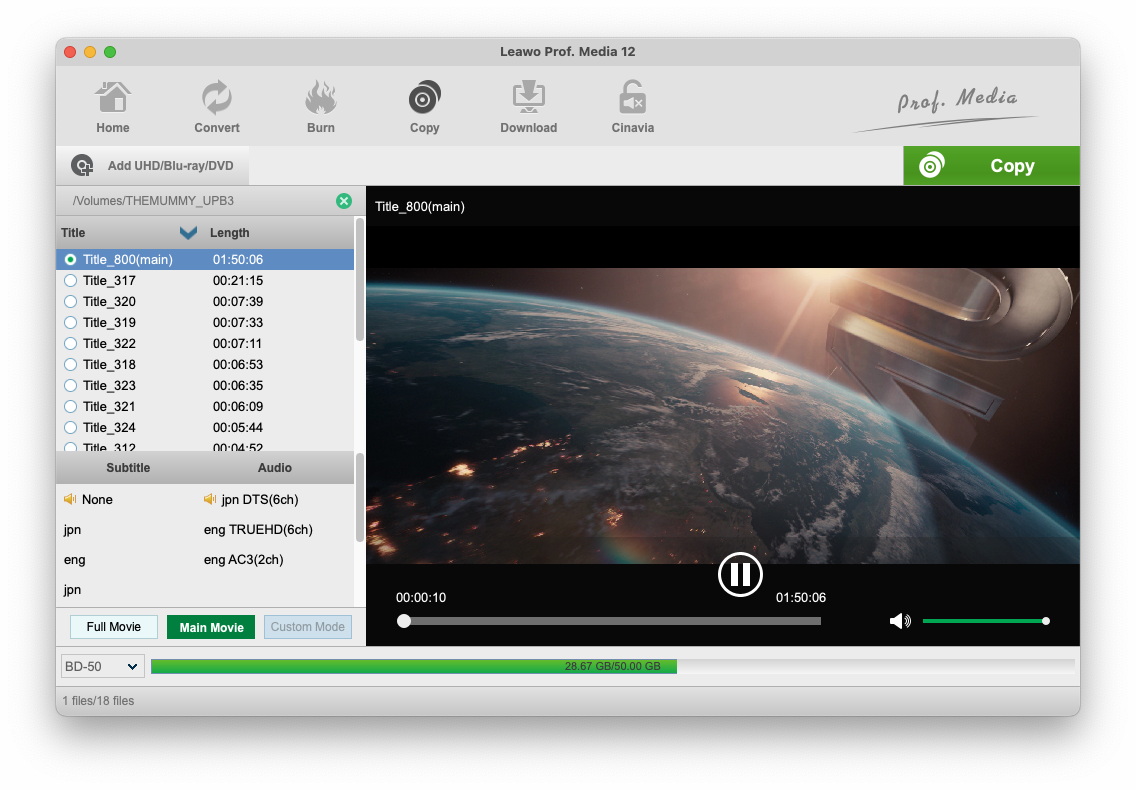
The Copy tab on a Mac with a disc mounted under /Volumes: the main title selected, subtitle and audio choices, the Full Movie, Main Movie and Custom Mode buttons, and the size bar. Leawo's Mac guide shows it with a Blu-ray and a BD-50 target. With a DVD, the targets are DVD-9 and DVD-5 (Prof. Media 12 for Mac).
Features
Exact 1:1 clones
Leawo DVD Copy for Mac copies a DVD-9 to a DVD-9 or a DVD-5 to a DVD-5 without re-encoding, so the copy has the same picture, menus and chapters as the original. Copy protection (CSS) and region codes are handled during the read, and both NTSC and PAL discs are supported.
DVD-9 to DVD-5 when you only have single-layer blanks
Leawo DVD Copy for Mac compresses a dual-layer DVD-9 to fit a 4.7 GB DVD-5 when you choose that target. The fill bar shows whether your selection fits, and dropping extras or spare audio tracks gives the film more room. One reviewer reported 87% compression on a children's film with Main Movie and couldn't tell the difference.
Pick what to keep
Leawo DVD Copy for Mac's Full Movie mode keeps everything on the disc. Main Movie keeps just the film. Custom Mode lets you tick individual titles, which is the one to use on a TV series disc. Under the title list you choose the subtitle and audio tracks to carry over, and the built-in player lets you check a title before copying.
Disc, folder and ISO targets
Leawo DVD Copy for Mac writes to any combination of a DVD folder, an ISO file and the burner, with a disc label you choose. The save location defaults to a folder inside your Movies folder, and the panel shows the space needed against what's free. With one drive, the program reads the disc first and then asks for a blank. It also burns an existing DVD folder or ISO to disc.
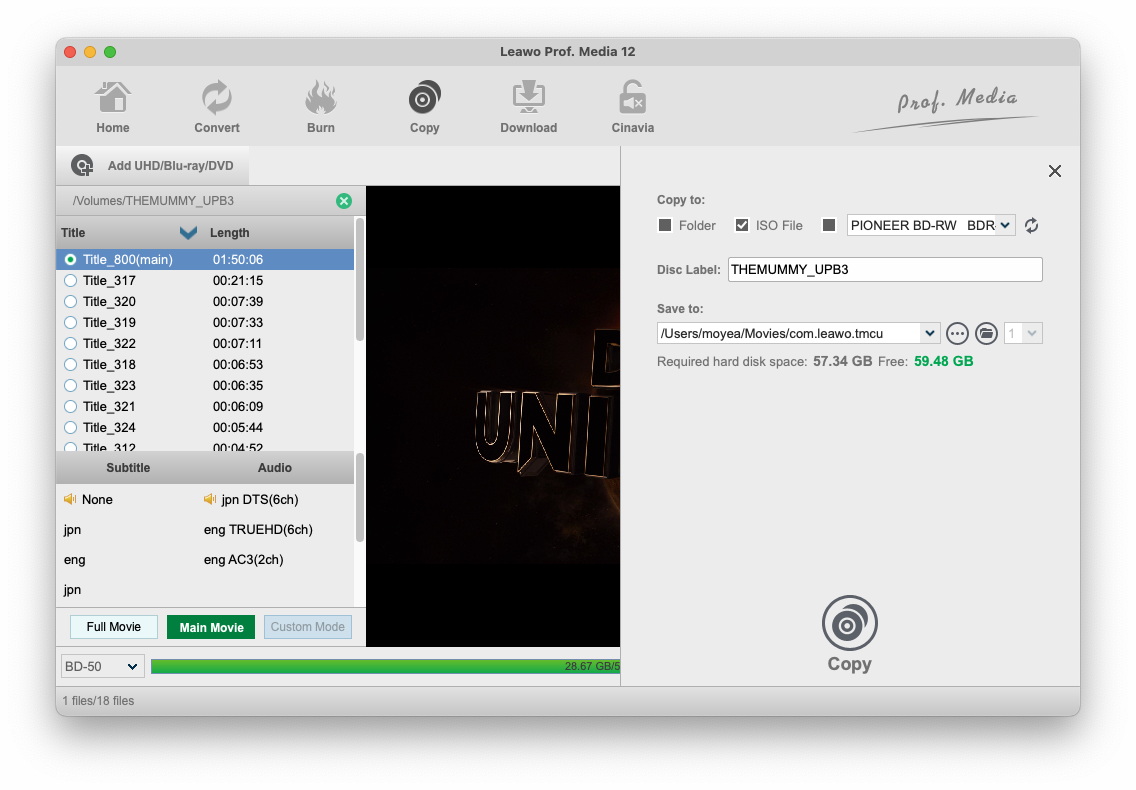
The Copy to panel on a Mac: Folder, ISO File (ticked) and a Pioneer burner as targets, the disc label, a save path under /Users/.../Movies/com.leawo.tmcu, and the required versus free disk space (Prof. Media 12 for Mac, shown with a Blu-ray job).
Benefits
- Cheap insurance for irreplaceable discs. Out-of-print DVDs and children's favorites are the ones that get scratched.
- A small archive. A DVD ISO is a few gigabytes, so a whole shelf fits on one external drive.
- No learning curve. Buyers keep using the same words: simple, no learning curve, does what it says.
Real-World Uses
- The car DVD player: a DVD-5 copy of each film the children watch on trips.
- Retiring the shelf: every DVD saved as an ISO on a drive or NAS, the cases boxed up.
- A rare concert or out-of-print film: a 1:1 copy while the original still reads cleanly.
- Re-burning an old ISO made years ago to a fresh disc.
Who It's For, and Who Should Skip It
It fits Mac owners with a DVD collection who want copies that stay DVDs, menus and all, and who want to pay as little as possible to do it.
Skip it if:
- You also own Blu-rays. Leawo Blu-ray Copy for Mac covers both.
- You want the movies in the Apple TV app, on an iPhone or in Plex. You need a ripper that makes MP4 files, such as Leawo DVD Ripper.
- Your DVDs carry Cinavia and you watch copies on a Cinavia-aware player. That's DVD Cinavia Removal.
- Your discs aren't protected and you only need a data copy. Disk Utility can image and burn an unprotected disc for free.
Usage Guide
- Install. Choose the Apple Chip or Intel Chip build on Leawo's download page, drag Leawo Prof. Media to Applications and open it.
- Load the DVD. Open the Copy tab, click Add UHD/Blu-ray/DVD and choose Add from CD-ROM, Add from folder or Add iso file, or drag the folder or ISO onto the window.
- Choose the content. Click Full Movie, Main Movie or Custom Mode, then pick subtitles and audio.
- Choose the size. Set DVD-9 or DVD-5 in the bottom-left drop-down and check the fill bar.
- Set the output. Click the green Copy button, tick Folder, ISO File and/or your DVD writer, and set the disc label and save location.
- Copy. Click Copy at the bottom of the panel. With one drive, swap in a blank disc when asked.
- Register through Help > Activate in the Mac menu bar to lift the 5-minute limit.
Tips
- Use Main Movie for DVD-5. Leaving out extras means less compression on the film.
- Keep the Mac awake for long jobs. Leawo's Mac spec sheet lists about 152% CPU while copying, so a laptop on battery will drain quickly.
- Save an ISO as well as the disc. Ticking both costs a few gigabytes and saves reading the original again.
Where it falls short
- It can be slow. Reviewers complain about long copy times, and Leawo's Mac spec claims "6X higher" speed, far below the 50X its product page credits to Intel Quick Sync acceleration, which Apple silicon Macs don't have.
- No copy on the fly. With one drive it reads first and burns afterwards, which a reviewer called "too bad".
- Not every disc. One reviewer said it "works with most of my DVDs", and another had a disc it wouldn't shrink to fit a blank.
- A big download for a small job. You install the whole 241 MB to 316 MB Prof. Media suite to use one tab.
- Few Mac-specific reviews. Leawo's review page for the Mac edition shows the same reviews as the Windows one, and few reviewers say which they used.
What Users Say
Leawo's review page for DVD Copy, which Leawo moderates and which is the same for the Windows and Mac editions, averages 4.8 out of 5 from 82 ratings (71 five-star, 6 four-star, 5 three-star). Many were posted in March 2013 and the newest in April 2021. Leawo as a company has a 4.4 TrustScore from 151 reviews on Trustpilot. We found no independent test of the Mac edition.
What buyers like
"Only copy I ever use works well, Simple to use no learning curve," Clay M Harris, 5 stars, November 2019
"Top of the line, only one I use. Awesome software, easy usage, plus customer support." Barbara Grace, 5 stars, November 2019
"Very good program, Use it weekly one of my favorite" James Costa, 5 stars, October 2019
"Dependable awesome software and tech support when needed, need I say more...!!" Mike Maund, 5 stars, "Awesome software and tech support!!", November 2018
"Seems to work very well, and Customer Service is rated as A+. Great program." vsxd1s2, 5 stars, March 2013
The complaints
"The program does the job admirably in regard to the actual copying and the final output quality, good solid copier program, but.. There is a marked lack of indicators as to the program's progress.." John Sanders, 3 stars, March 2013. He wanted at least elapsed and remaining time. The current version shows remaining time on its progress screen.
"This is a good program the only issue I have is it takes way to long to copy a movie." Johnny, 5 stars, March 2013
"Good copy program. It's just too bad you can't do copy on the fly." Larry Rolfe, 5 stars, March 2013
"works with most of my DVDs ... OK" TN, 4 stars, March 2013
Steven (5 stars, March 2013) was the harshest: his disc showed as about 14 GB, the program wouldn't shrink it to fit a blank, and he preferred DVD Shrink. Leawo replied that it would pass the request to its developers.
The recurring themes
People keep using it because it's simple and the copies look like the originals, and several mention helpful support. The complaints are about speed, no simultaneous read-and-burn, and the odd disc that won't copy or compress. Most reviews are old and few name the platform, so judge the Mac build in the trial.
Comparisons
Mac edition vs Windows edition
The two editions have the same modes, targets and prices ($29.95 a year, $39.95 lifetime). On the Mac you choose an Intel or Apple silicon build, the default save folder sits under Movies, and Leawo's speed claim is "6X higher" instead of the 50X the product page ties to Intel Quick Sync acceleration. Codes are platform-specific.
DVD Copy vs Blu-ray Copy for Mac
Blu-ray Copy for Mac includes DVD Copy and adds Blu-ray copying, recorder-disc copying and Blu-ray to DVD conversion, for $44.95 a year or $99.95 lifetime. If you'll never own a Blu-ray, DVD Copy at $39.95 lifetime is the better deal.
DVD Copy vs Disk Utility
macOS's Disk Utility can make an image of an unprotected disc, but it can't get past CSS on store-bought movies or shrink a DVD-9 to fit a DVD-5. That's what you pay Leawo for.
Editions and Pricing
| Option |
Price |
Term |
Modules |
Money-back period listed |
| DVD Copy for Mac, 1 Year |
$29.95 |
One year, one Mac (renewal quoted at $19.09) |
DVD Copy |
5 days |
| DVD Copy for Mac, Lifetime |
$39.95 |
One-time payment, one Mac |
DVD Copy |
14 days |
| Blu-ray Copy, Lifetime |
$99.95 |
One-time payment, one computer |
Blu-ray Copy, DVD Copy, Blu-ray Recorder Copy, Blu-ray to DVD |
14 days |
Unlimited free upgrades are included. The pricing section on Leawo's page, where Buy Now leads, has a Windows/Mac switch, so check that Mac is selected.
FAQs
Does Leawo DVD Copy for Mac work with Apple's USB SuperDrive?
Leawo DVD Copy for Mac needs a recordable DVD drive, and Apple's USB SuperDrive is one, as is any third-party USB DVD writer. With a single drive, you read the disc, then insert a blank when the program asks.
Is Leawo DVD Copy native on Apple silicon Macs?
Yes. Leawo DVD Copy for Mac ships inside Prof. Media for Mac, which has a native Apple silicon DMG as well as an Intel one.
Can Leawo DVD Copy for Mac play the ISO it makes?
Leawo DVD Copy for Mac has a built-in player for previewing a source before copying. To watch an ISO later, mount it in the Finder or open it in a player app that reads DVD images.
Can I copy a DVD that won't fit on one blank?
Leawo DVD Copy for Mac handles standard DVD-9 and DVD-5 discs, compressing a DVD-9 to DVD-5 when you choose that target. If a disc reports a size larger than a DVD-9, as one reviewer saw, use Main Movie or Custom Mode to leave out titles until the fill bar fits.
What languages does the Mac version support?
Leawo DVD Copy for Mac lists 15 interface languages, including English, German, French, Spanish, Italian, Japanese, Chinese, Russian, Dutch, Portuguese and Polish.
Can I get a refund if Leawo DVD Copy for Mac fails on my disc?
Leawo DVD Copy for Mac refunds are for confirmed problems Leawo's support can't fix, within 14 days, after you've worked with support. A change of mind or buying the wrong edition isn't refunded, so test your own discs with the trial first.
System Requirements
- macOS: 10.13 High Sierra, 10.14 Mojave, 10.15 Catalina, 11 Big Sur, 12 Monterey, 13 Ventura, 14 Sonoma, 15 Sequoia, 26 Tahoe, 27
- Processor: 1 GHz or faster Intel, or Apple M1/M2 (native Apple silicon build available)
- Memory: 512 MB RAM, 1 GB or more recommended
- Free disk space: 5 GB or more
- Drive: a recordable DVD drive
- Other: Internet connection
- Download: 241 MB (Intel) or 316 MB (Apple silicon)
Conclusion
Leawo DVD Copy for Mac is a sensible buy for a DVD-only collection, as long as you take the $39.95 lifetime license. It does the basic job of a DVD copier on a modern Mac, native on Apple silicon: 1:1 clones, DVD-9 to DVD-5, and ISO backups, with copy protection handled for you.
The one reason to buy it: it's the cheapest way in Leawo's range to keep protected DVDs as real DVDs on a Mac. The main reason not to: if you own any Blu-rays, Blu-ray Copy for Mac includes it, and buyers do report slow copies and the occasional disc it won't handle. Copy five minutes of your most awkward disc in the trial before paying.
Download Free TrialBuy Now