Leawo Tunes Cleaner for Mac: an iTunes Library Cleaner Stuck in the Intel, Big Sur Era
Leawo Tunes Cleaner for Mac is a $39.99-a-year or $59.99-lifetime Mac app that adds missing album artwork and tags and removes duplicate songs from an iTunes library or a music folder. The Mac version is 3.4.5 from April 2022, an Intel-only app that Leawo supports on macOS 10.10 Yosemite to macOS 11 Big Sur. On a current Mac with the Music app, check the free trial carefully before you pay.
Quick facts
- Mac version: 3.4.5, April 7, 2022 (its only change: a fix for registration "Error: -1")
- Installer: mactunescleaner_g.dmg, about 32 MB
- Processor: Intel; no native Apple silicon build
- macOS: 10.10 Yosemite to 11 Big Sur, per Leawo
- Needs: iTunes 10.4 or later and an internet connection
- Trial: scans and proposes fixes, but won't apply them
- Price: $39.99 a year (auto-renews) or $59.99 lifetime, 1 Mac
What we checked: the Mac disk image from Leawo's download page (mactunescleaner_g.dmg, 33,927,974 bytes, dated April 7, 2022), Leawo's update feed for the Mac edition (3.4.5, April 7, 2022), Rosetta Check's listing of version 3.4.5 as "Intel Only", and the Mac prices on Leawo's order page ($39.99 a year, $59.99 lifetime) on November 1, 2026. We didn't run it on a Mac.
Before you buy
- iTunes is gone from current macOS. Since macOS 10.15 Catalina, Apple's Music app holds your library, yet Tunes Cleaner for Mac still lists "iTunes 10.4 or later" as a requirement and Leawo's support list ends at Big Sur. Whether it reads your Music library on Sonoma, Sequoia or Tahoe is something to test in the trial, not assume.
- Intel only. On an M-series Mac it would need Apple's Rosetta translation, which Leawo doesn't mention.
- Not updated for four years. The April 2022 release only fixed a registration error, and it's no longer sold on the Mac App Store.
- Back up first. Make a copy of your Music folder (or a Time Machine backup) before letting any tool rewrite thousands of tags.
Download Free TrialBuy Now
Overview
Tunes Cleaner started on the Mac: Leawo's Mac review page has entries going back to 2012, and the Mac version was once sold through the Mac App Store. It does two jobs. The cleaner scans the library, groups songs without artwork, artist or album, looks them up online and fills the gaps, scoring the library out of 100 before and after. The duplicate remover compares songs either by their tags (Quick Scan) or by the sound itself (Deep Scan, an acoustic fingerprint), and lets you remove the extra copies.
Mac users who bought it in the iTunes years mostly loved it. The question now is the platform underneath it: Leawo's own requirements haven't caught up with the Music app or Apple silicon.
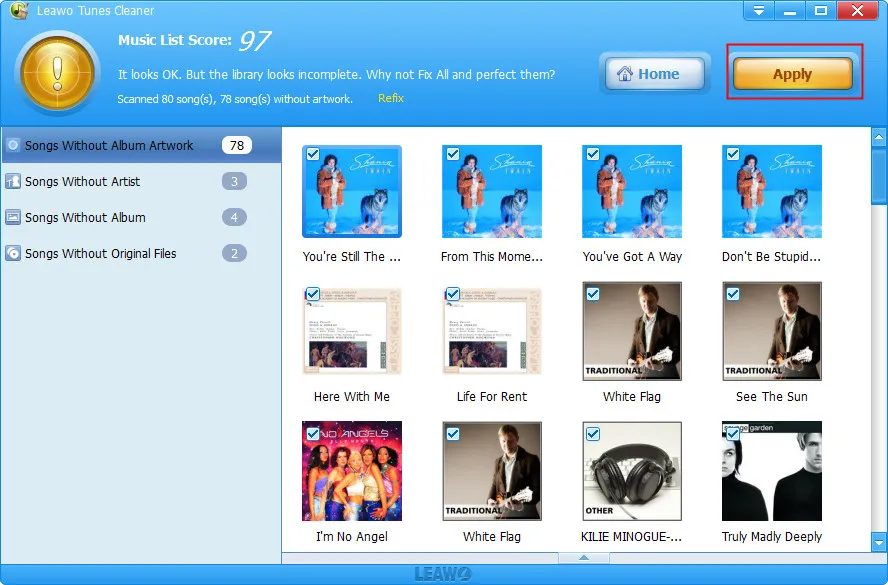
A scan result: "Scanned 80 song(s), 78 song(s) without artwork" with a score of 97, the problem lists on the left and the Apply button at the top. Leawo's guide shows the Windows window; the Mac app works the same way, though one Mac reviewer noted its screens didn't match the online instructions.
What It Does on a Mac
Fills in covers, artists and albums automatically
Leawo Tunes Cleaner for Mac finds songs with missing artwork or tags, proposes the details with Fix All, and writes them back when you click Apply. Unrecognized songs stay in their own list for manual editing in the built-in tag editor, and you can save a session and finish later.
Finds duplicates by tag or by sound
Leawo Tunes Cleaner for Mac's Quick Scan matches on the fields you tick (name, artist, album, file size, length); Deep Scan listens to the audio, which catches copies with different tags but takes longer. It scans the library or any folder you add.
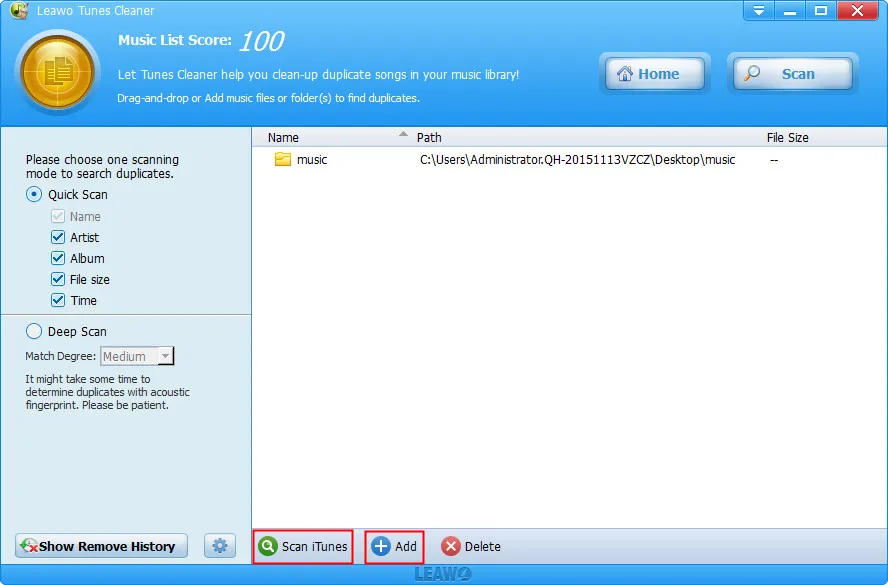
The duplicate cleaner before a scan: Quick Scan with Name, Artist, Album, File size and Time ticked, Deep Scan with a Medium match degree, a music folder added, and the Scan iTunes and Add buttons at the bottom (Windows window from Leawo's guide).
Who It's For, and Who Should Skip It
It fits an Intel Mac still running Mojave or earlier with a big iTunes library of ripped and downloaded music, or anyone willing to test it on a newer Mac against a backed-up library.
Skip it if your music lives in Apple Music's cloud library or a streaming service, since there are few local files to fix; if you're on Apple silicon and want software built for it; or if you dislike paying for a tool whose maker hasn't updated it for years.
Using It on a Mac
- Back up the Music folder in your home folder.
- Download the 32 MB trial, open the .dmg and drag the app to Applications.
- Click Start to Clean iTunes, or Open Music Files to point it at a folder.
- Click Fix All and check the proposed covers and tags, especially for soundtracks and compilations.
- Click Apply (needs a license) to write the changes.
- For duplicates, open Clean-up Duplicates, choose Quick or Deep Scan, scan, review the ticks and click Remove.
Where it falls short
- Very large libraries. A Mac reviewer with a 100,000-song library said it kept stopping, though it recovered.
- Wrong covers on obscure music. Mac reviewers mention the wrong cover on lesser-known songs and trouble with soundtracks and music videos.
- Limited control. The earliest Mac review complained that there was only a Fix All button, with no way to fix one category at a time.
- Subscription fatigue. A yearly plan that auto-renews for an app with no updates is hard to justify; one long-time user refused to renew.
What Users Say
Leawo's Mac review page (moderated by Leawo): 4.8 out of 5 from 463 ratings
Most of the Mac reviews were written in 2013; the newest is from May 2019. The fuller ones:
Wendy Murphy (5 stars, August 2017), "Epic! Saved me so much time!": "So much memory was freed up due to duplicates! Not to mention the fact that it corrected my ID3 tags and inserted every song into its correct album title."
David (5 stars, October 2016): "I ran a quick scan initially and removed some 1500 duplicates, ran a quick scan a second time with no duplicates found. I'm now running a deep scan to ensure everything is found."
Scott (5 stars, May 2016), "Tried The Rest...Bought the BEST": "While more expensive than some competitors, their software is more EXTENSIVE. The opportunity to update metadata is a nice plus."
Jacob Horton (5 stars, September 2013), "Way Better Than TuneUp": "This product actually does what it promises: fixes your itunes library. I tried others like TuneUp and all I got was random japanese song metadata. THIS WORKS."
Mixed and critical Mac reviews
tezzb (4 stars, July 2017): "about the best app of its type around, but I am not renewing ANY subscription renewal type apps in the future as I'd rather pay once than pay many"
Cahe Viana (4 stars, February 2014): "Sometimes gets the wrong cover, but only in really unknown songs. In the rest of them, it quickly finds the covers, artists and everything."
Cameron (4 stars, July 2013): "So far it has found a lot of artwork for me, but seems to keep stopping. I have a rather large song library 100K. Recovery seems graceful so far."
Paul Anderson (3 stars, June 2013): "The two-finger scrolling was backward on the scan screen, but correct on the report screen; and, the screens shown in the on-line instructions did not match the ones I got on my Mac, so I had some trouble figuring out what to do."
Liz (1 star, November 2012), "Limited": "Little control - there's only a 'Fix all' button and no option to only fix a certain category of problems. Nor is there an 'Uncheck all' option."
The pattern: Mac users switching from TuneUp found it faster and more accurate, and duplicate removal freed real space. The complaints are wrong covers on obscure tracks, huge libraries and the subscription. Nobody has reviewed it on an Apple silicon Mac or with the Music app.
Mac vs Windows Version
| Mac | Windows |
|---|
| Version | 3.4.5 (April 2022) | 2.4.5.0 (installer dated July 2020) |
| System | macOS 10.10 to 11, Intel | Windows 7 to 11 |
| Library it targets | iTunes (replaced by Music since macOS 10.15) | iTunes, still available for Windows |
| Installer | 32 MB .dmg | 23.5 MB .exe |
| Price | $39.99 / year, $59.99 lifetime | $39.99 / year, $59.99 lifetime |
The two versions do the same jobs at the same price, but the Windows one still fits its platform better: iTunes is still installable there, while on the Mac it has been gone since Catalina. Each license covers one platform.
FAQs
Does Leawo Tunes Cleaner for Mac work with the Music app?
Leawo Tunes Cleaner for Mac lists iTunes 10.4 or later as a requirement and supports macOS only up to Big Sur, and Leawo doesn't say it works with the Music app. Its folder mode can still clean music files directly; test both in the trial.
Will Leawo Tunes Cleaner run on an M1, M2 or M3 Mac?
Leawo Tunes Cleaner for Mac is an Intel app and Leawo lists only Intel processors, so on Apple silicon it would have to run through Rosetta, which Leawo doesn't claim to support. Try the free download first.
Can I still buy Tunes Cleaner on the Mac App Store?
No. Leawo Tunes Cleaner for Mac is no longer listed on the Mac App Store; it's sold on Leawo's site.
Which plan should I choose for Leawo Tunes Cleaner for Mac?
For a one-time clean-up, the $39.99 yearly plan with auto-renewal turned off costs less; for regular use, the $59.99 lifetime plan avoids renewals and has a 14-day money-back window instead of 5 days. Leawo refunds only for faults its support can't fix.
Does the Leawo Tunes Cleaner for Mac trial fix my library?
The Leawo Tunes Cleaner for Mac trial scans and shows the proposed fixes, but applying them needs a license. One early Mac reviewer found he couldn't finish evaluating it for that reason, so judge the proposals on screen.
System Requirements
- macOS 10.10 Yosemite to macOS 11 Big Sur
- 1 GHz or faster Intel processor
- 512 MB RAM (1 GB or more recommended)
- iTunes 10.4 or later and an internet connection
Conclusion
A good iTunes-era tool that a current Mac may have outgrown. Leawo Tunes Cleaner for Mac earned its reviews: it found artwork and tags quickly and cleared out duplicates. But it's an Intel app last updated in April 2022, Leawo supports it only up to Big Sur, and it still talks about iTunes.
On an older Intel Mac with an iTunes library, it's worth the trial and probably the price. On an Apple silicon Mac with the Music app, run the free scan against a backed-up library first, and don't buy unless it reads your library and proposes correct tags.
Download Free TrialBuy Now