Leawo iOS Data Recovery for Mac: Intel Macs Only, and Last Updated in 2019
Leawo iOS Data Recovery for Mac is a $59.95-a-year ($69.95 lifetime) Mac app that recovers deleted contacts, messages, notes and call history from an iPhone, iPad or iPod touch, or from its local or iCloud backup. The catch is age: the current build, 3.4.1, dates from March 2019, runs only on Intel Macs with macOS 10.12 Sierra to 10.15 Catalina, and supports iOS only up to iOS 10. If you have an Apple silicon Mac or a recent iPhone, this isn't the tool for you.
Quick facts
- Mac version: 3.4.1, dated March 8, 2019 in Leawo's update feed
- Installer: maciosdatarecovery_setup.dmg, about 27.4 MB, one Intel build (no Apple silicon version)
- macOS: 10.12 Sierra, 10.13 High Sierra, 10.14 Mojave and 10.15 Catalina
- Processor: 1 GHz or faster Intel
- iOS support: iOS 6 to iOS 10; devices up to the iPhone 7 Plus, iPad Pro and iPod touch 6
- Trial: scans and previews, but won't recover
- Price: $59.95 for 1 year (auto-renews, 5-day money-back) or $69.95 lifetime (14-day money-back), 1 Mac
What we checked: the Mac disk image from Leawo's download page (maciosdatarecovery_setup.dmg, 28,749,470 bytes, file dated July 6, 2020), Leawo's update feed for the Mac edition (version 3.4.1, March 8, 2019), and the Mac plan prices on Leawo's order page ($59.95 for 1 year, $69.95 lifetime) on November 1, 2026. We didn't install it or run a recovery.
Before you buy
- No macOS after Catalina. Leawo's requirements stop at macOS 10.15 and ask for an Intel processor. Big Sur, Monterey, Ventura, Sonoma, Sequoia and every Apple silicon Mac are missing from the list.
- No iOS after iOS 10. The last Mac update's notes say it added "compatible with data on iOS10", and the device lists end at the iPhone 7. Nothing has been released since March 2019.
- It still asks for iTunes. The Mac requirements say "the latest iTunes", but Catalina, the newest macOS on the list, has no iTunes app: Apple moved iPhone backups into Finder.
- Use the free scan as your test. If the trial can't see your device or backup, the paid version won't either, and Leawo's refund policy doesn't cover features it never advertised.
Download Free TrialBuy Now
Overview
On a Mac of the right age, Leawo iOS Data Recovery works the way it does on Windows: pick one of three sources (the connected device, a local backup, or an iCloud backup), let it scan, then tick the items you want in a list sorted by data type and save them to a folder. Leawo's spec sheet lists "Backup data to Mac" as a feature, which is just that export: the recovered contacts, messages and notes end up as files on the Mac rather than back on the phone.
What changes on the Mac is the window of machines it fits. Leawo built it for Intel Macs from the Sierra-to-Catalina years, the same years as the iPhones it supports. A 2017 iMac with an iPhone 6s from the same era is the natural match; a 2021 MacBook Pro with an iPhone 15 is not.
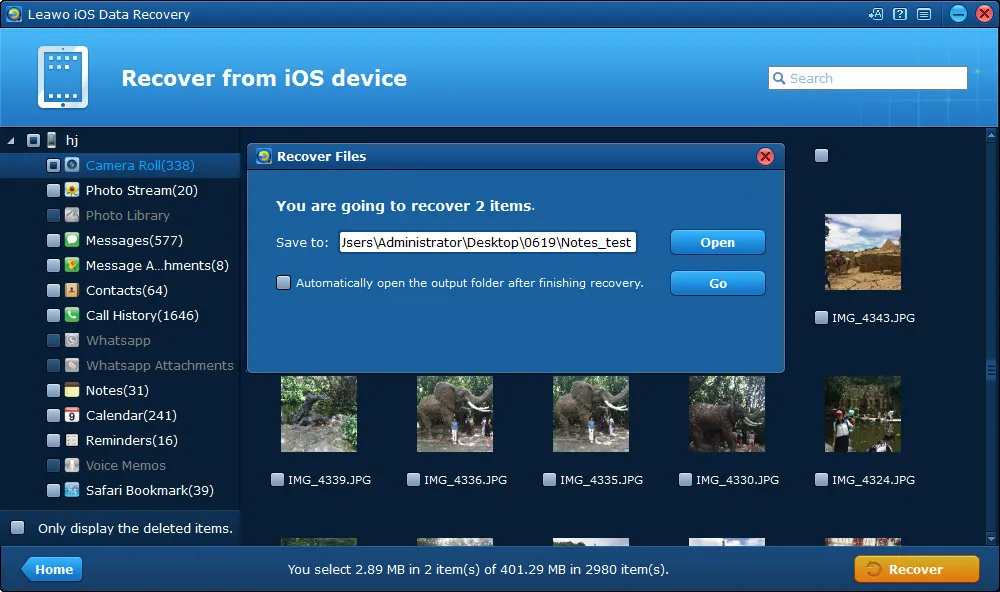
The Recover Files dialog ("You are going to recover 2 items") over a device's Camera Roll thumbnails. Leawo's guide shows the Windows window; it publishes no separate Mac screenshots.
Features
Three places to look for lost data
Leawo iOS Data Recovery for Mac scans a connected iPhone, iPad or iPod touch, a device backup stored on the Mac, or a backup it downloads from iCloud after you sign in. Scanning the device needs no backup at all, which is the case these tools exist for.
Up to 14 data types, depending on the source
Leawo iOS Data Recovery for Mac can show messages, contacts, call history, WhatsApp chats, notes, calendar, reminders and Safari bookmarks from a device or backup. Camera Roll, Photo Stream, the photo library, voice memos and message and WhatsApp attachments come straight off a device only from an iPhone 4 or iPod touch 4 in DFU mode.
Preview before you save
Leawo iOS Data Recovery for Mac lists every item it finds, with an option to show only deleted ones, so you can see a message or a contact's details before choosing what to save. That's also the whole point of the trial.
Who It's For, and Who Should Skip It
It fits someone who still has an Intel Mac on Sierra, High Sierra, Mojave or Catalina and needs contacts or texts from an iPhone 7 or older, or from a backup of one.
Skip it if your Mac has an M1 or later chip, runs Big Sur or anything newer, or if your iPhone was made after 2016. If the data is already in a Finder or iCloud backup, restoring that backup with Apple's own tools is free. For a current iPhone with no backup, look for a recovery app that is still updated and lists both your iOS version and your macOS version.
Usage Guide on a Mac
- Check your Mac first: Apple menu > About This Mac should show an Intel processor and macOS 10.12 to 10.15.
- Download the trial (a 27 MB .dmg), open it and drag the app to Applications.
- Connect the iPhone with a cable, enter its passcode and tap Trust.
- Pick a source on the home screen: the device, a local backup, or iCloud (sign in and download a backup).
- Scan and browse. Click a data type on the left, filter to deleted items, and tick what you want.
- Recover to a folder on the Mac. This last step needs a license.
Where it falls short
- Device recognition. Older reviewers found that phones weren't recognized until iTunes was installed, and that DFU mode didn't detect a phone at all; see Mark Bunner's review below.
- Apps outside Apple's own. Leawo iOS Data Recovery covers Apple's built-in apps and WhatsApp. Files from other apps, such as Pages or Numbers documents, aren't among its data types.
- Old deletions. Data deleted long ago may already be overwritten, and Leawo's own support says as much in its replies to reviewers.
What Users Say
Leawo's Mac review page (moderated by Leawo): 5.0 out of 5 from 9 ratings
The Mac edition has only nine reviews, seven of them from 2014, and two pairs of them use identical wording under different names, so read them as thin evidence. The ones with something to say:
Mang Gadget (5 stars, January 2016), "In a nutshell, this is the most convinient recovery software EVER!": "This might be one of those incredible softwares made exclusively for Appl Devices. Yes, we can almost recover anything from our iPhone. And how to use it? Even kids could operate since this software is well made and very easy to use."
cory dennis (5 stars, January 2014): "its the best recovery software for iPhone that i have seen."
Mac users on the main review page
Rollando Mota (5 stars, July 2016): "This is the best ios tool for windows and Mac I have EVER used. and i have been looking for software specifically to recover data from my device that I couldnt get out of recovery mode."
Kenneth Hutmacher (5 stars, June 2013), "Works with older iPods": "Works just like the Mac version with older iPods"
Mark Bunner (3 stars, June 2013), "Requires iTunes installed. So-so results": "First, I tested with an iPhone 3gs and 4 which resulted in neither being recognized. Then tried DFU mode with same results. [...] Then installed iTunes which let the 4 be recognized. [...] The 4 was successful in that it showed a couple of messages and related phone numbers; but nothing else."
The pattern: happy users from the iPhone 4 to iPhone 6 years, a few mixed results on very old phones, and nothing written in the Apple silicon era. Leawo's Trustpilot page (4.4 from 151 reviews) is about the company's video tools and doesn't mention this app.
Mac vs Windows Version
| Mac | Windows |
|---|
| Version | 3.4.1 (March 2019) | 3.4.2.0 (July 2017) |
| Operating system | macOS 10.12 to 10.15, Intel only | Windows 7 to 11 |
| Installer | 27.4 MB .dmg | 22.5 MB .exe |
| Price | $59.95 / year, $69.95 lifetime | $59.95 / year, $69.95 lifetime |
| Runs on a current computer | No (no Big Sur or later, no Apple silicon) | Yes, Windows 11 is listed |
Both editions share the same iOS 10 ceiling and the same features. The difference is that the Windows edition still installs on a current PC, while the Mac edition needs a Mac that is several years old. A license covers one platform, so buy the edition for the computer you'll actually use.
FAQs
Does Leawo iOS Data Recovery for Mac run on an M1, M2 or M3 Mac?
Leawo iOS Data Recovery for Mac lists only Intel processors and macOS 10.15 Catalina at most, and Apple silicon Macs shipped with macOS 11 or later. Leawo doesn't claim support for them, so try the free version before paying.
Can Leawo iOS Data Recovery for Mac read Finder backups?
Leawo iOS Data Recovery for Mac was written for iTunes backups and lists iTunes 8 to 12. Finder took over iPhone backups in macOS 10.15, the last version Leawo supports, and Leawo doesn't mention Finder backups.
Will Leawo iOS Data Recovery for Mac work with my iPhone 15 or 16?
Leawo iOS Data Recovery for Mac lists devices up to the iPhone 7 and iOS 10. A newer iPhone isn't on the list, and the app hasn't been updated since 2019.
Does one Leawo license cover both Mac and Windows?
No. Leawo iOS Data Recovery for Mac and the Windows version are separate products with separate licenses, each for one computer, at the same price.
Which Leawo iOS Data Recovery for Mac plan should I buy?
The lifetime license. Leawo iOS Data Recovery for Mac costs $69.95 for life against $59.95 for a year that auto-renews, and with no updates since 2019 a subscription adds nothing. The lifetime plan also has the longer 14-day money-back window.
System Requirements
- macOS 10.12 Sierra, 10.13 High Sierra, 10.14 Mojave or 10.15 Catalina
- 1 GHz or faster Intel processor
- 512 MB RAM (1 GB or more recommended)
- 2 GB of free disk space
- iTunes (Leawo asks for the latest version) and an internet connection
Conclusion
Not worth buying for a current Mac or iPhone. Leawo iOS Data Recovery for Mac is simple and cheap, but it stops at macOS Catalina on Intel and iOS 10, and it hasn't been touched since March 2019. On an M-series Mac it isn't supported at all.
The one case for it is an older Intel Mac and an iPhone 7-era device or backup. In that case, run the free scan, and pay for the $69.95 lifetime license only if your lost messages or contacts appear in the preview.
Download Free TrialBuy Now