CleverGet Video Recorder: record streams faster than real time
CleverGet Video Recorder (Leawo calls it the Streaming Video Recorder) is an $89.95 lifetime module for Windows and Mac that records what plays in CleverGet's built-in browser to MP4 or MKV, on demand or live, at up to 5X speed. The trial records 3 minutes of a video.
The speed is what you pay for. Leawo also has a free CleverGet Recorder, which records at 1X without a time limit, so a two-hour film takes two hours. The paid module cuts that to about 24 minutes on sites that don't limit playback speed.
Quick facts
- Version: CleverGet 27 on Windows (the recorder is a module of the same program)
- Developer: Leawo Software
- Platforms: Windows 7 to 11, 64-bit, and macOS 11 or later (bought separately)
- Output: MP4 or MKV, original quality or up to 4K 60fps
- Speed: 1X to 5X
- Price: $89.95 lifetime at checkout, list price $99.95
- Trial: 3 minutes of a video
- Guarantee: 14 days money back
What we checked: the CleverGet installer on the download server is 503 MB (the product page still says 377 MB). The purchase page sells the module as a lifetime license: the order page showed $99.95 less a $10 bundle discount, so $89.95, with no auto-renewal option in the cart. A 1-year option exists in the cart at $53.95, but the purchase page doesn't offer it. We read these on the order page on November 6, 2026 and didn't run test recordings ourselves.
Before you buy
Try the free CleverGet Recorder first if real-time recording is fine for you. Leawo says recording is legal for personal use only where content providers and local copyright law allow it, so check the rules for the service you use. And it only records video playing inside CleverGet's browser: it isn't a screen recorder for apps, games or your webcam.
Download Free TrialBuy Now
Overview
Most screen recorders capture a window and go black on protected services. CleverGet Video Recorder works differently: it's built into CleverGet's browser, finds the video frame by itself and leaves pop-ups and other windows out of the recording. Leawo says it handles DRM-protected services such as Netflix, Hulu, Disney+ and Amazon, and anything else that plays inside CleverGet.
The Recorder is the fallback for sites without their own CleverGet download module. If a module exists for your service, that's usually the better tool: Leawo's purchase page points people to the Recorder only when it finds no direct downloader.
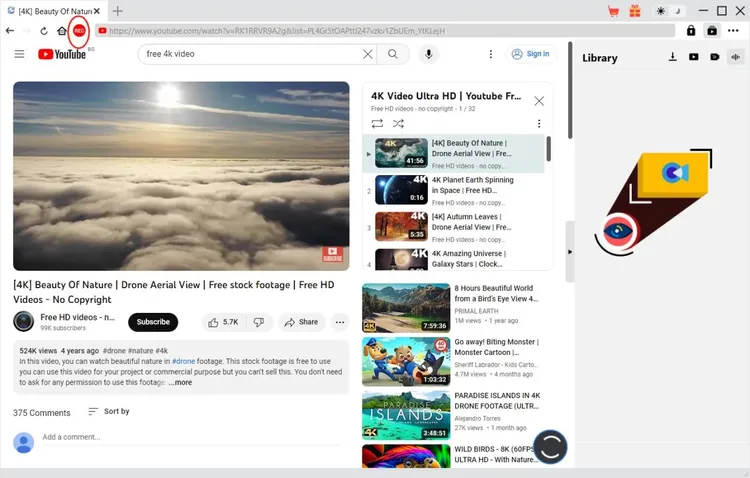
The red REC icon next to the address bar calls up the recording toolbar.
Features
Up to 5X recording speed
CleverGet Video Recorder records at 1X, 2X, 3X, 4X or 5X, except on sites that strictly limit playback speed. You can change speed during a recording. Playback can look choppy at high speed, but Leawo says that doesn't affect the saved file.
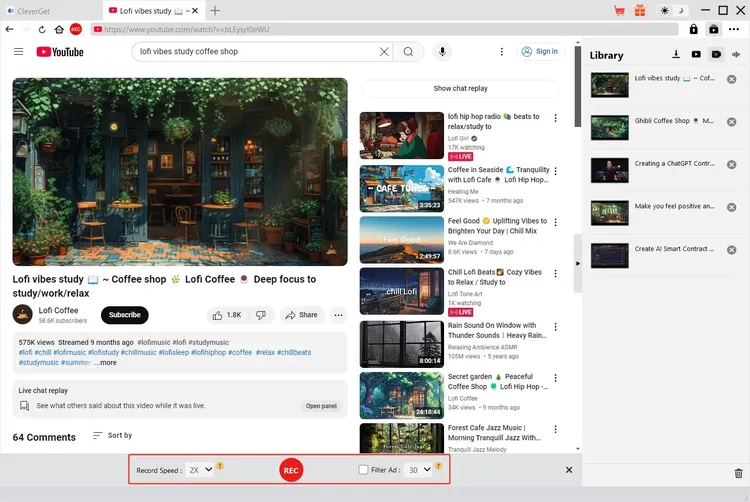
The toolbar at the bottom sets record speed and the ad filter before you press REC.
Original quality or up to 4K 60fps
CleverGet Video Recorder keeps the source resolution, frame rate and audio channels by default, or can output up to 4K 60fps. Leawo recommends original quality. In Settings you choose format, resolution, frame rate, audio sample rate, channels and GPU encoding.
Beta ad filter
CleverGet Video Recorder can skip ads by a length you set for each service. It's still in beta and won't work on every service, and with it unticked ads are recorded.
Timed and unattended recording
CleverGet Video Recorder can stop and save at a preset length, or by itself at the end of a video on services without autoplay, so you can leave it running. Each stop produces its own file.
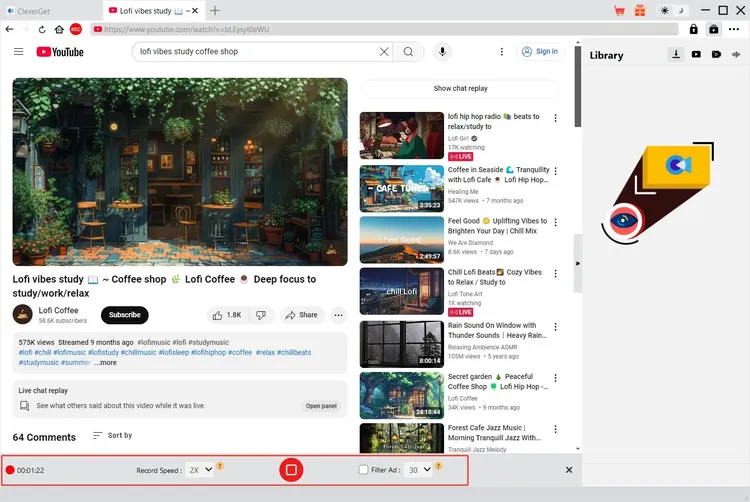
During a recording the toolbar shows the elapsed time and a stop button.
Live streams and metadata
CleverGet Video Recorder records live streams as well as on-demand video, with no built-in time limit beyond your disk space, and it saves the title, length and format with the file.
Real-World Uses
- A live concert or sports stream. Live streams are recorded in real time, and the preset length means you don't need to be there when it ends.
- A service with no CleverGet download module. If it plays in CleverGet's browser, it can usually be recorded.
- A long course. Record a lecture series at 3X or 5X overnight if the site allows it.
- A film you're allowed to keep. Save it to MP4 for a player without the service's app.
Who It's For, and Who Should Skip It
Buy it if you record often from sites without a download module, and your time is worth more than the $89.95 you'd save with the free version.
Skip it if you record now and then: the free CleverGet Recorder does the same job at 1X. Skip it if your service has its own CleverGet module, which saves the file with subtitles and audio tracks. If you want to capture your desktop, a game or a webcam, you need a real screen recorder such as OBS Studio or Leawo Screen Recorder, because this one sees only its own browser.
Usage Guide
- Install CleverGet and open it. The Recorder is an internal module, so there's nothing extra to install.
- Open the three-dot menu, choose Settings, then the Record tab, and set format, resolution, speed and output folder.
- Open the video in CleverGet's browser and play it. Set a specific playback quality, not Auto.
- Click the red REC icon by the address bar to call up the toolbar.
- Set record speed and ad filter, then press the red REC button.
- Stop when you're done, and find the file under Recordings in the Library panel.
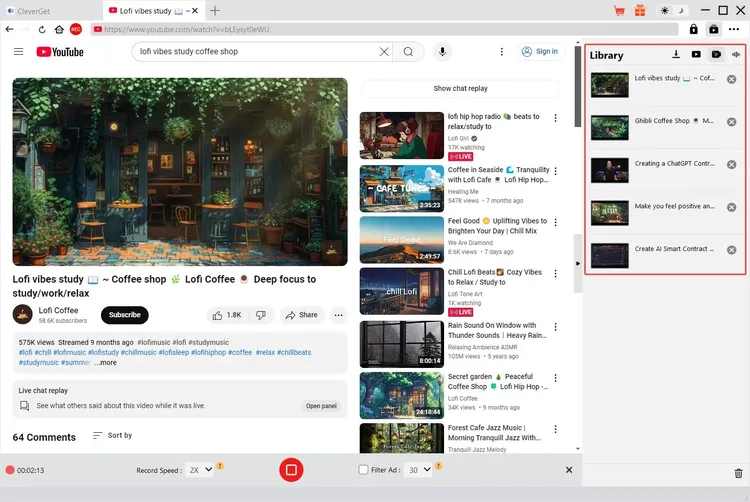
Finished recordings appear in the Library panel on the right.
Where it falls short
- 5X isn't everywhere. Sites that limit playback speed record slower, and live streams can't run faster than real time.
- No editing. There's a simple preview, but no trimming or cutting.
- A big install for one job. You get the whole 503 MB CleverGet program.
- The ad filter misses. It works by a preset length and is still in beta.
What Users Say
On CleverGet's own site
Reviews of the paid Recorder are mostly on CleverGet's own page, which lists a 4.9 rating and these testimonials:
- Rock Nanson: "It could even record DRM protected streaming videos. That's really cool."
- Stanley Perez: "This stream recorder works on my computer smoothly. It records streaming videos and save streaming videos to MP4 files, which are accepted by most players."
- Smart Evans: "They become black screen while recording these streaming sites, but this stream recorder works."
Trustpilot, for CleverGet overall
CleverGet's Trustpilot profile showed a TrustScore of 4.7 from 67 reviews on November 6, 2026: 79% five-star, 12% four-star and 6% one-star. The reviews cover the whole CleverGet range rather than one package, and the company replies to many of them. Most of the praise is for downloads that work and for support that follows through.
- Colin Harris (5 stars, November 2026), on an ITVX problem: "the effort put in by this company was way and beyond and would recommend to anyone"
- Mr Jim Craddock (5 stars, October 2026), on ITVX and Channel 4 downloads: "I cannot stand watching TV with ads, so the fact that this software strips them out is brilliant."
- Lauren M Loz (5 stars, July 2026): "This is the best program out there. I had many different ones for different pages."
- Pops (5 stars, July 2026): "I have had this product for years. It is a great product!"
- Jim (5 stars, July 2026): "Their product is easy to use, work wonderfully, and customer service is one of the best."
The complaints
- Satori Agape-Economo (5 stars, August 2026), with a caveat: "sometimes updates of the software or the update from the streaming platform can wreak havoc"
- Alberto (4 stars, March 2026): "The Crunchyroll module stopped downloading subtitles after the last update."
- Jennifer B (3 stars, August 2024): "a lot of the time the file is much larger than what I selected to download."
The pattern
We found no independent review of the paid Recorder on its own, so treat the vendor's page as marketing. Across CleverGet, buyers like the range and the support, and complain about things breaking after updates. Use the 3-minute trial on the service you care about before paying.
Comparisons
Paid Recorder vs. the free CleverGet Recorder
The free CleverGet Recorder records at 1X without a limit and also reaches 4K 60fps. Any faster and it stops at 3 minutes. The paid module removes that cap. Speed is the difference.
Recorder vs. CleverGet download modules
Download modules save directly from a URL and keep subtitles and audio tracks as separate choices. The Recorder captures what plays, so it's the choice for live streams and sites without a module.
Recorder vs. All-in-One
CleverGet All-in-One includes this Recorder and every download module for $269.95, three times the price.
Editions and Pricing
| Plan | Price | Term | Records |
|---|
| Video Recorder (Windows) | $89.95 | Lifetime, one-time payment | 1X to 5X, one PC |
| Video Recorder (Mac) | $89.95 | Lifetime, one-time payment | 1X to 5X, one Mac |
| CleverGet Recorder | Free | No charge | 1X with no limit, 3 minutes above 1X |
FAQs
Does CleverGet Video Recorder work on a Mac?
Yes. CleverGet Video Recorder runs on macOS 11 or later, and it costs the same $89.95 at checkout. The Mac license is bought separately from the Windows one, using the Mac switch on the purchase page.
Is CleverGet Video Recorder a one-time payment?
Yes, through the purchase page. The cart showed no auto-renewal for the lifetime license, and it keeps working after the first year.
Does CleverGet Video Recorder record audio?
CleverGet Video Recorder saves the video's audio, with the original channels or set to 2.0 or 5.1.
Is there a limit on how long CleverGet Video Recorder can record?
There's no built-in limit once you're registered. The practical limit is your disk space.
Can CleverGet Video Recorder record a webcam?
No. CleverGet Video Recorder only records video playing inside its browser.
Does CleverGet Video Recorder need a VPN?
Only for region-locked titles, which you must be able to reach first.
System Requirements
- Windows: 7, 8, 10 or 11, 64-bit, 1 GHz Intel or AMD processor, 512 MB RAM (1 GB or more recommended), 5 GB or more free disk space
- Graphics: NVIDIA GeForce GTX 260 or better
- Mac: macOS 11 or later
Conclusion
CleverGet Video Recorder is worth $89.95 only if you record a lot from services with no download module and you need more than 1X. The one reason to buy it is the time saved at up to 5X. The main reason not to is that the free CleverGet Recorder gets the same result if you can wait. Try the free one first.
Download Free TrialBuy Now