Leawo iTransfer for Mac: Copy Music, Photos, Messages and Contacts Off an iPhone Without a Finder Sync
Leawo iTransfer for Mac is a $19.95-a-year (or $29.95 lifetime) macOS app that copies music, videos, photos, contacts, text messages, notes and other files between an iPhone, iPad or iPod and your Mac, file by file, without syncing the device. It suits Mac owners with older iPhones and iPods who want their songs and messages saved on the Mac, and it runs on macOS 10.10 Yosemite through macOS 27.
The problem it solves is old and familiar. Apple's sync, first in iTunes and now in Finder, makes the device match one library: you can't drag a song from an iPhone back to the Mac, and syncing a phone filled on another computer offers to erase it. iTransfer reads the device like a folder, so you pick the files and copy them where you want.
Quick facts
- Developer: Leawo Software Co., Ltd.
- Mac build: itransfermac_setup.dmg, dated April 9, 2026 (82 MB). Leawo's page doesn't print a version number for the Mac build.
- Runs on: macOS 10.10 Yosemite to macOS 27, on Intel Macs and Apple M1/M2 Macs, according to Leawo's requirements
- Devices: iPhone, iPad and iPod. Leawo's published list ends at the iPhone XR and the first iPad Pro.
- Data types: music, movies, TV shows, podcasts, ringtones, books, photos and Camera Roll, contacts, SMS, notes, bookmarks, apps and a USB Storage area
- Price: $19.95 for 1 year (renews automatically) or $29.95 lifetime, for one Mac
- Refunds: 5 days on the yearly plan, 14 days on the lifetime license, for technical problems Leawo can't fix, not for a change of mind
- What we checked: the Mac installer on Leawo's download page (itransfermac_setup.dmg, 82 MB, last modified April 9, 2026) and the order page, which charged $19.95 for "Leawo iTransfer for Mac" on November 1, 2026. We didn't connect an iPhone to a Mac to test transfers.
Before you buy
- Try it with your own iPhone first. Leawo's compatibility list hasn't been updated past the iPhone XR, so a current iPhone on a recent iOS is untested as far as the published list goes.
- "The latest iTunes" is still listed as a requirement. Since macOS Catalina (10.15), Macs have no iTunes app: Music, TV and Finder replaced it. Leawo's Mac requirements haven't changed to reflect that, so the trial is the only way to know how it behaves on your macOS version.
- Copying to the device may be limited. In Leawo's own Mac tutorial screenshots (an iPhone on iOS 10.3.3), the status bar reads "Adding and deleting are not available for iOS 10.3.3." Copying from the iPhone to the Mac is the direction to count on.
- It needs 2 GB of free disk space on the Mac, per Leawo's Mac requirements, plus room for whatever you copy.
Download Free TrialBuy Now
Overview
On a Mac, iTransfer is a single window with a real macOS menu bar (File, Edit, View, Tools, Help). The sidebar shows the connected device with a LIBRARY list underneath (App, Bookmarks, Books, Camera, Contacts, Movies, Music, Notes, Photos, Podcasts, Ringtones, SMS, TV Shows and USB Storage) and a PLAYLIST section with the device's playlists. Select a category and its files fill the main pane, as a list or as thumbnails, with a filter box at the top right and a small preview in the bottom-left corner.
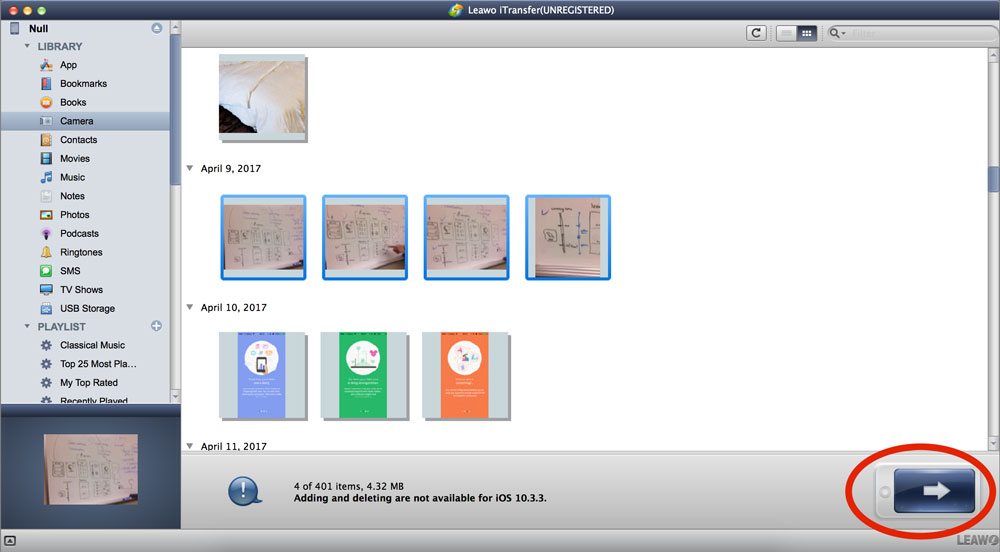
The Mac version with an iPhone connected: the Camera library grouped by date, four photos selected (4.32 MB), the preview at bottom left and the transfer arrow at bottom right. The status bar says adding and deleting aren't available for iOS 10.3.3 (Leawo's 2017 tutorial, unregistered trial).
Every transfer comes down to three moves: connect, select, transfer. Files that already exist at the destination aren't overwritten unless you delete them yourself.
Features
Copy files from the iPhone to a Mac folder
Leawo iTransfer for Mac sends selected files to My Computer, to iTunes, or to a second iOS device that's plugged in at the same time. You can start a transfer three ways: the large arrow button, a right-click on the selection, or File > Transfer to in the menu bar. Songs, videos and photos come off the device as ordinary files you can open in any Mac app.
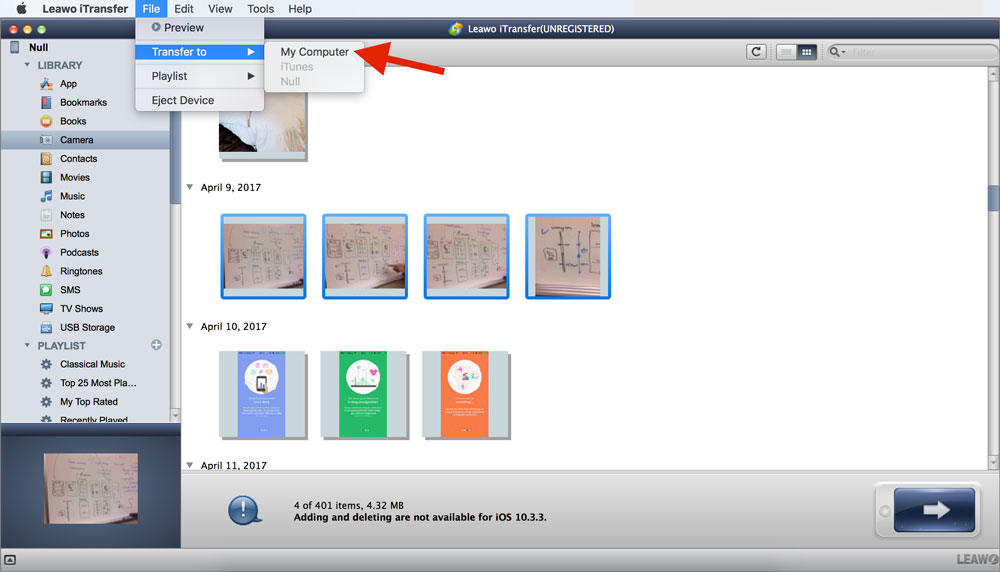
The macOS menu bar's File menu: Preview, Transfer to (My Computer, iTunes, or the device), Playlist and Eject Device.
Choose a folder or an iTunes list as the destination
Leawo iTransfer for Mac opens a small Transfer window before it copies anything. It shows how many files, how long (for media) and how many megabytes you're about to move, then lets you tick Save to folder (with a Change button to pick the folder) or Transfer to list to add them to a library list instead. Click Transfer Now and a progress bar follows.
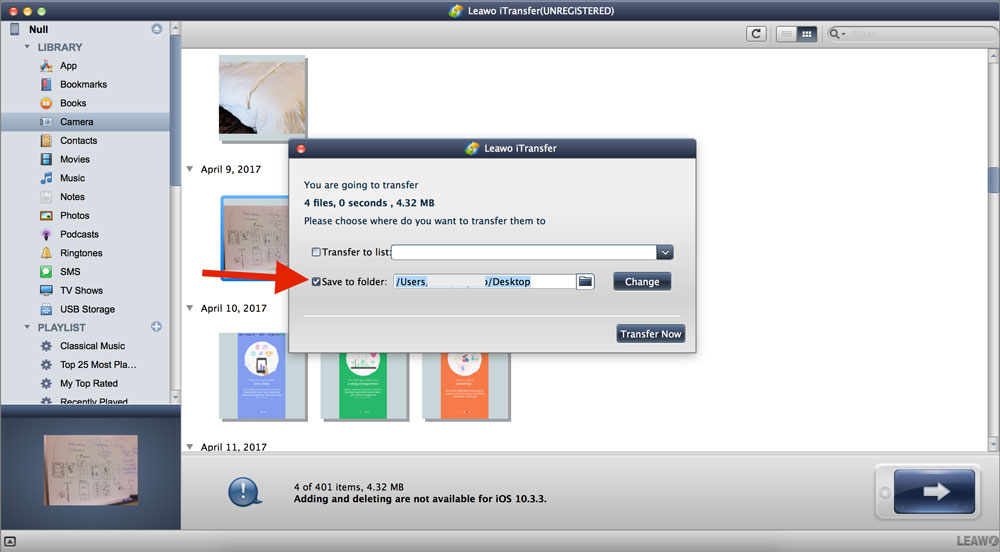
The Transfer window on a Mac: 4 files, 4.32 MB, going to a folder on the Desktop, with the Transfer to list option unticked.
Save contacts, messages, notes and Safari bookmarks
Leawo iTransfer for Mac backs up the personal data Finder only stores inside an opaque device backup. Contacts can be exported as CSV or VCF files, imported from Gmail, restored, and added, edited or grouped from the Mac. Text messages, notes and bookmarks can be exported to the Mac and imported back.
Edit the device's playlists from the Mac
Leawo iTransfer for Mac creates, renames and deletes playlists on the device, adds songs to them from the music library, and imports or exports the songs in a playlist. That's handy on an iPod Classic or Nano, which has no way to build playlists on the device itself.
Use the iPhone as a flash drive
Leawo iTransfer for Mac adds a USB Storage section to the device's library, where you can keep any file, even types iOS can't open, such as a ZIP archive or a Mac installer. The files stay in iTransfer's area, so you need iTransfer on whatever computer you plug the phone into to get them back out.
Benefits
- Your music isn't trapped on the device. Songs you added from another computer, or an old iPod's whole library, can come back to the Mac.
- Nothing gets wiped. There's no sync, so the device keeps everything you didn't touch.
- Readable copies of personal data. A VCF of your contacts or an exported message thread is a file you can open, print or archive, unlike a Finder backup.
- A low one-time price. The $29.95 lifetime license costs less than most Mac iPhone managers' yearly plans.
Real-World Uses
- Retiring an iPod Classic. Copy its songs and playlists to the Mac before the hard drive gives out.
- Keeping a message history. Export a text conversation to the Mac before you trade in an old iPhone.
- Collecting a family member's music. Pull the songs off a child's old iPhone that was filled from a different computer, without syncing it to your library.
- Moving contacts to another phone or service. Export them as a VCF and import the file wherever you need it.
Who It's For, and Who Should Skip It
It's a good fit if you have an older iPhone, iPad or iPod and a Mac, and you want to copy music, videos, contacts and messages to the Mac file by file, for a modest one-time price.
Skip it if:
- You only want your photos. The Photos app, Image Capture and AirDrop are built into macOS and import iPhone photos for free.
- Everything is already in iCloud. iCloud Photos, Contacts and Messages in iCloud keep the Mac and iPhone in step without any extra app.
- You want a full backup to restore a phone. Finder's own device backup is the tool for that. iTransfer copies files; it doesn't restore a whole iPhone.
- Your iPhone is new and the trial doesn't see it. The published device list stops at the iPhone XR.
Usage Guide
- Install. Download the DMG from Leawo's Mac download page, open it, and drag Leawo iTransfer to Applications. Launch it from there.
- Connect. Plug in the iPhone, iPad or iPod with its USB cable and tap Trust on the device if it asks. iTransfer shows the device at the top of the sidebar.
- Open a library. Under LIBRARY, click the type you want, such as Music, Camera or SMS. Use the filter box or switch between list and thumbnail view to find files.
- Select. Click files, using the Command key to pick several.
- Transfer. Click the arrow button at the bottom right, or choose File > Transfer to > My Computer.
- Pick the destination. In the Transfer window, tick Save to folder, click Change to choose a folder, then click Transfer Now. Keep the device connected until the progress bar finishes.
- Register. The title bar says UNREGISTERED until you enter the code Leawo emails after purchase.
Where it falls short
- Little sign of recent Mac work. Leawo's Mac tutorials date from 2017, its compatibility list stops at the iPhone XR, and the requirements still ask for iTunes on systems that no longer have it. The installer itself was rebuilt in April 2026, but Leawo doesn't say what changed.
- Write access depends on the iOS version. Leawo's own Mac screenshots show adding and deleting switched off for an iPhone on iOS 10.3.3.
- A dated interface. The window looks much as it did in 2017. It's clear enough, but nothing about it is modern.
- Apple silicon is only named up to M2. Leawo's requirements list Intel and Apple M1/M2 chips. M3 and M4 Macs aren't mentioned either way.
- Narrow refunds. Leawo refunds unfixable technical problems, not a purchase that turns out not to suit you, so the trial matters.
What Users Say
There isn't much independent writing about the Mac version. Most "reviews" of Leawo iTransfer online are on sites that sell a competing iPhone manager, so we left them out. Here is what customers posted on Leawo's Mac review page, what Leawo quotes on its product page, and what Trustpilot shows for Leawo as a company.
Leawo's review page for iTransfer for Mac (4 written reviews, all 5 stars)
Leawo moderates the reviews on its own site, and the Mac page has only a few short ones:
"Works well to access iPhone." Clifford Goolsby, 5 stars, September 2019
"Very good utility to sync files to and from" Ranjit, 5 stars, July 2017
"The best" Trung Le, 5 stars, July 2017
The newest, from March 2023, is titled "windows 10", so it seems to be about the Windows version even though it's on the Mac page: "Finally found a program to save photo's to my computer. And video, music) Now the I-pad is usable for pictures." huub, 5 stars
Quotes on Leawo's product page
Leawo's iTransfer page shows an average of 4.9 from 163 ratings collected on its own site, and quotes these (chosen by the vendor):
"If you are a music enthusiast and deal with a large number of tracks, you would need periodic clean ups. This kind of tool could be very useful. This is a very good tool." Free Downloads Center editor
"I was shocked by how complete and thorough this program is! I had first downloaded and paid for a competitive program but it was horrible! I no longer need to look elsewhere!" Salik Khan
Trustpilot (Leawo as a company: 4.4 TrustScore, 151 reviews)
Trustpilot's reviews of leawo.org are mostly about Leawo's disc software and its support team, which reviewers often say answers quickly. None of them names iTransfer, so they say more about the company than about this app.
The pattern
The few Mac users who wrote anything were happy that it reaches the iPhone's files and moves them both ways. What's missing is any recent report from someone using a current iPhone on a current macOS, which is the question most buyers have. That's what the free trial is for.
Comparisons
Leawo iTransfer for Mac vs Finder and Photos
Finder syncs and backs up an iPhone for free, and Photos or Image Capture import its pictures. What they can't do is copy a song from the iPhone to the Mac, export your messages as files, or save contacts as a VCF without going through iCloud. iTransfer does those, and leaves the sync alone.
Mac version vs Windows version
The two versions do the same job, at the same prices, but each license is for one platform, so a Windows key won't register the Mac app. The Mac build is a bigger download (82 MB against 39 MB) and Leawo asks for 2 GB of free space on a Mac against 100 MB on Windows. The Mac app uses the macOS menu bar, while Leawo's main user guide shows the Windows window.
Editions and Pricing
| Plan |
Price |
Term |
Money-back window |
| iTransfer for Mac, 1 year |
$19.95 |
1 Mac, renews automatically |
5 days |
| iTransfer for Mac, lifetime |
$29.95 |
1 Mac, one-time payment |
14 days |
Both plans include unlimited free upgrades. For $10 more than one year, the lifetime license is the better buy unless you only need the app for a single afternoon, and then you'd want to cancel the renewal.
FAQs
Does Leawo iTransfer for Mac work on macOS Sequoia, Tahoe or Golden Gate?
Leawo lists macOS Sequoia (15), Tahoe (26) and Golden Gate (27) among the supported systems, along with everything back to Yosemite (10.10). It also still lists iTunes as a requirement, which those systems don't have, so run the trial on your Mac before you buy.
Does Leawo iTransfer for Mac run natively on Apple silicon?
Leawo iTransfer for Mac lists "1 GHz or above Intel Processor and Apple M1/M2 chip" in its requirements, and there's one Mac download. Leawo doesn't say whether it runs natively or through Rosetta 2, and it doesn't mention M3 or M4.
Can Leawo iTransfer for Mac copy songs from an iPod to the Mac?
Yes. Leawo iTransfer for Mac lists the iPod Classic 1/2/3, iPod nano 3 to 7, iPod shuffle 2 to 4 and iPod touch 1 to 5, and copies their music to a Mac folder or a library list, which Apple's own tools won't do.
Will my Windows license of Leawo iTransfer work on my Mac?
No. Leawo sells iTransfer for Windows and iTransfer for Mac as separate products at the same prices, and each license covers one computer on its own platform.
Does the yearly Leawo iTransfer for Mac plan renew automatically?
Yes. The $19.95 plan renews every year until you cancel it. The $29.95 lifetime license is a single payment with free upgrades.
Can I get a refund if Leawo iTransfer for Mac doesn't suit me?
Probably not. Leawo refunds within 5 days (yearly) or 14 days (lifetime) only for technical problems its support can't fix, hardware incompatibility or duplicate orders. Not needing the program after buying it doesn't qualify.
System Requirements
- macOS: 10.10 Yosemite, 10.11 El Capitan, 10.12 Sierra, 10.13 High Sierra, 10.14 Mojave, 10.15 Catalina, 11 Big Sur, 12 Monterey, 13 Ventura, 14 Sonoma, 15 Sequoia, 26 Tahoe and 27 Golden Gate
- Processor: 1 GHz or faster Intel, or Apple M1/M2
- Memory: 512 MB RAM (1 GB or more recommended)
- Disk: 2 GB or more of free space
- Other: iTunes (as Leawo lists it), an internet connection and the device's USB cable
Conclusion
Leawo iTransfer for Mac is worth $29.95 if you own an older iPhone or an iPod and want its music, messages and contacts on your Mac as ordinary files. It does the one thing Finder refuses to do, copying from the device to the Mac file by file, and it's cheap.
The reason for caution is how little of it looks maintained on the Mac side: a device list that ends at the iPhone XR, requirements that still mention iTunes, and tutorials from 2017. For a recent iPhone, install the trial and see whether your device shows up and copies before paying. For photos alone, the free tools built into macOS are enough.
Download Free TrialBuy Now