Short answer
For most people, Bandicam Screen Recorder is the best audio recording software on Windows: its Audio-only mode records your PC's sound, your microphone or both to MP3 or WAV, runs for 24 hours or on a daily schedule, reduces mic noise and transcribes speech, for $44.95 once. On a budget, Vovsoft Sound Recorder does the basics with one click for $19, and its free trial has no time limit. Choose Leawo Music Recorder to turn streaming music and radio into split, tagged MP3s, and Renee Audio Recorder X if you want several scheduled recordings and transcripts made on your own graphics card for $24.95.
At a glance: four Windows audio recorders compared
| |
Bandicam |
Vovsoft Sound Recorder |
Leawo Music Recorder |
Renee Audio Recorder X |
| Price for one PC |
$44.95 once (Personal) |
$19 once |
$19.99 a year or $29.99 once |
$24.95 once (Basic) |
| Windows versions |
11, 10, 8, 7 |
11, 10, 8, 7 (32- and 64-bit) |
11, 10, 8.1, 8, 7 |
11, 10 (64-bit only) |
| PC sound and mic together |
✓ |
✓ |
✗ (one source at a time) |
✓ |
| Output formats |
MP3, WAV |
MP3, WAV |
MP3, WAV |
16, including MP3, WAV, FLAC, M4A, OGG |
| Scheduled recording |
✓ daily or weekly |
✗ |
✓ start time and duration |
✓ several tasks |
| Silence handling |
Stops after a set silence |
Trims silence or splits files at it |
Splits tracks at silence, drops short clips |
Pauses while it's silent |
| Speech to text |
✓ TXT, SRT |
✗ |
✗ |
✓ TXT, SRT, DOCX (needs a GPU) |
| Trim or edit |
✓ trim start and end |
✗ |
✗ (tags only) |
✗ |
| Free trial |
5 minutes per recording |
No time limit, nag screen, personal use |
3 minutes of audio |
30 seconds per recording |
| Best for |
Long sessions, podcasts, meetings |
Quick one-click recording |
Streaming music and radio |
Unattended recordings with transcripts |
How we picked and what we checked
- We started from what people search for: software that records the sound playing on a Windows PC, a microphone, or both, not a full music studio.
- We kept only programs that are still sold and updated, and checked each one's current version, Windows support and recording sources on the developer's site.
- We read each order page for the real price, the license term and whether it renews, and each program's free-version limits.
- We gathered user reviews and site ratings for each program from Trustpilot, Capterra, Software Advice, the vendors' own pages and independent reviews.
What we checked: on November 13, 2026 the order pages charged $44.95 for Bandicam's Personal Lifetime license ($49.95 less a $5.00 discount), $24.95 for Renee Audio Recorder X Basic and $19.00 for Vovsoft Sound Recorder with no renewal, and Leawo's store listed Music Recorder at $19.99 a year or $29.99 for life. The same day Bandicam's site listed version 27.0.7.2687 (October 15, 2026) and its free version's 5-minute limit for audio-only recordings, and Vovsoft's listed version 3.3 (February 10, 2026). Earlier, we downloaded the installers of Leawo Music Recorder 3.0.0.7 (October 29, 2026) and Renee Audio Recorder X 3.0.3 (November 8, 2026) and confirmed their versions and digital signatures.
We compared features, prices, licenses and trial limits. We didn't make test recordings or measure sound quality, so use each program's free trial on your own sound card before you buy.
First: what the free Windows recorder can and can't do
Windows' own Sound Recorder app is free and fine for a voice memo from your microphone. What it doesn't do is record the sound your PC is playing: a webinar, a call, an online radio show, a game. The old workaround was a hidden "Stereo Mix" input, which many PCs no longer show. Every program below records the computer's own audio directly (Windows calls this loopback recording), so you don't need Stereo Mix, a cable or a microphone held up to the speakers.
If you only need your voice now and then, stop here and use the free app. If you need the PC's sound, long or scheduled sessions, tidy files or a transcript, read on.
Price chart: the one-time price for one PC
One-time license for one PC (USD)
Vovsoft Sound Recorder$19.00
Renee Audio Recorder X (Basic)$24.95
Leawo Music Recorder (Lifetime)$29.99
Bandicam (Personal Lifetime)$44.95
Prices on the order pages and Leawo's store on November 13, 2026. Leawo also sells a $19.99 one-year license that renews automatically; Bandicam's order page also offers a one-year license.
1. Bandicam: best overall audio recorder
Bandicam Screen Recorder, version 27.0.7.2687 (Bandicam 2027), by Bandicam Company
- Price: $44.95 once at checkout for the Personal Lifetime license on one PC
- Runs on: Windows 11, 10, 8 and 7; Bandicam for macOS is a separate product
- Free version: 5 minutes per recording, scheduled recordings under 5 minutes only, partial transcripts
- Best for: long recordings, podcasts, lectures and meetings where you want the PC's sound and your voice, clean
Bandicam is sold as a screen recorder, but its Audio-only Recording mode makes it the most complete audio recorder in this list. You pick computer sound, microphone or both, choose MP3 or WAV, and press REC or the F12 hotkey. MP3 goes up to 320 kbps, and Bandicam lists 44.1 kHz and 48 kHz sample rates.
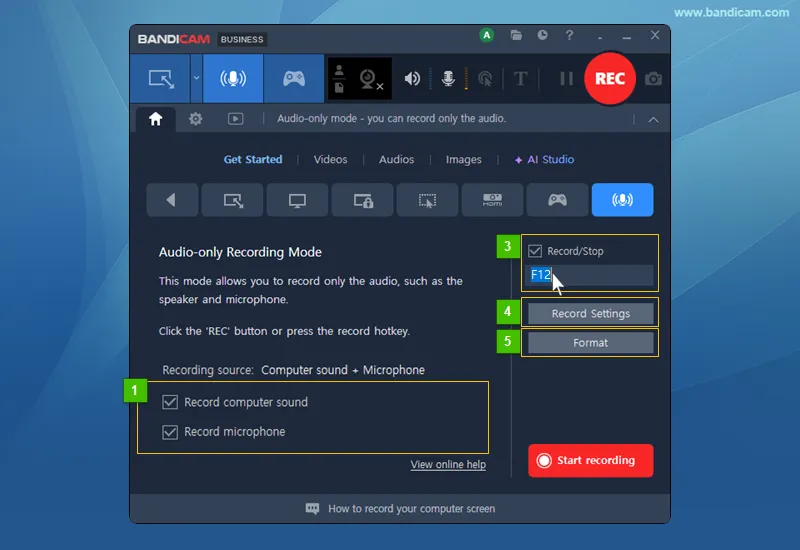
Bandicam's Audio-only Recording Mode: Record computer sound and Record microphone both ticked, the F12 Record/Stop hotkey, and the Record Settings and Format buttons. Vendor screenshot with numbered callouts.
What sets Bandicam apart is everything around the record button. It records for more than 24 hours at a stretch, or on a daily or weekly schedule, and its Auto-Complete Recording option starts a new file every hour or stops after a set period of silence. Microphone noise suppression (Low, Medium or High) helps reduce keyboard clicks, mouse sounds and other background noise, and you can mute the speaker or microphone mid-recording without stopping. Afterwards, the Audios tab lets you play a file, trim its start and end in the built-in editor, or turn speech into a transcript you save as TXT or SRT.
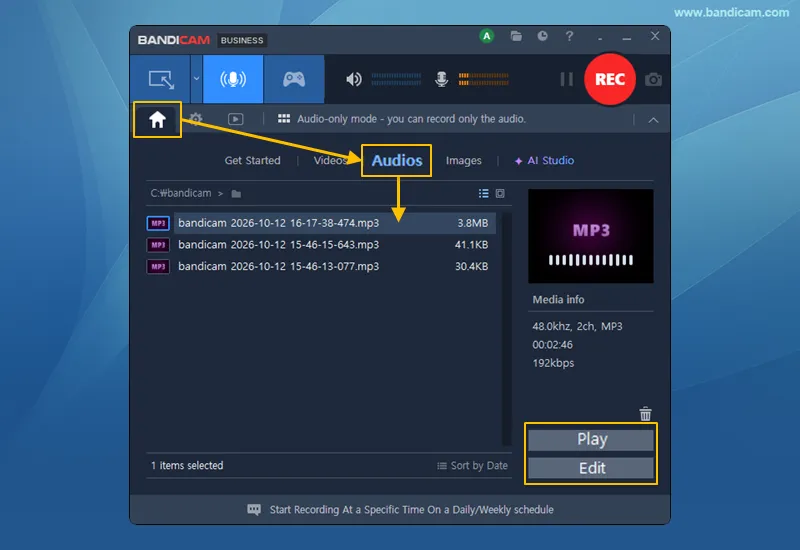
The Audios tab after recording: three MP3 files, the media info (48 kHz, 2 channels, 192 kbps, 2 minutes 46 seconds) and the Play and Edit buttons. Vendor screenshot.
Where Bandicam falls short: it's the most expensive pick here, and the Personal license is for non-commercial use only, so work recordings need the pricier Business license. "Lifetime" means lifetime use of Bandicam 2027. Bandicam keeps separate downloads for 2025 and 2024 perpetual license holders, and several buyers were unhappy to find a new yearly version needed a new purchase. It also offers far more than an audio recorder needs, which some will see as clutter.
What we like
- PC sound, mic or both, with separate volume and mute
- 24-hour recording and daily or weekly schedules
- Mic noise suppression and a built-in trimmer
- Transcripts to TXT or SRT
- Mature, frequently updated, well reviewed
Watch out for
- Highest price in this list
- Personal license: non-commercial use only
- "Lifetime" covers Bandicam 2027, not every later version
- Only MP3 and WAV on Windows
What users say about Bandicam
Bandicam had 4.2 out of 5 from 212 reviews on Trustpilot when we looked in November 2026, and Software Advice showed 4.4 overall, with 4.6 for ease of use. Michael Parnis wrote on Trustpilot: "I have been using the software for a couple of years now and find it both useful and very simple to use."
The criticism is about licensing, not recording. Legitti wrote: "Lifetime, that's not lifetime. They released a new version and the old license is no good." Capterra and Software Advice reviewers also mention the price, per-PC licensing and the free version's limits.
Download Bandicam FreeBuy Bandicam
2. Vovsoft Sound Recorder: best budget pick
Vovsoft Sound Recorder, version 3.3 (February 10, 2026), by Vovsoft
- Price: $19 once at checkout, lifetime license with free updates
- Runs on: Windows 11, 10, 8/8.1 and 7, 32-bit and 64-bit; installer or portable edition
- Free trial: no time limit, with a nag screen and no commercial use
- Best for: recording a lecture, a call or a stream with one click and no setup
Vovsoft Sound Recorder is the simplest program here: one small window with three source buttons (System Sound, Microphone or Both), three ways to save, an output folder and Start. It records through WASAPI, the audio interface built into Windows, so it captures your output device directly, with no Stereo Mix and even with no speakers plugged in. Since version 3.3 you can pick which microphone to use.

The whole of Vovsoft Sound Recorder: System Sound, Microphone and Both tabs, Save Full, Silence-Trimmed or Split Recordings, master volume, output folder, Start and Stop. Vendor screenshot.
The save options are the clever part of Vovsoft Sound Recorder. Save Full Recording keeps everything, Silence-Trimmed cuts the quiet parts out, and Split Recordings starts a new file at each silence, so a recorded playlist or radio show comes out as one file per track. It saves WAV or MP3, with the FFmpeg encoder built in.
The limits are just as clear. There's no pause button (stop and start a new file instead), no editing, no schedule, and no bit-rate setting on the main screen. One buyer reports that recordings on 32-bit Windows have a length limit, so use 64-bit Windows for long sessions. Vovsoft doesn't refund a change of mind, since the trial is there to test the program first.
What we like
- Cheapest here: $19, once
- Free trial with no time limit
- Records without Stereo Mix or speakers
- Splits files at silences automatically
- Portable edition and 32-bit support
Watch out for
- No pause, editing or scheduling
- Few quality settings
- Reported length limit on 32-bit Windows
- No refunds for a change of mind
What users say about Vovsoft Sound Recorder
Vovsoft's product page rated Sound Recorder 4.8 out of 5 from 5 votes, and Vovsoft as a company had 4.6 out of 5 from 410 Trustpilot reviews when we looked in November 2026. One buyer, Paul and Jean, wrote on Vovsoft's page: "The tiny Vovsoft you just one click to start and stop, and the result is perfect."
MajorGeeks called it "a user-friendly option for recording input or output device sounds through a barebones but functional UI" and noted that it "doesn't have any pause, etc., functions available".
Download Sound Recorder Free TrialBuy Vovsoft Sound Recorder
3. Leawo Music Recorder: best for streaming music and radio
Leawo Music Recorder, version 3.0.0.7 (June 22, 2026), by Leawo Software
- Price: $19.99 a year (renews automatically) or $29.99 for a lifetime license on one PC
- Runs on: Windows 11, 10, 8.1, 8 and 7; a separate Mac edition is sold too
- Free trial: records 3 minutes of audio
- Best for: building a library of tagged MP3s from online radio, podcasts and streaming music
Leawo Music Recorder is made for music rather than voices. It records whatever your PC plays (Leawo names YouTube, Spotify, Pandora, Deezer, SoundCloud, iHeartRadio and BBC Radio among the sources) or one input such as a microphone, and saves MP3 or WAV at the bit rate and sample rate you choose.

Leawo Music Recorder's Control tab: split automatically when the silence is longer than 0.2 seconds, and only save tracks longer than 1 second. Vendor screenshot of an unregistered copy.
The automation is why you'd pick Leawo Music Recorder. It splits a long session into separate songs at each silence and drops anything shorter than the length you set, which removes jingles and many short ads. Every recording goes into a Media library where you edit the title, artist, album, genre and cover, sort tracks into playlists and send them to iTunes in one click. A scheduler takes a start time and a duration, so a weekly radio show can record while you're out.
The drawbacks: Leawo Music Recorder records one source at a time, so it can't mix your voice with the PC's sound. It has no editing beyond tags, and its updates are minor (version 3.0.0.7 lists only an "optimized user experience"). The cheaper license is a yearly subscription, and Leawo's refund policy covers bugs support can't fix, hardware incompatibility or duplicate orders, not a change of mind.

The Audio Source tab: Record Computer Audio (selected) or Record Audio Input with a device list. Only one can be chosen. Vendor screenshot.
What we like
- Splits songs and filters short clips automatically
- Tag editor, library, playlists and iTunes export
- Scheduled recording for radio shows
- Mac edition available
Watch out for
- One source at a time, no voice-over-PC mix
- No editing, MP3 and WAV only on Windows
- $19.99 plan renews every year
- Narrow refund policy
What users say about Leawo Music Recorder
Independent reviews are old. Ashraf at dotTech, testing version 1.0 in October 2013, wrote: "Leawo Music Recorder is an excellent audio recorder," and listed among its pros: "Will automatically split audio into separate files if there is a pause of X seconds". His main complaint: "Built-in task scheduler is confusing to use and doesn’t appear to work". Test the scheduler during the trial.
Customer Jerry Triatik, quoted on Leawo's page, chose it over subscription tools: "I purchased it for a fair price and it works GREAT!" Leawo as a company had 4.3 out of 5 from 158 Trustpilot reviews in late October 2026, mostly about its disc tools and its support.
Download Leawo Music Recorder Free TrialBuy Leawo Music Recorder
4. Renee Audio Recorder X: best for scheduled recordings and private transcripts
Renee Audio Recorder X, version 3.0.3 (April 2026), by Rene.E Laboratory
- Price: $24.95 once at checkout (Basic Version); a Full Version option costs $34.95
- Runs on: 64-bit Windows 11 and 10 only
- Free trial: 30-second recordings, no scheduled recording
- Best for: recurring recordings that run on their own, with transcripts made on your PC
Renee Audio Recorder X records PC sound, your microphone or both from one window, and saves to 16 formats, including MP3, WAV, FLAC, M4A, OGG and WMA, the widest choice here. It pauses on its own when there's no sound, and a file-length setting splits long sessions into files of a chosen size.
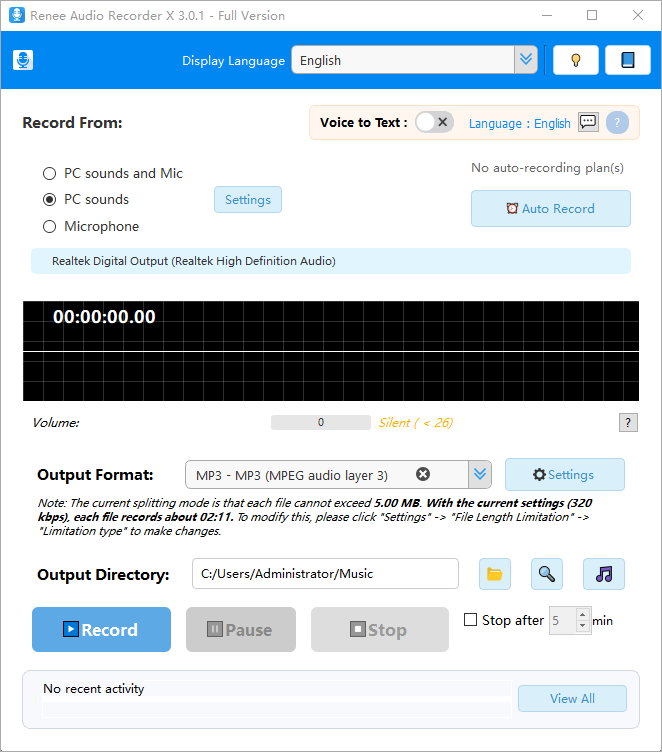
Renee Audio Recorder X 3.0.1 (Full Version): Record From options, the Voice to Text switch, Auto Record, MP3 output with its file-splitting note, and Record, Pause and Stop. Vendor screenshot.
Two features make Renee Audio Recorder X stand out. Its Task Scheduler runs several automatic recordings at set times and keeps a log of each run. And its voice to text transcribes on your own graphics card with a downloaded speech model (141 MB for the base model), exporting TXT, SRT subtitles or a Word DOCX, so interviews and meetings aren't uploaded anywhere.
The weak points are real. Transcription needs a supported NVIDIA, AMD or Intel GPU. Scheduled tasks only run while you're signed in and the PC isn't locked. Rene.E doesn't say what the $34.95 Full Version adds over the $24.95 Basic one, and nobody has published a test of version 3. The vendor promises an unconditional 60-day money-back guarantee, but Rene.E's Trustpilot profile is weak (see below).
What we like
- Several scheduled recording tasks with a log
- On-device transcripts: TXT, SRT, DOCX
- 16 output formats
- Pauses on silence, splits by file size
- 60-day money-back guarantee
Watch out for
- 30-second trial is too short to test a schedule
- Basic vs Full difference not published
- Transcription needs a supported GPU
- 64-bit Windows 10 and 11 only
- Weak company reviews
What users say about Renee Audio Recorder X
Audio Recorder X is too new for independent reviews. Softpedia reviewed its predecessor, Renee Audio Recorder Pro 2.0, as simple and easy to use, with a single-window interface and fine control over bit rate, channels, sample rate and silence detection in its settings.
Rene.E Laboratory's Trustpilot profile (reneelab.de) had a TrustScore of 1.8 out of 5 from 15 reviews in November 2026. The complaints are about other Rene.E products, refunds and unanswered support requests, not this recorder, but they're worth knowing before you buy.
Download Renee Audio Recorder X Free TrialBuy Renee Audio Recorder X
Ratings chart: how buyers rate each company
Trustpilot score out of 5 (number of reviews)
Leawo Software (158 reviews)4.3
Bandicam (212 reviews)4.2
Rene.E Laboratory (15 reviews)1.8
Trustpilot scores as shown between October 29 and November 8, 2026. They cover each company's products and support as a whole, not only its audio recorder.
Which audio recorder should you choose?
Pick Bandicam if you can spend $44.95 and record often; pick Vovsoft Sound Recorder if you want the cheapest program that records the PC's sound properly. The table matches the common situations to a pick.
| Your situation |
Our pick |
Why |
| Podcasts, voice-overs, narration |
Bandicam |
Mic noise suppression, separate source volumes and a trimmer |
| Lectures and webinars, several hours long |
Bandicam |
24-hour recording, hourly file splitting, transcripts |
| Occasional recording on a small budget |
Vovsoft Sound Recorder |
$19 once, one click, unlimited trial to test it |
| An old or 32-bit PC |
Vovsoft Sound Recorder |
Runs on 32-bit Windows 7 and up (keep sessions short there) |
| Online radio and streaming music |
Leawo Music Recorder |
Splits songs, drops short clips, tags and files them |
| Several recurring shows a week, plus transcripts kept private |
Renee Audio Recorder X |
Multiple scheduled tasks and GPU transcription on your PC |
| You need FLAC, M4A or OGG files |
Renee Audio Recorder X |
The only one here with 16 output formats |
| Recording for your business |
Vovsoft Sound Recorder |
Its $19 license allows commercial use; Bandicam's Personal license doesn't |
Who should skip each one
- Skip Bandicam if you record a few minutes a month: $44.95 buys features you won't use, and Vovsoft does the basics for $19.
- Skip Vovsoft Sound Recorder if you need to pause, schedule, trim or clean up a microphone; it only starts and stops.
- Skip Leawo Music Recorder if you want your voice and the PC's sound in one file, or you record speech rather than music.
- Skip Renee Audio Recorder X on 32-bit Windows or Windows 7, without a supported GPU if you want transcripts, or if a vendor's support record matters to you.
What commonly goes wrong
- Every system sound ends up in the file. When you record computer audio, notification chimes, another browser tab and call alerts are recorded too. Mute or close them first.
- A Bluetooth headset as both speaker and microphone causes trouble. Bandicam's own help recommends using the Bluetooth device only as the microphone, or a USB headset, when recordings drop sound. The same Windows limitation affects any recorder.
- Recording happens in real time. These are recorders, not downloaders: a 60-minute playlist takes 60 minutes, ads included.
- Scheduled recordings need the PC awake. A sleeping or locked PC misses the show. Renee warns its tasks need you signed in and the PC not set to lock.
- Trials hide the limits you care about. Renee's 30-second trial can't test a schedule, and Leawo's 3 minutes can't test a long split session. Test the exact source and settings you'll use.
- Consent and copyright. Recording a call without the other people's consent is illegal in many places, and streaming services' terms limit what you may keep. Leawo's terms restrict use to content you've lawfully obtained, for personal use.
FAQs
What is the best free audio recording software for Windows?
Vovsoft Sound Recorder's free trial is the most usable free option here: it records PC sound, a microphone or both with no time limit, though it shows a nag screen and is for personal use only. Bandicam's free version records up to 5 minutes at a time. Windows' built-in Sound Recorder app is free but records only the microphone.
How do I record my computer's sound without Stereo Mix?
Use a recorder that captures the output device directly. Vovsoft Sound Recorder does it through Windows' WASAPI loopback with no Stereo Mix and no speakers needed, and Bandicam, Leawo Music Recorder and Renee Audio Recorder X each have a "computer sound" or "PC sounds" source that does the same job.
Which audio recorder can record my microphone and PC sound at the same time?
Bandicam, Vovsoft Sound Recorder and Renee Audio Recorder X all record both into one file. Bandicam also lets you set each source's volume and mute either one mid-recording. Leawo Music Recorder can't: it records the computer's audio or one input, not both.
Which audio recorder can turn a recording into text?
Bandicam and Renee Audio Recorder X both transcribe speech. Bandicam saves transcripts as TXT or SRT, but its free version shows only part of a transcript. Renee Audio Recorder X saves TXT, SRT or DOCX and runs on your own NVIDIA, AMD or Intel graphics card, so it needs a supported GPU.
Can these programs record Spotify, YouTube or online radio?
Yes. Bandicam, Vovsoft Sound Recorder, Leawo Music Recorder and Renee Audio Recorder X record whatever your PC plays, in real time. Leawo Music Recorder is the one built for it, splitting and tagging songs. Whether you may keep the recording depends on the service's terms and copyright law where you live.
Which one can record a radio show while I'm away?
Bandicam schedules recordings daily or weekly and can record for more than 24 hours. Renee Audio Recorder X runs several scheduled tasks with a log, and Leawo Music Recorder takes a start time and a duration. Vovsoft Sound Recorder has no scheduler. In every case the PC has to be on and awake.
Are these one-time purchases or subscriptions?
Vovsoft Sound Recorder ($19), Renee Audio Recorder X ($24.95) and Bandicam's Personal Lifetime license ($44.95) are one-time purchases. Leawo Music Recorder's $19.99 license renews every year; its $29.99 lifetime license doesn't. Bandicam's lifetime license covers Bandicam 2027, and a later yearly version may need a new purchase.
Is there a Mac version?
Leawo Music Recorder has a separate Mac edition, Leawo Music Recorder for Mac, at the same prices, and Bandicam sells a separate Bandicam for macOS that saves audio as M4A. Vovsoft Sound Recorder and Renee Audio Recorder X are Windows only.
Can I use these recorders for work?
Vovsoft Sound Recorder's paid license allows commercial use (the free trial doesn't). Bandicam's Personal license is for non-commercial use, so a company needs Bandicam's Business license. Leawo's terms limit its software to personal, non-commercial use.
Conclusion
Bandicam is the best audio recording software for Windows if you record regularly: one $44.95 license gets PC sound and microphone recording, 24-hour and scheduled sessions, noise suppression, trimming and transcripts, from a program that's updated often and well reviewed. Its catches are the price, the non-commercial Personal license and a "lifetime" that covers this yearly version.
If that's more than you need, Vovsoft Sound Recorder at $19 records the PC's sound properly with one click and can be tried without a time limit. Leawo Music Recorder is the pick for collecting streaming music, and Renee Audio Recorder X for unattended recordings with private transcripts, once you've confirmed it works on your PC.
Download Bandicam FreeBuy BandicamBuy Vovsoft Sound Recorder