Vovsoft Sound Recorder: Record Your PC's Sound, Your Microphone or Both
Sound Recorder is a $19 Windows program from Vovsoft that records whatever your computer is playing, your microphone, or both at once, and saves it as a WAV or MP3 file. It works even without a "Stereo Mix" device or speakers, and the $19 is a one-time lifetime license with free updates; the free trial records too.
Capturing the audio of an online lecture, keeping a copy of a web radio show, or recording your own voice over a game: Windows' built-in Sound Recorder only takes the microphone, and the usual workaround is to set up Audacity. This tool does it with one Start button.
Quick facts
- Version: 3.3, released February 10, 2026
- Developer: Vovsoft, the one-person software company of Fatih Ramazan Çıkan in Turkey
- Platform: Windows 11, 10, 8/8.1 and 7, 32-bit and 64-bit. No Mac or Linux version
- Sources: system sound (loopback), microphone, or both combined in one file
- Output: WAV or MP3, saved in full, silence-trimmed, or split into separate files at each silence
- Editions: installer (16.53 MB) and portable (19.6 MB), one license for both
- Price: $19, one-time payment, lifetime license with free updates
- Trial: free and not time-limited, with recording, but with a nag screen and no commercial use
- Refunds: no money-back guarantee; refunds are at the vendor's discretion, mainly for accidental orders
- What we checked: the installer we downloaded from vovsoft.com on November 8, 2026 is version 3.3.0.0, 16.53 MB, digitally signed by Fatih Ramazan Çıkan; the order page showed $19.00 with no auto-renewal on November 8, 2026. We didn't install the program or make a test recording.
Overview
Sound Recorder is a single small window. Three buttons across the top pick the source (System Sound, Microphone or Both), three radio buttons pick how the recording is saved, a slider sets the master volume, and you choose an output folder. Then it's Start and Stop.
It records through WASAPI, the audio interface built into Windows, which lets it capture the output device directly (loopback recording). That's why it doesn't need Stereo Mix, which many PCs no longer show, or speakers plugged in. Vovsoft first released it in March 2021; 3.0 (January 2025) redesigned the window, added the combined "Both" mode and MP3 output, 3.2 (November 2025) locks the settings while a recording runs, and 3.3 (February 2026) added microphone device selection and a minimize-to-tray setting.
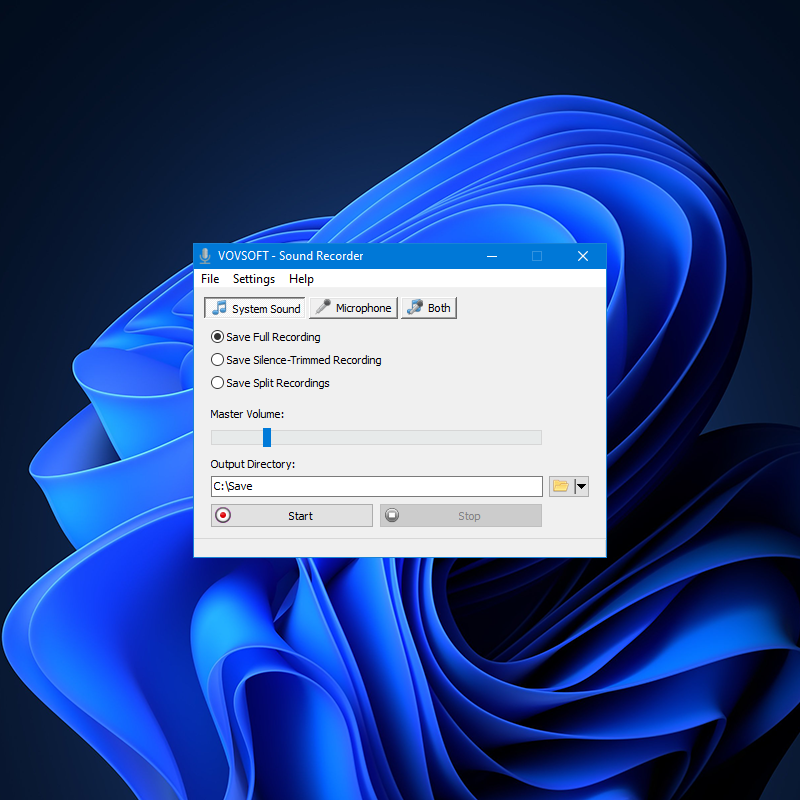
The whole program: System Sound, Microphone and Both tabs, the three save modes, master volume and the output folder.
Features
Record the sound your PC is playing
Sound Recorder captures the audio going to your output device, so you get a clean digital copy of a video, a call or a stream instead of holding a microphone up to the speakers. It works with no "Stereo Mix" option and even with no speakers connected.
Microphone, or both sources in one file
Sound Recorder's Microphone tab records your voice from the input device you choose (selectable since version 3.3), and the Both tab mixes the microphone and the system sound into a single file, which suits narrating over a game or recording your side of an online conversation together with the other side. The Online Computer Tips walkthrough shows that in this mode you can also have a separate audio file for each source, handy when you want to adjust your voice and the PC sound independently later.
Three ways to save: full, trimmed or split
Sound Recorder can save the full recording untouched, a silence-trimmed recording with the silent sections cut out, or split recordings that start a new file each time it detects silence. The split mode is the useful one for recording a playlist or a radio show: you end up with one file per track instead of one long file to cut by hand.
WAV or MP3, with FFmpeg built in
Sound Recorder saves lossless WAV or, since version 3.0, compressed MP3. It ships with FFmpeg for the MP3 encoding, so there's no separate encoder to install. Older reviews that say WAV is the only format describe versions before 3.0.
Small, portable and out of the way
Sound Recorder comes as an installer and as a portable edition that runs from a folder or USB stick, and it can minimize to the system tray while it records. It asks for confirmation if you try to close it mid-recording, so you don't lose a take by accident.
Benefits
The point is speed over setup. Audacity can do loopback recording too, but you have to find the right host and device settings first; here you click System Sound and Start. And because the recording is taken digitally from the output device, there's no room noise or speaker distortion in it. The split and trim modes save the editing step most people would otherwise need afterwards.
Real-World Uses
- Online classes and webinars: record the audio of a lecture to listen to again on a walk.
- Web radio and playlists: use Save Split Recordings to get a separate file for each track.
- Voice notes and dictation: record straight from a USB microphone to MP3.
- Commentary over gameplay or a video: the Both mode puts your voice and the PC sound in one file.
- Sound effects from software: capture a game's or an app's sounds when the files aren't available.
Who It's For, and Who Should Skip It
A good fit if you want to record computer audio or a microphone now and then without learning an audio editor, and you'd rather pay $19 once than subscribe.
Skip it if you need to edit, pause and resume, apply effects or mix many tracks: a full audio editor such as Audacity does all of that for free, at the cost of more setup. Mac users have no version. If you only need your microphone occasionally, Windows' own Sound Recorder app is enough. And always check that you're allowed to record what you capture: streams and calls can have copyright or consent rules.
Usage Guide
- Download the installer or the portable edition from vovsoft.com and run it.
- Pick the source: System Sound for what the PC plays, Microphone for your voice, or Both. On the Microphone tab, choose the input device.
- Choose a save mode: Full, Silence-Trimmed or Split Recordings.
- Set the Output Directory and the format (WAV or MP3).
- Start playback of the audio you want, press Start, and press Stop to finish. The file appears in the output folder.
- After buying, enter your key using Vovsoft's "How to Activate using License Key" steps; offline activation is available.
Before you buy
- Try it on your own sound card first. Loopback recording depends on your audio device and drivers; the free trial shows whether it works on your PC.
- No refund if you change your mind. Vovsoft generally doesn't refund purchases, because the trial is there to evaluate the program; refunds are at its discretion, mostly for orders placed by accident.
- One license per person. Vovsoft's EULA lets one person use a license on all of their own computers, or several people use one shared workstation, but not both.
Download Free TrialBuy Now
Where it falls short
- No pause button and no editing. MajorGeeks points out there's no pause function, and there's no way to trim or edit inside the program beyond the automatic silence modes.
- Length limit on 32-bit Windows. A buyer reports it works perfectly on 64-bit systems but that on 32-bit systems there's a limit on the length of a recording, so use 64-bit Windows for long sessions.
- Few settings. There's no bitrate or sample-rate control on the main screen, and no scheduled or timed recording.
- Big for what it does. The 16.5 MB installer is mostly the bundled FFmpeg encoder.
What Users Say
Sound Recorder is rated 4.8 out of 5 from 5 votes on Vovsoft's product page. Independent coverage is thin: download sites list it and describe it briefly, but we found no in-depth review that tests recording quality.
Buyers on vovsoft.com
"I am using Sound Recorder. On 64-bit systems it worked perfectly thus far. Its advantage is loading much faster than other programs I have which provide the same function. The interface is economic, clear and easy. On 32-bit systems there is a limit on the length of the captured sound." (Yigal Zan, also posted on Trustpilot in September 2026)
"Greetings from USA. Have found your tiny Sound Recorder to be quite remarkable. Since I think Windows 7 the Microsoft had removed the “stereo mix” function which allows to record from source other than the microphone. Only way around this is to download the cumbersome Audacity, and then monkey with its various settings. The tiny Vovsoft you just one click to start and stop, and the result is perfect." (Paul and Jean)
"As always an excellent program. I wish they had a second tier to expand all these programs furthrt" (David Smith)
MajorGeeks (editor's description, version 3.2)
MajorGeeks calls it "a user-friendly option for recording input or output device sounds through a barebones but functional UI" and notes that it "doesn't have any pause, etc., functions available", so you'd need another audio tool for editing. Its write-up still says WAV is the only format, which was true before version 3.0 added MP3.
Online Computer Tips (video walkthrough)
Online Computer Tips made the tutorial the vendor embeds on its page, "Record PC System Sounds, Microphone Audio or Both at the Same Time for Free", which walks through the three source modes.
The company on Trustpilot
Vovsoft as a company has a TrustScore of 4.6 from 410 Trustpilot reviews, 78% of them 5-star and 6% 1-star. They cover all of Vovsoft's programs and its support, not this tool in particular.
The common thread: people like that it starts fast and records system audio with one click where Windows no longer offers Stereo Mix. The criticism is about what's missing (pause, editing) and the 32-bit length limit, not about the recordings themselves.
Comparisons
Sound Recorder vs Windows' built-in Sound Recorder
The free app that comes with Windows records the microphone. Vovsoft Sound Recorder adds system-sound recording, the combined mode, and the trim and split options, which is what you're paying $19 for.
Sound Recorder vs Audacity
Audacity is free and can record loopback audio, edit it and export many formats, but you have to pick the right audio host and device first. Vovsoft Sound Recorder records with one click and splits by silence automatically, but can't edit anything.
Editions and Pricing
| Option | Price | License term | What you get |
|---|
| Free trial | $0 | No time limit | Recording, with a nag screen; personal use only |
| Sound Recorder license | $19 | One-time payment, lifetime, free updates | Commercial use, no nag screen, no ads; installer and portable |
Vovsoft also sells a $99 Universal License that covers all of its programs, including its Batch Audio Converter and Text to MP3 Converter, which pays off if you want several of them.
FAQs
Can Sound Recorder record computer audio without Stereo Mix?
Yes. Sound Recorder uses Windows' WASAPI loopback capture, so it records the output device directly, with no Stereo Mix device and no speakers needed.
Is Sound Recorder a subscription?
No. Sound Recorder costs $19 once. Vovsoft licenses never expire and include future updates, and the order page shows no auto-renewal.
Can Sound Recorder record a Zoom or Teams call?
Sound Recorder's Both mode records your microphone and the call audio playing on your PC into one file, so it can capture both sides. Tell the other participants first: recording a call without consent is illegal in many places.
Can I pause a recording in Sound Recorder?
No. Sound Recorder only has Start and Stop. Stop and start a new file instead, or use the Split Recordings mode to break a long session at its silences.
Can I use Sound Recorder's free version at work?
No. Sound Recorder's trial doesn't allow commercial use; the $19 license does.
Does Sound Recorder work on 32-bit Windows?
Yes, Sound Recorder runs on 32-bit and 64-bit Windows 7 through 11, but a user reports a limit on recording length on 32-bit systems, so 64-bit Windows is the better choice for long recordings.
Can I move my Sound Recorder license to a new PC?
Yes. Vovsoft says you can activate the same key on your new computer without deactivating the old one. A lost key can be retrieved from Vovsoft's User Panel with your purchase email.
System Requirements
- Windows 11, 10, 8/8.1 or 7, 32-bit or 64-bit
- About 17 MB of disk space for the installer version, 20 MB for the portable edition, plus space for your recordings
- A working audio output device for system-sound recording; a microphone for voice recording
- Internet connection only for online license activation (offline activation is available)
Conclusion
Sound Recorder is worth $19 if you want to record your PC's sound or your microphone with one click and no setup: loopback recording without Stereo Mix, a combined mode, MP3 output and automatic splitting at silences, with a lifetime license and an update as recent as February 2026. The reason not to buy is how little it does beyond that: no pause, no editing and few settings, while the free Audacity does more for anyone willing to configure it. The trial isn't time-limited, so record something on your own PC before you pay.
Download Free TrialBuy Now