Vovsoft Web Platform Identifier: Find Out Which CMS a List of Websites Runs On
Web Platform Identifier is a $19 Windows program from Vovsoft that takes a list of website addresses and tells you which platform each one is built on: WordPress, Shopify, Joomla, Drupal, Magento, Wix, phpBB, vBulletin and about 190 others. It checks many sites at once and exports the results. The $19 is a one-time lifetime license; the free trial checks a limited number of URLs.
It's for web designers, agencies, SEO and outreach people, and researchers who need to know what hundreds of sites run on, for prospecting, competitor research or link building, without opening each one in a browser extension.
Quick facts
- Version: 1.6, released February 28, 2026 (first released August 29, 2023)
- Developer: Vovsoft
- Platform: Windows 11, 10, 8/8.1, 7 and Vista, 32-bit and 64-bit. No Mac version
- Detects: about 190 CMSs, shop systems, site builders and forum packages
- Method: page content and HTTP headers, several platforms per site if found
- Batch: a URL list checked with multi-threading, adjustable timeouts and user agent
- Editions: installer (4.2 MB) and portable (3.2 MB), one license for both
- Price: $19, one-time payment, lifetime license with free updates
- Trial: a limited number of URL checks, a nag screen, non-commercial use only
- What we checked: installer file version 1.6.0.0 (4,411,904 bytes) with a valid code signature, downloaded from the vendor on November 11, 2026, and $19.00 on the order page with no auto-renewal on November 11, 2026. We didn't test its detection accuracy ourselves
Download Free TrialBuy Now
Overview
Web Platform Identifier is a single window: paste addresses into the URL List, set the connection and response timeouts and the browser user agent, and click Start. Each site gets a row with a status icon and the platform found, and Export Results saves the table.
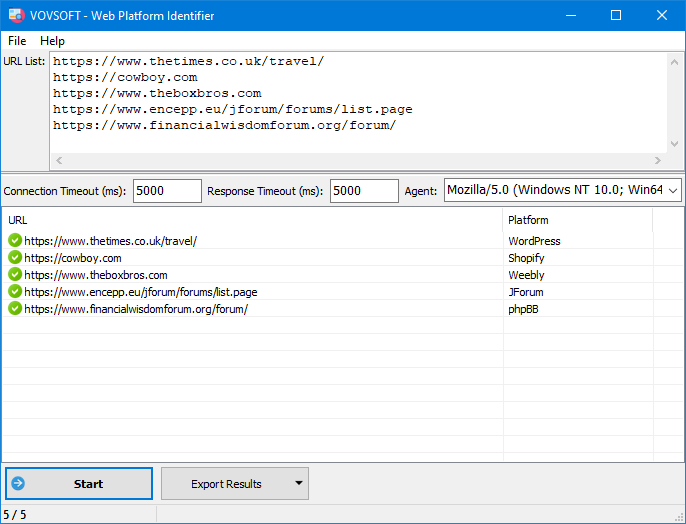
Five sites checked with 5,000 ms timeouts: a news section on WordPress, a store on Shopify, a Weebly site and two forums on JForum and phpBB.
Features
About 190 platforms, beyond the big CMSs
Web Platform Identifier's list covers the major CMSs (WordPress, Joomla, Drupal, TYPO3, Umbraco, Craft CMS), shop platforms (Shopify, Magento, BigCommerce, PrestaShop, OpenCart, Zen Cart, CS-Cart), hosted builders (Wix, Squarespace, Weebly, Webflow, Jimdo, GoDaddy Website Builder) and a long tail of forum software (phpBB, vBulletin, XenForo, Discourse, MyBB, Simple Machines Forum, Flarum and others), plus static generators like Hugo.
Bulk checks, fast
Web Platform Identifier checks a whole list of URLs in one run, and since version 1.5 it does so with multi-threading, so hundreds of sites don't take hours. It saves and reloads the URL list and your settings between sessions.
Headers and multiple matches
Web Platform Identifier reads each site's HTTP headers as well as its page, and when it finds signs of more than one platform on a site, it lists them all instead of picking one (both since version 1.5).
Tunable connections
Web Platform Identifier lets you set the connection and response timeouts in milliseconds and pick the user agent it presents, which helps with slow sites and sites that answer differently to unknown clients.
Benefits
Knowing what a site runs on tells you who to pitch, which plugins or integrations matter, and whether a prospect is a fit for your WordPress or Shopify service. Browser extensions answer that for one site at a time. Web Platform Identifier answers it for a list of hundreds in one go and hands you a table to sort, filter and share.
Real-World Uses
- A WordPress or Shopify agency filtering a lead list down to sites on its platform.
- Plugin or theme sellers finding sites on a specific CMS for outreach.
- SEO and link builders sorting a list of target forums by forum software.
- Researchers or students measuring which platforms are popular in a niche or country.
- Checking the platforms used by a list of competitors before a redesign.
Who It's For, and Who Should Skip It
Web Platform Identifier suits people who need the platform of many sites at once, regularly, and want a one-time purchase rather than a monthly data service.
Skip it if you only check the odd site: free browser extensions and websites such as Wappalyzer or BuiltWith answer that instantly. Skip it too if you need the full technology stack (analytics, frameworks, hosting, plugins, themes): it reports the platform, not every technology, and it doesn't show which WordPress theme a site uses.
Usage Guide
- Download the installer or portable edition and start Web Platform Identifier.
- Paste your website addresses into the URL List, one per line, or load a saved list.
- Adjust the connection and response timeouts and the user agent if needed.
- Click Start and watch the Platform column fill.
- Click Export Results to save the table.
Before you buy
The trial checks only a limited number of URLs, so use it to test detection on sites whose platform you already know. Unlimited checks and work use need the license. One license covers one person on any number of their own computers. Vovsoft's general policy is no refunds, since the trial comes first (it may refund an order made by accident, at its discretion, and PayPro Global has the final say on orders it handles).
Where it falls short
- No proxy support, so large batches all come from your own IP address. It's an open request on Vovsoft's feature page.
- OpenSSL 3 support is also still an open request, which may matter for sites that only accept the newest encryption settings.
- A custom-built site, or one behind a CDN that hides its fingerprints, simply won't match anything in the list.
- Platform only: no theme, plugin, analytics or hosting details.
What Users Say
Ratings and requests
Web Platform Identifier's product page shows 4.5 out of 5 from 2 ratings, with no written comments, and we found no independent hands-on reviews; download sites only repeat the vendor's description.
The feature request page shows what users ask for. Done: multi-threading, detection through HTTP headers, and support for Mobirise and vBulletin. Open: proxy support, showing the WordPress theme, a stricter WordPress check that requires wp-content and wp-includes links on the same domain, and OpenSSL 3.
Vovsoft as a company has a TrustScore of 4.6 out of 5 from 411 reviews on Trustpilot (read through a summarizer), with no recent review naming this program.
With so little public feedback, accuracy on your own kind of sites is the open question, which is exactly what the trial's limited checks are good for.
Comparisons
Web Platform Identifier vs Wappalyzer and BuiltWith
Wappalyzer and BuiltWith detect far more technologies, and their browser extensions are free for single sites, but bulk lookups and lead lists are paid plans. Web Platform Identifier only names the platform, but checks unlimited lists on your PC for a one-time $19.
Web Platform Identifier vs checking by hand
Looking at a page's source or footer for "Powered by" works for one site. For a list of 500 prospects, Web Platform Identifier does in minutes what would take a day.
Editions and Pricing
| Option | Price | License | What you get |
|---|
| Trial | Free | Personal, non-commercial use | Limited URL checks, nag screen |
| Web Platform Identifier license | $19 one time | Lifetime, commercial use allowed | Unlimited URL checks, no nag screen, all future updates |
| Vovsoft Universal License | $99 one time | Lifetime | All 115+ Vovsoft programs |
The license key arrives by email right after payment. Prices include tax.
FAQs
Can Web Platform Identifier tell which WordPress theme or plugins a site uses?
No. Web Platform Identifier reports the platform, such as WordPress or Shopify. Showing the WordPress theme is an open request on Vovsoft's feature page.
How many URLs can the trial check?
Web Platform Identifier's trial checks a limited number of URLs; Vovsoft doesn't publish the number. The license removes the limit.
Does Web Platform Identifier need an online account or API key?
No. Web Platform Identifier runs on your PC and connects to the sites directly, with no account, credits or monthly quota.
What if a site's platform isn't recognized?
It gets no platform name. Custom-built sites and platforms outside its list of about 190 won't get a name; you can suggest a platform on Vovsoft's feature request page, as users did for Mobirise and vBulletin.
Is the $19 a subscription?
No. Web Platform Identifier's $19 is a one-time payment for a lifetime license with future updates. Nothing renews.
System Requirements
- Windows 11, 10, 8/8.1, 7 or Vista, 32-bit or 64-bit
- About 4.2 MB for the installer, or 3.2 MB for the portable edition
- An internet connection; English interface
Conclusion
Web Platform Identifier is worth $19 if you regularly need the platform of dozens or hundreds of sites, for leads, outreach or research, and would rather pay once than subscribe to a technology-lookup service. The reason not to buy it: it names the platform only, with no themes, plugins or wider tech stack, and has no proxy support for very large batches. Run a few known sites through the trial to see how its detection does on your kind of list.
Download Free TrialBuy Now