WebSite X5 Pro: a Windows Website Builder You Buy Once
WebSite X5 Pro is a $209.95 Windows desktop program (a one-time, perpetual license) that builds websites, blogs and online stores with drag and drop, no coding, and uploads them to any host or to the 250 GB of hosting included for the first year. With the code X5AFFILIATE30 it costs $146.97 at checkout until December 31, 2026. It suits small businesses, freelancers and hobbyists on Windows who would rather own their site builder than rent one by the month.
If you've priced Wix or Squarespace and winced at paying every month forever, WebSite X5 takes the old-school route: you install it on your PC, design the site offline, and publish it with one click. The license never expires. What you pay for again, if you want it, is the next year of updates and hosting.
Quick facts
- Developer: Incomedia s.r.l. (Ivrea, Italy)
- Current version: 2026.3 (released October 2026, with Sections and other page-building changes)
- Platform: Windows 10 and 11, 64-bit only. No Mac or Linux version (Incomedia suggests Parallels or VMware on a Mac)
- Editions: Go, Evo, Pro and Agency, all one-time purchases
- Pro price: $209.95, or $146.97 with code X5AFFILIATE30 (30% off, until December 31, 2026)
- Included for 12 months: updates and new versions, 250 GB of hosting with 5 mailboxes, priority support
- Trial: 15 days of the full Pro edition after a short email registration; projects save up to 15 pages
- Guarantee: 30-day money-back guarantee, change of mind included
- Interface languages: 21, including English, German, French, Spanish, Italian, Polish and Japanese
- What we checked: edition names and product IDs on the order page, prices with and without the X5AFFILIATE30 code at checkout (Go $29.95, which the code doesn't apply to; Evo $69.97; Pro $146.97; Agency $251.97), and the release notes up to version 2026.3.6 on November 13, 2026. We didn't install the trial or build a site with it.
Before you buy
The license is perpetual, but updates, new versions, the included hosting and priority support last 12 months. After that the program keeps working at the version you have, and your site stays online only if you host it yourself or renew the hosting. Some extras (premium templates, plugins from the WebSite X5 Marketplace, extra AI generations) are paid with Credits on top of the license. And there's no Mac version.
Download Free TrialBuy EvoBuy ProBuy Agency
Overview
WebSite X5 has been around since the mid-2000s, and its structure hasn't changed much: you work through five steps on the left of the window (Settings, Template, Map, Pages, Export). You pick or design a template, lay out the site map, fill each page by dragging objects onto a grid, then publish. Incomedia hosts nothing you depend on while you edit: the whole project lives on your PC, and what you upload is plain HTML, CSS, JavaScript and, for the advanced features, PHP.
The 2025 and 2026 releases added AI on top of that base. MagicSite asks you about your business in a chat and generates a complete starting project; MagicText (Pro and Agency) writes, rewrites and translates text inside the editor. Version 2026.3 replaced the single page grid with independent Sections, so each band of a page can have its own layout.
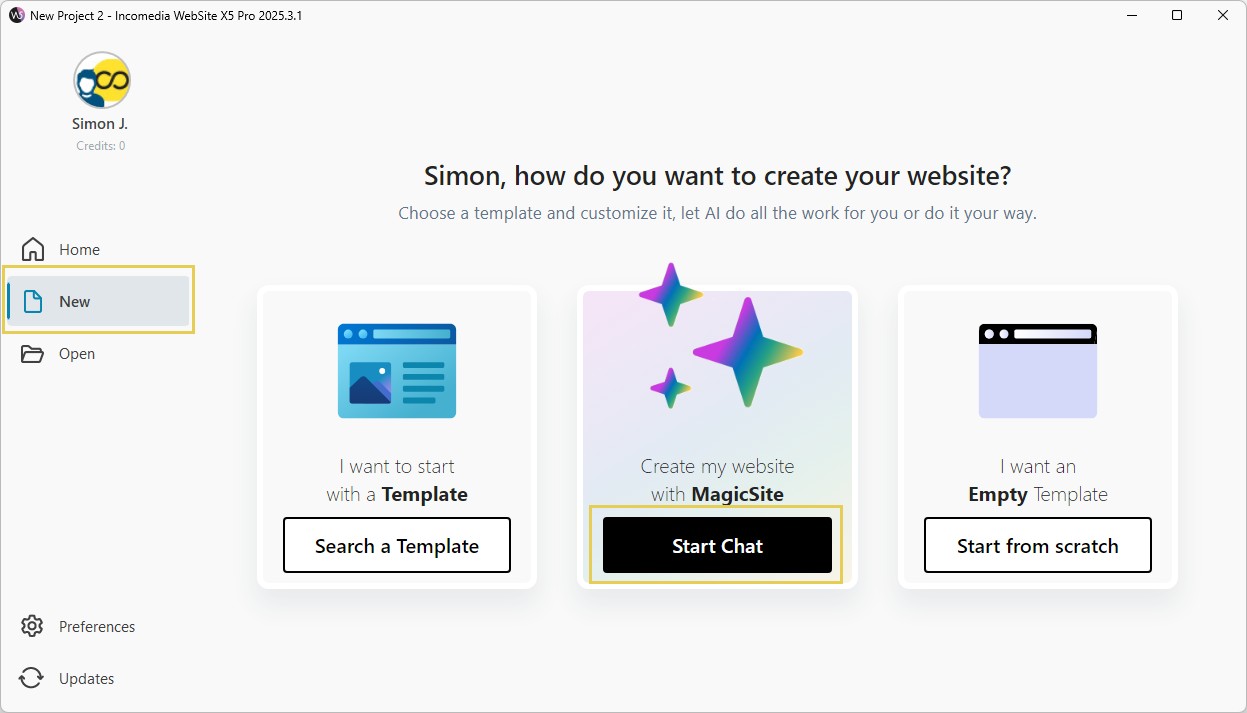
Starting a new project in WebSite X5 Pro (version 2025.3.1 shown): start from a template, chat with MagicSite, or begin with an empty template.
Features
A complete first draft of your site from a chat
WebSite X5's MagicSite asks what your business does, who it's for and which pages you need, proposes a site map and three style options, then builds a full project with text and images that you edit like any other. Pro includes 3 generations, Evo 2 and Agency 5; more cost 5 Credits each. The site map step lets you untick pages before anything is generated.
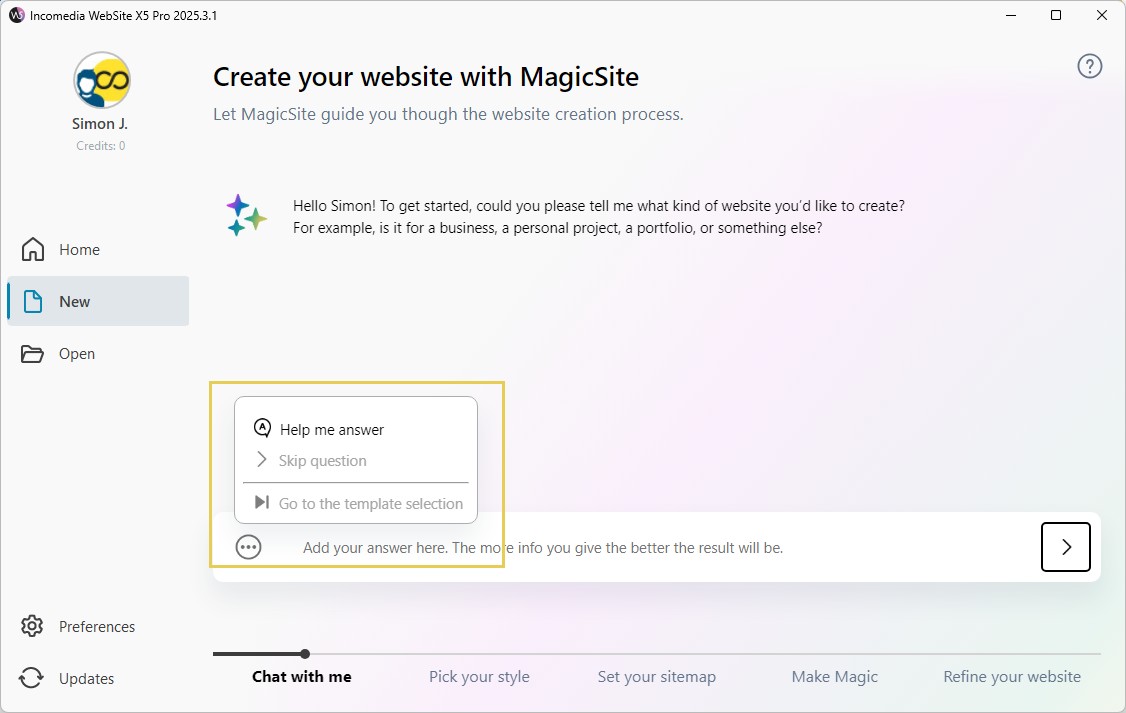
The MagicSite chat, which walks through Chat, Style, Sitemap, Magic and Refine steps along the bottom.

"Pick your style": three palettes and font pairings proposed from the chat (version 2026.1.1).
150 templates, or your own from a blank one
WebSite X5 Pro comes with 150 templates in categories such as food, travel, business and fashion (Evo has 100, Agency 200, Go 50), and each can be previewed on phone, tablet and desktop before you choose. More templates are sold in the Marketplace for Credits. You can also start from an empty template and design the header, footer and side bar yourself.
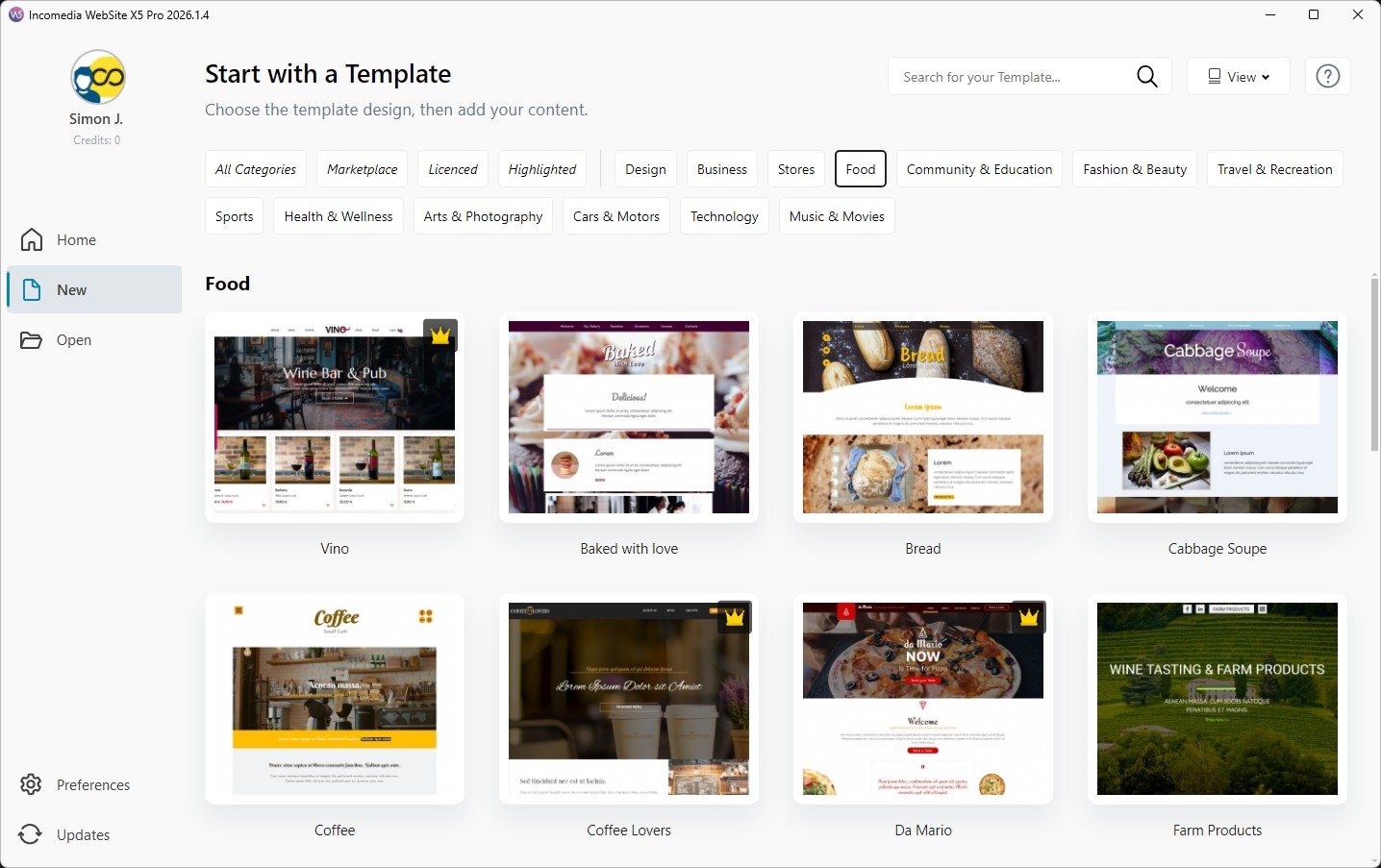
"Start with a Template": the template gallery filtered to Food (version 2026.1.4).
Drag-and-drop pages built from Sections
WebSite X5 builds each page by dragging objects (text, image, gallery, video, contact form, button, map, product catalog, HTML code and more) from a panel into the page. Since version 2026.3 the page is made of Sections, each with its own grid, background and spacing, instead of one grid for the whole page. Pro adds up to 10 responsive breakpoints, so you can rearrange a page separately for phones and tablets.
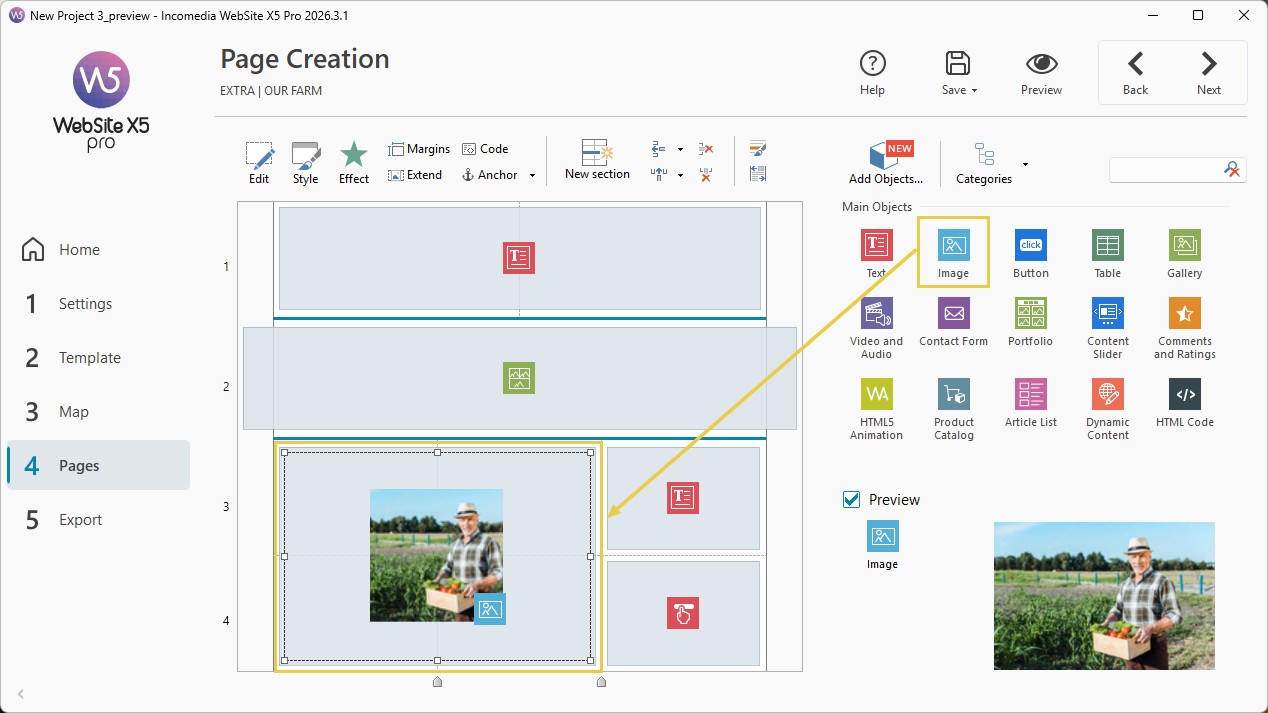
Page Creation in version 2026.3.1: the page is split into sections on the left and the object panel is on the right.
A real online store, without monthly fees
WebSite X5 Pro is the first edition with e-commerce: up to 10,000 products with variants (sizes, colors), product pages generated automatically, search filters, discounts and time-limited coupons, downloadable digital products, stock tracking, and payments through PayPal, Stripe and other providers. Orders, stock and customer reviews are managed from an online Control Panel, and the store can be linked to Facebook and Instagram. Evo doesn't include the store at all.
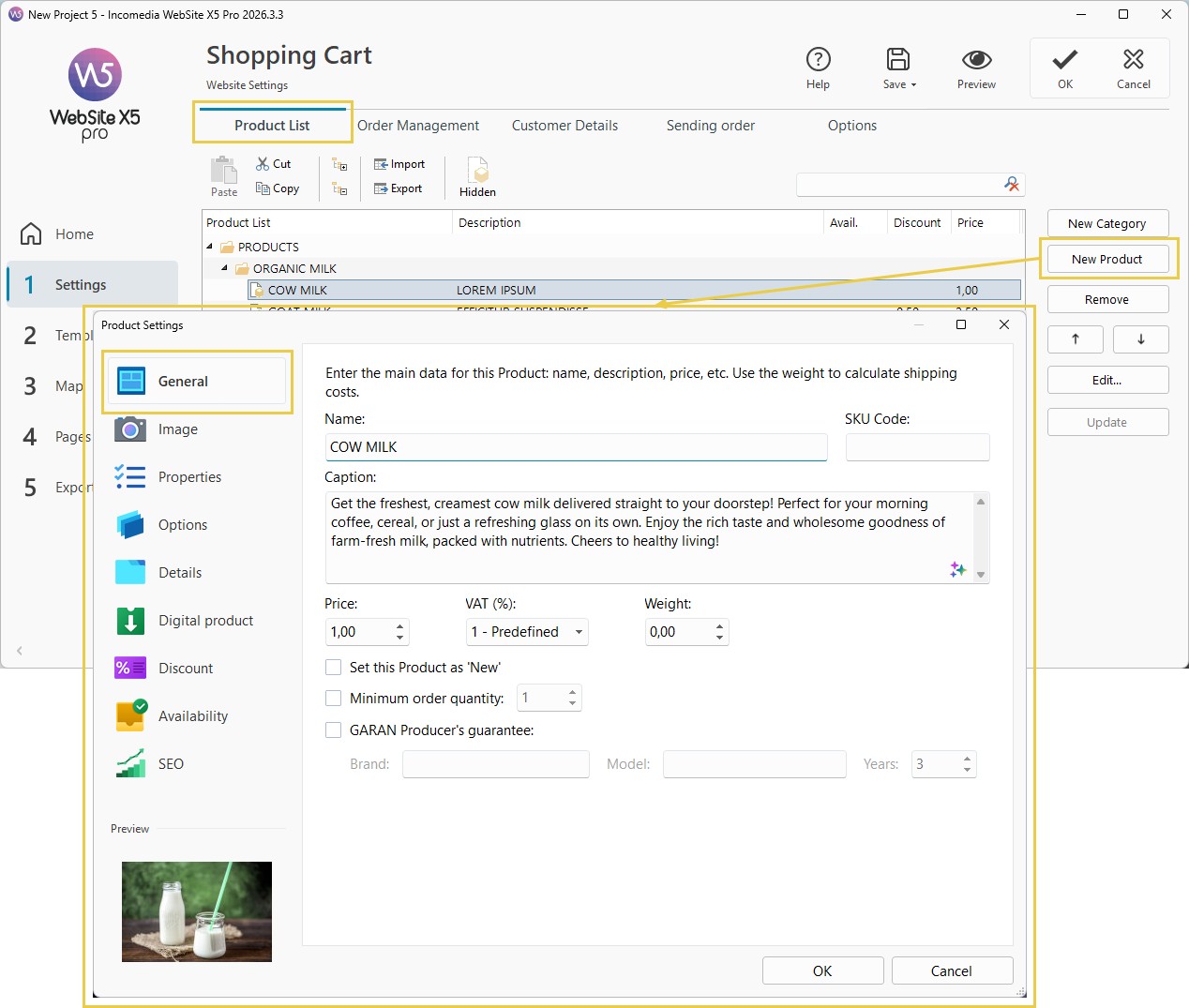
Shopping Cart settings in version 2026.3.3: the product list with the Product Settings window for name, description, price, VAT and weight.
Blog, members area, database and SEO tools
WebSite X5 Pro includes a blog with unlimited posts, comment moderation and posts restricted to members, a registration system so visitors can create accounts for protected pages, and a MySQL database connection to store orders, comments, form data and statistics. On the SEO side it creates the sitemap.xml, adds Schema.org structured data, compresses files, connects Google Analytics and runs an SEO check of the whole project.
One-click publishing to any host
WebSite X5 uploads the finished site with its built-in FTP client, either to the included hosting (250 GB with Pro for the first year, with a free automatic domain) or to any Windows or Linux host you already pay for. Only the advanced features need PHP 7.4 and MySQL 5.6 on the server. You can also export the site to a folder or back up the whole project.
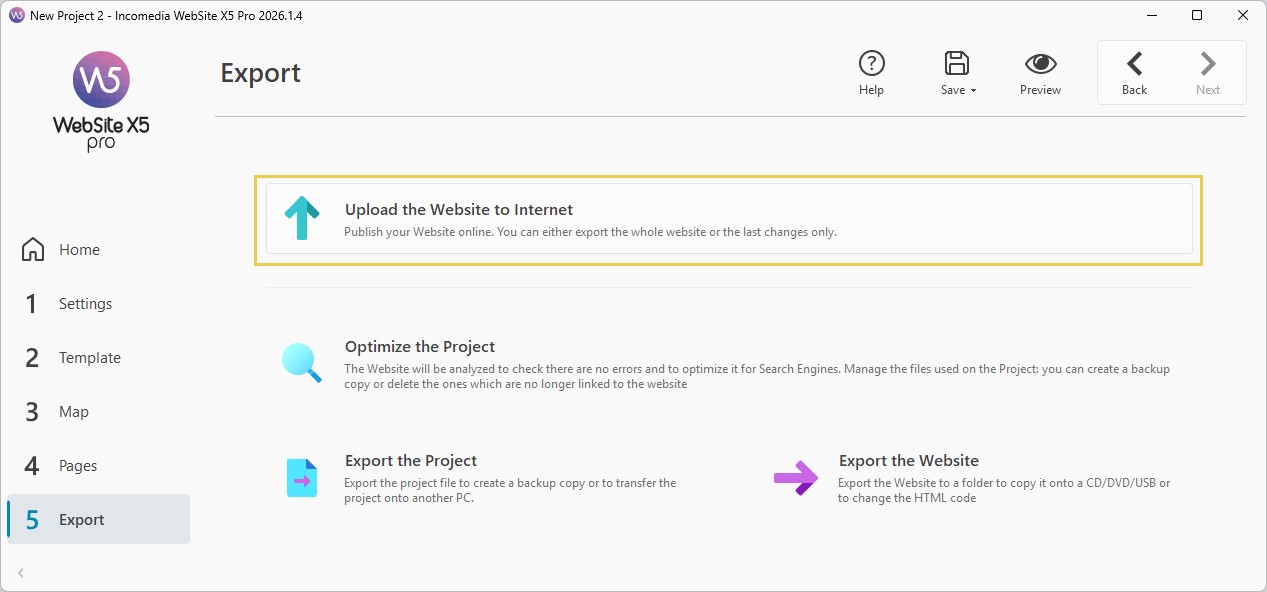
The Export step (version 2026.1.4): upload the website, optimize the project, export the project as a backup, or export the website to a folder.
Benefits
- You own the tool and the files. Nothing stops working if you skip a renewal, and the site is ordinary files you can move to any host.
- Lower cost over a few years. At $146.97 with the current code, WebSite X5 Pro costs about what a store plan on a hosted builder costs in six to twelve months.
- No transaction fees from the builder. The store takes payments through your own PayPal or Stripe account.
- Work offline. The whole project is on your PC, so you can edit on a train and publish later.
Real-World Uses
- A B&B or restaurant site with a gallery, a map, a contact form and a blog for news, built from one of the hospitality templates.
- A small online shop selling a few hundred products with sizes and colors, discount codes for newsletter readers and PayPal or Stripe checkout.
- A shop for digital downloads such as e-books, sheet music or presets, where Pro delivers the file after payment.
- A club or association site with a members-only area for documents and a public blog.
- A web designer's client work with the Agency edition, whose commercial license allows reselling the sites you build.
Who It's For, and Who Should Skip It
WebSite X5 Pro is for Windows users who want a full site with a store and blog, prefer to pay once, and don't mind working in a desktop program with a step-by-step layout rather than editing the live page. It's especially good value if you'll keep a site running for years.
Skip it if you work on a Mac (it runs only through a Windows virtual machine), if you want to edit pages exactly as they look online (TechRadar's main complaint was that you don't see the final page while editing), or if you need bookings, memberships with payments or a large catalog with complex integrations. A hosted builder or WordPress with WooCommerce fits those needs better. If you only need a small brochure site without a store, Evo is enough.
Usage Guide
- Install: download the installer from the link in your order email (or the trial email), install it on Windows 10 or 11 64-bit, and enter the license key. An internet connection and an email account are needed to activate.
- Start a project: choose a template, chat with MagicSite, or start from an empty template.
- Settings: enter the site name, language and description, and set up the shopping cart, blog and access management if you need them.
- Template and Map: adjust the header and footer, then add, rename and order pages and menus in the site map.
- Pages: drag objects into each section, set styles, and preview the page on desktop, tablet and phone.
- Export: run the SEO check, then upload the site to the included hosting or your own host by FTP.
Where it falls short
- The editor isn't the live page. You place objects on a grid and check the result in the preview, which makes fine text formatting slower than in a WYSIWYG builder.
- The yearly renewal feels like a subscription to some users. The program keeps working, but new versions, security updates for the generated PHP code and hosting stop after 12 months unless you renew.
- Credits add cost. Premium templates, many Marketplace plugins and extra AI generations are paid with Credits, and reviewers on WebsitePlanet complain that unused Credits expire after a year.
- Some settings are buried. Effects such as parallax backgrounds sit inside section style dialogs, and users on review sites mention a learning curve once they go past the template stage.
- The store is fixed in its layout. Capterra reviewers note the e-commerce module can't be customized much, and there's no booking system.
What Users Say
Capterra, GetApp and Software Advice
WebSite X5 holds 4.4 out of 5 from 47 reviews on Capterra and GetApp, with 41 reviews counted as positive, 2 neutral and 4 negative. Many reviews date from 2019 to 2022, so they describe older versions.
- Ease of use is the most common praise: reviewers describe a simple package for people with little or no web design experience, and like the built-in responsive design for phones and tablets and the FTP upload.
- Templates and ready-made objects come up often as a reason people chose it.
- Cost is the most common complaint: reviewers mention paying again each year for updates and still buying modules or Credits for extra features.
- Missing pieces: one user wanted a booking system for apartment rentals, another found the e-commerce module not customizable enough, and one asked for better product import.
- The lowest ratings (1 out of 5) are about customer service and Incomedia's commercial policy rather than the software itself.
TechRadar (Steve Paris, June 2020)
"An interesting web design tool, let down by interface inconsistencies, and an inability to preview your work as you're editing it."
TechRadar listed a responsive interface, many options and simple page formats as reasons to buy, and Windows-only, "Not a WYSIWYG interface" and paid blogging and e-commerce as reasons to avoid. In its final verdict: "The blogging tool works well, but the e-commerce side of things feels light on features, especially for a paid product." That review predates the AI tools, the Sections layout and the current store features.
WebsitePlanet (Jabran Kundi)
WebsitePlanet's editors score WebSite X5 4.3 (90th of 252 website builders) and list built-in blog and e-commerce, 100+ templates, drag and drop and SEO tools as pros. Their bottom line: "Website X5 has lots of interesting and useful features that could appeal to beginners or casual bloggers who don't mind spending time downloading and setting up the software on their computers. Another weak point is that it only works on Windows systems. I also find its commercial offerings somewhat limited for the price."
Its user reviews, all in German, average 1.9 from 8 reviews. The three most recent give 3 or 4 stars: they like the templates and the range of widgets, but find some settings hard to locate, dislike renewing the license every year to stay current, and object to Credits that expire after a year.
Trustpilot
Incomedia's Trustpilot page (unclaimed, 22 reviews, most of them in Italian and other languages) shows a TrustScore of 3.9, but the reviews are split: 36% five-star and 36% one-star. Recent English reviews praise the support team:
"Eric has been a fantastic help in sorting out my problems, very helpful and friendly, I am very grateful to him." (graham hoey, 5 stars, October 2026)
Earl Leamer (5 stars, November 2026) titled his review "Support above and beyond what I expected." after support fixed a menu problem directly in his project file.
Recurring themes
People like how quickly a beginner gets a good-looking, responsive site online, the large template library, and that the license is theirs to keep. The complaints are consistent too: Windows only, the gap between the editor and the finished page, and the extra spending on renewals, Credits and plugins. Support gets praise in recent reviews and criticism in older ones.
Comparisons
WebSite X5 Pro vs Evo
WebSite X5 Evo ($99.95, $69.97 with the code) is for sites without a store: 100 pages per site, 100 templates, a blog with up to 100 posts, standard responsive and SEO tools, and 100 GB of hosting for a year. Pro adds the online store, unlimited pages and posts, MagicText, the members area, the database connection, up to 10 breakpoints, advanced SEO and 250 GB of hosting. If you'll ever sell anything, buy Pro: Evo can't be extended with a store.
WebSite X5 Pro vs a hosted builder (Wix, Squarespace)
Hosted builders edit the live page in a browser on any computer and include hosting, but charge every month and keep your site on their platform. WebSite X5 Pro is paid once, runs only on Windows and lets you take the files anywhere. Over two or three years WebSite X5 is cheaper; for a Mac user or someone who wants true WYSIWYG editing, a hosted builder is easier.
Editions and Pricing
All four editions are one-time purchases with 12 months of updates, new versions and hosting. Prices are in US dollars at checkout on November 13, 2026, with code X5AFFILIATE30 (30% off until December 31, 2026). The code doesn't apply to Go. Each button orders that edition.
| Edition | Price (with code) | Users and PCs | What it adds | Buy |
|---|
| Go | $29.95 | 1 user, 1 PC | 10 pages per site, 50 templates, basic responsive and SEO tools, no blog or store | — |
| Evo | $99.95 ($69.97) | 1 user, 2 PCs | 100 pages, 100 templates, blog (100 posts), 2 AI generations, 100 GB hosting | Buy Evo |
| Pro | $209.95 ($146.97) | 1 user, 2 PCs | Unlimited pages, 150 templates, online store, MagicText, members area, database, 3 AI generations, 250 GB hosting | Buy Pro |
| Agency | $359.95 ($251.97) | 5 users, 10 PCs | Everything in Pro, 200 templates, 5 AI generations, 500 GB hosting, commercial license to resell sites | Buy Agency |
From November 22 to December 4, 2026, Incomedia's Black Friday code X5BF40 takes 40% off instead (Pro would be about $125.97). Outside those dates, X5AFFILIATE30 is the better code.
FAQs
Is WebSite X5 Pro a subscription?
No. WebSite X5 Pro is a perpetual license: you pay once and can use the version you bought for as long as you like. Only the 12 months of updates, new versions, hosting and priority support end, and you can renew them if you want.
What happens to my site after the first year?
Your WebSite X5 site stays online as long as it's hosted. If it's on the included hosting, you need to renew the hosting or move the site to another host; if it's on your own host, nothing changes. The program keeps working either way.
Can I use WebSite X5 on a Mac?
WebSite X5 runs only on Windows 10 and 11 (64-bit). Incomedia's suggestion for Mac users is to run it in a Windows virtual machine with Parallels Desktop or VMware.
Can I install WebSite X5 Pro on my desktop and my laptop?
Yes. A WebSite X5 Pro license is for one user on up to two computers. Agency allows five users on up to ten computers.
Do I have to use Incomedia's hosting?
No. WebSite X5 publishes by FTP to any Windows or Linux host. PHP 7.4 and MySQL 5.6 are needed only for the advanced features, such as the store's order management, the members area and the database.
Can I keep my trial project if I buy?
Yes. A project made in the WebSite X5 trial opens in the full version, so you can carry on where you stopped. During the trial only the first 15 pages are saved, and the test site on a *.websitex5.me address goes offline when the 15 days end.
Can I get a refund?
Yes. Incomedia offers a 30-day money-back guarantee on WebSite X5: you can cancel within 30 days of purchase for a full refund, even if you simply changed your mind.
Will my old WebSite X5 projects open?
The current WebSite X5 imports projects made with version 11 and later. Projects from older versions need to be converted in steps, as described in Incomedia's project conversion guide.
System Requirements
- Windows 10 or 11, 64-bit
- Screen resolution of at least 1024 x 720
- Internet connection and an email account to activate the product
- Web server: Windows or Linux; PHP 7.4 and MySQL 5.6 for the advanced features only
Conclusion
WebSite X5 Pro is worth it if you're on Windows, want a website with a real store or blog, and plan to keep it for years: at $146.97 with the current code, it costs less than a year of most hosted store plans and you keep the program and the files. The one reason to buy it is that ownership. The main reason not to is the editing style: you build on a grid and check the result in the preview, and the program is Windows-only. Try the 15-day trial first, since it's the full Pro edition, and remember the 30-day refund if it doesn't suit you.
Download Free TrialBuy EvoBuy ProBuy Agency