Vovsoft Read Mode: A Reader View for Any Text on Your Windows PC
Read Mode is a $19 Windows program from Vovsoft that shows any text you paste, or the text of a web page, in a clean, distraction-free reading window with dark, light or sepia colors, a comfortable column width, and full-screen mode. It can also read the text aloud and save the speech as a WAV file. The $19 is a one-time lifetime license, and the free trial works fully for personal use.
It's for people who read long articles, reports or e-texts on screen and are tired of ads, sidebars, tiny fonts and glaring white backgrounds: the same idea as a browser's reader view, but for text from anywhere.
Quick facts
- Version: 2.7, released October 6, 2025 (in development since at least 2018)
- Developer: Vovsoft
- Platform: Windows 11, 10, 8/8.1, 7, Vista and XP, 32-bit and 64-bit. No Mac version
- Input: paste, drag and drop, or import a web page's text by address
- Styles: Black, White, Dark, Sepia and Linen
- Extras: full screen, adjustable width and font size, print, read aloud, save speech as WAV
- Editions: installer (3.89 MB) and portable (2.8 MB), one license for both
- Price: $19, one-time payment, lifetime license with free updates
- Trial: all features, with a nag screen and for non-commercial use only
- What we checked: installer file version 2.7.0.0 (4,082,872 bytes) with a valid code signature, downloaded from the vendor on November 11, 2026, and $19.00 on the order page with no auto-renewal on November 11, 2026. We didn't use the program ourselves
Download Free TrialBuy Now
Overview
Read Mode is one window with a slim toolbar: Clear, Paste, Web Site, Style, full screen, print, speak, and a Width box. Everything else is your text, in large type, centered in a column of the width you set.
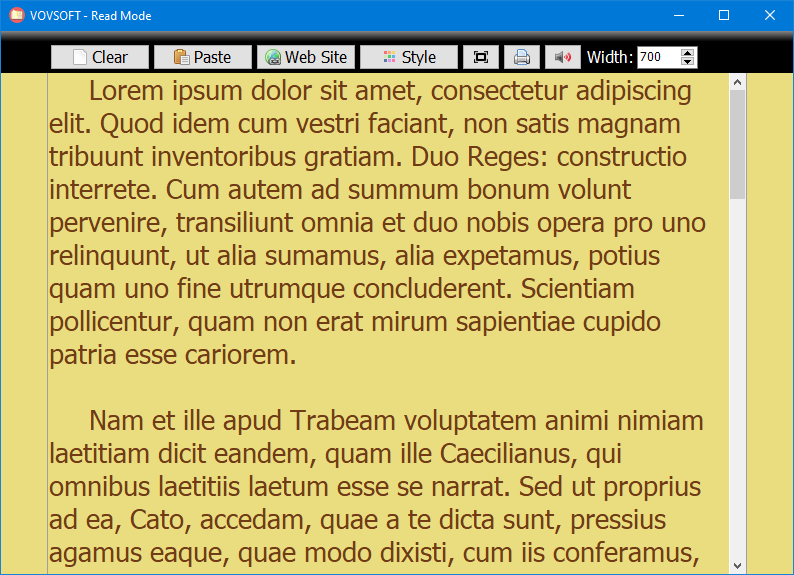
Sample text in a warm style, with the toolbar across the top and the column width set to 700.
Features
Text only, from anywhere
Read Mode strips pasted content down to plain text, so formatting, buttons, images and colors from the source disappear. Paste from a browser, an email or a document, drag text in, or click Web Site, enter an address, and it pulls in that page's text (with UTF-8 support and trimmed blank lines). Links in the text stay clickable.
Five color styles for different light
Read Mode offers Black, White, Dark, Sepia and Linen styles. Dark, light text on a dark background, is the default and suits night reading; the light styles suit daytime, and Sepia softens the brightness for early morning or evening. Version 2.7 refined the style colors and font.
A comfortable column, windowed or full screen
Read Mode lets you set the text column's width in pixels and the font size, so lines stay a readable length even on a wide monitor. Full Screen (F11, Esc to leave) hides everything else on the PC, and the window remembers its position and size.
Listen instead of reading
Read Mode reads the whole text, or just the part you select, aloud with the Windows text-to-speech voice, and Save as WAV turns it into an audio file for a walk or a commute. It can also print the cleaned text, always in black ink since version 2.6.
Benefits
Long reading on a screen is tiring when the page fights you with ads, pop-ups, odd fonts and bright white backgrounds. Read Mode gives every text the same calm, large, evenly spaced presentation in the colors that suit the time of day, which is easier on the eyes and keeps your attention on the words. Being able to switch to listening, or to save an article as audio, helps when your eyes have had enough.
Real-World Uses
- Reading long web articles or blog posts without the clutter around them.
- Studying a pasted report or e-text in full screen with sepia colors in the evening.
- Turning an article into a WAV file to listen to later.
- Printing a clean, ad-free copy of a web page's text.
- Giving someone with tired or weak eyes a large-type, high-contrast reading window.
Who It's For, and Who Should Skip It
Read Mode suits Windows users who read a lot of long text on screen, from many sources, and want one consistent, comfortable way to read or listen to it.
Skip it if your reading is mostly in one browser: Edge, Firefox and Safari have free reader views, and Edge has a free read-aloud. Skip it too if you need to read PDFs or Word files directly (it takes pasted text and web pages only), or want images and formatting kept, since it shows plain text.
Usage Guide
- Download the installer or portable edition and start Read Mode.
- Copy text from anywhere and click Paste, drag text in, or click Web Site and enter a page address.
- Click Style to pick colors, and adjust Width and the font size.
- Press F11 for full screen; Esc returns to the window.
- Use the speaker button to read aloud, or save the speech as a WAV file; use the printer button to print.
Before you buy
The trial has every feature, with a nag screen, and is for personal use; work use needs the license. One license covers one person on any number of their own computers. Vovsoft's general policy is no refunds, since the trial comes first (it may refund an order made by accident, at its discretion, and PayPro Global has the final say on orders it handles), so use the trial for a few days of real reading first.
Where it falls short
- No PDF or Word import: you have to copy the text out first. Both are open requests on Vovsoft's feature page.
- The read-aloud voice can't be changed in the program, another open request.
- No saving of a favorite font, color and size combination, and no highlighter.
- English interface only.
- Plain text only, so images, tables and headings from the source are lost.
What Users Say
TrishTech
Trisha at TrishTech reviewed Read Mode on January 19, 2024, describing it as "very similar to the Reader View found in Mozilla Firefox browser" and noting that "In the blink of an eye, you will have only text being displayed in front of you."
The verdict: "Read Mode for PC is a great program for making life easy for the users who tend to read a lot of text material online. Instead of reading, you can make it speak out the entire text or turn it into an audio book."
On Vovsoft's site
Read Mode's product page shows 4.5 out of 5 from 4 ratings, with these comments:
- "I prefer to copy and paste long readings rather than be exposed to fancy fonts and colors. This is the best readmode app I’ve ever used." (Anonymous User)
- "I like the option to change the style in this program. The Dark style proved to be best for my eyes." (Consuella)
- "I REALLY REQUIRED THIS. THANKS FOR THIS. LOVING IT." (Sunil M.)
- "Good at the job, ten out of ten." (Anonymous User)
The feature request page shows what users still want: Word and PDF import, export to PDF, a choice of voice, saved favorite styles, a line highlighter and other languages. Two earlier requests, Esc to leave full screen and clickable links, are done.
Vovsoft overall
Vovsoft has a TrustScore of 4.6 out of 5 from 411 reviews on Trustpilot (read through a summarizer), though none of the latest reviews mention Read Mode.
The praise is consistent: people like the plain, calm text and the dark and sepia styles. The wishes are consistent too: more file types and a choice of voice.
Comparisons
Read Mode vs a browser's reader view
Firefox's Reader View and Edge's Immersive Reader are free and keep a page's images and headings. Read Mode works on text from anywhere, not just web pages, gives you one consistent window and full screen across sources, and saves read-aloud speech as WAV.
Read Mode vs Windows dark mode or a text editor
Pasting into Notepad in dark mode gets you plain text for free, but with small type and full-width lines. Read Mode's large font, set column width, sepia styles and speech make long reading noticeably more comfortable.
Editions and Pricing
| Option | Price | License | What you get |
|---|
| Trial | Free | Personal, non-commercial use | All features, nag screen |
| Read Mode license | $19 one time | Lifetime, commercial use allowed | No nag screen, all future updates |
| Vovsoft Universal License | $99 one time | Lifetime | All 115+ Vovsoft programs |
The license key arrives by email right after payment. Prices include tax.
FAQs
Can Read Mode open PDF or Word documents?
No. Read Mode takes pasted or dragged text and web page addresses. Copy the text out of a PDF or Word file and paste it in.
Which voice does Read Mode use to read aloud?
Read Mode uses the text-to-speech voice set in Windows. To change it, change the default voice in Windows' speech settings; the program itself has no voice choice yet.
Can Read Mode read non-English text?
Read Mode displays UTF-8 text from web pages, but its menus are in English, and reading aloud depends on the Windows voices you have installed.
Does Read Mode work on Windows XP?
Yes. Read Mode supports Windows XP through Windows 11, in 32-bit and 64-bit.
Is the $19 a subscription?
No. Read Mode's $19 is a one-time payment for a lifetime license with future updates. Nothing renews.
System Requirements
- Windows 11, 10, 8/8.1, 7, Vista or XP, 32-bit or 64-bit
- About 3.9 MB for the installer, or 2.8 MB for the portable edition
- A Windows text-to-speech voice for reading aloud; English interface
Conclusion
Read Mode is worth $19 if you read a lot of long text on screen from different places and want one calm, large-type, dark or sepia window for all of it, with read-aloud and WAV saving as a bonus. The reason not to buy it: browsers already give you a free reader view for web pages, and Read Mode can't open PDFs or Word files directly. The trial has every feature, so use it for your normal reading for a few days before deciding.
Download Free TrialBuy Now