Vovsoft RegEx Extractor: Pull Every Email, Date or Number Out of a Folder of Files
RegEx Extractor is a $19 Windows program from Vovsoft that finds every piece of text matching a regular expression in pasted text or across thousands of files, and gives you just the matches, ready to export as TXT or CSV. It comes with ready-made rules for emails, dates, phone numbers, URLs and IP addresses, so you don't need to write regex yourself for the common jobs. The $19 is a one-time lifetime license; the free trial finds matches but can't export them.
It's for anyone who has to dig data out of a pile of text files: log files, exported mailboxes, scraped pages, old reports. Instead of opening each file, you get one list of what you were looking for and which file each item came from.
Quick facts
- Version: 3.0, released June 11, 2025 (first released October 31, 2021)
- Developer: Vovsoft
- Platform: Windows 11, 10, 8/8.1, 7, Vista and XP, 32-bit and 64-bit. No Mac version
- Input: pasted text, a folder with file masks and subfolders, or a list of files
- Filters: Starts with, Ends with, Contains, Lacks, each optionally case-sensitive
- Output: matched text as TXT, or matches with their source files as CSV
- Capacity: up to 100 million matches
- Editions: installer (3.48 MB) and portable (2.21 MB), one license for both
- Price: $19, one-time payment, lifetime license with free updates
- Trial: full search, but no export of results, a nag screen and non-commercial use only
- What we checked: installer file version 3.0.0.0 (3,650,760 bytes) with a valid code signature, downloaded from the vendor on November 11, 2026, and $19.00 on the order page with no auto-renewal on November 11, 2026. We didn't run searches ourselves
Download Free TrialBuy Now
Overview
RegEx Extractor's window has the pattern box at the top with a Rules menu beside it, four filter boxes under it, the input on the left (a Text tab and a Files tab) and the Matched list on the right. Press Start and the list fills with every match, while the status bar counts files, matches and elapsed time.

The pattern [0-9]+ run on a few paragraphs of pasted text: 41 numbers listed on the right in 0.016 seconds.
Features
Search whole folders, not one file at a time
RegEx Extractor scans a folder and, if you tick it, all its subfolders, limited by file masks such as *.txt;*.log (several masks separated by semicolons) so binary files are skipped. A File List tab takes a specific set of files instead, with a Paste button for a list you copied. Since version 3.0 a Text tab also lets you paste text straight in.
Built-in rules for the usual targets
RegEx Extractor's Rules menu fills in tested patterns for dates (simple and complicated), email addresses (simple and complicated), filenames, IPv4 and IPv6 addresses, letters, numbers, phone numbers, quoted text, US Social Security numbers, URLs and ZIP codes. Customize opens the rules file so you can add your own patterns and reuse them.
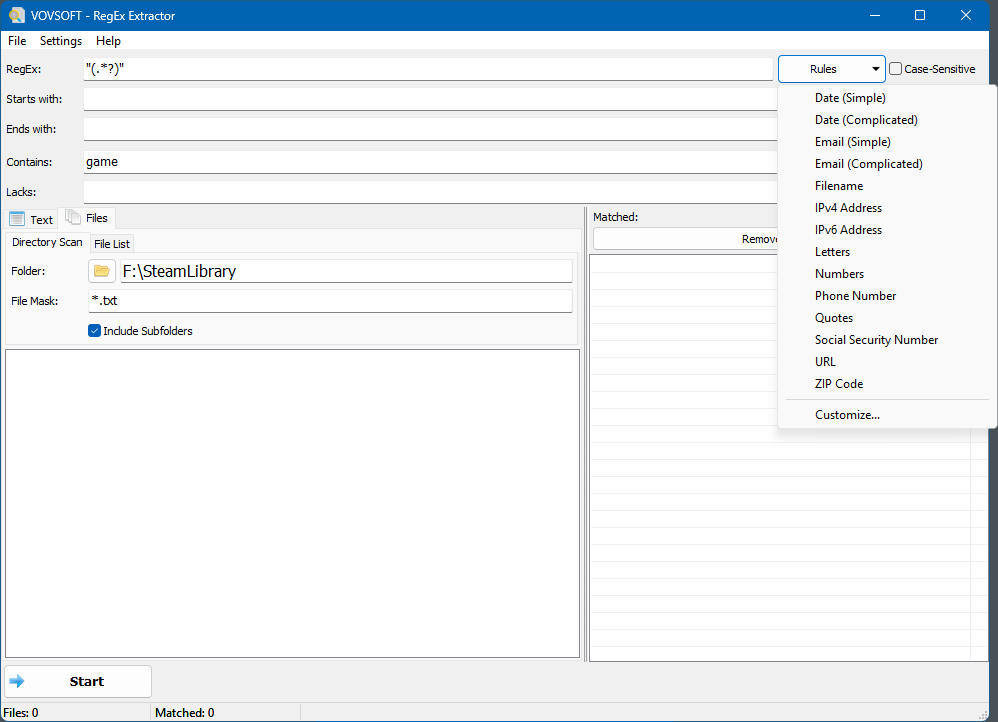
The Rules menu open over a folder scan set to *.txt files with subfolders included.
Filters that save you from writing harder regex
RegEx Extractor lets you keep only matches that start with, end with, contain or lack some text, each with its own case-sensitive switch, and each box takes several values separated by commas. So a simple numbers pattern plus "Starts with 20" gives you the years in a document, without crafting a stricter expression.
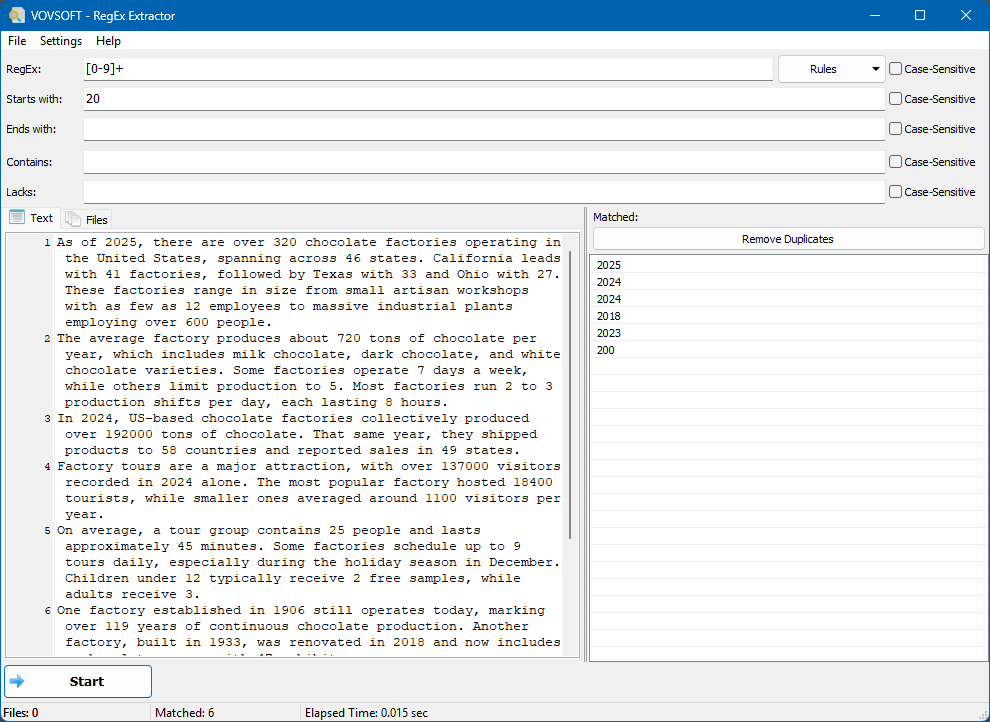
The same text and pattern with "20" in Starts with: the 41 numbers narrow to 6.
Know where each match came from
RegEx Extractor shows the source file when you select a match, and Export Matched List with Source Files writes a CSV pairing every match with its file, which is what you need when the question is "which documents mention this?". A plain export writes the matches alone to TXT, and Remove Duplicates cleans the list first.
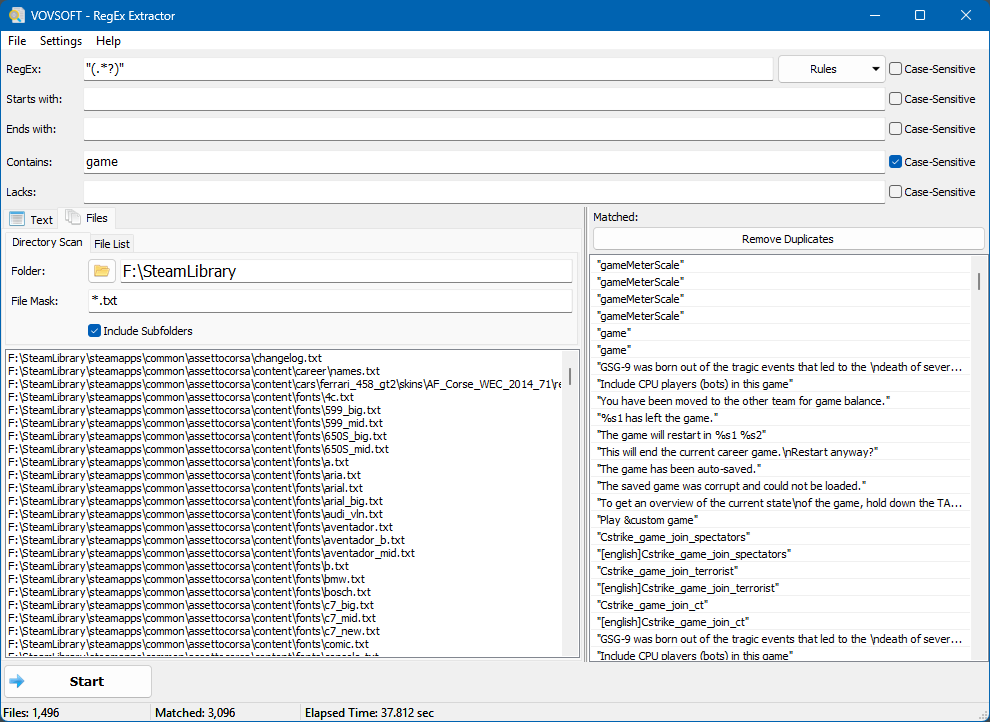
A scan of a game library folder: 1,496 .txt files, quoted strings containing "game", 3,096 matches in about 38 seconds.
Built for big result sets
RegEx Extractor holds up to 100 million matches, and since version 2.5 it refreshes the list once a second instead of after every hit, which keeps large scans fast. It remembers your last pattern, settings and window position.
Benefits
A text editor's search tells you a file contains something; RegEx Extractor hands you the something. That turns jobs like "collect every email address in these 3,000 old messages" or "list every IP that appears in last month's logs" from an afternoon of copying into a minute and a CSV. The built-in rules and the plain-language filters mean you can do a lot of it without being fluent in regular expressions.
Real-World Uses
- Pulling all email addresses out of a folder of exported emails or text archives into one list.
- Extracting every IP address or URL from server and application logs.
- Listing order numbers, invoice IDs or dates from a batch of text reports, with the file each one came from.
- Collecting all quoted strings from game or software language files, as in the vendor's own screenshot.
- Checking which documents in a folder still contain something sensitive, such as Social Security numbers, before sharing them.
Who It's For, and Who Should Skip It
RegEx Extractor suits Windows users who need the matching text itself from many plain-text files, and who like a form with a few boxes better than a command line.
Skip it if you need to replace text rather than extract it (a search-and-replace tool does that), if your data lives in Word or PDF files rather than plain text, or if you're comfortable with grep, PowerShell's Select-String or a programmer's editor, which do the same for free. Mac and Linux users have no version.
Usage Guide
- Download the installer or portable edition and start RegEx Extractor.
- Paste text into the Text tab, or open Files and choose a folder, file masks and Include Subfolders, or build a File List.
- Type a regular expression, or pick one from Rules.
- Optionally fill Starts with, Ends with, Contains or Lacks, and tick Case-Sensitive where needed.
- Click Start, then Remove Duplicates if you want a clean list.
- Export the matches to TXT, or with source files to CSV (licensed version).
Before you buy
The trial runs searches in full, so you can see exactly what it would find in your files, but exporting results needs the license, and the trial is for personal use only. One license covers one person on any number of their own computers. Vovsoft's general policy is no refunds, since the trial comes first (it may refund an order made by accident, at its discretion, and PayPro Global has the final say on orders it handles), so run your real files through the trial first.
Where it falls short
- One regular expression per run. Running several patterns at once, and seeing which one matched, is the top open request on Vovsoft's feature page.
- No multi-threading for big folders, also an open request.
- No regex cheat sheet in the program, so beyond the built-in rules you need to know the syntax.
- It reads text files; it doesn't open Word, Excel or PDF documents.
- It extracts only. There's no replace function.
What Users Say
TrishTech
Trisha at TrishTech reviewed RegEx Extractor on September 10, 2023, and placed it next to the free grepWin: "While grepWin is a much more advanced tool and is based on the grep tool available for Linux, Vovsoft RegEx Extractor is much simpler in nature."
The review liked the file mask "so that it avoids searching binary files", the option to search a list of files instead of a whole folder, the built-in patterns, and that "it can filter the results by parameters like a string that it starts with, a string that it ends with, and some string that it contains." Version 3.0 has since added the Text tab and version 2.3 the Lacks filter.
On Vovsoft's site
RegEx Extractor's product page shows 4.8 out of 5 from 4 ratings, with one short comment from Daniel Bonner: "Excellent software."
The feature request page shows how users push it. Already done at users' request: case-insensitive matching, the free text box "rather than having to load files", customizable rules, and showing the source file, after one user wrote: "This program has real potential IF the 'matched' list included or linked to the specific file that matched." Still open: multiple patterns at once, multi-threading, "Delete After" and "Delete Before", and a cheat-sheet button.
Vovsoft as a company has a TrustScore of 4.6 out of 5 from 411 reviews on Trustpilot (read through a summarizer), though none of the latest reviews mention RegEx Extractor.
The picture is consistent: a simple, focused extractor that users like, with the requests pointing at power-user features it doesn't have yet. Outside reviews are few, so the trial is the real test.
Comparisons
RegEx Extractor vs grepWin
grepWin is free and more powerful, with search and replace and many options, and shows matching lines in files. RegEx Extractor is simpler and is built around the extracted values themselves: a de-duplicated list with ready-made rules and export to TXT or CSV.
RegEx Extractor vs a code editor's Find in Files
Editors such as Notepad++ and VS Code search folders with regex for free, but they list whole matching lines inside a results pane. Getting only the matched values into a clean list or spreadsheet takes extra steps that RegEx Extractor does in one.
Editions and Pricing
| Option | Price | License | What you get |
|---|
| Trial | Free | Personal, non-commercial use | Full search, no export, nag screen |
| RegEx Extractor license | $19 one time | Lifetime, commercial use allowed | Export, no nag screen, all future updates |
| Vovsoft Universal License | $99 one time | Lifetime | All 115+ Vovsoft programs |
The license key arrives by email right after payment. Prices include tax.
FAQs
Do I need to know regular expressions to use RegEx Extractor?
Not for common jobs. RegEx Extractor's Rules menu has ready patterns for emails, dates, phone numbers, URLs, IP addresses and more, and the Starts with, Ends with, Contains and Lacks boxes narrow results in plain text. For anything unusual you write your own pattern.
Can RegEx Extractor search PDF or Word files?
No. RegEx Extractor reads plain-text files such as .txt, .log, .csv, .html or source code. Convert PDF or Word documents to text first.
Can I save the results from the free trial?
No. RegEx Extractor's trial shows every match on screen, but exporting to TXT or CSV is part of the $19 license.
Can RegEx Extractor run from a USB stick?
Yes. RegEx Extractor has a portable edition that runs without installing, and the same license key activates it.
Is the $19 a subscription?
No. RegEx Extractor's $19 is a one-time payment for a lifetime license with future updates. Nothing renews.
Can I use one license at home and at work?
Yes, if you're the only user. A RegEx Extractor license covers one person on any number of their own computers; a business with several users needs a license per user.
System Requirements
- Windows 11, 10, 8/8.1, 7, Vista or XP, 32-bit or 64-bit
- About 3.5 MB for the installer, or 2.2 MB for the portable edition
- English interface
Conclusion
RegEx Extractor is worth $19 if you regularly need to collect the matching values themselves, such as emails, IDs, IPs or dates, from many text files, and want them de-duplicated and exported with their source files without scripting. The reason not to buy it: it runs one pattern at a time and only extracts, and free tools like grepWin or a code editor cover a lot of the same ground if you're comfortable with them. Try your own folder in the trial; it shows every match before you pay.
Download Free TrialBuy Now