Vovsoft Network Alarmer: Get a Sound, a Script or a Phone Call When a Device Stops Answering
Network Alarmer is a small Windows program from Vovsoft that pings a list of servers, routers, printers or other devices on a schedule and raises an alarm when one goes down: it plays a sound, runs a file or web script of your choice, and can dial phone numbers through a modem. It costs $19 for a lifetime license, and in Vovsoft's Black Friday sale until December 1, 2026 it is $9.50 at checkout. It suits small offices and server rooms, not large networks that need dashboards and graphs.
Most small offices find out the file server or the internet link is down when someone walks over to complain. A PC in the corner running this can tell you first, and it can also watch the server-room air conditioner.
Quick facts
- Version: 5.2, released May 22, 2026
- Developer: Vovsoft, the software company of Fatih Ramazan Çıkan in Turkey
- Platform: Windows 11, 10, 8/8.1, 7 and Vista, 32-bit and 64-bit. No Mac or Linux version
- Checks: ICMP ping of IP addresses or hostnames at an interval you set, with timeout and retries; temperature of networked Emerson Liebert air conditioners
- Alarms: a WAV sound, opening any file or calling a URL (for example a script that sends email), and dialing a list of numbers through a fax/modem
- Editions: installer (4 MB) and portable (2.77 MB), one license for both
- Price: $19 one-time, lifetime license with free updates; $9.50 with Vovsoft's Black Friday coupon BLACKFRIDAY2026 until December 1, 2026 (the Buy Now button below applies it)
- Trial: free to try with monitoring and alarms working, but it shows a nag screen and doesn't allow commercial use
- Refunds: no money-back guarantee; refunds are at Vovsoft's discretion, mainly for accidental orders
- What we checked: installer file version 5.2.0.0 (4,202,072 bytes) with a valid digital signature, downloaded from the vendor and read without running it; checkout price $19.00, and $9.50 with the coupon, with no auto-renewal on the order page on November 24, 2026. We didn't run it against a live network or test modem dialing
Download Free TrialBuy Now
Overview
Network Alarmer is one dense window. The top half holds four lists: air conditioner IPs and the phone numbers to dial for them on the left, devices to ping and their phone numbers on the right, each with a Discover Local Devices button. Below are the check interval, connection timeout and retry settings, the Alarm Script field, the modem port and call duration, and a log pane that prints a green "works" or a red alarm line for every check.
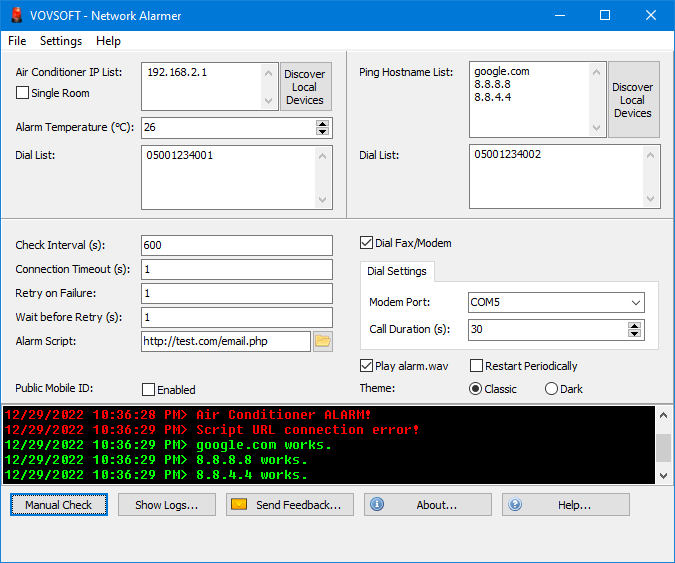
The current interface: google.com, 8.8.8.8 and 8.8.4.4 being pinged every 600 seconds, an air conditioner at 192.168.2.1, modem dialing on COM5, and the log showing an air conditioner alarm in red.
Vovsoft has updated Network Alarmer steadily. Version 5.0 (October 2024) added a countdown to the next check, stopped needing administrator rights or Task Scheduler for auto-start and removed the old Mobile ID feature; 5.1 (March 12, 2026) added a Save Logs setting with UTF-8 logs; and 5.2 (May 22, 2026) added Start Minimized and better tray-icon behaviour.
Features
Scheduled ping checks with retries
Network Alarmer pings every address or hostname in its list at the interval you set in seconds, waits for the timeout you choose, and retries a set number of times before calling a device down, which cuts false alarms from a single lost packet. A Manual Check button runs a round on demand.
Alarms that reach you away from the desk
Network Alarmer can run any program, batch file or web URL when something fails. Point it at a small script on your web server and that script can send an email or a chat message; Vovsoft's configuration guide includes a sample PHP email script. On a PC with a fax/modem it can also dial a list of phone numbers one after another.
Server-room air conditioner watch
Network Alarmer reads the temperature from networked Emerson Liebert cooling units and raises an alarm when it passes the limit you set. A Single Room option treats several units in one room as fine as long as one reports a good temperature.
Local device discovery
Network Alarmer can scan the local network and fill the lists for you, so you don't have to type every printer and switch address.
Logs, tray and portable use
Network Alarmer timestamps every result in its log pane, can save the logs to disk, starts with Windows and minimized to the tray, and comes in a portable edition that runs without installing.

An older version with the dark theme, pinging 8.8.8.8 and 8.8.4.4 every 600 seconds.
Benefits
- You hear about outages first. A failed check makes noise or sends a message instead of waiting for a user to notice.
- Cheap insurance for a server room. $19 once to watch the air conditioner that protects far more expensive hardware.
- Ten-minute setup. Type the addresses, set an interval, and leave it running in the tray.
Real-World Uses
- Small office IT: watch the file server, router, NAS and printers, and run a script that emails the admin when one drops.
- Server rooms: monitor a Liebert unit and dial the on-call phone if the room overheats at night.
- Home labs: keep an eye on a Raspberry Pi, a home server and the internet connection (ping 8.8.8.8).
- Shops and clinics: know when the card terminal network or a camera recorder stops responding.
Who It's For, and Who Should Skip It
Network Alarmer suits small offices, server rooms and home labs with a handful to a few dozen devices, where "is it up, and tell me if it isn't" is all you need.
Skip it if you need graphs, bandwidth or SNMP data, port or web-page checks, a web dashboard or monitoring of hundreds of devices: tools such as PRTG, Zabbix or Uptime Kuma are built for that. Skip it too if you want built-in email or phone-app notifications without setting up a script, or if you need a Mac or Linux tool.
Usage Guide
- Install it, or unzip the portable edition, and start it.
- Type the IP addresses or hostnames to watch in the Ping Hostname List, or click Discover Local Devices.
- Set the Check Interval in seconds, plus the connection timeout and retries.
- For email or chat alerts, put the URL of your own script (or a batch file) in Alarm Script. For phone calls, tick Dial Fax/Modem, choose the modem port and enter the numbers.
- Optionally add air conditioner IPs and the alarm temperature.
- Click Manual Check to test, then turn on auto-start and leave it in the tray.
Before you buy
- The sale price is temporary. $9.50 applies with coupon BLACKFRIDAY2026 until December 1, 2026. After that it's $19.
- Email isn't built in. There are no SMTP settings: email and messaging work by calling a script you host, so you need a web server with PHP or similar, or a batch file that sends mail.
- Phone calls need a modem. Dialing works only through a fax/modem connected to the PC, which few PCs have today.
- No refund if you change your mind. Vovsoft refunds at its discretion, mostly accidental orders, and PayPro Global has the final say on orders placed there.
Where it falls short
- Ping only. A server that answers ping while its website or database is down still shows as working.
- One brand of air conditioner. The temperature check supports Emerson Liebert units only.
- No "back up" message. Users have asked for an alert when a device comes back, for logging only failures, for Fahrenheit and for queueing alerts while the internet is down; none of these are there yet.
- Dated look. It's a busy single window with no dashboard, history chart or web access.
- Past version slip. A user on Vovsoft's blog reported in September 2021 that version 3.9 marked every device as failed while 3.7 had worked; 4.0 fixed a connection-timeout bug a month later.
What Users Say
Network Alarmer has only a handful of public reviews. Its product page showed 4.3 out of 5 from 4 ratings and Vovsoft's configuration guide 3.8 out of 5 from 5 ratings on November 24, 2026, and Vovsoft as a company showed 4.6 out of 5 from 416 reviews on Trustpilot on the same day.
Independent review
TrishTech (April 7, 2026) called it "a lightweight program made by Vovsoft to keep an eye on any device with an IP address or hostname" and summed up: "It quietly does exactly what it promises: watches your network, catches problems early, and tells you right away." It also liked that "No complicated setup menus or endless options" get in the way.
Comments on Vovsoft's configuration guide
Dennis (September 7, 2021): "I am very disappointed in this version 3.9, Previous version installed 3.7 worked, devices that were online had successful checks and those that were offline stated failed, this version 3.9 however ALL devices state failed."
Trustpilot reviews of Vovsoft (other products)
Kilidonia DeAcero (5 stars, November 2026), about a Vovsoft alarm tool: "it has been operating consistently without a glitch for over a month now."
Gary Zeune (5 stars, October 2026): "Saves me at least an hour a day doing thing I used to do manually."
A customer (1 star, October 2026): "CSV to VCF does a poor job. You need to start over on this one."
Across these sources people like that it's light and simple and keeps running unattended; the complaints are about a past release that broke checks and about what it doesn't do, such as built-in email and recovery notices.
Comparisons
Network Alarmer vs PRTG or Zabbix
PRTG and Zabbix monitor ports, bandwidth, SNMP sensors and web services with graphs and web dashboards, and take real setup. Network Alarmer only pings and alarms, but it's running in minutes on any Windows PC.
Network Alarmer vs Uptime Kuma
Uptime Kuma is free, self-hosted, checks HTTP and ports as well as ping, and sends notifications to dozens of services, but it needs Docker or Node.js on a server. Network Alarmer is a plain Windows program and adds modem dialing and Liebert temperature checks.
Network Alarmer vs a simple ping script
A batch file in Task Scheduler can ping and send mail for free. Network Alarmer wraps that up with retries, device discovery, logs, a sound alarm and a window that shows the state at a glance.
Editions and Pricing
| Option | Price at checkout | License | What you get |
|---|
| Network Alarmer | $9.50 with BLACKFRIDAY2026 until December 1, 2026 (regular $19) | Lifetime, free updates | This program, installer and portable |
| Vovsoft Universal License | $49.50 with BLACKFRIDAY2026 until December 1, 2026 (regular $99) | Lifetime, free updates | Every Vovsoft desktop program, including future ones |
The Universal License makes sense if you'd also use Vovsoft's IP Scanner, Log Analyzer or other tools: one key activates every Vovsoft desktop program, each otherwise $19.
Buy Network Alarmer ($9.50)Buy Universal License ($49.50)
FAQs
Can Network Alarmer send me an email when a server goes down?
Network Alarmer can, through a script: it calls a URL or runs a file when a check fails, and that script sends the email. Vovsoft publishes a sample PHP script; there's no built-in mail setting.
Does Network Alarmer need to run all the time?
Network Alarmer only checks while it's running, so it belongs on a PC that stays on, set to start with Windows and minimized to the tray.
Can Network Alarmer monitor a website or a port?
Network Alarmer checks devices by ping only. A web server that answers ping but has a broken site still counts as up.
How many devices can Network Alarmer watch?
Network Alarmer has no stated limit on its lists, but with one ping round per interval and a list-style window it's comfortable with tens of devices, not hundreds.
Does Network Alarmer have a phone app?
Network Alarmer no longer has its old Mobile ID feature, which version 5.0 removed in October 2024. For alerts on your phone, use the alarm script to send an email or chat message.
Is Network Alarmer a subscription?
Network Alarmer is a one-time purchase. The license never expires and includes future updates.
System Requirements
- Windows 11, 10, 8/8.1, 7 or Vista, 32-bit or 64-bit
- 4 MB for the installer or 2.77 MB for the portable edition
- A network connection to the devices you monitor
- Optional: a fax/modem for phone alerts, and a web server or script for email alerts
Conclusion
Network Alarmer is worth $9.50 until December 1, 2026, and still fair at $19, for a small office, server room or home lab that wants a loud, simple "this device is down" alarm without setting up a monitoring server. The one reason to buy it is dependable scheduled ping checks with retries and a script hook that can reach you anywhere. The main reason not to is everything it leaves to you: email needs your own script, calls need a modem, and it can't tell a running server from a running website. Try it on your devices in the trial first.
Download Free TrialBuy Now