Vovsoft Batch Translator: Translate Hundreds of Lines or Whole Text Files in One Pass
Batch Translator is a Windows program from Vovsoft that translates long lists of words, sentences or the lines of a text, Word or Excel file in one go, through Microsoft Azure, OpenAI or the offline Argos Translate, and shows every source line next to its translation. It costs $19 for a lifetime license, and in Vovsoft's Black Friday sale until December 1, 2026 it is $9.50 at checkout. You bring the engine: an Azure or OpenAI key, or Python for offline use.
Pasting 500 product names or interface strings into a web translator a screenful at a time is slow and easy to get wrong. This keeps the list in order, one line in, one line out, ready to save as a CSV.
Quick facts
- Version: 5.0, released February 25, 2026
- Developer: Vovsoft, the software company of Fatih Ramazan Çıkan in Turkey
- Platform: Windows 11, 10, 8/8.1 and 7, 32-bit and 64-bit. No Mac or Linux version
- Input: pasted text, TXT, Word (DOC, DOCX) and Excel (XLS, XLSX) files
- Output: TXT or CSV, with source and translation side by side
- Engines: Microsoft Azure Translator and OpenAI (100+ languages, your own API key, internet needed) or Argos Translate (30+ languages, offline, needs Python)
- Editions: installer (3.82 MB) and portable (2.74 MB), one license for both
- Price: $19 one-time, lifetime license with free updates; $9.50 with Vovsoft's Black Friday coupon BLACKFRIDAY2026 until December 1, 2026 (the Buy Now button below applies it)
- Trial: free to try and it translates on screen, but saving the results, the command line and commercial use need a license
- Refunds: no money-back guarantee; refunds are at Vovsoft's discretion, mainly for accidental orders
- What we checked: installer file version 5.0.0.0 (4,013,264 bytes) with a valid digital signature, downloaded from the vendor and read without running it; checkout price $19.00, and $9.50 with the coupon, with no auto-renewal on the order page on November 24, 2026. We didn't translate a test file or judge translation quality
Download Free TrialBuy Now
Overview
Batch Translator opens with a big text box, From and To language lists and a swap button. Paste or load your lines, press the translate button, and the box turns into a two-column table: original on the left, translation on the right, one row per line. A settings tab holds the engine credentials.
Vovsoft keeps it current with the services it relies on. Argos Translate (offline) arrived in version 4.1 in July 2024, Word and Excel loading in 4.0, IBM Watson was removed in 4.7 (January 2025) after IBM shut its translator down, and version 5.0 updated the recommended Python version and fixed high-DPI display issues.
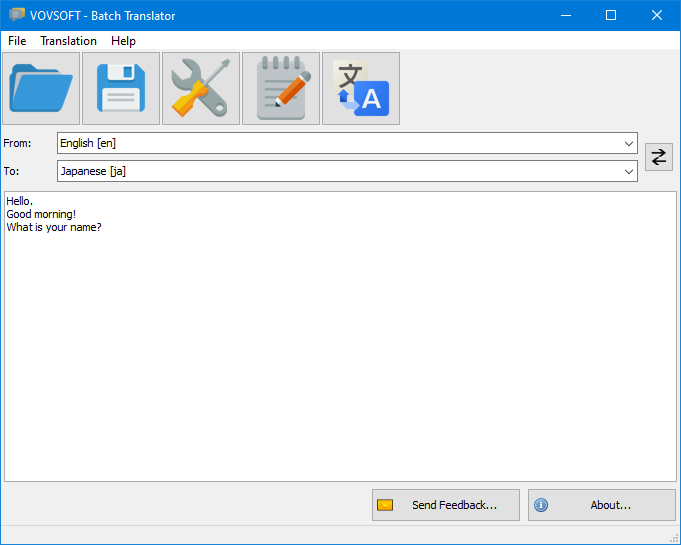
Three English lines pasted in, with English to Japanese selected.

The result: each English line with its Japanese translation in the next column.
Features
Line-by-line bulk translation
Batch Translator treats every line as its own item and translates the whole list in one run, keeping the order, so a list of 1,000 phrases comes back as 1,000 matching translations. Options preserve empty lines and set the line endings.
Three engines, online or offline
Batch Translator works with Microsoft Azure Translator, which Vovsoft says translates up to 2,000,000 characters a month free, the OpenAI API (GPT models, including the o1 reasoning models since January 2025), or Argos Translate, which runs on your own PC with no account. Vovsoft says Argos is slower and less accurate than the online engines.
Word and Excel files as input
Batch Translator loads text from DOC, DOCX, XLS and XLSX files as well as plain text, so you don't have to copy a spreadsheet column out first. It takes the text, not the layout.
Command line for many files
Batch Translator accepts parameters for input file, output file, engine and languages, so a batch script can translate a folder of files one after another, each with its own engine and language pair.
Edit before you save
Batch Translator lets you correct any translated line in an edit window and supports right-to-left reading order for Arabic and Hebrew, then saves the pairs as CSV or the translations as TXT.

The target language list, with codes such as [ar], [bg] and [zh-TW] next to each language.
Benefits
- Hours saved on lists. Glossaries, product names, menu strings and keyword lists go through in one pass.
- Low running cost. $19 once, and Azure's free allowance covers a lot of personal use.
- A private option. With Argos, the text never leaves your computer.
Real-World Uses
- App and website localization. Translate a file of interface strings into Japanese, save the CSV and hand it to a reviewer.
- Online shops. Turn a column of product titles into French and German for new marketplaces.
- SEO keyword research. Translate a keyword list into several languages to check search volume abroad.
- Language learners. Make a two-column vocabulary list from a word list.
Who It's For, and Who Should Skip It
Batch Translator suits translators, small businesses and developers who handle lists of short text and are comfortable creating an API key or installing Python.
Skip it if you want to translate formatted documents: it reads the text out of Word files but doesn't write a formatted Word document back, so a document translator keeps layout better. Skip it too if you want something that works the moment it's installed, if you translate one paragraph now and then (a free web translator is enough), or if you need a Mac app. For subtitle files, Vovsoft's Subtitle Translator keeps the timecodes.
Usage Guide
- Install it, or unzip the portable edition.
- Choose an engine in Settings. For Azure, create a Translator resource in the Azure portal and copy a key and region. For OpenAI, paste an API key. For Argos, install Python 3.12.10 and restart the program; the first translation downloads about 1 GB.
- Paste your lines, or open a TXT, Word or Excel file.
- Pick the From and To languages.
- Click the translate button and wait for the second column to fill.
- Fix any line by hand, then save as CSV or TXT with a licensed copy.
- For many files, call batchtranslator.exe from a batch script with -input, -output, -api, -from and -to.
Before you buy
- The sale price is temporary. $9.50 applies with coupon BLACKFRIDAY2026 until December 1, 2026. After that it's $19.
- The trial can't save. You can see the translations on screen, but exporting them needs a license.
- You need an engine. Azure and OpenAI may require a credit card and aren't available in some countries, such as China and Taiwan. OpenAI bills per use. Argos needs Python and about 1 GB of disk space.
- No refund if you change your mind. Vovsoft refunds at its discretion, mostly accidental orders, and PayPro Global has the final say on orders placed there.
Where it falls short
- One file at a time in the window. Translating several documents from the interface is still a user request; today that means the command line.
- No formatting kept. Users have asked for Word files to keep their formatting and for RTF loading; neither is there yet.
- No resume after an error. If the service drops mid-list there's no retry or "carry on from here" option, so long jobs may need restarting.
- Fewer engines than some tools. Google, DeepL, Gemini and Claude aren't supported.
- Machine quality. Vovsoft itself advises a human proofread for technical documents.
What Users Say
Batch Translator's product page showed 4.5 out of 5 from 4 ratings on November 24, 2026, and Vovsoft as a company showed 4.6 out of 5 from 416 reviews on Trustpilot on the same day.
Customer reviews on the vendor's page
Kenneth Bates: "I like the uncluttered look and speed of operation."
Anonymous User: "It’s an amazing program!"
Independent review
TrishTech (January 2024, an earlier version) walked through loading a text file, choosing languages and an engine, and saving the result, and noted that the engines "require login credentials which can be obtained by creating a new account and paying for the subscription" and "may not be available in all the countries of the world."
Trustpilot reviews of Vovsoft (other products)
Jaffer Dharamsi (5 stars, September 19, 2026), about Text Edit Plus: "Their response was quick, friendly, and effective, resolving the issue far faster than I expected."
Gary Zeune (5 stars, October 28, 2026): "Support is fast and on the money."
A customer (1 star, October 21, 2026): "CSV to VCF does a poor job. You need to start over on this one."
The recurring theme: buyers like the plain interface and speed, and reviewers point at the same hurdle, that the program is only as good as the engine you connect, which means an account or a Python install first. The open feature requests (retries, resume, multi-file in the window) come from people translating large jobs.
Comparisons
Batch Translator vs free web translators
Google Translate and DeepL's websites need no setup and are fine for a paragraph, but they cap the text length and you copy results back by hand. Batch Translator costs $19 and keeps long lists aligned line by line, ready for a spreadsheet.
Batch Translator vs Vovsoft Subtitle Translator
Both use the same engines. Subtitle Translator reads SRT, VTT and MKS subtitle files and keeps their timecodes; Batch Translator handles general text, Word and Excel files and adds a command line.
Batch Translator vs professional CAT tools
Tools such as Trados or memoQ keep formatting, translation memories and glossaries, and cost far more. {N} is a quick, cheap way to machine-translate lists, not a replacement for a translator's workbench.
Editions and Pricing
| Option | Price at checkout | License | What you get |
|---|
| Batch Translator | $9.50 with BLACKFRIDAY2026 until December 1, 2026 (regular $19) | Lifetime, free updates | This program, installer and portable |
| Vovsoft Universal License | $49.50 with BLACKFRIDAY2026 until December 1, 2026 (regular $99) | Lifetime, free updates | Every Vovsoft desktop program, including future ones |
The Universal License makes sense if you'd also use Subtitle Translator or other Vovsoft tools: one key activates every Vovsoft desktop program, each otherwise $19.
Buy Batch Translator ($9.50)Buy Universal License ($49.50)
FAQs
Does Batch Translator work offline?
Batch Translator works offline with Argos Translate once Python, the base library and the language packs are installed. Azure and OpenAI need an internet connection.
Do I have to pay for the translation engine as well as Batch Translator?
Batch Translator costs $19 once. Azure's free tier covers up to 2,000,000 characters a month according to Vovsoft, OpenAI charges per use on your own account, and Argos is free.
Does Batch Translator support Google Translate or DeepL?
Batch Translator supports Microsoft Azure, OpenAI and Argos Translate only. Google and DeepL aren't in the list.
Can Batch Translator translate a whole Word document and keep the formatting?
Batch Translator reads the text from DOC and DOCX files and translates it line by line, but it saves plain TXT or CSV, not a formatted Word file.
How many languages does Batch Translator support?
Batch Translator lists more than 100 languages with Azure and OpenAI, and about 30 with offline Argos Translate.
Is Batch Translator a subscription?
Batch Translator is a one-time purchase. The license never expires and includes future updates.
Can I use Batch Translator for client work?
Batch Translator's paid license allows commercial use. The trial doesn't.
System Requirements
- Windows 11, 10, 8/8.1 or 7, 32-bit or 64-bit
- 3.82 MB for the installer or 2.74 MB for the portable edition
- For Azure or OpenAI: an internet connection and your own API key
- For Argos: Python (3.12.10 recommended) and about 1 GB of disk space
Conclusion
Batch Translator is worth $19, and a bargain at $9.50 until December 1, 2026, if you regularly machine-translate lists of short text and can set up an Azure or OpenAI key or Python once. The one reason to buy it is clean, line-aligned bulk translation with a CSV export and a command line. The main reason not to is that it does nothing until an engine is set up, keeps no formatting, and the free trial can't save the result. Try your engine and language pair in the trial first.
Download Free TrialBuy Now