Vovsoft Math Practice: Simple Arithmetic Drills for Young Children on a Windows PC
Math Practice is a $19 Windows program from Vovsoft that gives elementary-school children endless addition, subtraction, multiplication and division exercises, each with four big answer buttons to pick from, at three difficulty levels. There's nothing to set up and no internet or account needed. The $19 is a one-time lifetime license, and the free trial works fully for home use.
It's for parents, homeschooling families and teachers who want a plain, distraction-free way for a child to practice the four operations on a PC, without the ads, rewards and in-app purchases of most math apps.
Quick facts
- Version: 3.3, released March 10, 2026
- Developer: Vovsoft
- Platform: Windows 11, 10, 8/8.1, 7 and Vista, 32-bit and 64-bit. No Mac, iPad or Android version
- Practice: addition, subtraction, multiplication, division
- Format: one problem at a time, four multiple-choice answers
- Levels: three difficulty levels
- Editions: installer (3.7 MB) and portable (2.43 MB), one license for both
- Price: $19, one-time payment, lifetime license with free updates
- Trial: all features, with a nag screen and for non-commercial use only
- What we checked: installer file version 3.3.0.0 (3,886,896 bytes) with a valid code signature, downloaded from the vendor on November 11, 2026, and $19.00 on the order page with no auto-renewal on November 11, 2026. We didn't try it with a child
Download Free TrialBuy Now
Overview
Math Practice opens on a menu where the child picks an operation. Each exercise shows a problem in very large numbers, such as "4 + 8 = ?", above four answer buttons. The child clicks one, then Next for another problem, or Menu to switch operations.
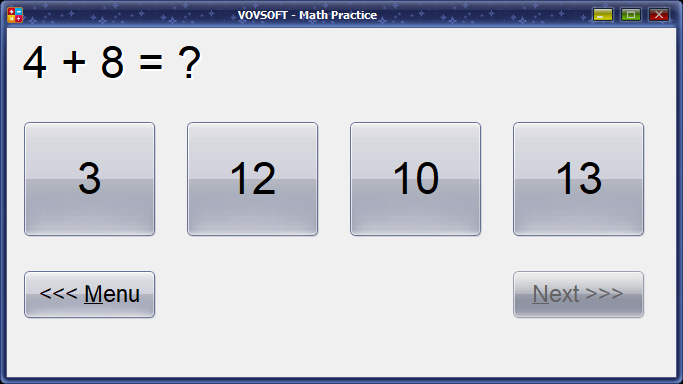
An addition exercise: 4 + 8 with the choices 3, 12, 10 and 13, and Menu and Next buttons below.
Features
The four operations, generated automatically
Math Practice covers addition, subtraction, multiplication and division. Choose one and new exercises keep coming, so a child can practice for five minutes or half an hour without anyone preparing worksheets.
Three difficulty levels
Math Practice has three difficulty levels, so a parent or teacher can start a child easy and raise the challenge as speed and accuracy improve.
Big, plain and distraction-free
Math Practice shows one problem in large type and four large buttons, with no ads or clutter around it, which suits younger children and children who are easily distracted.
Light and portable
Math Practice uses very little of the PC, runs on old computers back to Windows Vista, and has a portable edition that runs from a USB stick, handy for classroom or shared PCs where you can't install software.
Benefits
Basic arithmetic gets fast only through lots of repetition. Math Practice makes that repetition effortless to start: no worksheets to print or mark, no account, no internet, nothing to buy inside the program. Multiple-choice answers mean even a child who can't type well yet can work alone.
Real-World Uses
- Ten minutes of times-table practice after school on the family PC.
- A homeschool math warm-up before the day's lesson.
- A classroom station on an old PC while the teacher works with a small group.
- Practice from a USB stick on a library or shared computer.
Who It's For, and Who Should Skip It
Math Practice suits parents and teachers of children in the first years of elementary school who want plain arithmetic practice on a Windows PC, with nothing else to manage.
Skip it if you want progress tracking, reports, timed tests, word problems or anything beyond the four operations: it's a simple drill. Children on tablets need an app instead, since there's no iPad or Android version. And free websites and printable worksheets offer similar drills, so the $19 buys mainly simplicity and an offline, ad-free screen.
Usage Guide
- Download the installer or portable edition and start Math Practice.
- Pick an operation and choose a difficulty level.
- Click the right answer among the four buttons.
- Click Next for another problem, or Menu to change operation or level.
Before you buy
The trial has every feature, with a nag screen, and is for personal use; a school or tutoring business needs the license. One license covers one person on any number of their own computers, or one PC shared by several people. Vovsoft's general policy is no refunds, since the trial comes first (it may refund an order made by accident, at its discretion, and PayPro Global has the final say on orders it handles), so let your child try it for a week first.
Where it falls short
- No progress tracking, scores history or reports for parents.
- Multiple choice only: the child never has to produce an answer without options.
- Only the four basic operations, with no fractions, decimals or word problems.
- Slow development: between 2020 and 2026 the updates were bug and display fixes, with no new exercises.
What Users Say
On Vovsoft's site
Math Practice's product page shows 4.3 out of 5 from 4 ratings. One English comment reads: "I like it because it helps your child to think very fast." (Anonymous User).
Its feature request page shows no open requests, and we found no independent reviews. Vovsoft as a company has a TrustScore of 4.6 out of 5 from 411 reviews on Trustpilot (read through a summarizer), with no recent review naming this program.
The one written comment likes it as a drill that gets children thinking fast. With so few reviews, the free trial is the best way to see whether your child takes to it.
Comparisons
Math Practice vs math websites and apps
Free websites and tablet apps offer arithmetic drills, often with games, rewards and progress tracking, but many come with ads, accounts or subscriptions. Math Practice is far simpler, offline and ad-free, for a one-time $19.
Math Practice vs printed worksheets
Worksheets are free and make children write the answers, but someone has to print and mark them. Math Practice needs no printing or marking and never runs out of problems.
Editions and Pricing
| Option | Price | License | What you get |
|---|
| Trial | Free | Personal, non-commercial use | All features, nag screen |
| Math Practice license | $19 one time | Lifetime, commercial use allowed | No nag screen, all future updates |
| Vovsoft Universal License | $99 one time | Lifetime | All 115+ Vovsoft programs |
The license key arrives by email right after payment. Prices include tax.
FAQs
What age is Math Practice for?
Math Practice is aimed at elementary-school children learning the four basic operations; the three levels let you match it to a younger or older child.
Does Math Practice need the internet?
No. Math Practice runs offline once installed (activating a license uses the internet, and offline activation is available).
Does Math Practice keep track of my child's scores?
No. Math Practice keeps no score history or reports for parents.
Can Math Practice be used in a classroom?
Yes, with a license, since the trial is for non-commercial use. One license can be installed on a single workstation shared by several pupils; several classroom PCs need a license each.
Is the $19 a subscription?
No. Math Practice's $19 is a one-time payment for a lifetime license with future updates. Nothing renews.
System Requirements
- Windows 11, 10, 8/8.1, 7 or Vista, 32-bit or 64-bit
- About 3.7 MB for the installer, or 2.4 MB for the portable edition
- English interface
Conclusion
Math Practice is worth $19 for a family or teacher who wants a plain, offline, ad-free arithmetic drill on a Windows PC and values that simplicity over games and tracking. The reason not to buy it: it's very basic, multiple choice only, with no progress reports, and free websites, apps and worksheets cover the same ground. Since the trial has everything, let your child use it for a week, and buy it if they keep coming back to it.
Download Free TrialBuy Now