ActivePresenter 10: Screen Recorder, Video Editor and eLearning Course Builder in One App
ActivePresenter 10 is a Windows and Mac app from Atomi Systems that records your screen, edits the video and turns it into interactive courses and quizzes for a learning management system (LMS). It's a one-time purchase: $249 for Standard (videos and documents) or $499 for Pro (interactive HTML5, SCORM and xAPI courses), and the Free edition never expires.
If you make software tutorials, onboarding videos or compliance training, you usually end up juggling a screen recorder, a video editor and an authoring tool such as Articulate Storyline or Adobe Captivate, often on a subscription. ActivePresenter does all three jobs in one window that looks a lot like PowerPoint, and you pay for it once.
Quick facts
- Developer: Atomi Systems, Inc. (Hanoi, Vietnam)
- Latest version: 10.6.2, released October 15, 2026 (version 10.0 came out on August 29, 2025)
- Platforms: Windows 10 and 11 (64-bit only); macOS 13 or later, as one universal app for Apple Silicon and Intel Macs
- Editions: Free ($0, non-commercial), Standard ($249), Pro ($499), Pro EDU ($249 for eligible schools, students, teachers and non-profits)
- License: perpetual, per computer, with one year of free major upgrades; every 10.x update stays free
- Output: MP4, AVI, WMV, WebM and MKV video, images, PDF, Word, Excel, PowerPoint, HTML5, SCORM 1.2, SCORM 2004 and xAPI
- Trial: the Free edition has no time limit; paid features still work in it but put a watermark on the output
- Refunds: none on perpetual licenses, except a wrong product or a duplicate order within 7 days
- What we checked: the Windows installer for 10.6.2 (192.5 MB, dated October 15, 2026) and the 316 MB macOS installer on the download page, the version 10 release notes back to 10.0.0, and the order page prices for Standard ($249), Pro ($499) and Pro EDU ($249), all one-time, in US dollars on November 15, 2026. We didn't build or publish a course with it.
Before you buy
- Test it first, because there are no refunds. Atomi doesn't refund perpetual licenses once the key is sent. The Free edition runs every feature (with a watermark where it's a paid one), so build a real project in it before you pay.
- Pick the edition by what your learners do. If they only watch videos or read documents, Standard is enough. Quizzes, clickable simulations, branching and anything you upload to an LMS need Pro: HTML5, SCORM and xAPI export are Pro-only.
- Pro EDU needs approval first. Send Atomi proof of eligibility (a school ID, a paycheck stub from the school or similar, dated within six months) to sales@atomisystems.com and wait for their email before you order.
- AI features use credits. Standard, Pro and Pro EDU come with a starting balance; more credits cost $40 for 20,000, $50 for 25,000 or $60 for 30,000. The Free edition has no AI tools at all.
- One license works on one computer at a time. You can deactivate it (Help, Deactivate Product) and move it.
Download Free EditionBuy Standard ($249)Buy Pro ($499)
Overview
Atomi says ActivePresenter has passed 5 million downloads and is used in more than 10,000 organizations. Version 10 is a full redesign. The workspace follows the Office ribbon layout: slides down the left, the canvas in the middle, a Properties pane on the right and a multi-track Timeline along the bottom, where every recording, caption, shape and question sits as its own track.
The idea is that a project is a deck of slides. A slide can hold a full-motion screen recording, a webcam clip, an imported PowerPoint slide, a quiz question or an interactive simulation step, and you can mix them freely. The same project can then go out as a plain MP4 for YouTube, a PDF handout, or a tracked SCORM package for Moodle, Canvas or any other LMS.

The ActivePresenter 10 editor: a presenter filmed against a green screen, placed in a circle over a recorded quiz slide, with the Questions ribbon above and the multi-track Timeline below.
Features
Screen, webcam and audio recording in every edition
ActivePresenter records the screen as full-motion video together with the webcam, the microphone and system audio, all at once, with no time limit on a recording. It can also record an interactive simulation: every click and keystroke becomes a separate slide, and Smart Annotation writes the step text ("Click the File menu") for you from the actions it captured. On a Mac, recording system audio needs the free BlackHole 2ch driver.
Smart Studio polishes recordings almost automatically
ActivePresenter's Smart Studio, new in version 10.6, takes a raw screen recording and adds automatic zoom on clicks, typing and scrolling, a smooth high-definition cursor, on-screen keyboard shortcut overlays, presenter layouts for your webcam (from picture-in-picture to full screen) and auto framing that reframes the video for 16:9, 9:16 or 1:1 without stretching it. You choose a Calm, Balanced or Dynamic motion style and adjust the zoom level before you apply it.
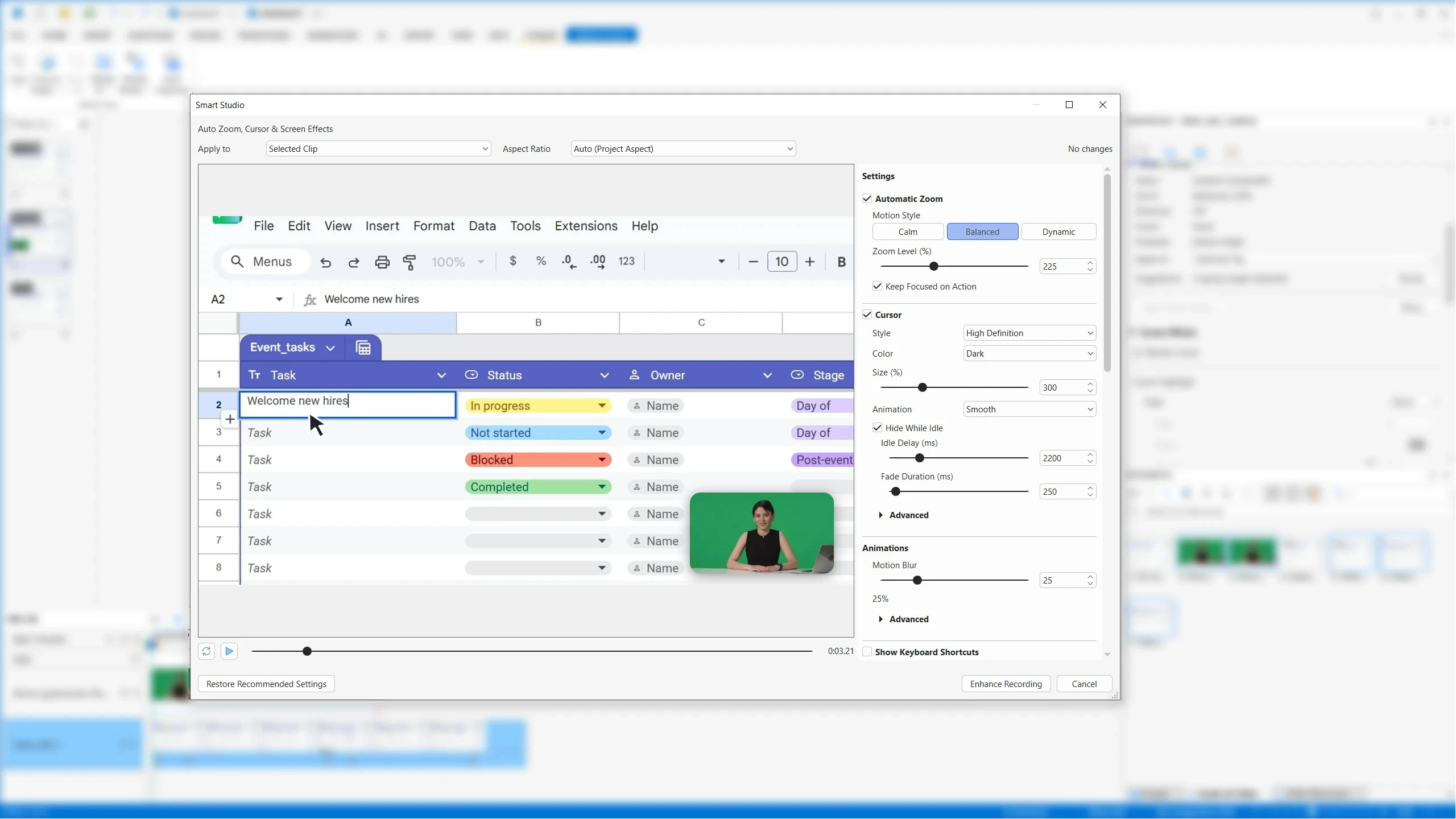
The Smart Studio dialog applied to a spreadsheet recording, with Automatic Zoom set to Balanced, a high-definition cursor and motion blur.
Video and audio editing on a multi-track timeline
ActivePresenter edits recordings without re-encoding them: cut, crop, split, join, change speed or volume, insert freeze frames and add closed captions in several languages. Zoom-n-pan and Spotlight point at the part of the screen that matters, and audio ducking lowers background music while you talk. Standard and Pro add the advanced effects: blur that follows a moving area (to hide faces or data), green screen, AI noise removal and audio normalization.
Quizzes, branching and LMS courses (Pro)
ActivePresenter Pro builds courses that react to the learner: 14 question types (multiple choice, drag-and-drop, hotspot, fill in the blanks, tracing, Likert scale and more), question pools that shuffle, scoring with custom grade scales, variables, IF/THEN/ELSE conditions, object states and multiple timelines. The Scenario Editor, added in 10.6, draws branching learning paths as a graph you can validate and simulate before you publish. Questions can be imported in bulk from GIFT or CSV files.
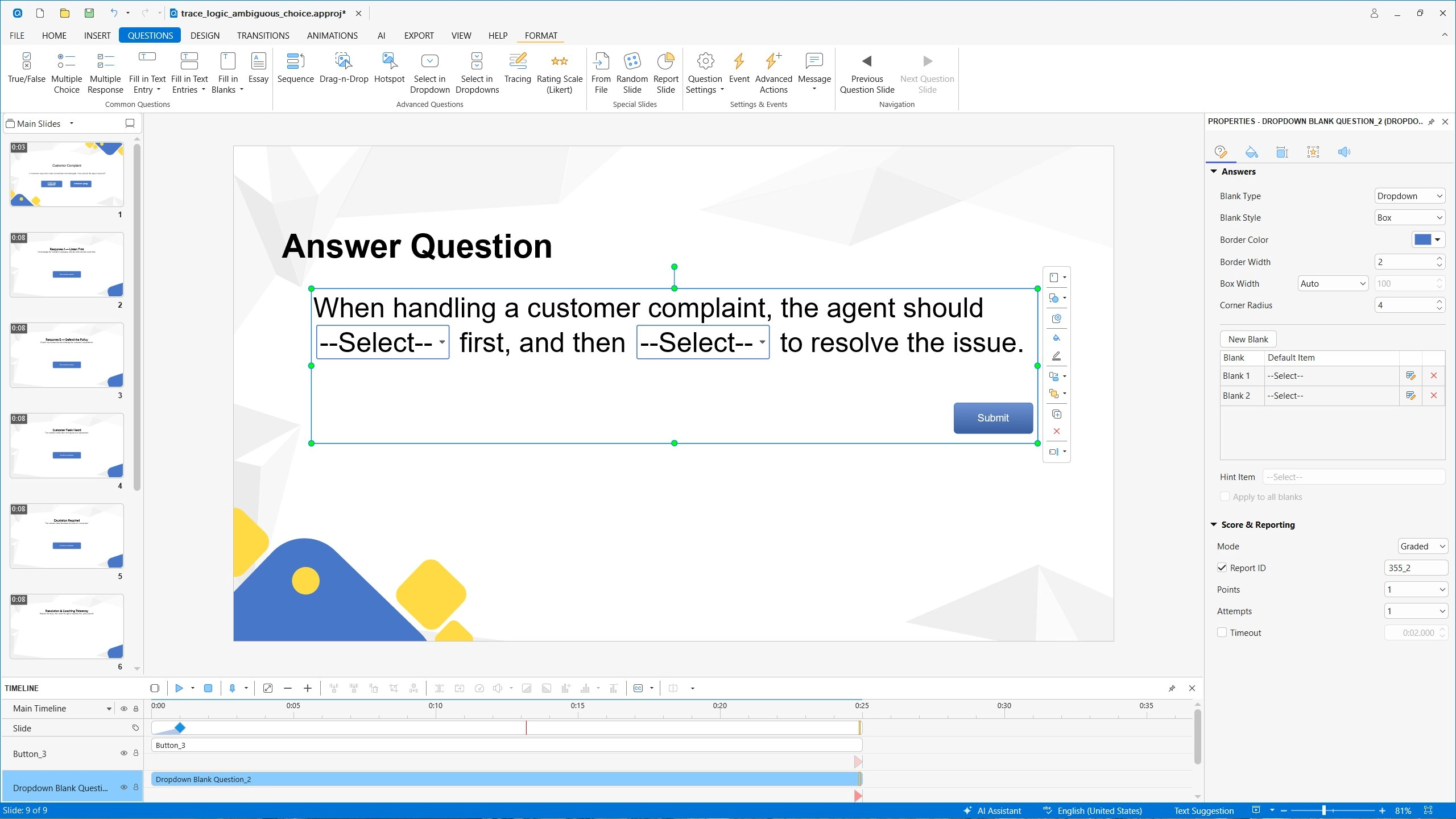
A fill-in-the-blanks question with two dropdown blanks; the Properties pane on the right sets the blank style, points, attempts and the report ID sent to the LMS.
AI Assistant for writing, voices and translation
ActivePresenter's paid editions include an AI toolkit that runs on credits: it drafts slide text and quiz questions, generates whole presentations from a prompt, creates and edits images, removes image backgrounds, reads text out of images, turns text into speech, writes captions from speech and translates a whole project into other languages. Speech-to-text can also run locally on your computer, without sending audio to a cloud service.

A recorded simulation of the "Generate with AI" screen: you type a presentation title and optional description, and the outline costs 5 credits.
PowerPoint in, Office documents out
ActivePresenter imports PPTX files natively, keeping charts, tables, 3D models and on-click animations, so an existing slide deck can become a trackable course. Since 10.6 it also writes Word, Excel and PowerPoint files itself, without Microsoft Office installed, which is handy for a printable step-by-step guide made from the same recording.
Benefits
- One tool instead of three. Recording, editing and authoring happen in the same project, so a change to a recording doesn't mean re-exporting it into another program.
- No subscription. You pay $249 or $499 once, and the version you bought keeps working after the upgrade year ends.
- A short learning curve for Office users. The ribbon, the slide list and the Properties pane will feel familiar to anyone who has built a PowerPoint deck.
- One project, many outputs. The same course can become a video for YouTube, a PDF handout and a SCORM package without rebuilding it.
Real-World Uses
- Software training: record an interactive simulation of a CRM or ERP task, let Smart Annotation write the steps, and publish a "try it" version where the learner has to click the right button to move on.
- Compliance courses: import the existing PowerPoint, add a question pool that shuffles, set a pass mark and upload the SCORM 2004 package to the company LMS, which records each score.
- YouTube tutorials: record the screen and webcam together, let Smart Studio add the zooms, blur a customer's email address and export a 9:16 cut for Shorts alongside the 16:9 original.
- Classroom lessons: a teacher turns a lecture into a video with captions in two languages and a short drag-and-drop quiz at the end.
Who It's For, and Who Should Skip It
ActivePresenter suits instructional designers, trainers, teachers and support teams who need real interactivity and LMS tracking but don't want to pay a subscription, and anyone who records software tutorials regularly and wants the zooms, captions and blur done in one place.
Skip it if you only need the occasional quick screen clip to send to a colleague: a free recorder (or ActivePresenter's own Free edition, for non-commercial use) does that. It's also the wrong buy on Linux or a Chromebook, since it runs only on 64-bit Windows 10/11 and macOS 13 or later, and on older PCs: Atomi asks for 8 GB of RAM and 10 GB of free disk space. Teams that need real-time co-authoring in a browser should look at a cloud authoring tool instead; ActivePresenter is a desktop app that saves projects locally.
Usage Guide
- Install and launch. Download the installer (192.5 MB for Windows, 316 MB for macOS) and install it with administrator rights. It starts as the Free edition.
- Activate a license if you bought one: enter the product key in the app. There is one installer for every edition, so nothing needs reinstalling.
- Start a project from the Start Page: record the screen as video, record a software simulation, import a PowerPoint file, or start from a theme or template.
- Record. Choose the area, the webcam and the audio sources, then press the record button. Stop with the hotkey and the recording opens as slides or a video clip in the project.
- Edit on the Timeline: trim, add captions, zoom-n-pan, blur, or run Smart Studio on a clip.
- Add interactivity (Pro): insert questions from the Questions tab, set events and actions, and check the logic in HTML5 Preview.
- Export from the Export tab to video, PDF or Office documents, or (Pro) to HTML5, SCORM, xAPI or the uPresenter LMS.
Where it falls short
- Interactivity only works in HTML5, SCORM and xAPI. A video or PDF export of a quiz is just a picture of it.
- The upgrade year runs out. After it, moving to the next major version costs 40% of the full price ($99.60 for Standard, $199.60 for Pro at today's prices).
- Fewer advanced authoring extras than the market leaders. The Learning Guild review pointed out it had no virtual reality options like Adobe Captivate and no slide layers like Articulate Storyline, and AlternativeTo users mention fewer slide transitions and a smaller feature set than "advanced competition".
- A fast-moving new major version. The 10.6.1 and 10.6.2 releases in September and October 2026 fixed crashes when previewing timelines and recordings, lost audio in simulation recordings, and formatting lost when importing PowerPoint, so keep it updated and keep backups of large projects.
- AI work costs extra. Once the starting credits are gone, AI text, voices and images need paid credit packs.
What Users Say
ActivePresenter has a loyal following among trainers and teachers. The praise centres on value and the PowerPoint-like learning curve; the criticism is about missing extras compared with Storyline and Captivate.
Journal of the Medical Library Association (ActivePresenter 9, October 2023)
Stephanie M. Swanberg, a user services librarian, reviewed version 9 for the journal and compared it with ScreenPal and Camtasia:
"The major advantage to using ActivePresenter is that it has a simple learning curve. ActivePresenter mimics the Microsoft Office layout so no matter the level of experience with video editing, the user can easily recognize the layout and find their way around the product."
"The free version of ActivePresenter is surprisingly robust for screen capture/video recording, editing, and video publishing options."
On the limits: "Closed captions have to be manually entered in the free version," and "For librarians that casually create video tutorials, the free version of ActivePresenter is likely sufficient for recording and editing needs. However, the Pro version should be considered for librarians who frequently develop learning objects and online tutorials, or record lectures."
The Learning Guild (Joe Ganci, April 2020, version 8 Pro)
eLearning developer Joe Ganci reviewed the Pro edition of version 8 in the Guild's Toolkit column: "It's an impressive set of options for a product that costs less than most."
He also listed what was missing: "It may not have virtual reality options as Adobe Captivate does, or slide layers as Articulate Storyline does." and "I didn't see a library of imported media either."
AlternativeTo (4.3 out of 5 from 6 ratings)
scotstew, December 2023: "ActivePresenter is hands-down the best value for the money"
javiergil, June 2019: "Very affordable. Versatile, easy learning curve."
rdeanshultz, August 2022: "Lossless recording is high quality." and "I wish there were more slide transitions."
NejyCR, January 2023: "minimal in features compared to advanced competition"
SourceForge (5 out of 5, 1 review)
Chante G., a teacher, titled her review "Excellent E-learning, Reasonable Price": "This is an eLearning authoring software comparable to Captivate or Storyline. It is easy to learn, flexible, and powerful." Her verdict: "I'm thrilled to have found a quality eLearning authoring tool at a reasonable price. I'm not sure why this isn't better known!"
Customers quoted on Atomi's site
Michael Apfel (Onebox): "I've been a user for 7 years and recommend ActivePresenter to all my colleagues. My life would be much more difficult without this wonderful tool."
Jay Sweeney (Knowsley Community College): "I am so happy I bought your product – it provides everything I need and more, to make tutorials, and your support is second to none."
The pattern: reviewers keep coming back to value for money, the Office-style interface and the quality of support. The complaints are about depth at the high end (slide layers, VR, transitions, a media library) rather than about things breaking, and both independent reviews say the Free edition alone covers casual tutorial work.
Comparisons
ActivePresenter vs Camtasia
Both record the screen and edit video on a timeline, and the JMLA review found them similar for recording, editing and publishing. ActivePresenter Pro goes much further into eLearning, with 14 question types, branching, variables and SCORM/xAPI output from the same project, and it's a one-time purchase.
ActivePresenter vs Articulate Storyline and Adobe Captivate
Storyline and Captivate are the best-known authoring tools, with extras such as slide layers (Storyline) and VR projects (Captivate). ActivePresenter Pro covers the core of the same work (interactions, quizzes, simulations, SCORM/xAPI) at $499 once, with screen recording and video editing built in.
Standard vs Pro
Both are commercial licenses with recording, advanced video effects, Smart Studio, AI tools and PDF/Office export. Pro adds everything a learner interacts with: interactions, quizzes, the Scenario Editor, responsive design and HTML5, SCORM, xAPI and uPresenter output. In Standard those features still work, but the output carries a watermark.
Editions and Pricing
All prices are one-time, in US dollars, for one computer, with one year of free major upgrades. Each button orders that edition.
| Edition | Price | Use | What it includes | Buy |
|---|
| Free | $0 | Trial and non-commercial | Recording, basic editing, video and image export; paid features watermark the output; no AI | Use the download button |
| Standard | $249 | Commercial videos and documents | Advanced effects, Smart Studio, AI tools with credits, PDF and Office export | Buy Standard |
| Pro | $499 | Interactive courses for an LMS | Everything in Standard plus quizzes, interactions, Scenario Editor, HTML5, SCORM, xAPI and uPresenter | Buy Pro |
| Pro EDU | $249 | Students, teachers, schools, non-profits | The full Pro edition; order only after Atomi confirms your eligibility by email | Buy Pro EDU |
Buying 2 or more licenses at once takes 20% off each (2-5 licenses), rising to 45% for 50 or more.
FAQs
Is ActivePresenter a subscription?
No. ActivePresenter Standard, Pro and Pro EDU are perpetual licenses: you pay once and the version you bought never expires. The price includes a year of new major versions, and every update within your version (10.x) stays free after that.
Can I use the Free edition of ActivePresenter for YouTube videos?
Yes, in most cases. Atomi counts posting to YouTube or social media as non-commercial use, and ad revenue is fine, unless the video promotes the products of your own business or one connected to it. A business tutorial or a product demo needs Standard or Pro.
Does ActivePresenter work with Moodle, Canvas or other LMSs?
ActivePresenter Pro exports SCORM 1.2, SCORM 2004 and xAPI (Tin Can) packages, which almost every LMS accepts, and it can publish straight to Atomi's own uPresenter LMS. Standard can't export those formats without a watermark.
Does ActivePresenter need Microsoft Office or PowerPoint installed?
No. ActivePresenter imports PPTX files and writes Word, Excel and PowerPoint files on its own; you only need Office (or another app) to open the exported files.
Does ActivePresenter run natively on Apple Silicon Macs?
Yes. Since version 10.6, ActivePresenter for macOS is a universal app that runs natively on M-series and Intel Macs, without Rosetta. It needs macOS 13 or later; Macs on older systems can use version 9.4.0 from the download page.
Can I move my ActivePresenter license to a new computer?
Yes. An ActivePresenter license works on one computer at a time: choose Help, Deactivate Product on the old one, then activate the same key on the new one. Activations can also be managed in Atomi's self-help portal.
What happens when the year of upgrades ends?
Nothing stops working. You keep ActivePresenter 10 and its updates; to move to a future major version you buy an upgrade at 40% of the full price.
Can I upgrade from Standard to Pro later?
Yes. Atomi sells a Standard to Pro upgrade in its ActivePresenter License Services portal, so you don't have to buy a second full license. Because one installer covers every edition, you only enter the new key afterwards.
System Requirements
- Windows 10 or Windows 11, 64-bit only, or macOS 13, 14, 15 or 26 (Apple Silicon or Intel)
- 2 GHz or faster processor with SSE2 (multi-core recommended)
- 8 GB of RAM or more
- 10 GB of free disk space
- Administrator rights to install
- Sound card and microphone for audio recording, a webcam for webcam video; BlackHole 2ch to record system audio on a Mac
- HTML5 courses play in current Chrome, Firefox, Edge and Safari, on iOS 15 or later and Android 12 or later
Conclusion
ActivePresenter 10 is worth it if you build training or tutorials for a living and don't want an authoring subscription. Pro at $499 once gives you a screen recorder, a capable video editor and a real eLearning authoring tool with quizzes, branching and SCORM/xAPI output, and it's the best reason to buy: very few tools combine all three this cheaply. Standard at $249 makes sense only if your output is video and documents.
The main reason not to buy is the no-refund policy combined with the gap to Storyline and Captivate at the high end: if you rely on slide layers or VR, or you need browser-based team authoring, look elsewhere. Either way, the Free edition never expires, so build one real lesson in it first and you'll know which edition you need.
Download Free EditionBuy Standard ($249)Buy Pro ($499)