Saola Animate 3 Pro: HTML5 Animations and Interactive Web Content Without Coding
Saola Animate 3 Pro is a Windows and Mac editor from Atomi Systems for making HTML5 animations, animated banners, infographics and small interactive pieces that play in any browser, without writing code. It costs $79 once, with a 30-day trial that includes every feature.
Since Flash died, animating something for a web page has meant hand-written CSS and JavaScript, an expensive design suite, or a Mac-only app. Saola Animate gives you a timeline, keyframes and a properties pane, the way animation tools have always worked, and writes the HTML5 for you.
Quick facts
- Developer: Atomi Systems, Inc., the maker of ActivePresenter
- Latest version: 3.1.4, released November 29, 2023 (version 3.0 came out on February 2, 2021)
- Platforms: Windows 10 and 11 (64-bit); macOS 10.14 or later, Intel and Apple Silicon
- Output: HTML5 for browsers, websites and LMSs; MP4, WebM and MKV video
- Price: $79 one-time for one computer, with a year of free upgrades and a year of email support; every 3.x update is free
- Trial: 30 days with every feature
- Refunds: none on perpetual licenses, except a wrong product or a duplicate order within 7 days
- What we checked: the Windows installer for 3.1.4 (130.5 MB, dated November 29, 2023) and the 236.6 MB macOS installer on the download page, the release notes back to 3.0.0, and the order page price of $79, one-time, in US dollars on November 15, 2026. We didn't build an animation with it.
Before you buy
- Saola Animate hasn't had a new release since November 2023. Atomi still sells it with a year of email support, and 3.1.4 runs on Windows 11 and Apple Silicon Macs, but the official system requirements list macOS only up to version 13. Install the trial on the computer you'll use and check it works before you pay.
- There are no refunds once the key is sent, which is why the 30-day trial matters: build one real banner or animation in it first.
- Activating and deactivating the license needs an Internet connection.
- There is only one edition. Everything described here is in the $79 license.
Download Free TrialBuy Now ($79)
Overview
A Saola Animate project is a set of scenes, arranged like slides, that play one after another or jump around when the viewer clicks. Each scene holds elements (shapes, text, images, SVG, video, HTML widgets) and one or more timelines that animate them. The workspace has the scene list on the left, the canvas in the middle, the Properties and Resources panes on the right and the timeline along the bottom, in a dark theme.
When you're done, Saola writes an HTML5 package that runs in Chrome, Safari, Firefox and Edge on Windows, macOS, iOS and Android, and that you can embed in a website or an LMS. Since version 3 it can also render the animation as a video file.

The Saola Animate 3 workspace: an illustrated "5 steps to stay safe" project with its scenes on the left, the scene's size, perspective and transition settings on the right and the main timeline below.
Features
Keyframe animation with auto-keyframing
Saola Animate animates any property of an element on a timeline. In Auto-Keyframe mode you just move the playhead and change a property (position, size, rotation, opacity, color), and the keyframe is added for you. You can pick from 40 easing methods for how each change speeds up and slows down, apply built-in preset effects and fine-tune them as keyframes, and animate text letter by letter or word by word. A scene can have several timelines, each played and controlled on its own.
Motion paths, morphing and hand-drawn effects
Saola Animate moves objects along curved motion paths you draw on the canvas, so a car can follow a road instead of sliding in a straight line. Morph animations turn one shape into another, and line-length keyframes draw a stroke over time, which is how you make whiteboard-style "hand-drawn" animations and charts that draw themselves.

A motion path (the red curve) that drives a bus across an illustrated town, with its Location keyframes on the timeline and Pause, Speed up, Slow down and Go backwards buttons on the canvas.
Shapes, SVG, sprite sheets and symbols
Saola Animate has built-in shapes, imports SVG, and has tools to draw and reshape freeform paths with custom dashes, joins and caps. Characters can be animated from sprite sheets (one image file, which loads fast on the web), and symbols let you reuse an element together with its own timeline and animations across scenes and projects. An element can also stay on screen across several scenes and animate differently in each.
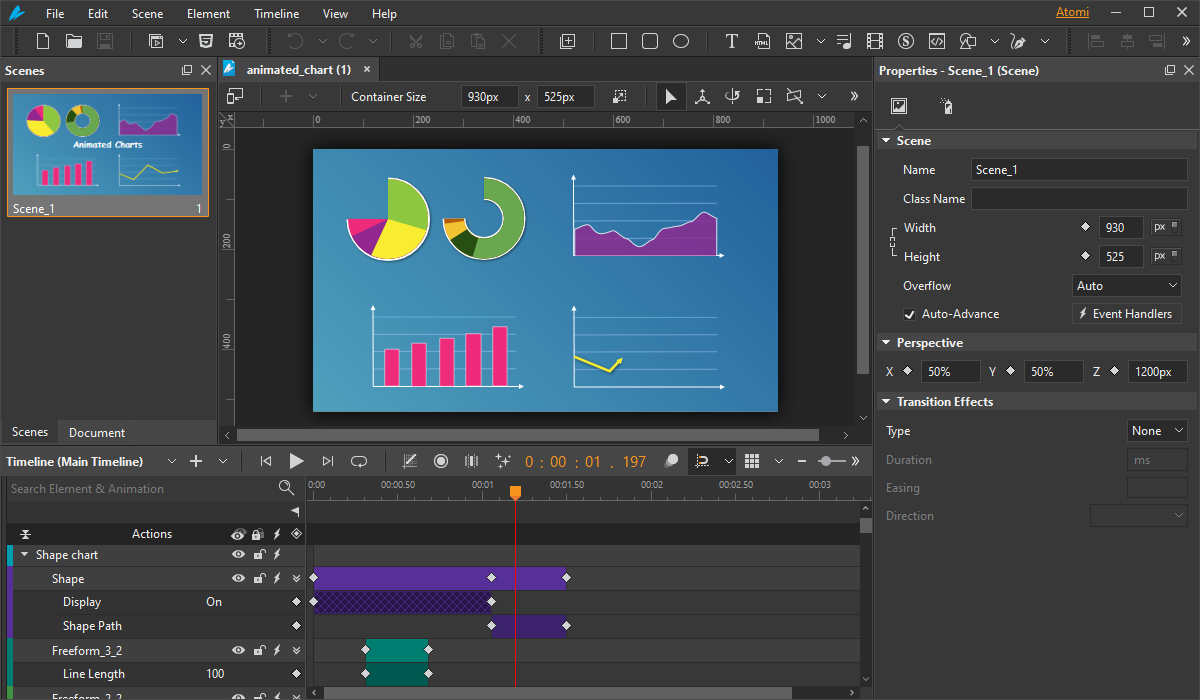
An animated charts sample: the timeline shows Shape Path keyframes (morphing) and a Line Length track that draws a freeform line over time.
Interactivity without code, and JavaScript when you want it
Saola Animate responds to clicks, key presses and other events with actions (play a timeline, jump to a scene, show an element) set up in dialogs, with no code. When that isn't enough, a built-in code editor and a JavaScript API give full control, you can import HTML, CSS and JavaScript files or URLs, and custom elements turn a few lines of markup into your own reusable HTML element (version 3.1.4 added JavaScript support inside them).
Responsive layouts and web fonts
Saola Animate content can resize with the browser window, with a separate layout for each screen size, so one banner works on a phone and a desktop. Hundreds of Google Fonts are available, and system fonts are embedded in the output.
Benefits
- Web-native output. HTML5 stays sharp at any size and works where video autoplay or GIF quality would fall short, such as clickable banners and infographics.
- Familiar animation model. Anyone who has used Flash, After Effects or a video editor will recognize scenes, timelines and keyframes.
- Cheap and permanent. $79 once, for Windows or Mac, with no subscription.
- Room to grow. Start with no-code events and actions, and add JavaScript only when a project needs it.
Real-World Uses
- Animated website banners with a responsive layout for desktop and mobile, embedded straight into a page.
- Infographics and animated charts where bars grow and lines draw themselves as the reader scrolls to them.
- eLearning interactions, such as a clickable diagram or a short drag-and-click activity, packaged as HTML5 and dropped into a course or LMS.
- Simple browser games, like the "Catching Birds" and "Finding Fruits" demos on Atomi's site, using sprite sheets for the characters and events for the clicks.
- Explainer clips for social media, exported as MP4 from the same project.
Who It's For, and Who Should Skip It
Saola Animate suits web designers, marketers and instructional designers who need interactive HTML5 animation now and then and don't want to pay for a large design suite or hand-code CSS animations.
Skip it if you need a tool under active development with new features every year: the last release was in November 2023. It's also the wrong buy for character animation with bones and rigging, for vector illustration from scratch (draw in a vector editor and import the SVG), or for anyone who only needs a video: a video editor is simpler. If you want screen recordings and full eLearning courses rather than web animation, Atomi's ActivePresenter is the better fit.
Usage Guide
- Install and launch the trial (130.5 MB for Windows, 236.6 MB for macOS). It runs for 30 days with every feature; enter your product key to activate it after buying.
- Create a project, set the container size (for example 1920 x 1080, or a banner size) and turn on a responsive layout if it must fit several screens.
- Add elements: shapes, text, imported images or SVG, video, or a sprite sheet. Use symbols for anything you'll reuse.
- Animate: switch on Auto-Keyframe, move the playhead, change properties, then pick easing, or draw a motion path for the element.
- Add interaction with Event Handlers in the Properties pane, or a JavaScript function for custom logic.
- Preview in the browser, then export to HTML5 for your site or LMS, or to MP4, WebM or MKV video.
Where it falls short
- Some editing comforts are missing. A user on Atomi's own forum listed things he wanted fixed: no duplication, no changing the corner radius of a div or a group of elements, no hand tool or space-bar panning like Photoshop or Inkscape, and trouble entering numbers with a graphics tablet.
- A small community. There are few tutorials outside Atomi's own and almost no third-party reviews, so expect to learn from the vendor's manual and forum.
- Older macOS support. macOS 10.13 and Windows 7 and 8 were dropped in version 3.1.0, and the official list stops at macOS 13.
What Users Say
Saola Animate has a small but positive following, and independent reviews of it are scarce.
AlternativeTo (2 reviews, both 5 stars)
uhada, February 2021: "Saola Animate is perfect for making advanced, interactive (!) object based (timeline) animations"
mackavi, September 2019: "Outstanding software, outstanding features and outstanding support."
Atomi user community (March 2022)
malabo1990, in a thread titled "Improve Saola animate": "There is no duplication" and "You can't do hand tool or space button to move the screen," ending "I think these points should change in the next version."
The few users who write about it praise the timeline-based interactivity and Atomi's support; the complaints are about editing conveniences that larger design tools have.
Comparisons
Saola Animate vs Google Web Designer
Google Web Designer is free and also builds HTML5 animations and ads on a timeline. Saola Animate costs $79 but adds motion paths, morphing, line-drawing animation, sprite sheets and video export in a tool that isn't tied to Google's ad formats.
Saola Animate vs Tumult Hype
Tumult Hype is a well-known HTML5 animation app, but it runs only on macOS. Saola Animate runs on both Windows and Mac.
Saola Animate vs ActivePresenter
Both come from Atomi. ActivePresenter is for screen recordings, training videos and full eLearning courses with quizzes and SCORM; Saola Animate is for animated, interactive web graphics. If you build courses, ActivePresenter Pro covers far more; if you make banners and infographics, Saola is the lighter, cheaper tool.
Editions and Pricing
| License | Price | Term | Includes |
|---|
| Free trial | $0 | 30 days | Every feature |
| Pro | $79 | Perpetual, one computer | All features, 1 year of free upgrades, 1 year of email support |
Buying 2 or more licenses at once takes 10% off each (2-5 licenses), rising to 35% for 50 or more.
FAQs
Is Saola Animate a subscription?
No. Saola Animate is sold as a perpetual license: you pay $79 once and the version you bought never expires. Atomi dropped its subscription license in version 3.1.0.
Can I put a Saola Animate project in my LMS or website?
Yes. Saola Animate exports HTML5 that you can embed in a web page or upload to an LMS as web content, and it plays in current Chrome, Safari, Firefox and Edge, on iOS 13 or later and on Android 10 or later.
Does Saola Animate run on Apple Silicon Macs?
Yes. ARM-based Macs have been officially supported since Saola Animate 3.1.0 (December 2022). Atomi's requirements page lists macOS 10.14 through 13, so test the trial on newer macOS versions before you buy.
Can Saola Animate export a GIF or a video?
Saola Animate exports video in MP4, WebM and MKV. GIF isn't one of its listed output formats.
Can I move the license to another computer?
Yes. A Saola Animate license is activated on one computer at a time; deactivate it on the old one (with an Internet connection) and activate it on the new one.
Do I need to know JavaScript to use Saola Animate?
No. Saola Animate's animations, scene changes and most interactions are set up with the timeline and the Event Handlers dialogs. JavaScript is optional, for custom logic.
System Requirements
- Windows 10 or Windows 11, 64-bit (x64) only
- macOS 10.14 or later (the requirements page lists 10.14 to 13), Intel or Apple Silicon
- 2 GHz or faster 64-bit processor
- 4 GB of RAM; more than 8 GB recommended
- Internet connection to activate and deactivate a license
Conclusion
Saola Animate 3 Pro is good value at $79 if you make HTML5 banners, infographics or small interactive pieces on Windows or Mac. The reason to buy it is a real timeline-and-keyframe animation tool with motion paths, morphing and no-code interactivity, which writes web-ready HTML5, for a one-time price.
The reason to hesitate is its pace: no new version since November 2023, a small user community and no refunds. Use the full 30-day trial to build one real project; if it does what you need now, the license keeps working whatever happens next.
Download Free TrialBuy Now ($79)