Vovsoft Audio to Lyrics Converter: Timed LRC Lyrics from Your Songs, Made Offline
Audio to Lyrics Converter is a Windows program from Vovsoft that listens to your MP3, WAV, OGG and FLAC files with OpenAI's Whisper AI, running on your own PC, and writes the words out as time-stamped LRC lyric files, SRT or VTT subtitles, or plain text. It costs $19 for a lifetime license, and in Vovsoft's Black Friday sale until December 1, 2026 it is $9.50 at checkout.
If your music player or karaoke app shows synced lyrics but half your library has none, especially songs by small artists that no lyrics site covers, this fills the gap without uploading a single track.
Quick facts
- Version: 1.5, released August 29, 2026 (first release June 13, 2026)
- Developer: Vovsoft, the software company of Fatih Ramazan Çıkan in Turkey
- Platform: 64-bit Windows 11 and 10 only. No Mac, Linux or 32-bit version
- Input: MP3, WAV, OGG and FLAC audio
- Output: LRC, SRT, VTT or TXT
- AI: Whisper models Base, Small, Medium, Large and Turbo, downloaded on first use and run on your CPU
- Editions: installer (132.99 MB) and portable (145.99 MB), one license for both
- Price: $19 one-time, lifetime license with free updates; $9.50 with Vovsoft's Black Friday coupon BLACKFRIDAY2026 until December 1, 2026 (the Buy Now button below applies it)
- Trial: free to try, but without the Premium AI models or commercial use, and with a nag screen
- Refunds: no money-back guarantee; refunds are at Vovsoft's discretion, mainly for accidental orders
- What we checked: installer file version 1.5.0.0 (139,457,048 bytes) with a valid digital signature, downloaded from the vendor and read without running it; checkout price $19.00, and $9.50 with the coupon, with no auto-renewal on the order page on November 24, 2026. We didn't transcribe a test song or judge accuracy
Download Free TrialBuy Now
Overview
Audio to Lyrics Converter has one window: a file list on the left and the settings on the right. You pick the output type (LRC, SRT, VTT or TXT), let it detect the language or choose one, set a maximum line length, choose an AI model and an output folder, and press Convert. Each file's result appears next to it in the list.
Vovsoft has shipped five updates since the June 2026 launch: a Stop button and settings memory in June and July, a manual language choice in August, an encoding option (UTF-8 with BOM by default) and network-path fixes, and support for Whisper's "Large Turbo" model in version 1.5.
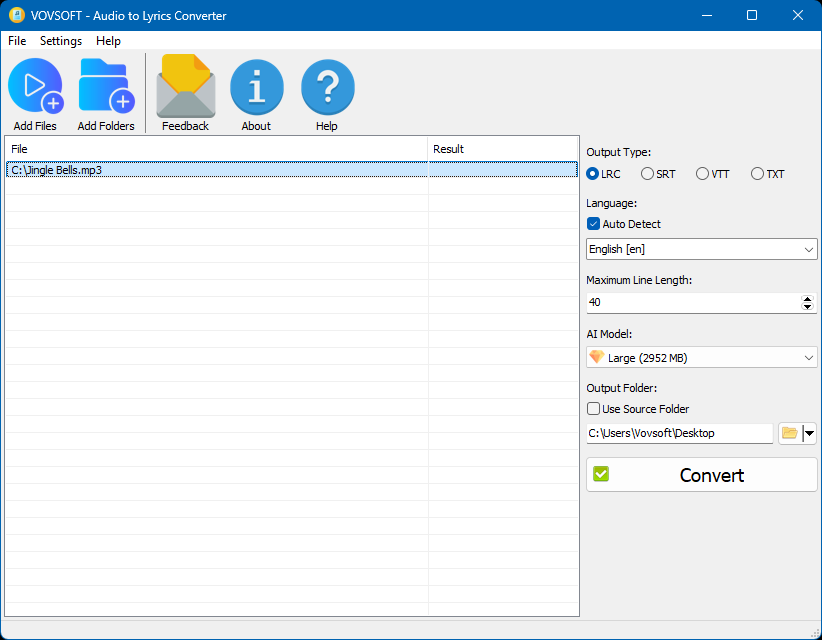
The main window with an MP3 queued, LRC output selected, language auto-detection on, a 40-character line limit and the Large (2952 MB) model.
Features
Synced LRC lyrics for music players and karaoke
Audio to Lyrics Converter writes standard LRC files with a timestamp such as [00:26.00] in front of every line, so players that read LRC show the words in step with the song. Save the .lrc next to the track with the same name and most players pick it up.
Subtitles and plain text from the same audio
Audio to Lyrics Converter can also save SRT or VTT, the subtitle formats YouTube and video editors accept, or a TXT transcript for podcasts, interviews and lectures.
Offline Whisper models you choose
Audio to Lyrics Converter runs OpenAI's Whisper models locally, from the small Base model to Large (2,952 MB) and the faster Large Turbo. Smaller models finish sooner, larger ones hear more accurately. No account, API key or internet connection is needed once a model is downloaded, and your audio never leaves the PC.
Batch conversion of whole folders
Audio to Lyrics Converter takes single tracks or whole folders, by button or drag and drop, and works through the queue in one go. A Stop button ends a long batch, and right-click items open the result or show it in Explorer.
Language detection or a fixed language
Audio to Lyrics Converter detects the sung or spoken language by itself, or you can set it by hand, which helps when a song mixes languages or the detection guesses wrong.

An LRC file it produced for "Jingle Bells", opened in Notepad: one timestamp per line, with lines wrapped at the 40-character limit.
Benefits
- Lyrics for songs nobody else has. Independent artists, demos and your own recordings get synced lyrics too.
- Private. Unreleased tracks and recordings stay on your computer.
- No running costs. One payment, no per-minute cloud charges.
Real-World Uses
- A synced-lyrics library. Run a folder of albums overnight and get .lrc files for a player that reads them.
- Karaoke tracks. Make a first LRC draft for a song, then fix the words by hand.
- Captions for a music video or podcast. Export SRT and load it into a video editor or YouTube.
- Songwriters. Turn voice-memo demos into a text lyric sheet.
Who It's For, and Who Should Skip It
Audio to Lyrics Converter suits Windows users with large music collections, karaoke hobbyists and small creators who want timed lyrics or captions without a subscription or an upload.
Skip it if you only need lyrics for popular songs, which lyrics sites and streaming apps already show, or if you need word-by-word karaoke highlighting, which it doesn't do yet. Mac users and anyone on 32-bit Windows can't run it. If your files are mostly videos needing subtitles, Vovsoft's Speech to Subtitle Converter reads video formats directly.
Usage Guide
- Install it, or unzip the portable edition. It needs 64-bit Windows 10 or 11.
- Click Add Files or Add Folders, or drag tracks into the list.
- Choose LRC (or SRT, VTT, TXT) as the output type.
- Leave Auto Detect on, or pick the language.
- Set the maximum line length; around 40 characters suits most players.
- Pick an AI model. The first use downloads it, and Large is about 3 GB.
- Choose the output folder, or tick Use Source Folder to save the lyrics next to each song, then click Convert.
Before you buy
- The sale price is temporary. $9.50 applies with coupon BLACKFRIDAY2026 until December 1, 2026. After that it's $19.
- The trial lacks the Premium AI models. Test the free models on your own songs first, and remember the bigger models will do better.
- No refund if you change your mind. Vovsoft refunds at its discretion, mostly accidental orders, and PayPro Global has the final say on orders placed there.
- Disk space. The program is about 133 MB and each model is extra, up to about 3 GB for Large.
Where it falls short
- Line-based timing only. Each line gets one timestamp. Word-by-word (syllable) sync is an open feature request.
- Line breaks by length, not by phrase. The vendor's own sample splits "jingle all / the way" across two lines, so expect to tidy breaks for karaoke.
- Music is harder than speech. Whisper hears vocals over loud instruments less reliably, so check names and repeated choruses before you share a file.
- CPU only. The vendor mentions multi-thread CPU support, not graphics cards, so the Large model on a long album takes time.
- A new program. It has been out only since June 2026 and has few public reviews yet.
What Users Say
Public feedback on Audio to Lyrics Converter itself is thin, as you'd expect for a program released in June 2026. Its product page showed 4.3 out of 5 from 3 ratings on November 24, 2026. Vovsoft as a company showed 4.6 out of 5 from 416 reviews on Trustpilot on the same day.
Customer review on the vendor's page
Casali Francesco: "I like to have lyrics for every song. I have resolved for many little unknown artist."
Trustpilot reviews of Vovsoft (other products)
Gary Zeune (5 stars, October 28, 2026): "Support is fast and on the money."
DJcooker (5 stars, October 3, 2026), about Merge Audio Files: "The next day they advised me to download version 1.3. Problem solved; works great."
Tom (3 stars, November 16, 2026): "The app works fine. But iphone did not restore all of my contacts due to format issues and lost 30% of contacts"
A customer (1 star, October 21, 2026): "CSV to VCF does a poor job. You need to start over on this one."
The pattern across Vovsoft's reviews: small, single-purpose tools that work and quick replies from support, with complaints aimed at specific conversions rather than the company. The one review of this program comes from exactly its target user, someone filling lyrics gaps for little-known artists.
Comparisons
Audio to Lyrics Converter vs Vovsoft Speech to Subtitle Converter
Both run Whisper offline. Audio to Lyrics Converter is built for songs and reads audio only, adding LRC lyric output. Speech to Subtitle Converter also reads video files such as MP4 and MKV and is the better pick for captioning videos. Both cost $19.
Audio to Lyrics Converter vs online lyrics sites
Lyrics sites have accurate, human-checked words for popular songs, often already synced. Audio to Lyrics Converter makes a first draft for anything, including tracks no site has, but it is machine transcription and needs checking.
Audio to Lyrics Converter vs free Whisper front-ends
Free open-source Whisper tools can transcribe audio too, and some save LRC, but they usually expect you to install Python or work in a command line. You pay $19 here for a simple window, batch folders and the line-length control.
Editions and Pricing
| Option | Price at checkout | License | What you get |
|---|
| Audio to Lyrics Converter | $9.50 with BLACKFRIDAY2026 until December 1, 2026 (regular $19) | Lifetime, free updates | This program, installer and portable |
| Vovsoft Universal License | $49.50 with BLACKFRIDAY2026 until December 1, 2026 (regular $99) | Lifetime, free updates | Every Vovsoft desktop program, including future ones |
The Universal License is worth a look if you also want tools like Speech to Subtitle Converter or Vocal and Instrumental Splitter: one key activates every Vovsoft desktop program, each otherwise $19.
Buy Audio to Lyrics Converter ($9.50)Buy Universal License ($49.50)
FAQs
Does Audio to Lyrics Converter need an internet connection?
Audio to Lyrics Converter needs internet only to download the program and each AI model once. Transcription itself runs offline on your PC.
Can Audio to Lyrics Converter make word-by-word karaoke lyrics?
Audio to Lyrics Converter times each line, not each word or syllable. Syllable-level sync is on its feature-request list but not available as of version 1.5.
Which languages does Audio to Lyrics Converter support?
Audio to Lyrics Converter uses Whisper, which handles dozens of languages, and it can detect the language automatically or let you choose it. The program's own menus are English only.
Will Audio to Lyrics Converter run on a Mac?
Audio to Lyrics Converter is Windows-only (64-bit Windows 10 or 11). Vovsoft has a help article on running Windows software on a Mac, which means a virtual machine or a compatibility layer.
Can I use Audio to Lyrics Converter for commercial work?
Audio to Lyrics Converter's paid license allows commercial use. The free trial does not.
Is Audio to Lyrics Converter a subscription?
Audio to Lyrics Converter is a one-time purchase. The license never expires and includes future updates.
Does Audio to Lyrics Converter need a graphics card?
Audio to Lyrics Converter runs on the CPU with multiple threads, so no graphics card is required; a faster CPU makes the larger models quicker.
System Requirements
- Windows 11 or 10, 64-bit
- 132.99 MB for the installer or 145.99 MB for the portable edition
- Extra disk space for the AI models, up to about 3 GB for Large
- Internet for the first download of each model
Conclusion
Audio to Lyrics Converter is worth $19, and an easy buy at $9.50 until December 1, 2026, if you want synced LRC lyrics for songs that no lyrics service covers, or captions from audio, without uploading anything. The one reason to buy it is offline Whisper transcription with LRC output and folder batches in a plain window. The main reason not to is that it is line-timed machine transcription: popular songs already have better lyrics online, and karaoke users will want to clean up the line breaks. Try the free models on two or three of your own tracks first.
Download Free TrialBuy Now