Vovsoft Website File Collector: Find and Download Every PDF, Image or Video on a Site
Website File Collector is a $19 Windows program from Vovsoft that crawls a website, lists every link to the file types you ask for (PDF, DOC, JPG, MP4, ZIP or any extension), and downloads them all into one folder. You see the full list, with file sizes if you want them, before anything is downloaded. The $19 is a one-time lifetime license, and the free trial works fully for personal use.
It solves a familiar chore: a site has dozens or hundreds of documents, manuals, reports or images spread across its pages, and you want all of them without clicking each link.
Quick facts
- Version: 1.8, released October 25, 2026 (first released November 5, 2024)
- Developer: Vovsoft
- Platform: Windows 11, 10, 8/8.1, 7 and Vista, 32-bit and 64-bit. No Mac version
- Finds: any file extension you type, such as pdf doc jpg png mp4 css js
- Scope: domain only, subdomain only or all domains, with or without recursive scanning
- Download: pick files with checkboxes, see file sizes first, progress bar
- Editions: installer (5.13 MB) and portable (4.58 MB), one license for both
- Price: $19, one-time payment, lifetime license with free updates
- Trial: all features, with a nag screen and for non-commercial use only
- What we checked: installer file version 1.8.0.0 (5,385,920 bytes) with a valid code signature, downloaded from the vendor on November 11, 2026, and $19.00 on the order page with no auto-renewal on November 11, 2026. We didn't crawl a site ourselves
Download Free TrialBuy Now
Overview
Website File Collector has a box for Start URLs, a box for File Extensions, and two lists below: the URL List of pages it visited and the File List of matching files it found. When the scan ends, choose a folder and click Download, or save the list for later.
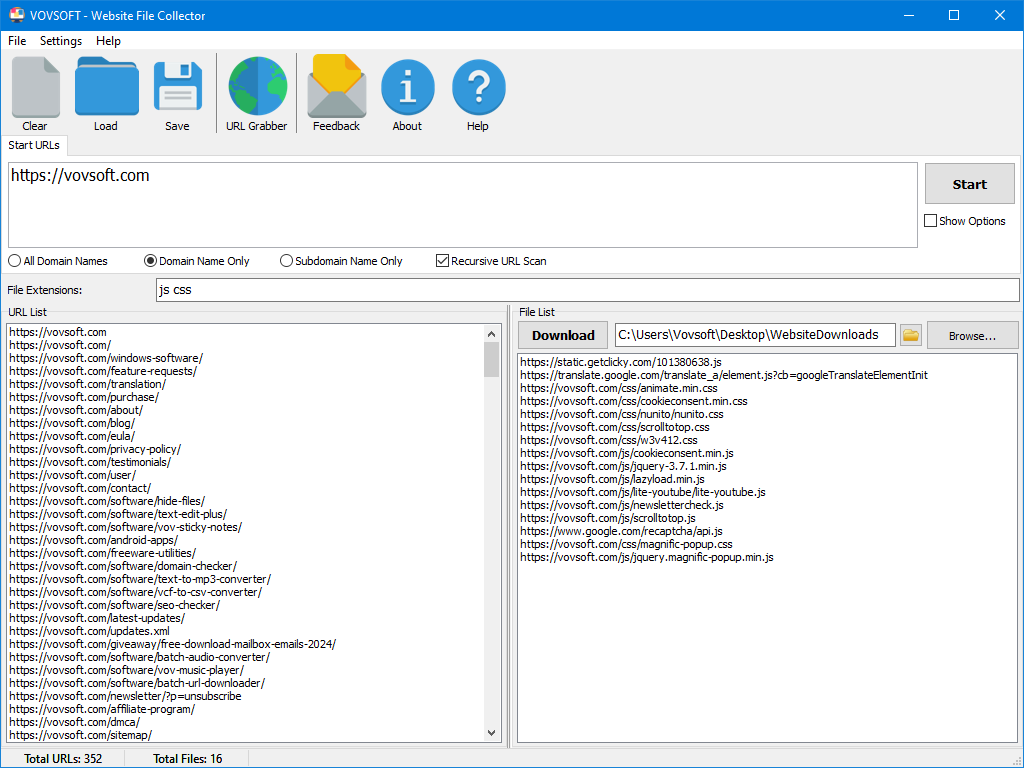
A recursive scan of one domain for js and css files: 352 pages visited on the left, 16 matching files on the right, ready to download.
Features
Collect files by type
Website File Collector looks for links ending in the extensions you list, separated by spaces, so "pdf" grabs every PDF and "jpg png webp" every image. Any extension works, including custom ones, and you can enter several start URLs, one per line, to scan several sites in one run.
Control how far the crawl goes
Website File Collector can stay on the domain only, on the subdomain only, or follow all domain names, and Recursive URL Scan decides whether it follows links page after page or only reads the start pages. An Ignore URLs setting skips addresses you don't want crawled.
Check before you download
Website File Collector shows the complete list of found file URLs before downloading. Since version 1.6 a Retrieve Filesize button fills a size column, so you can spot a 2 GB video before it eats your disk, and since 1.5 each file has a checkbox so you download only what you want, with a progress bar and a count of what's left.
URL Grabber and saved projects
Website File Collector adds a URL Grabber tool (since version 1.1), and Save and Load keep a scan's settings and lists for next time. Version 1.7 moved to OpenSSL 3, so sites that require TLS 1.3 work.
Benefits
A site's files are often scattered over many pages: a manual library, a course with a PDF per lesson, a press kit, a public archive. Saving them one by one takes an hour and misses some. Website File Collector reads the whole site in one pass, shows you the result, and downloads exactly what you ticked, so you end up with a complete local copy of the documents you care about without the rest of the website.
Real-World Uses
- Downloading every PDF manual or datasheet from a manufacturer's support site.
- Saving all lecture slides and handouts from a course website before it closes.
- Collecting every image from a press or media page.
- Auditing your own site: listing every PDF, video or script it links to, with sizes, and exporting the list.
- Archiving public reports from an agency or research group's website.
Who It's For, and Who Should Skip It
Website File Collector suits Windows users who want a site's files of a certain kind, quickly, without learning a command-line tool.
Skip it if you need pages behind a login (there's no cookie or login support yet), if you want a whole browsable offline copy of a website (a site-mirroring tool such as HTTrack does that), or if the files only appear through JavaScript after the page loads, which a link crawler may not see. People comfortable with wget can do the same for free.
Usage Guide
- Download the installer or portable edition and start Website File Collector.
- Type one or more addresses in Start URLs, one per line.
- Enter the extensions in File Extensions, separated by spaces, for example
pdf docx. - Choose the domain scope and whether to scan recursively, then click Start.
- Review the File List, use Retrieve Filesize if needed, and untick anything you don't want.
- Click Browse... to pick a folder, then Download.
Before you buy
The trial has every feature, with a nag screen, and is for personal use; work use needs the license. One license covers one person on any number of their own computers. Vovsoft's general policy is no refunds, since the trial comes first (it may refund an order made by accident, at its discretion, and PayPro Global has the final say on orders it handles), so test it on the sites you actually need. Only download files you're allowed to, and go easy on small sites.
Where it falls short
- No cookie or login support, so members-only files are out of reach. Both are open user requests.
- Failed downloads raise error messages one at a time; a user on Vovsoft's feature page calls them annoying when downloading a large number of files and asks for a summary instead.
- The download list can't be sorted by name or size yet, and the window doesn't remember its size, also open requests.
- It saves files, not browsable pages: offline viewing of a whole site isn't supported.
What Users Say
Ratings and requests
Website File Collector's product page shows 4.0 out of 5 from 1 rating, with no written comments, and we found no independent reviews.
Its feature request page says more about how people use it. Three requests are already done: file sizes before downloading, checkboxes to choose files, and a progress bar ("so the user knows how many files have downloaded / number left to download"). One open request, about errors on big jobs, reads: "If a file cannot be downloaded for any reason, please don't put up error messages which have to be acknowledged individually." Others ask for offline website copies, sorting, cookies and logging in through a built-in browser.
Vovsoft as a company has a TrustScore of 4.6 out of 5 from 411 reviews on Trustpilot (read through a summarizer), with no recent review naming this program.
Vovsoft has released nine versions since November 2024, many of them answering those requests, so the program is clearly being worked on. With so little feedback, try it on your own target sites first.
Comparisons
Website File Collector vs HTTrack
HTTrack is free and mirrors a whole website, pages included, for offline browsing. Website File Collector skips the pages and gets only the file types you name, with a list to review first, which is quicker and tidier when the documents are all you want.
Website File Collector vs wget
wget can crawl a site and keep only certain extensions, for free, from the command line. Website File Collector does it with a form, a reviewable file list, sizes and checkboxes.
Editions and Pricing
| Option | Price | License | What you get |
|---|
| Trial | Free | Personal, non-commercial use | All features, nag screen |
| Website File Collector license | $19 one time | Lifetime, commercial use allowed | No nag screen, all future updates |
| Vovsoft Universal License | $99 one time | Lifetime | All 115+ Vovsoft programs |
The license key arrives by email right after payment. Prices include tax.
FAQs
Can Website File Collector download files from a site that needs a login?
No. Website File Collector has no cookie or login support, so it only finds files that are publicly linked.
Can I just get the list of file links without downloading?
Yes. Website File Collector shows every found file URL first, and you can export or save the list and download nothing, or only the files you tick.
Does Website File Collector make an offline copy of the website?
No. Website File Collector downloads files of the types you choose, not the web pages themselves.
Is the trial limited?
Only by license terms. Website File Collector's trial has all features, but shows a nag screen and is for non-commercial use.
Is the $19 a subscription?
No. Website File Collector's $19 is a one-time payment for a lifetime license with future updates. Nothing renews.
System Requirements
- Windows 11, 10, 8/8.1, 7 or Vista, 32-bit or 64-bit
- About 5.1 MB for the installer, or 4.6 MB for the portable edition
- An internet connection; English interface
Conclusion
Website File Collector is worth $19 if you sometimes need every PDF, image or other file from a public website and want a simple form, a reviewable list and checkboxes instead of a command line. The reason not to buy it: it can't log in, so members-only files are out, and failed downloads interrupt you with one message each. Since the trial has every feature, run it on the site you have in mind first.
Download Free TrialBuy Now