Video Download Capture: Save Online Videos on Windows for a One-Time $69.95
Video Download Capture is a $69.95 one-time Windows program from Apowersoft that saves online videos by pasted link or by detecting a video as it plays, then converts them, plays them and records your screen. It suits people who regularly keep videos for offline viewing and want one program instead of a separate downloader, converter and recorder.
The catch with every paid downloader applies here too: video sites change their protection often, so some links will fail until the vendor catches up. The free trial is the place to find out whether your sites work.
Quick facts
- Version: 6.6.5.0
- Developer: Apowersoft
- Platform: Windows. Mac users need the separate Apowersoft Video Downloader for Mac
- Price: $69.95 one time (Personal Lifetime), or $39.95 a year, or $19.95 a month
- Trial: free download, 1 file at a time, 2 minutes of recording, 30% of a file converted, watermark on converted and recorded video
- Guarantee: 30 days money back (7 days on the Monthly plan)
- Installer: 174 MB, signed by Apowersoft Ltd
What we checked: installer file version 6.6.5.0 (174 MB, file dated September 17, 2026, with an Apowersoft Ltd digital signature) and the order page, which showed a one-time $69.95 for the Personal Lifetime license with no renewal, $39.95 yearly and $19.95 monthly, on November 5, 2026. We didn't run the program, so we didn't test download success on any site.
Download Free TrialBuy Now
Overview
Video Download Capture has five tabs across the top: Download, Detect, Library, Record and Convert. Most of your time goes in the first two. Download takes pasted links and shows a queue with progress, speed and source. Detect is a built-in browser that catches the video file while you play it, which is the fallback for sites where a pasted link doesn't work.
The other three tabs are add-ons. Library lists popular videos to browse and search. Record captures your screen. Convert changes files you already have into other formats. It looks like the older desktop app it is: plain, tab-driven and easy to follow.
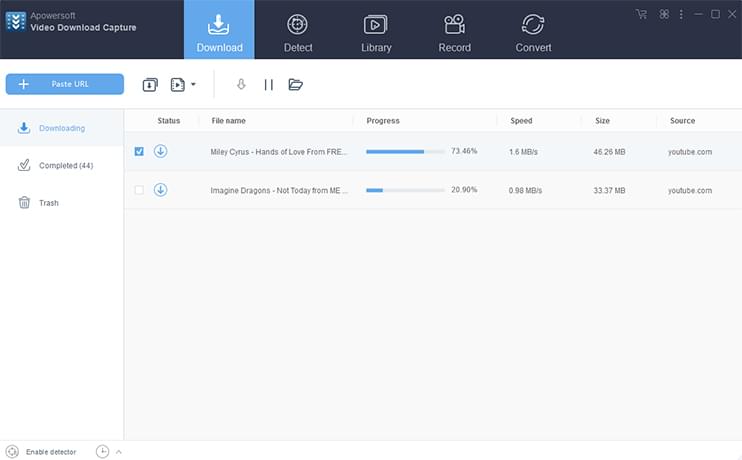
The Download tab with two files in the queue, showing progress, speed, size and source.
Features
Three ways to grab a video
Video Download Capture accepts a pasted URL, detects a video played inside its own Chrome-based Detect tab, and can watch your regular browser for video files through an advanced detector setting. Playlist links let you select the videos you want. Having three routes matters, because a site that rejects a pasted link may still give up the file when the video is played.
Parallel downloads with format choice up front
Video Download Capture downloads several files at once, and the guide suggests setting the limit from one to fifty. Pick the format and definition before downloading, and choose MP3 or AAC to save only the audio. Apowersoft quotes top speeds of up to 10 MB/s and support for 4K and HD. Your real speed depends on your connection and the site.
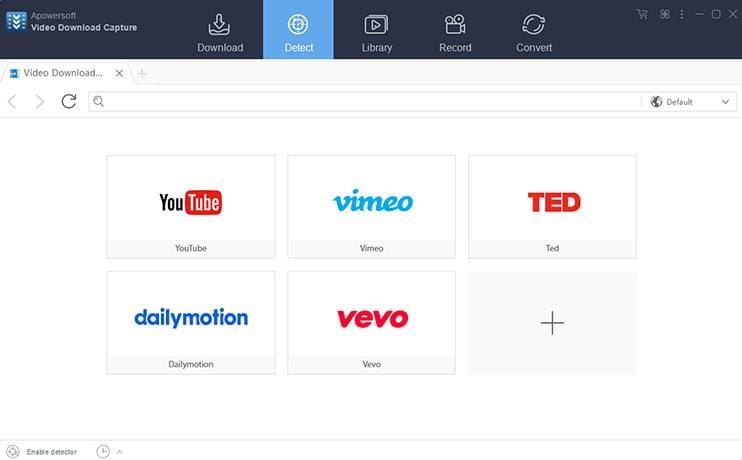
The Detect tab's built-in browser, with shortcuts to five video sites.
Logged-in downloads from accounts you pay for
Video Download Capture has an Accounts setting that stores your login for sites such as Lynda, Vimeo, Udemy and fc2, so it can save videos your account can already watch. You need your own paid access: the guide says the program won't save a paid Lynda course without it. Check that the site's terms allow offline copies.
Built-in converter, recorder and audio editor
Video Download Capture includes a converter covering MP4, MKV, AVI, MOV, WMV, FLV, HEVC and other video formats, plus MP3, AAC, FLAC, WAV and others for audio. The Record tab captures your screen, and the guide says it can capture a webcam too. A small audio editor works on a selected part of the waveform, and Add to iTunes passes a finished file to iTunes for syncing to an iPhone or iPad.

The Convert tab, with a drop area, the output profile and a preview pane.
Benefits
- You own the file. A saved video keeps playing on a flight, on a poor connection, or after the original is taken down.
- Fewer programs. Downloading, converting and basic recording sit in one window, so you don't juggle three tools for one clip.
- A real one-time price. At $69.95 the lifetime plan costs less than two years of the annual plan.
Real-World Uses
- Offline lessons: save tutorials or a course you have access to before a trip without Wi-Fi.
- Your own uploads: pull back videos you posted years ago when you've lost the originals.
- Audio only: save a lecture as MP3 for your phone.
- Format fixes: convert a file an old TV or player refuses to open.
- Live streams: use the Record tab on a stream that can't be downloaded.
Who It's For, and Who Should Skip It
Buy it if you're on Windows, download video from mainstream sites every week, and like having a converter and recorder in the same window.
Skip it if you only save one or two clips a month, since a free browser extension may be all you need. Skip it too if your main goal is streaming-service movies: the vendor's own guide says many sites keep changing their encryption to stop downloads, so don't buy on the assumption that a particular service works. Mac users should look at Apowersoft's separate Mac app, and anyone who needs serious editing should get a real video editor.
Usage Guide
- Download the installer (174 MB) and run it, then launch Video Download Capture.
- To activate after buying, click the second button at the upper right, choose Register, and sign in with your purchase email and the password Apowersoft sends you.
- Open Settings to choose the download folder and the default video or audio format.
- Copy a video link and paste it on the Download tab.
- If the download fails, open the Detect tab, paste the link in the address bar and play the video so the program can catch the file.
- Find finished files under Completed, then send them to Convert or to iTunes if you need to.
Before you buy
- Test your exact sites in the trial. The trial handles one file at a time, but that's enough to see whether a site works.
- Choose the Lifetime plan on purpose. The Annual and Monthly plans auto-renew until you cancel.
- Mind the 7-day limit. The Monthly plan only has a 7-day guarantee, against 30 days on the others.
Where it falls short
- Downloads break when sites change. Apowersoft's guide calls this the usual cause of a red failure icon and tells you to try Detect and email support. Expect occasional gaps.
- The advanced detector can upset your connection. It installs a file that can leave you unable to connect. The guide's fix is to disable it and clear the proxy setting in your network options.
- The documentation is old. The guide was last updated in October 2020 and its screenshots date from earlier, so some steps and supported-site claims may not match what you see.
- Editing is basic. This isn't a video editor.
- A heavy install. 174 MB is large for a downloader.
What Users Say
Independent reviews of Video Download Capture are thin, so here is what we could verify: the vendor's page, one buyer, one download site, and company-wide ratings for Apowersoft.
On the vendor's page
Apowersoft's product page shows 4.8 out of 5 from 34 reviews, and its how-to guide shows 4.3 out of 5 from 31 ratings. These are the vendor's own numbers on its own site, so treat them as the friendly end of the range.
"Apowersoft Video Download Capture works well for me. It never lets me down! Batch video download saves me so much time when I download online videos, and the output video quality is great!" - Mary, US
"What a powerful tool it is! Not only can it help me to download lots of videos from many websites, but also it provides us with useful recording and conversion function. I don't need to buy another converter any more. Thanks." - Jim, Australia
"It really helps me a lot. With Video Download Capture, I can download MP3 file from YouTube easily." - Lily, Canada
A lifetime buyer on Firefox Add-ons
The sharpest independent comment comes from an anonymous buyer, left in a review of a rival browser add-on on December 21, 2024:
"I purchased a lifetime license for Apowersoft Video Download Capture and the FREE version of Video DownloadHelper is far superior. It download TONS of video Apowersoft doesn't."
SoftRadar
The download site SoftRadar has a warm write-up: "This program reminds me of a swiss army knife. It's very versatile and useful." Its cons list is more guarded: "Limited formats for video conversion" and "Lack of advanced editing features."
Apowersoft on Trustpilot (the whole company)
Apowersoft's Trustpilot page shows 1.9 out of 5 from 241 reviews, read through a page summarizer. None of the reviews we saw were about this product, but they show what dealing with the company can be like:
"I have just cancelled after five years because I lost access and there is no response from the help desk." - Kai, May 26, 2025
"Not free at all and does not do anything it is supposed to" - Chris Hamlyn, February 28, 2026
"Good customer support - responsive and accurate" - Lee Folger, September 22, 2025
The pattern: people like having several tools in one program. The complaints are about coverage, with some videos it can't grab, and about uneven support across Apowersoft as a company. Use the trial to settle the first, and keep your purchase email safe for the second.
Comparisons
Video Download Capture vs Video DownloadHelper
Video DownloadHelper is a browser add-on with a free version, and the Firefox reviewer quoted above found it caught more videos. Video Download Capture is a full desktop program, so its case rests on the converter, recorder and download queue. If you only need to catch videos in your browser, try the add-on first.
Video Download Capture vs Apowersoft Unlimited
Apowersoft Unlimited is the vendor's subscription to all its software at $59.95 a year. If you also want its PDF, screen recording and phone mirroring tools, that's the better value. If you only want a downloader and dislike renewals, the $69.95 lifetime license makes more sense.
Editions and Pricing
| Plan | Price | Billing | Money-back period |
|---|
| Personal Lifetime | $69.95 | One time, free lifetime updates and support | 30 days |
| Annual | $39.95 | Yearly, auto-renews | 30 days |
| Monthly | $19.95 | Monthly, auto-renews | 7 days |
Apowersoft also sells a yearly bundle with Screen Recorder Pro at $49.95, and quotes education, volume and multi-user pricing on request.
FAQs
Does the Video Download Capture lifetime license ever renew?
No. Video Download Capture's Personal Lifetime license was a one-time $69.95 on the order page with no renewal term, and the vendor says it includes free lifetime updates and technical support.
Can Video Download Capture download from Netflix or other subscription streaming services?
Don't count on it. Video Download Capture's pages don't promise those services, and its guide says sites change their encryption to prevent downloading. Test any service you care about in the trial before paying, and check that service's terms.
Does Video Download Capture run on a Mac?
No, this installer is for Windows. Apowersoft sells a separate Video Downloader for Mac.
Is it legal to use Video Download Capture?
That depends on what you download. Video Download Capture is a tool, and saving your own videos or content you have permission to keep is fine. Copying copyrighted material or breaking a site's terms may not be, so check first. Apowersoft publishes its own disclaimer for the product.
Do I get a watermark in the Video Download Capture trial?
The Video Download Capture trial adds a watermark to converted and recorded video. The guide doesn't mention one on downloads, which are limited to 1 file at a time.
How do I activate Video Download Capture after buying?
Apowersoft emails you an account and initial password after payment. Use the upper-right menu in the program, choose Register, and sign in with those details.
What should I do if Video Download Capture fails on a link?
Try the same video on the Detect tab first, since playing it there can catch a file that a pasted link can't. If a partial download stops, check your connection and right-click the task to restart it. Vendor support asks you to report sites that stop working.
System Requirements
- Windows PC (Apowersoft doesn't publish minimum Windows versions or hardware)
- About 174 MB for the installer, plus space for your videos
- Internet connection, and iTunes if you use Add to iTunes
Conclusion
Video Download Capture is worth $69.95 only if it passes the trial on the sites you actually use. The best reason to buy is a one-time price for a downloader, converter and recorder in one Windows program. The main reason not to is coverage: at least one lifetime buyer found a free add-on caught more, and Apowersoft's Trustpilot score is poor. Casual users should start with a free option. Regular Windows downloaders who hate subscriptions should try this one.
Download Free TrialBuy Now