ApowerEdit: A Simple Timeline Video Editor for a One-Time $30.92
ApowerEdit is a beginner-friendly video editor for Windows and Mac that costs $30.92 once at checkout, about half of Apowersoft's own $59.95 lifetime price. It's for people making YouTube clips, tutorials, class videos and family movies who want titles, transitions and subtitles without learning a professional editor.
The free version exports with a watermark, so you can learn the program fully before paying. What you won't get is advanced color work, chroma key or multi-camera editing.
Quick facts
- Developer: Apowersoft (Wangxu Technology Co., Limited). Formerly called Apowersoft Video Editor
- Version: 1.7.10.5
- Platforms: Windows 7, 8, 10 and 11, and Mac OS X 10.11 and above
- Exports: MP4, AVI, WMV, MKV and MOV, or directly to video platforms
- Price: $30.92 for a Personal lifetime license at checkout ($59.95 on Apowersoft's store)
- Free version: adds a watermark to exported videos
- Guarantee: 30-day money-back guarantee, for the reasons in Apowersoft's refund policy
- What we checked: the Windows download is a 1.81 MB web installer (Apowersoft Installer 1.1.0.8) that fetches the program during setup, and the Personal lifetime license was $30.92 on the order page, with no renewal attached, on November 6, 2026. We didn't install the program or edit a video ourselves, so the feature details come from Apowersoft's manual and the reviews quoted.
Before you buy
Save your project before you activate. Apowersoft's manual says that if you edited a video before buying, you should use File, then Save as, to keep the project, then exit and reopen it after activation, or the export may still carry the watermark.
Check the vendor's reputation. Apowersoft scored 1.9 out of 5 on Trustpilot from 241 reviews on November 6, 2026, mostly over support, activation and refunds. Since a change of mind isn't covered by the refund policy, finish a real short project in the free version first.
Download Free TrialBuy Now
Overview
ApowerEdit asks for an aspect ratio when you open it: 16:9 for widescreen, 4:3 for traditional, or 9:16 for phones. The main window then has seven tabs for Media, Text, Filters, Overlays, Transitions, Elements and Music, a preview player, and a multi-track timeline below them. You drag what you want onto the timeline, and the toolbar above it handles the edits.

The start screen, where you pick the project's aspect ratio.
A first-run guide walks you through the basic editing steps with prompts, which suits someone who has never touched a timeline.
Features
ApowerEdit handles the everyday cuts
ApowerEdit trims, splits, deletes, crops and rotates clips from the toolbar, changes playback speed, and has a Freeze Frame button to hold a shot. Its separate picture-in-picture track lets you put a second video or image over the main one, for a webcam corner in a tutorial, for example.
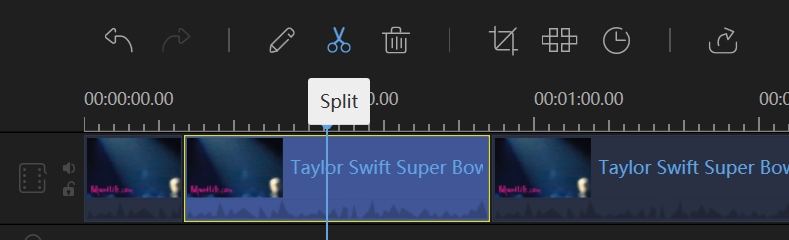
Splitting a clip on the timeline.
ApowerEdit adds transitions, filters and overlays by drag and drop
ApowerEdit keeps these in libraries that you drag onto the timeline. Right-click a transition to preview it, apply it at random, or apply it to every cut at once.
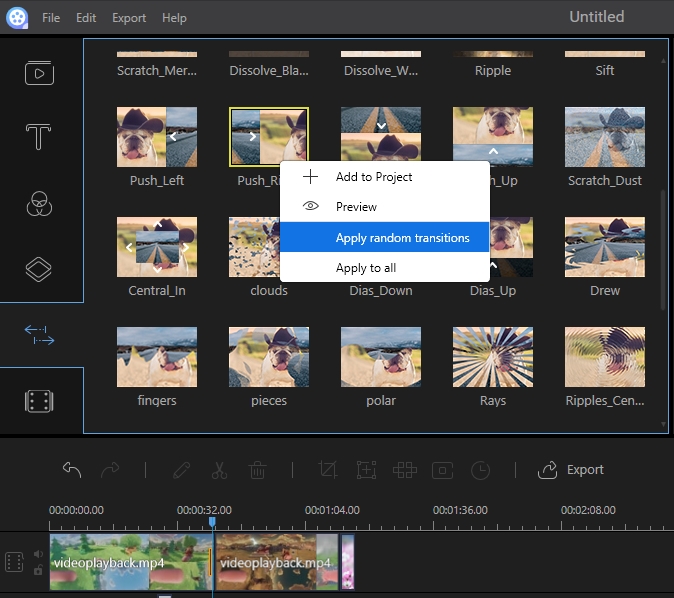
The transition library, with its right-click menu for applying one at random.
ApowerEdit turns speech into subtitles
ApowerEdit can convert the audio in a clip into subtitles that land on the timeline at the right moments, and turn typed text into a synthetic voice. Apowersoft added this in 2020. A Record Voiceover button also lets you narrate while the footage plays.
ApowerEdit hides what you don't want seen
ApowerEdit's Mosaic button blurs a chosen area of the video, such as a face or a license plate. It can also replace a face with a mask, which is handy for privacy in casual videos.

The mosaic editor, with the selected area marked on the left and the result on the right.
ApowerEdit exports to files or straight to a platform
ApowerEdit saves MP4, AVI, WMV, MKV and MOV video, and can export audio on its own as MP3 or AAC. A Video platform tab sends your finished video to sites such as YouTube, Vimeo and Facebook, or to Google Drive and Dropbox, and Apowersoft's page also lists burning to DVD.
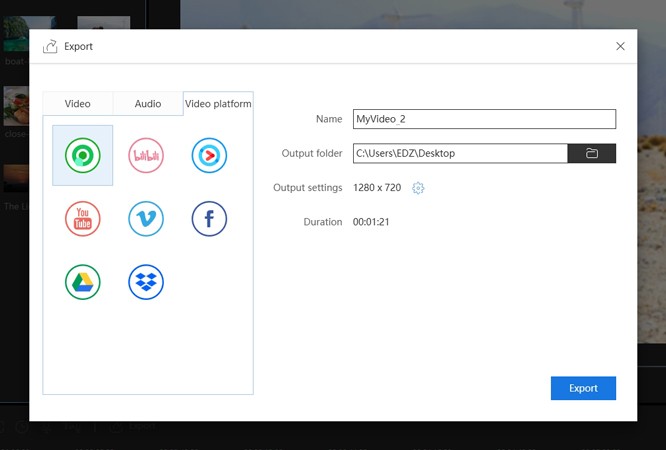
The export dialog's Video platform tab.
Benefits
- A short learning curve. The layout and first-run prompts get a beginner to a finished clip in an afternoon.
- No subscription. At this price, the lifetime plan costs less than one year on Apowersoft's own annual plan ($39.95).
- Subtitles without typing. Speech-to-text saves most of the work on tutorials and talking-head videos.
Real-World Uses
- A teacher's lesson video: record the screen separately, cut the mistakes, add a webcam corner on the picture-in-picture track, and let speech-to-text write the subtitles.
- A family holiday film: import phone clips and photos, drop in transitions and a music track, and export an MP4 for the TV.
- A vertical clip for social media: start a 9:16 project, trim to the best moments, add titles, and blur anyone who didn't agree to be filmed.
- A small shop's product video: combine photos and short clips, then add animated text with prices.
Who it's for, and who should skip it
Buy it if you're a beginner or a casual creator who wants a straightforward editor at a one-time price. Skip it if you need chroma key, multi-camera editing or serious audio tools: TechRadar and FileHorse both flag those gaps, and the free DaVinci Resolve handles all three if you'll put in the learning time. If you're happy on a phone or with a web tool, the free CapCut covers most short-video work. A business should look at the Business license, since this one is Personal.
Usage Guide
- Install and launch ApowerEdit. The download fetches the program during setup.
- Click the person icon at the upper right, click Activate, and paste the activation code from your order email.
- Choose an aspect ratio. A new project opens on the Media tab.
- Import your clips, photos and audio, then drag them onto the timeline.
- Use the toolbar to split, crop and adjust the clips, then add text, transitions and music from the tabs.
- Check it in the preview window, then save the project in .ve format.
- Click Export, choose a format or platform, and set the resolution.
Where it falls short
- No pro features. TechRadar's one con was that it "Lacks some pro-level features (eg chroma-keying)." FileHorse adds no multi-cam support and limited audio editing.
- Occasional lag. FileHorse notes some software lag, which you're more likely to feel on long projects.
- Old manuals. Apowersoft's user guide was last updated in 2020, and its Tech Specs still end at Windows 10, though FileHorse lists Windows 11. Some steps may have moved.
- Slow support. Apowersoft's negative reviews are mostly about support and refunds, so don't count on quick help.
What Users Say
ApowerEdit has one strong independent review and not much else. Most other user comments are short, and Apowersoft's company-wide rating is much lower than the product's own.
TechRadar (independent review)
Cat Ellis gave ApowerEdit 4.5 out of 5 in September 2017, under the headline "The easiest way to make and edit videos." Her list of pros: "Clear, straightforward interface," "Great selection of tools" and "Plenty of export options." Her one con: "Lacks some pro-level features (eg chroma-keying)."
FileHorse (editor's summary)
FileHorse lists its pros as "Easy-to-Use Interface," "Wide Format Compatibility," "Rich Editing Tools," "Supports High-Resolution Export" and "Affordable Pricing." Its cons are "Limited Advanced Features," "Watermark on Free Version," "Occasional Software Lag," "Limited Audio Editing Options" and "No Multi-Cam Support."
AlternativeTo (user review)
annasievers gave it five stars on December 4, 2017: "Apoweredit is super easy to use. It is suitable for beginners like me. Awesome software!" The page shows 11 likes in all, and this is its only review.
Trustpilot (Apowersoft as a company)
On November 6, 2026 Apowersoft scored 1.9 out of 5 from 241 reviews, with 57% five-star and 35% one-star. Reviewers rarely name ApowerEdit. The repeated complaints are about unanswered support emails, activation codes and logins, unexpected charges and refunds.
The themes: reviewers agree that ApowerEdit is easy and has plenty of tools for the price, and they agree on its ceiling too. The complaints are about the company rather than the editing.
Comparisons
ApowerEdit vs BeeCut
BeeCut comes from the same vendor and looks very similar, with the same layout of tabs and tracks. BeeCut costs $29.95 at checkout and adds built-in screen, phone and webcam recording, so compare the two on that extra. ApowerEdit has the longer review record.
ApowerEdit vs DaVinci Resolve
DaVinci Resolve is free and far more capable, with chroma key and pro color tools, but it demands a powerful PC and a real learning effort. ApowerEdit is for people who want a finished video this evening.
Editions and Pricing
| Plan | Price | Term |
|---|
| Personal lifetime (this listing) | $30.92 at checkout | One payment |
| Personal lifetime on Apowersoft's store | $59.95 | One payment |
| Personal yearly on Apowersoft's store | $39.95 | Renews every year |
| Personal monthly on Apowersoft's store | $29.95 | Renews every month |
| Business lifetime on Apowersoft's store | $159.90 | One payment |
FAQs
Does ApowerEdit remove the watermark after you buy?
Yes, ApowerEdit exports without a watermark once your license is active. A project you started before buying should be saved as a .ve file and reopened after activation.
Is ApowerEdit the same as Apowersoft Video Editor?
Yes, ApowerEdit is the newer name of Apowersoft Video Editor. Apowersoft's menus and web address still use "Video Editor" in places.
Does the ApowerEdit lifetime license work on both Windows and Mac?
ApowerEdit has Windows and Mac versions, and Apowersoft doesn't say on the order page that the $30.92 Personal license covers both. If you need both, ask Apowersoft before you pay.
Can ApowerEdit edit 4K video?
Apowersoft's pages for ApowerEdit don't promise 4K, and the export dialog in its manual shows 1280 x 720. Check the resolution options in the free version with your own footage before relying on it.
Can ApowerEdit burn a DVD?
Apowersoft's product page says ApowerEdit can burn videos to DVD, though the manual focuses on file and platform export.
Can I get a refund on ApowerEdit?
Apowersoft offers a 30-day money-back guarantee on ApowerEdit, but only for reasons such as a technical problem support can't fix, activation failure or buying the wrong product. A simple change of mind can be declined.
Can I use the Personal license of ApowerEdit for business videos?
ApowerEdit's Personal license is meant for individual use, and Apowersoft sells a separate Business license at $159.90 for a lifetime seat. A company should buy that one.
System Requirements
- Windows 7, 8, 10 or 11, or Mac OS X 10.11 and above
- DirectX 9.0c or later
- Windows Media Player 11 or higher for WMV playback
- Internet connection to install and activate
Conclusion
Worth $30.92 for beginners and casual creators. ApowerEdit gives you a clear timeline editor, automatic subtitles and direct upload for less than one year of many editors. The one reason to buy it is how quickly you'll get a good-looking video out of it. The main reason not to is its ceiling: there's no chroma key or multi-cam, and if something goes wrong, Apowersoft's support record is poor. Try the free version on a real project first.
Download Free TrialBuy Now