BeeCut: An Easy Multi-Track Video Editor With Built-In Screen Recording
BeeCut is a beginner video editor from Apowersoft for Windows and Mac, at a one-time $29.95 at checkout, half of the $59.95 lifetime price on Apowersoft's store. It suits people making short YouTube, TikTok and tutorial videos who want subtitles, music and screen recording in one program.
The free version lets you learn everything first, but it adds a watermark and holds back 1080p export. It doesn't aim at professionals: FileHorse lists limited advanced editing and some lag with large files.
Quick facts
- Developer: Apowersoft (Wangxu Technology Co., Limited)
- Version: 1.7.11.8, listed by FileHorse on February 4, 2026
- Platforms: Windows 7, 8 and 10 per FileHorse, plus Mac and iPhone versions
- Aspect ratios: 16:9, 9:16, 4:3, 1:1 and 3:4
- Exports: MP4, WMV, AVI, MKV and MOV
- Price: $29.95 for a Personal lifetime license at checkout ($59.95 on Apowersoft's store)
- Free version: adds a watermark, and 1080p export is marked VIP
- Guarantee: 30-day money-back guarantee, for the reasons in Apowersoft's refund policy
- What we checked: the Windows download is a 1.81 MB web installer (Apowersoft Installer 1.1.1.2) that fetches the program during setup, and the Personal lifetime license was $29.95 on the order page, with one payment and no renewal interval, on November 6, 2026. We didn't install the program or edit a video ourselves, so feature details come from Apowersoft's pages and the reviews quoted.
Before you buy
Read the vendor's record. Apowersoft scored 1.9 out of 5 on Trustpilot from 241 reviews on November 6, 2026, mostly over support, activation and refunds. A change of mind isn't covered by the refund policy, so complete a real short project in the free version first.
Use one email address. The license is tied to an Apowersoft account, so check out with the address you'll sign in with.
Download Free TrialBuy Now
Overview
BeeCut starts by asking for a shape: 9:16 for phones, 16:9 for widescreen or 4:3 for traditional video. The main window then shows the Media, Text, Filters, Overlays, Transitions, Elements and Music tabs on the left, a preview on the right, and a multi-track timeline across the bottom.
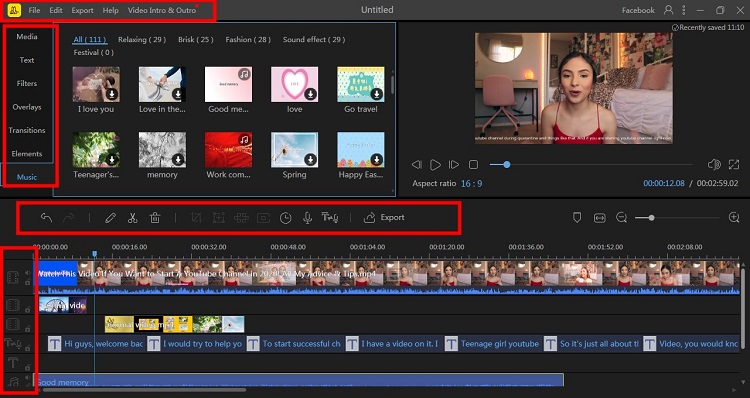
BeeCut's main window. The red outlines come from Apowersoft and mark the tabs, toolbar and tracks.
Features
BeeCut edits on several tracks at once
BeeCut gives you a main video track plus separate tracks for picture-in-picture, text and music, so you can layer a logo, subtitles and background audio and watch the combined result right away. Trimming, splitting, merging, cropping and zooming are all on the toolbar.
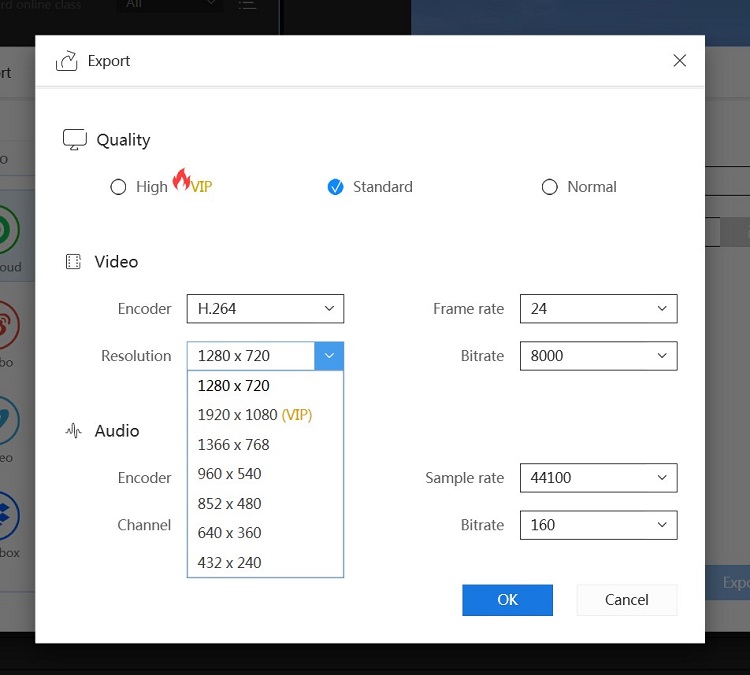
The export dialog. 1920 x 1080 and High quality are marked VIP.
BeeCut writes subtitles from speech
BeeCut's Speech and Text Converter turns the talking in your video into subtitles that you can correct and restyle. It also works the other way, reading typed text aloud in a generated voice, which helps if you'd rather not record narration.
BeeCut records your screen, phone or camera
BeeCut has recording built in, with options for the PC screen, a phone screen and a camera. A recording lands in the media library, so you can start cutting it without importing anything. That's the main thing that sets it apart from a plain editor, and it makes BeeCut handy for tutorials.
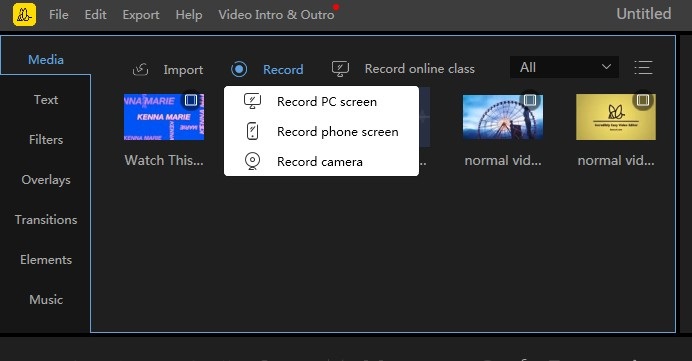
The Record menu on the Media tab.
BeeCut includes a free music library
BeeCut comes with a library of copyright-free tracks, sorted into groups such as Relaxing, Brisk and Fashion, plus sound effects. You can also mute a clip's original audio or separate it in one click and put your own track in its place.
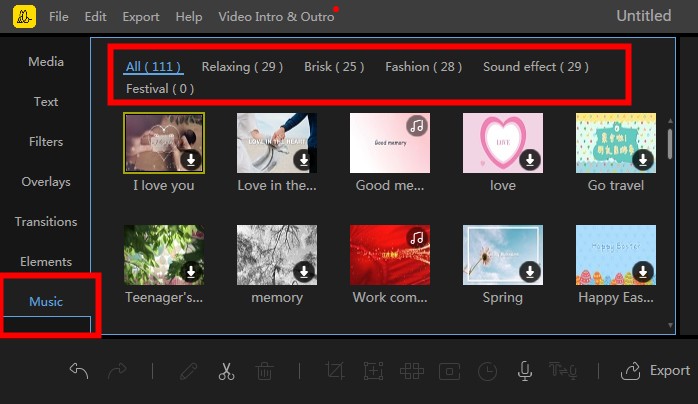
The Music tab and its categories.
BeeCut corrects color
BeeCut has sliders for contrast, saturation, brightness, hue, highlights and shadows, with the result shown live in the preview. That's enough to rescue a dull phone clip, though it isn't a professional grading panel.
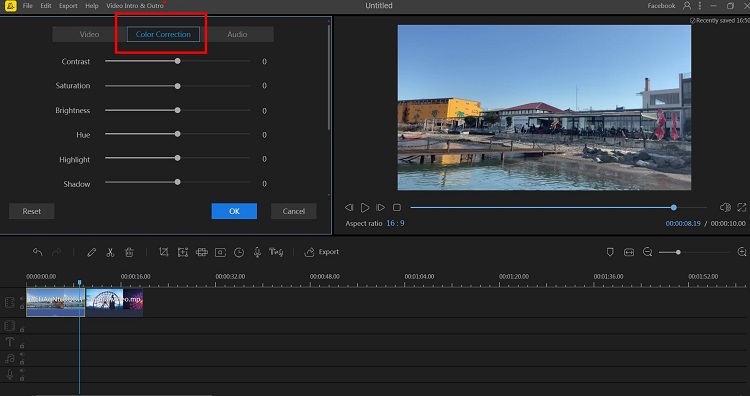
The Color Correction panel.
Benefits
- Everything for a short video in one place. You can record, edit, caption and score it without a second program.
- Fit for each platform. Choosing the ratio first saves you from re-cropping later.
- Pay once. $29.95 costs less than one year on Apowersoft's own annual plan ($39.95).
Real-World Uses
- A software tutorial: record your screen in BeeCut, cut the pauses, and let speech-to-text write the captions.
- A TikTok or Reels clip: start in 9:16, trim to the best bits, add text and a track from the music library.
- A small business promo: combine product photos and clips, add a mosaic over anything private, and export an MP4 in 1080p.
- A class project: layer narration over slides and photos on separate tracks.
Who it's for, and who should skip it
It suits beginners and casual creators, especially people who record tutorials. Skip it if you need advanced editing, as FileHorse's cons note, or if you edit long or very large projects. DaVinci Resolve is the free step up if you're willing to learn it, and CapCut is a free option for short social clips. A company should look at the Business license rather than this Personal one.
Usage Guide
- Install and launch BeeCut. The download fetches the program during setup.
- Sign in with the email you used at checkout to activate VIP.
- Choose the aspect ratio for your video.
- Click Import, then Import file, or record a new clip from the Media tab.
- Drag the media onto the timeline, then trim, split and crop it with the toolbar.
- Add text, filters, overlays, transitions and music from the tabs.
- Click Export and choose the format, resolution and quality.
Where it falls short
- Crashes and lag. FileHorse's cons list "Occasional crashes during editing" and "Some lag issues with large files."
- Slow exports. FileHorse also notes the "Export process can be slow at times."
- Limited for advanced work. It's made for simple editing, and there's little here for colorists or multi-camera shoots.
- Thin review record. There are few independent reviews, and at least one reader on AlternativeTo doubted the positive ones.
- Dated help pages. Apowersoft's BeeCut overview was last updated in 2021, so some menus may have changed.
What Users Say
BeeCut has few detailed independent reviews. The comments we could verify are short, and we left out pages with unattributed review text.
FileHorse (editor's summary)
Pros: "User-friendly interface," "Supports multiple aspect ratios," "Offers various filters and transitions," "Allows adding background music tracks" and "Provides multiple video export resolutions." Cons: "Free version includes a watermark," "Occasional crashes during editing," "Limited advanced editing features," "Some lag issues with large files" and "Export process can be slow at times."
AlternativeTo (user comments)
BeeCut has 13 likes there. kevinstrong, December 6, 2018: "Simple interface, I like!" r4l6kbaa, December 11, 2018: "I like the filters and transitions." tunaikaxv, January 11, 2019: "The timeline design is very great!"
A skeptical voice: Truc wrote on December 21, 2019 that "the other review are obviously fakes..." AlternativeTo also marks two of those comments as coming from low-activity accounts, so give them little weight.
Capterra
Capterra shows 4.0 out of 5 from a single user, too small a sample to mean much.
Trustpilot (Apowersoft as a company)
On November 6, 2026 Apowersoft scored 1.9 out of 5 from 241 reviews, with 57% five-star and 35% one-star. Reviewers rarely name BeeCut. The repeated complaints are about unanswered support emails, activation, unexpected charges and refunds.
The themes: people like how simple it is. The doubts are about stability on bigger projects, how genuine the early reviews are, and Apowersoft's support.
Comparisons
BeeCut vs ApowerEdit
Both come from Apowersoft and share the same layout and basic tools. BeeCut's built-in recording suits tutorial makers, and at $29.95 it's about the same price as ApowerEdit at $30.92 at checkout. ApowerEdit has a stronger independent review, including 4.5 out of 5 from TechRadar.
BeeCut vs DaVinci Resolve
DaVinci Resolve is free and much more capable, but it asks for a stronger PC and many hours of learning. BeeCut is for getting a tidy video out today.
Editions and Pricing
| Plan | Price | Term |
|---|
| Personal lifetime (this listing) | $29.95 at checkout | One payment |
| Personal lifetime on Apowersoft's store | $59.95 | One payment |
| Personal yearly on Apowersoft's store | $39.95 | Renews every year |
| Personal monthly on Apowersoft's store | $29.95 | Renews every month |
| Business lifetime on Apowersoft's store | $159.90 | One payment |
FAQs
Does BeeCut have a watermark?
BeeCut's free version adds a watermark to exports, and a paid license removes it. High quality and 1080p export are also marked VIP in the export dialog.
Does the $29.95 BeeCut lifetime license renew?
The BeeCut Personal lifetime license showed no renewal interval on the order page on November 6, 2026, so it's one payment. Apowersoft's store describes lifetime as including free updates and technical support.
Does BeeCut work on Windows 11?
BeeCut is listed by FileHorse for Windows 7, 8 and 10, without Windows 11. Run the free version on your PC before you pay.
Can BeeCut export 4K video?
BeeCut's resolution list on its vendor pages stops at 1920 x 1080. If you need 4K, look elsewhere.
Is BeeCut safe to use for YouTube music?
BeeCut describes its built-in music library as copyright-free, which is meant for use in your videos. YouTube's Content ID can still flag a track, so keep your license details.
Can I get a refund on BeeCut?
Apowersoft offers a 30-day money-back guarantee on BeeCut, but only for reasons such as a technical problem support can't fix, activation failure or buying the wrong product. A simple change of mind can be declined.
System Requirements
- Windows 7, 8 or 10, 32-bit or 64-bit, per FileHorse
- Mac and iPhone versions are also available
- Internet connection to install the program and activate the license
Conclusion
Good value at $29.95 for beginners who record tutorials. The one reason to buy BeeCut is getting recording, editing and automatic subtitles in one simple program for a single low payment. The main reason not to is reliability: reports of crashes and lag on larger projects, plus a vendor with a poor support record. Make a real short video in the free version first, and if it runs well on your PC, the price is hard to argue with.
Download Free TrialBuy Now