CleverGet Roku Channel Downloader: Save The Roku Channel's Movies and Shows for Offline Viewing
CleverGet Roku Channel Downloader is a Windows and Mac program that saves on-demand movies and TV episodes from The Roku Channel website as MP4 or MKV files at up to 1080p, with your choice of audio track and subtitles, and without the ads. It costs $49.95 for a year on one PC (or $79.95 for a lifetime license), and the free version downloads up to 3 videos.
The Roku Channel is free to stream, but it needs a connection and it plays ad breaks. If you want to watch a season on a flight, at a cabin with no internet, or on a media player that doesn't run the Roku app, a local copy is the answer. Leawo's fair use policy limits the program to videos you're entitled to watch, for personal use only.
Quick facts
- Current version: CleverGet 27.0.0.0 (Roku Channel Downloader is one of its modules)
- Developer: CleverGet, a Leawo Software brand
- Runs on: 64-bit Windows 7, 8, 8.1, 10 and 11. A Mac version is also sold.
- Source: therokuchannel.roku.com, on-demand movies and TV shows
- Output: MP4 or MKV video up to 1080p, SRT or SUP subtitles
- Price: $49.95 for 1 year on 1 PC (manual renewal), or a lifetime license at $79.95 ($71.95 on sale on CleverGet's site)
- Free version: downloads up to 3 videos
- Money-back guarantee: 5 days on the 1-year plan, 14 days on the lifetime license
- Download: 486 MB installer (the whole CleverGet suite)
- What we checked: the Windows installer we downloaded on October 20, 2026 is CleverGet 27.0.0.0 (486 MB, file dated October 15, 2026), digitally signed by ShenZhen Moyea Software. The order page showed the Roku Channel Downloader 1-year license at $49.95 on October 20, 2026, with no discount line. We didn't download any videos with it.
Before you buy
The installer is the full CleverGet app, with modules for many sites. A Roku Channel Downloader license activates only this module. Downloaders like this depend on the streaming site's player, so a change on The Roku Channel's side can break downloads until CleverGet ships an update. Use the free version's 3 downloads to check it works with the shows you want, and keep your use personal, as CleverGet's fair use policy requires: no sharing and no commercial use.
Download Free TrialBuy Now
Overview
CleverGet works like a web browser with a download button. You open therokuchannel.roku.com inside it, sign in if needed, and start playing the movie or episode you want. Once the video is playing, a blue download icon appears. Click it and CleverGet reads the stream and shows every available version: resolution, bitrate, audio tracks and subtitles. Pick one and the download runs in the background while a Library panel on the right lists what's finished.
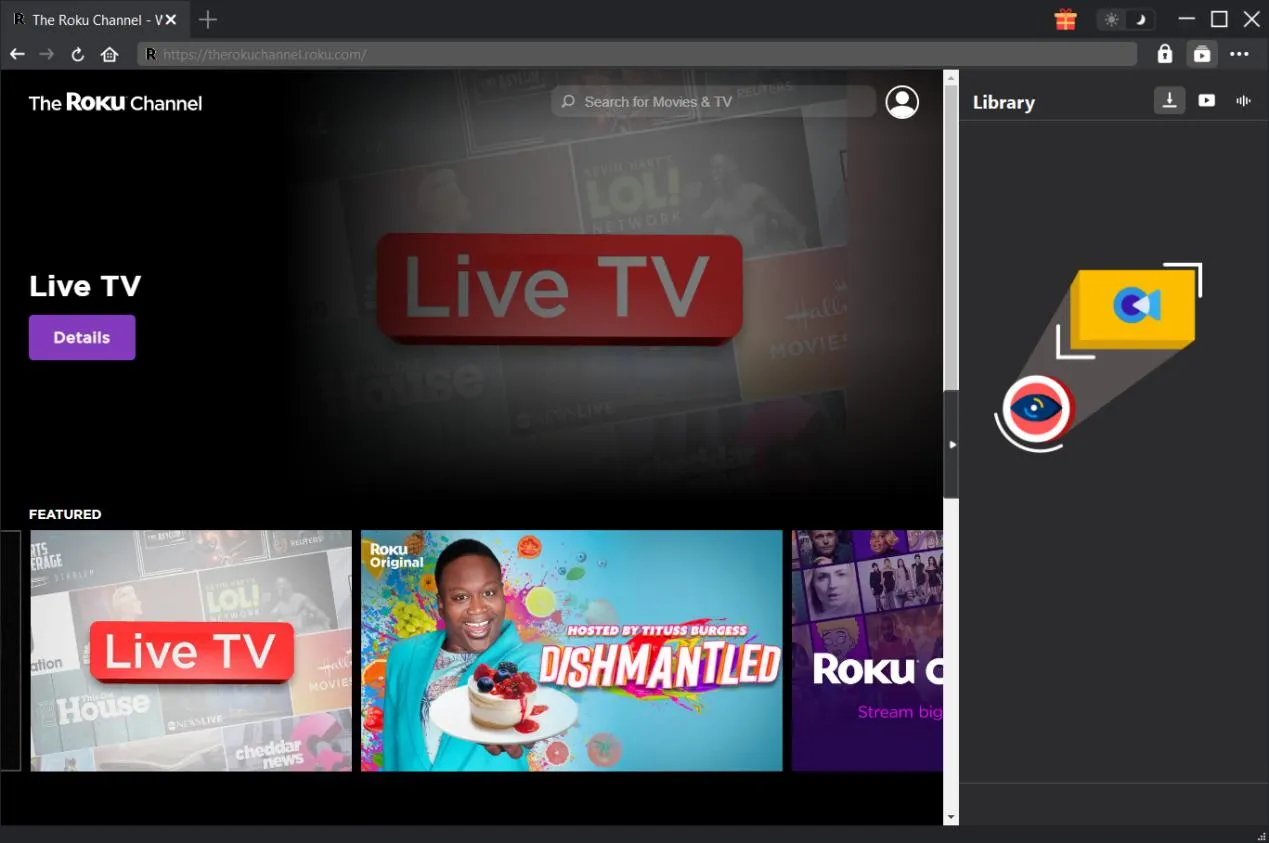
The Roku Channel's home page open in CleverGet's built-in browser, from CleverGet's user guide, with the empty Library panel on the right.
Features
MP4 or MKV files at up to 1080p
CleverGet Roku Channel Downloader saves Roku Channel movies and shows as MP4 or MKV, the two formats almost every TV, phone, tablet and media player can play. It offers each resolution the stream provides, up to 1920 x 1080, so you can pick full HD for a TV or a smaller 720p file for a phone.
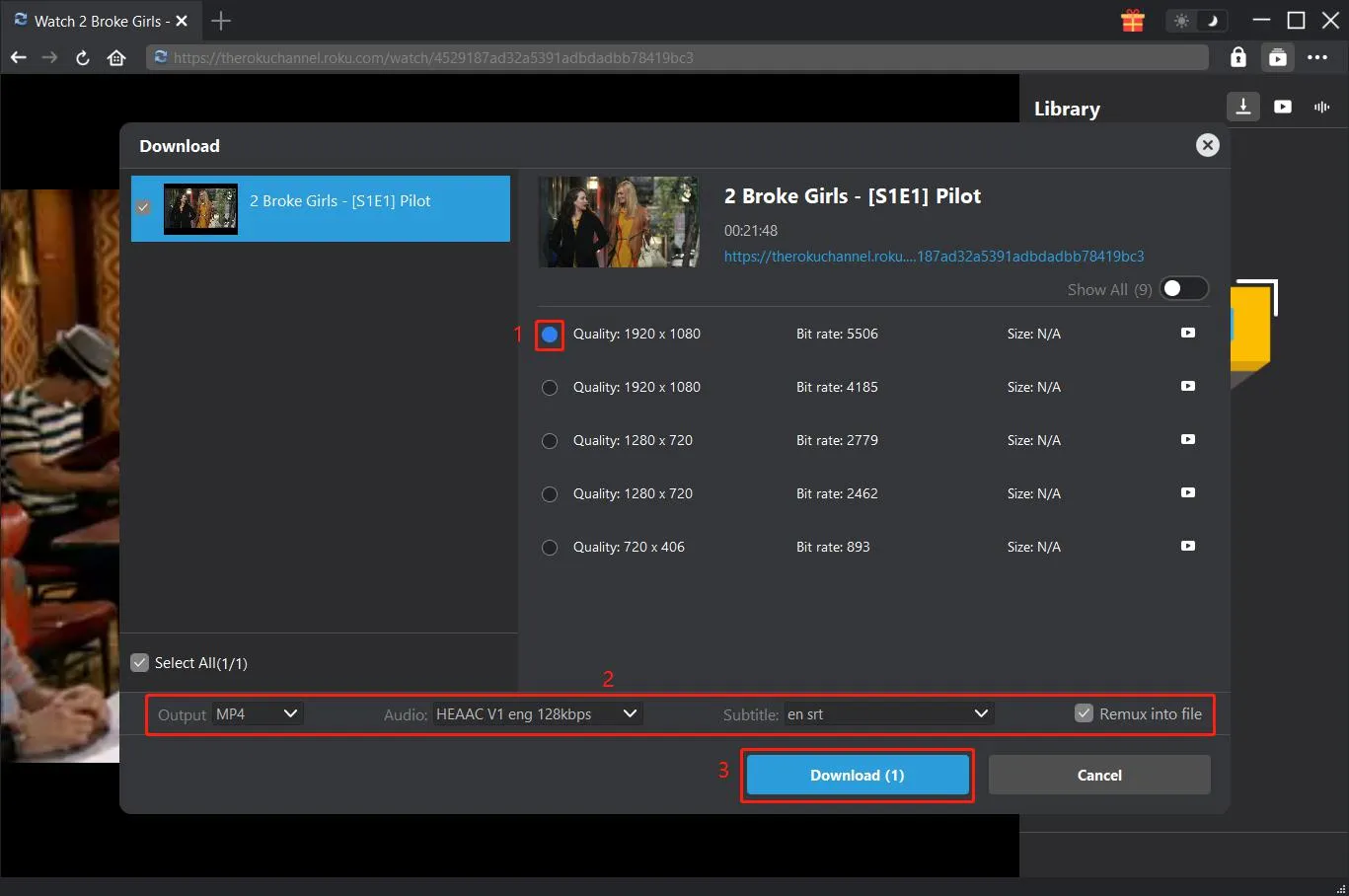
The Download dialog for a TV episode, from CleverGet's user guide: five quality options from 1920 x 1080 down to 720 x 406 with their bitrates, MP4 output, an English audio track, English SRT subtitles and "Remux into file" ticked.
Whole seasons in one go
CleverGet Roku Channel Downloader reads one episode page and finds the other episodes of the same series across all available seasons. You can then tick a single episode, several from one season, or every season, and download them as a batch instead of one at a time. Settings let you run 1 to 5 downloads at once.
Audio tracks and subtitles your way
CleverGet Roku Channel Downloader lets you choose which audio tracks and subtitles to keep when a title offers several languages. Subtitles can be packed into the video file or saved separately as SRT or SUP files, which is handy if your player handles external subtitles better.
No ad breaks in the saved file
CleverGet Roku Channel Downloader leaves out the ads The Roku Channel plays during streaming, so the saved movie or episode plays straight through.
Benefits
- Watch without a connection. Flights, road trips and weak hotel Wi-Fi stop being a problem.
- Watch on more screens. An MP4 plays on a laptop, a phone or a TV's USB port, no app needed.
- No interruptions. Ad-free files are easier for children's shows and long movie nights.
- Less babysitting. Queue a whole series and let it run.
Real-World Uses
- A long flight: save a few movies in 720p to a laptop the night before.
- Kids in the car: download a season of a children's show to a tablet for a road trip with patchy mobile data.
- A holiday cabin: copy MP4 files to a USB stick and play them on the TV there.
- Language learning: keep a film with its English subtitles as a separate SRT file for study.
Who It's For, and Who Should Skip It
CleverGet Roku Channel Downloader suits regular Roku Channel viewers who want offline copies of shows for personal viewing on a Windows PC or Mac, and who'd rather pay once a year than deal with ads and streaming outages.
Skip it if you only want one or two titles, which the free version's 3 downloads cover. Skip it too if you watch on a Roku device at home with a good connection, since streaming already works there, or if you need more than 1080p, which this module doesn't offer. If you want videos from many streaming sites, CleverGet's bundles with several modules cost less per site than buying them one by one.
Usage Guide
- Install and launch. Download and install CleverGet. The Roku Channel Downloader module is built in.
- Set the output folder. Click the three-dot menu, then Settings, and set "Save Video To". Tick "Create subfolder for each module" if you use several modules.
- Open The Roku Channel. Go to therokuchannel.roku.com in CleverGet's browser, sign in if needed, and find the movie or episode.
- Play it. CleverGet can only read a video that's playing.
- Click the download icon. Choose the quality, MP4 or MKV, the audio track and subtitles, then click Download.
- Find the file. Watch progress in the Library panel, then open the folder or play the file from the Video tab.
- Register (after buying). Click the Activate key icon and paste your license code. You need an internet connection to activate.
Where it falls short
- Breaks when the site changes. CleverGet users on Trustpilot mention that "sometimes updates of the software or the update from the streaming platform can wreak havoc", and that a module stopped downloading subtitles after an update until support fixed it.
- 1080p maximum. No 4K or HDR output.
- Heavy install for one site. The installer is 486 MB and asks for 5 GB of free space, a 64-bit Windows PC and an NVIDIA GeForce GTX 260 or better graphics card on Windows.
- You must play each title first. The video has to be playing in CleverGet before it can be downloaded.
- Activation hiccups. One Trustpilot reviewer runs into an activation issue every time they reinstall.
- Short refund window on the yearly plan. 5 days, against 14 days for the lifetime license.
What Users Say
Independent reviews of this one module are scarce. CleverGet's own Roku page quotes a few customers, and Trustpilot reviews cover the whole CleverGet suite.
On CleverGet's Roku Channel Downloader page
These quotes are picked by the vendor:
- "I don't need to pay a penny to skip the annoying ads. That's so wonderful." (Besley Nortorn)
- "Recommended by my friends. A saver to download Roku Channel TV shows. The operation is user-friendly and quick." (Nana Miller)
- "It does a great job of keeping the same image as the original Roku Channel videos. Now I watch the downloaded movies in my home theater." (Iverson Duffus)
Trustpilot: CleverGet as a whole
CleverGet scores 4.5 out of 5 from 66 reviews on Trustpilot, with 79% five-star and 6% one-star ratings, and the company replies to reviews on its first page. None of them is about the Roku module specifically.
- Mr Jim Craddock (5 stars, October 2026): "I cannot stand watching TV with ads, so the fact that this software strips them out is brilliant."
- Satori Agape-Economo (5 stars, August 2026): "sometimes updates of the software or the update from the streaming platform can wreak havoc"
- Alberto (4 stars, March 2026): "The Crunchyroll module stopped downloading subtitles after the last update."
- Kamlesh Bhatt (5 stars, August 2026): "Whenever I reinstall this software, I run into the activation issue."
- Mike (5 stars, February 2026), about an HBO download that support later patched: "downloaded video was systematically quite shorter than the original"
The pattern
People like the ad-free files and the support team, which several reviewers say fixed their problem with an update. The complaints are about the nature of streaming downloaders: modules that break for a while after a site or software update, missing subtitles, and activation trouble after reinstalling.
Editions and Pricing
| License |
Price |
Term |
Money-back |
| Free version |
$0 |
Up to 3 downloads |
- |
| 1 Year, 1 PC |
$49.95 |
1 year, manual renewal, free upgrades |
5 days |
| Lifetime, 1 PC |
$79.95 ($71.95 on sale on CleverGet's site) |
One-time payment, free upgrades |
14 days |
Prices from CleverGet's Roku Channel Downloader page and the order page on October 20, 2026. Buying several CleverGet modules together gets a bigger discount.
FAQs
Does the CleverGet Roku Channel Downloader 1-year plan renew automatically?
No. CleverGet lists the Roku Channel Downloader 1-year license as a manual renewal, so it isn't charged again unless you renew. When it expires you renew it or buy a lifetime license to keep downloading.
Can CleverGet download from the Roku app on my TV or Roku stick?
No. CleverGet Roku Channel Downloader works with The Roku Channel website, therokuchannel.roku.com, opened in CleverGet's browser on your computer. It doesn't connect to Roku devices or apps.
Is it legal to download Roku Channel videos with CleverGet?
CleverGet's fair use policy allows downloading only videos you legally have access to, for personal use, and forbids sharing them or using them commercially. Copyright rules and The Roku Channel's own terms differ by country, so check what applies where you live.
Does it work on a Mac?
Yes. CleverGet Roku Channel Downloader comes in Windows and Mac versions. The Windows version needs 64-bit Windows 7 or later.
Can one license cover several computers?
No. Each CleverGet Roku Channel Downloader license is for one PC. Buy a second license for another computer.
System Requirements
- Windows: Windows 7, 8, 8.1, 10 or 11, 64-bit
- Processor: 1 GHz Intel or AMD or faster
- Memory: 512 MB RAM (1 GB or more recommended)
- Disk space: 5 GB or more free
- Graphics: NVIDIA GeForce GTX 260 or better
- Internet: needed to stream, download and activate
Conclusion
CleverGet Roku Channel Downloader is worth $49.95 a year if you regularly watch The Roku Channel and want ad-free copies of its movies and series for personal viewing offline or on other screens. The one reason to buy it is how simple it makes batch downloads of whole seasons with the right subtitles. The main reason to hold back is that it depends on The Roku Channel's website, so it can stop working for a while after the site changes, and it tops out at 1080p. Try the 3 free downloads first. If you'll keep using it beyond two years, the lifetime license works out cheaper.
Download Free TrialBuy Now