Allavsoft for Windows: Save Videos, Music and Subtitles from YouTube, Spotify and 1,000+ Sites
Allavsoft is a Windows program that downloads online video, music and subtitles from YouTube, Spotify, Vimeo, Facebook, SoundCloud, Udemy and more than 1,000 other sites, and converts them to MP4, MP3, FLAC or almost any other format as it saves them. The lifetime license costs $59.99 for 1-3 PCs with free updates, and the trial lets you test a handful of downloads first.
Maybe it's a lecture you want on your laptop for a flight, a playlist for the car, or a clip you need in a presentation where the Wi-Fi can't be trusted. Allavsoft's answer is always the same two steps: paste the link, click the big round Download button.
Quick facts
- Version: 3.29.6.9784, released October 15, 2026
- Developer: Allavsoft
- Runs on: Windows 11, 10, 8, 7, Vista, XP and 2000 (a separate Mac version exists)
- Downloads from: YouTube, Spotify, Vimeo, Facebook, Dailymotion, SoundCloud, Deezer, Udemy, Lynda, BBC and 1,000+ other sites
- Saves as: the original file, or MP4, AVI, WMV, MOV, MKV, WebM, Apple ProRes, MP3, FLAC, WAV, M4A, AAC and more
- Price: $59.99 for a lifetime license on 1-3 PCs, with free lifetime updates
- Free trial: yes, limited to about five downloads, with conversions and merges capped at 5 minutes
- Refunds: 30-day money-back guarantee for technical problems
- What we checked: the installer (allavsoft.exe, 72.2 MB, file version 3.29.6.9784, not digitally signed) downloaded from allavsoft.com on October 24, 2026, and the lifetime license price of $59.99 on the order page on October 24, 2026. We didn't run downloads from every site Allavsoft lists.
Before you buy
- Test the exact sites you care about. Downloaders depend on how each site delivers its media, and sites change. Several Trustpilot reviewers say a site that worked for years stopped working after an update, until Allavsoft caught up. Run the trial on your own links before paying.
- Spotify downloads need your Spotify login. Some buyers report that Spotify blocked or closed their account after using it. If your Spotify account matters to you, think twice.
- Only download what you're allowed to. Saving media is subject to each site's terms of service and to copyright. Use Allavsoft for your own uploads, free-to-download material, courses you've paid for that permit offline use, and content you have permission to keep.
- The refund is for technical problems. Allavsoft offers money back within 30 days "if you meet tech problems", so contact support first if something doesn't work.
Download Free TrialBuy Now
Overview
Allavsoft's window is plain and practical. Four tabs run across the top: Download, Activity (the queue), Convert and Merge. The Download tab has a single box for the link, a "For Multiple URLs" option, a quality menu, the folder to save to, and an "Automatically Convert to" switch with a format menu. The toolbar holds the usual add, start, pause, stop and delete buttons, plus a red REC button for recording the screen.
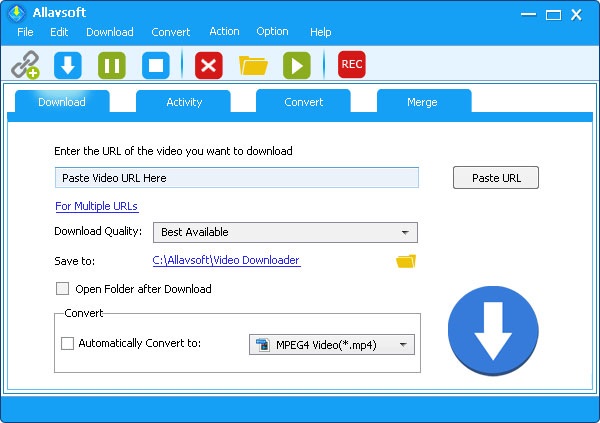
The Download tab: paste a link, pick the download quality and folder, and optionally convert to MP4 or another format as it downloads.
Features
Download from more than 1,000 sites with one paste
Allavsoft downloads movies, music videos, playlists, lectures, sports clips and subtitles from YouTube, Facebook, Vimeo, Twitter, Dailymotion, Crunchyroll, SBS, ABC iView, BBC, PBS, Udemy, Lynda and many more. You can paste one link, add a list with "For Multiple URLs", or drag a link from your browser onto the window. A browser add-on for Firefox and Chrome adds a Download button over videos while you watch them.
Convert while you download
Allavsoft keeps the original file by default, but tick "Automatically Convert to" and it converts as soon as the download finishes: MP4, AVI, WMV, MOV, MPEG-1, MPEG-2, VOB, ASF, RMVB, DV, TS, Apple ProRes, WebM, FLV or OGV for video, and MP3, WMA, WAV, AAC, Apple Lossless M4A, AIFF, RA, FLAC, OGG or AU for audio. That makes "YouTube to MP3" a one-click job.
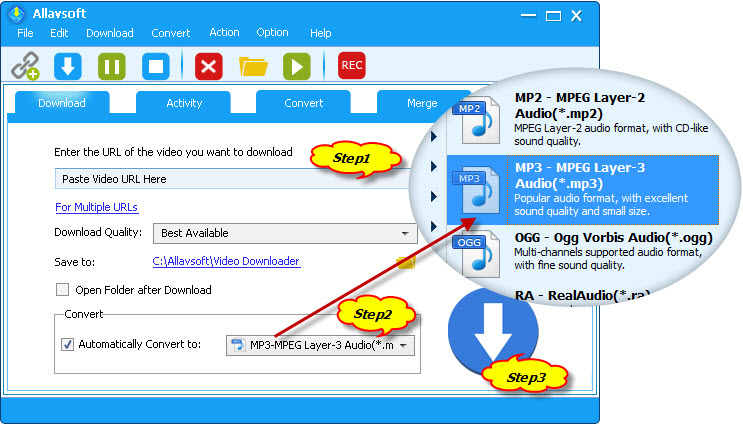
Allavsoft's own three-step illustration: paste the URL, choose MP3 under Automatically Convert to, and click Download.
Music from Spotify, Deezer, Qobuz and SoundCloud with tags
Allavsoft saves tracks and playlists from Spotify, Deezer, Qobuz, SoundCloud, Napster and Bandcamp to MP3 or FLAC, and writes ID3 tags such as title, artist, album, album artist, year and playlist position. A file-naming template in Preferences, for example "artist - track", keeps a downloaded playlist tidy.
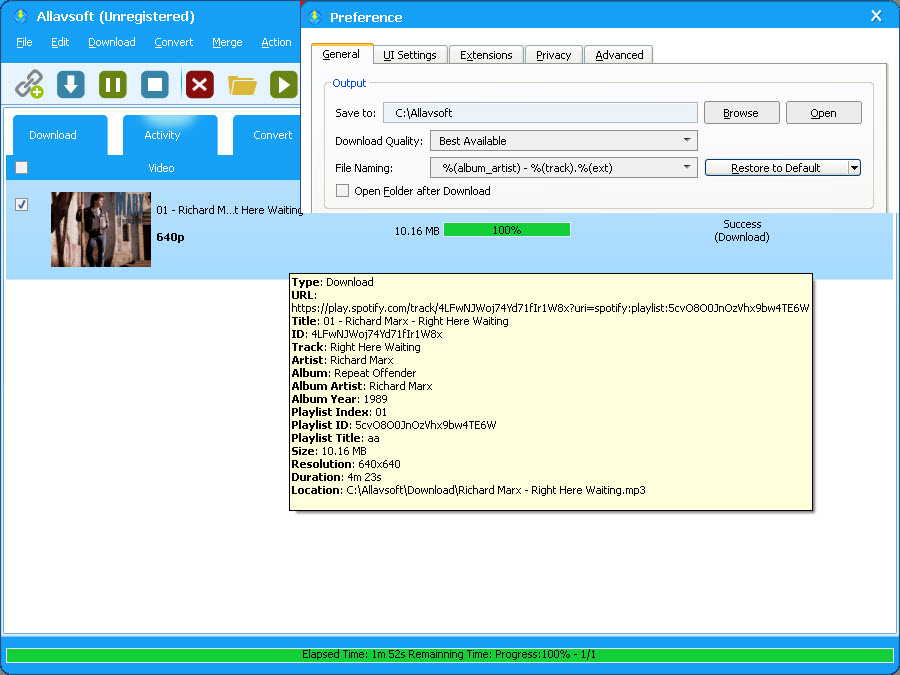
A finished Spotify download in the Activity tab, with its track, artist, album and playlist details, and the Preference window's file-naming setting (the trial's "Unregistered" title bar is visible).
Batch queues that look after themselves
Allavsoft downloads and converts several videos at once, skips the ads that sites insert, and lets you pause and resume any download. You can schedule downloads for off-peak hours, which helps if your internet plan has peak limits, and tell it to shut the PC down when the whole queue is finished. A download history keeps track of what you've already saved.
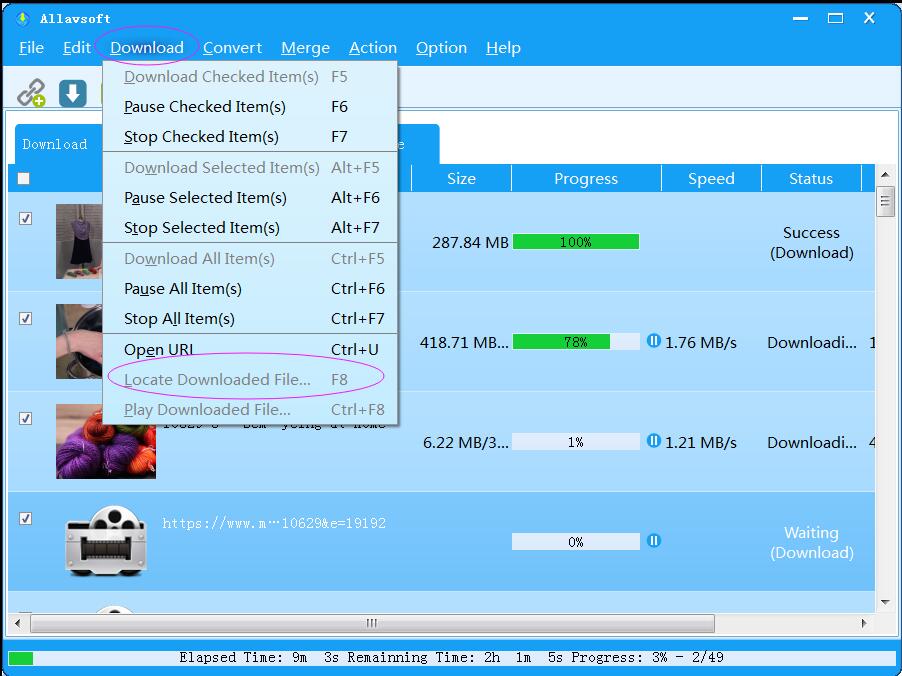
A queue of downloads with progress, speed and status, and the Download menu's pause, stop and "Locate Downloaded File" commands.
8K, 4K, 1080p and VR 360 quality
Allavsoft lets you pick from every quality the site offers, from 240p up to 1080p, 2K, 4K, 8K and 3D, or leave it on "Best Available". It also saves YouTube VR 360 videos, and it keeps chapter markers, so you can jump to a chapter in VLC instead of scrubbing through a two-hour video.
A player, converter and merger for files you already have
Allavsoft's built-in player previews downloaded files without opening another app. The Convert tab converts video and audio already on your PC, and the Merge tab joins several clips into one file, such as a lecture a site split into parts.
Benefits
- One tool instead of a dozen. Separate "YouTube to MP3", Vimeo and Spotify tools each come with their own ads and limits. Allavsoft handles all of them in one window.
- Files that just play. Converting while downloading means you get an MP4 your TV or phone accepts, not a WebM you have to convert later.
- Pay once. The lifetime license includes updates, which matters for a downloader that needs regular fixes as sites change.
- Works on old PCs. It still supports Windows 7 and earlier, which many newer downloaders have dropped.
Real-World Uses
- A student saves the Udemy course they bought before a long trip, merging the split parts into one video per lesson.
- A DJ or podcaster pulls their own SoundCloud uploads back down as FLAC, tagged and named by artist and track.
- A teacher downloads a Creative Commons video from Vimeo as MP4 so the lesson doesn't depend on the classroom Wi-Fi.
- A family queues a playlist of their own YouTube channel's videos overnight, with the PC set to shut down when it's done.
Who It's For, and Who Should Skip It
Allavsoft suits people who download from many different sites and want an easy, point-and-click tool that also converts. It's especially handy if you want audio files with proper tags, or if you're still on an older Windows PC.
Skip it if you only ever need YouTube: free tools such as yt-dlp (the open-source engine many downloaders build on) do that at no cost, if you're comfortable with fewer buttons. Skip it too if your main goal is downloading from Netflix, Disney+ or other paid streaming services, which protect their video with DRM and change their systems often. Those services' own offline download features are the reliable route.
Usage Guide
- Install and launch. Download the installer from allavsoft.com (about 72 MB) and run it.
- Copy a link. In your browser, copy the address of the video, song or playlist.
- Paste it. Click "Paste URL" on the Download tab, or use "For Multiple URLs" to add a list.
- Choose quality and format. Leave Download Quality on "Best Available" or pick a resolution, and tick "Automatically Convert to" if you want MP4, MP3 or another format.
- Click the big Download button. Watch progress in the Activity tab, and use pause or resume if you need the bandwidth.
- Find your files. Use Download > Locate Downloaded File, or open the folder shown under Save to.
- Register. Enter the license name and code you receive by email to remove the trial limits.
Where it falls short
- Sites break it, and fixes take time. The most common Trustpilot complaint is that YouTube, Spotify or another site stopped working after it changed something. Allavsoft usually ships a fix, but you may wait days.
- TikTok videos may keep the watermark. One reviewer reports TikTok downloads arriving with TikTok's watermark, which support couldn't remove.
- Some broadcaster streams pick the wrong audio track. An SBS On Demand user got the audio-description track over the video. Allavsoft replied that SBS is supported only for paid users.
- Extras are rougher than the core. TechJury found the merge and screen-recording features glitchy, with one merged file failing and recorded audio drifting out of sync.
- Old-fashioned look, unsigned installer. The interface hasn't changed much in years, and the Windows installer isn't digitally signed, so SmartScreen may warn you when you run it.
- It's built on familiar engines. An AlternativeTo user calls it "just a GUI for Youtube-DL". For YouTube alone, that's a fair point: you're paying for the convenience, the music sites and the conversions.
What Users Say
Trustpilot: 4.0 out of 5 from 316 reviews
About three quarters of Allavsoft's Trustpilot reviews are five stars, and 11% are one star. The happy reviewers mostly praise how simple it is and how fast support answers:
- "Definitely worth the paid version." — Terry J, who also noted that support replied within an hour
- "customer service has always quickly responded and has been helpful." — Flyer, a Windows user
- "The customer service is very helpful replying every inquiry in simply language." — Sandra
- "simple, easy to use product. does what it's supposed to do." — walker
- "I tried the video downloader and liked it so much that I bought it." — Scott Norwood
- "the support is just amazing !" — Chneb, who calls it their main downloading tool
Flyer also put the one big caveat fairly: "Sometimes YouTube or Windows changes things", which can break downloads until an update arrives.
The one-star reviews
Nearly every negative review is about a site that stopped working:
- "Complete piece of junk software!!" — Dale Morgan (July 2026), a lifetime-license owner whose Spotify and Deezer downloads stopped. Allavsoft replied: "We have found the solution to Spotify again."
- "My Allavsoft does not download anything anymore not even YouTube." — Alexander Wright, after a YouTube change. Allavsoft's answer: "YouTube is still supported."
- "I've always used allavsoft and I really like it." — Bruno Ferretti, before explaining that YouTube and Spotify downloads stopped after an update
- "Spotify closes account if this software is used." — Ronald Ramakers, whose Spotify account was blocked and later closed
- "It Does Not Work and Also Compromised My Spotify Credentials" — Mike
- "when i download videos from tiktok they download videos with tiktok watermark" — Muhammad Shoaib
Allavsoft replies to every negative review on the site, usually within a day.
Independent reviews and download sites
TechJury (Deyan Georgiev, Windows version) rated ease of use 5 out of 5: "Allavsoft might not have the fanciest user interface, but it makes up for it by being intuitive." He added that "It has a lot of useful features, like merging and downloading audio-only", got an email reply from support within a day, and found the merge and screen-recording tools glitchy.
On AlternativeTo, opinions split. RAM GOPAL AGARWAL calls it "the best video downloader having no virus issues", stefanachermann says it "works to download music from Tidal to FLAC or MP3", and TorQueMoD dismisses it: "This is just a GUI for Youtube-DL."
MajorGeeks users rate it 5 out of 5 from 181 votes.
The pattern: people who use Allavsoft for many sites like how easy it is and how quickly support answers. The complaints are almost all about sites, Spotify above all, breaking it for a while. Buy it for the breadth and convenience, test your own sites in the trial, and expect the occasional wait for a fix.
Comparisons
Allavsoft vs free yt-dlp front ends
yt-dlp is free, open-source and updated very quickly when YouTube changes, and several free programs put buttons on top of it. Allavsoft costs money but adds music-service downloads with tags, conversion to dozens of formats, merging, scheduling and email support in one installer that also runs on old Windows versions.
Allavsoft vs browser download extensions
Browser extensions are quick for a single video, but most can't save playlists, convert, or download from music services, and the Chrome Web Store doesn't allow extensions that download from YouTube. Allavsoft runs as its own program, so a browser update doesn't take it away.
Editions and Pricing
| License | Price | PCs | Updates |
|---|
| Lifetime License (sold here) | $59.99 (listed at $99.99) | 1-3 | Free for life |
| 1 Year License | $29.99 (listed at $49.99) | 1-2 | For one year |
| 1 Month License | $19.99 (listed at $29.99) | 1-2 | For one month |
The shorter licenses are on Allavsoft's own store. The lifetime license costs only twice the one-month price and never needs renewing, so it's the one to get unless you need Allavsoft for a single job. The license code arrives by email within minutes. From September 19 to December 29, 2026, Allavsoft's coupon code Give70OFF, typed on the order page, brings the lifetime license down to $18 (we checked it at checkout on October 24, 2026).
FAQs
Is Allavsoft safe to install?
Allavsoft is a long-running program from an established vendor, but its Windows installer isn't digitally signed, so Windows SmartScreen may warn you before it runs. Get it only from allavsoft.com, never from "full version" or "free license" pages, which often bundle malware.
Can one Allavsoft license be used on a Mac too?
No. Allavsoft sells Windows and Mac licenses separately, at the same price. The Windows lifetime license covers 1-3 Windows PCs.
Does Allavsoft download from Netflix or Disney+?
Don't count on it. Allavsoft has advertised Netflix downloads in the past, but paid streaming services encrypt their video and change their protection often, and reviewers mostly report success with free and open sites. Test it in the trial, and keep in mind those services' terms don't allow it.
What happens when a site stops working in Allavsoft?
Allavsoft fixes it in an update, which the lifetime license includes. Preferences has a "Check for Updates" option you can set to run every week. Contacting support at support@allavsoft.com also helps, since their replies on Trustpilot show they track which sites are broken.
Can Allavsoft limit its download speed?
Yes. Allavsoft's Preferences window has a download speed limit in KB/s, plus proxy settings, so a big queue doesn't swamp your connection.
Does Allavsoft download subtitles?
Yes. Allavsoft saves subtitles along with videos from sites that provide them, which is useful for foreign-language films and lectures.
Will Allavsoft run on Windows 7 or XP?
Yes. Allavsoft still lists Windows 2000, XP, Vista and 7 alongside Windows 8, 10 and 11, and needs only a 1 GHz processor and 512 MB of RAM.
System Requirements
- Windows 11, 10, 8, 7, Vista, XP or 2000
- 1 GHz Intel or AMD processor or faster
- 512 MB RAM or more
- 30 MB free disk space for installation, plus room for your downloads
- 800 x 600 display with 16-bit color or better
- An internet connection
Conclusion
Allavsoft is worth buying if you download from many sites, especially music services, and want conversion, tags and batch queues without learning a command-line tool. The lifetime license at $59.99 is fair for a program that needs constant updates, and it's a bargain with the Give70OFF coupon while it lasts. The reason not to buy is reliability on specific sites: when YouTube or Spotify changes, Allavsoft can stop working for a while. So use the trial on the sites you care about, and buy only once your own links download properly.
Download Free TrialBuy Now