iDealshare VideoGo for Mac: Get Camcorder, Windows and Web Video Into iMovie, Final Cut Pro and QuickTime
iDealshare VideoGo for Mac is a $49.99 lifetime-license video and audio converter for Mac users whose files won't open in iMovie, Final Cut Pro or QuickTime. It turns AVCHD, MXF, MTS, WMV, AVI, MKV and other formats into ProRes, MP4 or MOV that Apple's apps accept, extracts audio, and handles simple trims and merges. It's an Intel app that runs on Apple Silicon Macs through Rosetta 2.
On a Mac the problem usually looks like this: iMovie greys out your camcorder's clips, Final Cut Pro won't import an MXF file from a work camera, or QuickTime says it can't open a WMV someone emailed you. VideoGo for Mac converts the file into something Apple's software is happy with.
Quick facts
- Version: 6.8.2.9498 (the same version number as the Windows release), disk image dated January 2, 2026
- Developer: iDealshare
- Runs on: macOS Sonoma 14 and earlier, per iDealshare. It's built for Intel processors, so Apple Silicon Macs (M1 and later) run it through Rosetta 2
- Price: $49.99 for a lifetime license with free updates (a $29.99 one-year plan is also sold on iDealshare's own store)
- Free trial: converts only the first 5 minutes of each file, or half of a file shorter than 5 minutes
- Download: 49.1 MB disk image, about 124 MB once installed
- What we checked: we downloaded the disk image from idealshare.net on October 24, 2026 and looked inside the installer package: the app is version 6.8.2.9498, and every program file in it contains Intel (i386 and x86_64) code only, with no Apple Silicon or PowerPC code. The price on the order page was $49.99 for the lifetime license on October 24, 2026. We didn't run conversions on a Mac.
Before you buy
- On an M-series Mac, it depends on Rosetta 2. macOS offers to install Rosetta the first time you open an Intel app. It works, but an Intel-only app won't be as fast as native software, and Apple has announced that macOS 27 is the last release with full Rosetta 2 support: from macOS 28, Intel-only apps like this one won't run on Apple Silicon Macs.
- iDealshare's macOS list stops at Sonoma. If you're on a newer macOS, run the trial on your own Mac before paying.
- The refund policy is narrower than the "30-Day Money Back Guarantee" banner. iDealshare's FAQ refunds you when a bug blocks the program and support can't fix it, when your hardware isn't supported, or when you bought twice. Changing your mind isn't on the list.
- The license is for the Mac version only. The Windows version is a separate purchase.
Download Free TrialBuy Now
Overview
VideoGo for Mac looks like a classic Mac OS X app: a toolbar with Add File, Trim, Crop, Effect, Merge and Preference, a preview player on the left, your file list on the right, and the Profile menu, destination folder and a big round Convert button along the bottom.
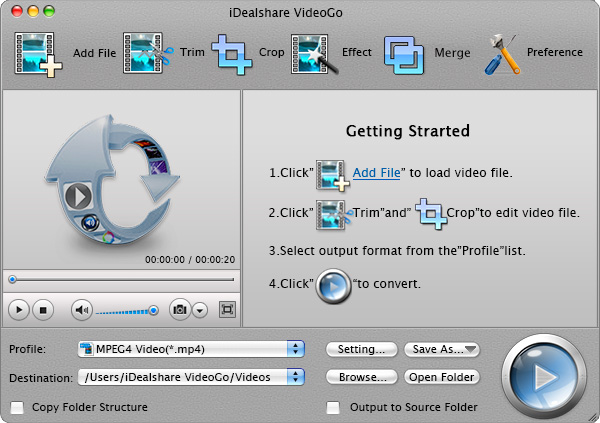
The iDealshare VideoGo for Mac main window: the Getting Started steps, the MPEG4 Video profile and the destination folder, with Setting, Save As and Browse buttons.
Features
Camcorder footage ready for iMovie and Final Cut Pro
iDealshare VideoGo for Mac converts camcorder and pro-camera formats, AVCHD (.mts, .m2t, .m2ts), MPEG-2, MXF, MOD, TOD, R3D and MPEG-4/H.264, into formats iMovie, Final Cut Pro, Final Cut Pro X and Final Cut Express import: MPEG-4 or DV for iMovie, Apple ProRes for Final Cut. iDealshare also names Avid Media Composer, Adobe Premiere and Sony Vegas as targets.
Apple ProRes output, including ProRes 4444
iDealshare VideoGo for Mac writes Apple ProRes, the editing codec Final Cut Pro works with best, and its Advanced Settings let you choose the ProRes profile, such as 4444, along with frame rate, aspect ratio and pixel format. It also converts ProRes clips back to MP4, AVI or WMV for sharing.
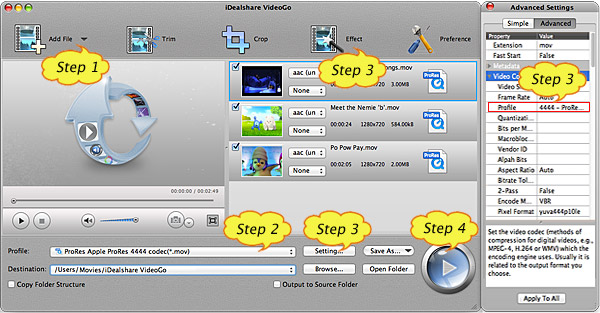
From iDealshare's ProRes guide (with its Step markers): three clips queued with the "ProRes Apple ProRes 4444 codec" profile, and the Advanced Settings panel showing Profile 4444 and pixel format yuva444p10le.
Windows and web formats that play in QuickTime, iTunes and on iPhone
iDealshare VideoGo for Mac converts WMV, AVI, DivX, Xvid, MKV, WTV, 3GP, VOB, RMVB, MPG, ASF, FLV and MVI to MP4 or MOV for QuickTime, iTunes, iPhone, iPad, iPod and Apple TV. It goes the other way too: MOV, M4V, MP4 and ProRes to AVI, WMV, 3GP, MKV or VOB for Windows players, Android phones and non-Apple editors. Device presets cover Apple, Android, Samsung Galaxy, Xbox, PSP and others.
Audio for iTunes and the Music app
iDealshare VideoGo for Mac extracts the soundtrack from a video and converts audio that Apple's apps won't play, such as FLAC, WMA, OGG, APE, DTS, RA, 3GA and RAM, into formats iTunes and the Music app accept. It can also increase or lower a track's volume, or mute the source audio.
Trim, crop, merge and add subtitles
iDealshare VideoGo for Mac's Video Edit window has Trim, Crop, Image, Watermark, Effect, Audio and Subtitle tabs with original and output previews side by side. Set a start and end time to keep one segment, crop black borders or a channel logo and lock the result to 16:9 or 4:3, adjust brightness, saturation and contrast, add effects like Old Film, Mosaic or Negative, and add or remove subtitles or a text or photo watermark. To join clips, select them and choose Merge.
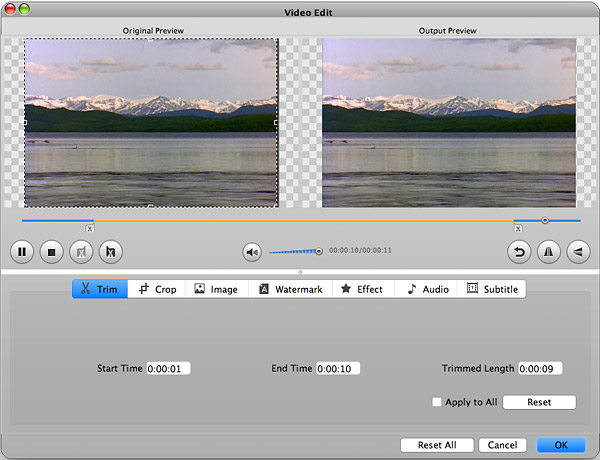
The Mac Trim tab: Start Time 0:00:01, End Time 0:00:10 and a trimmed length of 0:00:09, with the original and output previews above.
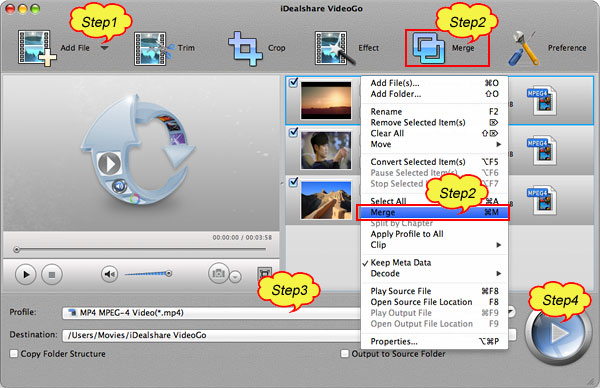
From iDealshare's video joiner guide (with its Step markers): three clips selected and the right-click menu open on Merge, with Split by Chapter, Apply Profile to All and Keep Meta Data below it.
Benefits
- Fewer "unsupported file" dead ends. One app gets camcorder, Windows and web video into Apple's tools.
- Edit-friendly output. ProRes output means Final Cut Pro edits smoothly instead of struggling with long-GOP camera files.
- Pay once. The lifetime license includes updates, so there's no yearly fee.
- Handy for older Macs. Because it's an Intel app, it still runs on Intel Macs that newer Apple Silicon-only software has left behind.
Real-World Uses
- A family camcorder archive: batch-convert years of AVCHD .MTS clips to MPEG-4 so iMovie imports them.
- Work footage on a personal Mac: turn MXF files from a broadcast camera into ProRes for Final Cut Pro.
- Files from Windows colleagues: convert their WMV screen recordings to MOV for QuickTime and Keynote.
- Movies for an iPad trip: convert MKV or AVI files with the iPad preset, burning in a subtitle file on the way.
- Music for the Music app: convert a FLAC or WMA collection into a format Apple's Music app plays.
Who It's For
VideoGo for Mac suits iMovie and Final Cut Pro users with mixed footage, and anyone who keeps receiving Windows video files, particularly on an Intel Mac or a recent Apple Silicon Mac with Rosetta installed.
Who should skip it: if you only need MKV to MP4, the free HandBrake runs natively on Apple Silicon. If you're on a macOS release newer than Sonoma and want something tested there, or you want a native Apple Silicon app for speed, look at a converter that lists them. And if your clips already open in iMovie or Final Cut, you don't need a converter for them.
Usage Guide
- Install. Open the 49.1 MB disk image and run the installer package, which puts iDealshare VideoGo in Applications. On an Apple Silicon Mac, accept the offer to install Rosetta the first time you open it.
- Add files. Click Add File, or drag files or a folder into the window.
- Choose the profile. Click the Profile menu and pick a format (for example, a ProRes profile for Final Cut Pro or MPEG-4 for iMovie) or a device preset. Click Setting... for the Advanced Settings.
- Edit if needed. Use Trim, Crop or Effect, or select several files and choose Merge.
- Convert. Click the round Convert button. Conversion runs in the background, and Open Folder shows the results.
- Register. Enter the license name and code from your order email to remove the 5-minute trial limit.
Where it falls short
- An older code base. Inside the app, the bundled FFmpeg libraries (libavcodec 56) date from around 2015. That's fine for the classic formats it lists, but it's a sign the conversion engine hasn't been rebuilt in years.
- A dated look and stability reports. FileHorse's Mac review lists "Occasional Crashes – Stability issues reported.", "Slow Large File Handling – Struggles with big files." and "Outdated UI Design – Looks a bit old-fashioned."
- Basic editing only. There's no timeline, titles or transitions, so you'll still need iMovie or Final Cut for real editing.
- Uneven support reports. Some Trustpilot buyers praise quick help, while one says they never got a refund or a reply.
What Users Say
FileHorse (Mac version)
FileHorse's review of VideoGo for Mac 6.8.2, by Sophia Jones, lists these pros: "Wide Format Support – Converts numerous file types.", "Fast Conversion Speed – Quick and efficient processing.", "Batch Processing – Converts multiple files at once.", "Built-in Video Editor – Basic editing tools included." and "User-Friendly Interface – Simple and easy to navigate."
And these cons: "Limited Advanced Features – Lacks pro-level editing tools." and "No Free Version – Only a trial with limitations.", plus the stability, large-file and interface points above.
FixThePhoto: 4.5 out of 5
Kate Gross and Kate Debela reviewed iDealshare's converter for macOS and Windows: "iDealshare is a super-efficient audio and video converter. Thanks to its intuitive design, iDealshare is very easy to use. You can work with any number of files without worrying about compatibility, as the application supports over 150 audio and video formats." Their pros include "Straightforward installation" and "Basic video and audio editing". Their one con: "Lags while editing large video files".
Trustpilot: 3.8 out of 5 from 8 reviews
iDealshare's Trustpilot reviews cover both versions and date from 2017 to 2020, so they're a rough guide. Most are five stars:
- "It works great whatever in convering, playing or the basic video and audio editing" — Hermann Pernell
- "i Highly recommend this tool, value for money is 100%." — Tarek Jammoul
- Ken Damon, "My "lifetime" version stopped working but they came through": "I had a problem with the program initially and they completely resolved the issue to my great satisfaction."
Two are one star:
- "NOT ONLY DID I NOT GET A REFUND, and never heard back from them..." — James Hammer
- "We downloaded this software to convert .n3r files, because an article on their website indicated that it could do that." — Ryan Keeney, to which iDealshare replied: "We do have free trial version, if it does not work, please do not buy it."
The pattern
Reviewers agree that VideoGo for Mac is easy to use and reads a very wide range of formats. The criticisms are its age: an old-fashioned interface, slowness on big files, some reports of crashes, and little recent feedback. None of the reviews we found test it on an Apple Silicon Mac, so the trial is your best check.
Comparisons
iDealshare VideoGo for Mac vs HandBrake
HandBrake is free, native on Apple Silicon and very good at MP4 and MKV. It only writes MP4, MKV and WebM files, doesn't convert audio-only files, and doesn't merge clips. VideoGo for Mac covers those, which matters most if you edit in Final Cut Pro or send files to Windows users.
iDealshare VideoGo for Mac vs Apple's own tools
QuickTime Player and the Finder's "Encode Selected Video Files" can re-encode a file that already opens on your Mac, to H.264, HEVC or ProRes. They can't open formats macOS doesn't support, like WMV, MKV or FLV. Opening those files is the job VideoGo for Mac does.
Editions and Pricing
| License | Price | Term | Updates |
|---|
| Mac Lifetime License (sold here) | $49.99 (list $59.99) | One-time payment | Free lifetime updates |
| Mac 1 Year Subscription (iDealshare's store) | $29.99 a year (list $39.99) | Renews yearly | While subscribed |
Until December 29, 2026, iDealshare's coupon Give70OFF brings the Mac lifetime license to $15 when you enter it at checkout (checked on October 24, 2026). Volume and academic licenses are available by contacting iDealshare.
FAQs
Does iDealshare VideoGo for Mac run on M1, M2, M3 or M4 Macs?
iDealshare VideoGo for Mac runs on Apple Silicon only through Rosetta 2, because the app contains Intel code only. macOS offers to install Rosetta the first time you open it. Try the free trial on your Mac to check it works with your files.
Does iDealshare VideoGo for Mac work on macOS Sequoia or later?
iDealshare's own list of supported systems ends at macOS Sonoma 14. It doesn't mention later releases, so test the trial on your macOS version before you buy.
Is the iDealshare VideoGo for Mac trial watermarked?
iDealshare VideoGo for Mac's trial limits length rather than adding a watermark: it converts only the first five minutes of a file, or half of a file shorter than five minutes. Your license code removes the limit.
Can I use my iDealshare VideoGo for Mac license on Windows?
No. iDealshare VideoGo for Mac and the Windows version are separate products with their own licenses.
How do I move iDealshare VideoGo for Mac to a new Mac?
iDealshare's FAQ says to remove it from the old computer, install it on the new one and register with the same license name and code. Lost the code? Email sales@idealshare.net with your order details and iDealshare resends it.
How do I uninstall iDealshare VideoGo for Mac?
Quit iDealshare VideoGo for Mac, then drag it from the Applications folder to the Trash.
System Requirements
- macOS Sonoma 14, Ventura 13, Monterey 12, Big Sur 11, Catalina 10.15 or older Mac OS X versions (iDealshare's list)
- Intel processor, or an Apple Silicon Mac with Rosetta 2
- 512 MB RAM or more
- About 125 MB of disk space once installed, plus room for converted files
- 800 x 600 display, 16-bit graphics or higher
Conclusion
iDealshare VideoGo for Mac is worth it if you regularly need to get camcorder, MXF or Windows video into iMovie, Final Cut Pro or QuickTime, and you'd rather pay once than subscribe. The one reason to buy it is that it opens and converts formats your Mac won't, including ProRes output for Final Cut. The main reason to hesitate is age: it's an Intel-only app on old libraries, officially listed only up to Sonoma, with a dated interface. On an Intel Mac or an Apple Silicon Mac with Rosetta, run the five-minute trial with your own files. If they convert cleanly, the $49.99 lifetime license is good value.
Download Free TrialBuy Now