Short answer: to save a Dailymotion or Youku video as an MP4, install a desktop downloader, paste the video's link, pick a quality and download. CleverGet Video Downloader ($71.95 lifetime at checkout) is our main pick: it opens the page in its own browser and lists the MP4 sizes that video really has.
Allavsoft is the budget pick at $18 with the code in its Buy button, and it has a Mac version. Only pay for CleverGet All-in-One or CleverGet All-in-One for Mac ($269.95) if you also save from subscription services, because neither adds anything for Dailymotion or Youku. Both CleverGet and Allavsoft have free trials, so test your exact link before you pay. That matters most for Youku.
Dailymotion and Youku downloaders at a glance
| Fact |
CleverGet Video Downloader |
Allavsoft |
CleverGet All-in-One |
| Price at checkout | $71.95 lifetime, $49.95 for 1 year | $18 lifetime with code ($59.99 without) | $269.95 lifetime |
| Computers | 1 | 1-3 | 1 |
| Platforms | Windows, Mac (separate license) | Windows, Mac (separate license) | Windows, Mac (separate license) |
| Free trial | 3 downloads in total | About 5 downloads, 5-minute convert limit | 3 downloads |
| Dailymotion | ✓ on its site list, with a published walkthrough | ✓ named on its homepage | ✓ through the Video Downloader module |
| Youku | ✓ youku.com on its site list, no walkthrough | ✓ own guide, dated December 2016 | ✗ no extra Youku module |
| MP4 output | ✓ when the site offers it (also MKV, WEBM, 3GP) | ✓ auto-convert after download | ✓ same as Video Downloader |
| Standout | Built-in browser with sign-in | Paste-a-link window, batch list | Every CleverGet module and the Recorder |
Only download what you have the right to save
These tools are for content you have the right to save, such as your own uploads, or videos whose owner allows it. Each site's terms still apply. Dailymotion's Terms of Use (updated June 30, 2026) describe the service as streaming and say its material may not be downloaded without written consent from Dailymotion or its licensors. Youku's own terms apply to anything on Youku. CleverGet's own fair use policy limits it to personal, educational and non-commercial copies of content you've legally obtained, and copyright law where you live applies on top. This guide doesn't cover getting around DRM or other copy protection.
How we picked and what we checked
- We searched our software listings for active downloaders whose makers name Dailymotion and Youku, then read each maker's supported-site list, guides and specs.
- We read the order page for every license in this article, in US dollars.
- We downloaded each current installer and read its version without running it.
- We read Dailymotion's upload specifications and Terms of Use, and Youku's app listing for its quality limits.
- We read the Trustpilot pages for both makers.
What we checked: on November 6, 2026, the order page showed CleverGet Video Downloader lifetime at $79.95 less an $8.00 discount, so $71.95, and $49.95 for 1 year. CleverGet All-in-One, Windows and Mac, showed $539.90 less a $269.95 offer, so $269.95. Allavsoft Lifetime, Windows and Mac, showed $59.99, or $18 with the code. The CleverGet Windows installer is version 27.0.0.1 (503 MB). Allavsoft is 3.29.7.9791 on both systems. youku.com and dailymotion.com are both on CleverGet's supported-site list that day.
We didn't run a Dailymotion or Youku download ourselves, so the steps and quality notes come from the makers' guides, and the screenshots are CleverGet's and Allavsoft's own. We compared features, prices and trials, not download speed.
How to convert a Dailymotion video to MP4, step by step
CleverGet Video Downloader turns a Dailymotion link into an MP4 in six steps, and the free trial covers your first 3 downloads. "Dailymotion to MP4" is a slightly misleading phrase here: the program doesn't convert anything, it saves the MP4 stream Dailymotion already serves.
- Install CleverGet. Use the Download button below. The same 503 MB installer covers every CleverGet module.
- Set the output folder. Open the three-dot menu, choose Settings, and pick a folder in the "Save Video To" box on the General tab, then click Save.
- Open the video. Paste the Dailymotion link into CleverGet's address bar and press Enter, or click the Dailymotion icon on the home screen and search there.
- Let the video load. CleverGet reads the page and opens a Download panel listing each version by quality, format and file size.
- Pick an MP4 row and click Download. The panel may show several versions, so choose the largest MP4 unless you need a smaller file.
- Find the file. It appears in the Library panel on the right, where you can double-click to play it or open its folder.

CleverGet's Settings panel: language, maximum download tasks, and the Save Video To and Save Audio To folders. The Dailymotion icon is at the bottom left of the home screen behind it. Older interface, from CleverGet's own guide.
What quality will you get from Dailymotion?
Dailymotion quality depends on what was uploaded, so no downloader can improve on it. CleverGet advertises up to 8K, but Dailymotion's upload specifications stop at 4K (3840 x 2160), and many videos are far below that. In CleverGet's own Dailymotion walkthrough, one 6:58 video offered MP4 at 1280 x 720 (109.67 MB) and 848 x 480 (42.67 MB), while another 10:44 video came down at 1920 x 1080 (489.10 MB). If the list stops at 720p, that video has no higher version for you to save.

A Dailymotion video open in CleverGet, with the Library panel at the right showing a 10:44 download at 1920 x 1080, 489.10 MB. Older interface, from CleverGet's own guide.
Which Youku video downloader actually works?
Youku is the less certain of the two sites, so treat any Youku video downloader as something to test first. CleverGet lists youku.com on its supported-site list, but it doesn't name Youku on the product page and sells no Youku module. Allavsoft has a step-by-step Youku guide, but that guide dates from December 2016. Neither maker shows a current Youku download, and we didn't run one.
The steps are the same as for Dailymotion in CleverGet, and Allavsoft's are shorter: copy the Youku link, paste it in, set the output format, click Download. Three limits apply whichever program you use:
- Quality follows your account. Youku's own app listing names 1080P streaming as a member benefit. A downloader can only offer what your account can play, so expect less than 1080p on many videos without a membership. In CleverGet, you sign in inside its built-in browser.
- Region matters. A video that won't play for you won't download. CleverGet says to confirm the page plays smoothly first. Its list names youku.com and no other Youku address.
- Paid and protected shows are out. CleverGet Video Downloader is for ordinary video sites, and neither maker promises paid Youku titles. Plan on this working for free, unprotected videos only.
So the honest test costs nothing: install a trial, paste the actual Youku link you care about, and see what the quality list shows. If it fails, try the other program's trial. If both fail, neither is worth buying for Youku.
How to download a video from a URL, or an MP4 from a link
Both programs download a video from a URL the same way, on any site they support: copy the link from your browser and paste it in. CleverGet takes the link in its address bar and plays the page, which helps on sites that need a sign-in. Allavsoft takes it in a "Paste Video URL Here" box without showing the page.
To get an MP4 from a link in Allavsoft, leave Download Quality on Best Available, tick "Automatically Convert to", choose MPEG4 Video (*.mp4), and click the large download arrow. For several videos, its "For Multiple URLs" option takes a list. If a site wraps a video in DRM, these two programs aren't the tool for it.
CleverGet Video Downloader
CleverGet Video Downloader costs $71.95 lifetime at checkout ($79.95 list price) or $49.95 for 1 year, for one computer. It runs on 64-bit Windows 7 to 11 and macOS 11 or later, with a separate Mac license. Best for: saving from Dailymotion and other free video sites at the best quality the site offers.
CleverGet Video Downloader works like a browser with a download panel. You see the video playing, then choose from what the page really offers, which is why it's our lead pick for Dailymotion. It also takes whole playlists and channels on YouTube, runs up to 5 downloads at once, and saves live streams. Output is MP4, MKV, WEBM or 3GP video, or WEBM and M4A audio.
Where it falls short: 3 trial downloads go fast, and the 503 MB install is heavy for one job, because it carries every CleverGet module. The program can't download from Netflix, Amazon Prime, Disney+, HBO Max or Twitch. Refunds are narrow too, so don't count on one if Youku doesn't work: Leawo's policy covers reproducible bugs and hardware incompatibility it can't solve, not a change of mind, and it looks for a request within 14 days.
What we like
- The quality list shows real sizes before you commit
- Sign-in works inside the built-in browser
- Saves MP4 directly, with no conversion step
- Lifetime license with free updates
Watch out for
- Only 3 trial downloads, in total
- Youku is listed but has no vendor walkthrough
- One license covers one computer
- Commercial use is forbidden
CleverGet scored 4.7 out of 5 from 67 reviews on Trustpilot on November 6, 2026, across all its modules.
"This is the best video downloader I have encountered so far." Kamlesh Bhatt, Trustpilot
"sometimes updates of the software or the update from the streaming platform can wreak havoc" Satori Agape-Economo, Trustpilot
"Super easy to use! Everything is perfect though it sometimes fail to download videos from unheard-of site." Laura, CleverGet's product page
Download CleverGet Video DownloaderBuy CleverGet Video Downloader
Allavsoft and Allavsoft for Mac
Allavsoft and Allavsoft for Mac cost $18 lifetime with the 70% code the Buy button applies, or $59.99 without it, for 1-3 PCs. Best for: the lowest price, and buyers who want a plain paste-a-link tool that also converts to MP4.
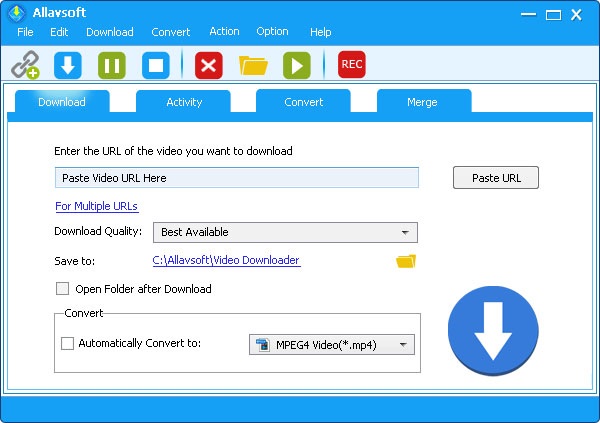
Allavsoft's Download tab: the Paste Video URL Here box, For Multiple URLs, Download Quality set to Best Available, and Automatically Convert to MPEG4 Video (*.mp4).
Allavsoft is the cheapest way to get a working Dailymotion and Youku downloader, and it does more for the money than its plain window suggests. It names Dailymotion on its homepage, lists qualities from 240p to 4K on its product page, and adds a merge tool and a converter. It's the only program here with a Youku guide of its own. Just remember that guide is old, and Allavsoft's Dailymotion guide was last updated in March 2019.
Where it falls short: you don't see the available qualities in a list before downloading the way you do in CleverGet, and the Windows installer isn't digitally signed. Allavsoft for Mac lists macOS only up to version 14, and the build we inspected on October 24, 2026 contained only Intel code, so an Apple silicon Mac would rely on Rosetta. Its 30-day money-back guarantee is for technical problems. The code is a limited offer: without it, the price is $59.99.
What we like
- $18 lifetime with the code
- One license covers 1-3 PCs
- Converts to MP4 automatically
- About 5 trial downloads
Watch out for
- Old guides for Youku and Dailymotion
- Windows installer isn't digitally signed
- Intel-only Mac build when we last looked inside
- Sites break until an update arrives
Allavsoft scored 3.9 out of 5 from 317 reviews on Trustpilot on November 6, 2026, with 76% five-star and 11% one-star reviews.
"Definitely worth the paid version." Terry J, Trustpilot
"Sometimes YouTube or Windows changes things" Flyer, Trustpilot
"it now doesn't download from Spotify, Deezer and sometimes even struggles with Youtube!!" Dale Morgan, Trustpilot (one star, July 2026). Allavsoft replied that it had "found the solution to Spotify again."
Download AllavsoftBuy Allavsoft
Download Allavsoft for MacBuy Allavsoft for Mac
CleverGet All-in-One: the step up, if you need it

CleverGet's home screen, the same in every edition, with shortcuts for YouTube, Bilibili, Vimeo, Dailymotion, BBC and other sites.
CleverGet All-in-One switches on every CleverGet module at once, including the Video Downloader and the Recorder. For Dailymotion and Youku alone it adds nothing, because CleverGet has no dedicated module for either site, and the same Video Downloader does the work for $198 less. All-in-One only pays off if you'd otherwise buy about three modules, each of which runs up to $99.95 lifetime at list price.
What we like
- One license for every module
- Includes the Recorder
- Same interface and same Dailymotion steps
Watch out for
- No extra Dailymotion or Youku ability
- One computer only, and a Mac needs its own license
- You still need your own subscriptions
Download CleverGet All-in-OneBuy CleverGet All-in-One
Download All-in-One for MacBuy All-in-One for Mac
Lifetime price for one license (USD)
Allavsoft, with the code$18.00
Allavsoft, without the code$59.99
CleverGet Video Downloader$71.95
CleverGet All-in-One$269.95
Order page prices checked on November 6, 2026.
Which should you choose?
| Your situation |
Pick |
Why |
| Mainly Dailymotion to MP4 | CleverGet Video Downloader | Shows each MP4 size before you download |
| Mainly Youku | Trial of both, then buy what worked | Neither shows a current Youku download |
| Tightest budget | Allavsoft | $18 with the code, and it covers 1-3 PCs |
| Modern Apple silicon Mac | CleverGet Video Downloader (Mac license) | Supports Apple silicon on macOS 11 or later |
| Subscription services as well | CleverGet All-in-One | The Video Downloader alone can't reach them |
Who should skip each one. Skip CleverGet Video Downloader if Youku is your only reason to buy and your trial test fails. Skip Allavsoft if you need Apple silicon code or prefer signed installers. Skip CleverGet All-in-One if Dailymotion and Youku are all you use. Skip all of them for a single clip you could get from the uploader by asking.
What commonly goes wrong
- "No downloadable video detected" in CleverGet. The page must play smoothly first. Refresh it, restart CleverGet and update to the latest version, in that order.
- A downloader stops working on a site. Video sites change often, and this is the top complaint for both makers. Reviewers of both describe fixes from support after a site update, so a broken site today can return, but it isn't guaranteed.
- Buying before testing. The trials exist for this. CleverGet's trial is only 3 downloads in total, so spend one on your hardest link first.
- Expecting 8K. The "up to 8K" claim is about the program, not about Dailymotion or Youku. You can't get more than the site serves your account.
- Risking the account. Sites can act on accounts used with downloaders. One Allavsoft reviewer, Ronald Ramakers, wrote that "Spotify closes account if this software is used." Sign in only if you accept that risk under that site's terms.
FAQs
Can CleverGet download Youku videos?
CleverGet Video Downloader lists youku.com on its supported-site list, so Youku is officially covered, but CleverGet publishes no Youku walkthrough and sells no Youku module. Use a free trial download on your link to confirm it before paying.
Is there a Youku video downloader online that needs no install?
CleverGet and Allavsoft are both desktop programs, not websites, so each needs an install. This guide only covers software listed on our site. The no-cost route with these two is the trial: 3 downloads in CleverGet, about 5 in Allavsoft.
Can I download Dailymotion videos for free?
Allavsoft and CleverGet Video Downloader both let you download a few Dailymotion videos free in their trials, then ask you to buy a license. For a handful of videos, the trial alone may be all you need.
Is it legal to download from Dailymotion?
Downloading your own uploads, or videos the owner lets you save, is the safe case. Dailymotion's Terms of Use otherwise bar downloading without written consent, and copyright law varies by country. CleverGet Video Downloader itself is legal software, but the responsibility for each download is yours.
Does CleverGet Video Downloader work on a Mac?
CleverGet Video Downloader runs on macOS 11 or later, on Intel and Apple silicon, but the Mac version needs its own license. The Mac lifetime license also showed $71.95 at checkout.
Why does my Dailymotion download look blurry?
Your Dailymotion download is probably a low-quality version, or the upload itself was low quality. In CleverGet Video Downloader, compare the sizes in the Download panel and pick the largest MP4. In Allavsoft, keep Download Quality on Best Available.
Can I use downloaded videos on my own channel or in a business?
No, not with CleverGet: its license is for personal use and forbids commercial use. Reposting someone else's video also needs the owner's permission, whichever downloader you used.
Conclusion
CleverGet Video Downloader is the one to start with for Dailymotion to MP4, because you see each version and its size before saving, and $71.95 lifetime is fair if you'll use it regularly. Choose Allavsoft at $18 if price comes first. For Youku, don't buy on trust: run your real link through a trial, since both makers' Youku support is thinner than their Dailymotion support. And keep to videos you have the right to save.
Download CleverGet Video DownloaderBuy CleverGet Video Downloader