CleverGet Video Downloader: Save YouTube Videos, Playlists and Live Streams for Offline Viewing
CleverGet Video Downloader (formerly Leawo YouTube Downloader) is a Windows and Mac program that saves videos from YouTube, Facebook, Vimeo, Bilibili and 1000+ other video sites, including whole playlists and live streams, at up to 8K when the source has it. A lifetime Windows license costs $79.95 (or $49.95 for one year), and the free trial lets you download 3 videos.
It's for people who want an offline copy of videos they're allowed to keep: a lecture series for a long flight, a playlist of workout videos for a gym with bad Wi-Fi, or a recording of a live event that the uploader may take down later.
Quick facts
- Current version: 27.0.0.0 (the CleverGet suite installer, October 15, 2026)
- Developer: CleverGet, a Leawo brand
- Runs on: Windows 7, 8, 8.1, 10 and 11 (64-bit). A Mac version for macOS 11 and later is sold separately.
- Sites: YouTube, Facebook, Twitter, Vimeo, Bilibili, Dailymotion, BBC and 1000+ others. TikTok and Twitch aren't on its supported-site list; CleverGet sells separate TikTok and Twitch Downloader modules
- Not included: Netflix, Amazon Prime, Disney+, HBO Max, U-Next and similar paid streaming services (separate CleverGet modules)
- Output: MP4, MKV, WEBM and 3GP video, WEBM and M4A audio, up to 8K
- Price: $79.95 lifetime or $49.95 for 1 year, for one PC
- Free trial: 3 video downloads in total
- Money-back guarantee: 14 days
- What we checked: the Windows installer we downloaded from CleverGet on October 20, 2026 is CleverGet version 27.0.0.0, a 486 MB installer for the whole CleverGet suite, digitally signed by ShenZhen Moyea Software. The order page for the 1-year Windows license showed $49.95 on October 20, 2026. We didn't download any videos with it ourselves.
Before you buy
Downloading is only legal for videos you have the right to keep. CleverGet's own fair use policy limits the program to personal, educational and non-commercial copies of content you've legally accessed, and forbids sharing downloads or using them commercially. Many sites' terms of service also forbid downloading, so check before you save. The 486 MB installer puts the whole CleverGet suite on your PC, and this license activates only the Video Downloader module. If you want Netflix, Amazon or Disney+, you need the separate streaming modules instead.
Download Free TrialBuy Now
Overview
CleverGet Video Downloader works like a web browser with a download button. The home screen shows shortcuts to YouTube, Facebook, Twitter, TikTok, Bilibili, Vimeo, Twitch, Dailymotion, MetaCafe, MySpace, Veoh and BBC, and an address bar where you paste any video link. The TikTok and Twitch shortcuts in Leawo's screenshots are misleading: the current supported-site list leaves both out, and Leawo says the Video Downloader can't download from Twitch.tv. When a video page opens, CleverGet finds the available versions and lists them by quality, format, frame rate and file size. You tick the ones you want, and the Library panel on the right shows the progress and, later, your finished video and audio files.
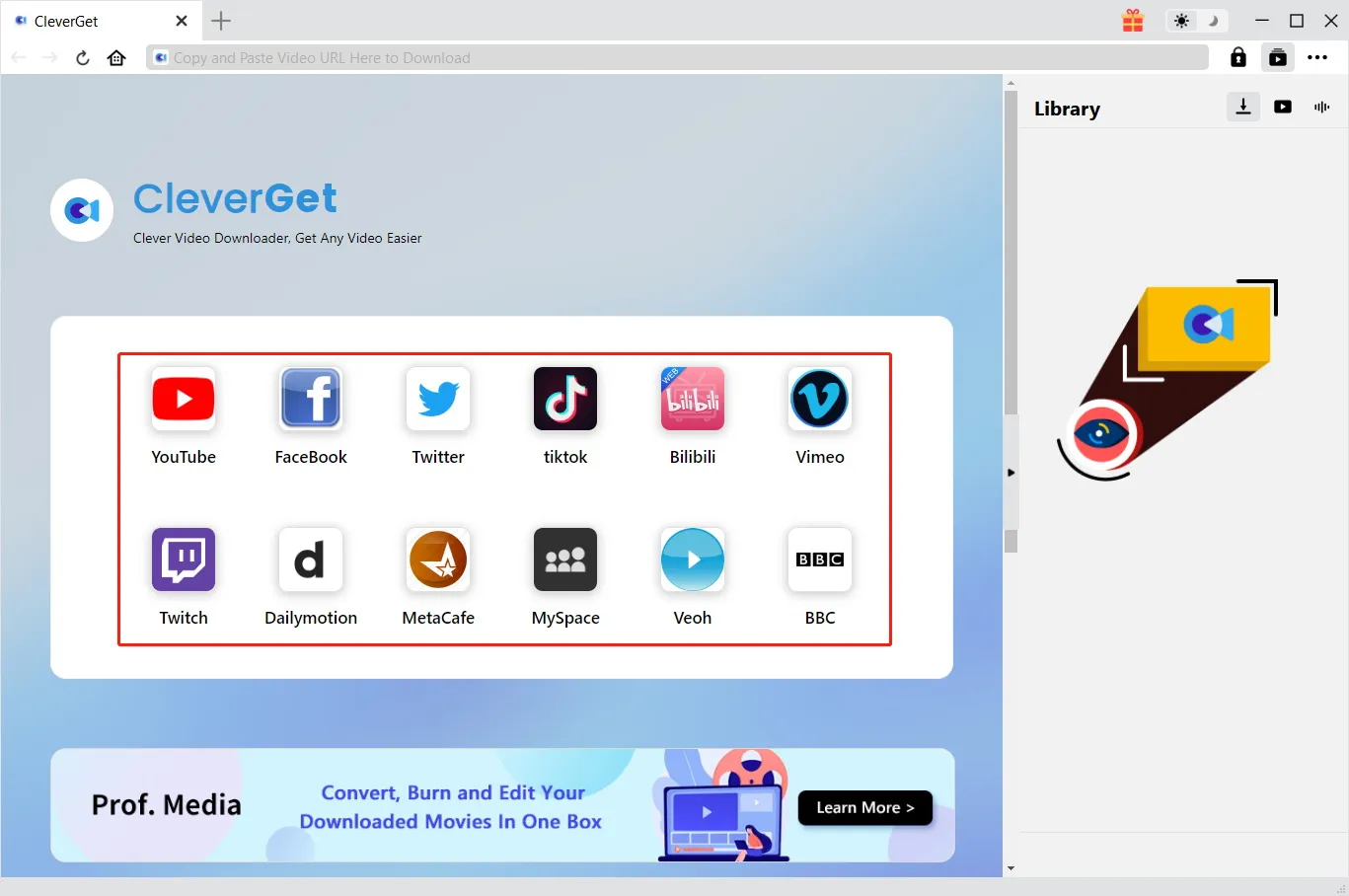
The CleverGet home screen, from CleverGet's user guide: the URL bar at the top, shortcuts to twelve video sites, and the Library panel on the right.
Features
Download from YouTube and 1000+ sites, up to 8K
CleverGet Video Downloader saves on-demand videos, Shorts, music videos and news clips from YouTube, Facebook, Twitter, Vimeo, VEVO and more than 1000 other sites. It offers every quality the site provides, up to 8K, and saves to MP4, MKV, WEBM or 3GP, or audio only as WEBM or M4A. Audio tracks and subtitles are kept when the source has them.
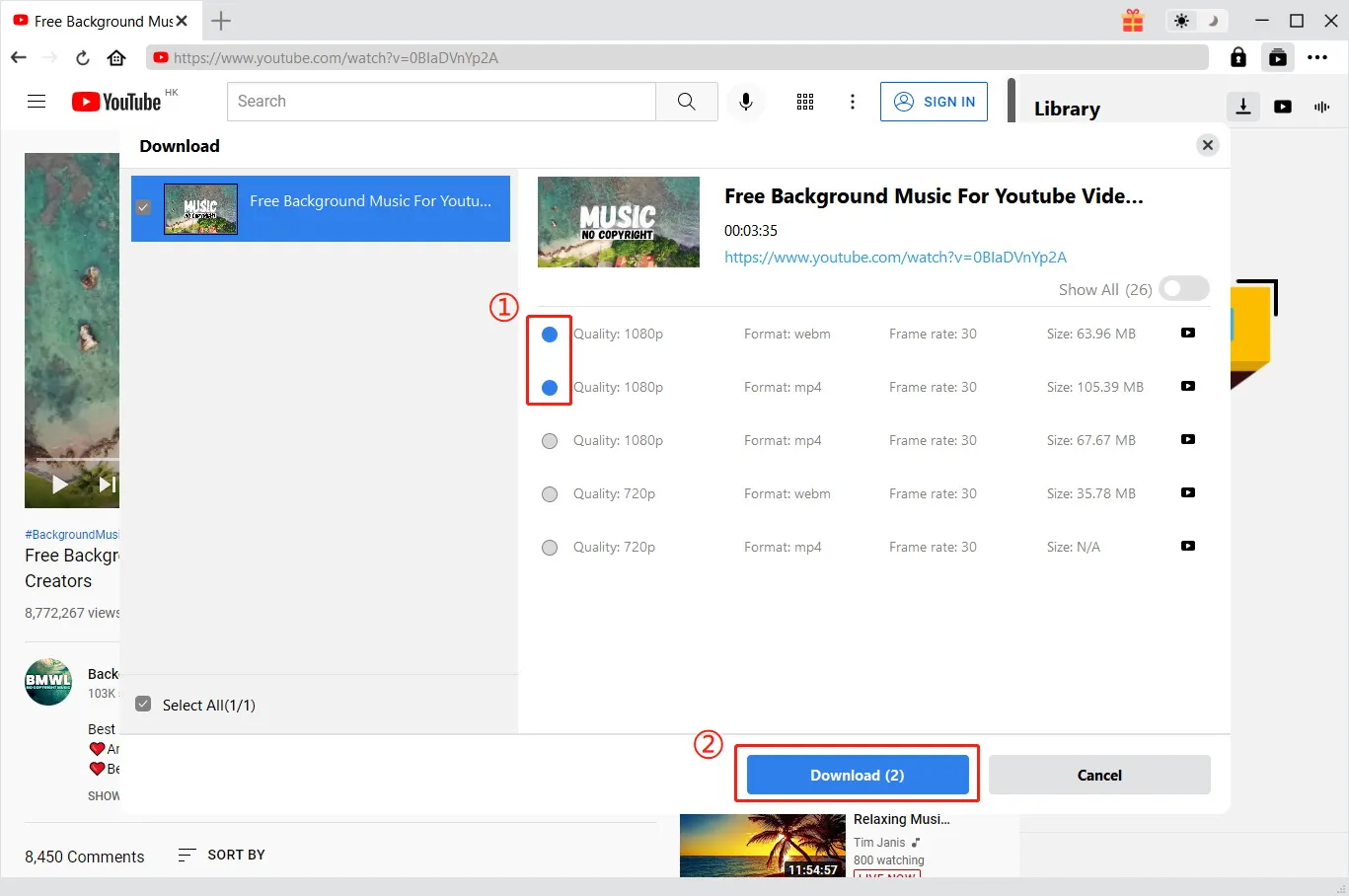
The Download panel, from CleverGet's user guide: a 3:35 YouTube video with 1080p and 720p options in WEBM and MP4, each with frame rate and file size, two of them ticked.
Whole playlists and channels in one go
CleverGet Video Downloader detects every video in a YouTube playlist or channel and lets you download all of them or just the ones you pick. Up to 5 downloads run at once, and the rest wait in a queue. You can restart failed or stopped downloads without analyzing the page again.
Live stream recording
CleverGet Video Downloader can save live streams from YouTube Live, Facebook Live and other sites that stream with M3U8 playlists. It finds the M3U8 link by itself while the stream plays, so you don't need a separate link extractor.
Practical extras
CleverGet Video Downloader saves the video's title and details with the file, can shut the computer down when the last download finishes, supports a proxy server, uses GPU acceleration (NVIDIA CUDA, Intel Quick Sync, AMD APP), and has light and dark modes. From the Library you can open downloaded files in Leawo's player or send them to Leawo Prof. Media to convert or burn.
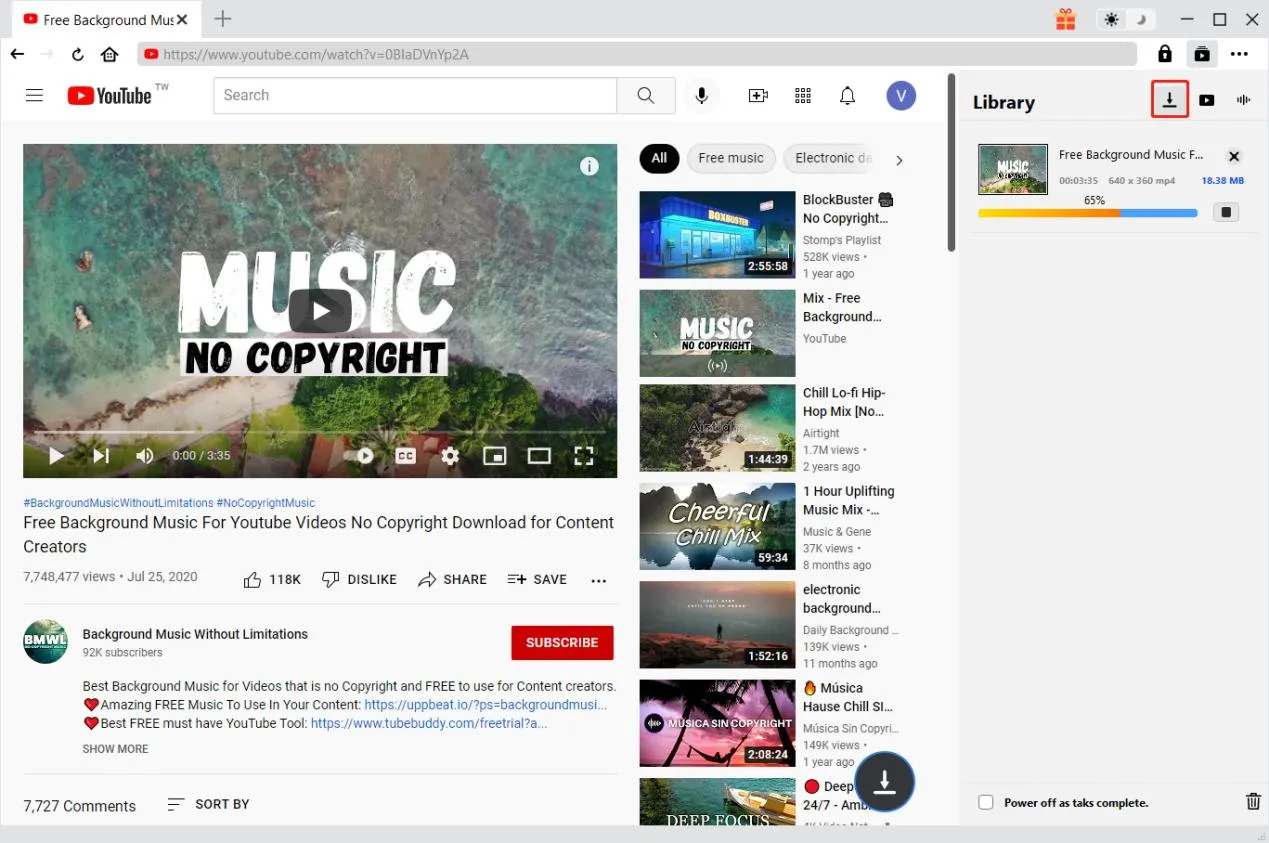
A download in progress, from CleverGet's user guide: the Library shows a 640x360 MP4 at 65%, with "Power off as task complete" at the bottom.
Benefits
- Offline when it matters. Course videos and playlists play on a plane, a train or anywhere the connection drops.
- One step for a whole series. A 60-video playlist becomes one batch instead of 60 copy-and-paste jobs.
- A copy that doesn't disappear. Your own live stream or a public talk is saved even if the original is removed later.
Real-World Uses
- A student saves a free university lecture playlist to a laptop before a week without reliable internet.
- A creator archives their own YouTube live streams in full quality.
- A teacher keeps classroom videos (licensed for teaching use) on a USB stick so lessons don't depend on school Wi-Fi.
- A family saves a relative's public Facebook video of a wedding toast before it scrolls out of reach.
Who It's For, and Who Should Skip It
CleverGet Video Downloader suits people who regularly save videos and playlists from YouTube and other free video sites for offline personal use, and want batch downloads and live stream recording in one place.
Skip it if you want Netflix, Amazon Prime, Disney+ or HBO Max: this module can't download from them. Skip it too if you only need an occasional single video, where the 3-download trial or a free tool may be enough, or if you want to reuse other people's videos commercially, which neither CleverGet's policy nor copyright law allows.
Usage Guide
- Install and launch. Download the installer from CleverGet and run it. It installs the CleverGet suite.
- Set the output folder. Click the three-dots icon, open Settings, and choose where to save videos under General. You can also set the maximum number of simultaneous downloads (1 to 5) there.
- Open the video. Paste the video's address into the URL bar and press Enter, or click a site shortcut and browse to it.
- Choose the versions. In the Download panel, tick the quality and format you want and click Download.
- Watch progress. The Library panel shows each download, and you can stop or remove tasks there.
- Register. After buying, click Activate in the top right and enter your registration code to remove the 3-download limit.
Where it falls short
- Breaks when sites change. Video sites change how they deliver video, and downloaders need updates to keep up. Even happy CleverGet customers on Trustpilot mention that platform updates can "wreak havoc" until the next CleverGet release.
- Crashes on some PCs. CleverGet's own FAQ starts with what to do when the program keeps crashing when you open a page.
- A heavy install. The 486 MB installer includes every CleverGet module, not just the Video Downloader.
- 8K only when it exists. CleverGet can't add quality: you get the best version the site offers.
- The 1-year plan expires. When a 1-year license ends you have to renew or buy again to keep using it.
What Users Say
Independent reviews of the Video Downloader module alone are rare, and many "CleverGet reviews" online come from competing downloader makers. The most useful source is Trustpilot, where reviews cover all CleverGet modules.
Trustpilot
CleverGet's Trustpilot profile shows a TrustScore of 4.5 from 66 reviews: 79% five-star and 6% one-star. The company answers its reviews, and most praise is for the downloads working and for support:
- Kamlesh Bhatt (5 stars, August 2026): "This is the best video downloader I have encountered so far."
- Farsite KG (5 stars, July 2026): "The programs' continued ability to download files from numerous entities is amazing"
- Jim (5 stars, July 2026): "Their product is easy to use, work wonderfully, and customer service is one of the best."
- Mike (5 stars, May 2026), on support: "quick answer, accurate instructions to debug the issue, follow-up within 1-2 days max"
- Satori Agape-Economo (5 stars, August 2026), with a caveat: "sometimes updates of the software or the update from the streaming platform can wreak havoc"
- Alberto (4 stars, March 2026), about another module: "The Crunchyroll module stopped downloading subtitles after the last update."
The pattern
Users like how many sites CleverGet handles and how quickly support responds. The complaints are about things breaking for a while after a site or program update, and missing subtitles on some services. That's normal for downloaders, but it means you should use the free downloads on the sites you care about before buying.
Comparisons
Video Downloader vs. the CleverGet streaming modules
CleverGet Video Downloader covers free video sites such as YouTube, Facebook and Vimeo. Netflix, Amazon Prime, Disney+, HBO Max, Hulu and other subscription services each have their own CleverGet module, sold separately or together in the CleverGet All-In-One package. If you only use YouTube and similar sites, the Video Downloader is all you need.
Editions and Pricing
| License |
Price |
Term |
Money-back guarantee |
| Video Downloader, 1 Year (Windows) | $49.95 | 1 year, free upgrades and support | 14 days |
| Video Downloader, Lifetime (Windows) | $79.95 | Lifetime, free lifetime updates | 14 days |
Prices are from CleverGet's purchase data on October 20, 2026. The Buy Now button opens CleverGet's Video Downloader page, where you choose the plan.
FAQs
Is CleverGet Video Downloader the same as Leawo YouTube Downloader?
Yes. CleverGet Video Downloader is the current name of Leawo's YouTube Downloader: the download page still calls it "Leawo YouTube Video Downloader", and it's sold under the same product code.
Can CleverGet Video Downloader download from Netflix or Amazon Prime?
No. CleverGet Video Downloader doesn't download from Amazon Prime, Netflix, HBO Max, Disney+, U-Next, Crackle, Twitch or FOD. CleverGet sells separate modules for those services, and for TikTok, which isn't on the Video Downloader's supported-site list either.
Is it legal to download YouTube videos with CleverGet?
CleverGet Video Downloader is legal software, but whether a download is allowed depends on the video and where you live. CleverGet's own policy limits it to personal, educational, non-commercial copies of content you've legally accessed, and YouTube's terms restrict downloading. Videos you own, public-domain videos and videos the creator allows you to download are the safe cases.
What does the CleverGet free trial include?
The CleverGet free trial lets you download up to 3 videos in total from the supported sites, with the same features as the paid version, so you can check that it works with the sites you use.
Does the Windows license work on a Mac?
No. CleverGet Video Downloader for Windows and for Mac are separate purchases. The Mac version runs on macOS 11 and later, on Intel and Apple silicon Macs.
Can CleverGet download a whole YouTube channel?
Yes. CleverGet Video Downloader lists every video in a playlist or channel so you can select all or some of them, and downloads up to 5 at a time.
Does it run on 32-bit Windows?
No. CleverGet Video Downloader needs 64-bit Windows 7, 8, 8.1, 10 or 11.
System Requirements
- Windows: Windows 7, 8, 8.1, 10 or 11, 64-bit
- Processor: 1 GHz Intel or AMD processor or faster
- Memory: 512 MB RAM (1 GB or more recommended)
- Disk space: 5 GB or more free
- Graphics: NVIDIA GeForce GTX 260 or better for GPU acceleration
- Mac version: macOS 11 or later, Intel or Apple silicon, 1 GB free disk space
Conclusion
CleverGet Video Downloader is worth it if you regularly save YouTube and other free-site videos for personal offline use and want playlists, channels and live streams handled in one program. The one reason to buy it is the batch and live stream support in a simple browser-style window. The main reason to hold back is that it only covers free video sites, and like every downloader it depends on quick updates when sites change. Use the 3 free downloads on the sites you care about, and if you'll use it for more than a year, the $79.95 lifetime license is the better buy.
Download Free TrialBuy Now