Vovsoft Delete Multiple Files: Clear Out Files From Many Folders in One Click
Delete Multiple Files is a small Windows program from Vovsoft that deletes files and folders from many different locations in one run, using wildcard masks such as *.tmp or *.pdf per folder, with a preview list first and a choice of the Recycle Bin or permanent deletion. It costs $19 for a lifetime license, and in Vovsoft's Black Friday sale until December 1, 2026 it is $9.50 at checkout. It's for people who clear the same set of folders again and again.
Explorer and the del command both work one folder at a time. If every week you empty a temp folder, old exports in two project folders and the PDFs your scanner drops on the desktop, this keeps those targets in a saved list and clears them together.
Quick facts
- Version: 2.0, released April 7, 2026
- Developer: Vovsoft, the software company of Fatih Ramazan Çıkan in Turkey
- Platform: Windows 11, 10, 8/8.1, 7 and Vista, 32-bit and 64-bit. No Mac version
- Targets: single files, folders, subfolders and recursive subfolders, each folder with its own file mask
- Delete modes: Send to Recycle Bin or Permanently Delete
- Lists: saved and loaded as CSV files, and loadable from the command line
- Languages: English and more than 30 others
- Editions: installer (4.22 MB) and portable (3.84 MB), one license for both
- Price: $19 one-time, lifetime license with free updates; $9.50 with Vovsoft's Black Friday coupon BLACKFRIDAY2026 until December 1, 2026 (the Buy Now button below applies it)
- Trial: free to try with deletion working, but it shows a nag screen and ads and doesn't allow commercial use
- Refunds: no money-back guarantee; refunds are at Vovsoft's discretion, mainly for accidental orders
- What we checked: installer file version 2.0.0.0 (4,431,640 bytes) with a valid digital signature, downloaded from the vendor and read without running it; checkout price $19.00, and $9.50 with the coupon, with no auto-renewal on the order page on November 24, 2026. We didn't run a deletion ourselves
Download Free TrialBuy Now
Overview
Delete Multiple Files is a two-column list, Files & Folders and File Mask, with Add, Remove, Edit, Load and Save buttons under it, the Recycle Bin or Permanently Delete switch, and two big buttons: LIST ALL shows every file that would go, and DELETE ALL does it.
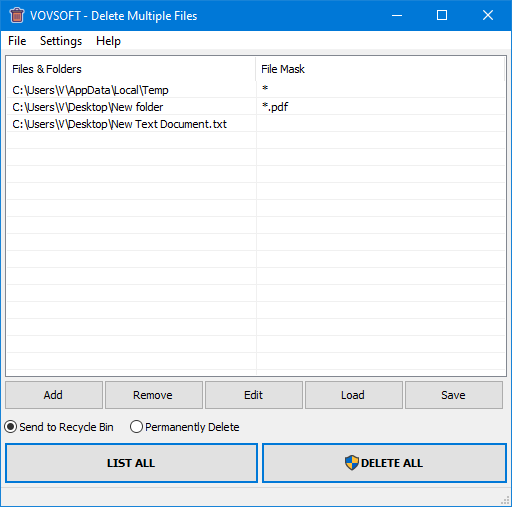
The main window: everything in the Temp folder (mask *), only PDFs in "New folder" (mask *.pdf), and one text file, set to go to the Recycle Bin.
Vovsoft first released Delete Multiple Files in January 2021 and has added to it since: the Recycle Bin option and CSV lists in 1.1, the List All preview in 1.3, masks on loaded lists and command line loading in 1.5, and in 2.0 (April 7, 2026) file and folder icons, a Delete All button inside the List All window and fixes for file masks, environment variables and drag and drop.
Features
Many locations in one list
Delete Multiple Files keeps any number of files and folders from anywhere on your drives in one list, added from the menu or by dragging them in from Explorer, and deletes them all with one button.
Wildcard masks per folder
Delete Multiple Files lets each folder have its own mask: * empties the folder, *.jpg removes only JPG files, and an empty mask deletes the file or folder itself. Folders can include their subfolders and recursive subfolders.

The Edit dialog, with hints: an empty mask deletes the item itself, * deletes all files, *.pdf only PDF files.
Preview before you delete
Delete Multiple Files's List All button shows the exact files a run will remove before anything is touched, and version 2.0 added a Delete All button right in that preview.
Recycle Bin or permanent
Delete Multiple Files can send everything to the Recycle Bin, so a mistake can be undone, or delete permanently to free the space straight away.
Reusable lists and command line
Delete Multiple Files saves a list as a CSV file and loads it again later, and command line parameters let a script or scheduled task load a list, so a regular clean-up becomes a two-click job.

The Completed window, logging each deletion by mask and path.
Benefits
- Repeat clean-ups take seconds. Save the list once and reuse it every week.
- Fewer accidents. The preview and the Recycle Bin option make a wrong mask easy to catch or undo.
- No command line skills needed. It does what a del script would, with a window and a preview.
Real-World Uses
- Developers: clear build output, *.log and *.tmp files across several project folders.
- Photographers: remove leftover *.xmp sidecars or exported JPGs from many shoot folders while keeping the RAW files.
- Office PCs: empty scan and download folders and the temp folder at the end of each week.
- IT staff: load a saved list from a script to clear the same cache folders on several machines.
Who It's For, and Who Should Skip It
Delete Multiple Files suits anyone who deletes the same kinds of files from the same set of folders over and over, and wants a preview instead of a script.
Skip it if you only delete a handful of files now and then, since Explorer's search box and Shift+Delete do that for free; if you want to find duplicates or large files, which needs a different kind of tool; or if you need files erased beyond recovery, since permanent deletion here is not a secure shredder. A general cleaner such as CCleaner suits you better if you just want Windows junk gone without choosing folders.
Usage Guide
- Install it, or unzip the portable edition, and start it.
- Click Add or drag files and folders onto the list.
- Select a folder and click Edit to set its file mask, such as * or *.pdf.
- Choose Send to Recycle Bin or Permanently Delete.
- Click LIST ALL and check every file in the preview.
- Click DELETE ALL, then Save the list if you'll run it again.
Before you buy
- The sale price is temporary. $9.50 applies with coupon BLACKFRIDAY2026 until December 1, 2026. After that it's $19.
- Start with the Recycle Bin. A mask of * on the wrong folder removes everything in it. Use LIST ALL and the Recycle Bin until you trust your list.
- No refund if you change your mind. Vovsoft refunds at its discretion, mostly accidental orders, and PayPro Global has the final say on orders placed there.
Where it falls short
- One mask per folder. You can't write *.xml,*.map in one entry; add the folder twice instead. Users have asked for multiple masks.
- No date or size filters. It can't delete "files older than 30 days", a common request for log and backup folders.
- No secure erase. Permanent deletion skips the Recycle Bin but doesn't overwrite the data, so recovery tools may still find it. A file shredder is on the request list, not in the program.
- No built-in schedule. Automatic runs need Windows Task Scheduler and the command line.
What Users Say
Delete Multiple Files has few public reviews. Its product page showed 4.5 out of 5 from 2 ratings on November 24, 2026, and Vovsoft as a company showed 4.6 out of 5 from 416 reviews on Trustpilot on the same day.
Customer review on the vendor's page
Anonymous User: "Thanks for the software which has saved me a great deal of time!"
Independent review
TrishTech (September 16, 2023, an earlier version) explained that Explorer and the del command "can be used for deleting files from just one folder only at a time", and that this tool "is designed to quickly and easily delete a large number of files from a number of different folders." It warned about the permanent option: "We should be careful when picking the second option because permanently deleted files cannot be recovered."
Trustpilot reviews of Vovsoft (other products)
Gary Zeune (5 stars, October 2026): "Saves me at least an hour a day doing thing I used to do manually."
DJcooker (5 stars, October 2026), after reporting a problem with Merge Audio Files: "The next day they advised me to download version 1.3. Problem solved; works great."
A customer (1 star, October 2026): "CSV to VCF does a poor job. You need to start over on this one."
Users credit Vovsoft's small tools with saving repetitive work and its support with quick fixes; the caution from reviewers is about care with permanent deletion, and the open requests are for date filters and multiple masks.
Comparisons
Delete Multiple Files vs Explorer and the del command
Both are free. Explorer needs you to visit each folder and select files, and del needs a script and gives no preview. Delete Multiple Files keeps all the targets in one saved list with a preview and the Recycle Bin as a safety net.
Delete Multiple Files vs CCleaner
CCleaner knows where Windows and browsers keep junk and cleans it for you. Delete Multiple Files knows nothing on its own but deletes exactly the folders and masks you choose, including your own project and work folders.
Delete Multiple Files vs Vovsoft Rename Multiple Files and Copy Files Into Multiple Folders
These sibling tools batch-rename and batch-copy in the same style. The Universal License covers all three.
Editions and Pricing
| Option | Price at checkout | License | What you get |
|---|
| Delete Multiple Files | $9.50 with BLACKFRIDAY2026 until December 1, 2026 (regular $19) | Lifetime, free updates | This program, installer and portable |
| Vovsoft Universal License | $49.50 with BLACKFRIDAY2026 until December 1, 2026 (regular $99) | Lifetime, free updates | Every Vovsoft desktop program, including future ones |
The Universal License makes sense if you'd also use Rename Multiple Files, Open Multiple Files or other Vovsoft tools: one key activates every Vovsoft desktop program, each otherwise $19.
Buy Delete Multiple Files ($9.50)Buy Universal License ($49.50)
FAQs
Can I undo a deletion made with Delete Multiple Files?
Delete Multiple Files can send everything to the Recycle Bin, so you can restore it from there. With Permanently Delete there's no undo in the program.
Does Delete Multiple Files securely shred files?
No. Delete Multiple Files's permanent mode removes files without the Recycle Bin but doesn't overwrite them, so use a file shredder for sensitive data.
Can Delete Multiple Files delete files older than a certain date?
Delete Multiple Files selects files by folder and name mask only; it has no date or size filter.
Can Delete Multiple Files run automatically every week?
Delete Multiple Files has no scheduler of its own, but its command line can load a saved list, so Windows Task Scheduler can start it on a schedule.
Does Delete Multiple Files work in my language?
Delete Multiple Files comes in English and more than 30 other languages, including German, French, Spanish, Chinese, Japanese, Arabic and Russian.
Is Delete Multiple Files a subscription?
Delete Multiple Files is a one-time purchase. The license never expires and includes future updates.
System Requirements
- Windows 11, 10, 8/8.1, 7 or Vista, 32-bit or 64-bit
- 4.22 MB for the installer or 3.84 MB for the portable edition
Conclusion
Delete Multiple Files is worth $9.50 until December 1, 2026, and fair at $19, if you clear the same folders and file types regularly and want a saved list with a preview instead of a script. The one reason to buy it is one-click, multi-folder deletion by mask with a Recycle Bin safety net. The main reason not to is that occasional users get the same result free from Explorer, and it has no date filter or secure erase. Try it in the trial with the Recycle Bin option on.
Download Free TrialBuy Now