Renee Audio Recorder X: Record PC Sound and Your Mic, Then Turn Speech Into Text
Renee Audio Recorder X is a $24.95 Windows 10 and 11 recorder from Rene.E Laboratory that captures your computer's sound, your microphone or both, saves to MP3, WAV, FLAC and a dozen other formats, runs recordings on a schedule, and transcribes speech to text on your own graphics card. It's for anyone recording calls, webinars, streams or narration who wants more than Windows' built-in Sound Recorder.
Quick facts
- Version: 3.0.3, released April 2026
- Developer: Rene.E Laboratory
- Platform: 64-bit Windows 11 and 10
- Price: $24.95 one-time (Basic); a Full Version option is $34.95
- Free trial: 30-second recordings, no scheduled recording
- Formats: MP3, AAC, AC3, AIFF, AMR, AU, FLAC, M4A, M4B, MKA, MP2, OGG, RA, VOC, WAV, WMA
- Voice to text: needs a supported NVIDIA, AMD or Intel GPU; exports TXT, SRT or DOCX
- Guarantee: 60-day money back, for any reason, per the vendor's FAQ
What we checked: the installer, version 3.0.3 (72 MB), digitally signed by Jiangmen Ruili Software Co., Ltd., and the order page, which showed Renee Audio Recorder X, Basic Version, at $24.95 with no renewal, and the Full Version option at $34.95, on November 8, 2026. We didn't make a recording or test the transcription.
Download Free TrialBuy Now
Before you buy
- Basic or Full? The order page offers a Basic Version at $24.95 (the price on the product page) and a Full Version at $34.95, and Rene.E doesn't publish what the extra $10 adds. If you need a specific feature, such as voice to text, ask Rene.E support which version includes it before you pay.
- Check your GPU for transcription. Voice to text runs locally and needs a supported graphics card; the settings window tells you whether your system is compatible.
- Ask before recording people. Recording calls and meetings without consent is illegal in many places.
Overview
Renee Audio Recorder X does everything from one window. Choose PC sounds, Microphone or PC sounds and Mic, pick the sound device, set the output format and folder, and click Record. A level meter and timer show what's being captured, a "Stop after" box ends the recording after a set number of minutes, and a Voice to Text switch at the top turns on live transcription.
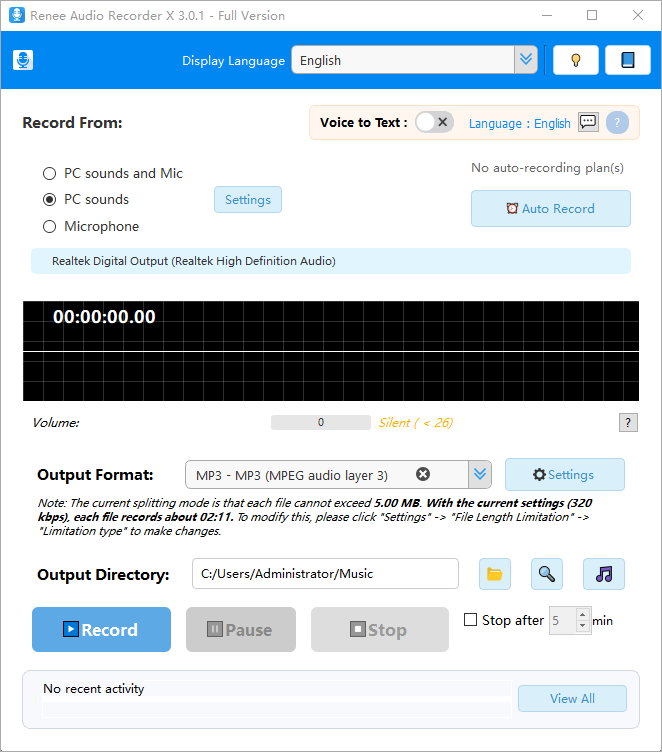
The main window (version 3.0.1, Full Version): sound source, Voice to Text, Auto Record, output format with its file-splitting note, and the Record, Pause and Stop buttons.
This is a rewrite of Rene.E's older Audio Recorder Pro, with a new interface, a separate task scheduler and the transcription feature. Its build history is current: the installer we downloaded was dated April 2026.
Features
Record computer sound, microphone or both
Renee Audio Recorder X captures whatever your PC plays (a stream, a call, a game) and your microphone, separately or mixed. You can choose among several sound cards, which matters if you use a USB headset alongside built-in speakers.
Long recordings without gaps or giant files
Renee Audio Recorder X pauses automatically when there's no sound (its Voice Activation System), so a three-hour session doesn't fill up with silence. A File Length Limitation setting splits a long recording into files of a chosen size; the main window tells you how many minutes each file will hold at your current bit rate.
Scheduled recordings with the Task Scheduler
Renee Audio Recorder X's Task Scheduler runs multiple automatic recording tasks at set times, shows when each next runs and whether the last run worked, and keeps an activity log. The tool warns that you need to be signed in to Windows and the PC set not to lock.
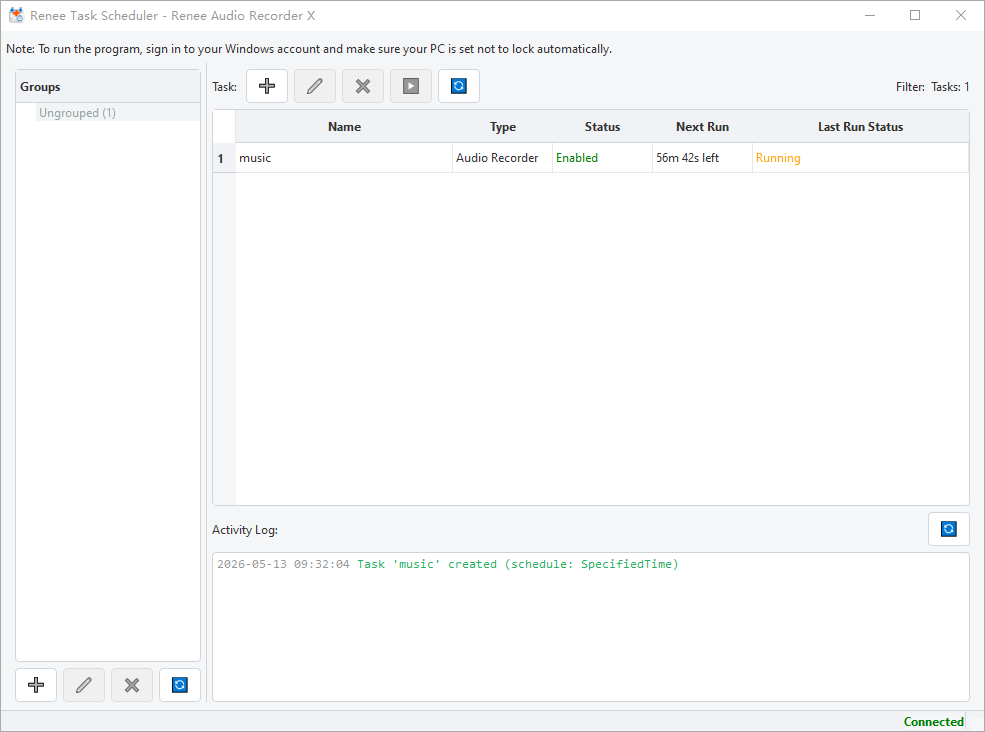
The Task Scheduler with one enabled recording task, its next run countdown, its status and the activity log.
Voice to text on your own GPU
Renee Audio Recorder X transcribes recordings into text and exports TXT, SRT subtitles or a Word DOCX. You download a speech model (the base model is 141 MB), pick the language and GPU, and set a no-speech filter so silence and noise aren't turned into gibberish. Because it runs on your graphics card, your audio isn't uploaded anywhere for transcription.

Voice to Text settings: language, speech model, GPU (an NVIDIA GTX 1060 here) and the no-speech filter. Other tabs cover files, voice activation, effects, file length and hotkeys.
Built-in player
Renee Audio Recorder X includes a player for checking a recording right after you stop, and it can import and play other audio files from your PC.
Benefits
- Private transcripts. Speech to text happens on your PC, which suits interviews and meetings you can't send to a cloud service.
- Set and forget. Schedules, silence detection and file splitting let it run unattended for hours.
- One payment. No subscription for the recorder or the transcription.
Real-World Uses
- Record a weekly online radio show every Sunday night without being at the PC.
- Capture both sides of a Zoom or Teams call (with everyone's consent) and get an SRT or DOCX transcript.
- Narrate a tutorial with your microphone while the PC's sound is recorded alongside it.
- Record a lecture stream and let silence detection skip the breaks.
Who It's For, and Who Should Skip It
Renee Audio Recorder X fits Windows 10 and 11 users who record audio regularly, especially on a schedule, and want local transcription without a subscription.
Skip it if you need to edit audio (cutting, mixing, noise removal): Audacity is free and does that, and records too. Skip it on a Mac or 32-bit Windows, which it doesn't support. And if you only need an occasional voice memo, Windows' own Sound Recorder is enough.
Usage Guide
- Download and install Renee Audio Recorder X on 64-bit Windows 10 or 11, then open it.
- Under Record From, choose PC sounds, Microphone, or both, and check the device shown below.
- Pick an Output Format and click its Settings button for bit rate and file-length options.
- Choose the Output Directory, then click Record. Use Pause and Stop, or "Stop after" a number of minutes.
- For transcripts, switch Voice to Text on, download a model in Settings, and select your GPU.
- For scheduled recordings, click Auto Record and add a task in the Task Scheduler.
Where It Falls Short
- Unclear editions. The order page sells Basic and Full versions without saying what separates them, and the vendor's store page still lists an older $34.95 "Standard Version".
- No audio editing. You get recording, conversion and playback, not a waveform editor.
- Transcription needs a GPU. PCs without a supported graphics card can't use voice to text.
- Scheduled tasks need an unlocked, signed-in PC. A recording won't run if Windows has locked the session.
- Short trial. 30 seconds per recording is enough to check sound quality but not to test a schedule, which the trial doesn't include.
What Users Say
Independent coverage of its predecessor
Audio Recorder X is too new for independent reviews. Softpedia reviewed its predecessor, Renee Audio Recorder Pro 2.0, and called it a simple, easy-to-use application with a straightforward, single-window interface, noting that the Settings window gives much finer control over bit rate, channels, sample rate, file naming and silence detection. The reviewer saw it as suited to tutorial narration and recording game audio. Audio Recorder X keeps those basics and adds scheduling and transcription.
The company's reputation
Rene.E Laboratory's Trustpilot profile (for reneelab.de) has a TrustScore of 1.8 out of 5 from 15 reviews. The complaints are about other products, such as activation limits on its backup software, plus refunds and unanswered support requests, not this recorder. The vendor's own testimonials on the product page talk about screen and game recording, so they don't describe this program.
The pattern: the recorder's design has had positive independent notice, but nobody has published a test of version 3 or its transcription. Use the trial to check sound quality on your hardware, and ask support about Basic versus Full before buying.
Comparisons
Renee Audio Recorder X versus Audacity
Audacity is free, records and edits audio in depth, and has a Timer Record for one-off timed recordings. Renee Audio Recorder X is simpler, handles several recurring scheduled tasks, pauses on silence and transcribes in the same program; Audacity is the better editor.
Renee Audio Recorder X versus Audio Recorder Pro
The older Renee Audio Recorder Pro recorded PC and mic sound with silence detection and an auto record plan. Audio Recorder X replaces it with a redesigned window, the separate Task Scheduler, voice to text and a built-in player, and it's the version the vendor now sells.
Editions and Pricing
| Version | Price | Term | Notes |
|---|
| Trial | $0 | No limit | 30-second recordings, no auto record, no support |
| Basic Version | $24.95 | One-time, no renewal | Default on the order page and the product page price |
| Full Version | $34.95 | One-time, no renewal | Option on the same order page; differences not published |
FAQs
Can Renee Audio Recorder X record Spotify or YouTube audio?
Renee Audio Recorder X records anything your PC plays through the selected sound device, which includes streaming sites and apps. Whether you may keep that recording depends on the service's terms and copyright law where you live.
Does Renee Audio Recorder X work on 32-bit Windows or Windows 7?
No. Renee Audio Recorder X supports only 64-bit Windows 10 and 11.
Is Renee Audio Recorder X's transcription done online?
Renee Audio Recorder X transcribes on your own graphics card with a downloaded speech model, so it needs a supported NVIDIA, AMD or Intel GPU. You only need the internet to download the model.
Is Renee Audio Recorder X a subscription?
No. Both Renee Audio Recorder X versions were one-time purchases with no renewal on the order page.
Can I get a refund on Renee Audio Recorder X?
Rene.E's FAQ for Renee Audio Recorder X promises an unconditional 60-day money-back guarantee: email them for a full refund. Some Trustpilot reviewers found refunds for other Rene.E products hard to get, so keep your order details.
Which languages does Renee Audio Recorder X's interface support?
Renee Audio Recorder X's interface comes in English, Chinese, French, Portuguese, Spanish, German, Italian, Japanese, Korean and Arabic.
System Requirements
- Windows 11 or Windows 10, 64-bit
- About 72 MB for the installer
- A sound card or USB audio device, and a microphone for voice recording
- For voice to text: a supported NVIDIA, AMD or Intel GPU and room for the speech model (141 MB for the base model)
Conclusion
Renee Audio Recorder X is worth $24.95 if you record audio from your PC regularly and want schedules and private, on-device transcripts in one simple program, without a subscription. The one reason to buy it is that combination at a low one-time price. The main reason to hesitate is the vague Basic versus Full split and the vendor's weak support reputation, so confirm which version you need and test the trial on your own hardware first.
Download Free TrialBuy Now