Renee Undeleter: Windows File Recovery With Three Scan Depths
Renee Undeleter is a $39.95-a-year Windows data recovery tool from Rene.E Laboratory for getting back files you deleted, lost to a format, or can't reach on a damaged partition, on hard drives, SSDs, USB sticks and memory cards. The free version scans and previews everything it finds and recovers up to 20 MB, so you can see whether your files are there before you pay.
It's built for the common home-user disasters: an emptied Recycle Bin, a camera card formatted by mistake, a USB stick that Windows suddenly calls RAW. It isn't a lab service, and it can't bring back files that new data has already overwritten.
Quick facts
- Version: 2026.11.05.321
- Developer: Rene.E Laboratory
- Platform: Windows 11 and 10 (an older build is offered for earlier Windows)
- Price: $39.95 for a 1-year license; 3-year and Pro licenses also sold
- Free version: full scan and preview, recovery capped at 20 MB
- Devices: internal drives, external disks, USB sticks, SD and other memory cards
- Guarantee: 60-day money back, per the vendor's store
- Languages: English plus Chinese, Dutch, French, German, Italian, Japanese, Korean, Polish, Portuguese, Russian and Spanish
What we checked: the installer, version 2026.11.05.321 (45 MB), digitally signed by Jiangmen Ruili Software Co., Ltd., and the order page, which showed Renee Undeleter, 1 Year at $39.95, on November 8, 2026. We didn't run a recovery.
Download Free TrialBuy Now
Before you install
- Don't install it on the drive you're recovering from. Rene.E says this too: every file written to that drive can overwrite what you want back. Install on another drive, or on a different PC with the damaged disk attached.
- Stop using the drive. The sooner you scan, the more you get back.
- Save recovered files elsewhere. Pick a different disk or USB stick as the destination.
- It's a 1-year license. Recovery is unlimited for the year, with updates and support for the same period.
Overview
Renee Undeleter opens on a menu of four big buttons: Fast Partition Scan, Whole Partition Scan, Whole Disk Scan and Image Creation. You pick the depth of search that matches what happened, choose a drive, and watch files appear in a folder tree as the scan runs. Tick what you want, click Recover, and choose where to save it.
The program has looked much the same for years, a green window with large icons, and it's aimed at people who've never used a recovery tool. The vendor still ships new builds: the one we downloaded was dated November 2026.
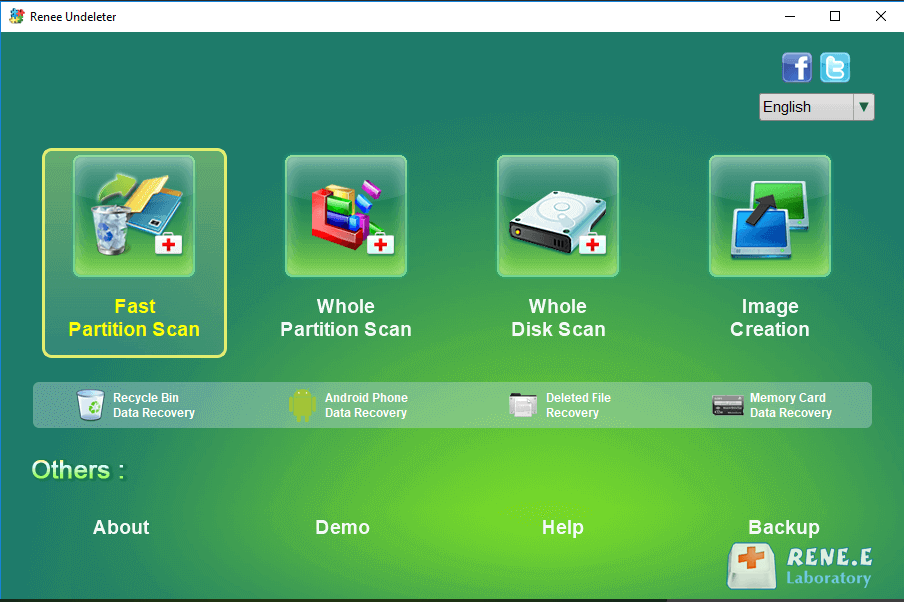
The main menu: four scan modes, with shortcuts for Recycle Bin, Android phone, deleted file and memory card recovery underneath.
Features
Fast Partition Scan for recent deletions
Renee Undeleter's Fast Partition Scan targets files you just deleted or flushed from the Recycle Bin, and finishes in minutes on most drives. You can pick file types before the scan (photos only, say) so it skips everything else, which saves time on a big disk.
Whole Partition Scan for formatted or RAW drives
Renee Undeleter's Whole Partition Scan reads an entire partition and lists every file it can rebuild. It's the mode for a drive you formatted by accident, or one Windows says is RAW or "needs to be formatted". The results come back as a folder tree on the left and a file list on the right, with counts per folder.
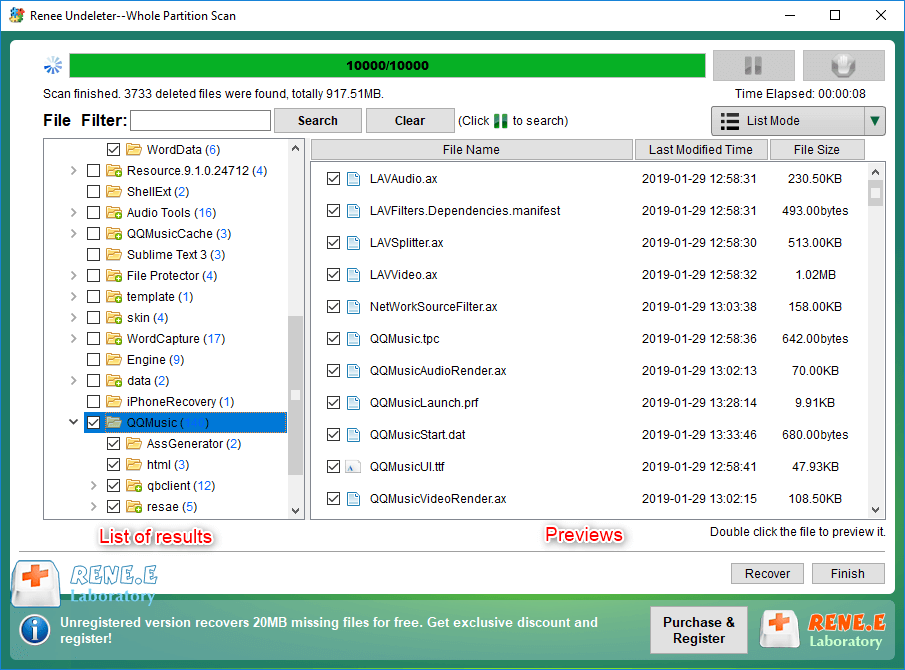
A finished Whole Partition Scan: 3,733 deleted files found, grouped by folder, with a search filter at the top.
Whole Disk Scan for lost partitions
Renee Undeleter's Whole Disk Scan goes below the partition level: it searches the whole disk for partitions that were deleted or whose partition table was damaged, then lets you choose which one to scan for files. This is the slowest mode; the program itself warns that a deep scan can take three hours or more.
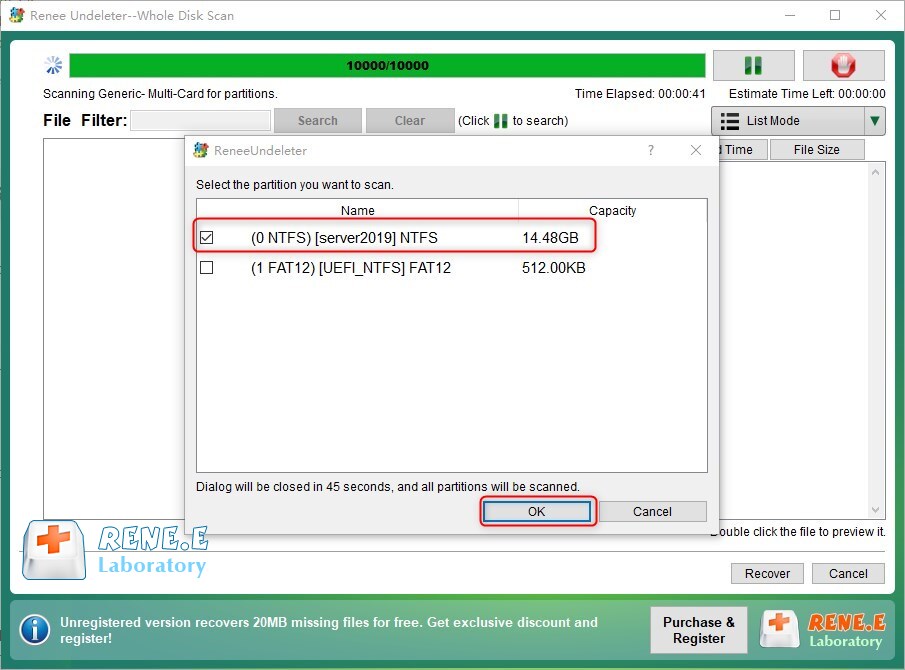
Whole Disk Scan on a memory card: it found an NTFS and a FAT12 partition and asks which to scan. The banner shows the free version's 20 MB limit.
Preview before you recover
Renee Undeleter previews photos and Office documents, even while the scan is still running, so you can check a file is intact before spending time on it. A thumbnail mode helps when you're hunting for one picture among thousands with meaningless recovered names.
Image Creation, and saved scan results
Renee Undeleter can copy a partition to an image file and then scan the image instead of the failing drive. That limits wear on a disk that's dying or very slow to read. Finished scans are also saved, so after a crash you can reload the result instead of scanning again.
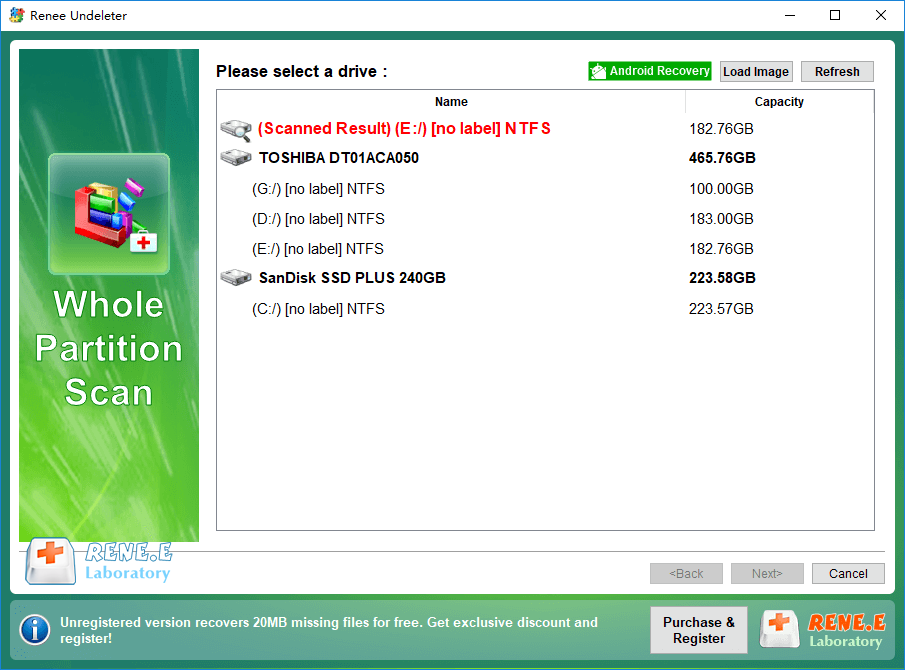
Choosing a drive. A saved scan result sits at the top in red, with Load Image and Android Recovery buttons above the list.
Benefits
- You know before you pay. The free scan shows exactly which files can come back, and 20 MB is enough to recover a few documents or photos completely.
- One tool for most home accidents. Deletions, formats, RAW drives and lost partitions are all covered by one of the three modes.
- Low price for a year of unlimited recovery. At $39.95 it costs less than many better-known tools' annual plans.
Real-World Uses
- You shift-deleted a project folder, or emptied the Recycle Bin a day too early.
- A camera prompted you to format its SD card and you tapped yes with a weekend of photos on it.
- Windows now says your USB stick is RAW and offers only to format it.
- A partition vanished after a failed resize or a Windows reinstall.
- An old external disk reads slowly, so you image it once and scan the copy.
Who It's For, and Who Should Skip It
Renee Undeleter fits home users and small offices on Windows 10 or 11 who've lost files through a mistake rather than a hardware failure, and who want a guided, simple tool.
Skip it if the drive clicks, isn't detected at all, or has been dropped: software can make physical damage worse, and a recovery lab is the right call. Skip it on a Mac, since this is the Windows version. Skip it if you need RAID or NAS recovery, which it doesn't offer. And if you're comfortable with a plainer interface, Microsoft's free Windows File Recovery command-line tool may be enough for simple deletions.
Usage Guide
- Download the installer and install it on a drive other than the one you're recovering from.
- Open Renee Undeleter and pick a mode: Fast Partition Scan for recent deletions, Whole Partition Scan for formats and RAW drives, Whole Disk Scan for lost partitions.
- Select the drive or card. For a memory card, connect it with a card reader first.
- Optionally limit the scan to certain file types, then start it.
- Browse the folder tree, use the filter box, and double-click files to preview them.
- Tick what you want, click Recover, and save to another disk. Register when the 20 MB free limit stops you.
Tips from the vendor's FAQ
- If the scan hangs or crashes, close your antivirus for the session: some block the low-level disk reads the program needs. Disconnect extra cards and drives too.
- To find documents faster, choose Advanced Settings, select only the file types you need, and set the allocation size to 512 bytes under "Others".
- If a recovered Word file won't open, it was probably partly overwritten. Try Word's Open and Repair, or search the scan for Word's temporary copies (names starting with "~").
Where It Falls Short
- Recovered file names and folders aren't always kept. Rene.E's own page warns that after recovery some file information, including type, size and dates, can be missing, which is normal for deep scans but means sorting through generic names.
- Antivirus conflicts. The vendor's FAQ lists hangs and crashes during scans and blames antivirus software; you may have to disable yours.
- No network folders. Scanning a network share isn't supported.
- Overwritten data is gone. No tool can fix a file whose space has been reused, and that's the usual reason a previewed file comes back corrupt.
- The license expires. After the year, you'd need to buy again to recover more.
What Users Say
Independent reviews are scarce
We couldn't find a hands-on test of Renee Undeleter from an independent magazine or lab. Download sites list it, and AlternativeTo lists it as a paid, proprietary file recovery tool, but none of them publish a recovery test or a meaningful number of user ratings. So the best evidence you'll get is your own free scan.
The company itself has a weak public record. Trustpilot's profile for Rene.E Laboratory (under the reneelab.de domain) shows a TrustScore of 1.8 out of 5 from 15 reviews. The complaints there aren't about Undeleter: they concern Renee Becca's activation limits, a disputed bundle purchase of its cloning software, refund requests that went badly, and one titled "they won't respond to request for help". The profile is unclaimed, and the reviews date from 2019 to 2021.
Testimonials on the vendor's site
Panayiotis, Israel: "I am so Happy !!!!!! I have recovered my lost files with the help of your software. Before I found Renee Undeleter, I have tried more than 10 software but none of them could successfully recover one of my files at all. SO A BIG THANK YOU!"
Mike Henry, Canada: "I have been working on recovering deleted files for about 16 hours using four different software that are in the same prize range. I had absolutely no success. Your program did the trick! It is just perfect and very user friendly. It recovered everything I was looking for. Thanks for a product that did not over-promise its capability."
Tom Nelson, US: "I am very pleased that I was able to recover all my wife's contacts, pictures, and videos when we thought they were lost 2 days ago. Great software! Did exactly what I wanted it to do."
The pattern: the vendor's chosen customers praise easy, successful recoveries, while the only independent ratings are complaints about the company's sales and support on other products. Treat the testimonials as promotion, run the free scan first, and keep your receipt in case you need the 60-day guarantee.
Comparisons
Renee Undeleter or Undeleter Pro?
Renee Undeleter Pro adds Renee PassNow's bootable media, so you can recover data from a PC that won't start and repair some boot errors. If your PC still boots, or you can attach the drive to another computer, the standard edition does the recovery part just as well.
Renee Undeleter versus free tools
Microsoft's Windows File Recovery and open-source PhotoRec cost nothing, but they run from a command line or a bare text interface and don't preview files as nicely. Renee Undeleter's selling points are the guided menu, live preview and the partition image tool; you're paying for convenience more than for a different recovery engine.
Editions and Pricing
| Edition | Price | License term | What you get |
|---|
| Free version | $0 | No limit | Scan and preview, 20 MB of recovery, no support |
| Basic, 1 year | $39.95 | 1 year | Unlimited recovery, all three scan modes, updates and support |
| Basic, 3 years | $54.95 | 3 years | The same, for three years |
| Pro, 3 years | $64.95 | 3 years | Adds PassNow bootable media for PCs that won't start |
Prices are from the vendor's store; the Buy Now button on this page opens the 1-year license at $39.95.
FAQs
Can Renee Undeleter recover files from an SSD?
Renee Undeleter can scan an SSD like any other drive, but recovery of deleted files on SSDs is often poor, because Windows sends TRIM commands that let the SSD wipe deleted blocks quickly. Run the free scan as soon as possible; the preview will tell you whether the files survived.
Does Renee Undeleter work on Windows 7 or 8?
The current Renee Undeleter installer supports only Windows 10 and 11. Rene.E's download page links to a previous version for older Windows.
What happens when the 1-year Renee Undeleter license ends?
Renee Undeleter's basic license covers unlimited recovery, updates and support for the year you bought. After that you'd renew or buy a new license to recover more. Automatic renewal is an optional, unticked box on the order page, and the 3-year license is the cheaper option if you expect to need it again.
Is there a Mac version of Renee Undeleter?
Yes, Rene.E sells a separate Mac version of Renee Undeleter. This page and its license cover the Windows version only.
Can Renee Undeleter recover files from my Android phone?
Renee Undeleter's menu has an Android Phone Data Recovery shortcut, and it can recover from a phone's removable SD card through a card reader. Its main job is PC drives and cards, so don't count on it for a modern phone's internal storage.
How do I pay for Renee Undeleter?
Renee Undeleter is sold through 2Checkout, which takes credit cards, PayPal and wire transfer, and the activation code is emailed right after payment.
Can I get a refund on Renee Undeleter?
Rene.E's store promises a 60-day money-back guarantee. Some Trustpilot reviewers say refund requests for other Rene.E products were hard to get, so test with the free version first and keep your order details.
System Requirements
- Windows 11 or Windows 10, 32-bit or 64-bit
- About 45 MB for the installer
- A second drive or USB stick to save recovered files to
- A card reader for memory cards
Conclusion
Renee Undeleter is a simple, still-updated Windows recovery tool, and at $39.95 for a year it's worth it if the free scan shows your files intact in the preview. That's the one reason to buy: you see the result before you pay. The main reason not to is the company's thin independent track record and poor Trustpilot rating for support and refunds, so don't buy it on faith. Scan first, and pay only when you can see what you're getting back.
Download Free TrialBuy Now