Renee iPassFix for Windows: Rescue a Stuck or Disabled iPhone From Your PC
Renee iPassFix is a Windows program from Rene.E Laboratory, $25.95 for a year or $49.95 for a lifetime license, that reinstalls iOS on an iPhone, iPad or iPod touch stuck on the Apple logo or in a restart loop, and removes the passcode from your own disabled device when you've forgotten it. It only works when Find My iPhone is turned off.
Use it only on a device you own. A passcode tool on someone else's phone is unauthorized access, and Apple's Activation Lock will stop a phone that's still linked to another person's Apple ID anyway.
Quick facts
- Version: 2024.03.76.121, released March 2024
- Developer: Rene.E Laboratory
- Runs on: Windows 10, 8, 7, Vista and XP (a separate Mac version is sold for $34.95)
- Devices: iPhone, iPad and iPod touch
- Price: $25.95 for 1 year on 1 PC; $49.95 lifetime on up to 5 PCs
- Requirement: Find My iPhone must be off for passcode removal
- Guarantee: 60-day money back, per the vendor's store
What we checked: the installer, version 2024.03.76.121 (29 MB), digitally signed by Jiangmen Ruili Software Co., Ltd., and the order page on November 8, 2026: $25.95 for the 1-year license, with automatic renewal offered as an unticked option, and $49.95 for the lifetime option. We didn't connect an iPhone to it.
Download Free TrialBuy Now
Before you buy
- Check your device is supported. Rene.E's compatibility list ends at the iPhone XS, XR and iOS 12, even though the page also says it supports the latest devices. Run the free download with your phone connected and see whether it's detected before paying.
- Removing a passcode erases the phone. Unlocking works by installing fresh iOS firmware, which wipes the device; restore your data from an iCloud or computer backup afterwards.
- Find My iPhone must be off. If it's on, you'll need your Apple ID password, or Apple's own recovery, instead.
- The 1-year license is the default. The Buy Now button opens the $25.95 1-year license. Automatic renewal is an optional box on the order page, unticked by default, and the vendor says support for new iOS versions comes only with renewal. The lifetime license is $49.95.
- Try Apple's free route first. A computer recovery-mode restore through iTunes or Finder also fixes many stuck devices, and erases them the same way.
Overview
Renee iPassFix has just two jobs, shown as two big buttons once your device is connected: Remove Device Passcode and Fix Device. Both work the same way underneath. The program identifies your model, downloads the matching iOS firmware from Apple (several gigabytes), and installs it. You can also point it at a firmware file you've already downloaded.
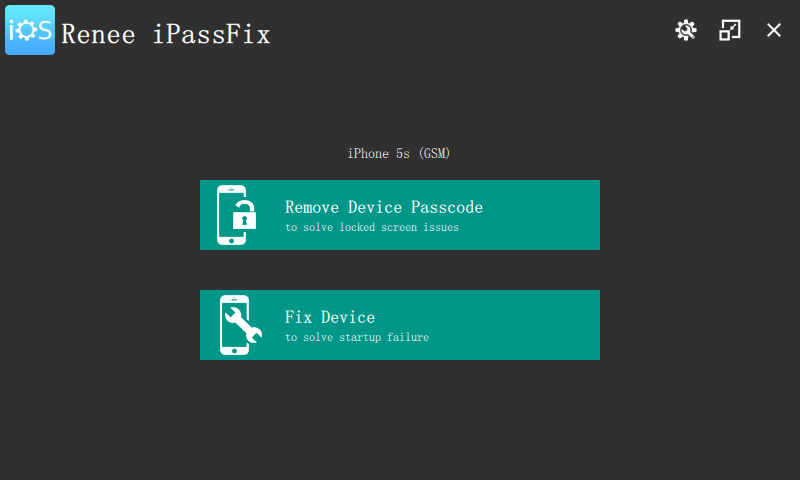
The main window after an iPhone 5s is detected: one button for passcode removal, one for system repair.
Features
Fix Device for stuck iPhones and iPads
Renee iPassFix's Fix Device recovers a device stuck on the Apple logo, on a black or white screen, frozen, in a restart loop, stuck in recovery or DFU mode, or failing a restore with errors such as 4013. The vendor says it handles up to 50 iOS system problems, and that a normal repair keeps your data.
Full Restoration when a repair isn't enough
Renee iPassFix has a Full Restoration checkbox, labelled in the program as erasing all user data, for devices a normal repair can't bring back. It's the same as a factory reset from a computer.
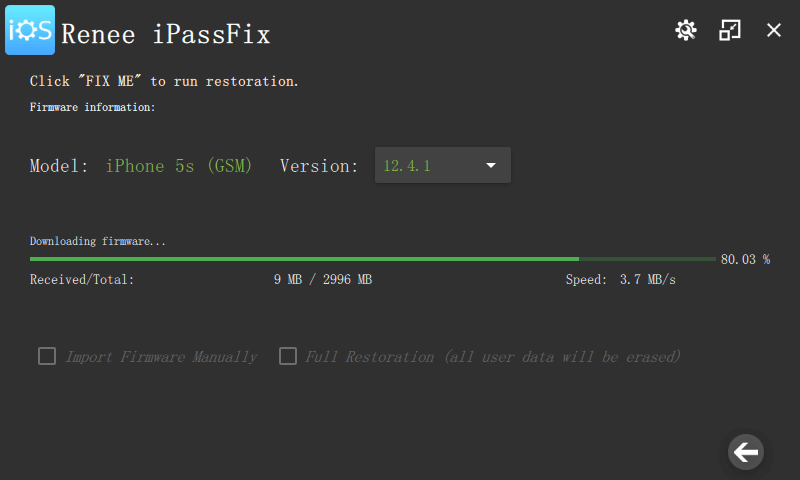
Fix Device downloading a 2,996 MB iOS 12.4.1 firmware, with options to import firmware yourself or run a Full Restoration.
Remove Device Passcode for a disabled device
Renee iPassFix removes a 4-digit or 6-digit passcode, Touch ID or Face ID lock from your own iPhone, iPad or iPod touch, including one that says "iPhone is disabled" or has a broken screen you can't type on. Afterwards you set the device up again, choose a new passcode and restore a backup.
Benefits
- No Apple Store trip. You can fix a stuck device at home from a Windows PC.
- Simple choices. Two buttons, and the firmware is found for you.
- Cheap for a one-off. $25.95 is less than many rival iOS repair tools charge for a month or a year.
Real-World Uses
- An update failed and your iPhone now sits on the Apple logo.
- A child entered wrong passcodes until the old family iPad said "disabled".
- iTunes keeps failing a restore with error 4013.
- A dropped phone's touchscreen no longer responds, so you can't type the passcode to reach your data or reset it.
Who It's For, and Who Should Skip It
Renee iPassFix fits owners of older iPhones and iPads who want a guided, Windows-based way to restore a stuck or disabled device that they own and whose Find My is off.
Skip it if your device is a recent model not on Rene.E's list, if Find My iPhone is on (you need your Apple ID, not a tool), or if the device isn't yours, including second-hand phones still linked to the seller. If you're comfortable with recovery mode, Apple's free restore through iTunes or Finder does the same factory restore.
Usage Guide
- Install Renee iPassFix on a Windows PC with a good internet connection and enough free space for a multi-gigabyte firmware file.
- Connect the iPhone, iPad or iPod touch with its USB cable.
- Choose Fix Device for a system problem, or Remove Device Passcode for a locked device.
- Confirm the model and iOS version, then click Fix or Unlock to download the firmware, or import it manually.
- Keep the cable connected until the program finishes, then disconnect and set the device up.
- Restore your data from your latest backup.
Where It Falls Short
- Old compatibility list. The supported models stop at the iPhone XS and iOS 12, and the latest Windows build is from March 2024.
- No way past Activation Lock. Passcode removal requires Find My iPhone to be off.
- Your data goes with the passcode. If you have no backup, the photos on a passcode-locked phone can't be saved this way.
- Big downloads. Each repair downloads a full iOS firmware of around 3 GB.
- No published trial limits. The vendor doesn't say what the free download can do before you register.
What Users Say
Independent coverage
We found no hands-on review of Renee iPassFix on an independent site, and no user ratings on SourceForge or Softpedia, which only list it. The company's Trustpilot profile (for reneelab.de) has a TrustScore of 1.8 out of 5 from 15 reviews; the complaints are about other Rene.E products, refunds and unanswered support requests. We skipped "reviews" on sites that sell competing iPhone unlock tools.
On the vendor's site
Joan: "My iPhone is disabled and can not be detected by iTunes. Fortunatly, Renee iPassFix brought my iPhone back to life. Great software!"
Benjamin: "Strongly recommend this software! My iPhone froze suddenly and did not response to any direction. With Renee iPassFix, this problem solved with simple steps and no data lost."
Kelvin: "My device got black screen. However, iTunes failed to start or recognized my device when I want to fix with iTunes. Finally, I have my device fixed with Renee iPassFix."
These are the vendor's own five-star picks with first names only, so they show what it's meant to do, not how reliably it does it. Your free test with your own device is the real evidence.
Editions and Pricing
| License | Price | PCs | Updates for new iOS |
|---|
| Windows, 1 year | $25.95 | 1 | While the license is renewed |
| Windows, lifetime | $49.95 once | Up to 5 | Vendor says a yearly renewal covers system-error fixes for the latest iOS |
| Mac version | $34.95 | 1 Mac | Sold separately |
FAQs
Will Renee iPassFix keep my photos when it removes the passcode?
No. Renee iPassFix removes a passcode by installing new iOS firmware, which erases the device. Your photos come back only from an iCloud or computer backup. The Fix Device repair, by contrast, is meant to keep your data.
Can Renee iPassFix bypass iCloud Activation Lock?
No. Renee iPassFix needs Find My iPhone to be off, so it won't help with a device linked to an Apple ID you can't sign in to. Apple's own account recovery is the route for your own device.
Does Renee iPassFix support the iPhone 15 or 16?
Renee iPassFix's published list stops at the iPhone XS and XR. The vendor claims compatibility with the latest devices, but doesn't list them, so test detection with the free download before paying.
Do I need iTunes installed for Renee iPassFix?
Renee iPassFix's vendor pitches it as working without iTunes or iCloud. Windows still needs Apple's device drivers to see an iPhone, which iTunes or the Apple Devices app installs, so it's worth having one of them installed.
Does the Renee iPassFix 1-year license renew automatically?
Only if you choose it. Renee iPassFix's order page, run by the reseller 2Checkout, shows automatic renewal as an unticked box, and 2Checkout says it can be turned off at any time. Choose the lifetime license if you'd rather pay once.
Is there a Mac version of Renee iPassFix?
Yes, Renee iPassFix for macOS 10.9 or later is sold separately for $34.95. This license covers Windows only.
System Requirements
- Windows 10, 8, 7, Vista or XP
- About 29 MB for the program, plus several gigabytes free for iOS firmware
- The device's USB cable and a working USB port
- An internet connection to download firmware
Conclusion
Renee iPassFix is worth $25.95 only if the free download detects your device and you need a simple, guided way to restore an older iPhone or iPad that's stuck or that you've locked yourself out of. Its one real draw is that simplicity at a low price. The main reason not to buy is its age: the device list ends at the iPhone XS, and Apple's free recovery-mode restore does the same factory reset. Test first, and pick the lifetime license if you don't want a renewal.
Download Free TrialBuy Now