Renee Becca Pro: Backup, Disk Cloning and SSD Migration for a One-Time $34.95
Renee Becca Pro is a $34.95 one-time-purchase Windows tool from Rene.E Laboratory that backs up your system, disks and files on a schedule, clones drives, and moves Windows to a new SSD. It suits home users who want a backup program with no subscription and an easy disk upgrade.
The main thing to check first is compatibility: the vendor's pages stop at Windows 10, even though the installer itself was updated in 2026. If you're on Windows 11, test the free download before buying.
Quick facts
- Version: 2026.62.95.378, file dated August 19, 2026
- Developer: Rene.E Laboratory
- Platform: Windows 10, 8.1, 8, 7, Vista and XP, 32-bit and 64-bit, as listed by the vendor
- Price: $34.95 once, lifetime license with free upgrades
- Guarantee: 60 days money back, for any reason
- Other edition: Standard at $29.95, cloning only
What we checked: installer version 2026.62.95.378 (28 MB, digitally signed by Jiangmen Ruili Software Co.), and the order page, which showed $34.95 with no renewal, on November 6, 2026. We didn't run a backup or clone, so we can't speak to speed or reliability.
Download Free TrialBuy Now
Overview
Renee Becca has five sections down the left of its window: Tutorial, Backup, Recovery, Clone and About. Task, History and Tools tabs along the top hold your scheduled jobs, past runs and disk utilities. The vendor's screenshots are older, but the layout gives a fair idea of what you get.
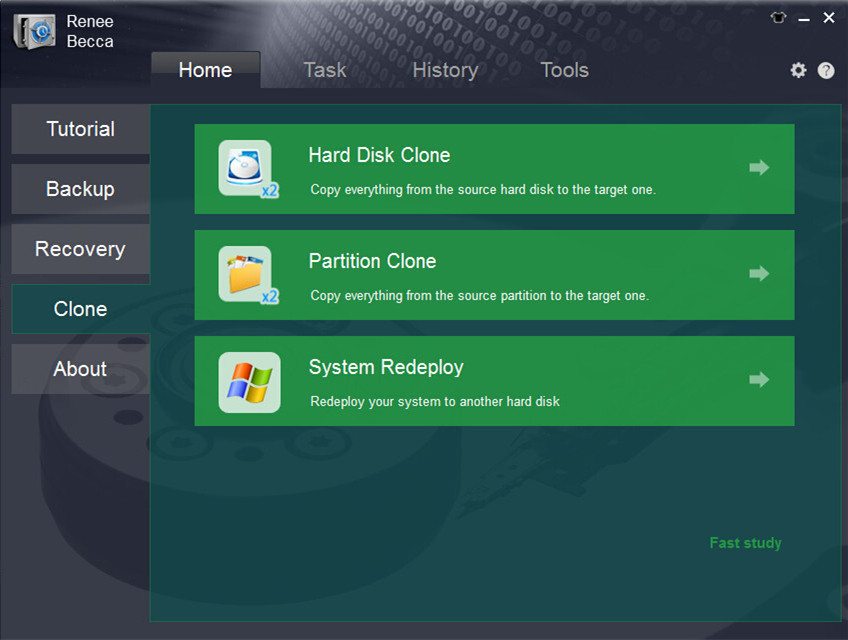
The Clone section: Hard Disk Clone, Partition Clone and System Redeploy.
Features
Backs up the system, disks, partitions and files
Renee Becca Pro makes full disk images as well as file backups, so you can restore Windows with its settings and programs, or one folder. It runs while you work, using Windows' VSS shadow copy.
Five backup modes and automatic schedules
Renee Becca Pro supports incremental and differential backups, which save only what has changed, and it can delete old images automatically to save space. Schedules are in Pro only. Standard doesn't back up at all.
Moves Windows to an SSD
Renee Becca's System Redeploy copies Windows to a new drive in three steps, with automatic 4K alignment. It can also clone to a smaller disk, as long as the target has room for the used space.
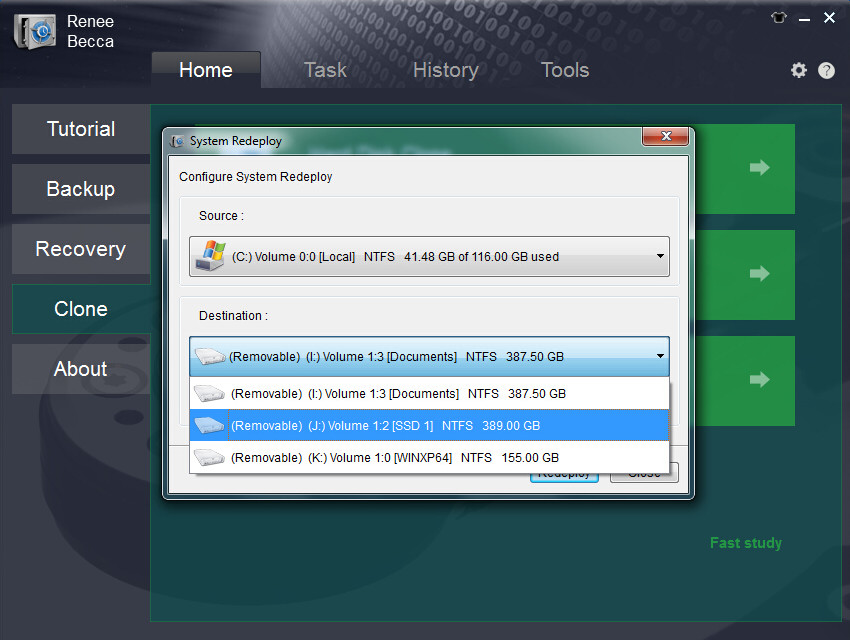
System Redeploy: choose the Windows source and the destination drive.
Clones disks, partitions and folders
Renee Becca Pro copies a whole disk or a single partition for a hard drive upgrade or a big data move, and it can add free space to new partitions while cloning.
Encrypts backups and erases drives
Renee Becca Pro protects backup files with 256-bit AES, according to the vendor. Its Tools tab also includes a drive eraser with 17 security standards, including DoD 5220.22-M.
Benefits
- No yearly fee. Many rivals now charge annually, and this doesn't.
- One tool for the whole upgrade. Back up, clone, then wipe the old disk.
- Low cost across PCs. Three to five codes drop to $24.96 each.
Real-World Uses
- Moving a laptop from a slow hard drive to an SSD without reinstalling programs.
- Running a weekly incremental backup of Documents to a USB drive.
- Keeping a full system image ready in case an update or malware breaks Windows.
- Wiping an old drive before selling it.
Who It's For, and Who Should Skip It
Renee Becca Pro fits home users on Windows 10 or older who want backup and cloning in one cheap purchase.
Skip it if you're on Windows 11 and need vendor-confirmed support, or if you run a business that needs server support, central management and a long independent track record. If you only need one disk clone, Standard saves $5. Anyone who needs cloud backup should look elsewhere, since the vendor doesn't describe a cloud target.
Usage Guide
- Download and install Renee Becca, then enter your code to activate Pro.
- Open Backup and choose what to protect: system, disk, partition or files.
- Pick a destination on a different drive, preferably external.
- Set a schedule and a backup mode, such as incremental.
- To upgrade a disk, connect the new drive, open Clone and choose System Redeploy.
Before you buy
- Test a real restore, not just a backup. An untested backup isn't protection.
- Back up before you clone. A wrong target disk gets overwritten.
- Windows 11 isn't on the vendor's compatibility list, so use the guarantee window to confirm it works on your PC.
Where it falls short
- Out-of-date vendor pages. Compatibility lists stop at Windows 10, and the FAQ mentions the wrong product in places.
- Very few independent reviews. You can't lean on a long record of outside testing.
- No Mac version. It's for Windows only.
- No support for free users. The vendor only helps license holders.
What Users Say
Independent coverage is thin
We found one hands-on review, from gHacks, seen as a search excerpt only. The reviewer found the program easy to use and worth a place among free Windows backup tools, and the main gap noted at that time was backup encryption, which the vendor now says Renee Becca has. Slashdot and SourceForge list the product with no user ratings. We skipped reviews on sites that sell competing backup tools.
On the vendor's site
- Keith Bryant, US: "Your program was intuitive and simple, runs in the background and backup speed was really good."
- Mark Dewitt, NY: "I used it to upgrade my notebook hard drive to a new 500 GB model. The Disk Clone feature worked great on my Win 7 system!"
- Sandeep Baidwan, CA: "Your products user friendly and customer services were quickly respond."
The pattern: what little feedback exists praises ease of use. These are vendor-chosen quotes from the Windows 7 era, so give more weight to your own trial.
Comparisons
Renee Becca Pro vs Renee Becca Standard
Both clone disks and migrate Windows. Only Pro backs up and restores, runs schedules and has the five backup modes. For $5 more, Pro is the sensible choice unless you truly need one clone.
Renee Becca Pro vs AOMEI Backupper and EaseUS Todo Backup
These better-known tools have larger user bases, more reviews and clear Windows 11 support, and both have free editions. Renee Becca Pro wins on a low one-time price, so it makes sense if you'd otherwise be paying for a subscription.
Editions and Pricing
| Edition | Price | License | What it includes |
|---|
| Standard | $29.95 | Lifetime | Disk, partition and system cloning, SSD migration, 4K alignment |
| Pro | $34.95 | Lifetime | All of Standard, plus backup and restore, schedules and 5 backup modes |
| Pro, 3 to 5 codes | $24.96 per code | Lifetime | The same, for several PCs |
FAQs
Is Renee Becca Pro a subscription?
No. Renee Becca Pro is a one-time purchase with a lifetime license and free upgrades, and the order page showed no renewal.
Does Renee Becca Pro work on Windows 11?
Renee Becca Pro isn't listed for Windows 11 on the vendor's pages, which stop at Windows 10. The current build dates from 2026, so it may work, but test it first.
Can Renee Becca clone to a smaller SSD?
Yes, as long as the SSD can hold all the used space. Renee Becca fits the used data first, then shares the remaining space between partitions.
Can I get a refund on Renee Becca Pro?
Yes. Renee Becca Pro has a 60-day money-back guarantee, and the vendor's FAQ says it applies if you're unhappy for any reason.
How many PCs does one Renee Becca Pro code cover?
Renee Becca Pro is sold per activation code, with lower prices when you buy several, so plan on one code per PC.
Does Renee Becca have a Mac version?
No. Renee Becca is Windows only.
System Requirements
- Windows 10, 8.1, 8, 7, Vista or XP, as listed by the vendor
- 32-bit or 64-bit
- 28 MB download, plus space on a separate drive for backups
Conclusion
Verdict: at $34.95 with no subscription, Renee Becca Pro is a good value for a Windows 10 PC that needs regular backups and a disk upgrade. The price is the reason to buy it.
The reason not to is confidence: the vendor doesn't list Windows 11, and there's little outside testing. A backup tool has to work on the worst day you'll have with your PC, so try a full restore within the 60-day guarantee.
Download Free TrialBuy Now