Renee PassNow Pro: Get Back Into Your Own Windows PC
Renee PassNow Pro is a $34.95 Windows rescue tool from Rene.E Laboratory for people locked out of their own PC by a forgotten password. It also recovers and copies files when Windows won't start, and repairs boot problems.
This tool is for computers you own or have explicit permission to service. Using it on anyone else's PC is unauthorized access, and it's illegal in most places. If the PC belongs to your employer or school, ask the IT department instead.
Quick facts
- Version: 2025.11.09.153, file dated December 7, 2025
- Developer: Rene.E Laboratory
- Platform: runs from USB or CD; Windows 11, 10, 8.1, 8, 7, Vista and XP
- Price: $34.95, one payment
- Trial: lists the accounts on the PC only
- Guarantee: 60 days money back, for any reason
- Support: for license holders only
What we checked: installer version 2025.11.09.153 (347 MB, digitally signed by Jiangmen Ruili Software Co.), and the order page, which showed $34.95 with no renewal, on November 6, 2026. The order page calls it simply Renee PassNow, and the price matches the Pro edition in the vendor's store. We didn't run it.
Download Free TrialBuy Now
Try the free options first
- Microsoft account? If you sign in to Windows with an email address, Microsoft's online password reset is free and is the right first step.
- Password reset disk or security questions? If you set these up, Windows can use them from the sign-in screen.
- BitLocker? If the drive is encrypted, you'll need your BitLocker recovery key to reach it. A boot tool doesn't replace that.
- Need only your files? Removing the drive and reading it from another PC can be enough, if it isn't encrypted.
Overview
Renee PassNow works from outside Windows. You install it on any working PC, use it to build a bootable USB or CD, then start your locked PC from that media. A small rescue environment loads with tools for accounts, disks and repairs. The vendor says this leaves your files in place.
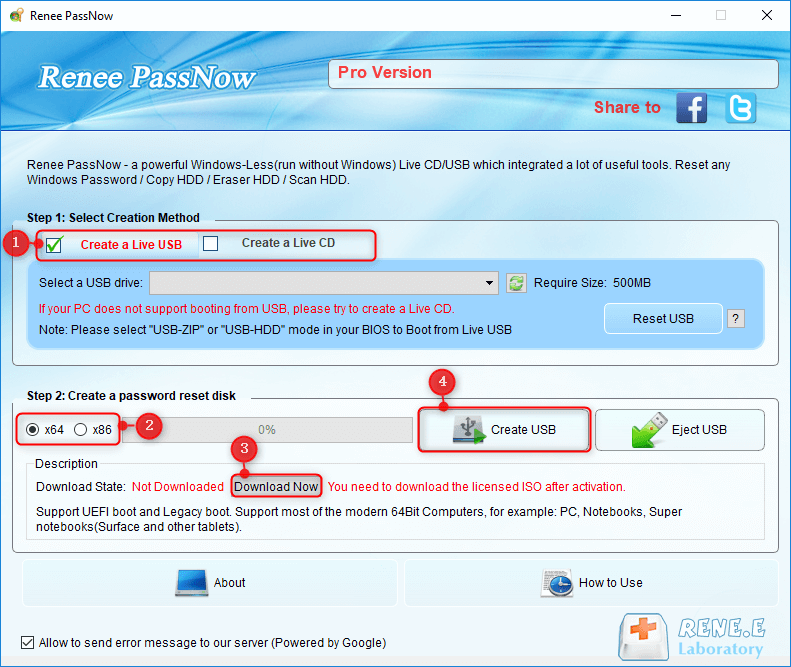
Building the rescue media in the Pro version, with the vendor's numbered steps.
Features
Regain access to your own account
Renee PassNow can reset the password on a local account you own, and the vendor says it handles administrator and Microsoft accounts too. It can also create a new administrator account on your PC.
Recover files when Windows won't start
Renee PassNow Pro includes the data recovery engine from Renee Undeleter, with fast partition scans and whole-disk scans. It previews images and Office documents before you restore them.
Copy files to safety first
Renee PassNow Pro's Data Transfer moves files from a dead Windows install to an external disk, which is worth doing before any repair or reinstall.
Repair boot problems
Renee PassNow Pro's Windows Recovery tool targets MBR and DBR errors, black or blank screens and the 0xc00000e error.
Clone and erase disks
Renee PassNow Pro can copy a whole disk or partition without Windows running, and erase a disk so data can't be recovered.

The rescue menu shown after booting. Small vendor image from the full version.
Benefits
- Avoids a reinstall. Your programs and settings stay where they are.
- More than a one-time fix. Keep the USB as a rescue kit for your own PCs.
- Covers old machines. Support goes back to Windows XP, with both UEFI and legacy boot.
Real-World Uses
- You come back to an old home PC after years and can't recall the local password.
- An inherited family PC, with the family's agreement, holds photos nobody can reach.
- Windows fails to boot after an update, and you want your documents out before reinstalling.
- You're retiring a PC and want the disk erased before you recycle it.
Who It's For, and Who Should Skip It
Renee PassNow Pro fits the owner of a Windows PC with a forgotten local password, and home users who want a rescue USB for boot failures and data transfers.
Skip it if you use a Microsoft account, since the online reset costs nothing. Skip it if the drive uses BitLocker and you don't have the key. Skip it for any machine that isn't yours: a work PC, a school PC, or a found or second-hand PC with someone else's data on it. For that last case, the seller or your IT department is the right call.
Usage Guide
- On a working PC, install Renee PassNow and enter your activation code.
- Download the rescue image from inside the program and build a USB (at least 500 MB) or a CD.
- Back up anything on that USB first, because it gets erased.
- Start your own PC from the USB, which may mean changing the boot order.
- Follow the on-screen tool for what you need, then remove the USB and restart.
Where it falls short
- Boot settings can get in the way. You may need to change BIOS or UEFI boot options, and some PCs need a CD or a different USB mode.
- The trial proves little. It shows accounts but doesn't reset anything.
- It's a large download. The installer is 347 MB.
- Dated interface. The rescue screens look old, and the vendor's pages are inconsistent about Windows 11, listing it at the top of the page but not in the older compatibility line lower down.
- No Mac version. It's for Windows PCs only.
What Users Say
Independent reviews
We couldn't find a hands-on review from an independent site. Slashdot and SourceForge list Renee PassNow with no user reviews, and most other results are download pages. So there's no outside evidence of how often it succeeds on current PCs, which is a good reason to use the 60-day guarantee if it fails.
On the vendor's site
- Cathleen, California, USA: "Whew.. It worked! Reset my Windows 7 and Windows 10 login password successfully."
- Eric Smith, Singapore: "I have spent a whole day to guess my password. But this software solved it in just 5 mins."
- Jack, Australia: "A few years ago I bought this program and used it successfully, their staff answered my questions in details."
The pattern: the vendor's customers report quick success on older Windows versions. These are the vendor's picks, so treat them as promotion rather than a test.
Comparisons
Renee PassNow Pro vs Renee PassNow Basic
Basic ($29.95) only covers account access. Pro ($34.95) adds file recovery and transfer, disk copy and erase, and boot repair. The extra $5 makes Pro the better buy for anyone whose PC might also have a boot problem.
Renee PassNow Pro vs Windows' own recovery
A Microsoft account reset and Windows reset options are free. They suit most people. Renee PassNow Pro is for the case those options don't cover: a local account on your own PC, with no reset disk, where you want to keep everything installed.
Editions and Pricing
| Edition | Price | What it includes |
|---|
| Trial | Free | Lists existing accounts only, no support |
| Basic | $29.95 | Account access tools, support and upgrades |
| Pro | $34.95 | Basic, plus data recovery and transfer, disk copy and erase, boot repair |
FAQs
Can I use Renee PassNow on someone else's computer?
No, not without the owner's explicit permission. Renee PassNow is meant for your own PC. Getting into a computer without authorization is illegal in most countries.
Is Renee PassNow a subscription?
No. Renee PassNow showed a single payment of $34.95 at checkout, with no renewal.
Does Renee PassNow work with Windows 11?
Renee PassNow lists Windows 11, 10, 8.1, 8, 7, Vista and XP as compatible, and it supports both UEFI and legacy boot.
Will Renee PassNow delete my files?
The vendor says Renee PassNow keeps your files intact when it restores account access. Any tool that changes system files carries some risk, so copy important files with Data Transfer first.
Does Renee PassNow work on an encrypted drive?
Renee PassNow can't get around BitLocker or other full-disk encryption without the key. If your drive is encrypted, find your recovery key first.
Can I get a refund on Renee PassNow?
Yes. Renee PassNow has a 60-day money-back guarantee, which the vendor says applies if you're unhappy for any reason.
System Requirements
- A working Windows PC to build the rescue media
- A USB stick or blank CD/DVD
- Your own locked PC running Windows 11, 10, 8.1, 8, 7, Vista or XP
- 347 MB download
Conclusion
Verdict: Renee PassNow Pro is worth $34.95 if you're locked out of a local account on your own PC, or Windows won't boot and you need your files. Choose Pro over Basic for the recovery tools.
The one reason to buy is keeping an installed PC intact when free routes are closed. The main reason not to is that many people don't need it at all: a Microsoft account can be reset online for free. It's also lightly reviewed, so rely on the 60-day guarantee.
Download Free TrialBuy Now