Renee Video Editor Pro: Screen Recorder and Simple Video Toolbox in One
Renee Video Editor Pro is a $49.95 Windows program from Rene.E Laboratory that records your screen and then trims, joins, watermarks and converts the video, with a one-time lifetime license for one PC. It suits people who make tutorials, record meetings or capture gameplay and want quick, basic edits rather than a full timeline editor.
Think of it as two tools in one window: a screen recorder that can start and stop on a schedule, and a "Video Toolbox" that applies one operation after another to a clip. It isn't a multi-track editor like DaVinci Resolve or Premiere, and it hasn't had a new build since September 2022.
Quick facts
- Version: 2022.09.20.56, released September 2022
- Developer: Rene.E Laboratory
- Platform: Windows 10, 8.1, 8 and 7; no Mac version
- Price: $49.95 lifetime for 1 PC; $79.95 lifetime for 3 PCs
- Free trial: exports carry a Rene.E watermark, are cut to 1 minute, and some tools work only 5 times
- Hardware acceleration: NVIDIA NVENC and CUDA
- Guarantee: 60-day money back, per the vendor's store
What we checked: the installer (87 MB, digitally signed by Jiangmen Ruili Software Co., Ltd., file dated September 21, 2022) and the order page, which showed Renee Video Editor Pro - 1 PC LifeTime at $49.95 with no renewal, on November 8, 2026. We didn't record or edit a video with it.
Download Free TrialBuy Now
Before you buy
- Development has slowed. The current installer dates from September 2022, and the vendor lists Windows 10 as the newest supported system. Run the trial on your Windows 11 PC before paying.
- The trial is a real test. One-minute watermarked exports are enough to check recording quality, sound sync and your output format.
- The effect store needs internet. Titles, light effects and motion graphics are downloaded on demand.
Overview
Renee Video Editor Pro opens on a two-button launcher: Screen Recorder and Video Toolbox. The recorder is a compact panel where you pick the area, the audio source and the output folder, then press Record. The Toolbox is a list-based editor: add files, apply Cut, Rotate & Crop, Effect, Watermark, Music, Subtitle or Opening/Ending, pick an output format at the bottom, and press Start.
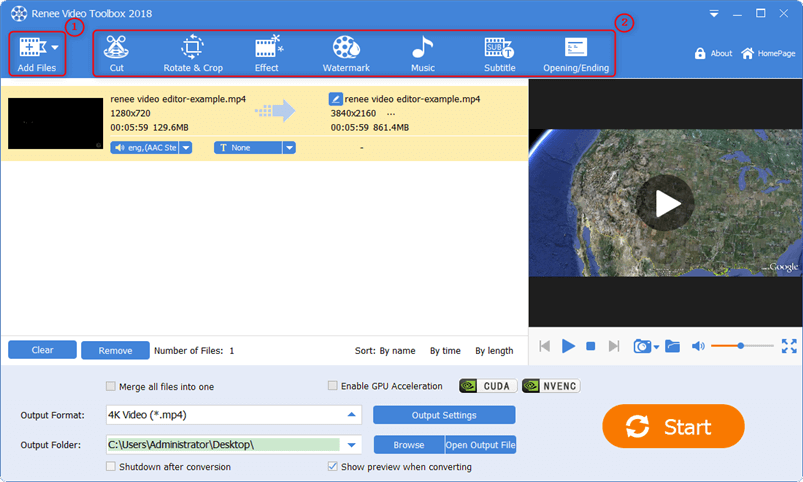
The Video Toolbox: editing tools across the top, a 720p clip set to export as 4K MP4, and the GPU acceleration switch. The window title reads 2018, from the vendor's older screenshots.
Features
Screen, webcam and audio recording
Renee Video Editor Pro records the full screen or a chosen area, with computer sound, microphone or both, and can record a webcam. You set frame rate and bit rate, add a watermark or mouse effects while recording, take screenshots, and record across two monitors.
Scheduled, hands-off recording
Renee Video Editor Pro's Auto Record plans start a recording at a set time, on chosen weekdays, or when a program launches, and stop after a duration, at a file size, when the program closes or at a set time. It can hide itself while recording and shut the PC down afterwards, which is handy for webinars or streams you can't attend.

Auto Record Settings: start on a day and time or when an app runs, stop by length, size or app exit, and hide the recorder.
Cut, join, crop and rotate
Renee Video Editor Pro trims unwanted parts, splits a clip, joins several files (even in different formats) into one, crops black bars, and rotates or flips sideways phone footage. It also zooms into a region and blurs a specific area with a mosaic, two tools the cheaper Renee Video Editor lacks.
Watermarks, music, subtitles and intros
Renee Video Editor Pro adds text, image, video or built-in figure watermarks, replaces or adds background music, burns in a subtitle file, and attaches opening and ending clips. Filters and an audio equalizer are included, and the online effect store adds titles, light effects and motion graphics.
Format conversion with device presets
Renee Video Editor Pro converts between common formats, including MP4 (H.264), 4K MP4, HEVC/H.265, MKV, MOV, AVI, WMV, FLV and WebM, and audio such as MP3, AAC, FLAC and WAV. Presets cover iPhone, iPad, Samsung, Huawei, game consoles and more, and you can set resolution, bit rate, sample rate and channels by hand.

Choosing an output format: categories on the left (Common Video, HD Video, iPhone, Samsung, Game Hardware and more), formats on the right.
Benefits
- Record and tidy up in one place. No hand-off between a recorder and an editor for a quick tutorial.
- Pay once. The lifetime license avoids the yearly fees many screen recorders charge.
- Gentle learning curve. Each tool is a separate dialog, so you never face a timeline.
Real-World Uses
- Record a software walkthrough, cut the false starts, add your logo and export an MP4 for YouTube.
- Schedule a recording of a webinar that starts at 3 a.m. your time.
- Capture a game session with NVENC acceleration and trim it to the highlights.
- Blur a customer's details in a support recording before sharing it.
- Convert a folder of old AVI and FLV clips to MP4 for a phone.
Who It's For, and Who Should Skip It
Renee Video Editor Pro fits beginners on Windows who mostly record their screen and need straightforward edits, and who'd rather pay once than subscribe.
Skip it if you need multi-track editing, keyframes or color grading; a timeline editor like DaVinci Resolve (free) or Shotcut (free) is the better choice. Skip it on a Mac, since there's no Mac version of Pro. And if you only record your screen, OBS Studio is free and actively developed, though harder to set up.
Usage Guide
- Download and install the trial, then open Renee Video Editor Pro.
- For a recording, choose Screen Recorder, set Target (full screen or area), Audio and Output, then click Record. Use the Auto button to schedule one.
- For editing, choose Video Toolbox and click Add Files.
- Apply tools from the top bar: Cut, Rotate & Crop, Effect, Watermark, Music, Subtitle, Opening/Ending.
- Pick an Output Format, tick "Merge all files into one" if you're joining clips, enable GPU acceleration if available, and click Start.
- Register with your activation code to remove the watermark and the 1-minute limit.
Where It Falls Short
- No timeline. You can't layer clips, overlap transitions or fine-tune edits frame by frame on tracks.
- Basic subtitles. Softpedia's review noted that its subtitle support is far from a dedicated subtitle editor: you add a file and adjust font and position, little more.
- Limited export formats from the editor. The vendor's FAQ lists FLV, MP4, AVI and WMV as the main video export formats for edits.
- Stale builds. No update since September 2022, and Windows 11 isn't on the vendor's list.
- GPU acceleration is NVIDIA-only in the vendor's description (NVENC and CUDA).
What Users Say
Independent coverage
Softpedia reviewed Renee Video Editor Pro and describes it as a screen recorder and a comprehensive video editing toolbox in a single application, with a cutter for removing ads or credits, watermarking, rotating and cropping, and a format converter. Its main reservation was the basic subtitle tool. A Portuguese tech site, Pplware, praised the simple, almost minimalist interface and the screen capture feature.
We found no user ratings on Capterra, G2 or Trustpilot for this product. The company's Trustpilot profile (for reneelab.de) has a TrustScore of 1.8 out of 5 from 15 reviews; the complaints concern other Rene.E products, refunds and slow support replies, not this editor.
On the vendor's site
Joan, Australia: "Really helpful for me! I need to have online conferences with my bosses regularly and process their needs to different departments. This software helps me record the meeting with just a few simple steps. Record every detail in my conferences. Easy to use and powerful."
Dean, Canada: "What an amazing software!!! Do me a great favor to record my game match with high quality and great performance. Besides, the advanced settings really helpful in screen recording."
The pattern: what feedback exists praises ease of use and recording, and the one reservation is depth of editing. Little of it is recent, so the trial is your best evidence.
Comparisons
Renee Video Editor Pro or Renee Video Editor?
Both edit, watermark, batch-process and convert. Only Pro records the screen, uses hardware acceleration, zooms in, applies a mosaic to an area, and has the advanced opening and ending editor. The plain Video Editor costs $39.95 and was last built in 2020, so Pro is the one to buy for $10 more.
Renee Video Editor Pro versus free tools
OBS Studio records better and is maintained, and Shotcut or DaVinci Resolve edit far more deeply, all for free. Renee's advantage is simplicity and scheduled recording in one small program; if you're willing to learn two free tools, you don't need it.
Editions and Pricing
| License | Price | PCs | Term |
|---|
| Free trial | $0 | 1 | Watermarked 1-minute exports, no support |
| 1 PC, 1 year | $39.95 | 1 | 1 year |
| 1 PC, lifetime | $49.95 | 1 | Lifetime, with updates and support |
| 3 PCs, lifetime | $79.95 | 3 | Lifetime, with updates and support |
The Buy Now button on this page opens the 1 PC lifetime license, the best value of the three.
FAQs
Does Renee Video Editor Pro run on Windows 11?
Renee Video Editor Pro's official list stops at Windows 10, and the current build is from September 2022. Many Windows 10 programs run on Windows 11, but check with the free trial before you buy.
Is the Renee Video Editor Pro lifetime license really one payment?
Yes. The Renee Video Editor Pro 1 PC lifetime license was $49.95 at checkout with no renewal, and the vendor says it includes updates and support.
Can Renee Video Editor Pro remove a watermark from a video?
Renee Video Editor Pro's vendor says it can remove watermarks as well as add them. Its tools for that are cropping and the area mosaic, which cut or blur the spot rather than rebuild what was underneath, so expect a visible patch.
Does Renee Video Editor Pro work with AMD or Intel graphics acceleration?
Renee Video Editor Pro's vendor names only NVIDIA NVENC and CUDA acceleration. On other graphics hardware it still works, using the processor.
Can I move my Renee Video Editor Pro license to a new PC?
Renee Video Editor Pro licenses are sold per PC. Rene.E doesn't publish a transfer policy, so ask its support before you replace your computer, and keep your order email.
Is there a refund for Renee Video Editor Pro?
Rene.E's store promises a 60-day money-back guarantee. Some Trustpilot reviewers found refunds for other Rene.E products hard to get, so test thoroughly with the trial first.
System Requirements
- Windows 10, 8.1, 8 or 7, 32-bit or 64-bit
- Intel or AMD processor at 2 GHz or faster
- 2 GB RAM; 8 GB recommended for HD or 4K
- 2 GB free disk space; an SSD helps for HD or 4K
- 1366 x 768 display, 32-bit color
- Internet for registration and the effect store
Conclusion
Renee Video Editor Pro is worth $49.95 for a Windows user who wants one easy program to record the screen, schedule recordings and make quick edits, and who prefers a one-time price. The scheduled Auto Record is the standout reason to buy it. The main reason not to is its age: no update since 2022 and no official Windows 11 support, while free tools like OBS and Shotcut keep improving. Try the trial on your own PC first; if it records cleanly there, it's a fair price.
Download Free TrialBuy Now