Leawo Music Recorder: Capture Streaming Music, Radio and Mic Audio as MP3 or WAV
Leawo Music Recorder is a Windows audio recorder that costs $19.99 a year (or $29.99 for a lifetime license) and saves whatever your PC plays, from Spotify, YouTube and Pandora to online radio and podcasts, or whatever your microphone hears, as MP3 or WAV files. It's for listeners who want offline copies of the audio they already have access to, with tracks split, tagged and filed automatically.
The usual situation: a radio show you can't catch live, a playlist you want on an old MP3 player, or a podcast that only streams in a browser. Instead of fiddling with Windows' "Stereo Mix" and an audio editor, you press one red button, play the source, and come back to a library of separate, tagged tracks.
Quick facts
- Version: 3.0.0.7, released June 22, 2026
- Developer: Leawo Software Co., Ltd.
- Runs on: Windows 11, 10, 8.1, 8 and 7. The Mac edition, Leawo Music Recorder for Mac, is a separate purchase.
- Records: computer audio (anything your PC plays) or one input device such as a microphone
- Saves as: MP3 or WAV, with a choice of bit rate and sample rate
- Interface languages: English, German and Japanese
- Price: $19.99 for one PC for one year, renewing automatically, or $29.99 for lifetime use on one PC
- Free trial: records only 3 minutes of audio
- Installer: 67.2 MB
What we checked: the Windows installer from Leawo's download server (musicrecorder_setup_g.exe, 70,476,016 bytes, file version 3.0.0.7, digitally signed by ShenZhen Moyea Software Co., Ltd.) and the price on the order page ($19.99 for the 1-year license, with the lifetime option adding $10.00), both on October 29, 2026. We didn't record a stream with it ourselves.
Before you buy
- The $19.99 license is a subscription. It renews every year until you cancel. If you'll keep using the program, the $29.99 lifetime license costs less from the second year on.
- Refunds are narrow. The pricing table lists a 5-day money-back guarantee for the 1-year license and 14 days for lifetime, but Leawo's refund policy pays out only for a bug its support can't fix, hardware incompatibility or a duplicate order. Changing your mind or buying the wrong product doesn't qualify, so test with the 3-minute trial first.
- Recording happens in real time. A 60-minute playlist takes 60 minutes to capture. This is a recorder, not a downloader.
- Personal use only. Leawo's own terms limit it to content you've lawfully obtained, for personal, non-commercial use.
Download Free TrialBuy Now
Overview
Leawo Music Recorder is a small, single-window program built around a big red record button. The top bar holds the record, rewind, play and forward buttons, a display that shows the elapsed time, and a volume slider. Below it, two tabs switch between Recording (the album-art view of what you're capturing) and Media (the library of everything you've recorded). Small icons along the bottom include the task scheduler (the clock) and the iTunes button.
It doesn't care which app or website makes the sound. It captures the audio stream your PC sends to its speakers, so it works with browsers, desktop players and radio apps alike. The trade-off is that it records what you hear, at the speed you hear it, including any ads the stream plays.

The Recording view during a capture: the red stop button, the "Recording" display with the elapsed time (1:15), and album covers of recent tracks. Vendor screenshot.
Features
Record any sound your PC plays, or your microphone
Leawo Music Recorder has two audio sources. Record Computer Audio captures streaming music and anything else playing on the PC: Leawo lists YouTube, Spotify, Pandora, Deezer, Apple Music, Last.fm, Napster, archive.org, AOL Radio, iHeartRadio, BBC Radio and SoundCloud among the sources. Record Audio Input captures a microphone or another input device, picked from a drop-down list, such as a Realtek line input.

The Audio Source tab of the settings: Record Computer Audio (selected) or Record Audio Input with a device drop-down. Vendor screenshot.
Automatic track splitting and ad filtering
Leawo Music Recorder can cut one long recording into separate songs. On the Control tab you tell it to split whenever the silence lasts longer than a set number of seconds, and to keep only tracks longer than a set length. The second setting is how it drops short clips, such as radio jingles and many streaming ads, without you editing anything afterwards.

The Control tab: "Automatically split when the silence is more than 0.2 seconds" and "Automatically filter, only save tracks longer than 1 seconds". Vendor screenshot of an unregistered copy.
MP3 or WAV, at the quality you choose
Leawo Music Recorder saves on Windows as MP3 or WAV. The Format tab sets the bit rate and sample rate (192 kbps and 44,100 Hz by default in Leawo's screenshot), and the General tab sets the output folder and the interface language. MP3 files play on nearly anything, from phones to car stereos. WAV keeps the capture uncompressed if you plan to edit it later.

The Format tab: the output format list (mp3 or wav), bit rate 192 kbps and sample rate 44100 Hz. Vendor screenshot.
Scheduled recordings
Leawo Music Recorder has a task scheduler, opened from the clock icon at the bottom left, where you set a start time and a duration. Leawo suggests it for FM radio shows: set it before you leave and the show is waiting in the library when you get back. The PC has to be on and the stream playing at that time.
A library with tag editing, playlists and one-click iTunes export
Every recording in Leawo Music Recorder lands in the Media tab, a library with a built-in player, a filter box and playlists. Right-click a track to add it to a playlist, send it to iTunes, or open Edit Music Tags to set the title, artist, album, year, genre and cover picture. Select several tracks and the iTunes button adds them all to your iTunes library, ready to sync to an iPhone or iPod.
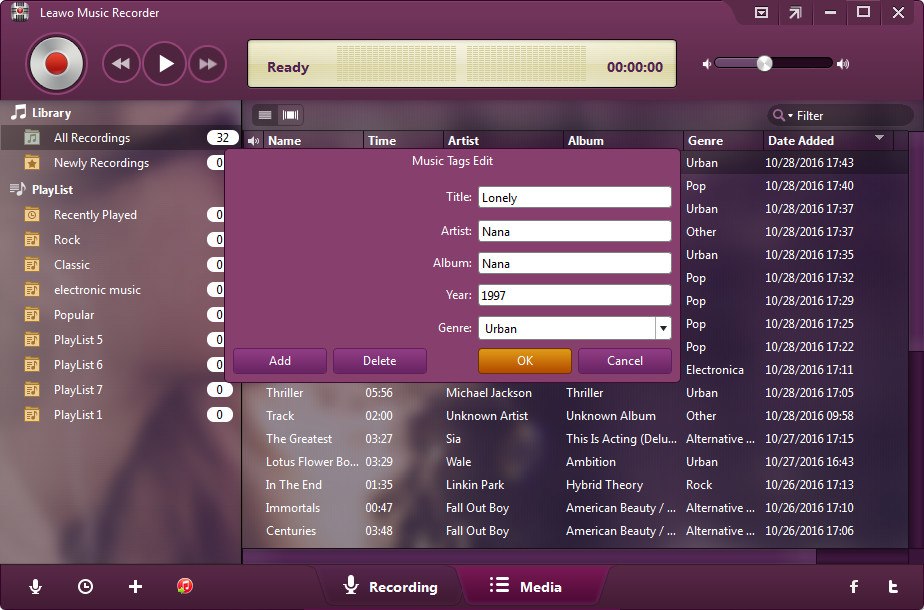
The Music Tags Edit dialog (title, artist, album, year, genre, and Add/Delete for the cover picture) over the library of recordings. Vendor screenshot; the library dates show it was taken in 2016.
Benefits
- One tool for every source. Because it records the PC's audio output, the same two clicks work for a browser tab, a desktop player or a radio app.
- Less clean-up afterwards. Splitting on silence and dropping short clips means a two-hour session becomes a folder of songs rather than one long file you have to cut.
- Organized files. Tags and cover pictures make the recordings show up properly in iTunes, phones and car stereos instead of as "Track 01".
- Low cost, no subscription needed. The lifetime license is a one-time $29.99.
Real-World Uses
- A weekly radio show you always miss. Schedule a two-hour recording for Saturday morning and listen on Monday's commute.
- Music for a device with no streaming app. Record a playlist to MP3, tag it, and copy it to an old iPod through iTunes or straight to a USB stick for the car.
- A lecture or webinar that only streams. Capture the audio as you watch, then replay the parts you need later.
- Voice notes and narration. Switch the source to the microphone and record straight to WAV for an editor such as Audacity.
Who It's For, and Who Should Skip It
It suits Windows users who want a simple "record what I hear" tool with automatic splitting, tagging and a library, without learning an audio editor. Fans of online radio and podcasts who listen later will get the most from the scheduler.
Skip it if you need to edit audio (cutting, fading, noise removal): it has a tag editor, not a waveform editor, so a free editor such as Audacity is the better fit. Skip it too if you want whole albums fast, since a recorder works only at playback speed. Mac users need the separate Mac edition, and anyone who needs M4A or FLAC output on Windows should look elsewhere, since this one saves only MP3 and WAV.
Usage Guide
- Install and launch. Download the installer (67.2 MB), run it, and open Leawo Music Recorder. The main window opens on the Recording tab.
- Pick the source. Click the Audio Source icon and choose Record Computer Audio for streams and players, or Record Audio Input and a device for a microphone.
- Set the format and folder. In the settings, the Format tab chooses MP3 or WAV with bit rate and sample rate, and the General tab chooses the output folder and language.
- Set splitting and filtering. On the Control tab, set the silence length that starts a new track and the shortest track to keep.
- Start recording, then play. Click the red button first, then start the music. Leawo's guide stresses that order, so the beginning isn't cut off.
- Stop and manage. Click the button again to stop. Open the Media tab to play, tag, sort into playlists or send tracks to iTunes.
- Register. After buying, Leawo emails a registration code. Click the menu icon at the top right, choose Register, and paste it in to lift the 3-minute limit.

The Media tab playing a recording: the library and playlists on the left, and the track list with name, time, artist, album, genre and date added. Vendor screenshot.
Tips
- Mute other sounds. In computer-audio mode, every system sound goes into the recording: notification chimes, other browser tabs, a video call.
- Tune the split setting to the source. A DJ mix or a live album with no gaps between songs won't split on silence, so expect long files there.
- Keep the volume steady. Set the player's volume before you start rather than adjusting it mid-song.
Where it falls short
- Little development. The most recent update, version 3.0.0.7 in June 2026, lists only "Optimized user experience", and the screenshots in Leawo's own guide date from 2016. The product page also links to Leawo's newer CleverGet Recorder.
- No audio editing. There's no trimming, fading or noise reduction, only tags.
- Two formats on Windows. MP3 and WAV only. The Mac edition adds M4A.
- Scheduler complaints. In a 2013 review of version 1.0, dotTech found the scheduler confusing and couldn't get it to work. Leawo's current guide describes it as setting a start time and a duration, so test it during the trial before you rely on it for a show you can't hear again.
- Ads still play. The short-track filter drops brief clips, but an ad longer than your minimum track length ends up in the library like any song.
What Users Say
Independent reviews of Leawo Music Recorder are few and mostly old. Here is what we could find, positive and negative.
dotTech (independent review, version 1.0.0.0, October 2013)
Ashraf at dotTech tested the first release and was enthusiastic overall: "Leawo Music Recorder is an excellent audio recorder." His pros included that it is "Easy to use and works well — good quality recordings", that it "Will automatically split audio into separate files if there is a pause of X seconds", and that it "Will automatically disregard audio recordings that are smaller than X seconds".
His cons were just as specific: "Built-in task scheduler is confusing to use and doesn’t appear to work", "No support for hotkeys", and "No offline Help documentation, and online Help documentation is fairly poor". The review covers a version from 2013, so some of this may have changed in version 3.
Testimonials on Leawo's product page
Leawo quotes TopTenReviews.com: "Leawo Music Recorder is an intuitive application that comes in handy to users who like to capture the online radio channel they are currently listening to."
Customer Jerry Triatik explains why he chose it over subscription tools: "I searched the internet for hours to find software to audio record from the internet. Some software wanted a monthly charge but I would only use it a few times a year so that was out of the question. Then I ran across Leawo Music Recorder WOW! This is exactly what I was looking for. I purchased it for a fair price and it works GREAT!"
Another customer, Judy, writes: "I tried to record the music from youtube and it works very well,the output music is very good and also I have transfered it to my android phone." These are testimonials the vendor chose to show, so they lean positive.
Leawo as a company (Trustpilot)
Leawo Software has a TrustScore of 4.3 from 158 reviews on Trustpilot, with 63% five-star and 25% one-star ratings. None of the reviews we read was about Music Recorder. Most are about Leawo's Blu-ray and DVD tools, but they show how the company treats buyers.
The praise is mostly for support. Fred Pratt (5 stars) wrote: "The team answered and followed up on my support ticket within thirty minutes." Guido (5 stars) gave "A+ to customer care services which promptly helped me sorting out issues with license activation".
Refunds do happen when there's a real problem. Kenny75 Photography (4 stars) said Leawo "told me to de-register the program and then they would process my refund, which was confirmed today." On the negative side, Maite Matar (1 star) wrote of a different Leawo product that "the software is unusable, and there's no helpline or customer support."
The pattern: people who use Leawo Music Recorder like how easy it is and the automatic splitting, and buyers who dislike subscriptions like the low one-time price. The recurring complaints are the scheduler (in the old review), thin documentation, and the absence of editing tools. There's very little recent independent testing, so the 3-minute trial is the best way to judge it on your own PC and sources.
Comparisons
Leawo Music Recorder vs Audacity
Audacity is a free, open-source audio editor that can also record. It wins on editing, effects and formats, but you set up the recording device yourself and get one long file to cut by hand. Leawo Music Recorder is the opposite: no editing, but splitting, filtering, tagging and a library happen automatically. Choose Audacity to edit and Leawo to collect music with minimal effort.
Windows vs Mac edition
Leawo Music Recorder for Mac is a separate product and license. It runs on macOS 10.12 and later including Apple Silicon Macs, adds M4A output, and its trial also can't fetch music information. A Windows license doesn't cover the Mac version.
Editions and Pricing
| License |
Price |
Term |
PCs |
Money-back period listed |
| 1 Year |
$19.99 |
1 year, renews automatically |
1 |
5 days |
| Lifetime |
$29.99 |
One-time payment |
1 |
14 days |
Both licenses include all features, and Leawo lists unlimited free upgrades for both. The Buy Now button below opens the 1-year license; the order page lets you switch it to lifetime for $10 more.
FAQs
Can Leawo Music Recorder record Spotify?
Yes. Leawo Music Recorder records Spotify the same way it records any other source: it captures the sound the Spotify app or web player sends to your speakers, in real time. It doesn't download files from Spotify, so each song takes its full length to record.
What does the Leawo Music Recorder trial let me do?
The Leawo Music Recorder trial can record only 3 minutes of audio. That's enough to check that it picks up your source and to try the splitting, format and tag settings.
Does the $19.99 Leawo Music Recorder license renew automatically?
Yes. The $19.99 Leawo Music Recorder license is a one-year subscription that renews automatically, and Leawo's pricing table says you can cancel at any time. The $29.99 lifetime license is a one-time payment.
Can I get a refund on Leawo Music Recorder if I don't like it?
Probably not. Leawo's refund policy covers only a bug its support can't fix, hardware incompatibility or a duplicate order, within 14 days of purchase. A refund request that only says you no longer need the program, or that you bought the wrong product, is refused. Use the free trial to decide.
Does one Leawo Music Recorder license work on two computers?
No. Each Leawo Music Recorder license, 1-year or lifetime, covers one PC. A second computer needs a second license.
Can Leawo Music Recorder record my microphone and the computer at the same time?
Leawo Music Recorder records one source at a time: either computer audio or an input device, chosen in the Audio Source settings. To mix your voice over music, record both into an editor that supports multiple tracks.
Does Leawo Music Recorder work on Windows 11?
Yes. Leawo lists Windows 11, 10, 8.1, 8 and 7 for the current version 3.0.0.7.
What do I do if I lose my Leawo Music Recorder registration code?
Leawo's website has a "Registration Code Retrieve" page, linked in the site's footer, for buyers who lost their code. The code is sent to the email address used for the order, so check that inbox (and its spam folder) first.
System Requirements
- Operating system: Windows 11, 10, 8.1, 8 or 7
- Processor: 1 GHz Intel or AMD or faster
- Memory: 512 MB RAM (1 GB or more recommended)
- Other: an Internet connection
- Download size: 67.2 MB
Conclusion
Leawo Music Recorder is worth $29.99 for the lifetime license if you regularly want offline copies of streaming music, radio or podcasts on a Windows PC and don't want to touch an audio editor. The one reason to buy it is the automation: it splits, filters, tags and files your recordings so a long session turns into a usable music library.
The main reason not to is that it's a mature, lightly updated program with no editing tools and only MP3 or WAV output, and Leawo's refund policy won't cover a change of mind. Skip the $19.99 yearly plan unless you need it for only a few months, try the 3-minute trial on the exact sources you care about, and buy lifetime if it works.
Download Free TrialBuy Now