Movavi Video Converter: Fast Format Conversion for Windows, with SuperSpeed and AI Upscaling
Movavi Video Converter is a Windows 10 and 11 program that converts video, audio and image files between 180+ formats, with presets for 200+ devices, a SuperSpeed mode that copies the video stream instead of re-encoding it, and basic trimming, cropping and subtitle tools. The yearly plan costs $54.95 on Movavi's order page (a sale price that ends November 1, 2026; the regular price is $79.95), and a lifetime license costs $109.95.
It's for the everyday file problem: an MKV that the TV won't play, MTS clips from a camcorder that your editor won't open, a phone video too big to email, or a folder of WAV files you want as MP3. You drop the files in, pick a format, and click Convert.
Quick facts
- Current version: 24.5.1, updated August 18, 2026
- Developer: Movavi
- Runs on: Windows 10 and 11, 64-bit only (a separate Mac version is sold)
- Formats: 180+ video, audio and image formats, including MP4, MOV, AVI, MKV, WMV, VOB, DVD-compatible video, HEVC, 4K and MP3
- Price: 1 month $19.95, 1 year $54.95 (regularly $79.95), lifetime $109.95
- Trial: 7 days, with a Trial watermark on videos, and only half of each audio file or SuperSpeed conversion is saved
- Refund: 14-day money-back guarantee for technical problems support can't solve
- Installer: a 2.7 MB online installer that downloads the program
What we checked: the Windows installer on Movavi's site (MovaviVideoConverterSetup.exe, 2,868,544 bytes, an online installer), version 24.5.1 and the August 18, 2026 update date on the product page, the trial limits on Movavi's trial-limitations page, and the prices on the order page (1 year $54.95 marked down from $79.95 as a limited-time offer), all on October 31, 2026. We didn't run conversion speed tests ourselves.
Before you buy
- The free version is a trial, not a free converter. Several Trustpilot reviewers were annoyed to find that Movavi's "free" download only converts half of an audio file and watermarks videos. Plan to pay if you need full files.
- The yearly plan renews. The 1-month and 1-year plans are subscriptions. If you want to pay once, choose the lifetime license, which gets minor updates within its version.
- No copy-protected discs. Movavi states that Video Converter does not convert copy-protected media files and DVDs.
- Windows 10 or 11, 64-bit. Older Windows versions and 32-bit systems aren't supported by the current version.
Download Free TrialBuy Now
Overview
Movavi Video Converter has one main window. The top half lists the files you've added, each with its source and output size, audio track and subtitle choice, and a note when SuperSpeed conversion is possible. The bottom half holds the format library, split into Popular, Video, Devices, Audio and Images tabs, with a search box. You pick an output format, choose a folder with Save to, and click Convert.

Movavi Video Converter with three clips added: the file list with output sizes and "SuperSpeed conversion supported" notes, and the Video tab of the format library (MP4, AVI, WMV, MOV, DVD-Compatible Video, HEVC, 4K Ultra HD, HD/Full HD), from Movavi's help.
Features
180+ formats and 200+ device presets
Movavi Video Converter reads and writes 180+ formats: video (MP4, MOV, AVI, MKV, WMV, VOB, FLV, MPEG, MTS/AVCHD, HEVC), audio (MP3, M4A and others) and images, plus GIF. Instead of choosing codecs, you can pick a device preset from more than 200 profiles, and the converter sets the resolution and format for you. It also turns video into audio, so you can pull the soundtrack out of a clip as an MP3.
SuperSpeed and hardware acceleration
Movavi Video Converter's SuperSpeed mode copies the video stream into the new container without re-encoding (remuxing), which is why it's fast and loses no quality. It works only when the codec and resolution stay the same and no edits are applied, for example MKV to MP4 with H.264 video. When re-encoding is needed, the converter can use NVIDIA, Intel and AMD hardware acceleration, switched on under Settings > Preferences > Acceleration.
Trim, crop, fix and add subtitles before converting
Movavi Video Converter's Edit window has tabs for Stabilization, Audio, Adjustments, Effects, Subtitles, Watermark, Crop, Rotate and Trim. You can cut off the start and end of a clip, fix a sideways phone video, normalize quiet audio, add a text or image watermark, and search for subtitles online and attach them. A Before/After switch shows the effect of each change.
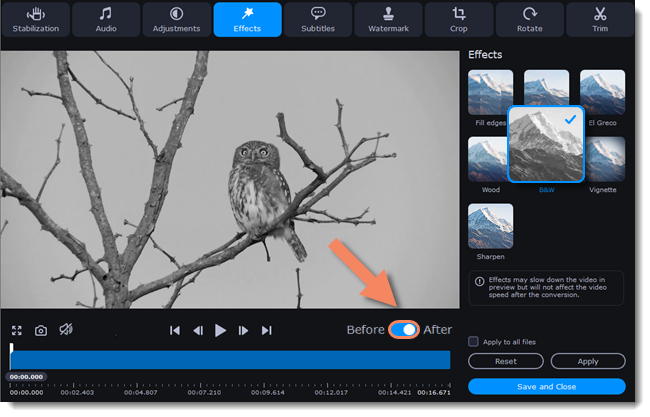
The Edit window's Effects tab, with the B&W effect selected and the Before/After switch under the preview. The tabs along the top are Stabilization, Audio, Adjustments, Effects, Subtitles, Watermark, Crop, Rotate and Trim.
Compression and AI upscaling
Movavi Video Converter compresses large files to save space and speed up uploads, and its AI upscaling raises the resolution of low-quality clips by up to 8 times. Batch processing converts a whole folder in one go, and several files can be merged into one without quality loss.
Benefits
- Files that just play. Device presets save you from looking up which codec a TV, phone or console wants.
- Speed where it counts. SuperSpeed remuxing turns a long MKV into an MP4 in the time it takes to copy the file, with no quality loss.
- Small fixes without a video editor. Trimming, rotating, volume fixes and subtitles happen in the same window.
Real-World Uses
- Camcorder footage: convert MTS/AVCHD clips to MP4 or MOV so your editor or phone can open them.
- A movie night: remux an MKV to MP4 for a smart TV, and attach subtitles found online.
- Sharing a long clip: compress a large phone video before uploading it.
- Audio only: pull the soundtrack of a lecture video out as an MP3 for listening on the go.
Who It's For, and Who Should Skip It
Good fit: home users who regularly run into files that won't play, people converting batches of camera or phone clips, and anyone who wants a point-and-click converter with presets rather than codec settings.
Skip it if:
- You convert one file a year. A free tool will do, and Movavi's trial watermarks videos and halves audio.
- You need to rip protected DVDs or Blu-rays. Movavi Video Converter doesn't convert copy-protected discs.
- You want a full video editor. The converter's tools stop at trimming, cropping and effects. Movavi Video Editor or Video Suite fit better.
- You're on Windows 7 or 8. The current version needs Windows 10 or 11, 64-bit.
Usage Guide
- Install: run MovaviVideoConverterSetup.exe. It downloads the program, so stay online.
- Add files: click Add Media or drag files and folders into the window.
- Edit (optional): click Edit next to a file to trim, crop, rotate, add subtitles or a watermark.
- Pick a format: choose one in the Video, Audio, Images or Devices tab, or search for it.
- Convert: set the folder with Save to and click Convert.
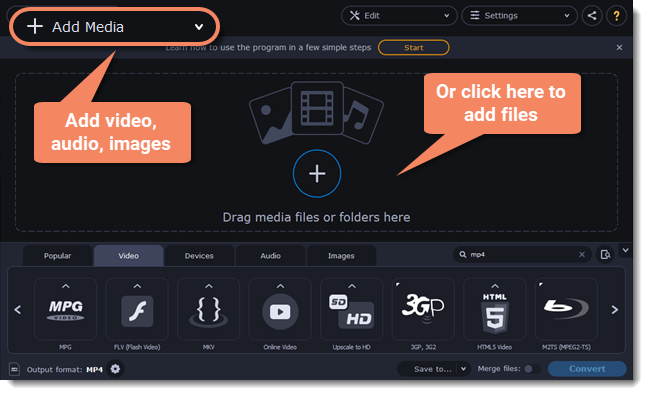
Starting a conversion: the Add Media button and the "Drag media files or folders here" area, with the format library below, from Movavi's help.
Tips
- Look for the SuperSpeed note. If the file list says "SuperSpeed conversion supported", keep the same codec and resolution and skip edits to get the fast, lossless path.
- Check the default player afterwards. One Trustpilot reviewer found the converter had made itself the default app for their video files; you can change it back in Windows Settings > Apps > Default apps.
Where it falls short
- Trial frustration. The most common complaint on Trustpilot is that the "free" converter turns out to be a trial that watermarks videos and converts only half of audio files.
- Occasional conversion problems. Some reviewers report files converted without sound, crashes, or a format they expected (MP4 to JPEG frames) not working the way they hoped.
- Upselling. The order page and the program push Video Suite and Video Editor bundles alongside the converter.
What Users Say
Trustpilot: the praise
Movavi's Trustpilot page (all Movavi products) showed a TrustScore of 3.5 out of 5 from 22,156 reviews on October 31, 2026. Reviews about the converter include:
- Rajiv Chopra (5 stars, August 2025), "Excellent support. Good products": "Their video converter is the best on the market"
- Jakub (5 stars, July 2025), "Very convenient converter": "Perfect for changing the format of video materials and embedding subtitles."
- Alex Curutiu (5 stars, April 2025): "Excellent product, I am using video converter since many years and it is a really great product."
- Sergio (5 stars, January 2025): "I use Movavi video converter version 23. It is a very well technically built product."
- Rich R (5 stars, March 2026): "Movavi Video Editor 23 and Movavi Video converter worked out extremely well for my project."
Trustpilot: the complaints
- Patrick Morell (1 star, August 2026), "Movavi have wasted my day": "After I downloaded and installed the program, it made itself the default application for my video files."
- Travis Smith (1 star, May 2026): "you can't really do anything without a paid subscription."
- James Thomas (1 star, January 2025), "Claims free audio converter but not…": "Will only do 50% track unless subscribe - basically false advertising."
- Bill Morin (1 star, March 2025), "Absolute garbage": "It converts videos but does it with NO SOUND!"
- Ed (1 star, January 2025), "Purchased Movie Converter": "everytime I try to use it it either locked up my PC or program crashed."
- Sherry Bradford (3 stars, January 2025), "Product OK But BE SURE You Know What You Are Purchasing Before Paying a Dime": "I've used the converter and the editor products as purchased standalones for years"
Reviews Movavi quotes on its page
Movavi's product page quotes press reviews of the converter, among them TopTenReviews: "It's incredibly easy to learn and use. It converts videos faster than any product we tested." It also shows user comments, such as Patricia Batton's: "Excellent program and does just what I need in the way of converting the mts files I am using to the Quicktime format I need for the finished product."
The pattern: people who use Movavi Video Converter for regular format changes praise its speed, simplicity and support. Most negative reviews come from people who expected a free converter and hit the trial limits, plus a smaller number of crashes and silent-output reports. Test your own files during the 7-day trial.
Comparisons
Movavi Video Converter vs HandBrake
HandBrake is free and open source, but it outputs only MP4, MKV and WebM and expects you to understand encoder settings. Movavi Video Converter covers far more formats, including audio and images, adds device presets and SuperSpeed remuxing, and is easier for beginners. Pick HandBrake if you're comfortable with settings and only need MP4 or MKV; pick Movavi for broad formats and a simpler workflow.
Movavi Video Converter vs Movavi Video Suite
Movavi Video Suite includes Video Converter together with Video Editor and Screen Recorder. On October 31, 2026 the order page listed Video Suite at $94.95 a year against $54.95 for the converter alone. Buy the suite only if you'll also edit or record videos.
Editions and Pricing
Prices on Movavi's Video Converter order page on October 31, 2026:
| Plan | Price | Term | Updates |
|---|
| 1 month | $19.95 | Renews monthly | All updates while subscribed |
| 1 year | $54.95 (regularly $79.95, offer until November 1, 2026) | Renews yearly | All updates while subscribed |
| Lifetime | $109.95 | One-time | Minor updates within the version bought |
| Video Suite (Converter + Editor + Screen Recorder) | $94.95 | 1 year | All updates while subscribed |
Every plan comes with a 14-day money-back guarantee for technical problems that support can't solve. Personal and business licenses are sold separately; the business license is for commercial use.
FAQs
Is Movavi Video Converter free?
No. Movavi Video Converter has a 7-day free trial that adds a Trial watermark to videos and converts only half of each audio file and of each SuperSpeed conversion. Full conversions need a subscription or the lifetime license.
Can Movavi Video Converter rip DVDs?
Only unprotected ones. Movavi Video Converter can convert DVD video files, but Movavi states it does not convert copy-protected media files and DVDs.
Does Movavi Video Converter work on Windows 7?
No. The current Movavi Video Converter needs 64-bit Windows 10 or 11 with up-to-date patches.
Why isn't SuperSpeed available for my file?
Movavi Video Converter can use SuperSpeed only when the output keeps the same video codec and resolution and you don't apply edits such as stabilization, effects or cropping. Change any of those and the file has to be re-encoded at normal speed.
Does the lifetime license include future versions?
Not major ones. Movavi says a lifetime license lets you use the version you bought for as long as you wish with free minor updates, but a newer version is a paid upgrade.
Can I use Movavi Video Converter for work?
Yes, with a business license. Movavi sells a personal license for non-commercial home use and a business license for commercial use; the program is the same.
System Requirements
- Windows: Windows 10 or 11, 64-bit, with up-to-date patches
- Processor: Intel, AMD or compatible, 1 GHz
- Graphics: NVIDIA GeForce series 8, Intel HD Graphics 2000, AMD Radeon R600 or higher, with up-to-date drivers
- Memory: 4 GB RAM
- Display: 1280 × 768, 32-bit color
- Disk: 120 MB to install, 750 MB for ongoing operations
Conclusion
Movavi Video Converter is worth buying if you convert files regularly and want it to be quick and painless. Device presets, 180+ formats and SuperSpeed remuxing make everyday conversions fast, and the trimming, subtitle and compression tools cover the small fixes that usually send you to a second program. The yearly plan at $54.95 is good value while the sale lasts; at the regular $79.95, the $109.95 lifetime license makes more sense if you'll use it for years.
The main reason to hold off: if you only need one file converted, the watermark and half-length trial limits mean you'll end up paying for something a free tool could do. Try it on your own files in the 7-day trial before you buy.
Download Free TrialBuy Now