Gecata by Movavi: A One-Click Game Recorder and Streamer for Windows
Gecata by Movavi (formerly Movavi Game Capture) is a $35.95 Windows program that records your PC games, or your whole desktop, with one hotkey, adds your webcam in a corner, and can stream to Twitch or another platform while it records. It's aimed at casual players and beginner YouTubers who find OBS Studio too fiddly, and a lifetime license covers one PC.
The catch you should know up front: the last update, version 6.1.2, came out in December 2020, and the official requirements stop at Windows 10. It still installs and still sells, but it isn't being developed any more.
Quick facts
- Version: 6.1.2, released December 21, 2020
- Developer: Movavi
- Platform: Windows 7, 8 and 10 (32- or 64-bit). There's no Mac version
- Captures: games on DirectX 9 to 12 and OpenGL (Game mode), or the full main monitor (Desktop mode), up to 120 fps, saved as MP4
- Audio and camera: system sound, a microphone and a webcam overlay
- Price: $35.95 Personal or $79.95 Business, both lifetime licenses for 1 PC
- Free version: 10 minutes of continuous capture and a watermark on the videos
- Refund: within 14 days if a technical problem can't be solved
- What we checked: installer MovaviGecataSetup.exe, file version 6.1.2 (38.8 MB), downloaded from Movavi on November 19, 2026, and the US order page price of $35.95 for the Personal license on November 19, 2026. We didn't record or stream a game with it.
Before you buy
Gecata hasn't had an update since December 2020, and Movavi lists only Windows 7, 8 and 10. A Steam reviewer wrote in October 2025 that it "fails to record on WINDOWS 11 ver.23H2". If you're on Windows 11, run the free version on the exact games you play before paying: the 10-minute limit is plenty to see whether it records them cleanly.
Download Free TrialBuy Now
Overview
Gecata is a small, single-window recorder. The top strip holds four round buttons (record, stream, pause, screenshot), each with its hotkey printed underneath, a toggle between Game and Desktop mode, and a counter for the file size and free disk space. Click the strip and it unfolds into Preferences with tabs for Devices, Files, Hotkeys, Overlays, Video, Web Camera, Streaming and Others.
The idea is that you set it up once, start your game, and press F10. Gecata names each recording after the game it came from, so a week of sessions doesn't turn into a folder of "Video 37.mp4" files. A built-in video manager lets you trim a clip, convert it and upload it to YouTube without opening another program.
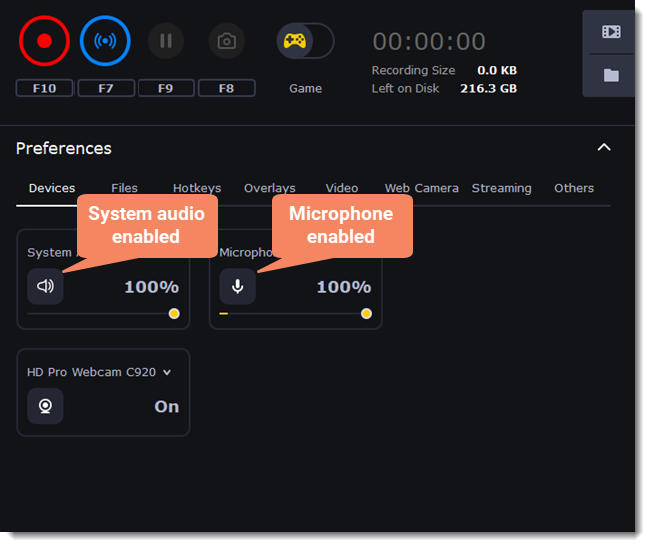
The Gecata 6 window in Game mode, with the Devices tab open: system audio and microphone switched on at 100%, and a webcam set to On.
Features
Game mode records the game, not your desktop
Gecata's Game mode hooks into games that run on DirectX 12 or earlier and OpenGL, and the recording starts as soon as you open the game and press F10. Movavi lists titles it has tested, including Minecraft, Fortnite, Roblox, PUBG, Apex Legends, Rainbow Six Siege, GTA V, League of Legends, World of Warcraft, World of Tanks and osu!. Frame rates go up to 120 fps, which also leaves room for smooth slow motion when you edit. Intel and NVIDIA hardware acceleration take the encoding load off the processor.
Desktop mode for everything else
When a game won't hook, or you want to record a browser game, a launcher or a tutorial, Gecata's Desktop mode records the whole main monitor. You switch with the toggle next to the screenshot button. There's no region or window selection: it's the full screen or nothing.
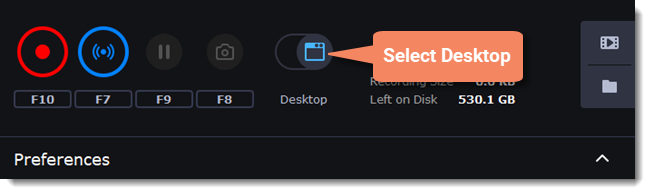
The capture mode toggle set to Desktop, next to the record (F10), stream (F7), pause (F9) and screenshot (F8) buttons.
Webcam overlay for facecam videos
Gecata puts your webcam picture on top of the game footage in either mode. On the Web Camera tab you pick the camera, its resolution and frame rate, set the overlay size with a slider (20% of the frame in Movavi's example) and place it in one of four corners. The cogwheel opens the camera's own brightness, contrast and exposure settings.
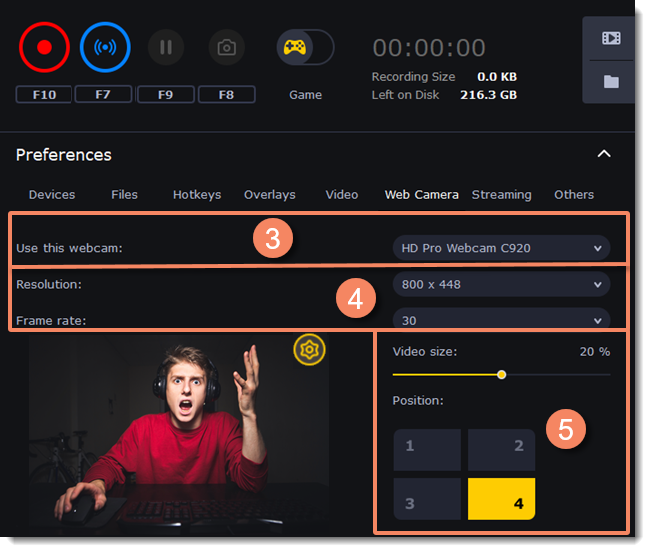
The Web Camera tab: camera choice, 800 x 448 at 30 fps, a live preview, the Video size slider at 20% and the bottom-right corner selected.
Stream and record at the same time
Gecata 6 added live streaming: press F7 (or the blue button) and it streams to Twitch or another platform you set up on the Streaming tab, while it can keep a local recording for viewers who missed the stream. It's a basic streamer, though. There are no scenes, chat boxes or alert widgets like in OBS Studio.
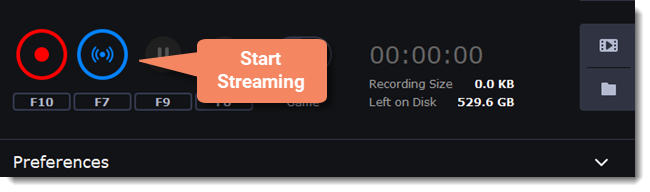
The Start Streaming button, with its F7 hotkey, next to the record button.
Hotkeys, sound and screenshots
Gecata runs from the keyboard so you never leave the game: F10 starts and stops recording, F9 pauses, F8 saves a screenshot and F7 streams, and you can change any of them under Hotkeys. It records game sound and your microphone, each with its own volume slider, and an in-game overlay turns red while it's recording so you know it's running.
Benefits
- Almost no setup. Two toggles and a hotkey replace the scene and source setup that puts people off OBS Studio.
- Light on older PCs. Several Steam reviewers with low-end machines say it records without lag where other tools stuttered.
- Small files. Users comparing it with OBS Studio mention noticeably smaller recordings.
- Pay once. The license is lifetime, with no subscription.
Real-World Uses
- Saving a great round. You're playing Fortnite or Apex Legends on a modest laptop, press F10 before the match and keep the clip, already named after the game.
- A facecam let's play. A new YouTuber records Minecraft with a webcam in the corner and microphone commentary, trims the start in the video manager and uploads it from Gecata.
- Streaming while keeping a copy. You stream a casual session to a handful of Twitch followers and keep the recording for a highlights video later.
- A quick desktop tutorial. Desktop mode records a full-screen walkthrough of a mod installer or game launcher settings.
Who It's For, and Who Should Skip It
Good fit: casual players and beginner content creators on Windows 10 who want a simple recorder with a facecam, on a PC where heavier tools lag, and who'd rather pay $35.95 once than learn OBS Studio.
Skip it if:
- You're on Windows 11 and play new, demanding games. It isn't on the supported list, and the newest complaints are about crashes in Unreal Engine 4, DirectX 12, 4K and ray-traced games. The free OBS Studio or the Xbox Game Bar built into Windows are safer bets.
- You stream seriously. With no scenes, chat or alert overlays, OBS Studio or Streamlabs suits a real channel better.
- You need to record part of the screen or a single window, or keep your microphone on a separate audio track for editing.
- You use a Mac. There's no Mac version.
Usage Guide
- Download and run the installer (about 39 MB), then launch Gecata. The free version opens with all features, limited to 10-minute recordings with a watermark.
- Pick Game or Desktop with the toggle in the top strip.
- Click the strip to open Preferences. On Devices, switch on System Audio and Microphone and set their volume sliders.
- For a facecam, open Web Camera, choose the camera, resolution, frame rate, size and corner, then turn the webcam on.
- Check the Video tab for frame rate and hardware acceleration, and the Files tab for the output folder.
- Click REC (the recording starts when the game opens) or press F10 in the game. F9 pauses and F8 takes a screenshot.
- Press F10 again to stop. The MP4 lands in the output folder and in the video manager, where you can trim it, convert it or upload it to YouTube.
- To stream, fill in the Streaming tab once, then press F7.
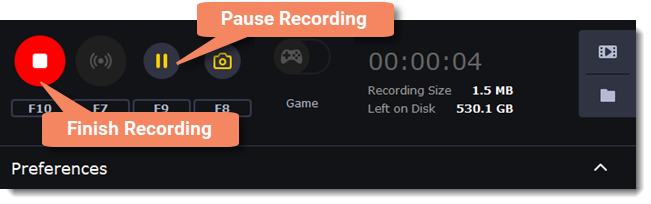
A recording in progress: the red stop button (F10) finishes it and the yellow pause button (F9) pauses it, with the elapsed time and file size on the right.
Where it falls short
- Crashes in demanding games. The most common complaint on Steam is crashes: Gecata crashing a game at start in Unreal Engine 4, DirectX 12, 4K or ray-traced titles, or crashing mid-recording and losing the footage.
- Full screen only. Desktop mode records the whole main monitor. You can't pick a region, a window or a second monitor.
- One mode at a time. You can't record the game and the desktop together. Switching means stopping, changing mode and starting a new file.
- Audio on one track. A Steam reviewer notes that game and microphone sound end up mixed in one track, which makes editing commentary harder.
- MP4 only, and a recording can be lost if the PC loses power mid-session.
- Fragile streaming. One user reports that Gecata 6 ends the stream at small connection or encoding hiccups instead of riding them out.
- No updates since December 2020, so fixes for new games and Windows versions aren't coming.
What Users Say
Gecata has no pages on Capterra, G2 or Trustpilot, so most independent feedback comes from Steam, where both versions are sold. Steam rates Gecata by Movavi 5 at 70% positive from 511 user reviews and Gecata by Movavi 6 at 49% positive from 69 reviews (November 19, 2026). The two versions share most of their code, and several reviewers own both.
From Movavi's site
"The game grabber is super easy, and the audio quality is great! The most straightforward streaming software I've seen so far. Thanks, guys!" timzee85
"The only free screen recorder for gaming that works flawlessly with all my games! I love Gecata!" H1hatterz
"I’ve had no problems with Gecata so far. It is cheap, has all the key tools, and it doesn’t lag like a lot of other programs. My favorite game capture software!" alanakeys
Positive reviews on Steam
"Amazing little software, was having trouble with OBS, and this app saved my day. Gecata 5 is a simple and user-friendly game recording software that offers good quality and small file sizes, with options for hardware acceleration, webcam and overlay, and export in MP4" Silverhand, Gecata 5, recommended, March 2024
"Good recording software, Mine does not lag at all. Even though I have potato PC." Average Rice Enjoyer, Gecata 5, recommended, 603 hours on record
"Simple to use, user interface makes this a great software for complete video editing beginners." The same reviewer liked that each file is saved under the game's name and that files are smaller than OBS Studio's, but added: "When I tried to use camera to film myself playing the game it crashed every time without even knowing it crashed which can be a huge problem for some." and "Regular price is really not worth it because there are other game recording software's on Steam with same functions that are much cheaper or even free." ADO69, Gecata 5, recommended, May 2023
"2022 Edit: This is better than obs, where obs would lag on recording, this plowed through. Props to a great product." ChromiaCat, Gecata 5, recommended
"At least for recording it seems to be recording decently on low spec computers." The reviewer's downsides: "it records game and mic audio in one audio track" and "it records only in mp4 format." PhantomDogman, Gecata 6, recommended, November 2020
Negative reviews on Steam
"nearly every time a game now is programmed in Unreal Engine 4, runs in DX12 and you’re using 4K, or even worse, also got Raytracing, the game suddenly crashes upon start because of Gecata." obsidian_whiskers, Gecata 6, not recommended, January 2023 (2,581 hours in Gecata 5)
"It's great when it works, it's trash when it fails, which it tends to do frequently. I've lost countless hours of footage because it crashed midway through recording" Sworn, Gecata 6, not recommended, December 2021 (3,480 hours on record)
"gecata 6 will turn your stream off and indicate that its your fault and your internet is too slow. Gecata 5 is the BEST for recording, And seems to be the same for 6." WackiTabacci, Gecata 6, not recommended, December 2020
"Missing key feature to record part of the screen. Only full screen recordings are possible." psydex, Gecata 5, not recommended, June 2021
"Stutter and low frame rate com pare to other softwares E.G. Action!, OBS. Also, the user interface is way too small for 4K, please fix." WarCrabft, Gecata 6, not recommended, November 2021
"fails to record on WINDOWS 11 ver.23H2 does not work in windows 11" tonytoes, Gecata 6, not recommended, October 2025
The pattern: people like Gecata for its simplicity, small files and smooth recording on weak PCs, and several long-time users preferred it to OBS Studio. The complaints are about stability: crashes in newer, heavier games, lost recordings, streams that cut out, and missing basics like region capture and separate audio tracks. The newer complaints (2023 to 2025) point at modern games and Windows 11, which fits a program that stopped getting updates in 2020.
Comparisons
Gecata vs OBS Studio
OBS Studio is free, updated all the time, and does everything Gecata does plus scenes, multiple sources, separate audio tracks and full streaming overlays. Gecata's case is ease: two toggles and F10 instead of building a scene. If OBS already works on your PC, you don't need Gecata.
Gecata vs Movavi Screen Recorder
Movavi Screen Recorder is the company's general screen recorder, still updated, with region capture and scheduled recordings, but it isn't built for games. Gecata is the one with a Game mode, in-game hotkeys and streaming.
Editions and Pricing
Every option is a lifetime license for one PC, and all are on the same order page. The Personal and Business versions are identical in features; Business allows commercial use and costs less per seat in volume (from $75.95 each for 5 seats).
| Option |
Price |
License |
What you get |
| Free version |
$0 |
Personal use |
All features, 10-minute recordings, watermark |
| Gecata Personal |
$35.95 |
Lifetime, 1 PC |
No time limit, no watermark |
| Gecata Business |
$79.95 |
Lifetime, 1 PC, commercial use |
Same features as Personal |
| Gecata + Movavi Video Editor |
$80.95 (separately $155.90) |
Lifetime, 1 PC |
Adds Movavi's full video editor |
| Gecata + Video Editor + Effects Bundle |
$109.95 (separately $205.85) |
Lifetime, 1 PC |
Adds the "Human, Robots, Art" gaming titles, stickers and transitions |
Prices are the US order page prices on November 19, 2026, including any VAT; buyers in other countries see local currency.
FAQs
Does Gecata by Movavi work on Windows 11?
Gecata by Movavi officially supports Windows 7, 8 and 10 only, and it hasn't been updated since December 2020. Some users run it on Windows 11, but a Steam reviewer reported in October 2025 that it failed to record on Windows 11 23H2. Test the free version on your own PC before buying.
Is Gecata by Movavi free?
Gecata by Movavi has a free version with every feature, but recordings stop after 10 minutes of continuous capture and carry a watermark. A $35.95 Personal license removes both.
Is the Gecata license a subscription?
No. Gecata licenses are lifetime licenses for one PC, paid once. Since the program no longer gets new versions, there's no paid upgrade to worry about either.
Can I get a refund if Gecata doesn't work with my games?
Movavi refunds the full price within 14 days if you have a technical problem its support can't solve. That covers a game Gecata won't record, but not a change of mind, so use the free version first.
Is Gecata the same as Movavi Game Capture?
Yes. Gecata by Movavi is the new name of Movavi Game Capture; Movavi renamed it around version 5.5 in 2018. Gecata 5 and Gecata 6 are also sold separately on Steam.
Is there a Mac version of Gecata?
No. Gecata by Movavi runs on Windows only. Mac users who want to record their screen can look at Movavi Screen Recorder for Mac, which isn't built for games.
Can Gecata stream to Twitch and YouTube?
Gecata by Movavi streams to Twitch and other platforms from its Streaming tab and can record at the same time. It's a simple one-source stream, without scenes, chat or alert overlays.
What's the difference between Gecata Personal and Business?
Gecata Personal and Business have exactly the same features. Business ($79.95) is the license you need to use it for commercial work in a company, and it gets volume discounts from 5 seats.
System Requirements
- Windows 7, 8 or 10, 32-bit or 64-bit, with current updates
- Intel i3 or better, or an AMD equivalent
- DirectX 9 compatible graphics card with 512 MB of video memory
- 2 GB of RAM
- 1024 x 768 display, 32-bit color
- 150 MB of disk space to install, 5 GB for recordings
Conclusion
Gecata by Movavi is worth $35.95 for one kind of buyer: someone on Windows 10, on a modest PC, who wants to press F10 and get a decent recording with a facecam, without learning OBS Studio. For that person, its simplicity and light footprint are real advantages, and the price is a one-time payment.
The reason not to buy is its age. With no updates since December 2020, no official Windows 11 support and a steady stream of crash reports in newer games, it's a gamble on a modern PC with current titles, where the free OBS Studio is the better choice. Try the free version on the games you actually play. If it records them cleanly, the license is cheap; if it doesn't, you've lost nothing.
Download Free TrialBuy Now