Movavi Screen Recorder for Mac: More Than QuickTime, With Webcam, Drawing and Scheduled Recordings
Movavi Screen Recorder for Mac is a screen recorder for Intel and Apple silicon Macs running macOS 12 or later, at $44.95 a year. It records the screen, a window or an area with your webcam, microphone and system sound, shows keystrokes and clicks, lets you draw on the screen while recording, and can start and stop recordings on a schedule. It suits teachers, trainers and anyone making tutorials or saving online classes on a Mac.
QuickTime and macOS's own screenshot toolbar record the screen for free, but they can't put your webcam in the corner, show which keys you pressed, circle something mid-recording or record a webinar while you're asleep. That's the gap Movavi fills.
Quick facts
- Current version: Movavi Screen Recorder for Mac 24.8.2, updated September 30, 2026 (formerly Screen Capture for Mac)
- Developer: Movavi
- Runs on: macOS 12 Monterey or later, on Intel and Apple silicon (M1 or later) Macs. The Windows version is sold separately.
- Price: $44.95 for a 1-year subscription, or $19.95 a month on Movavi's order page
- Free trial: 7 days, with a "Trial" watermark on recordings and no YouTube description or tags when you share
- Refunds: 14-day money-back guarantee for technical problems Movavi support can't solve
- Also on the Mac App Store: free to download with in-app subscriptions (yearly $44.99, monthly $19.99, 3 months $29.99)
What we checked: the Mac installer on Movavi's site (MovaviScreenRecorderSetup.dmg, 3,250,831 bytes, an online installer), version 24.8.2 and the September 30, 2026 update date on Movavi's Mac product page, the Mac trial limits on Movavi's trial-limitations page, the prices on Movavi's order page ($19.95 a month, $44.95 a year) and the Mac App Store listing (version 24.8.2, macOS 12.0 or later), all on October 31, 2026. We didn't record with it ourselves.
Before you buy
- System sound can need extra setup on a Mac. Mac App Store reviewers describe installing Movavi's audio plug-in from its website, and one reviewer on macOS 15 needed a legacy "soundgrabber" driver and a restart before it worked. Test system-audio recording during the trial.
- You must grant permissions. Movavi's support article lists Screen Recording, Microphone, Camera, Accessibility and Input Monitoring in System Settings > Privacy & Security. If one is off, macOS blocks it silently, with no error in the app.
- Not for games. Movavi says Screen Recorder "is not suitable for game recording", and its game recorder Gecata is Windows-only.
- No copy-protected video. Movavi states the program does not capture copy-protected video and audio streams.
Download Free TrialBuy Now
Overview
Movavi Screen Recorder for Mac lives in a small control panel at the edge of the screen. Click the camera button or press ⌥⌘2 and a selection tool appears: drag a rectangle, click a window, or press Space for the full screen, and type exact pixel sizes if you need them. The recording panel underneath switches the webcam, microphone and system sound on and off. Click REC and a 3-second countdown starts.
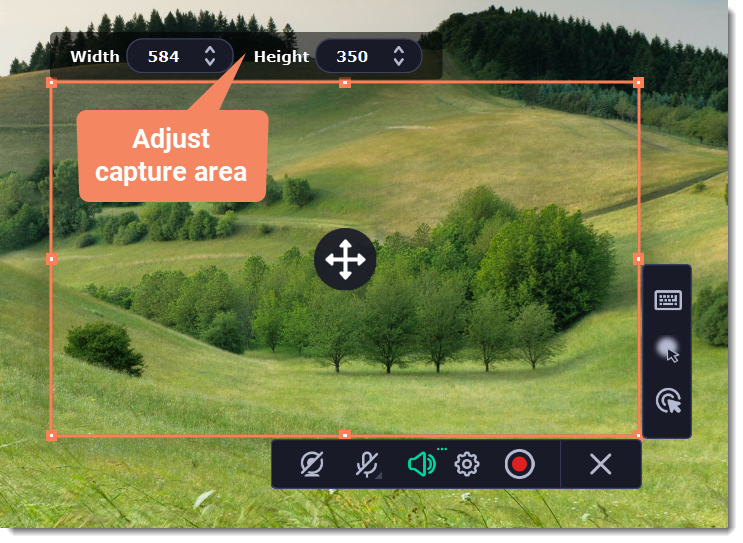
Setting the capture area in Movavi Screen Recorder for Mac: drag handles, Width and Height fields above, the webcam, microphone, system audio, settings and REC buttons below, and keystroke and cursor options on the right.
Recordings are saved as MKV files by default and open in a small capture editor when you stop. From there you can trim, export to another format (the App Store listing names MOV, MP4, AVI, WMV, GIF and MP3) or share. Files go to the Movies/Movavi Screen Recorder folder unless you change it in Preferences.
Features
Keyboard shortcuts for hands-free recording
Movavi Screen Recorder for Mac is easy to drive from the keyboard: ⌥⌘1 pauses, ⌥⌘2 starts and ends a recording, ⌥⌘3 takes a snapshot of the capture area and ⌥⌘5 ends an audio recording. You can change any of them in Preferences, which matters if they clash with another Mac app.
Show keystrokes and draw while you record
Movavi Screen Recorder for Mac can display the keys you press and highlight mouse clicks, which one Mac App Store reviewer, a music teacher, says students appreciate. The Pencil tool adds freehand lines, rectangles, circles and arrows in the middle of a recording. The marks fade from the screen after 5 seconds but stay in the saved video.
Timer and scheduled recordings
Movavi Screen Recorder for Mac's timer stops a recording after a set duration and then does nothing, puts the Mac to sleep or shuts it down. Scheduled recordings, which Movavi has brought back, start the capture at a date and time you choose, so you can record a class or webinar without being at the Mac.
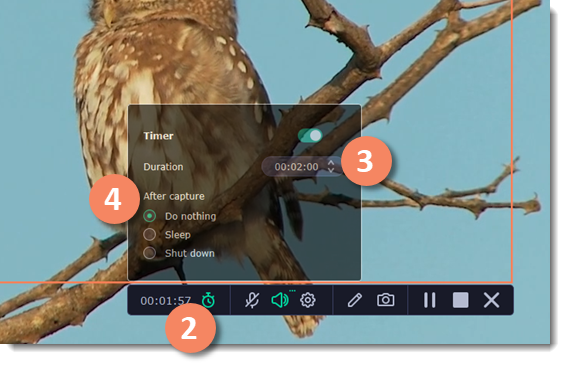
The Timer panel during a recording: the timer switched on, a 2-minute duration, and the After capture choices Do nothing, Sleep and Shut down.
Audio-only recording and noise reduction
Movavi Screen Recorder for Mac can record audio on its own, from the system, a microphone or both, and saves it as MP3. A noise reduction switch in the recording settings removes background sound from the microphone, useful for recording narration in a noisy room. If you have several microphones, you choose one from a list next to the mic button.
Trim and share without another app
Movavi Screen Recorder for Mac's capture editor cuts unwanted sections in three steps (cut, adjust, delete) and shares the result by link, WhatsApp, Telegram, email, YouTube or Google Drive. Screenshots get their own editor with lines, arrows, frames, a highlighter and text, plus scrolling screenshots for long pages.
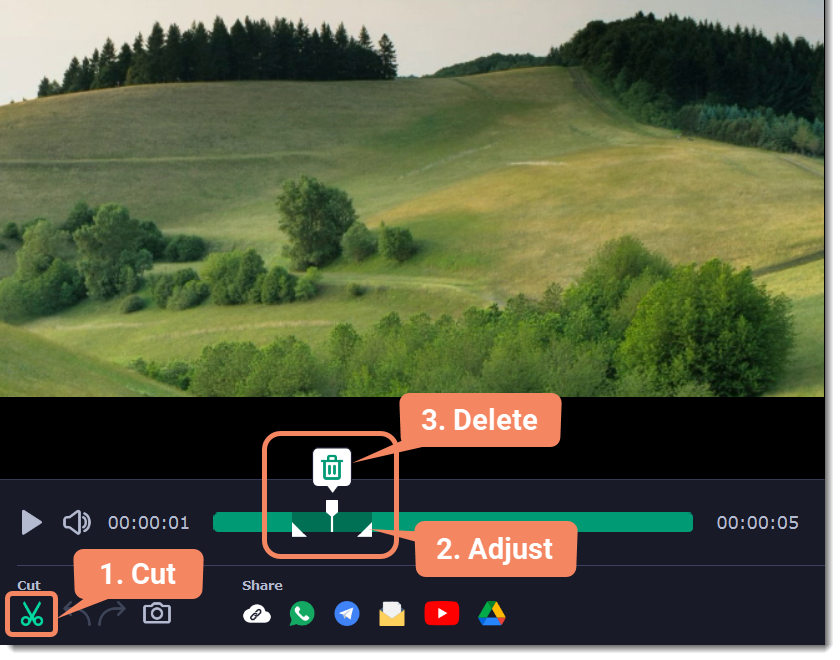
The capture editor after recording: the scissors tool, adjustable cut markers and the delete button on the timeline, with share buttons for a link, WhatsApp, Telegram, email, YouTube and Google Drive.
Benefits
- Tutorials that explain themselves. Keystrokes, click highlights and live drawing replace the "now press Command-Shift-..." narration.
- Webcam and screen in one take. No need to record the camera in Photo Booth and line it up later.
- Recordings while you're away. The scheduler and timer handle long webinars and can put the Mac to sleep afterwards.
Real-World Uses
- Online lessons: a teacher records each lesson with keystrokes on screen and the webcam in the corner, then sends students a link.
- A Mac app walkthrough: record a window, circle the menu you're explaining, trim the start and export to MP4.
- A podcast or voice-over: audio-only recording from the microphone with noise reduction, saved as MP3.
- A long-form webinar: set the start time and duration, choose Sleep after capture and go to bed.
Who It's For, and Who Should Skip It
Good fit: Mac-based teachers, trainers, course creators, support staff and remote workers who record their screen several times a week and want the webcam, keystrokes and drawing in the same take.
Skip it if:
- You only need the odd clip. QuickTime Player and the macOS screenshot toolbar (Shift-Command-5) record the screen for free.
- You record games. Movavi's game recorder Gecata runs on Windows only.
- System audio is essential and you don't want to install drivers. Expect some setup on a Mac.
- Your Mac runs macOS 11 or earlier. The current version needs macOS 12.
Usage Guide
- Install: open the downloaded DMG and run the installer. Movavi asks for 200 MB for installation and 2 GB for ongoing work.
- Grant permissions: in System Settings > Privacy & Security, allow Movavi Screen Recorder under Screen Recording, Microphone and Camera, plus Accessibility and Input Monitoring. Restart the program afterwards.
- Select the area: click the camera button or press ⌥⌘2, then drag, click a window or press Space.
- Choose sources: system sound is on by default. Turn on the webcam and microphone if you need them.
- Record: click REC, pause with ⌥⌘1, draw with the Pencil when needed, and press ⌥⌘2 to finish.
- Edit and save: cut unwanted parts in the capture editor, then Export to the format you need or share.
Tips for macOS
- Movavi missing from a permission list? Movavi's support article says to drag the app from Applications into that list, then restart the program. Some changes need a Mac restart.
- Do a 10-second test with sound first. Record a YouTube clip and your voice together before an important session, so you find any audio-driver issue in advance.
- Export to MP4 for sharing. MKV is the default recording format, and not every player or platform likes it.
Where it falls short
- System audio setup. The most common Mac complaint: getting computer sound into recordings can take a driver install and a restart.
- Mixing several apps' audio. A Mac App Store reviewer needed Rogue Amoeba's Loopback to blend the microphone with audio from other apps.
- No webcam toggle mid-recording. The same reviewer wished the camera could be turned on and off during a recording instead of making two videos.
- Basic editing and a subscription price. The editor only cuts, and at $44.95 a year it costs more than the free options built into macOS.
What Users Say
Mac App Store
The US Mac App Store listing doesn't have enough ratings to show an average, but its written reviews are detailed:
- harmonicminer, "Works, does what it says, I use it a every day I teach" (July 15, 2020): "I'm teaching music composition online. I record every lesson and send a link to the video to my students. This product really does work, and does things you can't do with screen recording in Quicktime. My students appreciate that I capture keystrokes which are displayed on screen in the video." And a wish: "I really wish you could turn the camera on and off during a recording, maybe while in pause."
- Jtg52381746, "Works fine with audio once you get it setup" (December 14, 2025): "Getting the audio loopback setup for capturing system audio in Movavi is a pain. One you find the link to the soundgrabber legacy driver in their support page, get past the error message when installing the grabber, and then restart you system, it works well." They add: "I expected better for a Mac application in 2025 (MAC OS 15.7.1)"
- S. Coffman, "Easy to use. Works great. Highly recommend." (December 28, 2017): "This application makes it easy to capture both the screen and internal system audio from your computer. There's a driver you need to down load from the company's website, and it takes about 30 seconds to do so."
Tech press
Hongkiat (Rean, February 6, 2024) called Movavi "a fully-featured screen recording app that I think professionals will find useful" and praised the system-audio capture for meetings, but found the editor minimal ("It only allows for trimming your videos") and ended: "But would I use it? Probably not because of the pricing and its lack of a free plan for me to test properly." Techloy (March 24, 2026, published as partner content) sums up the limits: "It's not built for gameplay recording. It also isn't a full editing environment".
Trustpilot
Movavi's Trustpilot page (all Movavi products, Windows and Mac) showed 3.5 out of 5 from 22,156 reviews on October 31, 2026. On the screen recorder:
- Chitrang Sawant (5 stars, September 2026): "The Screen Recorder is excellent too, and the combination makes for a really powerful workflow"
- Mark (3 stars, July 2026), "I bought the full version of this in 2021. Now I am forced into subscription. On all levels.", on promotional pop-ups getting in the way of selecting a recording area.
The pattern: Mac users who record lessons and tutorials say it does things QuickTime can't, especially keystrokes and the webcam overlay. The friction is almost all about system audio on macOS, plus the move to subscriptions and the basic editor.
Comparisons
Movavi Screen Recorder for Mac vs QuickTime Player
QuickTime Player and the Shift-Command-5 toolbar are free on every Mac and record the screen with the microphone. Movavi adds the webcam overlay, keystroke and click display, live drawing, scheduled and timed recordings, audio-only recording, noise reduction and quick sharing. If you make one recording a month, stay with QuickTime. If you make tutorials every week, Movavi saves real time.
Movavi's own site vs the Mac App Store
Both sell version 24.8.2 for macOS 12 or later. Movavi's order page charges $44.95 a year or $19.95 a month, and the App Store charges $44.99 a year, $19.99 a month or $29.99 for 3 months as in-app subscriptions. Buying from Movavi gets you the 14-day money-back guarantee and an activation key; App Store purchases follow Apple's refund rules.
Editions and Pricing
Movavi's order page, which the Mac product page links to, showed these plans on October 31, 2026:
| Plan | Price | License term | What you get |
|---|
| Screen Recorder | $19.95 | 1 month | The recorder, renews monthly |
| Screen Recorder | $44.95 | 1 year | The recorder, renews yearly |
| Screen Recorder + Video Editor | $59.95 | 1 year | Adds Movavi Video Editor |
The order page lists each plan with Windows and Mac options, and prices can vary by country. Each license covers one computer, and a Mac license doesn't activate the Windows version.
FAQs
Does Movavi Screen Recorder for Mac run natively on M1, M2 and M3 Macs?
Yes. Movavi Screen Recorder for Mac supports Apple M1 or later as well as 64-bit Intel processors, on macOS 12 Monterey or later.
Why are my Movavi recordings on Mac silent?
Usually a permission or the audio driver. Check that Movavi Screen Recorder is allowed under Microphone and Screen Recording in System Settings > Privacy & Security and restart it, and install Movavi's audio plug-in if you want system sound. macOS blocks denied access without showing an error.
Can Movavi Screen Recorder for Mac record Netflix or Apple TV+?
No. Movavi Screen Recorder doesn't capture copy-protected video and audio streams.
Does Movavi Screen Recorder for Mac work offline?
Yes. Movavi says you don't need an internet connection to record your screen and save the video. You need one to download the installer and to share online.
Where does Movavi Screen Recorder for Mac save files?
In your user's Movies/Movavi Screen Recorder folder by default. You can change the location in the Files section of Preferences.
Should I buy from Movavi or the Mac App Store?
Either works. The Mac App Store version is the same 24.8.2 release sold through in-app subscriptions and Apple's billing. Movavi's own store is a few cents cheaper and comes with Movavi's 14-day money-back guarantee.
System Requirements
- macOS: 12.0 Monterey or later
- Processor: 64-bit Intel or Apple M1 or later
- Memory: 4 GB RAM
- Display: 1280 × 800, 32-bit color
- Disk: 200 MB for installation, 2 GB for ongoing work
Conclusion
Movavi Screen Recorder for Mac is worth $44.95 a year if you make tutorials, lessons or recorded webinars on a Mac every week. Keystroke display, the webcam overlay, live drawing and scheduled recordings do things QuickTime can't, and users who teach with it say so.
The main reason to hesitate is system audio: on macOS it can take a driver install and a restart, so use the 7-day trial to record a clip with computer sound before you pay. If you only record now and then, macOS's free tools are enough.
Download Free TrialBuy Now