Movavi Photo Editor for Mac: One-Click AI Fixes for Everyday Photos
Movavi Photo Editor for Mac is an AI-assisted photo editor for macOS 12 or later that swaps backgrounds, erases unwanted objects, retouches portraits and restores old photos in a click or two. It costs $49.95 a year or $99.95 for a lifetime license, and it's for Mac users who post to social media, sell online or scan family albums and don't want to learn Photoshop or Lightroom.
The common problem: a good photo spoiled by a stranger in the background, a dull sky or a creased print. Movavi Photo Editor for Mac is built for exactly those fixes, with sliders to tone down whatever the AI does.
Quick facts
- Current version: Movavi Photo Editor 24.3.1 for Mac, updated January 15, 2024
- Developer: Movavi
- Runs on: macOS 12 Monterey or later, with an Intel Core i5 or better and 6 GB of RAM
- Price: $49.95 for one year or $99.95 for a lifetime license; $104.95 a year bundled with Movavi Video Suite for Mac
- Free version: saves up to 10 images, each with a watermark
- Installer: a 3.1 MB online installer (500 MB of disk space to install, 5 GB for work)
- Also on the Mac App Store as "Movavi Photo Editor: Edit Easy", free to download with a $19.95 monthly in-app subscription
What we checked: the Mac download link on Movavi's Photo Editor for Mac page (MovaviPhotoEditorSetup.dmg, 3,272,473 bytes, an online installer), the page's version data (24.3.1 for Mac, updated January 15, 2024), Movavi's trial limits for the Mac version, the Mac App Store listing (version 24.1.2 of February 27, 2024, requiring macOS 10.15 or later) and the Mac prices on Movavi's order page, all on October 31, 2026. We didn't edit photos with it ourselves.
Before you buy
- The last update was January 2024. Movavi's Mac page still lists version 24.3.1 from January 15, 2024, so don't expect a stream of new features.
- The free version is a test, not a tool. It saves only 10 images, each with a watermark, and copied image parts get a watermark too.
- It isn't a raw workflow. SLR Lounge found it opens most raw files, but edits are "destructive" and it isn't a raw conversion engine like Lightroom or Capture One.
- Desktop only. There's no iPhone or iPad version of this editor, so phone photos have to come to the Mac first.
Download Free TrialBuy Now
Overview
Movavi Photo Editor for Mac keeps its tools in a narrow bar down the left side: adjustments, object erasing, background removal, restoration, retouching, text, frames and cropping. Picking a tool opens its panel next to the bar, while your photo fills the rest of the window with zoom, compare and undo controls underneath and a Save button in the corner. Most tools offer an automatic option first and a manual one for fine control.
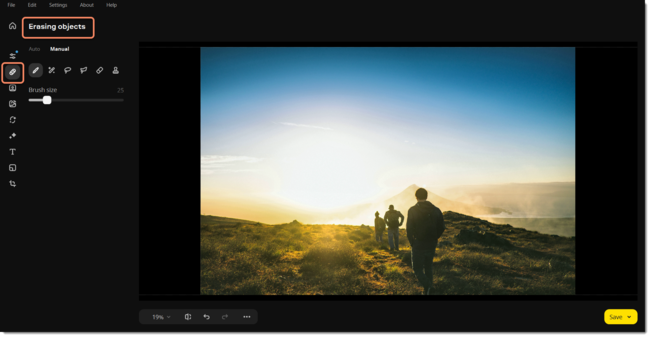
Movavi Photo Editor for Mac with the Erasing objects tool open: Auto and Manual tabs, brush and selection tools and a Brush size slider on the left, the photo in the center, and zoom, compare, undo and Save at the bottom.
Features
Object removal that fills in the background
Movavi Photo Editor for Mac erases unwanted things, such as a passer-by, a sign or a power line, and AI generates a natural-looking background to fill the gap. You can let it find objects automatically or paint over them with a brush. SLR Lounge on its AI retouching: "It's incredible. Once in a while you might have to hit 'undo' and try something a little differently".
Background removal and swapping
Movavi Photo Editor for Mac removes a photo's background automatically or with a manual selection, then lets you replace it with another image, from a cityscape to a starfield. It's the quickest way in the app to make product shots, profile pictures or thumbnails.
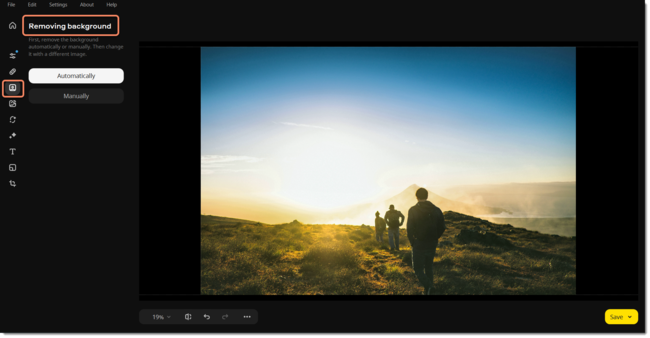
The Removing background panel in Movavi Photo Editor for Mac, with its Automatically and Manually buttons, next to a landscape photo of hikers at sunset.
Automatic enhancement and 34 color presets
Movavi Photo Editor for Mac's AI enhancement balances light and color in one click. For more control there are manual color correction tools, a sharpness adjustment to bring out texture or remove blur, and 34 color correction presets you can try one after another. SLR Lounge's before-and-after color edit used "just one automatic, AI-based automatic adjustment".
Portrait retouching
Movavi Photo Editor for Mac removes dark spots and blemishes, smooths skin, whitens teeth and applies makeup in a click, with the strength adjustable so faces still look like themselves.
Old photo restoration and colorization
Movavi Photo Editor for Mac hides crease lines, scratches and stains on scanned prints, reduces noise in scans and adds color to black-and-white photos, which makes it a good fit for digitizing a family album.
Filters, effects and text
Movavi Photo Editor for Mac also adds filters and atmospheric effects, captions and text, frames, and the usual cropping, rotating and resizing, so you can finish an image without opening a second app.
Benefits
- Results without training. The AI tools get most photos nearly right on the first click, and the sliders let you dial them back.
- Fast on big images. SLR Lounge reported processing times of "a second or less" on 40 to 60 megapixel images.
- A lifetime option. Unlike many AI editors, you can pay once ($99.95) instead of subscribing.
Real-World Uses
- Product photos for an online shop: remove the cluttered background, drop in a plain one and sharpen the product.
- A travel shot with tourists in it: erase the people behind you and let the AI rebuild the scenery.
- Grandparents' wedding photo: scan the print, hide the creases and scratches, then colorize it.
- Social posts: enhance color in one click, add a caption and save a JPG ready to upload.
Who It's For, and Who Should Skip It
Good fit: Mac users who edit photos for social media, small sellers making product images, and anyone restoring old family photos. SLR Lounge's verdict: "Movavi Photo Editor is indeed aimed at the hobbyist and beginner."
Skip it if:
- You shoot raw professionally. Lightroom or Capture One give you non-destructive raw processing and catalogs.
- You need layers and pixel-level control. Photoshop or Affinity Photo go much deeper.
- You edit mostly on your phone. This editor is desktop only.
- You only need basic crops and light fixes. Apple Photos is free and handles those.
Usage Guide
- Install: open the downloaded DMG and run the installer, which downloads the app. You need administrator rights and 500 MB of free space.
- Open a photo: launch Movavi Photo Editor and open an image from the File menu.
- Fix it: pick a tool from the left bar, such as Erasing objects or Removing background, and choose the automatic option or work manually with the brush.
- Fine-tune: adjust the strength sliders, compare with the original and undo anything you don't like.
- Save: click Save at the bottom right and choose the format.
Tips
- Keep your original. Edits are destructive, so save the result as a new file rather than over your only copy.
- Test on your hardest photo. Spend the 10 free saves on the photos you care about most, such as a damaged print or a busy background.
Where it falls short
- Limited depth. SLR Lounge lists "Simplified Interface may not offer enough to highly advanced users" among its cons.
- Very large or raw files. SLR Lounge also warns: "Stability or results may be compromised beyond 48 megapixels and/or with raw image files".
- Few independent Mac ratings. The Mac App Store listing doesn't have enough ratings to show an average, so most feedback comes from reviewers and Movavi's own page.
- No recent updates. The Mac version's last listed update was January 2024.
What Users Say
Independent reviews of Movavi Photo Editor are fewer than for Movavi's video tools, but they agree on the main points.
SLR Lounge (Alice Houstons, July 23, 2024)
The photography site, which lists the editor for Windows and Mac OS X 10.15 or later, concluded: "The AI in Movavi Photo Editor works very well, and we are impressed with the results. In fact, the results are almost perfect right out of the box, and only require manual fine-tuning from time to time." On performance: "even when testing Movavi Photo Editor on 60-megapixel images, I still was able to get good quality results, and the app never crashed!"
Its pros: "Amazing User Interface; very intuitive and fast", "High quality results with almost no learning curve" and "Stability, reliability, and overall performance & speed are excellent".
Its cons: "Simplified Interface may not offer enough to highly advanced users", "Manual Adjustments & presets seem to be either universal or local" and "Limited to computer operating systems; (PC & Mac) unavailable for mobile devices (iOS & Android)". It recommended the lifetime license over the yearly plan.
Users quoted on Movavi's Mac page
Movavi's Mac Photo Editor page shows these user comments (chosen by Movavi, so read them as testimonials):
- "Movavi is the easiest photo editor I have used, but don't let that fool you. It is also incredibly powerful." (User in Marketing and Advertising)
- "Provides a lot of features (even on the trial version), easy removal of picture elements that you don't want." (User in Photography)
- "Found this app while searching for a free photo editor for Mac. Tried it out, loved it, and bought it! Super intuitive and versatile!" (Jack M.)
Mac App Store and Trustpilot
The Mac App Store edition, "Movavi Photo Editor: Edit Easy", didn't have enough ratings in the US store to show an average on October 31, 2026. Movavi as a company scored 3.5 out of 5 from 22,138 reviews on Trustpilot in October 2026, across all its products; the negative reviews there are mostly about subscriptions, watermarks and refunds.
The pattern: reviewers like how quickly the AI tools produce good results and how easy the interface is, and they're clear it's a beginner's editor rather than a Photoshop or Lightroom replacement. Use the 10 free saves to check it on your own photos.
Comparisons
Movavi Photo Editor for Mac vs Apple Photos
Apple Photos is free and handles crops, light and color adjustments and simple retouching. Movavi Photo Editor adds AI background swapping, object removal that rebuilds the background, old photo restoration and colorization, and portrait makeup. Stay with Photos for quick tweaks; buy Movavi when you need those AI repairs.
Movavi Photo Editor for Mac vs Lightroom
Lightroom is a professional raw editor and catalog with a subscription and a learning curve. Movavi Photo Editor is a quick, destructive editor for finished JPGs and scans, with a lifetime license. Photographers who shoot raw should pick Lightroom; everyone fixing everyday photos will get there faster with Movavi.
Editions and Pricing
Movavi's order page listed these Mac prices on October 31, 2026:
| Plan | Price | Updates |
|---|
| Photo Editor for Mac, 1 year | $49.95 per year | All updates while subscribed |
| Photo Editor for Mac, lifetime | $99.95 one-time | Minor updates to the version bought |
| Video Suite for Mac + Photo Editor for Mac | $104.95 per year | All updates while subscribed |
| Mac App Store edition | $19.95 per month (in-app) | Through the App Store |
Movavi says lifetime buyers get minor updates within their version and pay to upgrade to a newer one. Subscriptions renew automatically.
FAQs
Is Movavi Photo Editor for Mac free?
Only to try. The free version of Movavi Photo Editor for Mac lets you save up to 10 images, and each carries a watermark. Saving without limits takes the $49.95 yearly or $99.95 lifetime license.
Which macOS does Movavi Photo Editor need?
Movavi's site lists macOS 12 Monterey or later for Movavi Photo Editor for Mac. The Mac App Store edition, an older build, lists macOS 10.15 or later.
Can Movavi Photo Editor for Mac edit raw photos?
It can open most raw files, but Movavi Photo Editor isn't a raw converter: edits are destructive and there's no catalog. SLR Lounge also warns that results may suffer with raw files and images above 48 megapixels.
Should I buy from Movavi's site or the Mac App Store?
Movavi's site sells Movavi Photo Editor for Mac as a yearly subscription or a $99.95 lifetime license, while the Mac App Store edition is a $19.95 monthly in-app subscription on an older build. If you want to pay once, buy from Movavi.
Does Movavi Photo Editor work on iPhone or iPad?
No. Movavi Photo Editor runs on Mac and Windows computers only, so photos from your phone have to be moved to the Mac to edit them.
How much RAM does Movavi Photo Editor for Mac need?
Movavi Photo Editor for Mac needs 6 GB of RAM, more than Movavi's video tools ask for, plus an Intel Core i5 or better and 5 GB of free disk space for working files.
System Requirements
- macOS: 12.0 Monterey or later
- Processor: Intel Core i5 or higher
- Memory: 6 GB RAM
- Display: 1280 × 768, 32-bit color
- Disk: 500 MB to install, 5 GB for ongoing work
- Permissions: administrator rights to install
Conclusion
Movavi Photo Editor for Mac is worth it if you want AI repairs (background swaps, object removal, restoration and retouching) without learning a pro editor. Reviewers found its automatic results nearly right first time and the interface easy, and the $99.95 lifetime license means you don't have to keep paying.
The reasons to hold back: it hasn't had a listed update since January 2024, it's not built for raw files or advanced work, and the free version only saves 10 watermarked images. Use those 10 saves on your toughest photos; if the results hold up, the lifetime license is the better buy than the yearly plan.
Download Free TrialBuy Now