PDFChef by Movavi for Mac: A Low-Cost Mac PDF Editor for Everyday Page and Text Jobs
PDFChef by Movavi for Mac is a basic PDF editor for macOS that costs $35.99 a year or $45.99 for a lifetime license. It reads PDFs, edits text and images, adds a signature image, rearranges, rotates, deletes and extracts pages, merges files, and converts PDFs to and from Word, images, EPUB and HTML. It's for Mac users who need more page control than Preview gives them, without paying for Adobe Acrobat.
The typical moment: a form needs one page removed, a contract needs your signature, or three scans need to become one file, and Preview makes it fiddly. PDFChef handles that kind of job. It isn't built for heavy professional document work, and it hasn't had a new version in a long time (see below).
Quick facts
- Current version: PDFChef 22.2, dated November 18, 2021
- Developer: Movavi
- Runs on: Mac OS X 10.12 Sierra or later. The requirements list a 64-bit Intel processor and don't mention Apple silicon. A Windows version is sold separately.
- Price: $35.99 for a 1-year subscription, or $45.99 for a lifetime license
- Subscription extras: the PDFChef Scanner mobile app, the online version and 1 GB of cloud storage (the lifetime license includes the scanner and storage for 6 months)
- Refund: 14-day money-back guarantee for technical problems that can't be solved
- Installer: a 41.9 MB DMG, administrator rights needed to install
What we checked: the Mac installer on Movavi's server (PDFChefSetup.dmg, 43,979,338 bytes, last changed March 9, 2022), the version and requirements on the Mac product page (22.2, November 18, 2021), and the prices on the PDFChef order page ($35.99 for 1 year, $45.99 lifetime), all on October 31, 2026. We didn't edit or convert documents with it ourselves, and we didn't test it on an Apple silicon Mac.
Before you buy
- No new version since November 2021. PDFChef 22.2 is still the version Movavi offers, and the Mac installer hasn't changed since March 2022. Don't expect new features or native Apple silicon support.
- Few independent reviews, and some bad ones. Trustpilot shows 3.1 from only 3 reviews, and the reviews from paying users (below) describe conversion problems and the app freezing on launch.
- Lifetime vs subscription. The lifetime license keeps the version you buy. The subscription adds upgrades, the online version, the mobile scanner app and cloud storage while it's active.
- Try it on your own files first. Download the free version and test the exact conversion or edit you bought it for, especially PDF to Word.
Download Free TrialBuy Now
Overview
PDFChef opens each document in its own tab. A narrow bar on the left switches between reading the document and Manage Pages mode, and an Edit button at the top turns on the editing tools: Image, Text and Signature. You open files with Open File, from the Recent files list or by dragging them from a Finder window onto the PDFChef window, and you save with the Save button (Overwrite) or File > Save As.
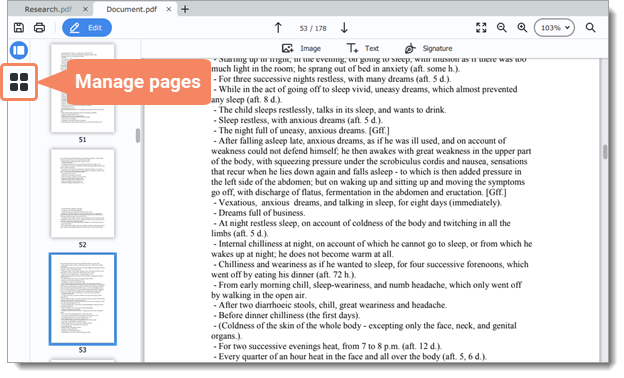
PDFChef for Mac (from Movavi's Mac help) with two documents open in tabs: page thumbnails on the left, the Edit button and the Image, Text and Signature tools at the top, and the Manage Pages button highlighted.
Features
Page management: add, rotate, delete, extract
PDFChef's Manage Pages mode shows every page as a thumbnail with a panel of actions: Blank Page, Append Files, Copy, Paste, Rotate, Delete, Extract and Convert to JPG, PNG, BMP. That covers the most common PDF chores: pulling three pages out of a long report, fixing a sideways scan, dropping a blank page, or adding a second file to the end of the first.
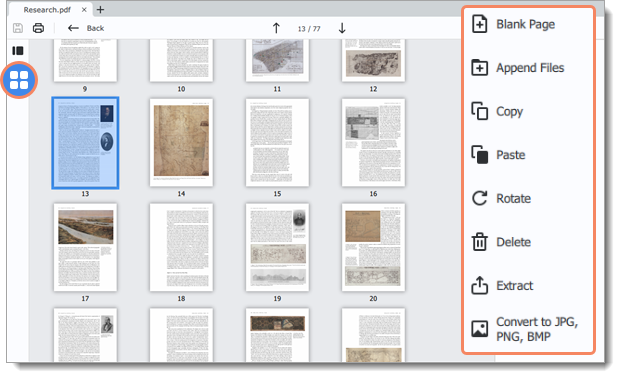
Manage Pages mode in PDFChef: page 13 of a 77-page document selected, with Blank Page, Append Files, Copy, Paste, Rotate, Delete, Extract and Convert to JPG, PNG, BMP on the right.
Edit text and images, and sign
PDFChef lets you add and edit text in a PDF, insert and resize images such as logos and stamps, and place an image of your signature on a document. It's built for quick corrections and filling in, not for redesigning a layout.
Create, merge and convert PDFs
PDFChef creates PDFs from Word, Excel, PowerPoint and TXT documents, JPEG, PNG and BMP images, EPUB and DjVu e-books and HTML pages, and combines several files into one. In the other direction it converts PDFs to Word, TXT, EPUB and HTML, and saves pages as JPEG, PNG or BMP images.
A reader with tabs and search
PDFChef also works as an everyday PDF reader: several documents in tabs, page scaling to fit your screen, and search for words or phrases, which one writer quoted below uses to check characters across a whole novel.
Benefits
- It does more than Preview. Extracting pages, appending files, converting to Word, EPUB or HTML and saving pages as images are each a click away, for $45.99 once.
- It's light. PDFChef for Mac needs 1 GB of RAM and 80 MB of disk space, and runs on Macs back to macOS Sierra.
- Your files stay on your Mac. The desktop app works offline, so confidential documents don't go through a website.
Real-World Uses
- Sign and send a contract: open it, place your signature image and save a copy.
- Clean up a scanned bundle: rotate the sideways pages, delete the blank ones and extract the pages you need into a new file.
- Combine a project: append a Word report, an Excel export and some images into one PDF to send to a client.
Who It's For, and Who Should Skip It
Good fit: Mac users, students and small offices who handle PDFs now and then, find Preview limiting, and want page management, simple edits and conversions for a one-time $45.99.
Skip it if:
- You need to make scanned paper searchable. Movavi doesn't list OCR (text recognition) among PDFChef's features. Choose an editor with OCR.
- PDF to Word conversion is your main job. Reviewers report poor formatting in converted files. Test it with the free version first.
- You need forms, redaction, comments for review rounds or e-signature workflows. These aren't among PDFChef's tools.
- You want a product that's actively developed, or native on Apple silicon. The last version is from November 2021, and the requirements still list an Intel processor.
- You only rotate or reorder pages. Preview, built into every Mac, already does that for free.
Usage Guide
- Install: open PDFChefSetup.dmg and run the installer (you need administrator rights).
- Open a document: click Open file, pick one from Recent files, or drag a PDF from a Finder window onto the PDFChef window.
- Edit pages: click Manage Pages on the left, select pages and use the options on the right (also in the Pages menu).
- Edit content: click Edit, then Text, Image or Signature.
- Save: click Save and choose Overwrite, or use File > Save As to keep the original.
Where it falls short
- Conversion quality. A Trustpilot reviewer found that PDF to Word conversion failed on files Word itself could convert, and that formatting was often poor.
- Stability. The same reviewer and a SourceForge reviewer both describe PDFChef stopping working: freezing on launch in one case.
- Support. The Trustpilot reviewer found no way to get help from the support site.
What Users Say
PDFChef has very few independent reviews, and the ones from paying users are negative. Here's all we could verify.
Trustpilot and SourceForge
PDFChef's Trustpilot page showed a TrustScore of 3.1 out of 5 from 3 reviews on October 31, 2026. The two 5-star reviews from March 2021 praise the free online converter ("Good PDF tools. I convert documents only on this site. Fast and free."). The one desktop review, from Dee Rose (2 stars, October 2024, "Unreliable and no support"), says they bought PDFChef in 2022 mainly for PDF to Word conversion, that it failed on files Word could convert, that it later froze on launch, and that they uninstalled it.
On SourceForge, PDFChef has 1.0 out of 5 from 1 review. Rich-Rune N., a producer who used it weekly for 1-2 years (February 2024, "Unusable - and not possible to give zero stars"): "I liked the PDFChef until it did not work anymore."
On Movavi's own page
Movavi's PDFChef pages quote three users (the same quotes appear on the Windows and Mac pages). Ivan, an IT consultant: "I use PDFChef every time I need to view PDF documents. It also helps me merge multiple files into one. It's so simple and convenient! Thank you, guys."
Andrey, an advertising specialist: "It lets me combine screenshots from different workshops into a single file, split documents, save separate pages, edit, convert, and export PDFs."
The pattern: people who use PDFChef as a reader and page organizer are happy with it. The trouble shows up in conversion quality and in long-term reliability, and with no new version since 2021, those problems are unlikely to be fixed. Test the free version on the documents you actually work with.
Editions and Pricing
PDFChef's order page showed these plans on October 31, 2026:
| Plan | Price | Includes | Upgrades |
|---|
| 1-year subscription | $35.99 per year | PDFChef, PDFChef Scanner, the online version, 1 GB cloud storage | Newer versions while subscribed |
| Lifetime | $45.99 one-time | PDFChef, plus PDFChef Scanner and 1 GB cloud storage for 6 months | Minor updates of the version bought |
Prices include VAT. Volume pricing is available from Movavi's sales team.
FAQs
Is PDFChef by Movavi still updated?
Not with new versions. PDFChef 22.2, dated November 18, 2021, is still the current version, and the Mac installer was last changed in March 2022. The subscription's online version and cloud storage are still offered.
Does PDFChef for Mac run on M1, M2 or M3 Macs?
PDFChef for Mac's requirements list a 64-bit Intel processor and Mac OS X 10.12 or later, and don't mention Apple silicon. Try the free version on your M-series Mac before you buy.
Should I buy the PDFChef lifetime license or the subscription?
For most people the PDFChef lifetime license makes more sense: it's only $10 more than one year of the subscription, and with no new versions coming, the subscription's upgrade rights add little. Pick the subscription only if you want the mobile scanner app and cloud storage beyond 6 months.
Can I get a refund for PDFChef?
PDFChef has a 14-day money-back guarantee for technical or other problems that can't be solved. Check Movavi's refund policy for the full conditions before you buy.
Is PDFChef's online version the same as the desktop app?
No. Movavi describes the online PDFChef as suited to one-time tasks (edit, merge, split, rotate, delete and organize pages, and convert), while the desktop app has more tools and editing modes and works offline.
System Requirements
- macOS: Mac OS X 10.12 Sierra or later
- Processor: 64-bit Intel
- Memory: 1 GB RAM
- Graphics: Intel HD Graphics 2000, NVIDIA GeForce series 8, AMD Radeon R600 or better
- Display: 1280 × 768, 32-bit color
- Disk: 80 MB to install, 250 MB for ongoing work
- Permissions: administrator rights to install
Conclusion
PDFChef for Mac is worth $45.99 only if Preview isn't enough and your PDF needs are still simple: extracting and appending pages, signing, merging files and the occasional conversion. For those jobs it's light, offline and far cheaper than Acrobat.
The reasons to hold back are real: no new version since November 2021, no mention of Apple silicon, very few independent reviews, and reports of poor PDF to Word conversions and the app freezing. Download the free version, run your own documents through it, and buy the lifetime license only if it does the job.
Download Free TrialBuy Now