Movavi Unlimited for Mac: Six Movavi Mac Apps and the Full Effects Store in One Yearly Plan
Movavi Unlimited for Mac is a $189.95-a-year subscription to all six of Movavi's Mac programs (Video Editor, Screen Recorder, Video Converter, Photo Editor, VHS Capture and Media Player) plus full access to the Movavi Effects store. It runs on Intel and Apple silicon Macs with macOS 12 or later, and it's aimed at Mac users who edit video, record their screen and fix photos often enough that separate subscriptions would add up.
Before you buy, compare it with Movavi Video Suite: if you don't need the photo editor or tape capture, the suite costs about half as much.
Quick facts
- What you get: 6 Movavi Mac programs (Video Editor, Screen Recorder, Video Converter, Photo Editor, VHS Capture, Media Player) and 1 year of full Movavi Effects store access
- Developer: Movavi
- Runs on: macOS 12 Monterey or later, on 64-bit Intel or Apple M1 and newer chips
- Price: $189.95 a year, shown by Movavi as a special offer against a crossed-out price
- Renewal: Movavi's FAQ says a subscription bought at the special price renews at that same price
- Not included on Mac: ChiliBurner, which the Windows version adds
- Trial: no trial for the bundle itself. Each included app has a 7-day trial that adds a "Trial" watermark.
- Guarantee: 14-day money-back guarantee for technical problems that can't be solved
What we checked: Movavi's Unlimited for Mac page and plan card (6 programs listed, $189.95 a year shown as a time-limited offer), its FAQ on the differences from the Windows version and on what happens when the subscription ends, the Mac Video Suite installer (MovaviVideoSuiteSetup.dmg, 3,752,160 bytes, an online installer), and the yearly prices of Movavi's separate Mac programs on its buy pages, all on October 31, 2026. We didn't buy the subscription or run the apps on a Mac ourselves.
Before you buy
- It's a subscription. When it ends and isn't renewed, Movavi says you "won't be able to work in any program of Movavi Unlimited," though you keep every file you exported.
- Mac only. The Windows version is a separate purchase.
- The price is an offer. Movavi shows $189.95 as a special price with an end date. Check the order page before paying.
- Test on your Mac first. The free download installs Movavi Video Suite for Mac, and each app's 7-day trial lets you check how it runs on your machine.
Download Free TrialBuy Now
Overview
On a Mac, Movavi's programs live inside Movavi Video Suite, a launcher window with Video, Audio, Photo and Data tabs. Each job has a tile: Edit Video opens the editor with a New Project button, Record computer screen starts the recorder, and other tiles capture from cameras or tapes, split video and play files. Movavi emails the download links and activation key after purchase, and they're also stored in your Movavi Account.

The Movavi Video Suite launcher for Mac (this help image shows version 23), Video tab: Edit Video with a New Project button, Record computer screen, Capture from cameras, VHS, TV, Split video and Watch video.
The subscription also opens the whole Movavi Effects store: over 6,000 titles, stickers, overlays, LUTs, transitions, intros, outros, backgrounds, frames and music tracks, with new effects added every month.
What's Included
Movavi Video Editor for Mac
Movavi Video Editor for Mac cuts, trims and joins clips and adds titles, transitions and filters, with AI automatic subtitles, silence removal, auto-cropping for vertical video, chroma key and motion tracking. It runs natively on Apple silicon.

Movavi Video Editor for Mac version 27: the import area with Add Files, Record Video, Capture Screencast, Record Audio and Slideshow Wizard above the empty timeline.
Movavi Screen Recorder for Mac
Movavi Screen Recorder for Mac records the screen, a window or a selected area with webcam, microphone and system sound, and lets you trim the recording before saving.
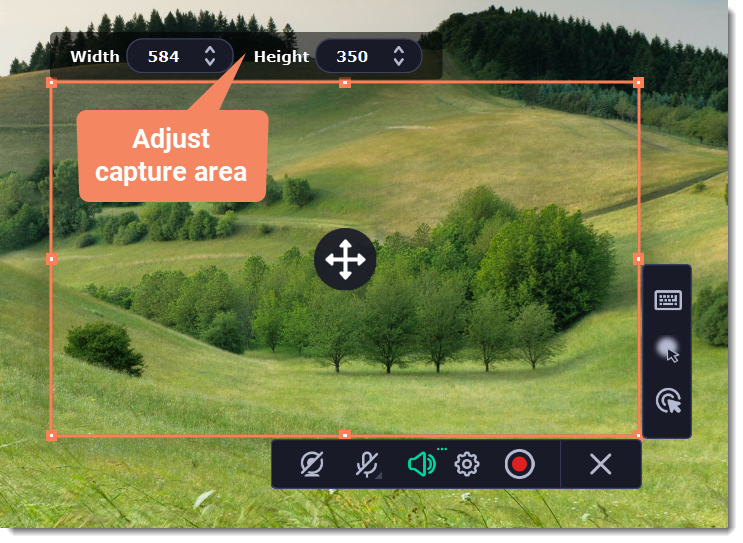
Movavi Screen Recorder for Mac's capture frame (584 × 350) with the toolbar for webcam, microphone, system audio, settings and record.
Video Converter, Photo Editor, VHS Capture and Media Player
Movavi Video Converter for Mac converts video, audio and images between 180+ formats, with SuperSpeed conversion. Movavi Photo Editor for Mac removes backgrounds and objects and restores old photos. VHS Capture captures VHS output and TV signals for digitizing tapes, and Media Player plays your files.
Is It Cheaper Than Buying the Mac Apps Separately?
Yes, against single apps; no, against Video Suite. Movavi's buy pages listed these yearly prices on October 31, 2026:
| Option | Price per year | What you get |
|---|
| Movavi Video Editor for Mac | $54.95 | The editor only |
| Movavi Video Suite Plus | $99.95 | Video Editor, Video Converter, Screen Recorder and Movavi Effects access |
| Four Mac apps bought one by one | $204.80 | Video Editor $54.95, Video Converter $54.95, Screen Recorder $44.95, Photo Editor $49.95 |
| Movavi Unlimited for Mac | $189.95 | All 6 Mac apps and the full Movavi Effects store |
Unlimited saves about $15 a year over the four main apps bought separately, and adds VHS Capture, Media Player and the effects store. But Video Suite Plus (the Mac Video Suite page links to the same buy page) covers editing, recording, converting and effects for $99.95. Unlimited is worth the extra $90 mainly if you want Movavi's Photo Editor and tape capture as well.
Who It's For, and Who Should Skip It
Good fit: Mac users who've outgrown iMovie and Photos and want one subscription for video editing, screen recording, conversion and photo cleanup, including family archivists digitizing tapes.
Skip it if:
- You only edit video. Movavi Video Editor for Mac is $54.95 a year, and iMovie is free for simple edits.
- You need video tools but no photo editor. Video Suite Plus is $99.95 a year.
- You'd rather own the software. Unlimited stops working when you stop paying. Movavi sells lifetime licenses for its individual Mac apps.
- Your Mac runs macOS 11 or older. Movavi's current apps need macOS 12 or later.
Usage Guide
- Buy and check your email: Movavi sends the download link and activation key about 15 minutes after purchase.
- Install Video Suite for Mac: open the DMG and run the installer. It downloads the apps, so stay online.
- Activate: enter your key when an app asks for it.
- Launch an app: in Video Suite, choose a tab and click the tile for the job, such as New Project under Edit Video or Launch under Record computer screen.
Where it falls short
- The value depends on the photo editor and extras. Video Suite covers the video tools for much less.
- Billing complaints. Movavi's negative Trustpilot reviews are mostly about subscriptions, renewal dates, activation and refunds.
- Fewer programs than on Windows. The Mac plan lists six programs against seven on Windows, at the same price.
What Users Say
We found no independent review of the Unlimited bundle itself. Movavi's Unlimited page shows 4.7 from 471 reviews and its Mac Video Editor page 4.8 from 1,127 reviews, both on Movavi's own site. Independent reviewers have covered the apps inside it.
Tech press on the included apps
Digital Camera World (George Cairns, July 2026) gave Movavi Video Editor 4.25 out of 5: "It only took a few seconds for Movavi's AI-powered Auto subtitles tool to generate accurate subtitles from Maryna's interview and place them above the appropriate footage in the timeline." He noted that "you do have to pay extra to access additional effects", which the Unlimited plan includes.
TechRadar (Steve Paris, August 2025) rated Movavi Video Suite 4.5 out of 5: "It's clean, simple, well organised, and gives you access to all the tools you need quickly and efficiently."
Trustpilot (all Movavi products)
Movavi scored 3.5 out of 5 from 22,138 reviews on Trustpilot on October 20, 2026.
- Jon Funder de Linde (4 stars, October 2026): "The editor is easy and intuitive to use, if you dare play around with it a bit."
- Ana Magalhães (5 stars, October 2026), on support: "within minutes, they fully resolved my issue."
- Ally Webb (1 star, October 2026): "I spent $70 on the one year subscription, and every time I tried to activate the code, the software crashed."
- Ronan Wilson (2 stars, October 2026): "Many of the old 2021 effects have been stripped out leaving a very basic offering"
The pattern: people find Movavi's apps easy and its support quick when it works, while complaints center on subscriptions, activation and the effects library changing over time.
FAQs
Does Movavi Unlimited for Mac run on Apple silicon?
Yes. Movavi Unlimited for Mac's apps support Apple M1 and newer chips as well as 64-bit Intel Macs, on macOS 12 or later.
What's the difference between the Mac and Windows versions of Movavi Unlimited?
Movavi Unlimited for Mac lists six programs and the Windows version seven: Movavi's FAQ says the Mac version doesn't include ChiliBurner. Both cost $189.95 a year and include the full effects store.
Does one Movavi Unlimited subscription cover both my Mac and my PC?
No. Movavi sells Movavi Unlimited for Mac and Movavi Unlimited for Windows as separate plans, each with its own buy button.
What happens if I don't renew Movavi Unlimited for Mac?
The apps stop working, but you keep every video and photo you exported. Export finished projects before the renewal date if you plan to stop.
Can I get a refund on Movavi Unlimited for Mac?
Movavi offers a 14-day money-back guarantee "if you experience technical or other problems that cannot be solved." Check Movavi's refund policy for whether your case qualifies.
System Requirements
- macOS: 12.0 or later
- Processor: 64-bit Intel, or Apple M1 or later
- Graphics: Intel HD Graphics 2000, NVIDIA GeForce series 8, AMD Radeon R600 or better
- Memory: 4 GB RAM
- Display: 1280 × 768, 32-bit color
- Disk: 800 MB to install, 1,350 MB for working
Conclusion
Movavi Unlimited for Mac is worth $189.95 a year if you'll use Movavi's photo editor and tape capture alongside its video apps. It costs a little less than four separate Mac subscriptions, puts everything in one launcher and includes every effect pack.
If your work is video only, Movavi Video Suite Plus does the editing, recording and converting for $99.95 a year, and that's the smarter buy. Either way it's a subscription with a dated special price, so check the order page and note your renewal date.
Download Free TrialBuy Now