Movavi Unlimited: Every Movavi Windows Program and the Full Effects Store for One Yearly Price
Movavi Unlimited is a $189.95-a-year subscription to all seven of Movavi's Windows programs: Video Editor, Screen Recorder, Video Converter, Photo Editor, VHS Capture, Media Player and ChiliBurner, plus full access to the Movavi Effects store. It's for people who edit video, record their screen, convert files and touch up photos often enough that buying each program separately starts to add up.
The catch is in the math: if you only need the video tools, Movavi's own Video Suite costs less. The section on pricing below shows where Unlimited pays off and where it doesn't.
Quick facts
- What you get: 7 Movavi programs (Video Editor, Screen Recorder, Video Converter, Photo Editor, VHS Capture, Media Player, ChiliBurner) and 1 year of full Movavi Effects store access
- Developer: Movavi
- Runs on: Windows 10 and 11, 64-bit. A Mac version with 6 programs (no ChiliBurner) is sold separately.
- Price: $189.95 a year, shown by Movavi as a special offer against a crossed-out $1,403.60. Movavi Unlimited Business, for commercial use, is $339.95 a year.
- Renewal: Movavi's FAQ says a subscription bought at the special price renews at that same price
- When it ends: the programs stop working, but every file you exported stays yours
- Trial: the bundle has no trial of its own. Each included program has a 7-day trial that adds a "Trial" watermark.
- Guarantee: 14-day money-back guarantee for technical problems that can't be solved
What we checked: Movavi's Unlimited page and plan card (7 programs listed, $189.95 a year shown as a time-limited offer, Business plan $339.95), its FAQ on renewal and on what happens when the subscription ends, the Video Suite trial download it installs from (MovaviVideoSuiteSetup.exe, 3,038,528 bytes, an online installer), and the prices of the separate Movavi programs on Movavi's buy pages, all on October 31, 2026. We didn't buy the subscription, so we didn't see the download email or check the effects store from inside the app.
Before you buy
- It's a subscription, not a license you keep. Movavi's FAQ: "After the subscription period is over and not prolonged, you won't be able to work in any program of Movavi Unlimited, but you will still have access to all the exported files."
- The price is a dated offer. Movavi shows $189.95 as a special offer with an end date, and its store prices change often. Check the price on the order page before you pay.
- Try the programs first. The free download installs Movavi Video Suite, where the included programs launch from. Each program's 7-day trial adds a watermark, so you can test how they run on your PC before paying.
- The refund is for problems, not second thoughts. Movavi's 14-day guarantee covers "technical or other problems that cannot be solved."
Download Free TrialBuy Now
Overview
Movavi Unlimited isn't a single program. It's one subscription that opens Movavi's whole Windows lineup. After you buy, Movavi emails the download links and activation key, and you install Movavi Video Suite, a launcher with tabs for Video, Audio, Photo and Data. Each program sits on its own tile with a Launch button, so the editor, the converter and the screen recorder are one click apart.

The Movavi Video Suite launcher on Windows, Video tab: tiles for Video Editor, Video Converter, Screen Recorder, Capture from cameras, VHS, TV, Watch video and more, each with a Launch button.
On top of the programs, Unlimited includes a year of the Movavi Effects store: over 6,000 titles, stickers, overlays, LUTs, transitions, intros, outros, backgrounds, frames and music tracks, with at least 100 new effects a month according to Movavi.
What's Included
Movavi Video Editor: the main reason most people buy
Movavi Video Editor is a timeline editor for cutting, trimming, color correction, titles and transitions, with one-click AI tools: automatic subtitles, noise removal, silence removal, background removal and motion tracking. Version 27 added templates built from editable Blocks.
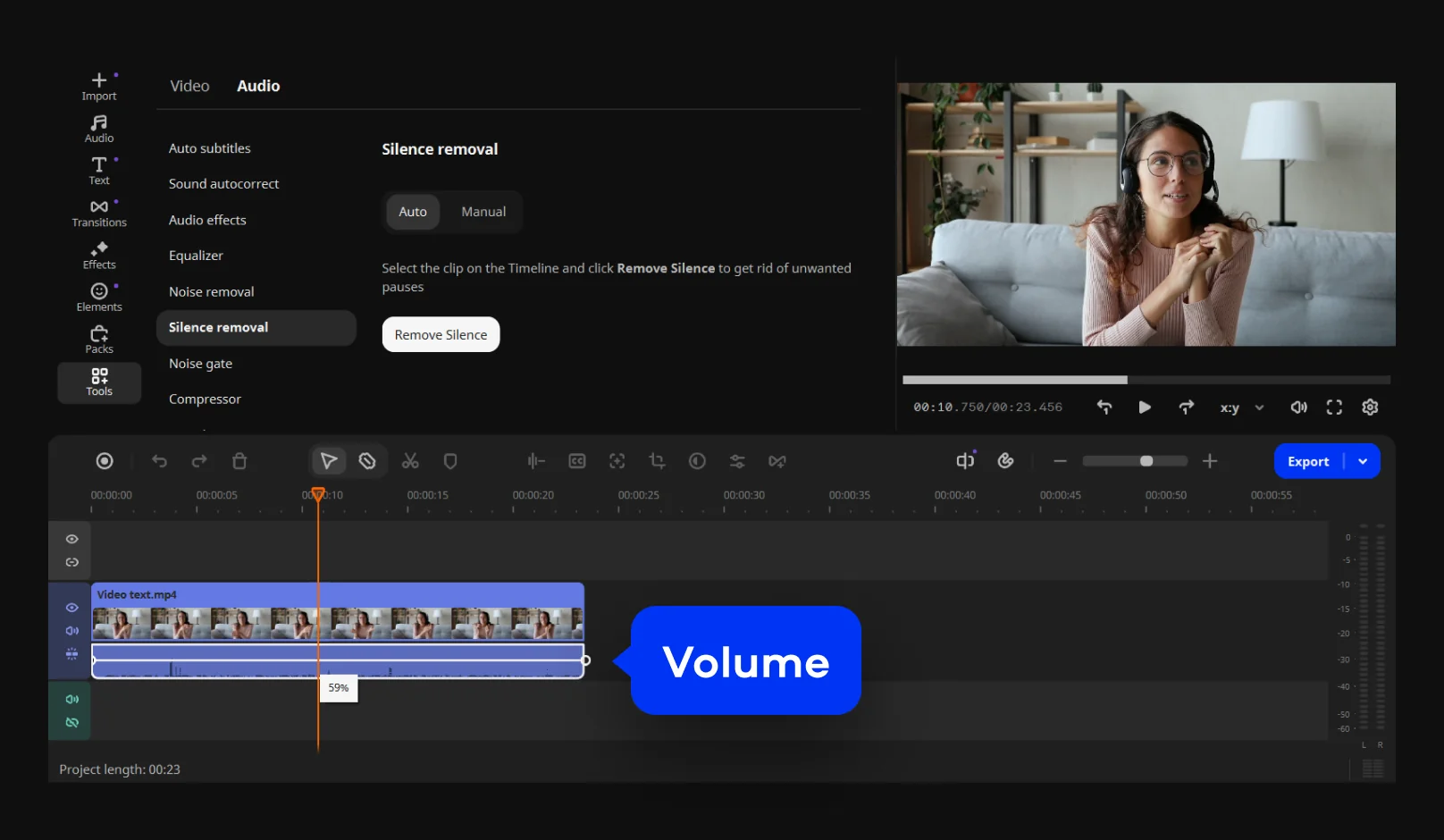
Movavi Video Editor, one of the programs in Unlimited, with the Silence removal panel open above the timeline.
Movavi Screen Recorder: screen, webcam and audio
Movavi Screen Recorder captures the whole screen, a window or an area you draw, with webcam, microphone and system sound. You can draw on the screen while recording, set a timer, take snapshots and trim the result before saving.
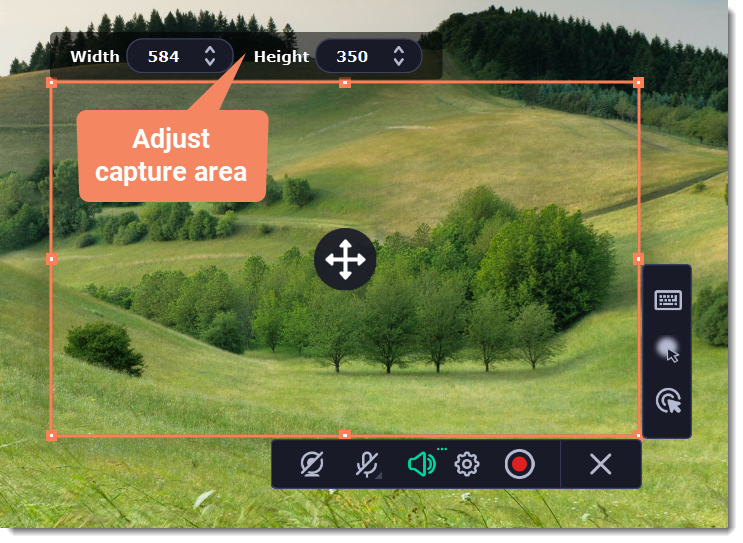
Movavi Screen Recorder's capture frame with width and height fields and the toolbar for webcam, microphone, system audio, settings and record (from Movavi's help).
Movavi Video Converter: 180+ formats
Movavi Video Converter changes video, audio and image files between more than 180 formats and device presets, with a SuperSpeed mode that skips re-encoding when the codec allows it. It can also trim, crop and compress files before converting.
Movavi Photo Editor: AI cleanup for pictures
Movavi Photo Editor removes or replaces backgrounds, erases unwanted objects, enhances and restores old photos, and handles retouching, text and cropping.
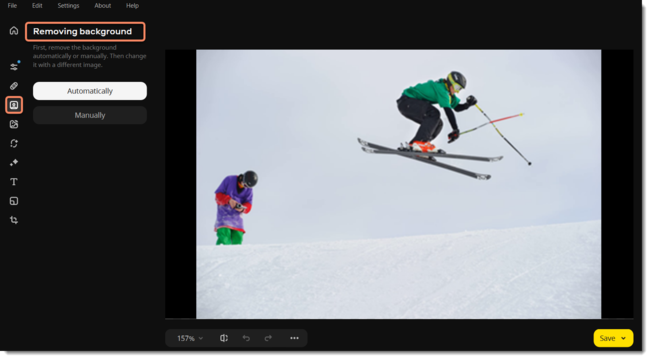
Movavi Photo Editor with the Removing background panel open: Automatically and Manually buttons next to a ski photo.
VHS Capture, Media Player and ChiliBurner
The three smaller programs round out the bundle. VHS Capture captures VHS output and TV signals, for digitizing old tapes. Media Player plays your files, and ChiliBurner, Windows only, burns discs. These are the programs you'd rarely buy on their own, and they're part of what separates Unlimited from Video Suite.
Is Unlimited Cheaper Than Buying the Programs Separately?
Only if you need the photo editor and the extras too. Movavi's buy pages listed these yearly prices on October 31, 2026:
| Option | Price per year | What you get |
|---|
| Movavi Video Editor (Video Editor Plus) | $69.95 | The editor and Movavi Effects access |
| Movavi Video Suite Plus | $99.95 | Video Editor, Video Converter, Screen Recorder and Movavi Effects access |
| Video Suite + Photo Editor | $104.95 | The video suite plus Photo Editor |
| Four programs bought one by one | $219.75 | Video Editor $69.95, Video Converter $54.95, Screen Recorder $44.95, Photo Editor $49.95 |
| Movavi Unlimited | $189.95 | All 7 programs and full Movavi Effects store access |
Unlimited is clearly cheaper than buying the four main programs one at a time. But Movavi's own bundles undercut it: Video Suite Plus at $99.95 already covers the editor, converter, screen recorder and effects, and adding Photo Editor brings a Video Suite bundle to $104.95. What Unlimited adds for the extra money is VHS Capture, Media Player, ChiliBurner and the full effects store in one plan. If you'll never digitize a tape or burn a disc, Video Suite is the better buy.
Real-World Uses
- A family archivist: digitize old VHS tapes with VHS Capture, trim and caption them in Video Editor, restore old prints in Photo Editor, and burn copies for relatives with ChiliBurner.
- A small business doing its own marketing: record product demos with Screen Recorder, edit them with effects from the store, cut out product photos in Photo Editor and convert clips for each social network.
- A teacher: record lessons with the screen recorder, add subtitles automatically in the editor, and convert the files for the school's platform.
Who It's For, and Who Should Skip It
Good fit: Windows users who'll use at least three of the programs, especially the photo editor and VHS Capture alongside the video tools, and who want every effect pack without buying them one at a time.
Skip it if:
- You only edit video. Movavi Video Editor alone is $69.95 a year.
- You need editing, recording and converting, but no photo tools or tapes. Movavi Video Suite Plus does that for $99.95 a year.
- You want to own the software. Unlimited stops working when you stop paying. Movavi sells lifetime licenses for its individual programs.
- You edit professionally. Premiere Pro or DaVinci Resolve go much deeper than Movavi's beginner-friendly tools.
Usage Guide
- Buy and check your email: Movavi says the download link and activation key arrive about 15 minutes after purchase, and they're also in your Movavi Account.
- Install Movavi Video Suite: run the installer. It's an online installer, so stay connected while it downloads the programs.
- Activate: enter the activation key when the program asks for it.
- Launch a program: open Video Suite, pick the Video, Audio or Photo tab, and click Launch on the program you need.
Where it falls short
- Value depends on the extras. The core video tools are cheaper in Video Suite, so Unlimited only pays off if you use the photo editor, VHS Capture or the full effects store.
- Billing complaints. Movavi's Trustpilot reviews are split, and the negative ones are mostly about subscriptions, renewals, refunds and activation, not the programs themselves.
- Beginner-level depth. Movavi's editor has no multicam editing or professional color grading.
What Users Say
We found no independent review of the Unlimited bundle itself, only of the programs inside it. Movavi's Unlimited page shows a 4.7 rating from 471 reviews on its own site.
Tech press on the included programs
Digital Camera World (George Cairns, July 2026) gave Movavi Video Editor 4.25 out of 5. On noise removal: "One click on this tool's icon, and the background noise disappeared from Maryna's audio track, and her voice sounded much clearer too!" His criticism was about pricing: "You can buy it outright, but the app won't be updated. The subscription models are relatively comparable with other apps, though you do have to pay extra to access additional effects."
TechRadar (Steve Paris, August 2025) rated Movavi Video Suite 4.5 out of 5: "It's unlikely to trouble the likes of Premiere Pro and Resolve any time soon, but it's superior to the likes of Apple iMovie or ClipChamp." His complaint: on first launch "everything was in Japanese," and the app didn't default to his computer's language.
Trustpilot (all Movavi products)
Movavi scored 3.5 out of 5 from 22,138 reviews on Trustpilot on October 20, 2026. The praise:
- Graham Voss (5 stars, September 2026): "So easy to use, especially for a pensioner like me. You can do so much like, brightening, cropping, adding titles, etc."
- Mark Anderson (5 stars, September 2026): "I particularly like the effects and how easy it is to use."
And the complaints, mostly about paying:
- Robert Gagnon (1 star, October 2026): "They have advanced my subscription date and are not willing to cancel it."
- Valentin Mladinescu (3 stars, October 2026): "Dissapointed on the subscription model for payment."
- Felipe Borges (1 star, October 2026): "I wanted to get a refund that same day and at that very hour, but according to their Terms of Service, that's not possible."
The pattern: reviewers who test Movavi's programs like how easy they are and how much the AI tools do in one click. The unhappy reviews are about the business side: subscriptions, renewal dates and refunds. With a yearly bundle, that matters: note your renewal date and decide before it comes around.
FAQs
What's the difference between Movavi Unlimited and Movavi Video Suite?
Movavi Unlimited adds Photo Editor, VHS Capture, Media Player and ChiliBurner to what Video Suite has. Video Suite Plus ($99.95 a year) includes Video Editor, Video Converter, Screen Recorder and Movavi Effects access; Unlimited ($189.95 a year) includes all seven Windows programs and the full effects store.
Can I use Movavi Unlimited on a Mac?
Not with the Windows subscription. Movavi Unlimited for Mac is a separate purchase, with six programs: it doesn't include ChiliBurner.
What happens to my videos if I cancel Movavi Unlimited?
Your exported videos and photos stay yours. Movavi Unlimited's programs stop working when the subscription ends, so keep exports of anything you may want to change later.
Can I use Movavi Unlimited for my business?
Movavi sells a separate Movavi Unlimited Business plan at $339.95 a year for commercial use. Movavi's buy pages say personal licenses are meant for non-commercial use at home.
Does Movavi Unlimited work with copy-protected DVDs?
No. Movavi states that Movavi Unlimited isn't intended for use with copy-protected media content.
System Requirements
- Windows: 10 or 11, 64-bit, with up-to-date patches
- Processor: Intel, AMD or compatible dual-core, 1.5 GHz
- Graphics: Intel HD Graphics 2000, NVIDIA GeForce series 8, AMD Radeon R600 or better, with up-to-date drivers
- Memory: 4 GB RAM
- Display: 1280 × 768, 32-bit color
- Disk: 600 MB to install, 1,350 MB for working
Conclusion
Movavi Unlimited is worth $189.95 a year if you'll use Movavi's photo editor, VHS capture or the full effects store as well as its video tools. It's far cheaper than buying the four main programs separately ($219.75 a year), and everything launches from one place.
If your work is only video, though, Movavi's own Video Suite Plus covers editing, recording and converting for $99.95 a year, and that's the better buy. Remember it's a subscription: the programs stop when you stop paying, and the special price is a dated offer, so check the order page.
Download Free TrialBuy Now