Aiarty 3-in-1 Bundle: Image Enhancer, Video Enhancer and Image Matting on One Lifetime License
The Aiarty 3-in-1 Bundle is Digiarty's package of all three of its offline AI tools, Aiarty Image Enhancer, Aiarty Video Enhancer and Aiarty Image Matting, as lifetime licenses for 3 Windows PCs, sold for $499 at checkout (Mac and Windows + Mac versions cost the same). It's for photographers, video editors and designers who would otherwise buy two or three of these apps one at a time.
The price math matters more than usual here. At the regular $499, the bundle costs exactly what the three lifetime licenses cost separately ($155 + $235 + $109), so it saves nothing. Its value comes from the coupon Digiarty's own store applies: with code VIPSAVE the order page charged $259 for the bundle on November 17, 2026, against $333 for the three apps with their own coupons.
Quick facts
- Developer: Digiarty Software, Inc.
- Included: Aiarty Image Enhancer 3.14, Aiarty Video Enhancer 3.9 and Aiarty Image Matting 2.7, each with a lifetime license and all future updates
- Licenses: 3 Windows PCs (this edition), 3 Macs, or 1 Windows PC plus 1 Mac, each its own bundle
- Price: $499 at checkout; $259 with coupon VIPSAVE
- Processing: on your own computer (GPU or CPU), with no uploads
- Trial: each app has a free trial with watermarked exports and no batch export; Video Enhancer processes up to 2 minutes per video
- Guarantee: 30 days, for software problems support can't solve
- What we checked: the three bundle licenses (3 PCs, 3 Macs, Windows + Mac) at $499 each on the order page, and $259 each with coupon VIPSAVE; current versions on Aiarty's download center (Video Enhancer's installer dated November 6, 2026); all on November 17, 2026.
Before you buy
- Check the coupon is on. The Buy buttons on this page open the order page with code VIPSAVE already applied, so you pay $259. If you reach checkout another way and see $499, click "I have a coupon code", type VIPSAVE and refresh: at $499 the bundle costs no less than the three apps bought separately.
- Pick the right platform. Each Aiarty license code works only on its own platform. The 3-PC bundle doesn't cover a Mac; for one PC and one Mac, buy the Windows + Mac bundle, which comes with separate codes for each.
- Need only two of the apps? Digiarty also sells smaller bundles: Image Enhancer + Image Matting, and Image Enhancer + Video Enhancer. The 3-in-1 makes sense only if you'll use all three.
- Check your graphics card. All three apps lean on a DirectX 12 GPU on Windows, and Video Enhancer wants 4 GB of video memory (8 GB recommended). Run the trials on your PC before paying.
Download Free TrialsBuy for 3 Windows PCsBuy for 3 MacsBuy for 1 PC + 1 Mac
Overview
Digiarty, the company behind WinX DVD and VideoProc, launched the Aiarty brand for AI image and video work that runs on your own machine rather than in the cloud. The three apps share a look (a large preview with a before/after slider, a model and settings panel on the right, Single Export and Batch Export buttons), so once you know one, the others feel familiar. Each is a separate program with its own installer; the bundle simply licenses all three at once.
Each app has its own full review on this site, with its features, limits, user reviews and system requirements:
What's in the Bundle
Aiarty Image Enhancer: upscale, denoise and deblur photos
Aiarty Image Enhancer upscales photos up to 32K and cleans up grain, blur and compression artifacts with a choice of AI models, in single or batch exports. It also restores faces, refines colors and HDR, erases objects with AI, reads RAW files and works as an external editor for Lightroom Classic. It's the app for old scans, soft or noisy shots and AI-generated images that need more resolution.
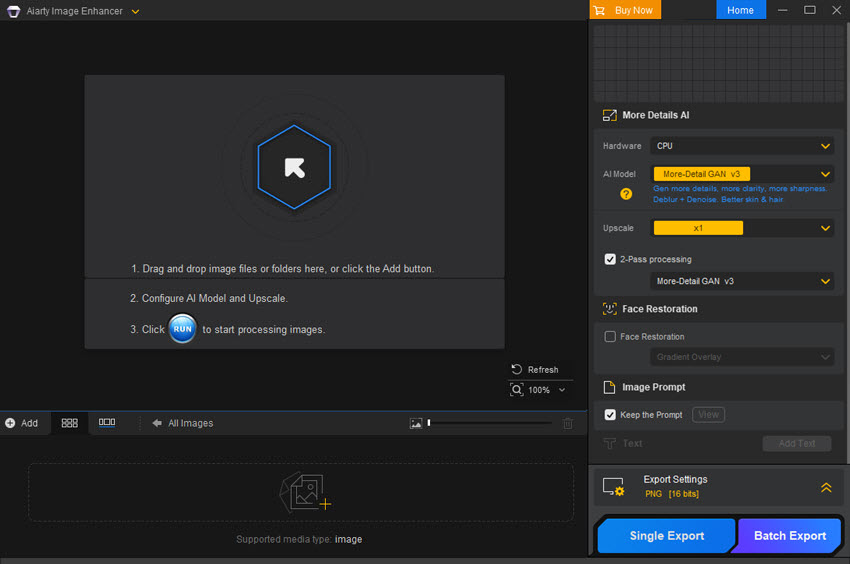
Aiarty Image Enhancer on Windows: the AI model, upscale and 2-pass settings, with Edit, Color, Face Restoration, HDR, AI Eraser and Text panels below.
Aiarty Video Enhancer: restore and upscale video to 4K
Aiarty Video Enhancer upscales video to 4K and removes noise and blur, interpolates frames up to 120 fps for smoother playback or slow motion, cleans up the audio track, and handles color correction and HDR. Basic pre-edits (cut, crop, rotate, flip) are built in. The newest version, 3.9, lets you pause and resume a job and export enhanced sections to compare before rendering the whole clip.
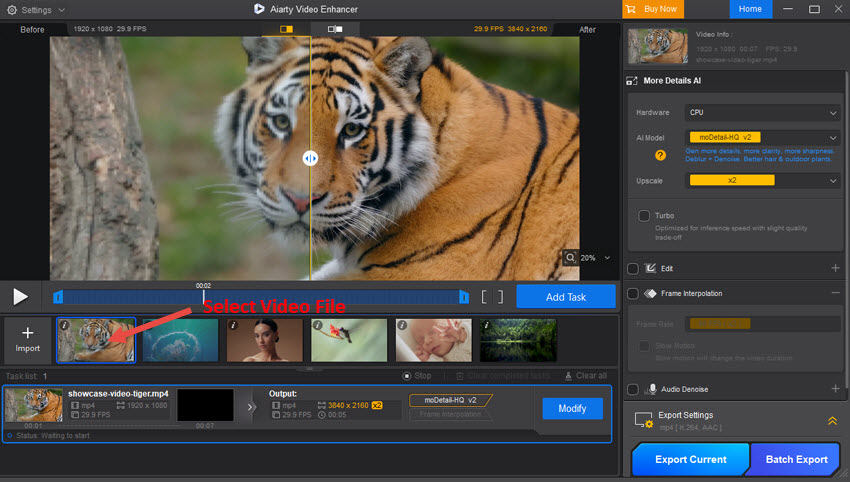
Aiarty Video Enhancer: a 1920x1080 clip queued for a 2x upscale to 3840x2160, with the before/after split preview and the Frame Interpolation and Audio Denoise options.
Aiarty Image Matting: cut out subjects and replace backgrounds
Aiarty Image Matting removes backgrounds with alpha matting, which keeps fine edges such as hair, fur, lace and glass semi-transparent instead of hard-cut. You can then blur, feather, pixelate or replace the background, and fix edges by hand with Eraser, Brush, Dodge and Burn tools. Batch export makes it practical for product photos.
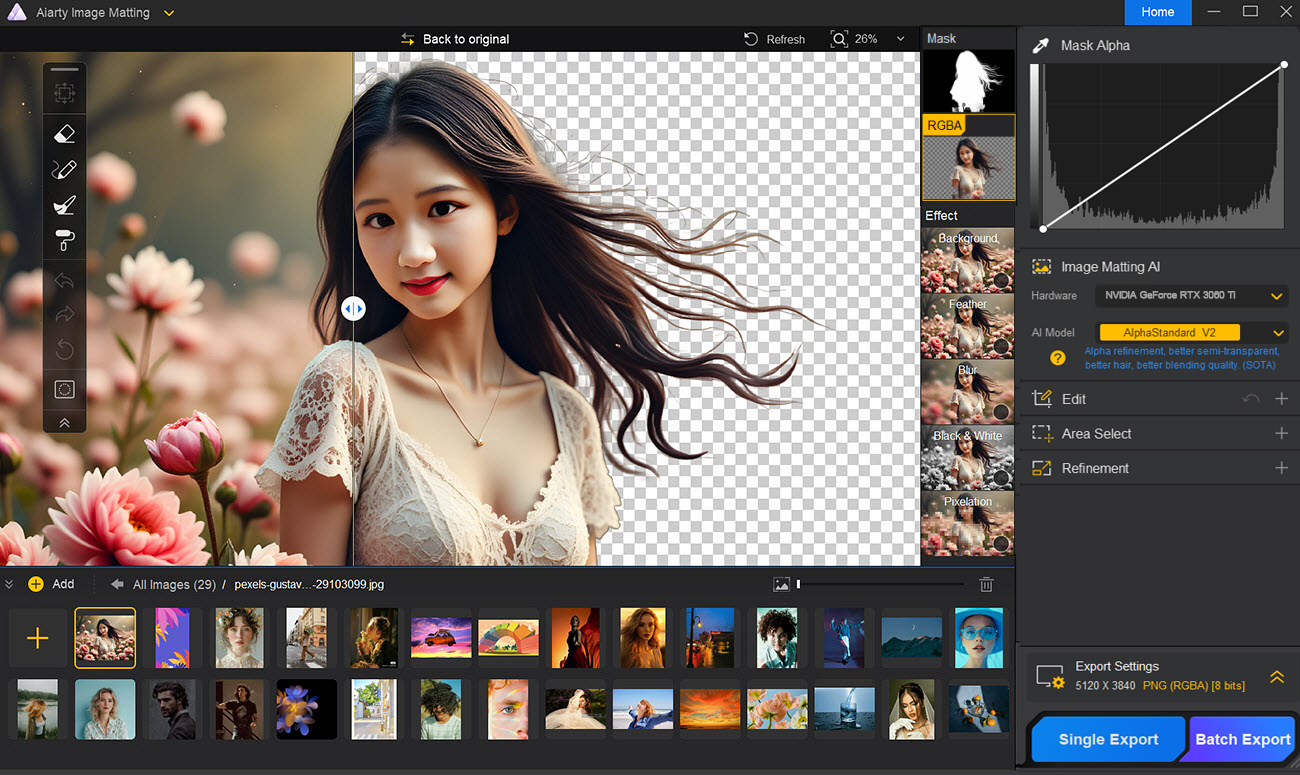
Aiarty Image Matting: a portrait cut out with loose strands of hair kept, the mask and RGBA views, and the Background, Feather, Blur, Black & White and Pixelation effects.
Benefits
- One payment, no subscriptions. All three lifetime licenses include future updates and version upgrades.
- Privacy by design. Photos and videos never leave your computer, and Digiarty states it doesn't use customers' files for AI training.
- Three PCs per license. The Windows bundle covers a desktop, a laptop and one more machine, for each of the three apps.
Real-World Uses
- Family archive: enhance scanned prints with Image Enhancer and digitized VHS or 480p camcorder clips with Video Enhancer, from the same set of tools.
- Online store: cut products out of their backgrounds in batches with Image Matting, then upscale small supplier images with Image Enhancer.
- Content creator: upscale older footage to 4K for a channel, sharpen thumbnails, and make clean cutouts for title cards.
- Wedding or event photographer: rescue high-ISO reception shots, cut out couples for albums, and smooth short clips into slow motion.
Who It's For, and Who Should Skip It
It's for people who work with both photos and video and want all of Digiarty's tools under one lifetime license, and who will buy with the coupon.
Skip it if you'll only use one or two of the apps: buy that app alone, or one of the two-app bundles. Skip it too if your PC has no capable graphics card, since Video Enhancer in particular gets slow on weak hardware, or if you need everything in one editor with layers and retouching tools, because these are three focused utilities, not a photo editor. Mac owners should buy the Mac bundle, not this one.
Usage Guide
- Install: download each app from Aiarty's download center (Image Enhancer about 335 MB, Video Enhancer about 401 MB and Image Matting about 206 MB on Windows) and install the ones you want.
- Activate: after purchase, the order email from Verifone, Digiarty's payment processor, carries the license codes. Enter each app's code in that app.
- Pick hardware and a model: in each app, choose your GPU under Hardware, then the AI model that fits your material.
- Preview, then export: drag the before/after slider to check the result, then use Single Export, or Batch Export for whole folders.
Where it falls short
- No saving at the regular price. Without a coupon the bundle costs the same as its three parts.
- Speed depends on your hardware. Reviewers report long render times on slower PCs, especially for video.
- AI can't recreate what isn't there. Heavy upscales of badly damaged originals can produce invented textures, and Image Enhancer works in 8-bit.
- Hard edges for Matting. Very blurry edges, or subjects close in color and texture to their background, still need manual cleanup.
What Users Say
Trustpilot: 3.9 out of 5 from 22 reviews
Aiarty's Trustpilot page covers all its products. One 5-star reviewer owns all three:
Daniel Correa Lima (5 stars, July 21, 2026): "I own the entire suite and highly recommend it to anyone looking for ease and speed in their editing workflow."
On the individual apps
A few lines from the reviews collected on each app's own page on this site:
Image Enhancer, Fstoppers (Michael Breitung, who received a license code): "80% of the time, I don't do any cleanup on top of it because the results are free of artifacts." He also warned that "It may not be sufficient to magically turn a blurry 8 MP image into a photo rivalling the detail of a medium-format camera."
Video Enhancer, Make Tech Easier: it "can provide surprisingly accurate guesses of missing data and does a great job of making bad video good – if not good, then much more watchable".
Image Matting, Larry Jordan (larryjordan.com): "I am very impressed with AIarty." His caveat: "It isn’t perfect, it struggles when edges are too blurry or close in texture to the background."
The pattern across all three: reviewers like the natural-looking results, the simple interface and the offline processing, and they complain about render times on weaker hardware and the limits of what AI can recover from very poor originals. Several published reviews were written with licenses Digiarty supplied, so the trials on your own files are the fairest test. Each app's page on this site has the full set of reviews.
Comparisons
3-in-1 Bundle vs the smaller Aiarty bundles
Digiarty sells two cheaper bundles. The Image Tool Bundle (Image Enhancer + Image Matting) lists at $264 and the Media Enhancer Bundle (Image Enhancer + Video Enhancer) at $390; the store showed them at $129 and $199 with its coupon. If you don't need Video Enhancer, the Image Tool Bundle is the better buy; if you never remove backgrounds, take the Media Enhancer Bundle.
3-in-1 Bundle vs buying the apps separately
With coupons, the three lifetime licenses on their own came to $333 (Image Enhancer $109, Video Enhancer $149, Image Matting $75) on November 17, 2026, so the bundle at $259 saves $74. Without coupons both routes cost $499.
Editions and Pricing
| Bundle license | Price at checkout, Nov 17, 2026 | With coupon VIPSAVE | Computers | Buy |
|---|
| Lifetime, Windows | $499 once | $259 | 3 Windows PCs | Buy Windows |
| Lifetime, Mac | $499 once | $259 | 3 Macs | Buy Mac |
| Lifetime, Windows + Mac | $499 once | $259 | 1 Windows PC and 1 Mac (separate codes) | Buy Win + Mac |
Each Buy button orders that bundle. Prices are in US dollars before sales tax, which the order page adds for your location. The Buy buttons apply Digiarty's own coupon VIPSAVE for you, which took each of the three bundles from $499 to $259 on November 17, 2026; if the order page shows $499, click "I have a coupon code", enter VIPSAVE and click the refresh icon.
FAQs
Does the Aiarty 3-in-1 Bundle expire?
No. The Aiarty 3-in-1 Bundle is a lifetime license for all three apps, with no yearly fee, and it includes future updates and version upgrades.
Can I use the Aiarty 3-in-1 Bundle on both Windows and Mac?
Only with the Windows + Mac bundle. Aiarty license codes are platform-specific, so the 3-PC bundle works on Windows only and the 3-Mac bundle on macOS only. The Windows + Mac bundle includes separate codes for one PC and one Mac.
Do I have to install all three Aiarty apps?
No. The Aiarty apps in the bundle are separate programs, so you can install only the ones you need on each computer and add the others later.
What does the Aiarty refund guarantee cover?
Aiarty refunds within 30 days when the software can't work normally because of an error or bug that support can't fix, or work around, within a reasonable time. Digiarty asks you to contact support first, and promises a reply within one business day.
Does Aiarty upload my photos or use them for AI training?
No. Aiarty's apps process everything locally on your computer's GPU or CPU, and Digiarty states it doesn't use customers' photos or videos for AI training without explicit consent.
System Requirements
- Windows 11 or Windows 10 64-bit, version 1809 or later (1903 or later for GPU acceleration)
- 64-bit Intel or AMD processor, 8 GB of RAM (16 GB recommended)
- DirectX 12 graphics card (AMD, Intel or NVIDIA); Video Enhancer needs 4 GB of video memory (8 GB recommended)
- About 940 MB for the three Windows installers
- Mac bundle: Apple silicon or Intel Macs; Video Enhancer needs macOS 13 or later, the other two macOS 11 or later on Apple silicon
Conclusion
The Aiarty 3-in-1 Bundle is worth buying if you'll really use all three tools, photo enhancement, video upscaling and background removal, and you enter Digiarty's coupon at checkout: at $259 it's the cheapest way to own Aiarty's whole lineup for life, with updates included and everything processed on your own PC. The main reason not to is that at the full $499 it's no cheaper than the three apps separately, and if you only need two of them, a two-app bundle or a single app costs less. Try the free trials on your own photos and footage first, since results and speed depend heavily on your graphics card.
Download Free TrialsBuy for 3 Windows PCsBuy for 3 MacsBuy for 1 PC + 1 Mac