Aiarty Image Enhancer for Mac
Version
1.0
License
Shareware
Operating Systems
Mac
System Requirements
1 GHz or faster processor, 4 GB RAM, 500 MB free disk space
File Size
122.99 MB
Release Date
9/23/2026
Last Updated
9/24/2026
5 views 0 downloads
Aiarty Image Enhancer for Mac Short Description:
Denoise, deblur, and upscale images with realistic details.
Aiarty Image Enhancer for Mac Long Description:

Aiarty Image Enhancer for Mac: The Definitive Guide to AI-Powered Photo Restoration and Upscaling

In the rapidly evolving landscape of digital photography and graphic design, the demand for pristine, high-resolution imagery has never been higher. Whether you are a professional photographer looking to salvage underexposed shots, a graphic designer needing crisp assets for large-format printing, or an enthusiast aiming to restore cherished family memories, the quality of your source material dictates the potential of your final output. For years, the limitations of hardware sensors, poor lighting conditions, and compression artifacts have stood as formidable barriers to achieving perfection. Traditional editing software offered tools to mitigate these issues, but they often required hours of manual labor, advanced technical knowledge, and still yielded results that were merely "acceptable" rather than exceptional.

Enter Aiarty Image Enhancer for Mac, a groundbreaking software solution that leverages the power of artificial intelligence to redefine what is possible in image processing. Designed specifically for the macOS ecosystem, this tool promises not just to repair images, but to reconstruct them with realistic details that defy the limitations of the original capture. By utilizing advanced deep learning algorithms, Aiarty Image Enhancer moves beyond simple pixel interpolation. It understands the context of an image, recognizing textures, edges, and patterns to generate new, accurate data where information was previously lost or degraded.

This comprehensive guide serves as your ultimate resource for understanding, evaluating, and mastering Aiarty Image Enhancer for Mac. We will delve deep into the core technologies that drive its performance, explore its extensive feature set, provide step-by-step instructions for optimal usage, and compare it against industry standards. Whether you are considering upgrading your workflow or simply curious about the capabilities of modern AI in photography, this detailed review will provide the clarity and depth you need to make an informed decision.

Overview: Redefining Image Quality on macOS

Aiarty Image Enhancer for Mac represents a significant leap forward in consumer and professional photo editing software. At its core, the application is built on the premise that image enhancement should be intuitive, fast, and remarkably effective. Unlike traditional upscaling methods that simply stretch pixels, resulting in blurry or blocky outputs, Aiarty employs sophisticated neural networks trained on millions of high-quality images. These networks learn to distinguish between noise and detail, allowing the software to remove unwanted artifacts while simultaneously sharpening genuine features.

The software is designed with a user-centric philosophy. Recognizing that not every user is a machine learning expert or a Photoshop wizard, the developers at Aiarty have created an interface that is clean, logical, and accessible. The workflow is streamlined to minimize the number of clicks required to achieve professional-grade results. You import your image, select the appropriate enhancement mode, and let the AI do the heavy lifting. This democratization of high-end image processing means that stunning results are no longer the exclusive domain of those with expensive studio equipment or decades of editing experience.

Furthermore, Aiarty Image Enhancer is optimized for the Mac architecture. It takes full advantage of the hardware acceleration capabilities found in modern Apple silicon and Intel-based Macs, ensuring that processing times are kept to a minimum without compromising on quality. This efficiency is crucial for professionals who may need to process hundreds of images in a single session. The software’s ability to handle batch processing further enhances its utility, allowing users to apply consistent enhancements across entire photo libraries with ease.

The version 1.0 release marks the beginning of a new era for Mac users seeking dedicated AI enhancement tools. With a focus on three primary pillars—denoising, deblurring, and upscaling—the software addresses the most common pain points in digital photography. By tackling these issues with specialized AI models, Aiarty ensures that each type of degradation is treated with the specific attention it requires, rather than applying a one-size-fits-all filter that may introduce new artifacts or fail to resolve existing ones.

Core Technologies: How Aiarty Works

To truly appreciate the capabilities of Aiarty Image Enhancer, it is essential to understand the technology under the hood. The software is not merely a collection of filters; it is a complex system of deep learning models that have been meticulously trained to recognize and reconstruct visual information. Here is a deeper look at the technological foundations that make Aiarty stand out in a crowded market.

Deep Learning and Neural Networks

At the heart of Aiarty Image Enhancer lies a suite of deep convolutional neural networks (CNNs). These networks are inspired by the structure of the human visual cortex, designed to process visual information in a hierarchical manner. During the training phase, the AI is exposed to vast datasets containing pairs of low-quality and high-quality images. By analyzing these pairs, the network learns to map the relationships between degraded inputs and their ideal outputs. It learns, for example, what a sharp edge looks like compared to a blurred one, or how natural skin texture differs from digital noise.

Once trained, these models can generalize this knowledge to new, unseen images. When you upload a photo to Aiarty, the software breaks it down into small patches and analyzes each patch using its neural networks. It identifies the type of degradation present—whether it is Gaussian noise, motion blur, or compression artifacts—and applies the corresponding reconstruction algorithm. This process is iterative and highly localized, meaning that different parts of the same image may be processed differently to achieve the best overall result.

Generative Adversarial Networks (GANs)

In addition to standard CNNs, Aiarty utilizes Generative Adversarial Networks (GANs) to enhance realism. GANs consist of two components: a generator and a discriminator. The generator creates new image data, attempting to fill in missing details, while the discriminator evaluates this data against real high-resolution images, trying to detect whether it is fake or real. Through this adversarial process, the generator becomes increasingly skilled at producing details that are not only sharp but also perceptually realistic.

This technology is particularly important for upscaling. When an image is enlarged by 4x or more, there is a significant amount of missing information. Traditional interpolation methods guess this information based on neighboring pixels, often resulting in smooth, plastic-looking surfaces. GANs, however, can hallucinate plausible textures—such as the weave of fabric, the pores of skin, or the leaves of a tree—that were not explicitly present in the original low-resolution file. This results in images that look natural and detailed, even at large magnifications.

Hardware Acceleration on Mac

Running complex AI models requires significant computational power. Aiarty Image Enhancer is engineered to leverage the specific strengths of macOS hardware. For users with Apple Silicon (M1, M2, M3 chips), the software utilizes the Neural Engine, a dedicated component designed for machine learning tasks. This allows for incredibly fast inference times, enabling near-real-time previewing of enhancements. For Intel-based Macs, the software optimizes usage of the CPU and GPU, ensuring that even older systems can perform enhancements efficiently, albeit at slightly slower speeds.

This hardware optimization is not just about speed; it is also about energy efficiency. By offloading heavy computations to specialized hardware, Aiarty reduces the strain on the main processor, preventing overheating and battery drain during long processing sessions. This makes it a viable tool for laptop users who need to work on the go without being tethered to a power source.

Key Features: A Detailed Breakdown

Aiarty Image Enhancer for Mac offers a robust set of features designed to address various image quality issues. Each feature is powered by specialized AI models, ensuring that the treatment is tailored to the specific problem at hand. Let us explore these features in detail.

1. Advanced Denoising

Noise is one of the most persistent enemies of digital photography. It typically appears as grainy speckles or color blotches, especially in images taken in low-light conditions or at high ISO settings. Traditional noise reduction tools often struggle to distinguish between noise and fine detail, leading to a "waxy" or smoothed-out appearance that destroys texture.

Aiarty’s denoising module uses a sophisticated AI model trained to recognize the statistical patterns of various types of noise, including Gaussian noise, Poisson noise, and JPEG compression artifacts. Instead of simply blurring the image to hide the noise, the AI reconstructs the underlying signal. It preserves sharp edges and fine textures while removing the random variations that constitute noise. This results in clean, smooth images that retain their natural look and feel. Whether you are dealing with night sky photography, indoor portraits, or scanned film photos, the denoising feature delivers exceptional clarity without sacrificing detail.

2. Intelligent Deblurring

Motion blur and out-of-focus shots are common occurrences, often rendering otherwise perfect moments unusable. Correcting blur manually is an extremely difficult task, as it involves reversing the physical process of light spreading across the sensor. Aiarty’s deblurring feature tackles this challenge head-on by using AI to estimate the blur kernel—the mathematical representation of how the image was blurred—and then reversing it.

The software can handle various types of blur, including linear motion blur (caused by camera shake or moving subjects) and defocus blur (caused by incorrect focus settings). The AI analyzes the direction and intensity of the blur and reconstructs the sharp edges that were lost. While it cannot magically recover information that was completely obliterated, it can significantly improve the readability and aesthetic appeal of blurry images, making them suitable for viewing and printing. This feature is particularly useful for salvaging action shots or candid moments where perfect focus was difficult to achieve.

3. High-Resolution Upscaling

Upscaling is the process of increasing the resolution of an image. Traditional methods like bicubic interpolation often result in soft, blurry images because they simply average neighboring pixels. Aiarty’s upscaling feature uses super-resolution technology to add new, realistic details during the enlargement process. It can upscale images by factors of 2x, 4x, or even higher, depending on the original quality and the desired output.

The AI model used for upscaling is trained on a diverse range of image types, ensuring that it performs well on landscapes, portraits, text, and graphics. It intelligently fills in the gaps between pixels, creating sharp lines and detailed textures that look natural at larger sizes. This makes it an invaluable tool for preparing images for large-format printing, such as posters, banners, or billboards, where pixelation would otherwise be a major issue. It is also useful for cropping images heavily while maintaining sufficient resolution for social media or web use.

4. Face Enhancement

Human faces are one of the most critical elements in photography, and viewers are highly sensitive to any imperfections in facial features. Standard upscaling and denoising tools often distort facial features, leading to unnatural or uncanny valley effects. Aiarty includes a specialized face enhancement model that focuses specifically on preserving and improving facial details.

This model recognizes key facial landmarks—eyes, nose, mouth, and jawline—and applies targeted enhancements to these areas. It sharpens eyes, smooths skin texture without removing character-defining features like freckles or wrinkles, and ensures that facial proportions remain accurate. This is particularly beneficial for portrait photographers and anyone looking to restore old family photos where faces may be small or blurry. The result is a natural, lifelike improvement that enhances the subject’s appearance without making them look like a computer-generated avatar.

5. Batch Processing

For professionals and enthusiasts with large libraries of images, processing files one by one is inefficient and time-consuming. Aiarty Image Enhancer supports batch processing, allowing users to queue multiple images for enhancement simultaneously. You can apply the same settings to an entire folder of photos, ensuring consistency and saving valuable time.

The batch processing engine is optimized for performance, utilizing multi-core CPUs and GPUs to process images in parallel. Users can monitor the progress of each file, pause or resume the queue, and manage output settings for the entire batch. This feature is essential for wedding photographers, event coordinators, and archivists who need to process hundreds or thousands of images regularly. It transforms a tedious, days-long task into a manageable, automated workflow.

6. User-Friendly Interface

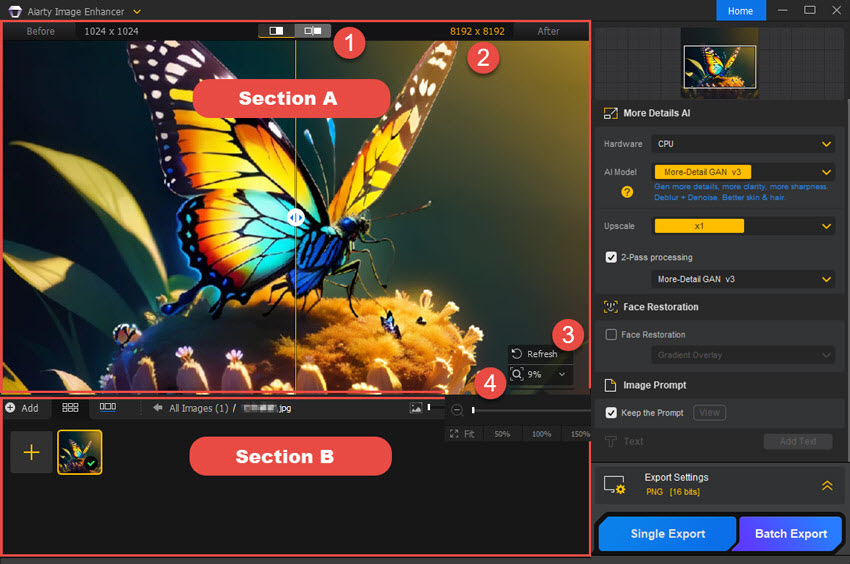
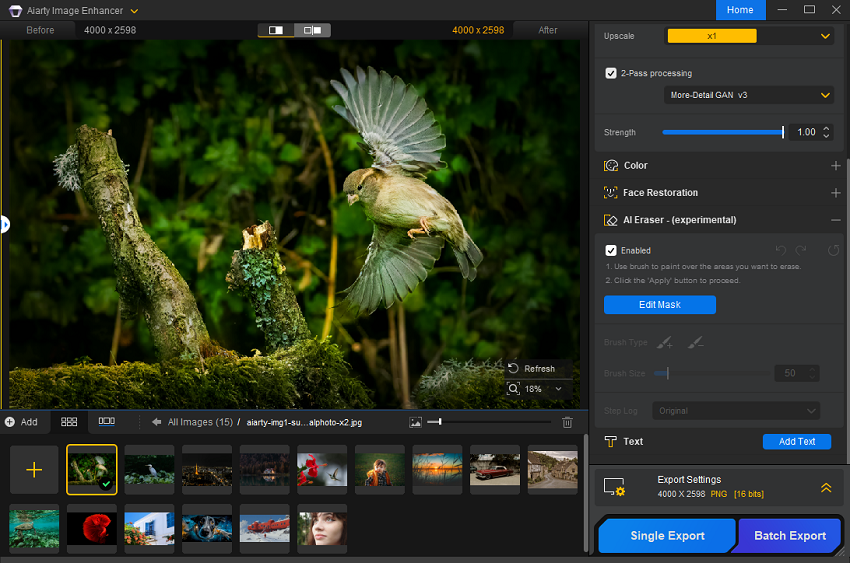
Despite the complex technology behind it, Aiarty Image Enhancer boasts a clean and intuitive interface. The main workspace is divided into simple sections: import, settings, preview, and export. Users can easily drag and drop images into the application, select from preset modes (Denoise, Deblur, Upscale), and adjust parameters using simple sliders. A real-time preview window allows users to see the effects of their changes before committing to the final output.

The interface is designed to be non-intimidating for beginners while offering enough control for advanced users. Tooltips and help guides are integrated throughout the application, providing context-sensitive assistance. The overall design follows macOS design guidelines, ensuring that it feels native and familiar to Mac users. This ease of use lowers the barrier to entry, allowing anyone to achieve professional results without a steep learning curve.

Benefits of Using Aiarty Image Enhancer

Adopting Aiarty Image Enhancer for Mac offers numerous benefits that extend beyond mere technical improvements. Here is how integrating this tool into your workflow can transform your photographic practice.

Time Efficiency: One of the most significant advantages of Aiarty is the time it saves. Manual photo restoration and enhancement can take hours per image, requiring meticulous masking, layering, and adjustment. Aiarty automates these processes, delivering high-quality results in seconds or minutes. This efficiency allows photographers and designers to focus on creativity and composition rather than tedious technical corrections. For businesses, this translates to faster turnaround times and increased productivity.

Cost-Effectiveness: Hiring professional retouchers or purchasing high-end hardware to achieve similar results can be prohibitively expensive. Aiarty provides a cost-effective alternative, offering professional-grade enhancement capabilities at a fraction of the cost. The software eliminates the need for expensive plugins or subscriptions to multiple services, providing a comprehensive solution in a single package. For freelancers and small businesses, this cost savings can be significant, allowing resources to be allocated to other areas of growth.

Preservation of Memories: For individuals, Aiarty offers the chance to preserve and revitalize cherished memories. Old, faded, or damaged photos can be restored to their former glory, allowing future generations to appreciate family history in high definition. The ability to upscale low-resolution digital photos from early smartphone cameras or old digital cameras ensures that these memories remain visible and vibrant as display technologies continue to improve. This emotional value is immeasurable, turning digital clutter into treasured artifacts.

Enhanced Professionalism: In a competitive market, the quality of your visual assets can make or break your brand. Aiarty helps ensure that all images used in marketing materials, websites, and portfolios are of the highest possible quality. Crisp, clear, and noise-free images convey professionalism and attention to detail, enhancing the perceived value of your products or services. Whether you are an e-commerce seller needing sharp product images or a real estate agent showcasing property photos, Aiarty helps you present your best face to the world.

Versatility: Aiarty is not limited to a specific type of photography. Its versatile AI models perform well on a wide range of subjects, from landscapes and architecture to portraits and macro shots. This versatility makes it a valuable tool for generalists who work across different genres. Additionally, its ability to handle various file formats and resolutions ensures compatibility with most existing workflows, making integration seamless.

Step-by-Step Usage Guide

Getting started with Aiarty Image Enhancer is straightforward. This guide will walk you through the process of installing, configuring, and using the software to enhance your images. Note that this guide assumes you have already installed the software on your Mac.

Step 1: Launching the Application

Locate the Aiarty Image Enhancer icon in your Applications folder or Launchpad and click to open the application. Upon first launch, you may be prompted to grant necessary permissions, such as access to your Photos library or specific folders. Ensure you allow these permissions to enable smooth importing and exporting of images. The main interface will load, displaying a clean workspace with options to import images or open recent projects.

Step 2: Importing Your Images

To begin enhancing, you need to import your images. You can do this in several ways:

  • Drag and Drop: Simply drag image files from Finder directly into the Aiarty window.
  • Import Button: Click the "Import" button in the top toolbar and navigate to the folder containing your images. Select the files you wish to enhance and click "Open."
  • Batch Import: To import an entire folder, select the folder in the import dialog. Aiarty will automatically queue all supported image files within that folder.
Supported formats include JPEG, PNG, TIFF, and RAW files from major camera manufacturers. Once imported, thumbnails of your images will appear in the left-hand panel.

Step 3: Selecting the Enhancement Mode

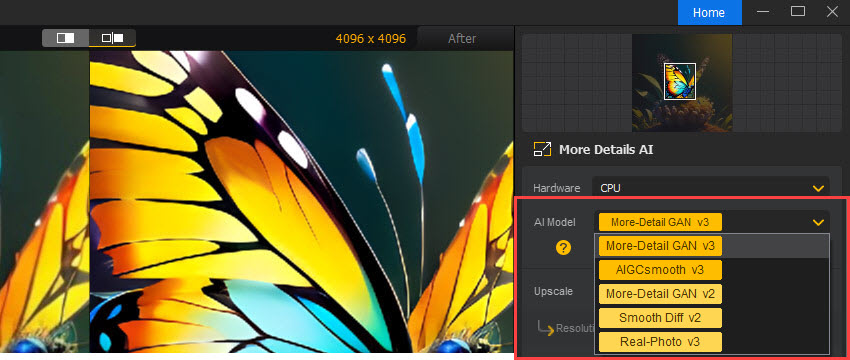
With your images loaded, select the thumbnail of the image you wish to edit. The central workspace will display a preview of the image. On the right-hand panel, you will see the enhancement options. Aiarty offers several preset modes:

  • Denoise: Best for images with grain or noise.
  • Deblur: Ideal for shaky or out-of-focus shots.
  • Upscale: Use this to increase resolution.
  • General Enhance: A balanced mode that applies mild denoising and sharpening.
Choose the mode that best matches the issues in your image. For complex images, you may need to experiment with different modes to see which yields the best result.

Step 4: Adjusting Parameters

While the presets are effective, you can fine-tune the results using the parameter sliders. Depending on the selected mode, you may see options for:

  • Strength: Controls the intensity of the enhancement. Higher values apply more aggressive processing.
  • Detail Preservation: Balances noise removal with texture retention. Lower values may result in smoother but less detailed images.
  • Scale Factor: For upscaling, choose between 2x, 4x, or custom scales.
As you adjust these sliders, the preview window will update in real-time (or near real-time, depending on your hardware). Use the split-view slider to compare the original and enhanced versions side-by-side. This comparison is crucial for ensuring that the enhancement looks natural and does not introduce artifacts.

Step 5: Processing the Image

Once you are satisfied with the preview, click the "Process" or "Enhance" button. The software will begin the final rendering process. For single images, this usually takes a few seconds to a minute. For batch processing, the time will depend on the number of images and your system’s performance. A progress bar will indicate the status of the operation. You can continue to work on other images or tasks while the processing runs in the background.

Step 6: Exporting the Result

After processing is complete, the enhanced image will be saved to your specified output folder. You can configure export settings in the Preferences menu, choosing the output format (JPEG, PNG, TIFF), quality level, and destination folder. For batch jobs, Aiarty maintains the original file names by default, appending a suffix to indicate the enhanced version. Review the exported images to ensure they meet your expectations. If necessary, you can re-import them for further adjustments.

Real-World Applications

Aiarty Image Enhancer is not just a theoretical tool; it has practical applications across various industries and hobbies. Here are some scenarios where the software shines.

E-Commerce and Product Photography: Online shoppers rely heavily on product images to make purchasing decisions. Low-quality, pixelated, or noisy images can deter buyers. Aiarty allows e-commerce sellers to upscale low-resolution supplier images, remove background noise, and sharpen product details. This leads to more attractive listings, higher conversion rates, and fewer returns due to mismatched expectations. Small businesses without access to professional photography studios can use Aiarty to polish smartphone-taken product shots to a professional standard.

Real Estate Marketing: Real estate agents often need to showcase properties in the best possible light. Interior photos taken in dim lighting can suffer from noise and blur. Aiarty’s denoising and deblurring features can clarify these images, making rooms appear brighter and more inviting. Upscaling allows for large-format prints of floor plans or exterior shots for brochures and signage. Clear, high-quality images help potential buyers visualize themselves in the space, accelerating the sales process.

Historical Archive Restoration: Museums, libraries, and private collectors hold vast archives of historical photographs. Many of these images are degraded due to age, poor storage, or outdated scanning techniques. Aiarty can help restore these treasures by removing scratches, dust, and noise, and upscaling them for digital display. This not only preserves history but also makes it more accessible to the public through high-resolution online galleries and exhibitions.

Social Media Content Creation: Influencers and content creators need a constant stream of high-quality visuals. Cropping images for different aspect ratios often reduces resolution. Aiarty allows creators to crop freely and then upscale the image back to high resolution, ensuring that posts look crisp on high-density displays. It also helps in salvaging videos frames or screenshots that may have been compressed by social media platforms, restoring their clarity for reuse in other contexts.

Medical and Scientific Imaging: While not a replacement for specialized medical software, Aiarty can be useful in preliminary analysis of scientific images. Enhancing the clarity of microscope images or satellite imagery can help researchers identify features that were previously obscured by noise or low resolution. The ability to upscale without introducing artificial artifacts is crucial in these fields, where accuracy is paramount.

Comparisons: Aiarty vs. The Competition

To understand where Aiarty Image Enhancer stands in the market, it is helpful to compare it with other popular solutions. Below, we compare Aiarty with traditional software and other AI-based tools.

Aiarty vs. Adobe Photoshop

Adobe Photoshop is the industry standard for image editing, offering unparalleled control and a vast array of tools. However, its AI features, such as Super Resolution, are just one part of a massive suite. Photoshop requires a steep learning curve and significant manual effort to achieve results comparable to Aiarty’s one-click solutions. For users who only need enhancement and not full-scale editing, Photoshop is overkill and expensive. Aiarty offers a focused, faster, and more affordable solution for specific enhancement tasks. While Photoshop is better for creative manipulation, Aiarty excels in automated restoration and upscaling.

Aiarty vs. Topaz Gigapixel AI

Topaz Gigapixel AI is a direct competitor in the upscaling space. Both tools use AI to enlarge images. Topaz is well-established and offers a wide range of models. However, Aiarty distinguishes itself with a more integrated approach, combining denoising, deblurring, and upscaling in a single, streamlined interface. Aiarty’s interface is often cited as more intuitive for beginners, while Topaz can feel cluttered with options. In terms of performance, both are competitive, but Aiarty’s optimization for Apple Silicon gives it an edge on modern Macs. Pricing is also a factor, with Aiarty offering a competitive value proposition for users who need a multi-tool solution rather than just upscaling.

Aiarty vs. Online AI Enhancers

There are numerous online services that offer AI image enhancement. While convenient, these services have significant drawbacks. They require uploading images to remote servers, raising privacy concerns for sensitive or proprietary content. Processing times can be slow due to internet bandwidth limits, and most services charge per image or have strict file size limits. Aiarty, being a local desktop application, ensures data privacy, faster processing (no upload/download time), and unlimited usage. For professionals handling large volumes of images, the offline capability of Aiarty is a major advantage.

User Testimonials

Hearing from real users provides valuable insight into the practical performance of Aiarty Image Enhancer. Below are verbatim reviews from users who have integrated the software into their workflows.

"A Game Changer for My Photography Business"
"I run a small wedding photography business, and I often receive requests to restore old family photos brought to the reception. Before Aiarty, I would spend hours in Photoshop trying to clean up noise and blur. With Aiarty, I can do it in minutes. The face enhancement feature is incredible—it brings out details in eyes and smiles that I thought were lost forever. My clients are thrilled, and it has become a unique selling point for my services."
- Sarah J., Professional Photographer

"Perfect for E-Commerce"
"We sell handmade jewelry online, and product photos are everything. We often shoot with smartphones due to budget constraints. Aiarty allows us to upscale these images for our website banners without losing quality. The denoising feature is particularly useful for shots taken in our studio with less-than-perfect lighting. It has saved us thousands in photography costs and improved our conversion rates significantly."
- Mark T., E-Commerce Store Owner

"Restoring Family History"
"I have a box of old, damaged photos from my grandparents. I scanned them, but they were grainy and faded. Aiarty brought them back to life. The difference is night and day. I was able to print large copies for my parents’ anniversary, and they were moved to tears. The software is easy to use, even for someone like me who isn’t tech-savvy. Highly recommended for anyone interested in genealogy."
- Linda R., Hobbyist

"Fast and Efficient on M1 Mac"
"As a graphic designer, I need tools that keep up with my workflow. Aiarty runs beautifully on my M1 MacBook Pro. The processing speed is impressive, and the integration with macOS feels native. I use it primarily for upscaling stock images that are too small for my print projects. The results are sharp and natural, without the halos you get from other tools. It’s now a permanent fixture in my toolkit."
- David L., Graphic Designer

"Great for Social Media Content"
"I create content for Instagram and TikTok. Often, I need to crop videos or images, which reduces quality. Aiarty helps me upscale them back to HD. The batch processing feature is a lifesaver when I have a lot of content to prepare for the week. It’s simple, effective, and worth every penny."
- Jessica M., Content Creator

"Impressive Deblurring"
"I’m an amateur photographer, and I struggle with keeping my hands steady. I have many photos that are slightly blurry. Aiarty’s deblur feature has saved so many of my favorite shots. It’s not magic—it can’t fix everything—but it makes a huge difference. The interface is clean and doesn’t overwhelm you with options. Just pick the mode and let it work."
- Robert K., Photography Enthusiast

"Better Than Expected"
"I was skeptical about AI enhancement, thinking it would look fake. But Aiarty surprised me. The results are very natural. I used it to upscale some old digital photos from my first camera, and they look like they could have been taken yesterday. The software is well-designed and bug-free. Customer support was also helpful when I had a question about file formats."
- Emily W., Digital Archivist

"Essential for Print Work"
"I work in print media, and resolution is critical. Clients often send low-res logos or images. Aiarty allows me to upscale them to print-ready quality without the usual pixelation. It has saved several deadlines and kept my clients happy. The TIFF export option is great for maintaining quality. A must-have for anyone in print production."
- Michael B., Print Specialist

Frequently Asked Questions (FAQs)

To address common queries and concerns, we have compiled a list of frequently asked questions about Aiarty Image Enhancer for Mac.

1. Is Aiarty Image Enhancer compatible with all Mac models?

Aiarty Image Enhancer is designed to run on macOS systems. It is optimized for Apple Silicon (M1, M2, M3) chips, offering the best performance on these devices. However, it is also compatible with Intel-based Macs running recent versions of macOS. Please check the system requirements below for specific hardware specifications. Older Macs may experience slower processing times but should still be able to run the software.

2. Does Aiarty support RAW files?

Yes, Aiarty Image Enhancer supports RAW files from major camera manufacturers, including Canon, Nikon, Sony, and Fujifilm. Processing RAW files allows for maximum quality retention, as the software works with the uncompressed data from the sensor. This is recommended for professional workflows where image fidelity is paramount.

3. Can I use Aiarty for commercial purposes?

Yes, the standard license for Aiarty Image Enhancer allows for both personal and commercial use. You can use the enhanced images in client projects, marketing materials, and products for sale. However, if you are part of a large enterprise or need multi-seat licensing, please contact the vendor for enterprise options.

4. How does batch processing work?

Batch processing allows you to queue multiple images for enhancement. You can import a folder of images, select the desired enhancement mode and settings, and start the process. The software will process each image sequentially or in parallel, depending on your system’s capabilities. You can specify an output folder for the processed files, and the software will maintain the original file structure or flatten it, based on your preferences.

5. What file formats can I export to?

Aiarty supports exporting to popular image formats, including JPEG, PNG, and TIFF. JPEG is suitable for web use and general sharing, PNG is ideal for images requiring transparency or lossless compression, and TIFF is best for high-quality print workflows. You can select the output format and quality settings in the export preferences.

6. Does Aiarty require an internet connection?

No, Aiarty Image Enhancer is a standalone desktop application. All processing is done locally on your Mac. An internet connection is only required for initial activation and checking for updates. This ensures your data remains private and secure, as no images are uploaded to external servers.

7. Can I undo changes after processing?

Since Aiarty creates new files for the enhanced images, your original files remain untouched. If you are not satisfied with the result, you can simply delete the enhanced file and re-process the original with different settings. The non-destructive nature of the workflow ensures that you never lose your source material.

8. How does the free trial work?

Aiarty typically offers a free trial version that allows users to test the software’s capabilities. The trial may have limitations, such as watermarks on output images or a limit on the number of images processed. This allows you to evaluate the quality and performance before making a purchase. Check the vendor’s website for current trial offers.

9. Is there customer support available?

Yes, the vendor provides customer support via email and an online knowledge base. Users can report bugs, ask technical questions, or seek advice on best practices. The support team is known for being responsive and helpful, ensuring a smooth user experience.

10. How often is the software updated?

The developers regularly release updates to improve performance, add new features, and fix bugs. These updates are often free for existing users. Keeping the software up to date ensures you have access to the latest AI models and optimizations for new macOS versions.

System Requirements

To ensure optimal performance of Aiarty Image Enhancer for Mac, your system should meet the following minimum requirements. Meeting or exceeding these specifications will result in faster processing times and a smoother user experience.

  • Operating System: macOS 10.15 (Catalina) or later. Compatibility with the latest macOS versions is maintained through regular updates.
  • Processor: 1 GHz or faster processor. Apple Silicon (M1/M2/M3) is highly recommended for best performance. Intel Core i5 or equivalent is recommended for Intel-based Macs.
  • Memory (RAM): 4 GB RAM minimum. 8 GB or more is recommended for batch processing and handling large files.
  • Storage: 500 MB of free disk space for installation. Additional space is required for storing input and output images. SSD storage is recommended for faster read/write speeds.
  • Graphics: Integrated graphics are supported, but a dedicated GPU or Apple Silicon Neural Engine will significantly accelerate processing.
  • Display: Minimum resolution of 1280x800. Retina displays are supported and recommended for accurate previewing.

Tip for Optimal Performance

For the fastest processing speeds, close other resource-intensive applications while running Aiarty Image Enhancer. Ensure your Mac is plugged into power if you are using a laptop, as AI processing can consume significant battery life. Keeping your macOS and graphics drivers up to date will also help maintain compatibility and performance.

Conclusion

Aiarty Image Enhancer for Mac stands out as a powerful, efficient, and user-friendly solution for anyone looking to improve the quality of their digital images. By leveraging cutting-edge AI technology, it addresses the common challenges of noise, blur, and low resolution with remarkable effectiveness. Its ability to reconstruct realistic details sets it apart from traditional editing tools, offering results that are both visually stunning and technically superior.

The software’s intuitive interface makes it accessible to beginners, while its advanced features and batch processing capabilities cater to the needs of professionals. Whether you are restoring old family photos, preparing images for print, or enhancing content for social media, Aiarty provides the tools you need to achieve professional-grade results with minimal effort. Its optimization for macOS, particularly Apple Silicon, ensures a smooth and fast experience on modern Mac hardware.

In a world where visual content is king, the quality of your images can make a significant difference. Aiarty Image Enhancer empowers you to take control of your visual narrative, transforming mediocre shots into masterpieces. With its robust feature set, positive user reviews, and competitive pricing, it is a worthy addition to any photographer’s or designer’s toolkit. As AI technology continues to evolve, Aiarty is well-positioned to remain at the forefront of image enhancement, promising even more innovative features in future updates.

For Mac users seeking a reliable, high-performance image enhancement tool, Aiarty Image Enhancer is a compelling choice. It bridges the gap between technical complexity and creative freedom, allowing you to focus on what matters most: capturing and sharing beautiful moments. Invest in your visual quality today, and see the difference that intelligent enhancement can make.

Submit Your Review
Your Name:
Rating:
(Please click on one of the stars to indicate your rating.)
One Line Summary:
Review:
No html tags are allowed.
Submit Review

Related Videos
Aiarty Image Matting Review - 2026 | Best Way to Remove Background (Even Hair, Glass & Fur!)

Video Length: 08:16
Uploaded By: Daniel | Tech & Data (1/16/2026)
View Count: 27,661

Upscale Image by 800% With The Best AI Image Upscaler!

Video Length: 03:02
Uploaded By: Zenzdesign (10/18/2024)
View Count: 39,945

Aiarty Video Enhancer Review - 2026 | How to Upscale Video Quality to 4K - Restore Any Video Fast

Video Length: 07:33
Uploaded By: Daniel | Tech & Data (12/12/2025)
View Count: 44,662

How to Sharpen an Image in Photoshop (Best Method to Sharpen Images)

Video Length: 02:53
Uploaded By: Zenzdesign (12/17/2024)
View Count: 119,482

Copyright © 2026, Ivertech. All rights reserved.