Aiarty Image Enhancer for Windows: AI Upscaling, Denoising and Deblurring That Runs on Your Own PC
Aiarty Image Enhancer is a Windows program from Digiarty that uses AI models to upscale, denoise, deblur and restore photos on your own computer, with nothing uploaded to the cloud. The license sold here is a lifetime license for 3 PCs at $155, and a free trial with every feature (but watermarked exports) lets you test it on your own photos first.
Maybe it's a bird you could only catch from far away, so the crop you love is a soft 1,200-pixel smudge. Maybe it's a box of family prints you scanned at the wrong resolution, or a phone photo from a dark restaurant full of colored grain. Aiarty is built for that moment: you drop the picture in, pick a model, and it rebuilds detail and clears noise so the image holds up on a 4K screen or a large print.
Quick facts
- Version: 3.14, released September 22, 2026
- Developer: Digiarty Software, Inc.
- Runs on: 64-bit Windows 10 (version 1809 or later) and Windows 11. The Mac version is a separate product with its own license.
- What it does: AI upscaling (2x, 4x, 8x or a custom size up to 32,000 pixels), noise removal, deblurring, face restoration, color and SDR-to-HDR adjustments, an AI eraser and batch processing
- Opens: JPG, PNG, TIFF, WebP, HEIC, AVIF, BMP, JPEG 2000 and RAW files from most camera makers (CR3, NEF, ARW, RAF, DNG and dozens more)
- Saves: JPG, PNG (8- or 16-bit), TIFF, DNG, AVIF and HEIC, at 72 to 1000 DPI
- Price: $155 for a lifetime license on 3 PCs with free updates for life, paid once
- Free trial: every feature works, but exported images carry a watermark and batch export is off
- Refunds: 30-day money-back guarantee, for the cases listed in Digiarty's refund policy (see below)
- What we checked: the Windows installer, version 3.14.0.0 (319 MB) and digitally signed by Digiarty Software, Inc., downloaded from aiarty.com on October 24, 2026, and the price on the order page ($155, or $109 with coupon VIPOFFER) on October 24, 2026. We didn't run our own enhancement tests.
Before you buy
- Test it on your own pictures and your own PC. The trial is the full program, so the only question is how your photos look and how long they take. On a PC without a recent graphics card, a large upscale can take a long time (see What Users Say).
- "Changed my mind" isn't a refund reason. Digiarty's refund policy covers wrong or duplicate purchases, a license code that doesn't arrive within 24 hours, and bugs that support can't fix, but not a refund requested for no particular reason.
- This license is Windows only. If you also own a Mac, Digiarty sells a lifetime license for 1 Windows PC plus 1 Mac at the same $155 (see Editions and Pricing).
- Buy from Digiarty or its official checkout. Digiarty warns that some unauthorized sellers on Amazon and eBay sell license keys that don't work.
Download Free TrialBuy Now
Overview
Aiarty Image Enhancer has a simple dark window. Your photo fills the left side, with a strip of thumbnails underneath for everything you've added. The right-hand panel holds the choices that matter: which graphics card to use, which AI model, how much to upscale, a Strength slider, and fold-out sections for Edit, Color, Face Restoration, HDR, the AI Eraser and Text. At the bottom sit the export settings and two big buttons, Single Export and Batch Export.
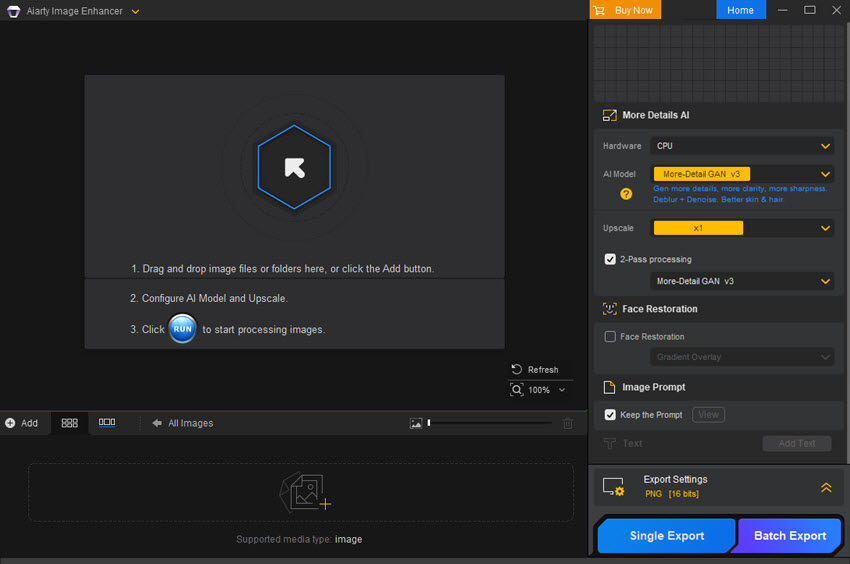
The empty main window of the trial, from Aiarty's user guide: the three steps (add images, set the model and upscale, click Run) on the left, and the Hardware, AI Model, Upscale, 2-Pass and Strength settings on the right above the Single Export and Batch Export buttons.
Everything runs locally. The AI models download to your PC the first time you need them, and after that you can tick "Use local AI models only" and work offline. Digiarty says that's why your photos are never collected or used for training, and an independent reviewer (Ricks Reviews) confirmed it kept working with the internet switched off.
Features
Several AI models for different kinds of picture
Aiarty Image Enhancer gives you a choice of models instead of one "magic" button. More-Detail GAN v3 generates extra detail and is aimed at skin, hair, fur and other fine textures. AIGCsmooth v3 is tuned for AI-generated art, anime and line art with smooth surfaces. Real-Photo v3, a diffusion model, goes for fidelity on real photographs such as family portraits, product shots and landscapes, and upscales up to 2x. Older v2 models are still in the list if you prefer their look.
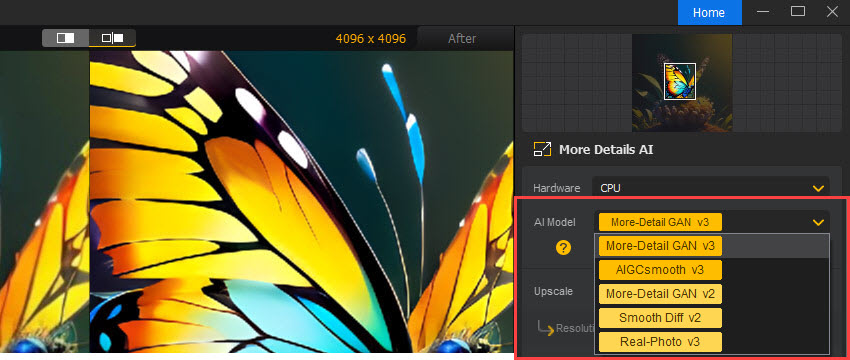
The AI Model menu open over an old family photo, with an NVIDIA GeForce RTX 3060 selected as the hardware and the Strength slider at 0.72.
Upscaling to 4K, 8K or a custom size up to 32K
Aiarty Image Enhancer enlarges by 2x, 4x or 8x, to preset 1K, 2K, 4K and 8K sizes, or to any width and height you type in, up to 32,000 pixels on the long side in the Windows version (the Mac version stops at 16,000). Choose x1 and it cleans up the image at its original size, which is the right setting when the problem is noise or blur rather than pixel count.
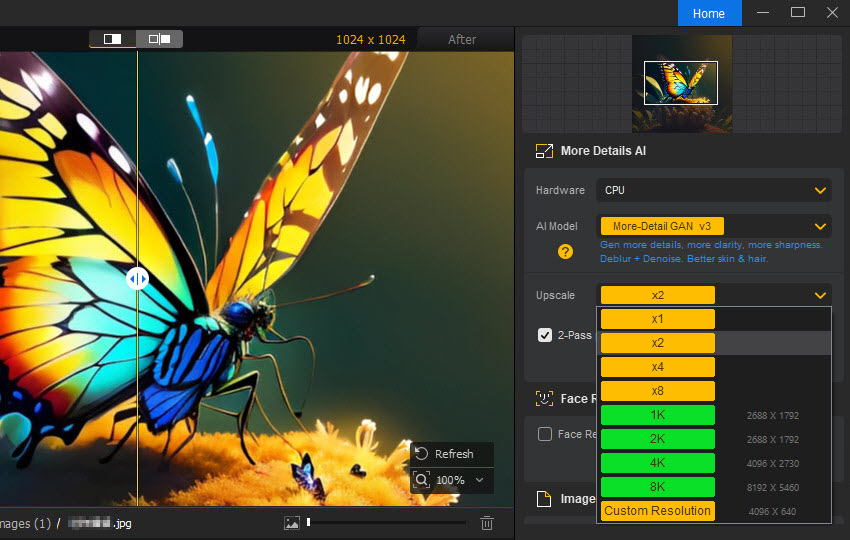
The Upscale menu (x1, x2, x4, x8, 1K, 2K, 4K, 8K and Custom Resolution, here 5000 x 3716), with the prompt that appears when the AI models still need to be downloaded.
A strength slider and 2-pass processing to avoid the "AI look"
Aiarty Image Enhancer lets you dial the effect from 0 to 1 instead of accepting whatever the model produces. A low value keeps the photo close to the original, a high one adds more sharpness and generated detail. For badly degraded files, 2-pass processing (on the More-Detail GAN v3 and AIGCsmooth v3 models) runs an extra cleanup pass at the original size before upscaling, which would otherwise take two separate steps.
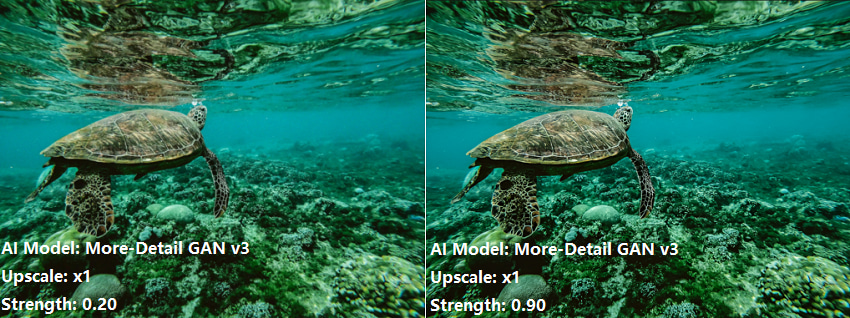
The same underwater photo processed with More-Detail GAN v3 at x1, with Strength 0.20 on the left and 0.90 on the right.
Face restoration for old and low-resolution portraits
Aiarty Image Enhancer has a separate face model you switch on when faces are the weak point: old prints, small scans, grainy group shots. You can set its strength, choose which faces in the picture to restore, and blend the result with the original. Digiarty itself says the standard models are often enough, so compare with it on and off.
Color, lighting and SDR-to-HDR
Aiarty Image Enhancer includes basic color tools (temperature, tint, exposure, contrast, saturation, highlights, shadows, whites and blacks) and a Restore Color slider that pulls the colors back toward the original if the AI shifted them. It can also convert an 8-bit SDR picture to 10-bit HDR and export HDR as TIFF or DNG.
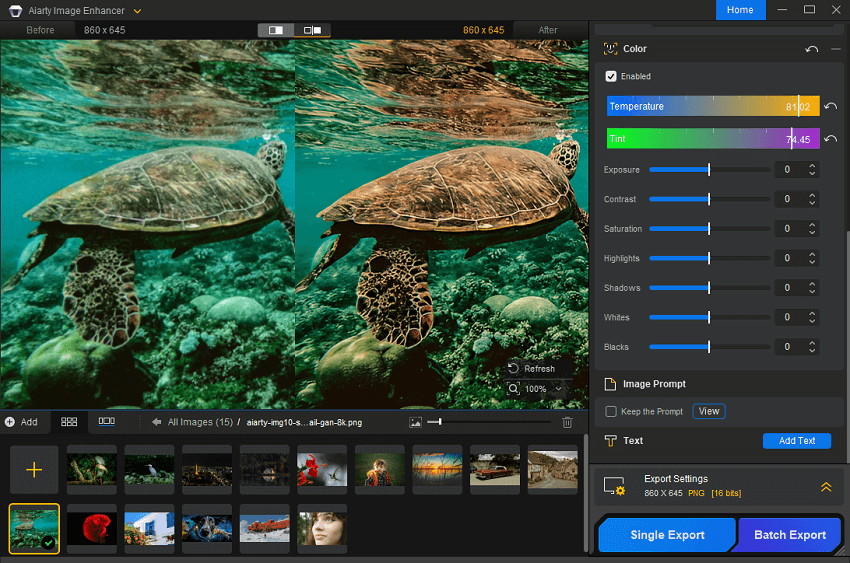
A side-by-side Before (860 x 645) and After (4096 x 3072) view with the Color panel's sliders, and a batch of 15 images in the thumbnail strip below.
Quick edits, AI eraser and Lightroom hand-off
Aiarty Image Enhancer can crop, rotate and flip, add text, and paint out small distractions with an AI Eraser (still labeled experimental in the app). Version 3.14 sets itself up as an external editor for Lightroom and Lightroom Classic, so you can send a photo over, enhance it and return it, and it keeps the photo's EXIF data and shows the RAW shooting details (aperture, shutter speed, ISO, focal length).
Batch processing with GPU acceleration
Aiarty Image Enhancer processes whole folders at once in the full version and can save the results next to the originals. On Windows it uses DirectML on AMD, Intel and NVIDIA graphics cards that support DirectX 12, and NVIDIA TensorRT on GeForce GTX 1050 and newer. Digiarty quotes up to 3,000 images per hour offline; real speed depends heavily on your graphics card and the target size.
Benefits
- Your photos stay on your PC. No uploads, no account, and no online service deciding what happens to family pictures or client work.
- One payment, no subscription. The lifetime license includes future updates, which matters for a tool whose models keep improving.
- More control than a one-click web upscaler. Model choice, strength, 2-pass and color restore let you stop before the result looks artificial.
- Room to crop. Upscaling a tight crop gives you a usable print or wallpaper from a shot you'd otherwise discard.
Real-World Uses
- A family historian scans a box of 1960s prints at low resolution, runs them through Real-Photo with face restoration, and exports 300 DPI files for an album.
- A wildlife photographer rescues a heavily cropped, high-ISO bird shot with More-Detail GAN at x2, then sends it back to Lightroom for the final edit.
- An online seller batch-upscales supplier product photos to 2K so they stay sharp on zoom.
- An AI artist takes 1024-pixel Stable Diffusion images to 4K with AIGCsmooth for posters.
Who It's For, and Who Should Skip It
Aiarty Image Enhancer suits photographers, family archivists, designers and AI-art makers on Windows who want offline AI upscaling and noise removal without a subscription, and who have a reasonably modern graphics card.
Skip it if your PC has no dedicated or recent integrated GPU and you need big upscales often: it will run, but slowly. Skip it, too, if you expect it to recover a face or a sign that simply isn't in the original. It generates plausible detail, not the real thing. For an occasional single photo, a free online upscaler may be enough, and for full editing (layers, masks, retouching) you still need a regular photo editor.
Usage Guide
- Install and launch. Download the Windows installer (about 319 MB) and run it. Open the app; the trial needs no sign-up.
- Add photos. Drag files or a whole folder into the window, or click Add.
- Pick the hardware and model. Choose your graphics card under Hardware, then a model: Real-Photo for real photos, More-Detail GAN for texture, AIGCsmooth for AI art.
- Set the size. Choose x1 to clean up only, x2 to x8, a preset like 4K, or a custom width and height.
- Click Run and compare. The first run downloads the model. Use the before/after view at 100% zoom, and lower the Strength if it looks overdone.
- Adjust if needed. Turn on Face Restoration or 2-pass for poor originals, and use Color or Restore Color if the tones shifted.
- Export. Pick the format and DPI in Export Settings, then Single Export, or Batch Export for everything in the list (full version only).
- Register. Enter your license code in the app to remove the watermark and turn on batch export.
Where it falls short
- Speed depends on your hardware. Upscaling is heavy work. Reviewers with fast NVIDIA cards report minutes per batch, while a Trustpilot reviewer on a slower PC spent over an hour on one 2x upscale.
- Large upscales aren't perfect. Fstoppers' reviewer needed almost no cleanup up to about 1.5x, but added sharpening beyond that, and Ricks Reviews found the smallest details can look "a little artificial" at 100%.
- It invents detail. On severely damaged photos the face model can produce a plausible face that isn't quite the person, so keep the original.
- The before preview looks soft. A Fstoppers commenter noticed the "before" side is blurred in the app, and the reviewer agreed and compares in Photoshop instead.
- Not a full editor. The eraser and color tools are quick fixes, and there's no Photoshop plugin, only the Lightroom external-editor hand-off.
What Users Say
Trustpilot: 3.9 out of 5 from 22 reviews (all Aiarty products)
Aiarty's Trustpilot page covers its image and video tools together, so not every review names the product. The ones about photo work are mixed:
- "GREAT customer service! (The new version is fantastic by the way)." — Mark D., about Image Enhancer
- "Within minutes, I was again upgrading early 1900's black and white family photos for inclusion in my Family Tree." — Randal
- "These features work better than in ON1. This program is worth recommending." — Piotr Pieniążek
The critical reviews are about bugs and speed:
- "the product is vary buggy and leaves artifacts in DNG files." — Michael Knibbs, 1 star
- "All in all it took me more than an hour to produce a 2 x upscaled photo." — E. Geertsema, 2 stars
Fstoppers: Michael Breitung, January 2026
Landscape photographer Michael Breitung, who received a license code to use the program past the trial, uses it in his own workflow: "80% of the time, I don't do any cleanup on top of it because the results are free of artifacts." His limit: "As long as you don't upscale beyond 1.5 times the original resolution, you'll need nearly no additional work." He also warned that "It may not be sufficient to magically turn a blurry 8 MP image into a photo rivalling the detail of a medium-format camera" and noted that "Aiarty is currently limited to working with 8-bit."
The comments under the article are less kind. One reader called it "one of the worst A.I. enhancers available," another missed a Lightroom or Photoshop plugin, and one described trouble getting a refund.
Ricks Reviews: Rick, March 2026
Testing on a Mac Studio with an M1 Max, Rick found that "The results from Aiarty can be very impressive" and that it is "an easy to use AI tool to improve your images." He was also frank about the models: "in all honesty the results of all models are roughly the same," and "When zooming in to 100% the smallest details may look a little artifical." His bottom line on lost information: "the software can't work miracles."
GottaPics: Marian Florinel Condruz, April 2025
Working from a free license, Condruz reported that "processing 100 images from approximately 1024 to 2048 pixels took around 12 minutes" on an NVIDIA RTX 4070 Ti SUPER, and that it "provided visible improvements to blurry, noisy, and low-resolution images." He added two cautions: "Aiarty is not a replacement for a complete photo editor," and "AI-generated textures or facial details may not accurately reproduce information missing from the original photograph."
The pattern
Reviewers who use it with a good graphics card on moderately soft or noisy photos are pleased with the natural look and the offline processing. The complaints come from slower PCs, from pushing upscales too far, and from badly damaged originals where the AI has to guess. Note that several of the positive reviews were written with a license Digiarty supplied. The trial lets you judge it on your own files, which is the test that counts.
Comparisons
Aiarty Image Enhancer vs online AI upscalers
Online upscalers are quick for one picture, but you upload your photo, often hit size or credit limits, and get little control. Aiarty works offline with no size limit beyond your hardware, handles RAW files and batches, and gives you model choice and a strength slider, in exchange for a large download and a paid license.
Aiarty Image Enhancer vs Topaz Gigapixel and Topaz Photo AI
Topaz's tools are the best-known desktop alternatives and do the same core jobs: upscaling, noise removal and sharpening on your own PC. Check Topaz's current plans against Aiarty's one-time price, and run both trials on the same photos before deciding, since results vary from image to image.
Windows vs Mac version
The Windows version upscales to 32K pixels and uses DirectML or NVIDIA TensorRT; the Mac version stops at 16K and uses CoreML on Apple Silicon. They're licensed separately unless you buy the 1 PC + 1 Mac license.
Editions and Pricing
| License | Price at checkout | With coupon VIPOFFER | Computers | Updates |
|---|
| Lifetime, Windows (sold here) | $155 once | $109 | 3 PCs | Free for life |
| Lifetime, Windows + Mac | $155 once | $99 | 1 PC and 1 Mac | Free for life |
| Standard, Windows | $85 a year, renews yearly | $59 | 1 PC | While subscribed |
All prices are in US dollars on the order page on October 24, 2026, and every paid license includes commercial use. Coupon VIPOFFER, which Aiarty's own buy page applies, worked when typed in at checkout that day. If you only need one Windows PC and one Mac, the Windows + Mac license is the better deal; if you need up to three PCs, take the Windows lifetime license.
FAQs
Does Aiarty Image Enhancer work without a graphics card?
Aiarty Image Enhancer can run on the CPU (it's one of the Hardware choices), but it's much slower. For regular use, Digiarty lists a DirectX 12 graphics card such as an NVIDIA GTX 960, AMD Radeon R9 390 or Intel 4th-generation HD Graphics as the minimum, and an NVIDIA GTX 1050 or newer for TensorRT acceleration.
Can I use one Aiarty license on both Windows and Mac?
Aiarty Image Enhancer's Windows lifetime license covers Windows PCs only. To use it on a Mac as well, buy the lifetime license for 1 Windows PC and 1 Mac instead.
Does the lifetime license include future versions?
Yes. Aiarty Image Enhancer's lifetime license includes free updates for life and isn't tied to one version.
Can I sell photos I enhance with Aiarty?
Yes. Aiarty Image Enhancer's paid licenses include commercial use, such as stock photos, prints, ads and client work, as long as you have the rights to the original images.
Can Aiarty Image Enhancer open RAW files from my camera?
Aiarty Image Enhancer opens RAW formats from most camera makers, including Canon CR2 and CR3, Nikon NEF, Sony ARW, Fujifilm RAF, Panasonic RW2, Olympus ORF and Adobe DNG, and can export to DNG or 16-bit PNG and TIFF.
Does Aiarty Image Enhancer need an internet connection?
Only to download the AI models the first time. After that, Aiarty Image Enhancer processes photos offline, and you can force it to use only local models.
Can I get a refund if I don't like the results?
Not usually. Digiarty's 30-day guarantee covers wrong or duplicate purchases, an undelivered license code and bugs support can't fix, but not a change of mind, which is why the trial matters.
How many computers can I install it on?
Aiarty Image Enhancer's Windows lifetime license sold here covers 3 PCs. Digiarty asks businesses that need more than 3 devices to contact sales for a multi-seat license.
System Requirements
- Windows 10 (x64) version 1809 or later, or Windows 11
- Any 64-bit Intel or AMD processor
- 8 GB RAM (16 GB or more recommended)
- For DirectML acceleration: a DirectX 12 (Feature Level 12.0) graphics card, such as AMD Radeon R9 390 or newer, Intel 4th-generation HD Graphics or newer, or NVIDIA GTX 960 or newer
- For TensorRT acceleration: NVIDIA GeForce GTX 1050 or newer, driver 452.39 or later and CUDA runtime 11.1 or later
- About 320 MB for the installer, plus space for the AI models and your exported images
Conclusion
Aiarty Image Enhancer is worth it if you're a Windows user with a decent graphics card and a steady stream of soft, noisy or small photos: old family scans, cropped wildlife shots, AI art, product images. The reason to buy is natural-looking enhancement you control, done offline, for a one-time price with lifetime updates. The reason to hesitate is speed on modest hardware and results that can look artificial when you push the upscale too far or the original is badly damaged. Since refunds for a change of mind aren't offered, run the free trial on your own photos first, and if they come out well, the lifetime license is a fair price.
Download Free TrialBuy Now