WinX DVD Ripper Platinum: A Complete Guide to Converting DVDs to MP4, AVI, MOV, and MKV on Windows
WinX DVD Ripper Platinum is a Windows-based DVD conversion application designed to turn DVD content into widely used digital video formats such as MP4, AVI, MOV, and MKV. With support for hardware acceleration and a workflow centered on simplicity, it is aimed at users who want to preserve DVD content, reduce reliance on physical discs, and create video files that are easier to store, organize, and watch across different devices.
Quick Product Snapshot
- Software name: WinX DVD Ripper Platinum
- Supported operating system: Windows
- Version covered: 1.0
- Listed price: $59.95
- Primary function: Convert DVDs to MP4, AVI, MOV, MKV, and other formats
- Performance feature: Hardware acceleration support
- Minimum processor: 1 GHz or faster
- Minimum RAM: 4 GB
- Minimum free disk space: 500 MB
Overview: What Is WinX DVD Ripper Platinum?
WinX DVD Ripper Platinum is a desktop application for Windows users who want to convert DVD content into digital video files. Instead of keeping every movie, home video, or educational DVD tied to a physical disc, the software helps transform that content into common file formats that can be stored on a computer, organized into libraries, and played back through media players that support standard video files.
The core purpose of the program is straightforward: take a DVD source and produce a digital video output. The product description highlights support for popular formats including MP4, AVI, MOV, and MKV, along with hardware acceleration. These two points matter because they address the two biggest concerns people usually have when converting DVDs: compatibility and efficiency. Format compatibility determines where and how the resulting file can be watched, while hardware acceleration can help reduce the strain on the processor during conversion.
For many users, DVDs remain a meaningful part of their media collections. They may include purchased movies, family recordings, training material, instructional content, or archived video projects. Over time, discs can become scratched, misplaced, or inconvenient to use, especially as many newer computers no longer include built-in optical drives. Converting DVDs into digital files can make the content easier to access without handling the disc every time.
WinX DVD Ripper Platinum is positioned as a practical solution for this kind of DVD-to-digital workflow. It is not merely a player for watching DVDs on a computer. Its main role is conversion: taking DVD video content and producing files that can live on your hard drive and be used in a more flexible way. That makes it relevant to people who want to create personal backups, reduce disc clutter, or prepare video for playback on devices that may not have a DVD drive.
The application is listed for Windows, which means it is intended for PCs rather than macOS systems. The listed system requirements are relatively modest: a processor of at least 1 GHz, 4 GB of RAM, and 500 MB of free disk space. Of course, actual conversion work may require additional free space for the output files, especially when converting full-length DVDs. Still, the base requirements suggest that the program is designed to run on a broad range of Windows machines, including many everyday home and office computers.
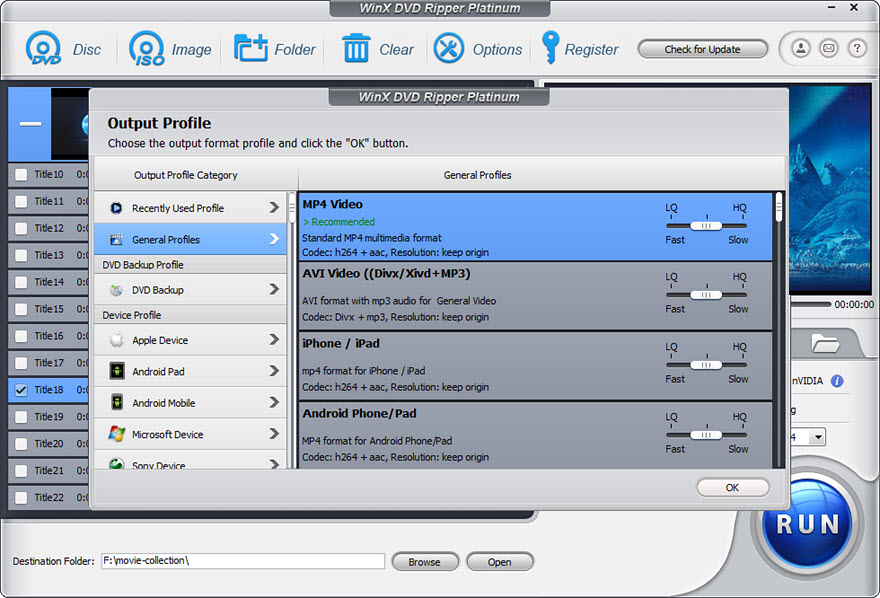
Another important part of the product identity is its focus on commonly used output formats. MP4 is widely favored because it is broadly compatible and efficient for storage. AVI has long been associated with Windows environments and older playback setups. MOV is often associated with Apple ecosystems and certain editing workflows. MKV is a flexible container format that can be useful for users who want more freedom in how video streams are stored. By supporting these formats, WinX DVD Ripper Platinum gives users multiple paths depending on their playback goals and storage preferences.
Hardware acceleration is another notable point in the product description. In general, hardware acceleration means that certain parts of the conversion workload can be handled by compatible hardware rather than relying entirely on the central processor. When supported by the system, this can help make the conversion process more efficient. The exact experience can vary depending on the computer, the disc, the selected output settings, and the available hardware, but the presence of hardware acceleration is a meaningful feature for users who plan to convert multiple DVDs or who want a smoother workflow.
In short, WinX DVD Ripper Platinum is a focused DVD conversion tool for Windows. It is designed for users who want a practical way to convert DVDs into digital files without needing to build a complex technical workflow. Its combination of common output formats, hardware acceleration support, and Windows compatibility makes it a relevant option for anyone looking to digitize DVD content in a structured way.
Core Features of WinX DVD Ripper Platinum
DVD-to-Format Conversion for MP4, AVI, MOV, and MKV
One of the central features of WinX DVD Ripper Platinum is its ability to convert DVD content into several widely recognized video formats. The product description specifically mentions MP4, AVI, MOV, and MKV, along with other formats. This variety is important because different users have different goals. Some want maximum compatibility, some want a format that works well with older software, and some want a container that offers flexibility.
MP4 is often the first choice for users who want a balanced digital video file. It is commonly used because it can deliver good compatibility across many types of players and devices. For people converting DVDs so they can watch them on computers, tablets, phones, or media players, MP4 is usually a practical starting point.
AVI is a classic video format with a long history in Windows environments. While it may not always be as efficient as newer formats, it remains familiar and useful in certain situations, especially where legacy software or older playback systems are involved. Users who prefer a traditional Windows-compatible format may find AVI useful.
MOV is another widely recognized format, often associated with Apple environments and certain multimedia workflows. Users who work with software or devices that favor MOV files may prefer this output option. It can be a good choice when the goal is to keep the converted DVD in a format that fits a specific media ecosystem.
MKV is a flexible container format that can hold video, audio, and other elements in a single file. It is often appreciated by users who want more flexibility in how their media is stored. While compatibility can vary more than with MP4, MKV is popular among users who manage large media libraries and want a container that can support different types of content.
By covering these major formats, WinX DVD Ripper Platinum gives users a practical range of choices. Instead of forcing everyone into one output type, it allows the conversion result to match the intended use. That is especially helpful for users who maintain mixed device environments or who want different outputs for different purposes.
Hardware Acceleration Support
Hardware acceleration is one of the key performance-related features mentioned in the product description. In simple terms, it means the software can use compatible hardware resources to help handle parts of the conversion process. This can reduce the burden on the CPU and may help the system work more efficiently during conversion.
DVD conversion can be a demanding task because it involves reading video data, processing it, and encoding it into a new format. If the processor has to do everything alone, the system may slow down, especially on lower-powered machines. Hardware acceleration can help by distributing some of the workload to hardware that is designed to assist with media processing.
The actual benefit depends on the computer being used. A system with compatible hardware and sufficient resources is more likely to see a smoother experience than a very old or limited machine. Even so, the inclusion of hardware acceleration is a valuable feature because it shows the software is designed with performance awareness in mind.
This feature is especially relevant for users who plan to convert more than one DVD. If you are digitizing a collection, efficiency matters. A more efficient conversion process can make the overall project less frustrating and can help the computer remain more usable while the task is running.
It is also useful for users who want to continue doing light work on their PC while conversion is in progress. Hardware acceleration may help reduce the chance that the system becomes heavily bogged down, though performance will still vary based on system specifications, background applications, disc condition, and output choices.
Windows-Focused DVD Workflow
WinX DVD Ripper Platinum is listed as a Windows application. That makes it suitable for users who run Windows desktops or laptops and want a DVD conversion tool built for that environment. A Windows-focused design can be beneficial because the software is intended to fit within the file system, drive structure, and general usage patterns of a PC.
For many Windows users, DVD conversion is not just about producing a file. It is also about fitting that file into an existing media setup. Some users store videos in a dedicated library folder. Others keep them on external drives. Some want files that can be moved to a media server or played through a home theater PC. Because Windows is so widely used for these kinds of setups, having a conversion tool designed for that ecosystem can be convenient.
The software is also relevant for users who still have DVD drives in their Windows machines, whether built-in or external. If you have a collection of discs and want to transition toward digital storage, a Windows-based ripper can serve as the bridge between physical media and file-based playback.
Because the supported operating system is specifically Windows, users on other platforms should pay attention to compatibility before assuming the product will work for them. The product listing is clear on this point, which helps set expectations.
Simple Conversion-Oriented Design
A good DVD conversion tool should not require users to become technical experts just to produce a usable file. WinX DVD Ripper Platinum is presented as a solution centered on converting DVDs into digital formats, which suggests a workflow built around selecting a source, choosing an output format, and starting the process.
This kind of workflow is especially helpful for users who are digitizing DVDs for the first time. Instead of needing to understand every technical detail of video encoding, they can focus on the basic decisions: what disc to convert, what format to use, and where to save the result. The software can then handle the conversion steps behind the scenes.
For experienced users, a simple workflow is still valuable. Even people who understand video formats often prefer tools that do not overcomplicate routine tasks. If the goal is to convert a DVD into a reliable MP4 or MKV file, a direct workflow can save time and reduce unnecessary friction.
The emphasis on common formats also supports simplicity. Users do not need to search for obscure codecs or worry about whether the output will be understood by common players. MP4, AVI, MOV, and MKV are familiar formats with broad recognition.
Flexible Output Choices for Different Use Cases
One of the advantages of supporting multiple output formats is that the same DVD collection can be converted for different purposes. A user might choose MP4 for general playback, MKV for a more flexible library format, AVI for compatibility with older systems, or MOV for a specific workflow.
This flexibility is useful in households with multiple devices. One person may want to watch converted videos on a laptop, another on a tablet, and another on a media player connected to a television. Having format options makes it easier to match the output to the playback environment.
It is also useful for people who are archiving content. Some users prefer to keep a high-quality master file in one format and then create smaller or more compatible versions later if needed. While the exact conversion options depend on the settings chosen within the application, the presence of multiple target formats supports this kind of flexible approach.
For users who manage large collections, format choice can also affect organization. Some media servers and players handle certain containers more smoothly than others. By supporting several major formats, WinX DVD Ripper Platinum allows users to choose the option that best fits their preferred media management setup.
Support for Personal DVD Digitization Projects
Many people do not convert DVDs just once. They do it as part of a larger project: preserving a movie collection, backing up family discs, converting educational material, or moving away from physical storage. WinX DVD Ripper Platinum fits naturally into this kind of project because its main purpose is to make DVDs easier to use in digital form.
Digitization projects often involve repeated steps: insert a disc, load it, choose a format, convert it, name the file, and store it in the right folder. A tool that supports this kind of routine can make the process feel more manageable. The software’s focus on common formats and hardware acceleration helps support a repeatable workflow.
This is especially valuable for users who have maintained DVD collections for a long time and now want to reduce shelf clutter. Once DVDs are converted, the physical discs can be stored more carefully or used less often, while the digital files become the primary way to access the content.
It is also relevant for users who want to protect discs from repeated handling. Every time a disc is inserted, removed, cleaned, or transported, there is some risk of wear or damage. Converting important discs into digital files can reduce how often the original media needs to be handled.
Benefits of Using WinX DVD Ripper Platinum
Turn Physical DVDs into Convenient Digital Files
The most obvious benefit of WinX DVD Ripper Platinum is convenience. DVDs require a disc drive, careful handling, and physical storage space. Digital files, by contrast, can be stored on a hard drive, organized into folders, searched by name, and accessed without changing discs.
For users who have moved toward digital media libraries, converting DVDs can bring older disc-based content into the same workflow as newer files. This can make it easier to watch content through media players, home network setups, or personal archives without returning to physical media every time.
This benefit is especially noticeable for users who no longer have convenient access to a DVD player. If a television, laptop, or media device does not support discs directly, having a converted file can make the content usable again in a practical way.
Reduce Disc Wear and Handling
Physical media is fragile. Scratches, fingerprints, dust, and improper storage can affect playback. Even when discs are treated carefully, repeated use can increase the chance of visible wear over time.
By converting DVDs into digital files, users can reduce how often the original discs need to be handled. This is particularly valuable for discs that are sentimental, rare, difficult to replace, or important for long-term reference.
Once a DVD has been converted, the physical disc can be stored in a safer place and used less frequently. The digital copy becomes the everyday version, while the original remains preserved with less handling.
Better Organization for Media Collections
Digital files are easier to organize than shelves of discs. Users can create folder structures, rename files clearly, group content by category, and maintain a more searchable library. For people with large DVD collections, this can make a significant difference.
Instead of browsing through physical cases, users can locate a converted file by name. They can also maintain consistent naming conventions, such as including the title, format, or disc source in the file name. Over time, this makes the collection easier to manage.
For households with multiple users, organization becomes even more important. A shared media folder can be arranged by genre, family member, or purpose. WinX DVD Ripper Platinum supports this kind of transition by helping convert discs into files that can be stored and arranged systematically.
More Flexible Playback Options
DVDs are tied to disc playback. Digital files are not. Once a DVD has been converted into a common format, it can be played through compatible media players on a computer or other supported device. This can make viewing more flexible.
For example, a user may prefer to watch converted content on a laptop, a media player connected to a television, or a home network setup. The exact playback experience depends on the device and player being used, but having a digital file opens more possibilities than relying only on the original disc.
Format choice plays a role here. MP4 is often chosen for broad compatibility, while MKV may be preferred by users who want a flexible container. AVI and MOV can serve specific needs depending on the playback environment. WinX DVD Ripper Platinum’s format support gives users room to choose the best fit.
Efficiency Through Hardware Acceleration
DVD conversion can take time, especially for full-length discs. Hardware acceleration can help make the process more efficient by using compatible system resources. This can be especially helpful for users who are converting multiple discs or who want to keep their computer responsive during the task.
While results vary by system, the presence of hardware acceleration is a meaningful benefit because it addresses one of the main pain points of video conversion: performance. A more efficient process can make large digitization projects feel less overwhelming.
This benefit is not only about speed. It can also affect the overall user experience. If the system remains more usable during conversion, the process feels less disruptive. That can matter for users who want to convert DVDs while continuing light computer work in the background.
A Practical Path Away from Disc-Only Viewing
Many users still own DVDs but no longer prefer to watch them through a traditional player. Some have moved to media servers, some use laptops without optical drives, and others simply prefer file-based access. WinX DVD Ripper Platinum provides a practical path for making that transition.
Instead of letting DVDs sit unused because the playback setup has changed, users can convert them into files that fit their preferred viewing habits. This can make older content relevant again and can help users get more value from media they already own.
This benefit is especially relevant for people who have upgraded their entertainment setup but still want access to older disc-based content. Converting DVDs can bridge the gap between physical ownership and digital convenience.
Who Is WinX DVD Ripper Platinum For?
WinX DVD Ripper Platinum is best suited for users who want a straightforward way to convert DVDs into digital files on Windows. It is not limited to one type of user. Its usefulness depends on the size of the DVD collection, the desire for digital convenience, and the playback setup being used.
Home Movie Enthusiasts
People who own a collection of movies on DVD may want to convert them into digital files for easier access. Instead of searching through cases and inserting discs, they can maintain a digital library. WinX DVD Ripper Platinum can help make that transition easier by supporting common formats and a conversion-focused workflow.
Families Preserving Personal DVDs
Families often have DVDs that contain personal memories: events, trips, school performances, or archived family videos. These discs may be important but inconvenient to play regularly. Converting them into digital files can make them easier to access while reducing handling of the original discs.
Students and Educators
Educational DVDs can include lectures, training sessions, language programs, or documentary content. Students and educators may prefer to convert these materials into digital files so they can be organized alongside other study resources. This can make it easier to reference content without needing a disc player every time.
Users Transitioning Away from Optical Drives
Many newer computers do not include built-in DVD drives. Users who still own DVDs may find that their media collection is becoming less convenient to use. WinX DVD Ripper Platinum can help convert those discs into files that fit a more digital-first setup.
People Building Personal Media Libraries
Users who maintain a structured media library often prefer files over discs because files are easier to catalog, store, and back up. WinX DVD Ripper Platinum can support this kind of project by converting DVDs into formats that can be stored in a centralized library.
Step-by-Step Usage Guide
The following guide explains how a typical DVD conversion session with WinX DVD Ripper Platinum can work. The exact wording of menus and options may vary, but the general process follows a logical sequence: install the software, load the DVD, choose an output format, adjust settings if needed, start the conversion, and verify the result.
Important Note Before You Begin
Only convert DVDs that you own or have permission to convert. Laws and regulations regarding copying and conversion vary by location, and users are responsible for complying with applicable rules and respecting the rights of content owners.
-
Install and launch WinX DVD Ripper Platinum on your Windows computer.
Begin by installing the application on a Windows PC that meets the listed system requirements. Once installation is complete, launch the program. If you plan to convert a physical DVD, make sure your computer has a working DVD drive connected and recognized by Windows. If you are using an external USB DVD drive, ensure it is properly connected before starting.
-
Insert the DVD you want to convert.
Place the DVD into your computer’s optical drive. Wait a moment for Windows to recognize the disc. In many cases, the software will be able to access the disc once it is available in the system. If the disc is dirty or scratched, it may help to clean it gently before proceeding.
-
Load the DVD into the application.
Within WinX DVD Ripper Platinum, choose the option to load or open the DVD source. This step tells the program which disc you want to work with. The software will then prepare the DVD content for conversion. Depending on the disc, this may take a short amount of time while the program reads the necessary information.
-
Select your desired output format.
Choose the format you want for the converted file. If you want broad compatibility, MP4 is often a practical choice. If you need a format associated with older Windows workflows, AVI may be appropriate. If you prefer a format often used in certain multimedia environments, MOV may be suitable. If you want a flexible container format, MKV can be a good option. Choose the format that best matches your playback or storage goals.
-
Adjust settings if needed.
Depending on your preferences, you may want to review available settings before starting. This can include choosing where the output file will be saved or confirming the selected format. If you are unsure, using a common format such as MP4 is often the simplest starting point. More experienced users may prefer to choose settings that fit their specific media library needs.
-
Choose a destination folder for the converted file.
Make sure you know where the output file will be stored. It is a good idea to use a dedicated folder for converted DVDs so your library stays organized. You might create folders by movie title, genre, family member, or project. Also make sure you have enough free disk space for the output file, especially if you are converting a full-length DVD.
-
Start the conversion process.
Once the DVD is loaded, the format is selected, and the destination is set, start the conversion. The software will begin processing the DVD content and creating the digital output file. During this stage, it is best to avoid removing the disc or interrupting the process.
-
Monitor progress and wait for completion.
Conversion time can vary depending on the length of the DVD, the speed of your computer, the condition of the disc, and the selected output format. Systems with compatible hardware acceleration may handle the process more efficiently, but users should still expect some waiting time for longer discs.
-
Locate and verify the converted file.
After the conversion is complete, go to the destination folder and confirm that the output file exists. Play it with a compatible media player to make sure the video and audio appear as expected. This verification step is important, especially if you are converting a large collection and want to ensure each disc was processed successfully.
-
Organize and store the result.
Once you have verified the file, rename it clearly if needed and move it into your preferred library structure. If you are converting multiple DVDs, maintaining a consistent naming system will make your collection easier to manage over time. You may also want to keep a backup of important converted files on another drive if the content is valuable to you.
Interface Screenshot
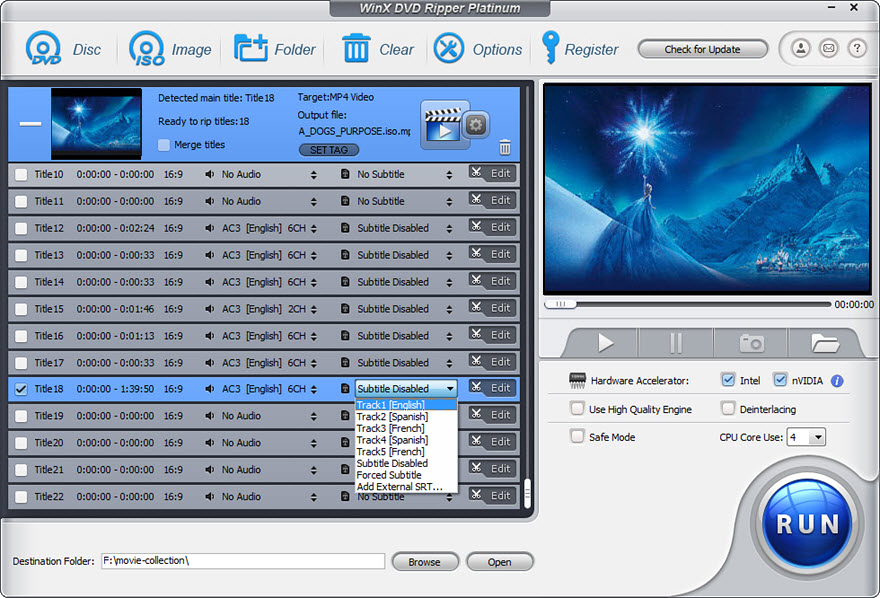
The following screenshot provides a look at the WinX DVD Ripper Platinum interface. The layout is centered around the main conversion workflow, helping users move from disc loading to format selection and conversion without unnecessary complexity.
The interface is designed to keep the main task visible: converting DVD content into a digital output. This can be helpful for users who want a clear path from start to finish without needing to navigate through unrelated tools or complicated menus.
Practical Use Cases
Creating a Personal Movie Library
One of the most common use cases is converting a DVD movie collection into digital files. Users can store the files on a computer or external drive and organize them by title or category. This makes it easier to browse and watch content without handling physical discs.
Preserving Family Discs
Family DVDs often contain irreplaceable memories. Converting them into digital files can reduce how often the original discs are handled. This can be especially useful for discs that are old, sentimental, or difficult to replace.
Preparing Content for Portable Viewing
Users who prefer to watch video on portable devices may find DVD conversion useful. By converting to a common format such as MP4, the content becomes easier to move into a device-friendly workflow. The exact compatibility depends on the device and player being used, but MP4 is often a practical starting point.
Organizing Educational Material
Educational DVDs can be inconvenient to use if they must be played through a separate disc player. Converting them into digital files allows students and educators to store them alongside other digital resources. This can make study material easier to access and organize.
Reducing Shelf Clutter
For users with large DVD collections, physical storage can become cumbersome. Converting discs into digital files can reduce the need to keep every case within easy reach. The original discs can be stored elsewhere while the digital versions become the primary way to access the content.
Comparisons: How WinX DVD Ripper Platinum Fits Among Common Alternatives
WinX DVD Ripper Platinum vs. Playing DVDs Directly
Playing a DVD directly is simple if you have a compatible player and display setup. However, it still requires physical handling, a working drive, and a playback environment that supports discs. Over time, this can become inconvenient, especially for users who have moved toward digital media.
WinX DVD Ripper Platinum offers a different approach. Instead of relying on the disc every time, it converts the DVD into a digital file. This can make the content easier to store, organize, and play through compatible media players. For users who want to reduce disc dependence, conversion is often more convenient than direct playback alone.
WinX DVD Ripper Platinum vs. Manually Copying DVD Files
Some users may consider copying DVD files directly from the disc to the computer. While this can preserve certain files, it does not always produce a convenient single video file in a common format. DVD structures can be complex, and simply copying files may not result in something that plays easily in every media player.
A dedicated conversion tool like WinX DVD Ripper Platinum is designed to produce output files in formats such as MP4, AVI, MOV, and MKV. This can be more practical for users who want a finished digital video file rather than a collection of disc files that may require further handling.
WinX DVD Ripper Platinum vs. Using Only a Media Player
Media players can often play DVDs, but playback is not the same as conversion. A player may let you watch the disc on a computer, but it does not necessarily create a standalone digital file that can be stored and used elsewhere.
WinX DVD Ripper Platinum is focused on conversion. Its purpose is to turn DVD content into a file that can live outside the original disc. For users who want a digital library rather than just disc playback, a conversion-focused tool is more appropriate than relying on a player alone.
WinX DVD Ripper Platinum vs. Generic Free Converters
There are many generic video conversion tools available, but not all of them are focused on DVD sources. Some may handle file-to-file conversion well but offer limited support for DVD workflows. Others may lack a clear path from disc to finished output.
WinX DVD Ripper Platinum is specifically positioned as a DVD ripper for Windows. That focus can make it more suitable for users whose primary goal is converting DVDs rather than converting random video files. The inclusion of hardware acceleration and support for common output formats also makes it a more targeted solution for DVD digitization.
WinX DVD Ripper Platinum vs. Keeping DVDs Only in Physical Form
Keeping DVDs in physical form has value, especially for collectors or users who want to preserve original media. However, physical-only storage has limitations. Discs take up space, require careful handling, and depend on working playback hardware.
Converting DVDs into digital files does not require discarding the originals. Instead, it creates a more convenient access copy. This hybrid approach can be ideal: keep the original disc for preservation while using the digital file for everyday viewing. WinX DVD Ripper Platinum supports this kind of strategy by making the conversion step more practical.
Tips for Getting Better Results
Start with Clean, Readable Discs
Before converting a DVD, check the disc for dust, fingerprints, or visible scratches. A clean disc is more likely to load smoothly and convert without interruptions. If the disc is dirty, gently clean it with a soft cloth before placing it in the drive.
Choose MP4 When You Want a Safe General Format
If you are unsure which format to choose, MP4 is often the most practical starting point. It is widely recognized and works well in many playback scenarios. For users building a general-purpose digital library, MP4 can be a reliable default.
Use MKV When You Want Container Flexibility
MKV can be a good choice for users who want a flexible container format. It is often used in media libraries where users want more freedom in how video content is stored. If your playback environment supports MKV well, it can be a useful option.
Use AVI for Legacy-Friendly Scenarios
AVI is a long-established format that may still be useful in certain Windows-based or legacy playback situations. If you are converting DVDs for use with older software or systems that favor AVI, this format may be appropriate.
Use MOV for Specific Workflow Needs
MOV is often associated with certain multimedia environments. If your preferred playback or editing workflow favors MOV files, choosing this output format can make the converted file easier to integrate into your existing setup.
Make Sure You Have Enough Free Space
The listed minimum free disk space is not the same as the space needed for converted output files. Full-length DVDs can produce sizable video files, so make sure your destination drive has enough room. This is especially important when converting multiple discs in one session.
Verify Each Conversion Before Moving On
If you are converting a large collection, take a moment to check each output file before starting the next disc. Play the file briefly to confirm that video and audio are present. This helps catch problems early and prevents surprises later.
Keep a Consistent File Naming System
When converting multiple DVDs, consistent naming makes your library easier to manage. Consider using clear titles, disc numbers, or category labels. A good naming system can save time when you later search for a specific converted file.
System Requirements and Practical Considerations
WinX DVD Ripper Platinum is listed with the following system requirements:
- Processor: 1 GHz or faster
- RAM: 4 GB
- Free disk space: 500 MB
- Operating system: Windows
These requirements describe the basic environment needed to run the software. However, users should keep in mind that actual conversion work may require more resources depending on the task. For example, converting a full-length DVD will require enough free disk space for the output file, which can be much larger than the application’s own installation footprint.
It is also important to remember that a DVD drive is needed if you are converting physical discs. Some modern laptops no longer include built-in optical drives, so an external USB DVD drive may be necessary. As long as Windows recognizes the drive, it can be used as part of the conversion workflow.
Hardware acceleration can help improve efficiency, but its effectiveness depends on the system. Users with newer or more capable hardware may experience a smoother conversion process than users with very old or limited machines. If you plan to convert many DVDs, it is wise to ensure your computer has enough storage, adequate cooling, and a stable power supply.
Because the product is listed for Windows, users on other operating systems should not assume compatibility. The supported operating system is specifically Windows, which makes the product most relevant to PC users.
Storage Planning Tip
If you are converting a large DVD collection, consider using a dedicated internal or external drive for your converted files. This can help keep your media library organized and prevent your main system drive from becoming too full. It can also make backup and file management easier over time.
Pricing and Licensing Context
WinX DVD Ripper Platinum is listed at a price of $59.95 for version 1.0. This places it in the category of paid desktop software rather than a free utility. For users who plan to convert multiple DVDs or who want a dedicated tool for the task, a paid application can offer a more focused experience than generic free alternatives.
The listed price should be considered alongside your specific needs. If you only need to convert one or two discs, you may have different priorities than someone digitizing a large collection. For users with a substantial DVD library, the value of a dedicated conversion tool often comes from time savings, convenience, and the ability to create a more manageable digital archive.
As with any software, users should review the licensing terms and system requirements before assuming it fits their setup. The key point here is that WinX DVD Ripper Platinum is positioned as a Windows-based DVD conversion solution with a clear focus on turning DVDs into common digital video formats.
Frequently Asked Questions
What is WinX DVD Ripper Platinum?
WinX DVD Ripper Platinum is a Windows application designed to convert DVD content into digital video files. It supports output formats such as MP4, AVI, MOV, and MKV, and it includes hardware acceleration support to help make the conversion process more efficient.
Which operating system does WinX DVD Ripper Platinum support?
The product listing specifies Windows as the supported operating system. Users on other platforms should not assume compatibility unless they have confirmed support through official product information.
What version is covered in this guide?
This guide refers to WinX DVD Ripper Platinum version 1.0. Features and details are discussed based on the product identification provided for that version.
What is the listed price?
The listed price for WinX DVD Ripper Platinum is $59.95. This is the price associated with the product listing and should be reviewed alongside the software’s features and system requirements.
Which output formats are supported?
The product description highlights MP4, AVI, MOV, and MKV, along with other formats. These are among the most commonly used video formats, giving users flexibility depending on their playback and storage needs.
Why would I choose MP4 as the output format?
MP4 is often chosen because it is widely compatible and efficient for storage. It is a practical choice for users who want a general-purpose digital video file that can work across many types of players and devices.
Why would I choose AVI?
AVI is a long-standing format with strong historical ties to Windows environments. It may be useful for users who need compatibility with older software or who prefer a traditional video format for specific playback scenarios.
Why would I choose MOV?
MOV is often associated with certain multimedia workflows and environments. Users who work with software or devices that favor MOV files may find this format convenient for their converted DVD content.
Why would I choose MKV?
MKV is a flexible container format that can be useful for users who want more freedom in how their video files are stored. It is often appreciated by people managing media libraries who want a container that can support different types of content.
What does hardware acceleration mean in this context?
Hardware acceleration means that the software can use compatible hardware resources to help handle parts of the conversion process. This can reduce the load on the CPU and may help the system work more efficiently during conversion.
Does hardware acceleration guarantee faster conversion?
Not necessarily. Hardware acceleration can help improve efficiency when supported by the system, but actual results depend on the computer, the disc, the selected output format, and other system conditions. It is a helpful feature, but it does not guarantee identical performance on every machine.
What are the minimum system requirements?
The listed requirements are a processor of at least 1 GHz, 4 GB of RAM, and 500 MB of free disk space. The supported operating system is Windows. Keep in mind that converted output files may require additional storage beyond the application’s own footprint.
How much disk space do I really need?
The 500 MB figure refers to free disk space for the software itself. Converted DVD files can be much larger, especially for full-length videos. You should make sure your destination drive has enough room for the output files you plan to create.
Do I need a DVD drive?
If you are converting physical DVDs, yes. You need a working DVD drive, whether built into your computer or connected externally. If your laptop does not have an internal optical drive, an external USB DVD drive can be used if Windows recognizes it.
Is WinX DVD Ripper Platinum suitable for beginners?
Yes, the software is aimed at users who want a straightforward DVD conversion workflow. The basic process of loading a disc, choosing a format, and starting conversion is easy to understand, even for users who are new to DVD digitization.
Can I use it to convert DVDs for portable devices?
Yes, converting DVDs into common formats can make them easier to use with portable devices. MP4 is often a practical choice for broad compatibility, though actual device support depends on the specific player and device being used.
Can I convert DVDs that I own for backup purposes?
Users should only convert DVDs that they own or have permission to convert. Creating backup copies may be subject to local laws and content rights. It is the user’s responsibility to ensure that their use complies with applicable rules.
Does WinX DVD Ripper Platinum edit videos?
The primary focus of WinX DVD Ripper Platinum is DVD conversion, not advanced video editing. Users looking for a dedicated editing suite should consider whether the software’s conversion-focused feature set matches their needs.
Can I choose where the converted file is saved?
In a typical conversion workflow, users can select a destination folder for the output file. This allows you to organize converted DVDs into specific folders and keep your media library structured.
How long does conversion take?
Conversion time depends on several factors, including the length of the DVD, the speed of your computer, the condition of the disc, and the selected output format. Systems with compatible hardware acceleration may handle the process more efficiently, but users should expect some waiting time for longer discs.
Can I use WinX DVD Ripper Platinum on a laptop?
Yes, as long as the laptop runs Windows and meets the listed system requirements. If the laptop does not have a built-in DVD drive, an external USB DVD drive can be used for physical disc conversion.
Is there a Mac version?
The product listing specifies Windows as the supported operating system. Users looking for a macOS solution should not assume this version is compatible with Mac systems.
Does it convert audio CDs?
The product description focuses on DVD conversion. Users looking specifically for audio CD conversion should verify whether that use case is supported by the software’s current feature set.
What should I do if a disc does not load properly?
First, check that the disc is clean and free of visible damage. Make sure the DVD drive is recognized by Windows. If the problem continues, try a different disc or a different drive to determine whether the issue is with the disc, the drive, or the software environment.
What should I do if conversion fails?
Check the disc for damage, ensure there is enough free disk space, confirm that the destination folder is accessible, and make sure your system meets the listed requirements. Restarting the application or the computer can also help resolve temporary issues.
Is WinX DVD Ripper Platinum a good fit for large DVD collections?
It can be a good fit for users who want to digitize a collection in a structured way. The combination of common output formats, hardware acceleration support, and a conversion-focused workflow makes it suitable for users who plan to convert multiple discs over time.
Final Thoughts: Is WinX DVD Ripper Platinum Worth Considering?
WinX DVD Ripper Platinum is best understood as a focused DVD-to-digital conversion tool for Windows users. Its main strength lies in taking DVD content and turning it into common video formats that are easier to store, organize, and play back in a modern media setup. The support for MP4, AVI, MOV, and MKV gives users practical choices depending on their playback goals, while hardware acceleration adds a performance-aware element to the conversion process.
For users who still rely on DVDs but want more convenience, this software addresses a real need. Physical discs are not always convenient in a world where many computers no longer include optical drives and where file-based media has become the norm. Converting DVDs into digital files can make older content easier to access and can reduce the need to handle fragile discs repeatedly.
The software is especially relevant for people who want to preserve personal media, organize a movie collection, or transition away from disc-only playback. It is also useful for users who want to create a more structured digital library and who prefer having multiple output format options rather than being locked into a single file type.
At a listed price of $59.95, WinX DVD Ripper Platinum is positioned as a paid solution rather than a casual free utility. That makes it most relevant to users who have a clear need for DVD conversion and who value a dedicated workflow. If you only need to convert one disc and have no long-term interest in digitizing media, you may want to weigh the cost carefully. But if you have a collection of DVDs and want a practical way to bring them into a digital library, the software’s feature set aligns well with that goal.
Overall, WinX DVD Ripper Platinum is a solid option for Windows users who want a straightforward way to convert DVDs into MP4, AVI, MOV, and MKV files. Its combination of format flexibility, hardware acceleration support, and conversion-focused design makes it a relevant tool for anyone looking to preserve, organize, and enjoy DVD content in a more convenient digital form.