WinX MediaTrans: Move Photos, Music and Videos Between Your iPhone and a Windows PC Without iTunes
WinX MediaTrans is a $49.95 Windows program (lifetime license, one PC) that copies photos, music, videos, e-books, ringtones and voice memos between an iPhone, iPad or iPod and your PC over a USB cable, with no iTunes and no iCloud. It's for Windows users who want their media off the phone, or onto it, without a sync that can wipe what's already there.
The usual story: your iPhone says storage is full, iCloud wants another monthly fee, and iTunes (or Apple's Devices app) only offers to sync, which makes the phone match the PC. With MediaTrans you pick the photos or songs, click Export or Add, and only those files move.
Quick facts
- Version: 8.7
- Developer: Digiarty Software, Inc. (makers of WinX DVD Ripper, in business since 2006)
- Runs on: Windows 11, 10 and earlier, 32-bit or 64-bit
- Devices: iPhone, iPad and iPod touch on iOS 7 or later, including iOS 27 and the iPhone 18 lineup
- Connection: USB cable. iTunes doesn't need to be installed.
- Price: $49.95 USD for a lifetime license on one PC, with free lifetime upgrades
- Free trial: fully working, with daily caps of 30 photos, songs, books or ringtones in each direction and 10 videos
- Refunds: 30-day money-back guarantee, for problems support can't fix
- Interface languages: English, Japanese, French and German, among others
- What we checked: installer version 8.7.0.0 (47 MB, digitally signed by Digiarty Software) downloaded from the vendor on October 11, 2026, and a checkout price of $49.95 for the lifetime license on October 11, 2026
Before you buy
Use the trial on your own iPhone first. It isn't time-limited and every tool works, so a day's worth of transfers (30 photos, 30 songs, 10 videos) tells you whether MediaTrans recognizes your device and handles your files. Older reviews mention songs that wouldn't load and ringtones that failed to save, so it's worth testing the exact things you plan to do.
The license needs the Internet now and then. Activation connects to Digiarty's license server, and both lifetime and 1-year licenses re-check about every 30 days. A PC that stays offline longer can show an "Invalid License Code" message, and you may have to remove and re-enter the code while online.
If iTunes is installed, switch off automatic syncing. MediaTrans asks you to tick "Prevent iPods, iPhones, and iPads from syncing automatically" in iTunes on first launch, so that iTunes doesn't erase the device when you plug it in.
Buy Now
Overview
WinX MediaTrans opens to a small, single-screen launcher with seven tiles: Photo Transfer, Music Manager, Video Manager, Encrypt File, Book, Voice & Ringtone and Flash Drive. Plug in your iPhone and each tile opens a manager with the same layout: device folders on the left, your files in the middle, and Export, Add, Delete and Refresh buttons along the top.
Additions and deletions are counted at the bottom of the window ("Added: 2, Deleted: 0") and only reach the phone when you press Sync, so you can review them first. Exports go straight to a folder on your PC, which you can change in Settings.
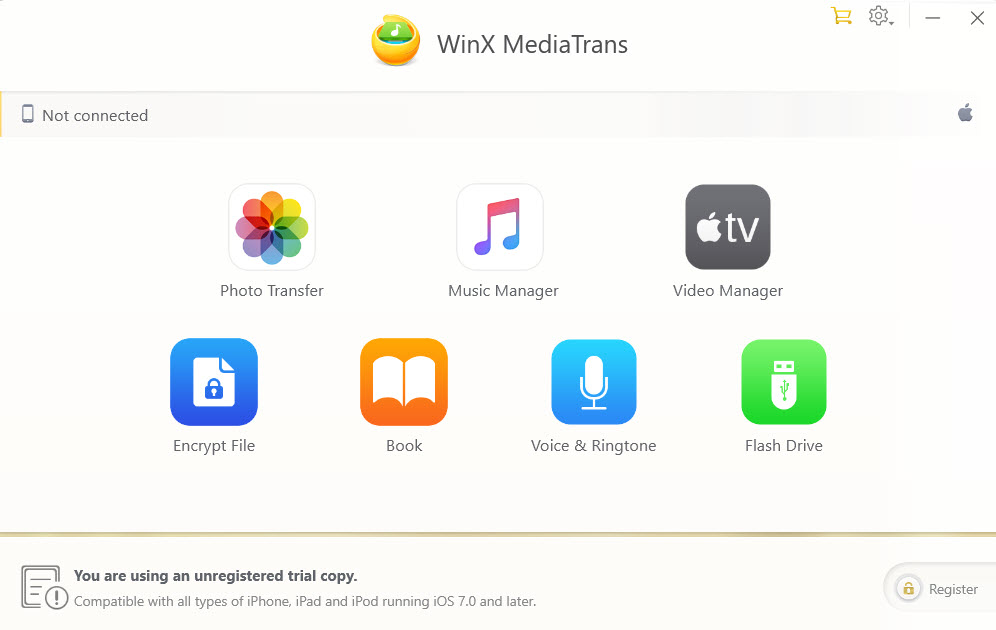
The home screen with no device connected: Photo Transfer, Music Manager, Video Manager, Encrypt File, Book, Voice & Ringtone and Flash Drive, plus the trial banner and Register button at the bottom. The banner's "iOS 7.0 and later" line is from an earlier build.
Features
Fast photo export, with HEIC to JPG conversion
WinX MediaTrans exports photos from your iPhone's Camera Roll and from third-party apps to your PC, grouped by year, month or day so you can tick a whole month at once. Digiarty puts the speed at a hundred 4K photos in about 8 seconds. iPhone HEIC photos can be previewed and exported as JPG, so they open on any Windows PC, and AVIF and WebP pictures export too. Live Photos come out as a JPG plus a MOV clip.
It also works in the other direction: add JPG, PNG, GIF, BMP or TIFF pictures to the iPhone, create or delete albums, and delete photos to free up space. Hit Refresh after taking new pictures and they appear without unplugging the phone. Tick Export with Encryption and the exported photos are password-protected.
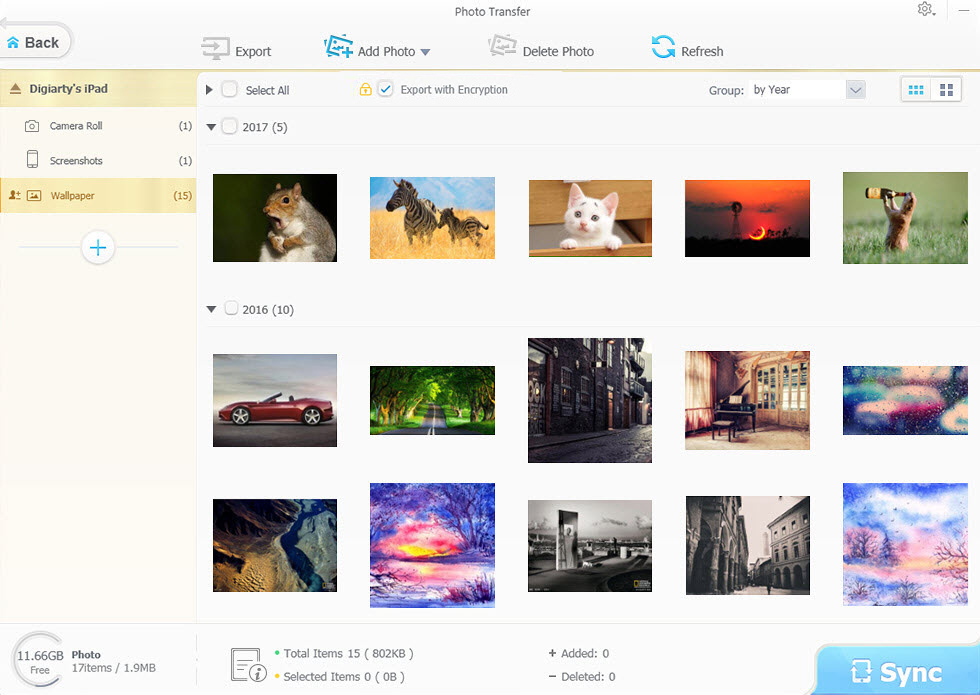
Photo Transfer on an iPad: albums on the left, thumbnails grouped by year, Export, Add Photo and Delete Photo buttons, and the Export with Encryption checkbox. The sample library dates from 2016 and 2017, so this is an older build's window.
Two-way music transfer and playlist editing
WinX MediaTrans copies songs from your iPhone to your PC and from your PC to your iPhone, which matters most when your music library lives only on the phone. Imported songs land in the iPhone's Music app as if iTunes had put them there.
Inside the Music Manager you can create, rename and delete playlists, drag songs into them, delete songs from the device, and fix titles, artists and album names in batches. Audio the iPhone can't play is converted to MP3 or AAC on the way in.
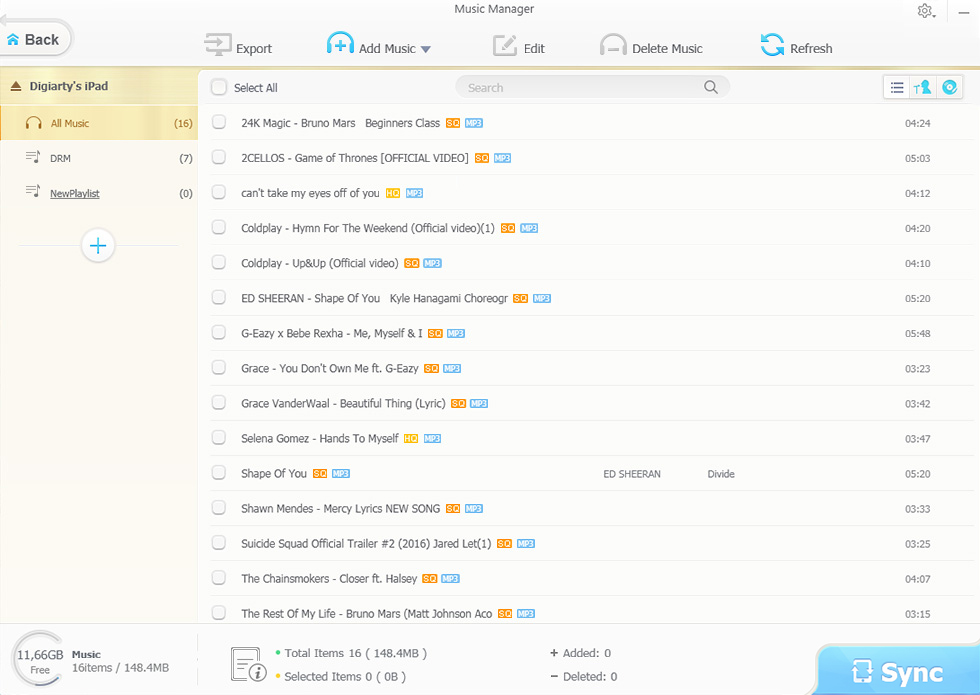
Music Manager: All Music, DRM and a new playlist on the left, the song list with format tags, and Export, Add Music, Edit and Delete Music buttons.
Video transfer that converts and rotates for you
WinX MediaTrans converts videos the iPhone can't play, such as MKV, AVI and AVCHD, while it copies them to the device, and it can shrink big files by up to half and rotate vertical clips for full-screen playback. Conversion to MP4 (H.264) can use Intel QSV and Nvidia NVENC hardware acceleration, and with the auto-convert option on in Settings you just add the file and press Sync.
Going the other way, you can back up selected iPhone videos to the PC, including movies and TV shows bought from iTunes, in 4K or 1080p and in batches. Paid licenses also include a Remove DRM tool for iTunes Store purchases, which the trial can't use.
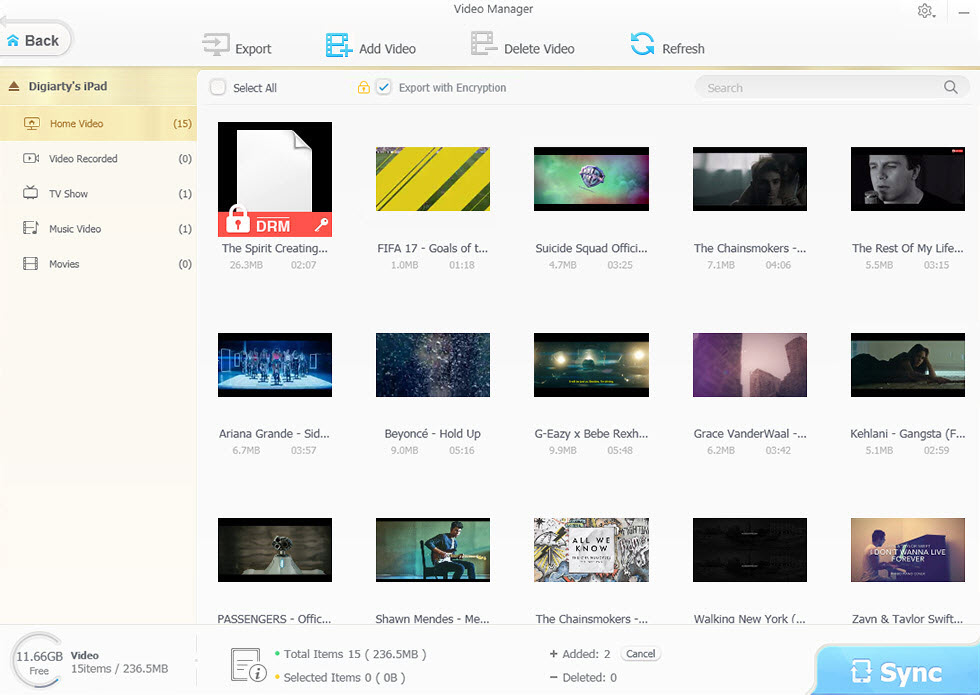
Video Manager: Home Video, Video Recorded, TV Show, Music Video and Movies on the left, video thumbnails with size and length (one marked DRM), and two pending additions waiting for Sync.
Password encryption for photos and videos
WinX MediaTrans can lock photos and videos behind a password, both the ones you export from the iPhone and ones already on your PC's hard drive, singly or a whole folder at a time. It uses 256-bit AES, 1024-bit RSA, PBKDF2 and Argon2. Encrypted files only open again through the File Decryption tab with your password.
There's no password recovery. Lose the password and the files stay locked, as the app itself warns.
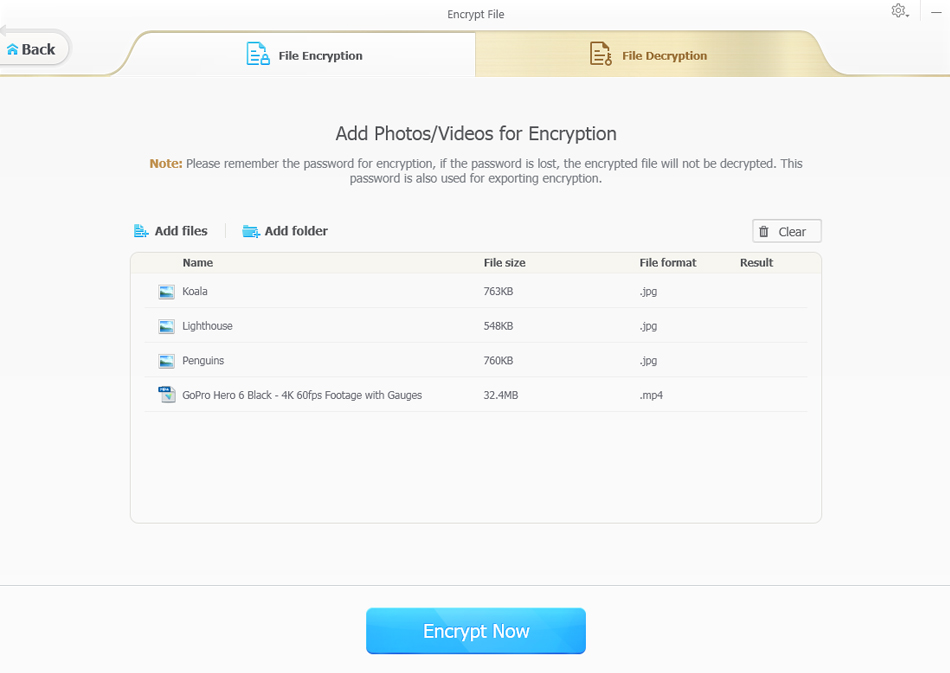
Encrypt File: File Encryption and File Decryption tabs, three JPG photos and an MP4 video queued, a warning to remember the password, and the Encrypt Now button.
Use your iPhone as a USB flash drive
WinX MediaTrans turns spare iPhone storage into a private flash drive for any file type: Word documents, spreadsheets, PDFs, archives, even installers. Drag files or whole folders in, make sub-folders, and rename, export or delete files. This tool is free to use, even in the trial.
The catch is that the files aren't visible on the phone itself. You can only open them on a PC that has MediaTrans installed.
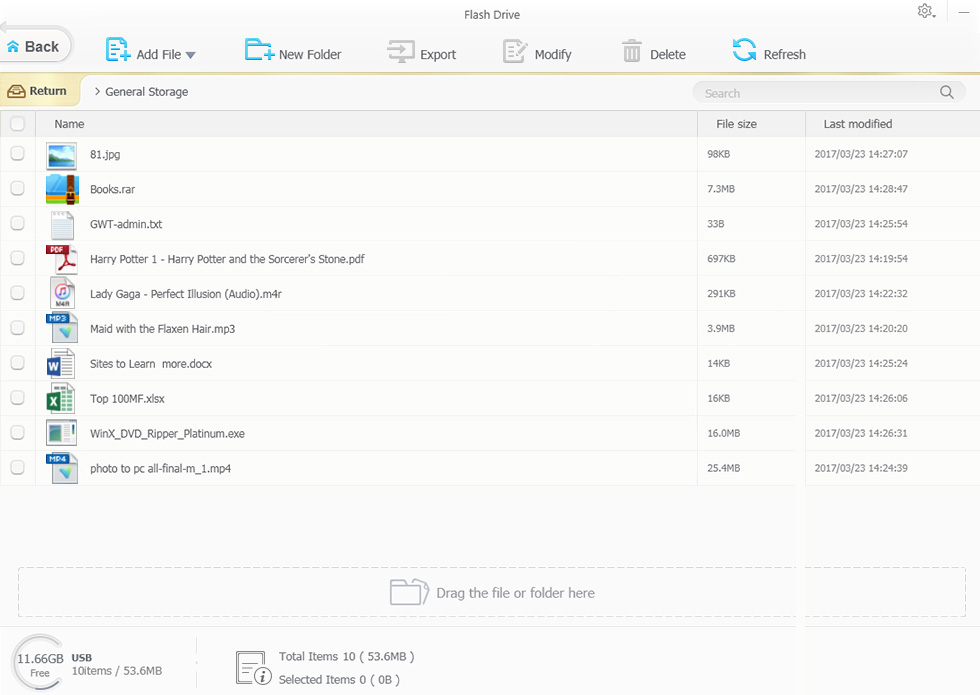
Flash Drive: a JPG, a RAR archive, a PDF, Word and Excel files, MP3 and MP4 files and an EXE in General Storage, with Add File, New Folder, Export, Modify and Delete buttons and a drop zone.
E-books, audiobooks, ringtones, voice memos and podcasts
WinX MediaTrans moves EPUB books, PDFs and audiobooks between your iPhone and PC, and converts EPUB to PDF, TXT or HTML for reading on a Kindle or a computer.
The Voice & Ringtone tool cuts a ringtone of up to 40 seconds from any song on a waveform and syncs it to the phone, keeping the original audio quality, from eight supported audio formats. The same screen exports Voice Memos to the PC (one way only) and transfers podcasts and iTunes U lectures in both directions.
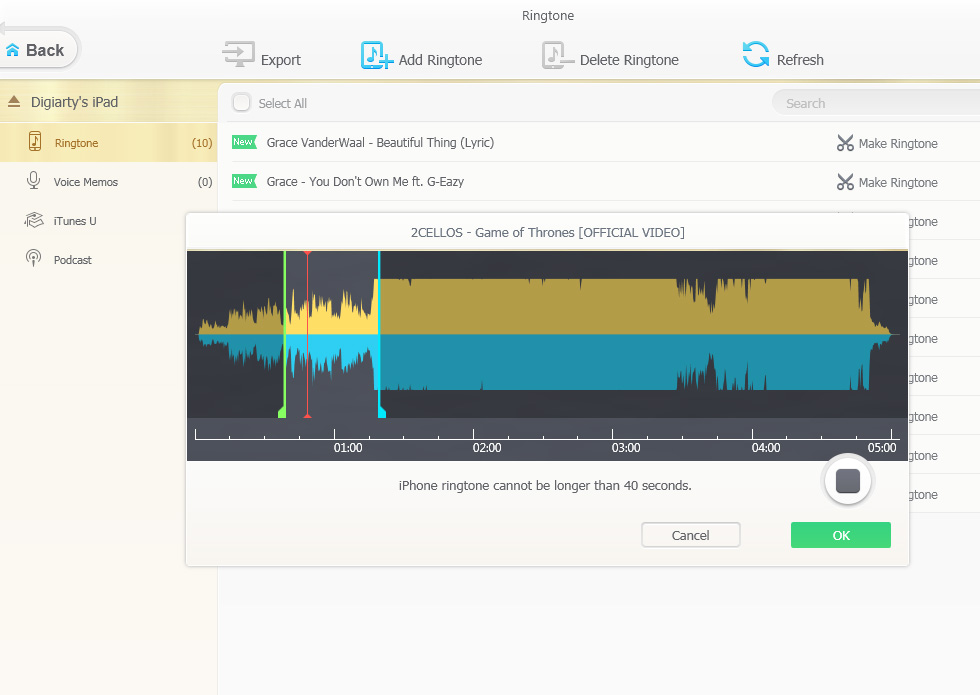
The ringtone maker: a song's waveform with start and end markers and the note that an iPhone ringtone can't be longer than 40 seconds. Voice Memos, iTunes U and Podcast sit in the left column.
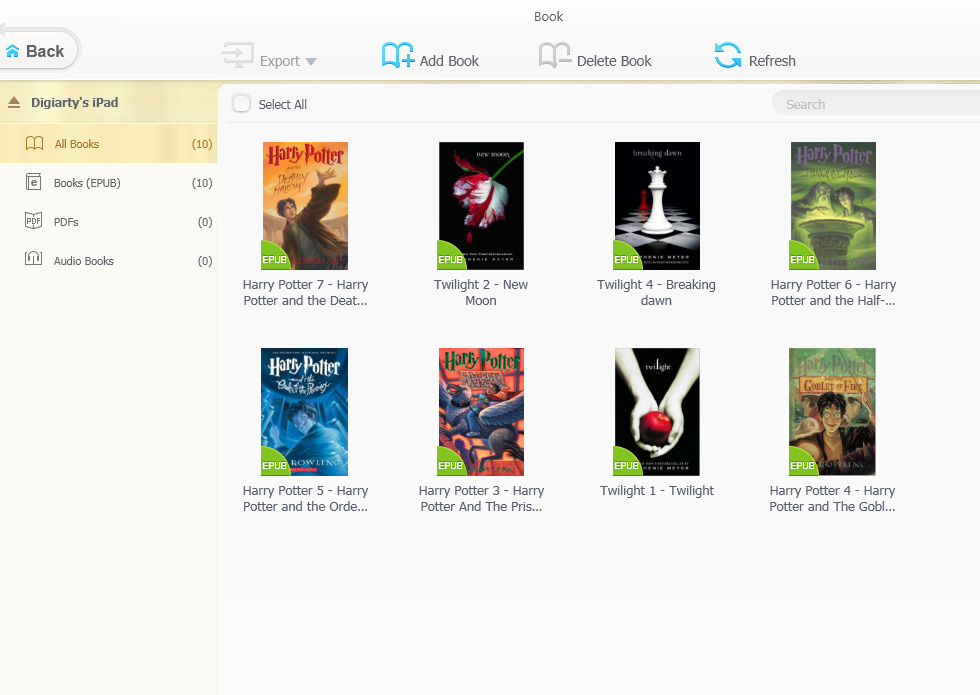
The Book manager: All Books, Books (EPUB), PDFs and Audio Books on the left, EPUB covers in the middle, and Export, Add Book and Delete Book buttons.
Benefits
You choose what moves. A sync makes the phone match the computer, and that's how people lose music when they plug into a new PC. With MediaTrans you pick files one by one or a month of photos at a time, and nothing else on the phone changes.
Your files stay on hardware you own. Photos and videos go over the cable to your own drive, with no cloud account, upload or monthly storage fee, and you can encrypt the private ones as they arrive.
Real-World Uses
- Clearing space before an iOS update: export a few years of Camera Roll photos and 4K videos to the PC, check them, then delete them from the phone in the same window.
- Rescuing a music library: your old PC died and the only copy of your collection is on the iPhone. Export the songs to the new PC instead of letting a sync replace them.
- Movies for a flight: drop MKV and AVI files onto the Video Manager the night before, and they arrive on the iPad converted, resized and rotated for playback.
- Keeping private photos private: export them with encryption so they can't be opened on the family PC without your password.
Who It's For
WinX MediaTrans suits Windows users with an iPhone or iPad who move media often and find iTunes or Apple's Devices app slow or risky: people with big photo libraries, music collectors who still own their files, and parents loading videos onto a child's iPad. It's less useful if you live in iCloud Photos and Apple Music, or if what you need to move is contacts, messages or app data, which it doesn't handle. Mac users need the separate MacX MediaTrans.
Usage Guide
- Install: double-click winx-mediatrans-setup.exe, click Yes at the Windows UAC prompt, then Install (Custom Installation lets you choose the folder, a desktop shortcut or a Quick Launch icon), then Launch.
- Prepare iTunes, if you have it: follow the first-run prompt and turn on "Prevent iPods, iPhones, and iPads from syncing automatically".
- Connect the device: plug the iPhone or iPad in with its USB cable and wait for the home screen to show it as connected.
- Export photos: click Photo Transfer, tick the photos or a whole date group, and click Export. They're saved to your Pictures folder unless you change the path in Settings.
- Add music or video: open Music Manager or Video Manager, click Add, choose files, then click Sync. Unsupported formats are converted automatically, or with the Convert button if auto-convert is off.
- Register: after buying, click Register on the home screen, enter the Licensed Email and Registration Code from your order email (copy and paste, no spaces), and click Activate while online.
What Users Say
Most in-depth reviews of WinX MediaTrans were written between 2016 and 2018, so a few of their complaints (one-way photo transfer, support for older iOS versions only) no longer apply to version 8.7. They're still useful for how the app feels and where it has stumbled. User reviews are scarce: Digiarty's Trustpilot page covers all its products, and few of its reviews mention MediaTrans by name.
groovyPost (Jack Busch, October 2016)
groovyPost's hands-on review liked the speed and the video tools:
"If you hate the bloated, restrictive environment of iTunes, then WinX MediaTrans is a speedy alternative that's worth a try."
"Compared to iTunes, Winx MediaTrans feels very lightweight and fast."
"If there's one feature that's going to make you buy this software, it's the video transfer feature. ... WinX MediaTrans makes it stupidly simple to get videos onto your phone."
But it also called the app "a convenience rather than a necessity" and listed real problems:
"Making ringtones is a little touch and go. Some of the ringtones failed to save."
"And also some songs just wouldn't load correctly."
On the Flash Drive: "I have my misgivings about whether or not iOS would respect that space during an update or some other routine maintenance. Best just get yourself a thumb drive and encrypt it."
A reader, achtneun, added in January 2018 that a "black screen" problem had "different causes. In my case it was a broken user profile," which they fixed by replacing a Windows cache folder from a working user account.
How2Shout (Rajkumar Maurya, October 2017)
How2Shout timed transfers on a Core i7 PC with 12 GB of RAM and an SSD:
"While reviewing the WinX MediaTrans the file transfer speed was impressive. All the features are on fingertips and easy to use. No lag or glitches while importing or exporting the music, videos, and during conversion."
"In our test, it took 12 seconds to transfer 100 pictures in 4K format."
Its one reservation was about the Flash Drive: "The only problem is that the iPhone itself doesn't offer any file manager to browse the files on the phone."
Techrrival and Beebom
Techrrival (Mehul Boricha, September 2018; the site discloses affiliate partnerships) liked the plain design: "The User Interface of WinX MediaTrans is very minimal and sober. It looks very basic and to the point when compared to the one on iTunes."
Beebom's August 2016 review was sponsored by Digiarty, yet it's the most critical of the four. Akshay Gangwar wrote that "the interface is not very appealing, but it's definitely not a bad interface," and that "WinX also allows importing music and video files, but unfortunately, those features did not work in our testing of the app." That was an early version, and the later reviews above report importing working without trouble.
Trustpilot and FileHorse
Digiarty's Trustpilot page (winxdvd.com, all products) shows a TrustScore of 3.9 from 417 reviews. One five-star review from May 2026 by Shoshi Platypus is about MediaTrans: "Support staff always super-helpful. Got my MediaTrans license code up and running again after reinstalling Windows." and "Prompt, friendly and helpful."
FileHorse's editor lists fast transfers, no iTunes dependency, two-way sync and a simple interface as pros, and a limited free trial, no cloud backup, no wireless transfer and only basic editing tools as cons.
The recurring themes: reviewers agree that MediaTrans is quicker and simpler than iTunes, that photo export is fast, and that the automatic video conversion is the standout. The complaints are about reliability in corners (some songs not loading, ringtones not saving, an early import bug, a black-screen startup problem tied to a Windows profile) and about the Flash Drive being readable only through the app. Since nearly all detailed reviews are several years old, the trial is the best way to see how version 8.7 behaves with your own device.
Comparisons
WinX MediaTrans vs iTunes and Apple's sync
WinX MediaTrans transfers individual files, while iTunes and Apple's Devices app sync whole libraries. Syncing an iPhone to a different computer replaces its music with that computer's library, and Apple's tools won't copy your own songs off the phone. MediaTrans copies music, photos, videos and books both ways without that replacement, and it doesn't need an Apple ID or iTunes installed.
What Apple's tools do that MediaTrans doesn't: full device backups and restores, app data, and contacts and messages. MediaTrans is a media manager next to them, not a replacement for a full backup.
Editions and Pricing
| Edition |
Price (USD) |
License term |
PCs |
What you get |
| Lifetime License (this listing) |
$49.95 once |
Lifetime, never expires |
1 |
All features, free lifetime upgrades, priority support |
| Premium 1-Year |
$19.95 first year, then $29.95 a year |
1 year, renews automatically |
3 |
All features and upgrades while subscribed, priority support |
| Volume license |
$29.95 per unit (5-10), $24.95 per unit (11-30) |
Lifetime upgrades |
3 per license |
For government, education and nonprofit groups of 5 or more |
| Free trial |
$0 |
No time limit |
Any |
Daily caps (30 photos or songs, 10 videos), Flash Drive free, no DRM removal |
The 1-year plan is cheaper up front and covers three PCs, but it bills again every year until you cancel (you get an email 7 days before each renewal). If you'll use MediaTrans for more than a couple of years on one PC, the lifetime license works out cheaper.
FAQs
Does WinX MediaTrans need iTunes installed?
No, WinX MediaTrans doesn't need iTunes or an Apple ID to transfer files. If iTunes is installed, turn off its automatic syncing so it doesn't change the device while MediaTrans is working.
Can I use WinX MediaTrans without an Internet connection?
WinX MediaTrans transfers files offline, but the license isn't meant to stay offline for good. It needs the Internet to activate and then checks the license about every 30 days. After a longer gap it can report "Invalid License Code", and you may need to remove the code and register it again while connected.
Does WinX MediaTrans work with the newest iPhones and iOS?
Yes, WinX MediaTrans 8.7 supports iOS 27 and the iPhone 18 lineup, and older devices back to iOS 7. With the lifetime license, updates for future iPhones and iOS versions are included at no extra cost.
Is there a Mac version of WinX MediaTrans?
WinX MediaTrans itself is Windows-only. Digiarty sells a separate Mac program, MacX MediaTrans, with its own license, so this license won't activate on a Mac.
Can WinX MediaTrans transfer contacts, messages or WhatsApp chats?
No. WinX MediaTrans handles media and files: photos, music, videos, books, ringtones, voice memos, podcasts and Flash Drive files. Contacts, notes, messages and app data aren't part of it, so you'll need Apple's backup or a different tool for those.
Does the WinX MediaTrans lifetime license ever expire?
No, the WinX MediaTrans lifetime license doesn't expire and has no annual fee, and it includes all future updates and version upgrades. It covers one PC.
What is WinX MediaTrans's refund policy?
Digiarty refunds WinX MediaTrans within 30 days of purchase when the program won't work properly because of an error or bug that support can't solve or work around in a reasonable time. Contact support first with a description of the problem; they promise a reply within one business day.
System Requirements
- Operating system: Windows 11, 10 and earlier versions, 32-bit or 64-bit
- Devices: iPhone, iPad or iPod touch running iOS 7 or later, up to iOS 27 and the iPhone 18 series
- Connection: the device's USB cable
- Internet: needed to activate and roughly every 30 days for the license check
- Disk space: 47 MB for the installer, plus room for the media you export
- iTunes: not required
Conclusion
WinX MediaTrans does one job well: it gets photos, music and videos on and off an iPhone from a Windows PC, file by file, without a sync deciding what stays. The automatic video conversion and fast photo export are the parts reviewers keep praising, and the encryption and Flash Drive tools are handy extras.
It isn't a full backup tool, it has had rough edges with some songs and ringtones, and the lifetime license still wants to check in online once a month. If you regularly clear your phone to the PC or load videos onto an iPad, the $49.95 lifetime license pays for itself quickly. Try the free version on your own device first, then decide.
Buy Now